

Ottimizzare il WiFi dell'hotel per i viaggiatori d'affari
Questa guida fornisce strategie attuabili e neutrali rispetto al fornitore per i responsabili IT del settore alberghiero, al fine di ottimizzare il WiFi dell'hotel per i viaggiatori d'affari, combinando il blocco degli annunci a livello DNS con politiche di Quality of Service (QoS) end-to-end. Copre l'architettura tecnica, la segmentazione VLAN, la conformità alla sicurezza e casi di studio reali che dimostrano come l'eliminazione del rumore di fondo possa recuperare fino al 35% della larghezza di banda sprecata. I direttori delle operazioni della struttura e gli architetti di rete troveranno passaggi di implementazione concreti, framework decisionali e benchmark di ROI misurabili per giustificare ed eseguire la distribuzione in questo trimestre.
Ascolta questa guida
Visualizza trascrizione del podcast
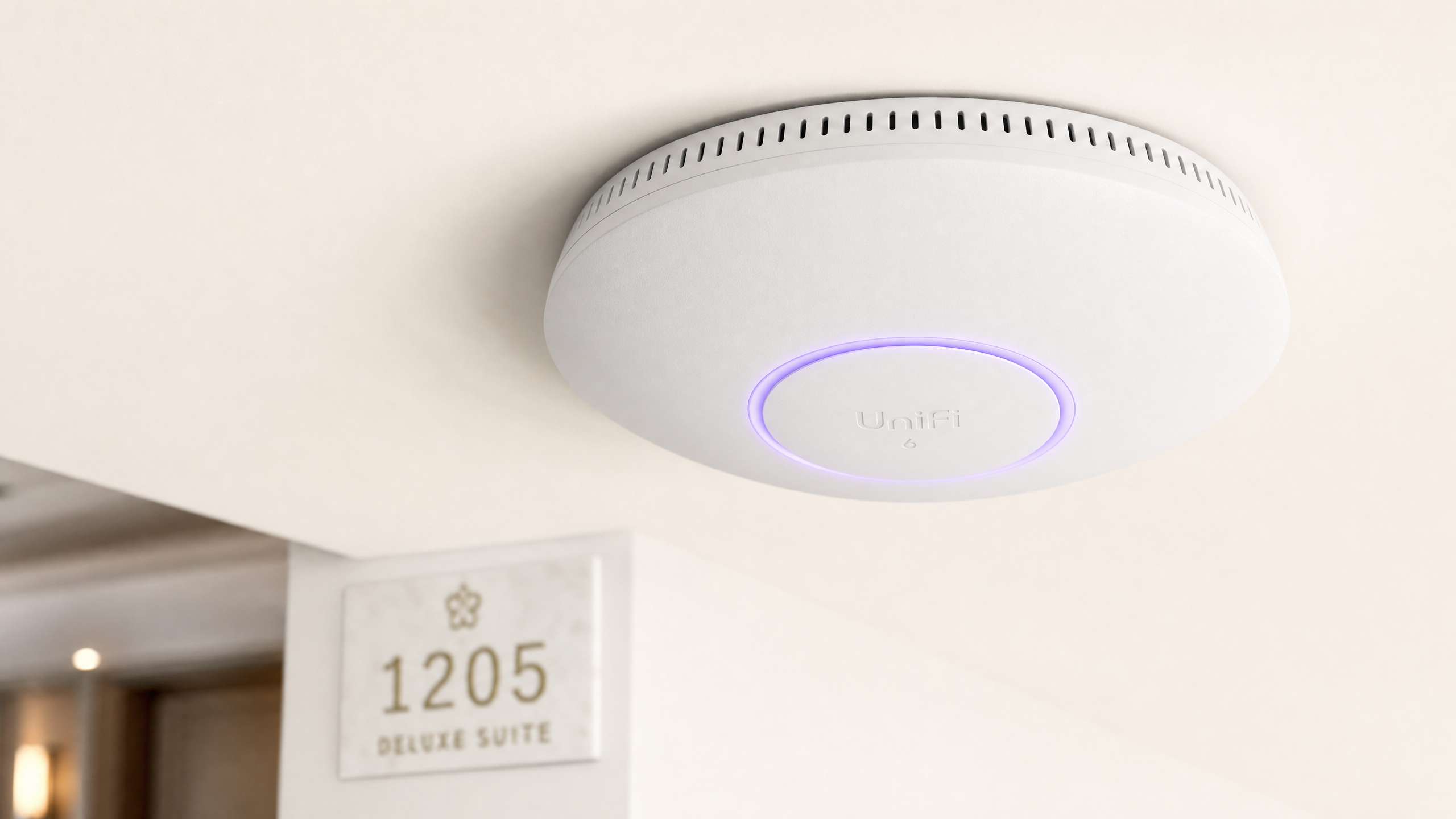
Sintesi Esecutiva
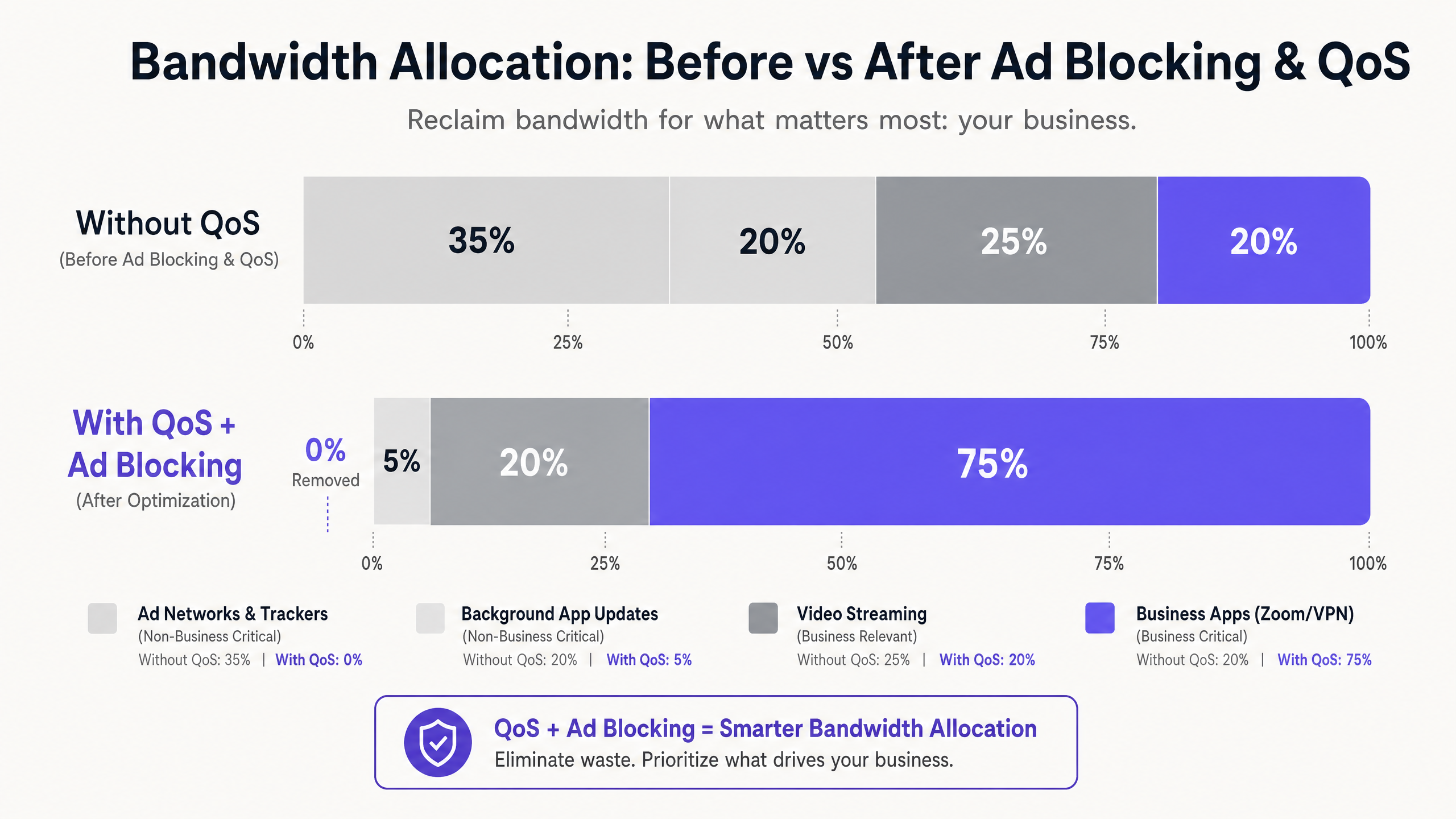
Per i responsabili IT e i direttori delle operazioni delle strutture nel settore Hospitality , fornire un WiFi affidabile non è più un elemento di differenziazione, ma un requisito operativo di base. I viaggiatori d'affari richiedono connettività ad alte prestazioni per VPN aziendali, videoconferenze e applicazioni ospitate nel cloud. Eppure la maggior parte delle reti alberghiere sta silenziosamente perdendo capacità a causa del traffico di fondo invisibile: tracker pubblicitari, beacon di telemetria e aggiornamenti automatici delle applicazioni che possono consumare fino al 35% della larghezza di banda totale disponibile prima ancora che una singola applicazione aziendale sia stata inizializzata.
Questa guida descrive in dettaglio un'architettura collaudata e neutrale rispetto al fornitore per recuperare quella capacità sprecata. Implementando il blocco degli annunci a livello DNS sul gateway di rete e applicando politiche di Quality of Service (QoS) end-to-end mappate tramite Deep Packet Inspection (DPI), gli architetti di rete possono garantire che le applicazioni sensibili alla latenza — Zoom, Microsoft Teams, VPN IPsec e tunnel SSL — ricevano una larghezza di banda prioritaria garantita. L'approccio è implementabile sulla maggior parte delle infrastrutture esistenti, offrendo un ROI misurabile attraverso aggiornamenti differiti dei collegamenti ISP e un miglioramento dei punteggi di soddisfazione degli ospiti aziendali.
Approfondimento Tecnico
La sfida principale negli ambienti WiFi alberghieri moderni è la proliferazione di traffico di fondo non richiesto. Quando un qualsiasi dispositivo moderno — un laptop aziendale, uno smartphone, un tablet — si connette a una rete, avvia immediatamente decine di connessioni in background. Queste includono il polling degli SDK pubblicitari da applicazioni installate, la telemetria del sistema operativo, i servizi di sincronizzazione cloud e i controlli automatici degli aggiornamenti. Su una rete piatta e non gestita con 200 ospiti contemporanei, questo "chiacchiericcio" di fondo non è semplicemente scomodo; è un problema strutturale di larghezza di banda.
La ricerca sui profili di traffico delle reti ospiti aziendali mostra costantemente che le reti pubblicitarie e i tracker di terze parti rappresentano tra il 25% e il 40% del volume delle query DNS sulle reti alberghiere non gestite. Ogni query risolta può avviare un trasferimento di dati e, sebbene i singoli payload siano piccoli, l'effetto aggregato su centinaia di connessioni simultanee è significativo. Questa è la larghezza di banda che dovrebbe servire una riunione del consiglio di amministrazione su Zoom di un CFO o una sessione VPN di un consulente al loro data center aziendale.
Layer 1: Blocco di annunci e tracker basato su DNS
Il punto di intervento più efficiente è la risoluzione DNS. Instradando tutte le query DNS degli ospiti attraverso un risolutore di filtraggio — sia un'appliance on-premises che un servizio di sicurezza DNS basato su cloud — la rete può silenziosamente bloccare le richieste a server pubblicitari noti, domini di tracker ed endpoint di telemetria prima che qualsiasi dato di payload attraversi il collegamento WAN. Il guadagno di efficienza qui è strutturale: una query DNS bloccata consuma risorse trascurabili rispetto alla connessione HTTP/S completa che avrebbe altrimenti avviato.
Per le implementazioni alberghiere in produzione, i servizi di filtraggio DNS gestiti offrono blocklist regolarmente aggiornate con SLA aziendali, il che è preferibile alle soluzioni open-source autogestite in ambienti dove il tempo di attività è critico. Il requisito di configurazione chiave è garantire che il walled garden — l'insieme di domini accessibili prima dell'autenticazione del captive portal — sia esplicitamente inserito nella whitelist e non soggetto alla politica di filtraggio generale. La mancata osservanza di questo è la causa più comune di reclami degli ospiti post-implementazione.
Layer 2: Deep Packet Inspection e Tagging QoS
Una volta ridotto il rumore di fondo a livello DNS, il traffico rimanente deve essere gestito attivamente per priorità. La Deep Packet Inspection (DPI) sul firewall perimetrale o sull'appliance Unified Threat Management (UTM) identifica specifici protocolli applicativi. I moderni motori DPI possono classificare in modo affidabile Zoom, Microsoft Teams, Cisco Webex, il traffico voce RTP/SIP, le sessioni VPN IPsec e SSL in base alle loro firme di pacchetto e ai modelli di porta, anche quando le porte standard non vengono utilizzate.
Il traffico critico per il business identificato viene etichettato con valori Differentiated Services Code Point (DSCP) nell'intestazione IP. Il campo DSCP fornisce 64 possibili comportamenti per hop, ma in pratica, la maggior parte delle implementazioni alberghiere utilizza un modello semplificato a tre livelli: Expedited Forwarding (EF, DSCP 46) per voce e videoconferenza; Assured Forwarding Class 4 (AF41, DSCP 34) per VPN e dati di applicazioni aziendali; e Best Effort (BE, DSCP 0) per la navigazione web generale e lo streaming.
Layer 3: QoS Wireless tramite WMM
La configurazione QoS cablata è efficace solo se gli access point wireless mappano correttamente i tag DSCP alle appropriate categorie di accesso Wi-Fi Multimedia (WMM). WMM definisce quattro categorie di accesso: Voice (AC_VO), Video (AC_VI), Best Effort (AC_BE) e Background (AC_BK). La mappatura da DSCP a WMM deve essere configurata esplicitamente sull'AP, poiché il comportamento predefinito varia a seconda del fornitore. Verificare questa configurazione nella console di gestione dell'AP; è una lacuna comune che rende una politica QoS altrimenti ben progettata inefficace all'ultimo hop.
Segmentazione VLAN e Architettura di Sicurezza
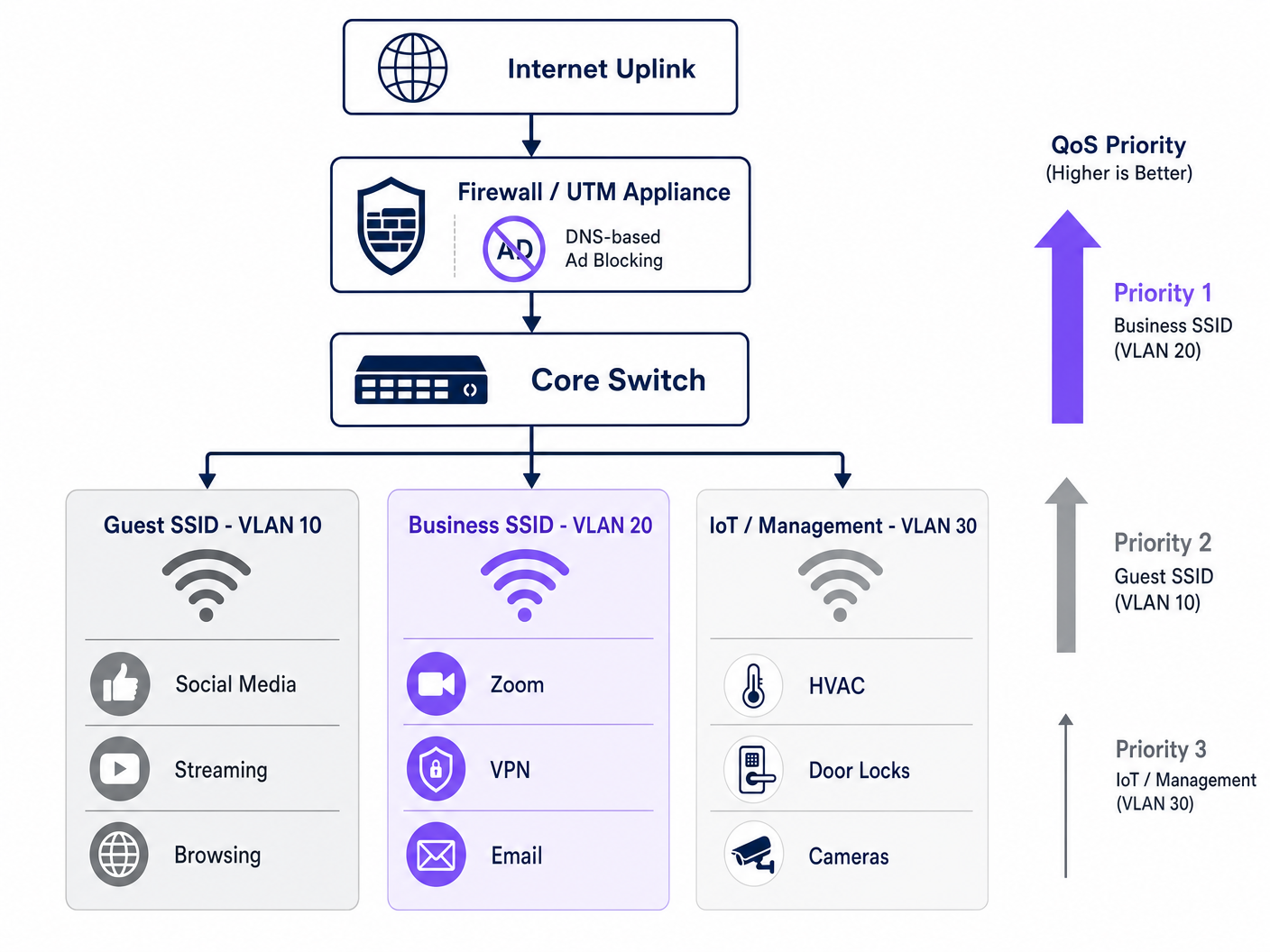
Una rete alberghiera correttamente ottimizzata opera su almeno tre segmenti logici. La Guest SSID (VLAN 10) serve i viaggiatori di piacere e i partecipanti a conferenze con accesso internet standard, soggetto a filtraggio DNS e limitazione della velocità. La Business SSID (VLAN 20) trasporta la massima priorità QoS ed è autenticata tramite WPA3-Enterprise con IEEE 802.1X, integrandosi con un server RADIUS per le credenziali per utente. La IoT e Gestione VLAN (VLAN 30) isola i dispositivi smart della camera, i sensori HVAC, le serrature elettroniche e le telecamere IP da tutto il traffico degli ospiti.
Questa segmentazione non è solo un'ottimizzazione delle prestazioni, ma un requisito di conformità. Secondo il PCI DSS, qualsiasi segmento di rete che gestisce dati di carte di pagamento deve essere isolato dalle reti generiche con regole firewall e controlli di accesso documentati. Secondo il GDPR, i dati personali raccolti tramite l'autenticazione Guest WiFi devono essere gestiti con adeguate misure di sicurezza tecniche, e la segmentazione della rete è un controllo fondamentale che dimostra la dovuta diligenza. Mantenere un audit trail completo per la sicurezza IT nel 2026 su tutte le VLAN è essenziale per dimostrare la conformità durante le valutazioni.
Guida all'Implementazione
L'implementazione di questa architettura richiede un approccio strutturato per evitare di interrompere i servizi per gli ospiti. Si raccomanda la seguente sequenza per un'implementazione a fasi.
Fase 1 — Profilazione del Traffico (Settimana 1). Prima di apportare modifiche, implementare uno strumento di analisi del traffico su una porta SPAN dello switch core per acquisire una baseline di 72 ore. Identificare i 20 domini e categorie di applicazioni che consumano più larghezza di banda. Questi dati giustificano l'investimento e forniscono una base per misurare il miglioramento post-implementazione. Molti operatori sfruttano le capacità di WiFi Analytics per comprendere i tipi di dispositivi, i modelli di permanenza e l'utilizzo delle applicazioni nella loro struttura.
Fase 2 — Filtro DNS Pilota (Settimana 2). Implementare il filtro DNS su una singola VLAN isolata — idealmente un segmento per il personale o il back-office — utilizzando una blocklist conservativa. Monitorare i falsi positivi per 48 ore prima di estendere ai segmenti degli ospiti. Documentare tutti i domini aggiunti alla whitelist del walled garden.
Fase 3 — Implementazione della Policy QoS (Settimana 3). Configurare le regole DPI e il tagging DSCP sul firewall di bordo. Verificare che i tag DSCP siano preservati attraverso ogni hop dello switch catturando i pacchetti al livello di distribuzione. Abilitare WMM su tutti gli access point e confermare che la mappatura DSCP-to-WMM sia applicata correttamente. Per indicazioni sulla pianificazione delle frequenze e la gestione dei canali durante questa fase, fare riferimento a Frequenze Wi-Fi: Una Guida alle Frequenze Wi-Fi nel 2026 .
Fase 4 — Ristrutturazione VLAN (Settimana 4). Migrare i dispositivi IoT a una VLAN di gestione dedicata. Introdurre l'SSID Business con autenticazione WPA3-Enterprise. Comunicare il nuovo SSID agli account aziendali e agli organizzatori di conferenze.
Fase 5 — Monitoraggio e Ottimizzazione (Continuo). Stabilire i KPI: punteggio medio di qualità delle chiamate Zoom, tasso di successo delle connessioni VPN, utilizzo del throughput nelle ore di punta e indice di soddisfazione del WiFi per gli ospiti. Rivedere e aggiornare mensilmente le blocklist DNS.
Migliori Pratiche
Le seguenti raccomandazioni, neutrali rispetto al fornitore, riflettono gli attuali standard di settore e sono applicabili su tutte le principali piattaforme hardware, inclusi Cisco Meraki, Ubiquiti UniFi, Aruba Networks e Ruckus.
| Pratica | Standard / Riferimento | Priorità |
|---|---|---|
| WPA3-Enterprise su SSID Business | IEEE 802.11i / WPA3 | Critical |
| Autenticazione RADIUS 802.1X | IEEE 802.1X | Critical |
| Preservazione DSCP end-to-end | RFC 2474 | High |
| WMM abilitato su tutti gli AP | Wi-Fi Alliance WMM | High |
| Airtime Fairness abilitato | Vendor-specific | Medium |
| Filtro DNS con blocklist gestite | NIST SP 800-81 | High |
| Segmentazione VLAN (Ospiti/Business/IoT) | IEEE 802.1Q | Critical |
| Isolamento di rete PCI DSS | PCI DSS v4.0 Req. 1 | Critico (se applicabile) |
Per le strutture che operano in ambienti Retail accanto a spazi di ospitalità — come negozi nella hall dell'hotel o aree retail integrate per conferenze — si applicano gli stessi principi di VLAN e QoS, con l'aggiunta del traffico POS che riceve una propria coda ad alta priorità. I principi discussi in Office Wi-Fi: Ottimizza la Tua Rete Wi-Fi per Ufficio Moderna sono direttamente trasferibili alle implementazioni di business center e sale conferenze degli hotel.
Risoluzione dei Problemi e Mitigazione dei Rischi
Le modalità di guasto più comuni nelle implementazioni di ottimizzazione del WiFi negli hotel rientrano in tre categorie.
Interruzione del Captive Portal. Sintomo: gli ospiti non riescono a raggiungere la pagina di login dopo l'abilitazione del filtro DNS. Causa principale: la policy di filtraggio blocca i domini necessari per il reindirizzamento del captive portal o per il walled garden. Mitigazione: verificare tutti i domini richiesti per il flusso di autenticazione e aggiungerli alla whitelist di pre-autenticazione prima di abilitare il filtro generale. Se si stanno diagnosticando problemi di congestione più ampi, la guida Perché il Nostro WiFi per Ospiti è Così Lento? Diagnosi della Congestione di Rete fornisce un framework diagnostico strutturato. Per gli operatori di lingua spagnola, la risorsa equivalente è disponibile su ¿Por qué nuestro WiFi para invitados es tan lento? Diagnóstico de la congestión de la red .
Rimozione Tag DSCP. Sintomo: il QoS è configurato sul firewall e sugli AP, ma le prestazioni delle applicazioni aziendali non migliorano sotto carico. Causa principale: uno switch intermedio sta rimuovendo o rimarcando i tag DSCP. Mitigazione: catturare i pacchetti in più punti del percorso di rete utilizzando Wireshark o equivalente. Verificare che la policy di fiducia QoS di ogni switch sia impostata per fidarsi dei DSCP dai dispositivi a monte.
Instabilità dei Dispositivi IoT Dopo l'Airtime Fairness. Sintomo: i dispositivi smart della camera (termostati, serrature) si disconnettono intermittentemente dopo l'abilitazione dell'airtime fairness. Causa principale: i dispositivi IoT legacy 802.11b/g trasmettono lentamente e ricevono un tempo di trasmissione insufficiente sotto una policy di fairness. Mitigazione: spostare i dispositivi IoT su un SSID dedicato a 2.4GHz su VLAN 30 con airtime fairness disabilitato. Applicare l'airtime fairness solo agli SSID guest e business a 5GHz.
ROI e Impatto sul Business
Il caso finanziario per questo investimento è semplice. Recuperando il 20-35% della larghezza di banda sprecata solo tramite il filtro DNS, la maggior parte delle strutture alberghiere può posticipare un aggiornamento del collegamento ISP di 12-18 mesi. Con i tipici prezzi della banda larga aziendale per un circuito in fibra dedicato da 1 Gbps, ciò rappresenta un differimento di capitale da £15.000 a £40.000 a seconda del mercato e dei termini contrattuali.
Oltre ai risparmi sull'infrastruttura, l'impatto sulla soddisfazione degli ospiti aziendali è misurabile. Gli hotel che possono commercializzare in modo credibile un WiFi affidabile e di livello aziendale ottengono un premio nel segmento dei viaggi d'affari. Un miglioramento costante nei punteggi di soddisfazione del WiFi — tipicamente misurati tramite sondaggi post-soggiorno — si correla direttamente con i tassi di prenotazione ripetuta da parte degli account aziendali, che rappresentano il segmento a più alto margine per la maggior parte degli hotel a servizio completo.
Per le strutture Sanitarie e di Trasporto che offrono WiFi per ospiti o pazienti, i vantaggi in termini di conformità sono altrettanto significativi. Dimostrare un approccio documentato e verificabile alla sicurezza della rete e alla gestione dei dati riduce il rischio normativo e semplifica le valutazioni di conformità.
Definizioni chiave
DNS Filtering
The process of blocking access to specified domains at the DNS resolution stage, preventing devices from establishing connections to those destinations.
Deployed at the gateway to prevent guest devices from reaching ad networks and tracker domains, reclaiming bandwidth before any payload data is transmitted.
Quality of Service (QoS)
A set of network mechanisms that prioritise certain types of traffic over others to guarantee performance for latency-sensitive applications.
Essential for ensuring that Zoom, VoIP, and VPN traffic receive guaranteed throughput and low latency on a congested hotel network shared by hundreds of users.
Deep Packet Inspection (DPI)
An advanced form of packet filtering that examines the data content of a packet beyond its header to identify the specific application or protocol.
Used by edge firewalls to accurately classify application traffic (e.g., distinguishing a Zoom call from generic HTTPS traffic) so it can be tagged for QoS prioritisation.
DSCP (Differentiated Services Code Point)
A 6-bit field in the IP packet header used to classify and mark packets for per-hop QoS treatment across network devices.
The industry-standard mechanism for tagging packets so that switches, routers, and access points know which traffic is business-critical and should be processed first.
WMM (Wi-Fi Multimedia)
A Wi-Fi Alliance certification that implements QoS on wireless networks by defining four access categories: Voice, Video, Best Effort, and Background.
The wireless equivalent of wired QoS. Must be enabled on all access points and correctly mapped to DSCP values to ensure that wired QoS policies are honoured at the last hop.
Airtime Fairness
A wireless scheduling feature that allocates equal transmission time to all connected clients, rather than equal packet counts, preventing slow legacy devices from monopolising channel capacity.
Critical in hotel environments where a mix of modern business laptops and older devices share the same AP. Prevents a single slow device from degrading the experience for all others.
VLAN (Virtual Local Area Network)
A logical network segment created on a physical switch infrastructure using IEEE 802.1Q tagging to isolate traffic between groups of devices.
Used to separate guest, business, and IoT traffic on the same physical infrastructure. A mandatory control for PCI DSS compliance and a best practice for network security and performance management.
Captive Portal
A web-based authentication gateway that intercepts a new device's HTTP traffic and redirects it to a login or registration page before granting full network access.
The primary touchpoint for guest WiFi authentication and first-party data collection. Must be carefully managed to ensure DNS filtering policies do not block the authentication flow.
Walled Garden
A set of domains and IP addresses that a device can access before completing captive portal authentication, typically including the portal itself and any required third-party authentication services.
Must be explicitly configured when deploying DNS filtering to ensure the authentication flow is not disrupted by the general blocking policy.
IEEE 802.1X
An IEEE standard for port-based Network Access Control that provides an authentication mechanism for devices wishing to connect to a network.
The authentication framework underpinning WPA3-Enterprise deployments. Integrates with a RADIUS server to provide per-user credentials and is the recommended standard for business-grade hotel SSIDs.
Esempi pratici
A 400-room city-centre hotel is hosting a major technology conference with 600 registered delegates. The venue has a 1Gbps symmetric fibre uplink. During the first morning of the conference, the network operations team receives a flood of complaints: Zoom calls are dropping, VPN connections are timing out, and the conference app is failing to load. A traffic capture shows the 1Gbps link is at 94% utilisation. How should the IT team respond, both immediately and structurally?
Immediate response (within 30 minutes): Deploy an emergency DNS sinkhole for the top 50 ad network and telemetry domains identified in the traffic capture. This alone should shed 25–35% of current load. Simultaneously, configure emergency QoS rules on the edge firewall to hard-prioritise traffic on UDP ports 8801-8802 (Zoom) and TCP 443 with Zoom's IP ranges, and to rate-limit traffic to known streaming CDN IP ranges to 10Mbps aggregate.
Structural response (post-event): Segment the network into dedicated conference delegate and speaker VLANs. Deploy a managed DNS filtering service with a maintained blocklist. Implement DPI-based QoS with DSCP tagging for all future events. Negotiate a burst capacity agreement with the ISP for high-density event periods. Consider a dedicated 10Gbps event uplink for conferences exceeding 300 delegates.
A 120-room boutique hotel group with properties across three cities wants to standardise their WiFi infrastructure. Each property has a mix of leisure and business guests. The IT director wants to ensure that business guests get a premium experience without investing in new hardware at each site. The existing infrastructure is a mix of Ubiquiti UniFi APs and Cisco Meraki firewalls. What architecture should be recommended?
Recommend a centralised cloud-managed architecture leveraging the existing Meraki firewalls for DNS filtering (via Meraki's built-in content filtering and Umbrella integration) and DPI-based QoS. Configure two SSIDs per property: a standard Guest SSID (WPA3-Personal with captive portal) and a Business SSID (WPA3-Enterprise with 802.1X). Map the Business SSID to a dedicated VLAN with the highest QoS priority tier. On the UniFi APs, enable WMM and configure the DSCP-to-WMM mapping to match the Meraki firewall's tagging policy. Deploy a centralised RADIUS server (or use a cloud RADIUS service) for 802.1X authentication across all three properties. Provide corporate account guests with Business SSID credentials at check-in.
Domande di esercitazione
Q1. You have just enabled DNS filtering on your hotel's guest VLAN. Within 10 minutes, the front desk receives calls from guests saying they cannot connect to WiFi — they are not seeing the login page and are getting a 'No Internet Connection' error. What is the most likely cause and how do you resolve it?
Suggerimento: Consider the sequence of events when a new device joins an open network and attempts to reach the captive portal.
Visualizza risposta modello
The DNS filtering policy is blocking one or more domains required for the captive portal redirect or the walled garden. When a device joins the network, it sends an HTTP probe request to detect the captive portal. If the DNS resolver cannot resolve the redirect domain (because it is on the blocklist or the filter is too aggressive), the device never sees the login page. Resolution: immediately identify the captive portal's redirect domain, authentication server domain, and any social login provider domains (e.g., accounts.google.com for Google login), and add them to the walled garden whitelist. The walled garden must bypass the DNS filter entirely for unauthenticated devices.
Q2. A network architect has configured DPI on the edge firewall to tag Zoom traffic with DSCP EF (46) and has verified the configuration is correct. However, during peak conference hours, business guests still report jitter and dropped calls. A packet capture at the AP shows Zoom traffic arriving with DSCP 0 (Best Effort). What is the most likely cause?
Suggerimento: Remember that QoS is an end-to-end requirement and that each device in the path must be configured to trust and forward priority markings.
Visualizza risposta modello
A switch between the firewall and the access point is stripping or remarking the DSCP tags to 0 (Best Effort). This is a common issue when switches are configured with a default 'untrusted' QoS policy that resets all incoming DSCP values. Resolution: identify the switch(es) in the path between the firewall and the APs, and configure their QoS trust policy to 'trust DSCP' on the uplink ports. Additionally, verify that the access points are configured to map DSCP EF to WMM AC_VO (Voice) and not defaulting to AC_BE.
Q3. You are advising a 250-room hotel that wants to implement Airtime Fairness to improve WiFi performance for business guests. The hotel also has 80 smart room devices (thermostats, motorised blinds) that use 802.11b/g and are currently on the same SSID as guests. What is the risk of enabling Airtime Fairness in this configuration, and what is the recommended approach?
Suggerimento: Consider how Airtime Fairness allocates resources and how the transmission rate of legacy 802.11b devices compares to modern 802.11ac/Wi-Fi 6 devices.
Visualizza risposta modello
Airtime Fairness allocates equal transmission time to all clients, regardless of their data rate. A legacy 802.11b device transmitting at 1–11 Mbps receives the same time slice as a modern Wi-Fi 6 device transmitting at 600+ Mbps. In practice, the legacy device transmits far less data in its time slice, which is acceptable for the device itself, but the problem is that the access point must wait for the slow device to finish its transmission before serving the next client. This can cause the smart room devices to miss their polling windows, leading to intermittent disconnections. The recommended approach is to migrate all IoT devices to a dedicated 2.4GHz SSID on VLAN 30 (IoT/Management) with Airtime Fairness disabled, and enable Airtime Fairness only on the 5GHz guest and business SSIDs where all clients are modern devices.
Q4. A hotel group's CTO asks you to justify the cost of deploying a managed DNS filtering service (£8,000/year) versus continuing with the current unmanaged network. The hotel has a 1Gbps fibre uplink costing £24,000/year. How would you structure the ROI argument?
Suggerimento: Consider both direct infrastructure savings and indirect revenue impact.
Visualizza risposta modello
Structure the ROI argument in two parts. Direct savings: if DNS filtering reclaims 30% of wasted bandwidth, the effective throughput of the existing 1Gbps link increases to the equivalent of approximately 1.3Gbps. This defers the need for a 10Gbps upgrade (typically £45,000–£80,000 capital cost plus increased annual line rental) by at least 18–24 months. The £8,000/year filtering service cost is recovered within the first year through deferred capital expenditure alone. Indirect revenue impact: improved WiFi satisfaction scores in the corporate segment — typically a 15–25% improvement based on comparable deployments — directly influence repeat booking rates from corporate accounts. For a 250-room hotel with 40% corporate occupancy at an average rate of £180/night, even a 2% improvement in corporate repeat bookings represents approximately £65,000 in additional annual revenue. The combined ROI case is compelling and quantifiable within a single financial year.