
Perché la banda a 5GHz è più veloce ma quella a 2.4GHz è più affidabile
Questa guida tecnica approfondita esplora i compromessi architetturali tra le frequenze wireless a 2.4GHz e 5GHz, offrendo strategie di implementazione pratiche per IT manager e progettisti di rete. Copre la fisica della propagazione delle frequenze, la pianificazione dei canali, il band steering e scenari di implementazione reali nei settori hospitality, retail e pubblico. I gestori delle sedi e i CTO troveranno indicazioni concrete su come ottimizzare la copertura, mitigare le interferenze e misurare il ROI dei loro investimenti nell'infrastruttura WiFi.
Video overview
Ascolta questa guida
Visualizza trascrizione del podcast
Parte della nostra serie principale: Guida al WiFi per gli ospiti →

Sintesi Esecutiva
Per i CTO e i network architect che gestiscono implementazioni wireless aziendali, la decisione tra 2.4GHz e 5GHz non è una scelta binaria - è una strategia architetturale fondamentale. La banda a 5GHz offre la massiccia velocità di trasmissione richiesta per ambienti ad alta densità e applicazioni complesse, mentre la banda a 2.4GHz fornisce lo strato di copertura critico necessario per penetrare le barriere fisiche e supportare i dispositivi IoT legacy. Questa guida analizza la fisica alla base di queste due frequenze, spiegando perché i 5GHz offrono incrementi di velocità esponenziali e perché i 2.4GHz rimangono indispensabili per l'affidabilità di base. Forniamo raccomandazioni pratiche e neutrali rispetto ai fornitori per la pianificazione dei canali, la sintonizzazione della potenza di trasmissione e il band steering intelligente. Implementando una strategia dual-band opportunamente sintonizzata e supportata da robuste piattaforme di analisi come Guest WiFi , i gestori delle strutture possono mitigare i rischi, ottimizzare il ROI e offrire un'esperienza di connettività fluida nei settori Hospitality , Retail , Healthcare e Transport .
Approfondimento Tecnico
La Fisica della Frequenza: Perché la Lunghezza d'Onda Determina Tutto
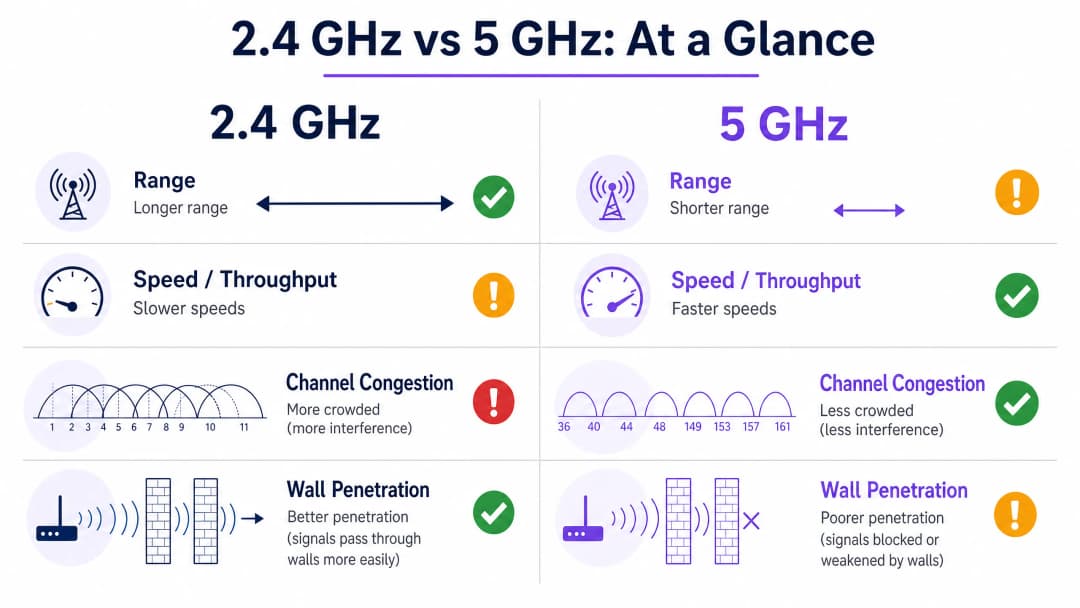
La differenza fondamentale tra 2.4GHz e 5GHz risiede nella loro lunghezza d'onda. La banda a 2.4GHz opera su lunghezze d'onda più lunghe (circa 12,5 cm), che sono altamente efficaci nel penetrare oggetti solidi come pareti di cemento, porte d'acciaio e persino corpi umani in ambienti affollati. Questa caratteristica fisica è il motivo per cui i 2.4GHz offrono un'area di copertura più ampia e sono spesso percepiti come più affidabili quando gli utenti si spostano attraverso ambienti complessi o si trovano lontani da un access point.
Tuttavia, questa portata maggiore comporta compromessi significativi. Lo spettro a 2.4GHz è notoriamente ristretto, offrendo solo tre canali non sovrapposti (1, 6 e 11) nella maggior parte dei domini di regolamentazione. Nelle installazioni dense - il piano di un hotel, un negozio al dettaglio, un centro congressi - questo porta inevitabilmente a gravi interferenze co-canale (CCI). Inoltre, la banda a 2.4GHz è una risorsa condivisa e congestionata: compete con dispositivi Bluetooth, forni a microonde, baby monitor e un ecosistema in crescita di hardware IoT legacy, che riducono la velocità di trasmissione complessiva per ogni dispositivo sulla rete.
Al contrario, la banda a 5GHz opera su lunghezze d'onda più corte (circa 6 cm). Sebbene questo limiti la sua capacità di penetrare le barriere fisiche - un segnale che attraversa facilmente una parete su 2.4GHz potrebbe essere interamente bloccato su 5GHz - essa offre uno spettro molto più ampio. Con un massimo di 24 canali non sovrapposti disponibili (a seconda del dominio normativo e della disponibilità dei canali DFS), la banda a 5GHz consente un legame di canale più ampio: 40MHz, 80MHz o anche 160MHz secondo lo standard IEEE 802.11ac (WiFi 5) e 802.11ax (WiFi 6/6E). Questo canale più ampio è la chiave per raggiungere l'enorme throughput richiesto per ambienti ad alta densità, streaming video HD e moderne applicazioni aziendali. Quando un dispositivo si connette a 5GHz con una linea di vista libera, le velocità raggiungibili sono esponenzialmente superiori a quelle che la banda a 2.4GHz può offrire.
Architettura dei Canali e Modelli di Interferenza
Comprendere l'architettura dei canali è fondamentale per qualsiasi implementazione aziendale. Sulla banda a 2.4GHz, lo standard IEEE 802.11 definisce 14 canali (sebbene i domini normativi varino), ma solo i canali 1, 6 e 11 sono veramente non sovrapposti. Ciò significa che in una determinata area, un massimo di tre access point può operare simultaneamente senza causare interferenze tra canali adiacenti. In un hotel a più piani o in un ambiente retail densamente popolato, questo vincolo diventa un limite insormontabile per la capacità della rete.
Sulla banda a 5GHz, lo scenario è radicalmente diverso. Le bande UNII-1 (5.15-5.25 GHz), UNII-2 (5.25-5.35 GHz), UNII-2 Extended (5.47-5.725 GHz) e UNII-3 (5.725-5.85 GHz) forniscono complessivamente fino a 24 canali a 20MHz non sovrapposti. I progettisti di rete possono distribuire un numero significativamente maggiore di access point nello stesso spazio fisico senza creare interferenze, consentendo i progetti ad alta densità richiesti per stadi, centri congressi e grandi ambienti retail.
I canali DFS (Dynamic Frequency Selection), che rientrano nelle bande UNII-2 e UNII-2 Extended, espandono ulteriormente lo spettro disponibile ma richiedono un'attenta valutazione. Questi canali devono essere condivisi con i sistemi radar, e un access point che rileva un segnale radar deve liberare il canale entro 10 secondi e rimanere fuori da quel canale per 30 minuti. Negli ambienti vicini ad aeroporti o stazioni meteorologiche, l'instabilità dei canali DFS può interrompere servizi critici, pertanto i progettisti dovrebbero pianificare di conseguenza dei canali di fallback.
Guida all'Implementazione
Architettura Dual-Band e Band Steering
L'approccio standard del settore per la moderna architettura wireless è un'implementazione dual-band con un band steering aggressivo. Gli access point devono essere configurati per incoraggiare attivamente i dispositivi compatibili con il dual-band - moderni smartphone, laptop e tablet - a connettersi sulla banda a 5GHz. Questa strategia libera lo spazio aereo a 2.4GHz per i dispositivi legacy, i sensori IoT critici e le aree di copertura marginali dove il segnale a 5GHz non può arrivare.
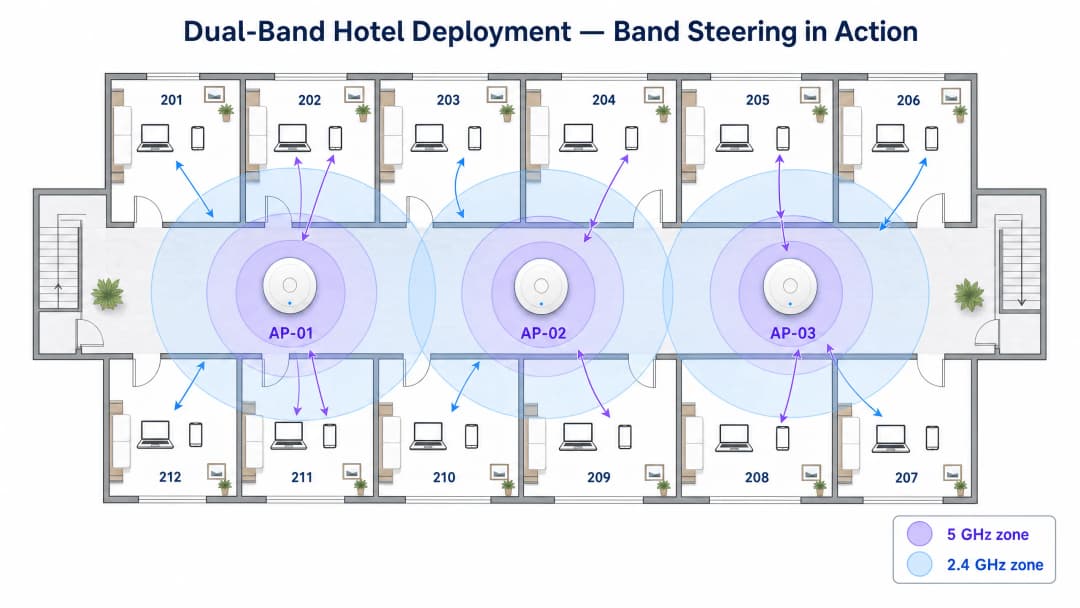
Il band steering funziona sopprimendo le risposte ai probe a 2.4GHz per i client compatibili finché questi non si associano sulla banda a 5GHz o non rispondono dopo un numero definito di tentativi. La maggior parte dei produttori di infrastrutture di livello enterprise implementa questa funzione in modo nativo, ma l'aggressività della policy di steering deve essere calibrata in base all'ambiente. In una struttura in cui sono presenti molti dispositivi più vecchi - ad esempio un edificio del settore pubblico o una struttura sanitaria - un band steering eccessivamente aggressivo può impedire del tutto la connessione ai legittimi dispositivi che supportano solo i 2.4GHz.
Progettare per la Capacità, Non per la Copertura
Un errore comune e costoso nelle implementazioni nei settori Hospitality e Retail consiste nell'aumentare la potenza di trasmissione sulle radio a 5GHz nel tentativo di eguagliare l'area di copertura dei 2.4GHz. Questo approccio crea il problema del "client appiccicoso" (sticky client): i dispositivi mantengono un segnale a 5GHz debole anziché effettuare il roaming verso un access point più forte, con conseguente degrado delle prestazioni per il client interessato e consumo di tempo di trasmissione (airtime) che peggiora le prestazioni di tutti gli altri client nella cella.
L'approccio corretto consiste nel progettare per la capacità installando più access point con impostazioni di potenza di trasmissione inferiori. Celle di copertura più piccole e ben definite garantiscono un roaming fluido, un riutilizzo ottimale dei canali e un carico bilanciato su tutta la rete. Come regola pratica, la potenza di trasmissione a 5GHz dovrebbe essere generalmente impostata su valori superiori di 6-9 dBm rispetto a quella a 2.4GHz, creando un differenziale di copertura naturale che incoraggia i client a preferire i 5GHz quando sono vicini a un AP e a passare ai 2.4GHz al limite della cella.
L'integrazione di una piattaforma indipendente dall'hardware come WiFi Analytics di Purple consente ai gestori delle strutture di acquisire dati sulle prestazioni in entrambe le bande, fornendo la visibilità necessaria per identificare i client appiccicosi, le zone ad alta interferenza e gli access point con prestazioni insufficienti. Questo approccio all'ottimizzazione della rete basato sui dati è particolarmente prezioso in ambienti dinamici come i luoghi di eventi, dove l'ambiente RF cambia drasticamente tra un evento e l'altro.
Elenco di Controllo per l'Implementazione Passo dopo Passo
| Fase | Azione | Standard / Riferimento |
|---|---|---|
| 1. RF Survey | Condurre una survey passiva e attiva del sito per mappare le fonti di interferenza esistenti | IEEE 802.11-2020 |
| 2. Piano dei Canali | Assegnare canali non sovrapposti; utilizzare 1, 6, 11 su 2.4GHz; allocare i canali DFS su 5GHz con cautela | Wi-Fi Alliance Best Practices |
| 3. Regolazione Potenza | Impostare la potenza di trasmissione a 5GHz a 6-9 dBm sopra i 2.4GHz; evitare impostazioni di potenza massima | Linee guida RRM specifiche del produttore |
| 4. Band Steering | Abilitare il band steering; regolare l'aggressività in base al mix di dispositivi | IEEE 802.11v (BSS Transition) |
| 5. RSSI Minimo | Configurare le soglie minime di RSSI per evitare client appiccicosi | Specifico del produttore |
| 6. Sicurezza | Implementare WPA3-SAE sulle reti guest; WPA3-Enterprise (IEEE 802.1X) sugli SSID aziendali | Specifiche WPA3, GDPR |
| 7. Analitica | Implementare WiFi Analytics per monitorare l'utilizzo delle bande, il numero di client e gli eventi di roaming | Piattaforma Purple |
Hai domande sulla tua configurazione specifica?
Il nostro team collabora con gestori di sedi, responsabili IT e ingegneri di rete in 80.000 sedi. Prenota una chiamata di 20 minuti e ti mostreremo come altri professionisti come te hanno risolto il problema.
Best Practice
Una pianificazione rigorosa dei canali non è negoziabile. Attenersi ai canali 1, 6 e 11 sulla banda a 2,4GHz per evitare interferenze da canali adiacenti. Sulla banda a 5GHz, utilizzare i canali DFS laddove l'ambiente lo consenta, ma mantenere un piano di emergenza documentato per i cambi di canale attivati dai radar.
Disattivare i tassi di trasmissione legacy su entrambe le bande. La rimozione del supporto per i tassi di trasmissione 802.11b (1, 2, 5.5 e 11 Mbps) su 2,4GHz riduce significativamente l'overhead di gestione e costringe i client con segnale scarso a effettuare il roaming verso un access point più vicino, anziché mantenere una connessione deteriorata. Questa singola modifica di configurazione può migliorare l'efficienza complessiva della rete del 20 - 30% negli ambienti densi.
Implementare 802.11r (Fast BSS Transition) per consentire un roaming fluido tra gli access point. Negli ambienti in cui gli utenti sono in movimento - aree di vendita al dettaglio, reparti ospedalieri, snodi di trasporto - lo standard 802.11r riduce il tempo di handoff del roaming da diverse centinaia di millisecondi a meno di 50 ms, il che è fondamentale per il voice-over-WiFi e le applicazioni in tempo reale.
Segmentare gli SSID per finalità. Evitare la tentazione di far transitare tutto il traffico su un unico SSID. Una rete correttamente segmentata separa il traffico ospiti (gestito tramite Guest WiFi con apposito captive portal e acquisizione dati), il traffico aziendale (protetto con IEEE 802.1X e WPA3-Enterprise) e i dispositivi IoT (isolati su una VLAN dedicata). Questa segmentazione supporta anche la conformità PCI-DSS per gli ambienti retail che gestiscono pagamenti con carta.
Risoluzione dei problemi e mitigazione dei rischi
Interferenza co-canale (CCI)
Rischio: Più access point che operano sullo stesso canale a distanza di ricezione l'uno dall'altro, costringendo i dispositivi ad attendere che il canale sia libero prima di trasmettere. Questa è la causa principale di scarse prestazioni del WiFi negli ambienti aziendali.
Mitigazione: Implementare la gestione automatizzata delle risorse radio (RRM) o verificare manualmente l'assegnazione dei canali su base trimestrale. Utilizzare strumenti di analisi dello spettro per identificare access point non autorizzati e fonti di interferenza non WiFi. Negli edifici multi-tenant, coordinare i piani dei canali con i tenant vicini, laddove possibile.
Client appiccicosi (Sticky Clients)
Rischio: Dispositivi che rimangono connessi a un access point con un segnale debole anche quando ne è disponibile uno più forte, consumando tempo di trasmissione e degradando le prestazioni della cella.
Mitigazione: Configurare soglie RSSI minime (in genere da –70 a –75 dBm) per disassociare delicatamente i client con segnale scarso. Combinare con la gestione delle transizioni BSS 802.11v per indirizzare i client verso access point migliori prima che si renda necessaria la disassociazione.
Instabilità dei canali DFS
Rischio: Eventi di rilevamento radar che costringono gli access point a uscire dai canali DFS, causando brevi interruzioni di connettività per i client associati.
Mitigazione: In ambienti vicini ad aeroporti, installazioni militari o stazioni meteorologiche, evitare del tutto i canali DFS. In altri contesti, assicurarsi che gli access point siano configurati per spostarsi su un canale di fallback predefinito anziché selezionare dinamicamente un nuovo canale, il che potrebbe causare interferenze imprevedibili.
Compatibilità dei dispositivi IoT
Rischio: I dispositivi IoT legacy - sensori ambientali, terminali di pagamento, lettori di controllo accessi - potrebbero supportare solo la banda a 2.4GHz e protocolli di sicurezza obsoleti, creando una vulnerabilità se condividono la stessa rete del traffico guest o aziendale.
Mitigazione: Isolare i dispositivi IoT su un SSID e una VLAN dedicati. Assicurarsi che la radio a 2.4GHz non sia disabilitata nel tentativo di semplificare la rete, poiché ciò renderebbe questi dispositivi inutilizzabili. Per indicazioni sulla gestione dei limiti di indirizzamento di rete in ambienti IoT ad alta densità, consultare la nostra guida sulla Gestione dell'esaurimento degli IP pubblici negli alloggi per studenti .
ROI e Impatto sul Business
Una rete dual-band adeguatamente progettata offre risultati di business misurabili in ogni settore. Nel settore dell' Hospitality , un WiFi ad alta velocità affidabile è costantemente classificato tra i fattori principali nei punteggi di soddisfazione degli ospiti, influenzando direttamente le valutazioni delle recensioni e le prenotazioni ricorrenti. Un'implementazione a 5GHz ben sintonizzata assicura che gli ospiti possano trasmettere contenuti in streaming, effettuare videochiamate e utilizzare applicazioni cloud senza interruzioni, mentre il livello a 2.4GHz garantisce il mantenimento della connettività anche nelle camere più lontane dall'access point.
Nei contesti del Retail , il caso aziendale è ancora più diretto. Una rete a 5GHz affidabile garantisce che i sistemi point-of-sale elaborino le transazioni senza latenza, mentre la rete a 2.4GHz supporta gli scanner di inventario all'interno delle corsie più profonde. I tempi di inattività causati da un ambiente RF progettato male si traducono direttamente in perdite di fatturato. Sfruttando i WiFi Analytics , gli operatori retail possono anche misurare i tempi di sosta e i modelli di affluenza, trasformando l'infrastruttura di rete in una risorsa di dati di prima parte.
Per le organizzazioni del settore pubblico e gli operatori di trasporto, il calcolo del ROI include la mitigazione del rischio e i ricavi diretti. Una rete che si interrompe durante i picchi di domanda - un evento in uno stadio, il tragitto dei pendolari nelle ore di punta - crea un danno d'immagine difficile da quantificare, ma facile da evitare con una corretta architettura. Il lavoro di Purple in questo settore, inclusa la nomina di una leadership specialistica per l'inclusione digitale nel settore pubblico, come dettagliato nell' annuncio di Iain Fox , riflette il crescente riconoscimento che il WiFi aziendale è un'infrastruttura pubblica fondamentale.L'emergere di tecnologie di autenticazione senza password, come esplorato nella nostra guida su Come un Assistente WiFi abilita l'accesso senza password nel 2026 , aumenta ulteriormente il ROI di una rete ben progettata riducendo i costi di supporto e migliorando l'esperienza di onboarding degli ospiti. Le funzionalità di resilienza offline, come quelle descritte nella Modalità Mappe Offline di Purple , assicurano che l'esperienza utente rimanga intatta anche quando la connettività a monte è degradata.
Risultati previsti da una distribuzione Dual-Band configurata correttamente:
| Metrica | Miglioramento tipico |
|---|---|
| Punteggi di soddisfazione degli ospiti per il WiFi | +15 - 25% |
| Ticket di supporto relativi alla rete | - 30 - 40% |
| Throughput nelle ore di punta per client | +40 - 60% |
| Tempo di handoff in roaming (con 802.11r) | - 80% (da ~300ms a <50ms) |
| Utilizzo del tempo di trasmissione a 2.4GHz | - 20 - 30% (scaricato su 5GHz) |
Definizioni chiave
Band Steering
Un meccanismo mediante il quale un access point sopprime le risposte di probe a 2.4GHz per i client che supportano il dual-band, incoraggiandoli invece ad associarsi sulla banda a 5GHz.
Fondamentale per ottimizzare l'utilizzo del tempo di trasmissione (airtime) in ambienti densi. Deve essere calibrato attentamente per evitare di bloccare i dispositivi legittimi che supportano solo i 2.4GHz.
Co-Channel Interference (CCI)
Interferenza che si verifica quando due o più access point che operano sullo stesso canale si trovano a distanza di ascolto reciproca, costringendo il protocollo CSMA/CA a far attendere i dispositivi che l'airtime sia libero prima di trasmettere.
La causa principale delle scarse prestazioni del WiFi nelle implementazioni aziendali. Mitigata attraverso un'attenta pianificazione dei canali e un'adeguata densità di AP.
Channel Bonding
La pratica di combinare canali adiacenti a 20MHz per creare canali più ampi (40MHz, 80MHz, 160MHz), aumentando la velocità di trasmissione disponibile per i client associati.
Altamente efficace sui 5GHz per applicazioni ad alta larghezza di banda. Dovrebbe essere evitato sui 2.4GHz a causa dello spettro limitato disponibile.
Dynamic Frequency Selection (DFS)
Un requisito normativo che impone ai dispositivi WiFi che operano su determinati canali a 5GHz di rilevare ed evitare i segnali radar, liberando il canale entro 10 secondi in caso di rilevamento radar.
Amplia il set di canali a 5GHz disponibili, ma introduce il rischio di cambi di canale durante gli eventi di rilevamento radar. Richiede un'attenta pianificazione in prossimità di aeroporti e installazioni militari.
Received Signal Strength Indicator (RSSI)
Una misura della potenza presente in un segnale radio ricevuto, tipicamente espressa in dBm (valori negativi, dove il valore più vicino a 0 è il più forte).
Utilizzato per determinare lo stato di salute del client, attivare eventi di roaming e convalidare la copertura durante i sopralluoghi sul sito. In genere è richiesto un minimo di –70 dBm per un funzionamento affidabile del WiFi aziendale.
Sticky Client
Un dispositivo che rimane associato a un access point nonostante abbia un segnale debole (RSSI basso), quando è disponibile un access point con segnale più forte. Ciò accade perché lo standard 802.11 offre ai client il pieno controllo sulle decisioni di roaming.
Degrada le prestazioni del client interessato e consuma airtime, riducendo le prestazioni di tutti gli altri client nella cella. Mitigato da soglie minime di RSSI e dalla gestione delle transizioni BSS 802.11v.
Throughput
La quantità effettiva di dati trasferiti con successo attraverso la rete in un determinato periodo di tempo, distinta dalla velocità teorica massima dei dati (PHY rate) dichiarata dall'access point.
La metrica pratica per l'esperienza utente. Il throughput è sempre inferiore alla velocità fisica (PHY rate) a causa del sovraccarico del protocollo, delle ritrasmissioni e dell'airtime condiviso.
Radio Resource Management (RRM)
Un sistema automatizzato che regola dinamicamente l'assegnazione dei canali e i livelli di potenza di trasmissione in un gruppo di access point per ridurre al minimo le interferenze e ottimizzare la copertura.
Disponibile sulla maggior parte dei controller wireless di livello enterprise. Riduce i costi operativi della pianificazione manuale dei canali, ma deve essere convalidato regolarmente, poiché le decisioni RRM non sono sempre ottimali in ambienti complessi.
IEEE 802.11r (Fast BSS Transition)
Un emendamento allo standard 802.11 che pre-autentica i client con gli access point vicini, riducendo il tempo di passaggio del roaming da diverse centinaia di millisecondi a meno di 50 ms.
Essenziale per applicazioni vocali su WiFi, applicazioni in tempo reale e ambienti di lavoro mobili come aree di vendita e reparti ospedalieri.
Esempi pratici
Un hotel da 200 camere registra frequenti reclami per WiFi lento durante i picchi serali (18:00 - 22:00). L'installazione attuale utilizza access point montati nei corridoi con radio sia a 2.4GHz che a 5GHz impostate sulla massima potenza di trasmissione. Un'analisi del sito rivela che la maggior parte delle camere si trova a 8 - 12 metri dall'AP più vicino, con due pareti in cemento tra il dispositivo e l'AP.
Fase 1 - Ridurre la potenza di trasmissione su entrambe le bande. Impostare la banda a 5GHz a 17 dBm e quella a 2.4GHz a 10 dBm. Questo crea un differenziale di copertura naturale che incoraggia i client a preferire i 5GHz quando sono vicini all'AP e a passare ai 2.4GHz al limite della cella, riducendo i problemi di client che rimangono associati a un AP lontano.
Fase 2 - Abilitare il band steering aggressivo. Configurare l'infrastruttura per escludere le risposte di probe a 2.4GHz per i dispositivi dual-band per almeno 200 ms, dando priorità alla banda a 5GHz. Monitorare il tasso di utilizzo della banda tramite la piattaforma di analisi; puntare al 70 - 80% dei client sulla banda a 5GHz nelle ore di punta.
Fase 3 - Disabilitare i tassi di trasmissione dati legacy 802.11b sulla banda a 2.4GHz (1, 2, 5.5, 11 Mbps). Questo riduce il sovraccarico di gestione e forza i client con un segnale debole a effettuare il roaming anziché mantenere una connessione deteriorata.
Fase 4 - Implementare il Fast BSS Transition 802.11r e configurare soglie minime di RSSI a -72 dBm per garantire che i client effettuino il roaming prima che la qualità del segnale scenda al di sotto dei livelli utilizzabili.
Fase 5 - Pianificare un aggiornamento graduale installando access point in camera per i primi tre piani (con la maggiore densità di reclami). Gli AP in camera offrono una linea di vista diretta a 5GHz ai dispositivi degli ospiti, eliminando completamente il problema della penetrazione delle pareti per quei piani.
Un grande magazzino per la vendita al dettaglio (15.000 mq) necessita di connettività WiFi sia per un'area ufficio aziendale (50 dipendenti che utilizzano laptop e videoconferenze) sia per l'area del magazzino (200 scanner di codici a barre legacy che si spostano tra scaffalature metalliche alte 8 metri). La rete esistente utilizza un unico SSID su entrambe le bande.
Fase 1 - Segmentare la rete. Creare tre SSID: CORP (WPA3-Enterprise, 802.1X, preferenza 5GHz), WAREHOUSE (WPA2-PSK, solo 2.4GHz, VLAN isolata) e GUEST (Captive Portal tramite Purple Guest WiFi, dual-band).
Fase 2 - Progettare l'area ufficio per la capacità a 5GHz. Distribuire gli access point a una distanza di 10 - 12 metri l'uno dall'altro con un channel bonding di 80MHz sulla banda a 5GHz per garantire videoconferenze ad alta velocità. Disattivare la banda a 2.4GHz sugli AP dell'area ufficio o ridurne la potenza al minimo.
Fase 3 - Progettare l'area del magazzino specificamente per l'affidabilità a 2.4GHz. Le scaffalature metalliche creano un ambiente a multipath severo per i 5GHz, causando un rapido degrado del segnale. Distribuire gli AP all'estremità di ogni corridoio a livelli di potenza ottimizzati per i 2.4GHz. Utilizzare i canali 1, 6 e 11 in uno schema rigidamente alternato tra i corridoi per ridurre al minimo la CCI.
Fase 4 - Convalidare la connettività degli scanner con un test sul campo, misurando l'RSSI all'estremità di ogni corridoio. Puntare a un minimo di –65 dBm per un funzionamento affidabile degli scanner.
Fase 5 - Integrare Purple WiFi Analytics per monitorare gli eventi di roaming degli scanner e identificare eventuali corridoi con lacune di copertura.
Domande di esercitazione
Q1. Stai progettando la rete WiFi per una nuova aula magna universitaria che dovrebbe ospitare 300 studenti, ognuno dei quali porterà 2 - 3 dispositivi. L'aula ha un soffitto piatto a 4 metri e nessuna parete interna. Qual è la tua strategia di frequenza primaria e l'approccio di posizionamento degli AP?
Suggerimento: Considera la densità dei dispositivi, l'ambiente fisico e la necessità di ridurre al minimo l'interferenza co-canale.
Visualizza risposta modello
La strategia primaria è una copertura a 5GHz ad alta densità. Con un massimo di 900 dispositivi in un'unica stanza, la banda a 2.4GHz si saturerebbe immediatamente a causa del limite di tre canali. Distribuisci 6 - 8 access point con antenne direzionali sul soffitto, creando celle di copertura a 5GHz piccole e non sovrapposte. Imposta la potenza di trasmissione bassa (12 - 15 dBm a 5GHz) per definire confini di cella precisi ed evitare client persistenti. Abilita il band steering aggressivo e disabilita la banda a 2.4GHz sulla maggior parte degli AP, lasciandola attiva solo su 1 - 2 AP sul retro dell'aula per eventuali dispositivi legacy. Utilizza il channel bonding a 40MHz sulla banda a 5GHz per bilanciare throughput e riutilizzo dei canali.
Q2. Il direttore IT di un ospedale segnala che i carrelli di telemetria medica perdono frequentemente la connessione WiFi quando si spostano tra i reparti. La rete è dual-band con band steering abilitato. Qual è la causa più probabile e quale rimedio consigli?
Suggerimento: Considera il comportamento di roaming, le caratteristiche fisiche della struttura ospedaliera e l'impatto del band steering sui dispositivi mobili.
Visualizza risposta modello
La causa più probabile è una combinazione di client persistenti e un band steering troppo aggressivo. I carrelli probabilmente mantengono un segnale a 5GHz debole mentre si spostano attraverso pareti di cemento, invece di passare a un AP più forte. Quando alla fine effettuano il roaming, il ritardo di handoff causa la perdita di connessione dell'applicazione. Rimedio: (1) Controlla le impostazioni della potenza di trasmissione - assicurati che la banda a 2.4GHz sia impostata a un livello inferiore rispetto a quella a 5GHz per creare confini di cella chiari. (2) Configura le soglie minime di RSSI a –70 dBm per attivare il roaming prima che il segnale si degradi a livelli inutilizzabili. (3) Implementa 802.11r Fast BSS Transition per ridurre il tempo di handoff del roaming a meno di 50 ms. (4) Se l'applicazione di telemetria richiede solo una larghezza di banda ridotta, valuta di configurare i carrelli per connettersi esclusivamente a 2.4GHz, che garantirà una copertura più uniforme attraverso le pareti di cemento dell'ospedale.
Q3. Una catena di negozi desidera distribuire analisi di localizzazione basate su WiFi in 50 punti vendita per misurare il tempo di permanenza e mappare il percorso dei clienti. La piattaforma di analytics dovrebbe basarsi principalmente sui dati dei probe a 2.4GHz o a 5GHz, e perché?
Suggerimento: Considera su quale frequenza i dispositivi inviano probe più frequentemente, le implicazioni di portata per la precisione della triangolazione e il ruolo di una piattaforma come Purple WiFi Analytics.
Visualizza risposta modello
La location analytics dovrebbe basarsi principalmente sui dati di probe a 2.4GHz, per due motivi. In primo luogo, la frequenza a 2.4GHz ha una portata maggiore, il che significa che gli access point possono rilevare le richieste di probe dei dispositivi da distanze superiori, fornendo più punti dati per la triangolazione e migliorando la precisione. In secondo luogo, molti smartphone effettuano ancora il probe in modo più aggressivo a 2.4GHz per risparmiare batteria, il che si traduce in un volume maggiore di dati di probe. Tuttavia, una piattaforma robusta come WiFi Analytics di Purple aggregherà i dati di probe di entrambe le bande per massimizzare la copertura e l'accuratezza. È inoltre importante notare che iOS 14+ e Android 10+ implementano la randomizzazione dell'indirizzo MAC per le richieste di probe, il che richiede alla piattaforma di analytics di utilizzare tecniche di fingerprinting statistico anziché affidarsi esclusivamente al tracciamento basato su MAC.
Continua a leggere questa serie
20MHz vs 40MHz vs 80MHz: quale larghezza di canale utilizzare?
Questa guida fornisce un riferimento tecnico definitivo e neutrale rispetto ai fornitori per IT manager, network architect e direttori operativi di sedi su come selezionare la corretta larghezza di canale WiFi - 20MHz, 40MHz o 80MHz - in tutte le distribuzioni aziendali nei settori alberghiero, retail, eventi e settore pubblico. Copre i meccanismi IEEE 802.11 sottostanti, i compromessi sulla capacità nel mondo reale e una guida dettagliata alla distribuzione per aiutare i team a fare la scelta giusta in questo trimestre. Comprendere la selezione della larghezza di canale è una delle decisioni a più alto impatto in qualsiasi progettazione di reti LAN wireless, influenzando direttamente il throughput, l'interferenza, il supporto per la densità dei client e l'affidabilità dei servizi rivolti agli ospiti.
Come cercare le interferenze WiFi e trovare il canale migliore
Questa guida tecnica completa offre ai responsabili IT aziendali metodologie pratiche per identificare le interferenze RF e selezionare i canali a 5GHz ottimali. Copre l'analisi dello spettro, le considerazioni DFS e le strategie di implementazione pratica per massimizzare la velocità di trasmissione e ridurre la latenza senza richiedere nuovi investimenti in hardware.
Come arrestare il consumo eccessivo di larghezza di banda sulla rete WiFi pubblica
Questa guida fornisce una guida tecnica dettagliata per i responsabili IT per implementare il filtraggio DNS intelligente sulle reti WiFi pubbliche. Bloccando le reti pubblicitarie e la telemetria all'edge, le strutture possono recuperare fino al 40% della larghezza di banda sprecata e migliorare l'esperienza degli ospiti senza ricorrere a un rigido controllo della velocità di trasmissione.
Hai domande sulla tua configurazione specifica?
Il nostro team collabora con gestori di sedi, responsabili IT e ingegneri di rete in 80.000 sedi. Prenota una chiamata di 20 minuti e ti mostreremo come altri professionisti come te hanno risolto il problema.