
Progettazione di reti WiFi per edifici per uffici multi-tenant
Questa guida fornisce a responsabili IT, architetti di rete e CTO un modello indipendente dal fornitore per la progettazione di reti WiFi scalabili, sicure e isolate in edifici per uffici multi-tenant. Copre la segmentazione VLAN in conformità a IEEE 802.1Q, l'assegnazione dinamica delle VLAN tramite 802.1X e RADIUS, la pianificazione RF per ambienti ad alta densità e le considerazioni di conformità ai sensi di GDPR e PCI DSS. Gli operatori delle strutture e i gestori degli edifici troveranno linee guida sull'architettura pratiche, casi di studio reali ed errori di configurazione da evitare prima della distribuzione.
Ascolta questa guida
Visualizza trascrizione del podcast
Parte della nostra serie principale: Multi-Tenant WiFi Guide →
Sintesi Esecutiva
Per i CTO e gli architetti di rete che gestiscono edifici per uffici multitenant, la sfida è chiara: come fornire una connettività affidabile, sicura e isolata a più organizzazioni indipendenti su un'unica rete fisica condivisa. In un ambiente multitenant, un'architettura di rete flat rappresenta un grave rischio per la sicurezza. Amplia l'ambito di conformità ai sensi del GDPR e PCI DSS, espone i tenant a minacce di sicurezza laterali e crea un onere operativo che scala difficilmente con la crescita del numero di tenant.
Questa guida fornisce un progetto indipendente dai vendor per la progettazione di architetture WiFi multitenant. Implementando la segmentazione VLAN IEEE 802.1Q, l'assegnazione dinamica delle VLAN basata su 802.1X e una pianificazione RF rigorosa, è possibile eliminare la proliferazione degli SSID, ridurre il sovraccarico dei tempi di trasmissione fino al 20% e applicare un rigido isolamento di Layer 2 tra i tenant. Dettagliamo gli standard tecnici, le considerazioni sull'hardware per vari vendor, tra cui Cisco Meraki, HPE Aruba, Ruckus e Juniper Mist, e le policy di routing necessarie per proteggere l'infrastruttura. Se implementata correttamente, questa architettura riduce i costi di supporto, semplifica gli audit di conformità e consente di monetizzare la connettività come servizio.
Approfondimento Tecnico
Il Caso Contro le Rete Flat
Una rete flat colloca ogni dispositivo - indipendentemente dal tenant, dal tipo di traffico o dal livello di sicurezza - in un unico dominio di broadcast. Ogni dispositivo riceve ogni pacchetto di broadcast. Un singolo dispositivo ospite compromesso può scansionare e raggiungere i terminali POS, i sistemi di gestione dell'edificio e le workstation aziendali. Questo mette l'intera rete sotto l'ambito dell'audit PCI DSS. Non si tratta di un rischio teorico; è lo stato predefinito di molti edifici multitenant cablati prima che la densità wireless diventasse un fattore di progettazione.
La soluzione è la segmentazione logica. Non è necessaria un'infrastruttura fisica separata per ogni tenant; occorrono un'architettura VLAN progettata correttamente, un firewall ben configurato e una piattaforma di gestione centralizzata.
IEEE 802.1Q e Tagging VLAN
Le VLAN - standardizzate come IEEE 802.1Q - consentono di suddividere un'unica infrastruttura di switch fisica in più reti logiche isolate. Quando un client si connette a un access point (AP) WiFi, l'AP contrassegna i frame di quel client con un identificatore VLAN (VID) a 12 bit. Gli switch leggono questo tag e assicurano che il traffico di una VLAN non venga mai inoltrato a una porta su un'altra VLAN, a meno che una regola esplicita di routing del firewall non lo consenta.
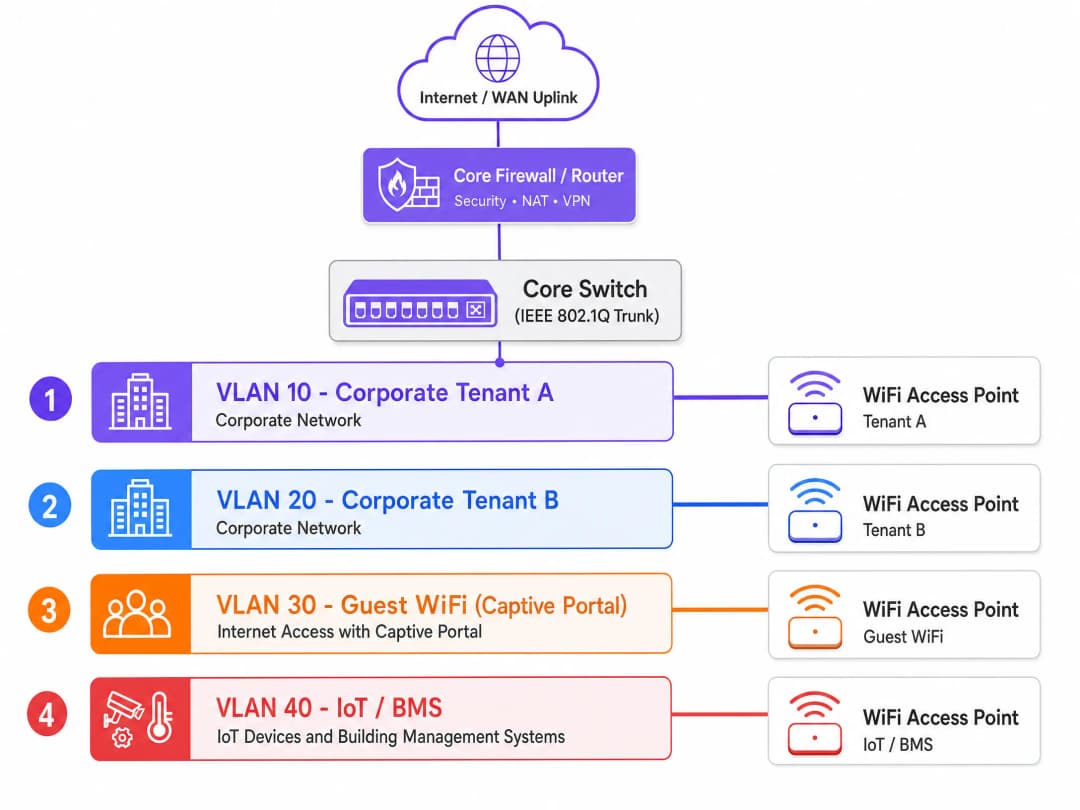
Un tipico edificio per uffici multitenant richiede almeno quattro VLAN:
| VLAN | Classe di Traffico | Policy di Routing |
|---|---|---|
| VLAN 10 | Tenant aziendale A | Solo Internet + risorse specifiche del tenant |
| VLAN 20 | Tenant aziendale B | Solo Internet + risorse specifiche del tenant |
| VLAN 30 | Guest WiFi (captive portal) | Solo Internet, nessun accesso di alcun tipo a qualsiasi VLAN dei tenant |
| VLAN 40 | IoT e BMS | Solo uscita verso le piattaforme di gestione designate |
Per gli edifici con più tenant, è sufficiente estendere il modello. Ogni tenant aggiuntivo riceve una VLAN dedicata e una politica firewall corrispondente. L'infrastruttura fisica rimane condivisa.
Assegnazione dinamica della VLAN tramite 802.1X e RADIUS
In passato, gli ingegneri di rete creavano un SSID separato per ogni tenant. Questo approccio riduce le prestazioni. Ogni SSID trasmette frame di gestione (beacon) alla tariffa dati di base obbligatoria più bassa per garantire che i dispositivi legacy possano connettersi. La trasmissione di sei o sette SSID su un singolo access point può consumare dal 20% al 30% del tempo di trasmissione wireless disponibile prima ancora che vengano trasmessi i dati dell'utente. In un edificio multi-tenant densamente popolato, questo è inaccettabile.
Lo standard moderno è l'assegnazione dinamica della VLAN. Si trasmette un singolo SSID sicuro utilizzando l'autenticazione IEEE 802.1X. Quando un utente si connette, il suo dispositivo (il supplicant) scambia le credenziali con un server RADIUS tramite l'access point (l'authenticator). Il server RADIUS convalida le credenziali rispetto a un provider di identità - Microsoft Entra ID, Okta o Google Workspace - e restituisce un messaggio Access-Accept all'access point. Tale messaggio contiene tre attributi RADIUS standard IETF:
- Tunnel-Type (attributo 64): impostato su VLAN
- Tunnel-Medium-Type (attributo 65): impostato su 802
- Tunnel-Private-Group-ID (attributo 81): l'ID VLAN specifico per l'organizzazione di quell'utente
L'access point riceve questi attributi e inserisce dinamicamente il traffico di quell'utente nella VLAN designata. Un dipendente del Tenant A e un dipendente del Tenant B si connettono allo stesso SSID. Il loro traffico è completamente isolato al livello 2. Gli switch li trattano come se fossero collegati a reti fisiche completamente separate.
Per il segmento ospiti, il traffico viene instradato attraverso una VLAN ospiti dedicata a un captive portal. La piattaforma Guest WiFi di Purple gestisce la gestione del consenso conforme al GDPR, l'onboarding sicuro e la WiFi Analytics sul segmento isolato, con zero accesso instradato alle reti aziendali. Per una panoramica più ampia sull'architettura di controllo degli accessi, consulta la nostra guida ai sistemi di controllo degli accessi alla rete.
WPA3-Enterprise e standard di crittografia
WPA3-Enterprise è lo standard di crittografia consigliato per le distribuzioni multi-tenant. Offre una modalità di sicurezza a 192 bit, elimina le vulnerabilità dell'handshake a quattro vie di WPA2 e impone i Protected Management Frames (PMF) ai sensi dello standard IEEE 802.11w. Per gli ambienti che gestiscono dati di carte di pagamento o informazioni aziendali sensibili, WPA3-Enterprise con EAP-TLS - autenticazione reciproca basata su certificati - elimina interamente il vettore di furto delle credenziali.
Per i segmenti ospiti in cui non è possibile distribuire i certificati, WPA3-SAE (Simultaneous Authentication of Equals) garantisce la forward secrecy, assicurando che una chiave compromessa non esponga il traffico storico.
Pianificazione RF in ambienti ad alta densità
L'interferenza co-canale (CCI) è la causa principale delle scarse prestazioni del WiFi negli edifici per uffici multi-tenant. Quando gli access point adiacenti trasmettono sullo stesso canale di frequenza, i dispositivi devono attendere il tempo di trasmissione libero prima di trasmettere. In un edificio con più tenant e un'estrema densità di dispositivi, un'allocazione non pianificata dei canali crea un ambiente RF congestionato che nessuna quantità di larghezza di banda può risolvere.
Un'indagine RF attiva in loco è essenziale prima della distribuzione. Le mappe di copertura dei fornitori sono in genere ottimistiche. Sono necessarie misurazioni reali del segnale effettuate nello spazio fisico, tenendo conto dei materiali delle pareti, della costruzione dei pavimenti e dell'ambiente RF degli edifici vicini.
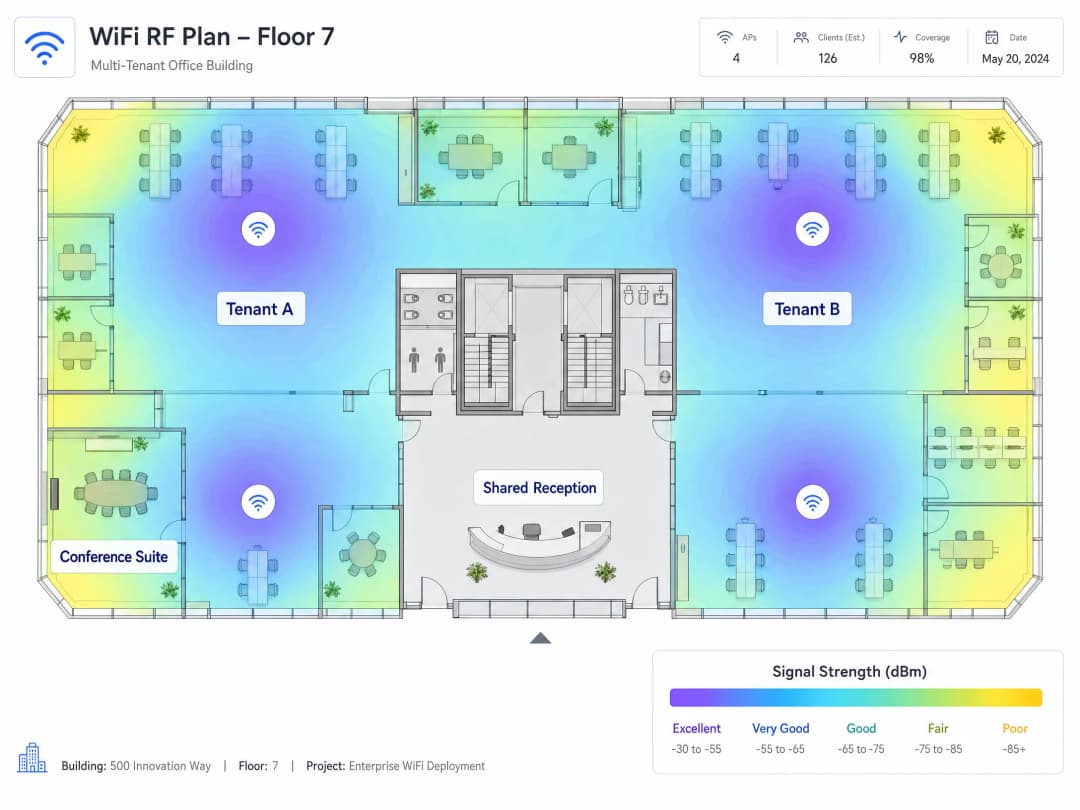
Nella maggior parte dei domini normativi, la banda a 2.4 GHz offre tre canali non sovrapposti (1, 6 e 11). La banda a 5 GHz offre una capacità significativamente superiore. Il WiFi 6E si estende nella banda a 6 GHz, fornendo uno spettro pulito ampiamente privo di interferenze da parte di dispositivi legacy. Per le nuove installazioni multi-tenant, la scelta di access point compatibili con WiFi 6E di Cisco Meraki, HPE Aruba, Ruckus, Juniper Mist o Ubiquiti UniFi offre il margine spettrale richiesto dagli ambienti ad alta densità.
Isolamento IoT
I moderni edifici per uffici contengono sistemi di gestione dell'edificio, controller HVAC, illuminazione intelligente, controllo degli accessi e CCTV. Questi dispositivi sono notoriamente difficili da patchare e rappresentano una superficie di attacco sostanziale. Devono essere isolati su una VLAN dedicata con un rigido filtraggio in uscita, consentendo la comunicazione outbound solo verso le loro piattaforme di gestione designate. Zero accesso instradato a qualsiasi VLAN dei tenant. Zero accesso instradato alla VLAN ospiti. Questo è non negoziabile sia dal punto di vista della sicurezza che del GDPR.
Hai domande sulla tua configurazione specifica?
Il nostro team collabora con gestori di sedi, responsabili IT e ingegneri di rete in 80.000 sedi. Prenota una chiamata di 20 minuti e ti mostreremo come altri professionisti come te hanno risolto il problema.
Guida all'implementazione
Passo 1: Progetta la tua architettura logica prima di toccare l'hardware. Mappa il numero dei tuoi tenant e le classi di traffico (aziendale, ospiti, IoT, pagamenti, gestione) e alloca le VLAN. Documenta il tuo schema di indirizzamento IP. Definisci la tua policy di routing inter-VLAN: cosa può comunicare con cosa, e cosa è assolutamente vietato.
Step 2: Commission an active RF site survey. Non affidarti mai alle mappe di copertura del fornitore. È necessario effettuare misurazioni reali del segnale nello spazio fisico per definire il posizionamento degli AP e l'allocazione dei canali.
Step 3: Configure your core firewall with a Default-Deny policy. Blocca tutto il routing inter-VLAN per impostazione predefinita. Aggiungi solo eccezioni esplicite e specifiche per porta. Ogni percorso inter-VLAN deve essere giustificato e documentato.
Step 4: Disable VLAN 1 on all trunk ports. Modifica la VLAN nativa sulle porte trunk con un ID VLAN non utilizzato e non instradabile. Questo previene gli attacchi di VLAN hopping che sfruttano la VLAN nativa predefinita.
Step 5: Verify trunk port configuration. Consenti esplicitamente ogni ID VLAN richiesto su ogni collegamento trunk nel percorso dall'access point al livello di distribuzione. Un tag VLAN mancante causa cadute silenziose del traffico che richiedono ore per essere diagnosticate.
Step 6: Deploy centralised cloud management. Le piattaforme di Cisco Meraki, HPE Aruba, Juniper Mist e Ruckus offrono criteri di larghezza di banda per SSID, reportistica per tenant e integrazione con la tua infrastruttura RADIUS. La gestione di un parco AP distribuito senza un controller comporta un sovraccarico operativo insostenibile su scala.
Step 7: Set DHCP lease times per segment. VLAN aziendali: da 8 a 24 ore. VLAN WiFi ospiti: da 1 a 2 ore. Tempi di lease brevi sul segmento ospiti prevengono l'esaurimento degli indirizzi IP in ambienti ad alta rotazione.
Step 8: Isolate the management plane. La tua VLAN di gestione deve essere completamente isolata da tutte le VLAN tenant e ospiti. Applica ACL rigide al traffico di gestione. Se un tenant può raggiungere il tuo piano di gestione, hai una grave vulnerabilità di sicurezza.
Best Practices
La tabella seguente riassume gli standard di configurazione chiave per una distribuzione WiFi multi-tenant conforme.
| Control | Standard | Rationale |
|---|---|---|
| Segmentazione VLAN | IEEE 802.1Q | Isolamento Layer 2 tra i tenant |
| Autenticazione | IEEE 802.1X con WPA3-Enterprise | Elimina i vettori di furto delle credenziali |
| Assegnazione dinamica della VLAN | RADIUS con attributi tunnel | Riduce il numero di SSID, preserva il tempo di trasmissione |
| Onboarding ospiti | Captive Portal con consenso GDPR | Conformità e acquisizione dati |
| Isolamento IoT | VLAN dedicata con ACL di uscita | Limita la superficie di attacco dei dispositivi non aggiornati |
| Pianificazione RF | Site survey attivo | Mitiga l'interferenza co-canale |
| Roaming | 802.11r Fast BSS Transition | Passaggio fluido tra gli AP |
| VLAN nativa | ID VLAN non instradabile e non utilizzato | Previene gli attacchi di VLAN hopping |
Per le distribuzioni nel settore dell'hospitality, l'isolamento della VLAN ospiti è fondamentale. Per gli ambienti del retail, l'isolamento dei terminali POS su una VLAN dedicata riduce direttamente l'ambito di audit PCI DSS. Per gli snodi di trasporto e le strutture sanitarie, si applicano gli stessi principi di segmentazione, con ulteriore attenzione ai volumi di connessione simultanee e alla diversità dei tipi di dispositivi.
Per i locali che considerano uplink WAN a banda larga satellitare, la guida di Purple Come impostare un Captive Portal su Starlink copre le considerazioni specifiche per gli ambienti remoti e marittimi.
Risoluzione dei problemi e mitigazione dei rischi
Perdita silenziosa di traffico. Questa è la modalità di guasto più comune nelle distribuzioni multi-tenant. La causa è un tag VLAN mancante su una porta trunk. Un utente si autentica con successo tramite 802.1X, il server RADIUS lo assegna alla VLAN 40, ma la VLAN 40 non è consentita sulla porta trunk. Il traffico viene interrotto e l'utente non può ottenere un indirizzo IP. Documentare meticolosamente le configurazioni dei trunk e verificarle durante la messa in servizio.
Proliferazione di SSID. Ogni SSID trasmesso consuma tempo di trasmissione dei frame di beacon. In ambienti densi, da 8 a 10 SSID per AP degradano le prestazioni della rete per tutti. Mantenere gli SSID a non più di 4 per radio. Utilizzare l'assegnazione dinamica della VLAN tramite attributi RADIUS anziché SSID separati per servire più tenant.
Esposizione del piano di gestione. Se la VLAN di gestione non è isolata, un tenant che ottiene l'accesso può modificare le configurazioni degli AP, interrompere il servizio o intercettare il traffico di gestione. Utilizzare la gestione out-of-band ove possibile e applicare ACL rigorose a tutte le interfacce di gestione.
Espansione incontrollata dei dispositivi IoT. I gestori degli edifici aggiungono frequentemente dispositivi IoT senza informare il team di rete. Implementare una politica di controllo dell'accesso alla rete (NAC) che richieda un'autorizzazione esplicita prima che qualsiasi nuovo dispositivo ottenga un indirizzo IP sulla VLAN IoT.
Esaurimento del DHCP sulla VLAN guest. In ambienti ad alto ricambio, i dispositivi mantengono i lease DHCP anche dopo la disconnessione. Una sottorete /24 fornisce 254 indirizzi. In un centro congressi o spazio di coworking affollato, questi si esauriscono rapidamente. Impostare i tempi di lease su 1 o 2 ore e dimensionare le sottoreti della VLAN guest per accogliere il numero massimo di dispositivi simultanei.
ROI e impatto commerciale
Un'architettura WiFi multi-tenant correttamente segmentata offre risultati misurabili su tre dimensioni.
Costi di conformità ridotti. In base ai dati di implementazione di Purple, l'isolamento dei POS e dei terminali di pagamento su una VLAN dedicata con severi controlli firewall riduce l'ambito dell'audit PCI-DSS di circa il 70%. Ciò riduce direttamente i costi di audit annuali e il tempo che il team IT dedica alla documentazione di conformità.
Efficienza operativa. La gestione centralizzata in cloud riduce le OpEx associate alla gestione di un parco AP distribuito. Il provisioning zero-touch, l'applicazione delle policy globali e la reportistica per tenant eliminano la necessità di modifiche alla configurazione in loco. Il tempo di onboarding dei tenant scende da giorni a ore.
Generazione di ricavi. Una rete sicura e ad alte prestazioni consente ai gestori degli edifici di monetizzare la connettività come servizio. Piani di larghezza di banda scaglionati, SLA per tenant e approfondimenti basati sull'analisi dei dati trasformano il WiFi da un centro di costo a una fonte di ricavo. Purple opera in oltre 80.000 sedi fisiche a livello globale e ha gestito 440 milioni di accessi nel 2024 (dati interni Purple, 2024), fornendo l'infrastruttura di analisi necessaria per supportare questo modello su scala.
Per approfondire come la connettività WiFi supporti obiettivi di inclusione digitale più ampi, consulta il nostro articolo sul World WiFi Day 2026. Per un'introduzione alle considerazioni sull'architettura WAN rilevanti per le distribuzioni multi-sito, consulta la nostra guida alla definizione di una rete informatica WAN.
Definizioni chiave
IEEE 802.1Q
Lo standard di rete che definisce il taggamento VLAN per i frame Ethernet. Aggiunge un tag di 4 byte a ciascun frame contenente un identificativo VLAN (VID) a 12 bit, consentendo agli switch di mantenere più domini di broadcast isolati su un'infrastruttura fisica condivisa.
Il protocollo fondamentale per la segmentazione della rete multi-tenant. Ogni switch e access point aziendale supporta lo standard 802.1Q. Senza di esso, l'isolamento logico tra i tenant è impossibile.
Dynamic VLAN Assignment
Un metodo in cui un server RADIUS assegna una VLAN specifica a un utente o dispositivo in seguito a un'autenticazione 802.1X riuscita, utilizzando gli attributi RADIUS IETF (Tunnel-Type, Tunnel-Medium-Type, Tunnel-Private-Group-ID) per indicare all'access point in quale VLAN inserire l'utente.
L'approccio standard per servire più clienti da un unico SSID. Elimina la proliferazione di SSID e preserva il tempo di trasmissione wireless mantenendo il completo isolamento di Layer 2 tra i clienti.
IEEE 802.1X
Lo standard IEEE per il controllo dell'accesso alla rete basato su porte (PNAC). Definisce un modello di autenticazione a tre parti: il supplicant (dispositivo client), l'authenticator (access point o switch) e l'authentication server (RADIUS). L'authenticator blocca tutto il traffico fino a quando il supplicant non viene autenticato.
Il framework di autenticazione utilizzato per applicare il Dynamic VLAN Assignment. Richiesto per le distribuzioni WPA3-Enterprise. Si integra con gli Identity Provider, tra cui Microsoft Entra ID, Okta e Google Workspace.
RADIUS
Remote Authentication Dial-In User Service. Un protocollo di rete che fornisce una gestione centralizzata di autenticazione, autorizzazione e contabilità (AAA). Nelle distribuzioni WiFi, il server RADIUS convalida le credenziali dell'utente e restituisce gli attributi di assegnazione della VLAN all'access point.
L'infrastruttura server che applica il Dynamic VLAN Assignment. Può essere distribuita on-premises o come servizio cloud. Si integra con gli Identity Provider tramite LDAP, SAML o SCIM.
Interferenza co-canale (CCI)
Interferenza causata quando due o più access point trasmettono sullo stesso canale di frequenza entro la portata reciproca. I dispositivi devono attendere che il tempo di trasmissione sia libero prima di trasmettere, riducendo la velocità di trasmissione effettiva per tutti gli utenti su quel canale.
La causa principale delle scarse prestazioni del WiFi negli edifici densamente popolati da più clienti. Mitigata attraverso survey attive dei siti RF e un'attenta allocazione dei canali nelle bande a 2.4 GHz, 5 GHz e 6 GHz.
Native VLAN
La VLAN su una porta trunk 802.1Q che trasporta traffico senza tag. Per impostazione predefinita, la maggior parte degli switch utilizza la VLAN 1 come native VLAN, creando un vettore di attacco ben noto per il VLAN hopping.
Un rischio per la sicurezza che deve essere affrontato in ogni distribuzione multicliente. Modificare la native VLAN su tutte le porte trunk impostando un ID VLAN inutilizzato e non instradabile per prevenire attacchi di VLAN hopping.
Captive Portal
Una pagina web con cui l'utente deve interagire prima di ottenere l'accesso alla rete. Nelle distribuzioni WiFi, l'utente si connette a un SSID aperto o WPA2-Personal, viene reindirizzato a una splash page per l'autenticazione o l'accettazione dei termini, e ottiene quindi un accesso limitato a Internet su una VLAN isolata.
Il meccanismo di onboarding standard per i segmenti WiFi ospiti. Consente la raccolta del consenso conforme al GDPR, la verifica dell'identità e l'analisi dei dati. Deve essere distribuito su una VLAN con zero accesso di routing alle reti aziendali o dei clienti.
WPA3-Enterprise
L'ultimo protocollo di sicurezza WiFi per le reti aziendali, standardizzato dalla WiFi Alliance. Fornisce una forza crittografica a 192 bit (suite CNSA), richiede l'autenticazione 802.1X, impone i Protected Management Frames (PMF) ai sensi dello standard IEEE 802.11w ed elimina le vulnerabilità del handshake a quattro vie di WPA2.
Lo standard di crittografia consigliato per i segmenti WiFi aziendali multicliente. Richiesto per gli ambienti che gestiscono dati di carte di pagamento o informazioni aziendali sensibili. Supportato da tutti i principali fornitori di AP aziendali.
EAP-TLS
Extensible Authentication Protocol - Transport Layer Security. Un metodo di autenticazione 802.1X basato su certificati che richiede sia al client che al server RADIUS di presentare certificati digitali X.509, fornendo un'autenticazione reciproca ed eliminando il furto di credenziali basato su password.
Il metodo di autenticazione 802.1X più sicuro. Utilizzato in ambienti multicliente ad alta sicurezza in cui il furto di credenziali è una preoccupazione primaria. Richiede una Public Key Infrastructure (PKI) per emettere e gestire i certificati client.
MAC Authentication Bypass (MAB)
Un metodo di autenticazione di fallback che utilizza l'indirizzo MAC di un dispositivo come identità quando il dispositivo non supporta il protocollo 802.1X. Il server RADIUS cerca l'indirizzo MAC e assegna il dispositivo a una VLAN predefinita.
Utilizzato per dispositivi IoT, stampanti e altre apparecchiature che non possono eseguire l'autenticazione 802.1X. Poiché gli indirizzi MAC possono essere falsificati, il MAB deve sempre essere combinato con regole di firewall rigorose sulla VLAN assegnata.
Esempi pratici
Un gruppo alberghiero di 12 strutture con 350 camere ha la necessità di mettere in sicurezza la propria rete. Attualmente, gli smartphone degli ospiti, i laptop del personale, i terminali POS e i sistemi di gestione dell'edificio condividono un'unica rete piatta. Il team IT dedica 40 ore al mese alla documentazione di conformità PCI DSS perché l'intera rete rientra nell'ambito di applicazione. Il CTO desidera ridurre il carico di lavoro legato alla conformità e migliorare la sicurezza prima del prossimo audit.
Implementare un'architettura a quattro VLAN utilizzando lo standard IEEE 802.1Q in tutte le 12 proprietà tramite una piattaforma di gestione cloud centralizzata. Assegnare le VLAN come segue: VLAN 10 per Staff Corporate (autenticata tramite 802.1X, instradata verso le risorse interne e internet), VLAN 20 per Guest WiFi (con Captive Portal, solo internet), VLAN 30 per terminali POS (autenticata tramite 802.1X, instradata solo verso gli endpoint del processore di pagamento) e VLAN 40 per IoT e BMS (con MAC Authentication Bypass, solo uscita verso la piattaforma di gestione BMS). Configurare una policy del firewall Default-Deny tra tutte le VLAN. Integrare la piattaforma Guest WiFi di Purple sulla VLAN 20 per la gestione del consenso e l'analisi in conformità con il GDPR. Validare le configurazioni delle porte trunk su ogni switch nel percorso durante la messa in servizio.
Un operatore di coworking gestisce un edificio per uffici di 15 piani con 40 aziende associate indipendenti. Ogni azienda ha bisogno della propria rete WiFi isolata. L'architettura attuale trasmette un SSID separato per azienda, con il risultato di 40 SSID per piano. Le prestazioni del WiFi sono scarse in tutto l'edificio nonostante un uplink in fibra da 10 Gbps. Il team di rete desidera risolvere i problemi di prestazioni senza sostituire l'hardware.
Consolidare in un unico SSID sicuro utilizzando l'autenticazione WPA3-Enterprise e IEEE 802.1X. Configurare un server RADIUS integrato con l'identity provider dell'edificio (Microsoft Entra ID o Okta). Configurare il server RADIUS per restituire gli attributi di Dynamic VLAN Assignment (Tunnel-Type, Tunnel-Medium-Type, Tunnel-Private-Group-ID) per ogni utente autenticato, inserendolo nella VLAN dedicata alla propria azienda. Mantenere un SSID Guest WiFi separato con un Captive Portal per l'accesso dei visitatori. Questo riduce il numero di SSID da 40 a due per radio. Condurre un rilevamento RF attivo del sito per verificare l'allocazione dei canali e il posizionamento degli AP a seguito del consolidamento degli SSID.
Domande di esercitazione
Q1. Stai distribuendo il WiFi per un nuovo edificio a uso misto con 20 inquilini commerciali indipendenti al piano terra e 10 inquilini di uffici dal 1° al 5° piano. Il proprietario dell'edificio desidera che ogni inquilino disponga della propria rete WiFi sicura, oltre a una rete Guest WiFi condivisa per i visitatori. Qual è l'approccio architetturale più efficiente e qual è il numero massimo di SSID che dovresti trasmettere per access point?
Suggerimento: Considera l'impatto della trasmissione di 30 SSID separati sul tempo di trasmissione wireless. Pensa a come l'assegnazione dinamica della VLAN (Dynamic VLAN Assignment) possa servire più utenti da un singolo SSID.
Visualizza risposta modello
Distribuisci un singolo SSID sicuro utilizzando l'autenticazione WPA3-Enterprise e IEEE 802.1X per tutti gli inquilini aziendali. Utilizza un server RADIUS integrato con l'identity provider dell'edificio per eseguire la Dynamic VLAN Assignment, inserendo i dispositivi di ciascun inquilino nella propria VLAN isolata al momento dell'autenticazione. Distribuisci un secondo SSID per la rete Guest WiFi con un Captive Portal. Ciò si traduce in due SSID per radio, ampiamente entro il limite massimo di quattro SSID. Ciascuno dei 30 inquilini riceve una VLAN dedicata con una corrispondente policy di firewall Default-Deny. La VLAN del Guest WiFi ha zero accesso di routing verso qualsiasi VLAN degli inquilini.
Q2. Durante un audit post-configurazione di un edificio per uffici multi-tenant, scopri che il traffico proveniente dalla VLAN Guest WiFi (VLAN 30) riesce a pingare con successo i dispositivi sulla VLAN IoT (VLAN 40). Entrambi si trovano su VLAN separate. Qual è la causa più probabile e quale è il passaggio di mitigazione immediato?
Suggerimento: Le VLAN separano i domini di trasmissione al Layer 2. Cosa gestisce il routing del traffico tra diverse sottoreti al Layer 3?
Visualizza risposta modello
Sul router o firewall principale manca una policy di routing inter-VLAN Default-Deny. Per impostazione predefinita, i router inoltrano il traffico tra tutte le sottoreti collegate. La soluzione immediata consiste nel configurare una regola di Deny esplicita sul firewall che blocchi tutto il traffico dalla VLAN 30 alla VLAN 40. Esegui contemporaneamente un controllo di tutte le altre policy di routing inter-VLAN per confermare che non esistano altri percorsi non intenzionali. La soluzione a lungo termine consiste nell'implementare una policy Default-Deny su tutte le VLAN, consentendo solo eccezioni esplicite e documentate.
Q3. Un inquilino in un edificio per uffici multi-tenant segnala che i suoi dispositivi riescono a autenticarsi correttamente alla rete WiFi, ma non ricevono mai un indirizzo IP e non possono accedere a Internet. Gli altri inquilini sugli stessi access point funzionano normalmente. I log del server RADIUS mostrano un'autenticazione riuscita e l'assegnazione della VLAN 50 per l'inquilino interessato. Qual è la prima configurazione da verificare?
Suggerimento: Pensa al percorso fisico che il traffico taggato VLAN compie dall'access point allo switch principale. Cosa deve essere configurato su quel percorso affinché il traffico della VLAN 50 possa passare?
Visualizza risposta modello
Verifica la configurazione della porta trunk 802.1Q sulla porta dello switch collegata all'access point. Verifica che la VLAN 50 sia esplicitamente elencata come VLAN consentita sul trunk. Se la VLAN 50 non è consentita sul trunk, lo switch scarta tutti i frame taggati con la VLAN 50 e il client non riceve mai una risposta DHCP. Aggiungi la VLAN 50 all'elenco delle VLAN consentite del trunk e verifica che il client riceva un indirizzo IP. Conferma inoltre che esista un ambito DHCP per la sottorete della VLAN 50.
Q4. Un gestore di un edificio desidera aggiungere 50 nuovi sensori IoT per monitorare il consumo energetico in un edificio per uffici multitenant. I sensori non supportano l'autenticazione 802.1X. Come dovresti configurare questi dispositivi in modo sicuro e quale policy di firewall dovresti applicare alla loro VLAN?
Suggerimento: Considera il metodo di autenticazione disponibile per i dispositivi che non possono eseguire l'autenticazione 802.1X e le implicazioni di sicurezza di tale metodo.
Visualizza risposta modello
Utilizza il MAC Authentication Bypass (MAB) per configurare i sensori IoT. Registra l'indirizzo MAC di ciascun sensore nel server RADIUS e configura il server per assegnare gli indirizzi MAC autenticati alla VLAN dedicata ai sensori IoT (ad es., VLAN 40). Poiché gli indirizzi MAC possono essere contraffatti, applica regole di firewall in uscita molto rigide alla VLAN 40: consenti il traffico in uscita solo verso gli indirizzi IP della piattaforma di gestione dell'energia designata e blocca tutto l'altro traffico in uscita e tutto il traffico in ingresso. Applica ACL rigide per impedire a qualsiasi dispositivo sulla VLAN 40 di avviare connessioni verso qualsiasi VLAN dei tenant o verso la VLAN di gestione.
Continua a leggere questa serie
Mean time to innocence: come dimostrare che non è colpa del WiFi
Il Mean time to innocence (MTTI) è la metrica critica che definisce il tempo speso dai team IT per dimostrare che un problema di rete non è di loro responsabilità. Questa guida descrive una metodologia di osservabilità in cinque passaggi per eliminare il rimpallo di responsabilità negli ambienti multi-tenant, sostituendo le accuse con prove condivise per ridurre il mean time to resolution (MTTR).
Requisiti legali e di conformità per l'infrastruttura WiFi condivisa
Questa guida di riferimento tecnico autorevole delinea i requisiti legali, normativi e architetturali critici per la distribuzione e la gestione di un'infrastruttura WiFi condivisa. Fornisce ai responsabili IT, agli architetti di rete e ai gestori di sedi framework operativi per garantire una solida protezione dei dati, una rigorosa conformità alla sicurezza dei pagamenti e un isolamento dei tenant ad alte prestazioni utilizzando standard enterprise.
Gestione della larghezza di banda e Quality of Service (QoS) negli spazi di co-working
Una guida di riferimento tecnico autorevole per IT manager, network architect e direttori delle operazioni della struttura sull'implementazione di solidi framework di gestione della larghezza di banda e Quality of Service (QoS) negli ambienti di co-working. Questa guida illustra dettagliatamente la segmentazione della rete, la prioritizzazione del traffico, le configurazioni neutrali rispetto ai vendor e le metriche di ROI reali per fornire connettività di livello enterprise. Copre gli standard IEEE 802.11e/WMM, la progettazione delle VLAN, la limitazione della tariffa per utente e le strategie di risoluzione dei problemi con risultati aziendali misurabili.
Hai domande sulla tua configurazione specifica?
Il nostro team collabora con gestori di sedi, responsabili IT e ingegneri di rete in 80.000 sedi. Prenota una chiamata di 20 minuti e ti mostreremo come altri professionisti come te hanno risolto il problema.