
Riduzione della latenza su reti WiFi ad alta densità
Questa guida spiega in dettaglio come l'eliminazione delle query DNS non necessarie per i domini di tracciamento riduca drasticamente la latenza sulle reti WiFi ad alta densità. Fornisce indicazioni pratiche su architettura, implementazione e ROI per i responsabili IT che gestiscono ambienti ad alta affluenza congestionati.
Ascolta questa guida
Visualizza trascrizione del podcast
Executive Summary

Per i CTO e gli architetti di rete che gestiscono ambienti ad alta densità come strutture ricettive del settore Hospitality , stadi e punti vendita del settore Retail , la latenza viene spesso fraintesa come un semplice problema di RF o di backhaul. Tuttavia, una percentuale significativa della latenza percepita sulle moderne reti WiFi ha origine a livello del DNS. Quando un utente si connette al tuo Guest WiFi , il caricamento di una singola pagina può attivare da 20 a 70 query DNS, principalmente per pixel di tracciamento di terze parti, reti pubblicitarie e beacon di telemetria. In un luogo affollato, questo crea una "tempesta di query DNS" che blocca i resolver locali e consuma tempo di trasmissione prezioso.
Implementando un caching DNS locale aggressivo all'edge e filtrando i domini di tracciamento, le strutture possono restituire istantaneamente NXDOMAIN per le richieste non necessarie. Questo approccio elimina i passaggi intermedi sulla rete internet pubblica, riducendo la latenza percepita fino all'87%. Questa guida fornisce l'architettura tecnica e il framework di implementazione per distribuire un WiFi ottimizzato per il DNS, migliorando l'esperienza utente, riducendo i ticket di supporto e garantendo un'acquisizione fluida dei dati di WiFi Analytics .
Approfondimento Tecnico
Anatomia di una Tempesta di Query DNS
Nelle distribuzioni ad alta densità che eseguono lo standard 802.11ax (WiFi 6/6E), i meccanismi di efficienza come OFDMA e BSS colouring sono progettati per gestire le interferenze co-canale e ottimizzare il tempo di trasmissione. Tuttavia, questi meccanismi presuppongono che il mezzo radio stia trasmettendo dati utente effettivi. Quando 3.000 ospiti in un hotel o 10.000 tifosi in uno stadio tentano contemporaneamente di caricare pagine web, l'enorme volume di query DNS per domini non essenziali (ad esempio, ad-tracker.com, analytics.thirdparty.net) introduce un sovraccarico massiccio.
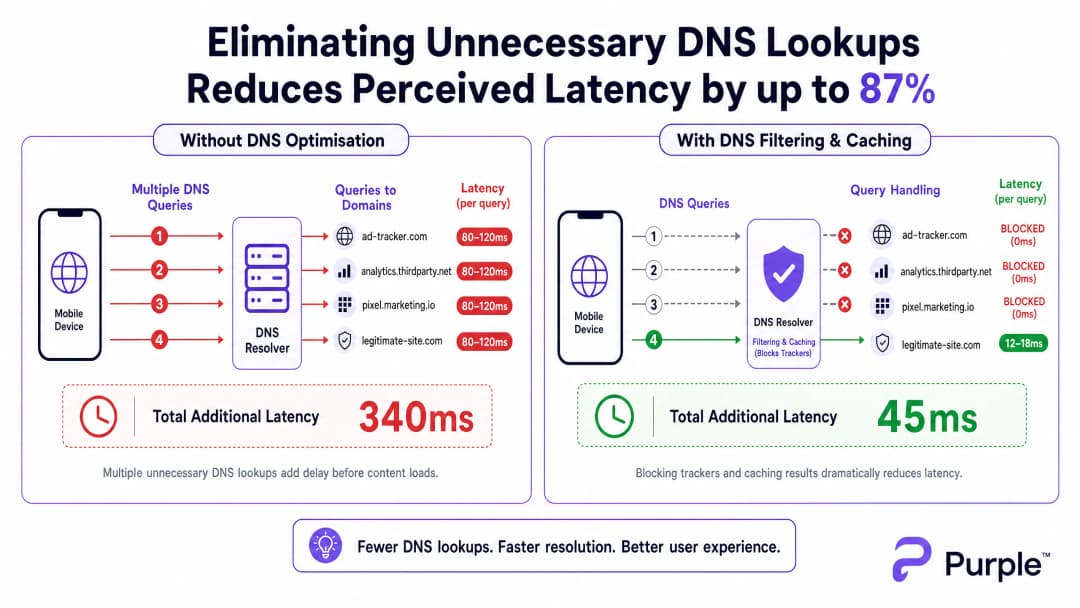
Ogni query DNS inviata a un resolver esterno (come il DNS predefinito di un ISP o il server 8.8.8.8 di Google) comporta un tempo di andata e ritorno di 80 - 150 ms su reti congestionate. Se una pagina richiede 15 ricerche di domini di tracciamento prima di renderizzare i contenuti, l'utente subisce oltre un secondo di ritardo "invisibile". Questo non è un problema di throughput; è un collo di bottiglia transazionale.
Architettura per la Risoluzione all'Edge
Per mitigare questo problema, l'architettura deve spostare la risoluzione ai margini della rete (edge). La distribuzione di un resolver DNS locale con una cache TTL aggressiva garantisce che i domini validi e richiesti frequentemente vengano risolti in meno di 5 ms.
 Fondamentalmente, questo resolver dovrebbe integrare una blocklist curata (ad esempio, la modalità enterprise di Pi-hole, Cisco Umbrella) per eliminare le query verso domini di tracciamento noti. Restituire
 NXDOMAIN libera immediatamente l'opportunità di trasmissione (TXOP) sul mezzo wireless, consentendo ai dati di payload reali di fluire più velocemente.
Hai domande sulla tua configurazione specifica?
Il nostro team collabora con gestori di sedi, responsabili IT e ingegneri di rete in 80.000 sedi. Prenota una chiamata di 20 minuti e ti mostreremo come altri professionisti come te hanno risolto il problema.
Guida all'implementazione
Passaggio 1: Audit dei valori di riferimento
Prima di modificare il percorso DNS, stabilisci un valore di riferimento. Strumentalizza il tuo resolver esistente o distribuisci tap passivi per acquisire i log delle query durante le finestre di picco di utilizzo. Identifica i 50 domini più cercati; in genere, il 30-50% sarà costituito da servizi di tracciamento o telemetria.
Passaggio 2: Distribuzione del resolver locale
Distribuisci un resolver on-premises o ospitato all'edge. Configura zone autorevoli per le risorse interne (split DNS) e applica una blocklist conservativa. Inizialmente evita elenchi troppo aggressivi per evitare di interrompere applicazioni legittime.
Passaggio 3: Gestione di DNS over HTTPS (DoH)
I sistemi operativi moderni aggirano sempre più spesso i resolver locali utilizzando DoH. Per mantenere il controllo, intercetta il traffico DoH sul firewall bloccando le connessioni TCP/UDP 443 in uscita verso i provider DoH noti e reindirizzale al tuo resolver DoH gestito. Per implicazioni più approfondite, consulta la nostra guida su DNS Over HTTPS (DoH): Implications for Public WiFi Filtering .
Best Practice
- Blocklisting iterativo: aggiorna le blocklist settimanalmente tramite feed automatizzati, ma mantieni un processo di whitelist a risposta rapida per i falsi positivi.
- Allineamento alla conformità: documenta il filtraggio DNS nei termini di servizio del tuo Captive Portal. Questo si allinea al GDPR riducendo attivamente la raccolta di dati di terze parti.
- Segmentazione VLAN: testa le nuove blocklist sulle VLAN di staging o su sottoinsiemi specifici di AP prima di distribuirle a livello di intera struttura.
Risoluzione dei problemi e mitigazione dei rischi
- Interruzione dell'applicazione: la modalità di errore più comune è il malfunzionamento di un'app legittima a causa del blocco di una dipendenza. Monitora i picchi di
NXDOMAIN; un aumento improvviso di solito indica un falso positivo. - Errori di bypass del DoH: se la latenza rimane elevata nonostante il filtraggio locale, controlla i log del firewall per verificare la presenza di DNS crittografati che aggirano le regole di intercettazione.
- Avvelenamento della cache: assicurati che il tuo resolver locale sia protetto da attacchi di avvelenamento della cache, in particolare nelle distribuzioni pubbliche per i settori Transport o Healthcare .
ROI e impatto aziendale
La riduzione della latenza tramite l'ottimizzazione DNS influisce direttamente sui profitti. Per un hotel, caricamenti più rapidi del Captive Portal e una navigazione reattiva si correlano direttamente a punteggi TripAdvisor più elevati. Per un ambiente retail, ciò garantisce un'integrazione fluida con strumenti come i servizi basati sulla posizione, come l'iniziativa Purple Appoints Iain Fox as VP Growth – Public Sector to Drive Digital Inclusion and Smart City Innovation o il lancio di Purple Launches Offline Maps Mode for Seamless, Secure Navigation to WiFi Hotspots .
Trattando il DNS come un livello infrastrutturale critico piuttosto che come un aspetto secondario, le location possono ottenere il massimo delle prestazioni dai loro investimenti esistenti in hardware RF.
Podcast Expert Briefing
Ascolta l'analisi del nostro consulente senior sulle dinamiche e sulle strategie di implementazione per l'ottimizzazione del DNS nelle location ad alta densità.
Definizioni chiave
DNS Query Storm
Un picco massiccio e simultaneo di richieste di risoluzione dei nomi di dominio, che si verifica tipicamente quando centinaia di dispositivi si connettono e caricano contemporaneamente pagine web ricche di tracciamenti.
Comune negli stadi e negli hotel durante i picchi di affluenza, causa una percezione di guasto alla rete anche quando la larghezza di banda è disponibile.
NXDOMAIN
Un codice di risposta DNS che indica che il nome di dominio richiesto non esiste.
Utilizzato strategicamente nel filtraggio DNS per terminare istantaneamente le richieste verso domini di tracciamento noti, risparmiando latenza e tempo di trasmissione radio.
DNS over HTTPS (DoH)
Un protocollo per eseguire la risoluzione remota del Domain Name System tramite il protocollo HTTPS, crittografando i dati tra il client DoH e il resolver DNS basato su DoH.
Sebbene sia positivo per la privacy dei consumatori, il DoH può aggirare i controlli e i filtri della rete aziendale, richiedendo specifiche strategie di intercettazione tramite firewall.
TTL Cache (Time to Live)
Un meccanismo in cui un resolver DNS locale memorizza l'indirizzo IP di un dominio risolto di recente per un periodo specificato, servendo istantaneamente le richieste successive senza interrogare il server autorevole.
Fondamentale per ridurre la latenza dei domini legittimi e ad alto traffico (es. google.com, netflix.com) all'interno di una struttura.
Airtime Overhead
La percentuale di capacità di trasmissione wireless consumata da frame di gestione, frame di controllo e protocolli transazionali (come il DNS) piuttosto che dai dati effettivi degli utenti.
La riduzione delle query DNS non necessarie riduce direttamente l'airtime overhead, migliorando l'efficienza dell'intero cluster di AP.
Split DNS
Un'implementazione in cui vengono fornite risposte DNS diverse a seconda dell'indirizzo IP di origine della richiesta, spesso utilizzata per risolvere i nomi host interni in modo diverso da quelli esterni.
Necessario quando una struttura ospita servizi locali (come un Captive Portal o un server multimediale locale) che non devono essere risolti tramite l'internet pubblico.
BSS Colouring
Una tecnica di riutilizzo spaziale in 802.11ax (WiFi 6) che assegna un "colore" (un numero) a ciascun Basic Service Set, consentendo agli AP sulla stessa frequenza di differenziare il proprio traffico da quello di reti sovrapposte.
Una funzionalità chiave di ottimizzazione RF che funziona al meglio quando la rete non è rallentata da sovraccarichi transazionali non necessari come query DNS eccessive.
Passive DNS Tap
Un metodo per monitorare il traffico DNS copiando i pacchetti da una porta dello switch (porta SPAN) senza interferire con il flusso effettivo del traffico.
Utilizzato durante la fase iniziale di audit per comprendere il volume delle query e identificare i principali domini di tracciamento prima di implementare il filtraggio.
Esempi pratici
Un hotel resort da 500 camere riscontra gravi reclami per "WiFi lento" durante la fascia oraria di check-in dalle 16:00 alle 18:00, nonostante l'aggiornamento agli access point WiFi 6 avvenuto l'anno scorso. L'utilizzo del backhaul è solo al 40%.
- Distribuire un resolver DNS con caching locale (es. Unbound) sulla VLAN ospiti. 2. Implementare una blocklist prudente per i domini di tracciamento. 3. Configurare il server DHCP per assegnare l'IP del resolver locale a tutti i client ospiti. 4. Implementare regole di firewall che blocchino la porta 53 in uscita per forzare tutto il traffico DNS attraverso il resolver locale.
Un grande centro congressi deve implementare il filtraggio DNS per migliorare la latenza, ma teme che gli smartphone moderni aggirino il resolver locale utilizzando DNS over HTTPS (DoH).
- Identificare gli intervalli IP dei principali provider DoH pubblici (Cloudflare, Google, Quad9). 2. Creare regole di firewall che blocchino la porta TCP 443 in uscita verso questi specifici intervalli IP. 3. Distribuire un resolver locale compatibile con DoH. 4. Utilizzare i criteri di rete (es. DHCP Option 6) per indirizzare i client verso il resolver DoH gestito.
Domande di esercitazione
Q1. Stai gestendo una rete WiFi in uno stadio. Durante l'intervallo, gli utenti segnalano tempi di caricamento lenti. Le metriche della dashboard mostrano che l'utilizzo della CPU dell'AP è basso e la larghezza di banda del backhaul è al 30% della capacità. Qual è la causa più probabile e quale l'immediata mitigazione?
Suggerimento: Considera il volume transazionale che si verifica quando 15.000 persone aprono i propri telefoni contemporaneamente.
Visualizza risposta modello
La causa più probabile è una tempesta di query DNS che sovraccarica il risolutore locale o il risolutore dell'ISP a monte. La mitigazione immediata consiste nel verificare il tasso di successo della cache del risolutore locale e assicurarsi che sia attiva una blocklist per i domini di tracciamento ad alto volume, restituendo istantaneamente NXDOMAIN per ridurre il carico delle query.
Q2. Una catena retail implementa il filtraggio DNS locale per bloccare i domini di tracciamento. Una settimana dopo, il team marketing si lamenta che la nuova app di analisi instore non si carica sul WiFi ospiti. Come risolvi il problema mantenendo i vantaggi in termini di latenza?
Suggerimento: Il filtraggio non è una configurazione da impostare e dimenticare.
Visualizza risposta modello
Esamina i log delle query DNS per i dispositivi specifici o gli intervalli di tempo in cui l'app ha riscontrato l'errore. Identifica il dominio bloccato da cui dipende l'app (un falso positivo). Aggiungi questo dominio specifico alla whitelist del risolutore, garantendo il funzionamento dell'app mentre gli altri domini di tracciamento rimangono bloccati.
Q3. Distribuisci un risolutore DNS locale con caching e filtraggio aggressivi in un edificio del settore pubblico. Tuttavia, le acquisizioni di pacchetti mostrano un volume significativo di traffico DNS che esce ancora dalla rete sulla porta 443. Cosa sta succedendo e come si applicano le policy locali?
Suggerimento: I browser moderni utilizzano protocolli crittografati per bypassare il DNS standard sulla porta 53.
Visualizza risposta modello
I dispositivi utilizzano il DNS over HTTPS (DoH) per bypassare il risolutore locale. Per applicare la policy, è necessario configurare il firewall per bloccare il traffico in uscita sulla porta TCP/UDP 443 destinato agli intervalli IP dei noti provider DoH pubblici (ad esempio, Cloudflare, Google), costringendo i dispositivi a ripiegare sul risolutore locale fornito dal DHCP.
Continua a leggere questa serie
Comprendere l'RSSI e la potenza del segnale per una pianificazione ottimale dei canali
Questa guida fornisce un approfondimento tecnico completo su RSSI, rapporto segnale-rumore (SNR) e principi di propagazione RF per una pianificazione ottimale dei canali. Fornisce ai responsabili IT, agli architetti di rete e ai direttori delle operazioni delle strutture strategie pratiche per mitigare l'interferenza co-canale e adiacente, ottimizzare il posizionamento degli AP e sfruttare la business intelligence per un impatto aziendale misurabile nei settori dell'ospitalità, del commercio al dettaglio e pubblico.
20MHz vs 40MHz vs 80MHz: quale larghezza di canale utilizzare?
Questa guida fornisce un riferimento tecnico definitivo e neutrale rispetto ai fornitori per IT manager, network architect e direttori operativi di sedi su come selezionare la corretta larghezza di canale WiFi - 20MHz, 40MHz o 80MHz - in tutte le distribuzioni aziendali nei settori alberghiero, retail, eventi e settore pubblico. Copre i meccanismi IEEE 802.11 sottostanti, i compromessi sulla capacità nel mondo reale e una guida dettagliata alla distribuzione per aiutare i team a fare la scelta giusta in questo trimestre. Comprendere la selezione della larghezza di canale è una delle decisioni a più alto impatto in qualsiasi progettazione di reti LAN wireless, influenzando direttamente il throughput, l'interferenza, il supporto per la densità dei client e l'affidabilità dei servizi rivolti agli ospiti.
WiFi 6 vs WiFi 5: Risolve l'Interferenza di Canale?
Questa guida fornisce un approfondimento tecnico su come il WiFi 6 (802.11ax) affronti l'interferenza di canale in ambienti aziendali ad alta densità attraverso l'OFDMA e il BSS Coloring. Offre a IT manager, architetti di rete e CTO strategie di implementazione pratiche, casi di studio reali nei settori hospitality e healthcare, e un framework per valutare il ROI degli aggiornamenti infrastrutturali in ambienti in cui le prestazioni wireless sono critiche per il business.
Hai domande sulla tua configurazione specifica?
Il nostro team collabora con gestori di sedi, responsabili IT e ingegneri di rete in 80.000 sedi. Prenota una chiamata di 20 minuti e ti mostreremo come altri professionisti come te hanno risolto il problema.