
Ridurre al minimo le distrazioni degli studenti con il blocco degli annunci a livello di rete
Questa guida di riferimento tecnico autorevole descrive in dettaglio l'architettura, l'implementazione e l'impatto aziendale del blocco degli annunci a livello di rete negli ambienti educativi. Fornisce ai responsabili IT e agli architetti di rete strategie pratiche per recuperare larghezza di banda, rafforzare la conformità ed eliminare i rischi di malvertising.
Ascolta questa guida
Visualizza trascrizione del podcast
Parte della nostra serie principale: Enterprise WiFi Security Guide →
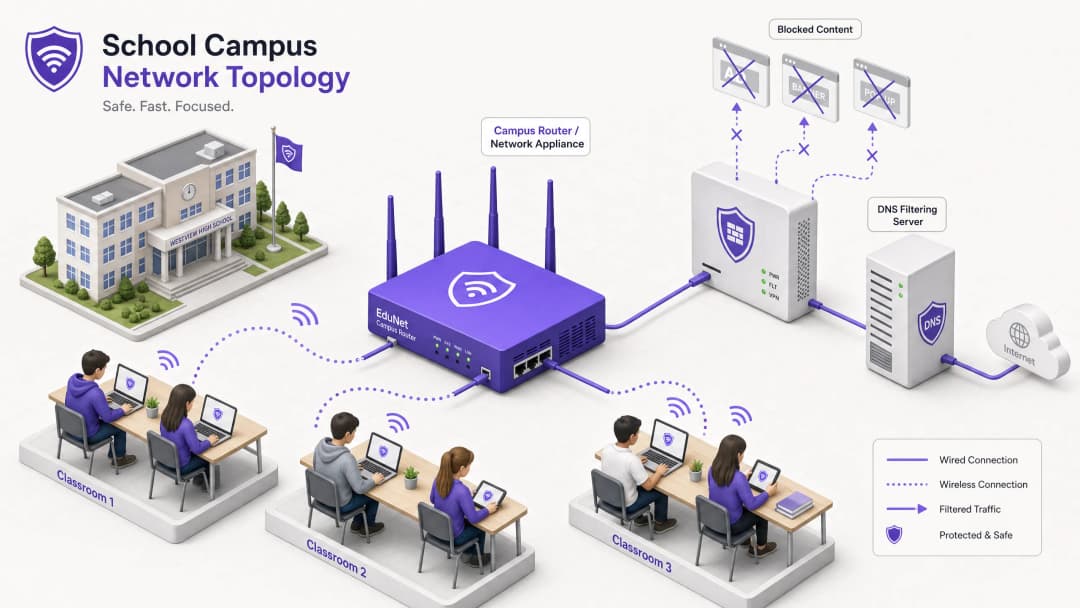
Executive Summary
Per i direttori IT e gli architetti di rete che gestiscono ambienti educativi, la proliferazione dei dispositivi ha creato una grave crisi in termini di consumo di banda, rischi per la sicurezza e lacune di conformità. Con gli studenti che portano in media 2,5 dispositivi a testa nel campus, la gestione del filtraggio basato su endpoint non è più una strategia operativa sostenibile.
L'ad blocking a livello di rete rappresenta un cambiamento fondamentale, passando dalla gestione degli endpoint al controllo a livello di infrastruttura. Intercettando il traffico a livello di DNS o proxy prima che raggiunga il dispositivo client, i team IT possono eliminare unilateralmente fino al 30% del consumo di banda non didattica, mitigare i rischi di malvertising e garantire la conformità con i framework di protezione dei dati come GDPR e COPPA.
Questa guida tecnica di riferimento illustra l'architettura, la metodologia di implementazione e la misurazione del ROI per l'integrazione del blocco degli annunci a livello di rete nei campus scolastici e universitari, sulla base di implementazioni reali in ambienti ad alta densità.
Ascolta il nostro podcast di approfondimento per una panoramica strategica:
Approfondimento Tecnico
L'implementazione dell'ad blocking a livello di rete richiede un approccio architetturale a più livelli per gestire la diversità del traffico web moderno, in particolare l'onnipresenza del protocollo HTTPS e dei nuovi protocolli DNS crittografati.
Architettura di Filtraggio a Livello DNS
Il livello fondamentale del blocco degli annunci di rete è il filtraggio DNS. Quando un dispositivo client tenta di risolvere domini associati a reti pubblicitarie, telemetria o tracciamento, il risolutore DNS della rete intercetta la query e la confronta con blocklist dinamiche.

Questo approccio è estremamente efficiente perché impedisce che la connessione venga stabilita a monte. Il payload dell'annuncio non viene mai scaricato e gli script di tracciamento non vengono mai eseguiti. Tuttavia, le implementazioni moderne devono tenere conto di DNS-over-HTTPS (DoH) e DNS-over-TLS (DoT). Se i dispositivi client aggirano i risolutori locali utilizzando un DNS crittografato, il livello di filtraggio viene superato. Gli architetti di rete devono configurare i firewall perimetrali per bloccare gli endpoint DoH/DoT noti (come 8.8.8.8 sulla porta 443) per forzare un fallback al DNS standard (porta 53), oppure implementare una soluzione gateway che ispezioni nativamente il traffico DoH.
Ispezione Proxy e SSL
Mentre il filtraggio DNS gestisce la maggior parte del traffico pubblicitario, il proxy HTTP/HTTPS trasparente fornisce un controllo granulare su URL specifici piuttosto che su interi domini. Poiché la maggior parte del traffico web è crittografato, la distribuzione dell'ispezione SSL (decrittografia Man-in-the-Middle) è necessaria per l'ispezione profonda dei pacchetti.
Ciò richiede l'installazione di un certificato radice attendibile su tutti i dispositivi gestiti. Pur essendo una pratica standard nei contesti aziendali, l'ispezione SSL negli ambienti educativi richiede una definizione accurata dell'ambito per evitare di decrittografare il traffico sensibile (ad esempio, portali bancari o sanitari) e deve allinearsi con la politica di utilizzo accettabile dell'organizzazione.
Integrazione con il controllo dell'accesso alla rete (NAC)
Un filtraggio efficace richiede politiche basate sull'identità. L'integrazione con IEEE 802.1X consente alla rete di applicare politiche di filtraggio differenziate in base all'utente autenticato o al profilo del dispositivo. Uno studente che accede alla rete tramite WPA3-Enterprise riceve una politica restrittiva, mentre un membro del personale riceve una politica diversa e un visitatore sulla rete Guest WiFi riceve una politica di conformità di base.
Hai domande sulla tua configurazione specifica?
Il nostro team collabora con gestori di sedi, responsabili IT e ingegneri di rete in 80.000 sedi. Prenota una chiamata di 20 minuti e ti mostreremo come altri professionisti come te hanno risolto il problema.
Guida all'implementazione
La distribuzione del blocco degli annunci a livello di rete richiede un approccio graduale per evitare di interrompere le legittime attività didattiche.
Passaggio 1: Controllo del traffico e definizione del baseline
Prima di applicare qualsiasi regola di blocco, distribuisci la soluzione di filtraggio in modalità di monitoraggio passivo (solo registrazione) per 14 - 21 giorni. In questo modo si stabilisce un baseline del volume e della categorizzazione delle query DNS correnti. Utilizza questi dati per identificare le principali reti pubblicitarie e i domini di tracciamento che attualmente consumano larghezza di banda. Questo baseline è fondamentale per i successivi calcoli del ROI e per i report di WiFi Analytics.
Passaggio 2: Distribuzione pilota
Seleziona un segmento di rete rappresentativo - come una singola VLAN per studenti o un edificio specifico - per la fase pilota. Applica le politiche iniziali di blocco destinate alle reti pubblicitarie e ai tracker noti.
Passaggio critico: stabilisci un processo di richiesta di whitelist a risposta rapida. Gli insegnanti si imbatteranno inevitabilmente in falsi positivi in cui contenuti educativi legittimi sono ospitati su domini classificati come pubblicità o tracciamento. L'helpdesk IT deve essere pronto a valutare e inserire rapidamente i domini nella whitelist per mantenere la fiducia degli utenti.
Passaggio 3: Distribuzione completa e ottimizzazione delle politiche
Estendi la distribuzione a tutti i segmenti di rete pertinenti, applicando politiche differenziate attraverso l'integrazione 802.1X. Monitora costantemente i log per le prime 48 ore per identificare eventuali problemi sistemici.
Assicurati che la distribuzione sia allineata con le politiche di sicurezza più ampie, come il mantenimento di un Explain what is audit trail for IT Security in 2026 per dimostrare la conformità ai requisiti di sicurezza.
Best Practice
- Difesa stratificata: Non affidarti esclusivamente al filtraggio DNS. Combinalo con la gestione degli endpoint per i dispositivi di proprietà della scuola e con solide regole firewall per bloccare i tentativi di bypass (ad esempio, protocolli VPN, DoH).2. Sicurezza standardizzata: Assicurati che tutte le nuove implementazioni wireless utilizzino WPA3 per proteggersi dal furto di credenziali, che è un vettore comune per gli studenti che tentano di accedere alle reti del personale per aggirare il filtraggio.
- Allineamento della conformità: Nel Regno Unito, assicurati che le tue policy di filtraggio soddisfino i requisiti di base descritti in IWF Compliance for Public WiFi Networks in the UK (o Cumplimiento IWF para redes WiFi públicas en el Reino Unido per le operazioni in lingua spagnola).
- Revisioni regolari: Le reti pubblicitarie cambiano costantemente domini per eludere le blacklist. Assicurati che la tua soluzione di filtraggio utilizzi feed di intelligence sulle minacce aggiornati dinamicamente anziché elenchi statici.
Risoluzione dei problemi e mitigazione dei rischi
| Modalità di guasto | Causa principale | Strategia di mitigazione |
|---|---|---|
| Aggiramento tramite DNS crittografato | Gli studenti configurano i browser per utilizzare DoH/DoT (es. Cloudflare, Google DNS). | Blocca gli indirizzi IP dei provider DoH noti sul firewall; imponi la risoluzione DNS locale tramite DHCP. |
| Aggiramento tramite VPN | Utilizzo di client VPN commerciali o estensioni del browser. | Blocca i protocolli VPN comuni (IPsec, OpenVPN, WireGuard) e i domini di provider VPN noti sulla VLAN degli studenti. |
| Blocco eccessivo (Falsi positivi) | Un filtraggio euristico aggressivo sta bloccando i contenuti educativi. | Implementa un processo di richiesta di whitelist semplificato e supportato da SLA per il personale docente; sperimenta accuratamente le policy prima della distribuzione completa. |
| Perdita IPv6 | Il filtraggio viene applicato solo a IPv4, consentendo l'aggiramento tramite la risoluzione DNS IPv6. | Assicurati che la soluzione di filtraggio e l'infrastruttura di rete supportino e implementino pienamente le policy su tutto lo stack IPv6. |
ROI e impatto aziendale
Il caso aziendale per il blocco degli annunci a livello di rete va oltre la sicurezza; offre un'efficienza operativa misurabile.
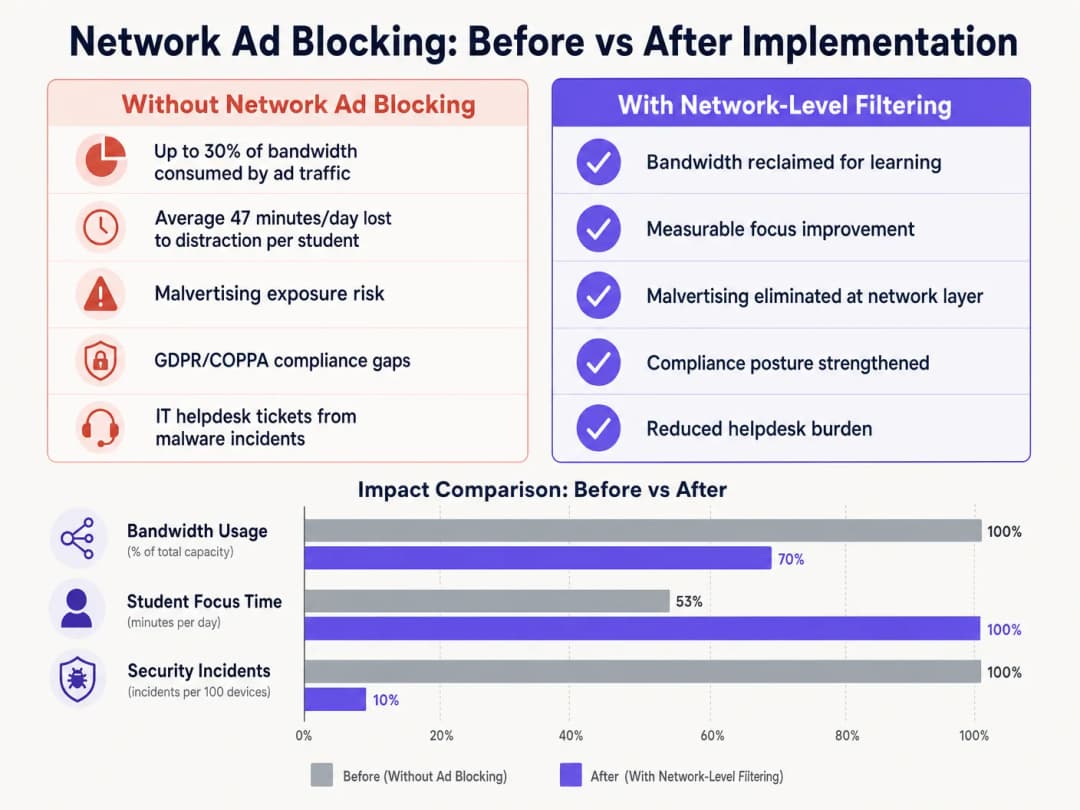
Eliminando i payload pubblicitari e gli script di tracciamento all'edge della rete, le strutture in genere recuperano dal 15% al 30% della loro larghezza di banda totale. Questa capacità recuperata differisce la necessità di costosi aggiornamenti dei circuiti e migliora le prestazioni delle applicazioni cloud critiche. Inoltre, il blocco dei domini di malvertising a livello DNS riduce significativamente il volume degli incidenti malware, riducendo direttamente il volume dei ticket dell'helpdesk IT e i costi di ripristino. Sia che si tratti di implementazioni nelle scuole, di ottimizzare la rete Office Wi Fi: Optimise Your Modern Office Wi-Fi Network o di gestire ambienti ad alta densità nei settori Retail, Healthcare, Hospitality o Transport, la comprensione del livello fisico - come illustrato in Wi Fi Frequencies: A Guide to Wi-Fi Frequencies in 2026 - e la protezione del livello logico tramite il filtraggio DNS sono componenti essenziali della moderna architettura di rete.
Definizioni chiave
Filtraggio DNS
Il processo che consiste nell'utilizzare il Domain Name System per bloccare i siti web dannosi e filtrare i contenuti nocivi o indesiderati restituendo un indirizzo IP nullo per i domini bloccati.
Il meccanismo principale per il blocco degli annunci a livello di rete, che opera a monte dei dispositivi client.
DNS-over-HTTPS (DoH)
Un protocollo per eseguire la risoluzione del Domain Name System da remoto tramite il protocollo HTTPS, crittografando i dati tra il client DoH e il risolutore DNS basato su DoH.
Un metodo comune utilizzato per aggirare le policy locali di filtraggio DNS della rete.
Malvertising
L'uso della pubblicità online per diffondere malware, spesso attraverso reti pubblicitarie legittime all'insaputa dell'editore.
Un rischio di sicurezza fondamentale mitigato dal blocco degli annunci a livello di rete.
Ispezione SSL
Il processo di intercettazione, decrittografia e ispezione del traffico HTTPS alla ricerca di contenuti dannosi o violazioni delle policy prima di crittografarlo nuovamente e inoltrarlo.
Richiesta per l'ispezione profonda dei pacchetti del traffico web crittografato, sebbene complessa da distribuire in ambienti BYOD.
IEEE 802.1X
Uno standard IEEE per il controllo dell'accesso alla rete basato su porta (PNAC), che fornisce un meccanismo di autenticazione ai dispositivi che desiderano connettersi a una LAN o a una rete WiFi.
Utilizzato per identificare utenti e dispositivi al fine di applicare policy di filtraggio differenziate.
WPA3-Enterprise
L'ultima generazione di sicurezza WiFi, che fornisce una maggiore forza crittografica e protegge dagli attacchi a dizionario.
Essenziale per proteggere le reti dei campus e garantire che gli utenti non possano facilmente camuffare le proprie identità per aggirare il filtraggio.
VLAN (Virtual Local Area Network)
Una sottorete logica che raggruppa una collezione di dispositivi provenienti da diverse LAN fisiche.
Utilizzata per segmentare il traffico di studenti, personale e ospiti per applicare diverse policy di sicurezza e filtraggio.
Transparent Proxy
Un sistema intermediario che si interpone tra un utente e un fornitore di contenuti, intercettando le richieste senza richiedere la configurazione lato client.
Utilizzato per applicare policy di filtraggio a livello di URL senza implementare agenti endpoint.
Esempi pratici
Un grande gruppo di accademie con 15.000 studenti in 12 campus deve implementare il blocco degli annunci. Attualmente utilizzano un mix di Chromebook forniti dalla scuola e una politica BYOD per gli studenti dell'ultimo biennio. La rete risente di una congestione della larghezza di banda durante le ore di punta.
- Distribuire una soluzione di filtraggio DNS gestita in cloud in tutti i 12 campus, indirizzando tutte le impostazioni DNS assegnate tramite DHCP ai risolutori cloud.
- Configurare il firewall per bloccare il traffico in uscita sulla porta 53 verso qualsiasi IP esterno diverso dai risolutori cloud approvati per impedire l'override manuale del DNS.
- Bloccare gli IP noti dei provider DoH a livello di firewall.
- Integrare la soluzione di filtraggio DNS con Active Directory del gruppo tramite 802.1X per applicare diverse policy di filtraggio: una policy restrittiva per la VLAN dei Chromebook e una leggermente più permissiva per la VLAN BYOD, mantenendo al contempo il blocco principale di annunci e malvertising su entrambe.
Il team IT di un campus universitario riceve lamentele dal dipartimento di Informatica in quanto la nuova soluzione di blocco degli annunci di rete impedisce l'accesso a strumenti di sviluppo legittimi e API utilizzati nei corsi di studio.
- Esaminare i log delle query DNS per la VLAN di Informatica per identificare i domini specifici bloccati.
- Creare un gruppo di policy dedicato per le VLAN dei docenti e degli studenti di Informatica.
- Implementare una whitelist mirata per i domini di sviluppo richiesti, applicandola solo al gruppo di policy di Informatica per mantenere la sicurezza nel resto del campus.
- Stabilire una categoria di ticket IT prioritaria specificamente per il "Blocco dei contenuti didattici" per gestire le richieste future con uno SLA di 2 ore.
Domande di esercitazione
Q1. Hai distribuito il filtraggio DNS su tutta la rete del campus, ma il monitoraggio mostra che un numero significativo di dispositivi BYOD degli studenti sta ancora caricando annunci e accedendo a contenuti limitati. Qual è la causa più probabile e come dovresti risolverla?
Suggerimento: Considera come i browser moderni gestiscono le query DNS indipendentemente dalle impostazioni di rete del sistema operativo.
Visualizza risposta modello
La causa più probabile è che i browser moderni sui dispositivi BYOD utilizzino il DNS-over-HTTPS (DoH) per aggirare il risolutore DNS della rete locale. Per risolvere il problema, configura il firewall perimetrale per bloccare gli indirizzi IP dei provider DoH noti e scartare il traffico in uscita sulla porta 53 che non proviene dai risolutori DNS approvati del campus. Questo costringe i dispositivi a ripiegare sull'infrastruttura DNS locale filtrata.
Q2. Il team di direzione della scuola vuole bloccare globalmente tutti i social media e le reti pubblicitarie su tutto il campus per garantire la massima conformità. In qualità di Direttore IT, perché potresti sconsigliare una singola policy globale e quale architettura proporresti invece?
Suggerimento: Considera i diversi gruppi di utenti del campus e le loro esigenze specifiche.
Visualizza risposta modello
Una singola policy globale causerà inevitabilmente attriti operativi. Il personale potrebbe avere bisogno di accedere ai social media per comunicazioni o marketing, e alcune reti pubblicitarie potrebbero essere necessarie per strumenti didattici legittimi. Proponi invece un'architettura segmentata che utilizzi l'integrazione 802.1X per applicare policy sensibili all'identità. Crea VLAN e gruppi di policy distinti per Studenti, Personale e Ospiti, applicando un blocco rigoroso agli studenti e consentendo l'accesso necessario al personale.
Q3. Prima di passare la nuova soluzione di filtraggio DNS in modalità di applicazione attiva, quale processo operativo critico deve essere stabilito con l'helpdesk IT?
Suggerimento: Pensa all'impatto dei falsi positivi sul personale docente.
Visualizza risposta modello
È necessario stabilire un processo di richiesta di whitelist a risposta rapida. Il filtraggio euristico bloccherà inevitabilmente alcune risorse didattiche legittime (falsi positivi). Senza un processo rapido e supportato da SLA che consenta ai docenti di richiedere lo sblocco dei domini, l'implementazione interromperà l'apprendimento e causerà la resistenza degli stakeholder.
Continua a leggere questa serie
Come revocare l'accesso WiFi quando un dipendente lascia l'azienda
Questa guida mostra ai team IT e di gestione delle sedi come rimuovere l'accesso WiFi del personale quando un dipendente lascia l'azienda, senza interrompere il lavoro degli altri collaboratori. Confronta la tecnologia 802.1X basata su certificati, l'iPSK specifico per l'identità e il deprovisioning guidato da SCIM, fornendo poi un runbook per il giorno stesso, un metodo di test e un modello di tracciabilità dei controlli.
Pianificazione di una distribuzione WiFi 7 in un ambiente clinico: dispositivi IoMT, interferenze e HIPAA
Questa guida completa esplora la pianificazione di una distribuzione WiFi 7 in un ambiente clinico, concentrandosi sulla strategia per la banda a 6 GHz, sulla compatibilità con i dispositivi IoMT legacy, sugli obblighi di interferenza RF secondo la norma IEC 60601-1-2 e sulla segmentazione della rete in linea con HIPAA. Fornisce consigli architetturali pratici per i leader IT del settore sanitario per proteggere flotte di dispositivi misti utilizzando la piattaforma cloud RADIUS di Purple.
Come segmentare in sicurezza le reti WiFi del personale e degli ospiti: Best Practice per LAN aziendali
Questa guida fornisce ai responsabili IT e agli architetti di rete un progetto tecnico, indipendente dai vendor, per proteggere le LAN aziendali segmentando correttamente il traffico WiFi del personale e degli ospiti. Copre l'autenticazione 802.1X, il cloud RADIUS, l'isolamento VLAN e la gestione del ciclo di vita delle credenziali necessaria per eliminare le password condivise e proteggere le risorse aziendali.
Hai domande sulla tua configurazione specifica?
Il nostro team collabora con gestori di sedi, responsabili IT e ingegneri di rete in 80.000 sedi. Prenota una chiamata di 20 minuti e ti mostreremo come altri professionisti come te hanno risolto il problema.