
Wi-Fi 6 vs Wi-Fi 5: Risolve l'interferenza di canale?
Questa guida offre un'analisi tecnica approfondita su come il Wi-Fi 6 (802.11ax) affronta l'interferenza di canale negli ambienti aziendali ad alta densità tramite OFDMA e BSS Coloring. Fornisce a IT manager, architetti di rete e CTO strategie di implementazione attuabili, casi di studio reali dal settore dell'ospitalità e della sanità, e un framework per valutare il ROI degli aggiornamenti infrastrutturali in luoghi dove le prestazioni wireless sono critiche per il business.
Ascolta questa guida
Visualizza trascrizione del podcast
Sintesi Esecutiva
Per i direttori IT e gli architetti di rete che gestiscono ambienti ad alta densità — sia nel settore dell'ospitalità, della vendita al dettaglio o in grandi luoghi pubblici — l'interferenza co-canale rimane il principale collo di bottiglia per le prestazioni wireless. L'approccio tradizionale per mitigare l'interferenza riducendo la potenza di trasmissione o disabilitando le radio a 2.4 GHz su punti di accesso alternati ha raggiunto il suo limite logico.
La transizione dal Wi-Fi 5 (802.11ac) al Wi-Fi 6 (802.11ax) rappresenta un cambiamento architettonico fondamentale. Piuttosto che aumentare semplicemente la velocità di trasmissione teorica, il Wi-Fi 6 è stato progettato specificamente per affrontare la capacità e l'efficienza nello spazio aereo congestionato. Attraverso l'introduzione dell'Orthogonal Frequency-Division Multiple Access (OFDMA) e del Basic Service Set (BSS) Coloring, il Wi-Fi 6 fornisce meccanismi deterministici per gestire l'interferenza piuttosto che limitarsi a reagire ad essa.
Questa guida esplora le realtà tecniche della mitigazione dell'interferenza del Wi-Fi 6, fornendo strategie di implementazione attuabili per i team IT aziendali. Esaminiamo come questi standard operano in ambienti con client misti e come l'integrazione di piattaforme di intelligence come l'analisi Guest WiFi possa convalidare il ROI del vostro aggiornamento infrastrutturale.
Analisi Tecnica Approfondita: Come il Wi-Fi 6 Cambia le Regole
Per capire come il Wi-Fi 6 affronta l'interferenza, dobbiamo prima esaminare i limiti del suo predecessore.
Il Problema di Contesa del Wi-Fi 5
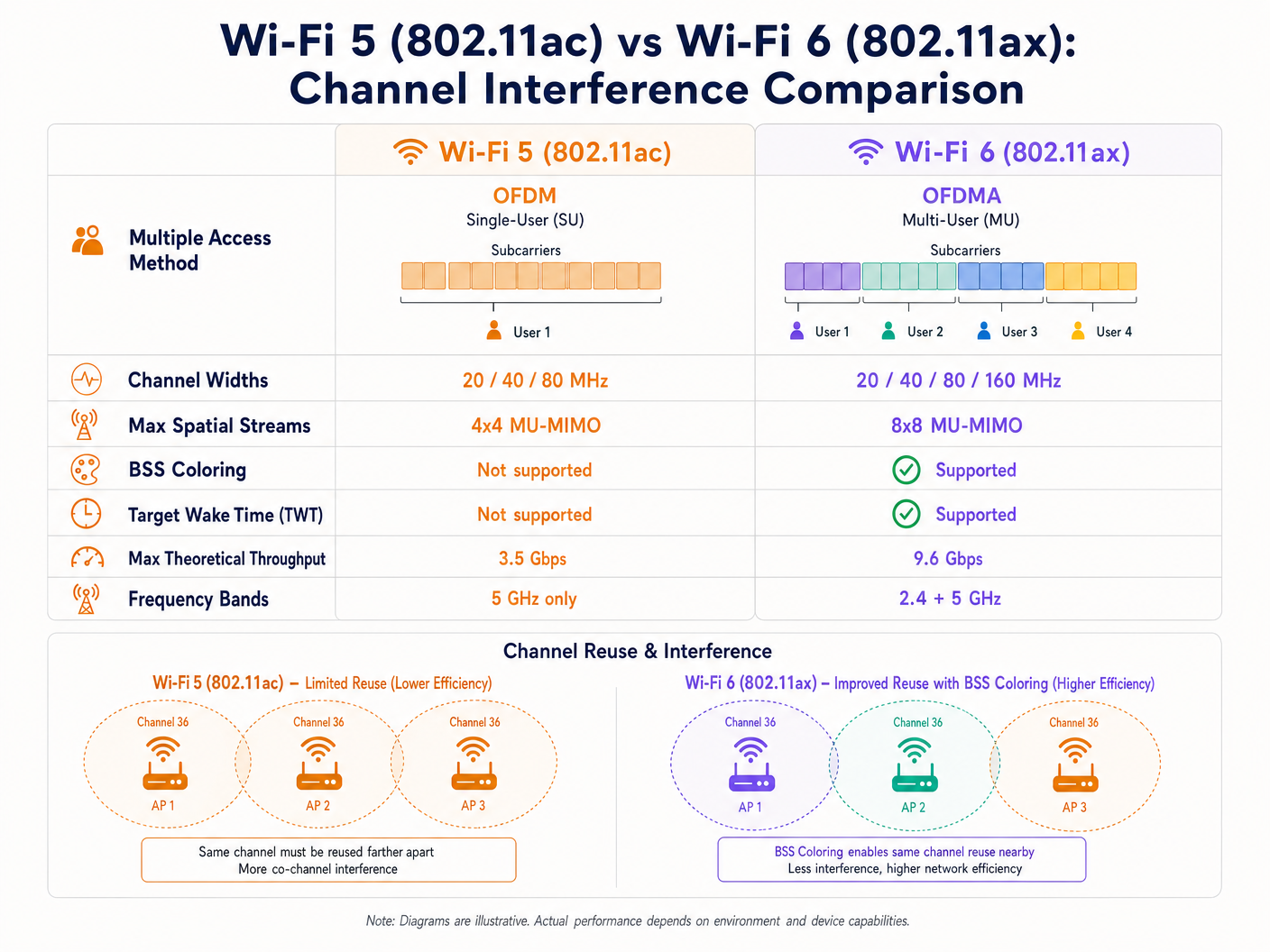
Il Wi-Fi 5 si basa sull'Orthogonal Frequency-Division Multiplexing (OFDM). In questo modello a utente singolo, un Access Point (AP) deve allocare l'intera larghezza di banda del canale — sia essa 20, 40 o 80 MHz — a un singolo client per una data trasmissione, indipendentemente dalla dimensione del payload. Questo è altamente inefficiente per pacchetti di dati piccoli, come quelli generati da dispositivi IoT o telemetria in tempo reale.
Inoltre, il Wi-Fi 5 utilizza un rigoroso meccanismo Carrier Sense Multiple Access with Collision Avoidance (CSMA/CA). Se un AP o un client rileva energia RF sul suo canale al di sopra di una soglia specifica (tipicamente -82 dBm), posticipa la trasmissione. In distribuzioni dense, le aree di copertura sovrapposte si traducono in una significativa interferenza co-canale (CCI), dove i dispositivi trascorrono più tempo ad aspettare che a trasmettere. Questo è il problema centrale che il Wi-Fi 6 è stato progettato per risolvere.
OFDMA: Allocazione Granulare dello Spettro
Il Wi-Fi 6 introduce l'OFDMA, che divide il canale in sottoportanti più piccole e discrete chiamate Resource Units (RU). Invece di dedicare un intero canale da 20 MHz a un singolo dispositivo, un AP può suddividere quel canale in un massimo di nove RU distinte, trasmettendo o ricevendo da più client contemporaneamente. Questo riduce drasticamente il sovraccarico di contesa e la latenza. Sebbene l'OFDMA non elimini l'interferenza esterna, rende la rete notevolmente più efficiente, riducendo il tempo complessivo in cui il mezzo è occupato e quindi la probabilità di collisione.
BSS Coloring: Riutilizzo Spaziale in Azione
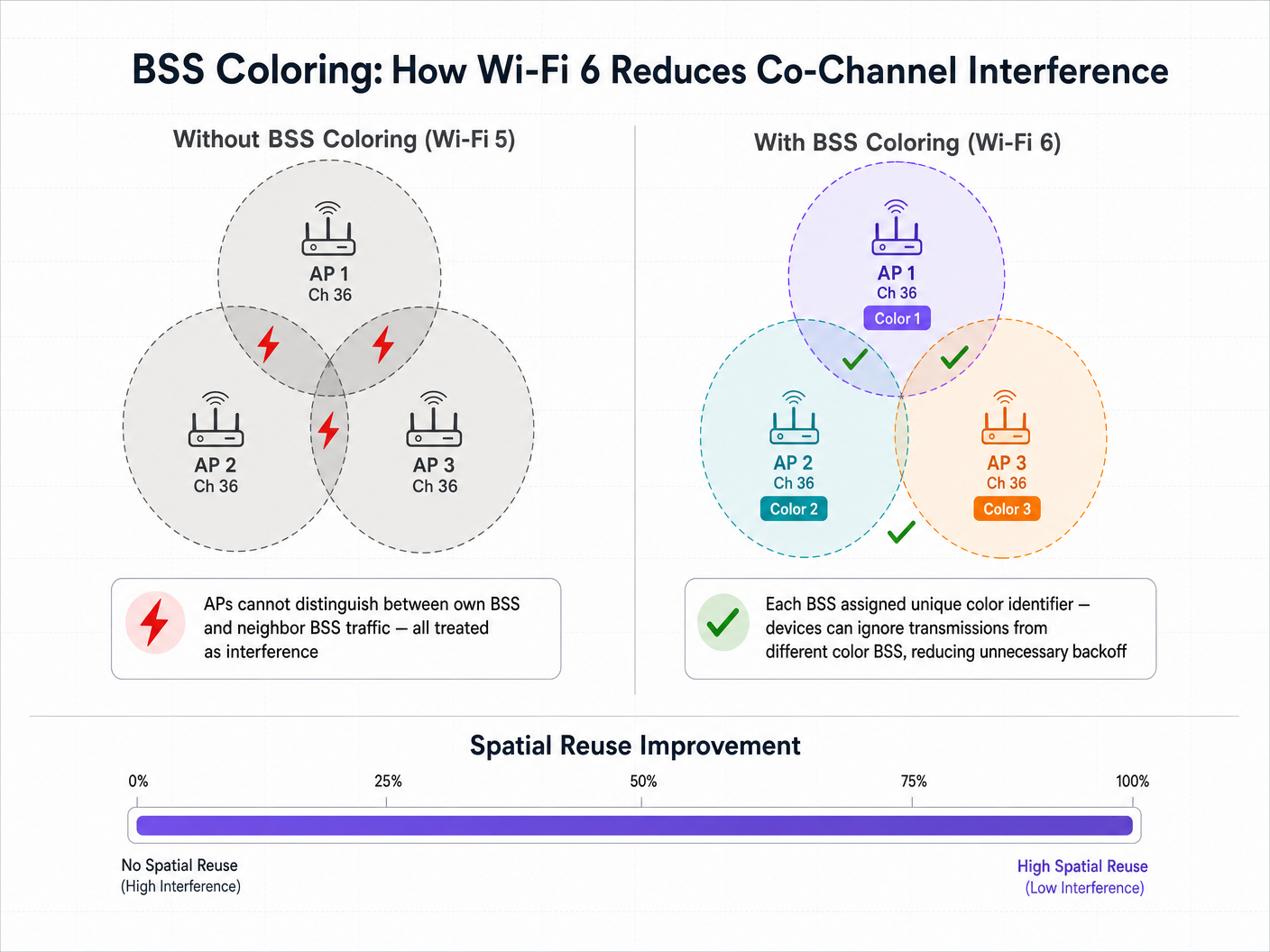
La funzionalità che mira più direttamente all'interferenza co-canale è il BSS Coloring, formalmente noto come Riutilizzo Spaziale. In una distribuzione densa, più AP spesso operano sullo stesso canale a causa della limitata disponibilità di spettro. Nel Wi-Fi 5, un dispositivo client non può distinguere tra il traffico destinato al proprio AP (il suo Basic Service Set) e il traffico proveniente da un AP vicino sullo stesso canale. Tratta tutto il traffico come interferenza e posticipa la trasmissione, indipendentemente da quanto sia debole il segnale interferente.
Il Wi-Fi 6 aggiunge un identificatore a 6 bit — il "colore" — all'intestazione del livello fisico (PHY). I dispositivi possono ora differenziare tra traffico intra-BSS (stesso colore) e traffico inter-BSS (colore diverso). Se un dispositivo rileva una trasmissione con un colore diverso, applica una soglia adattiva di Clear Channel Assessment (CCA). Se il segnale interferente è relativamente debole, il dispositivo può ignorarlo e trasmettere simultaneamente, aumentando significativamente la capacità complessiva della rete attraverso il riutilizzo spaziale.
Guida all'Implementazione: Distribuzione per Alta Densità
La distribuzione del Wi-Fi 6 richiede un cambiamento strategico dalla progettazione incentrata sulla copertura all'architettura incentrata sulla capacità. Le seguenti raccomandazioni si applicano agli ambienti Hospitality , Retail e del settore pubblico.
1. Strategia di Larghezza del Canale
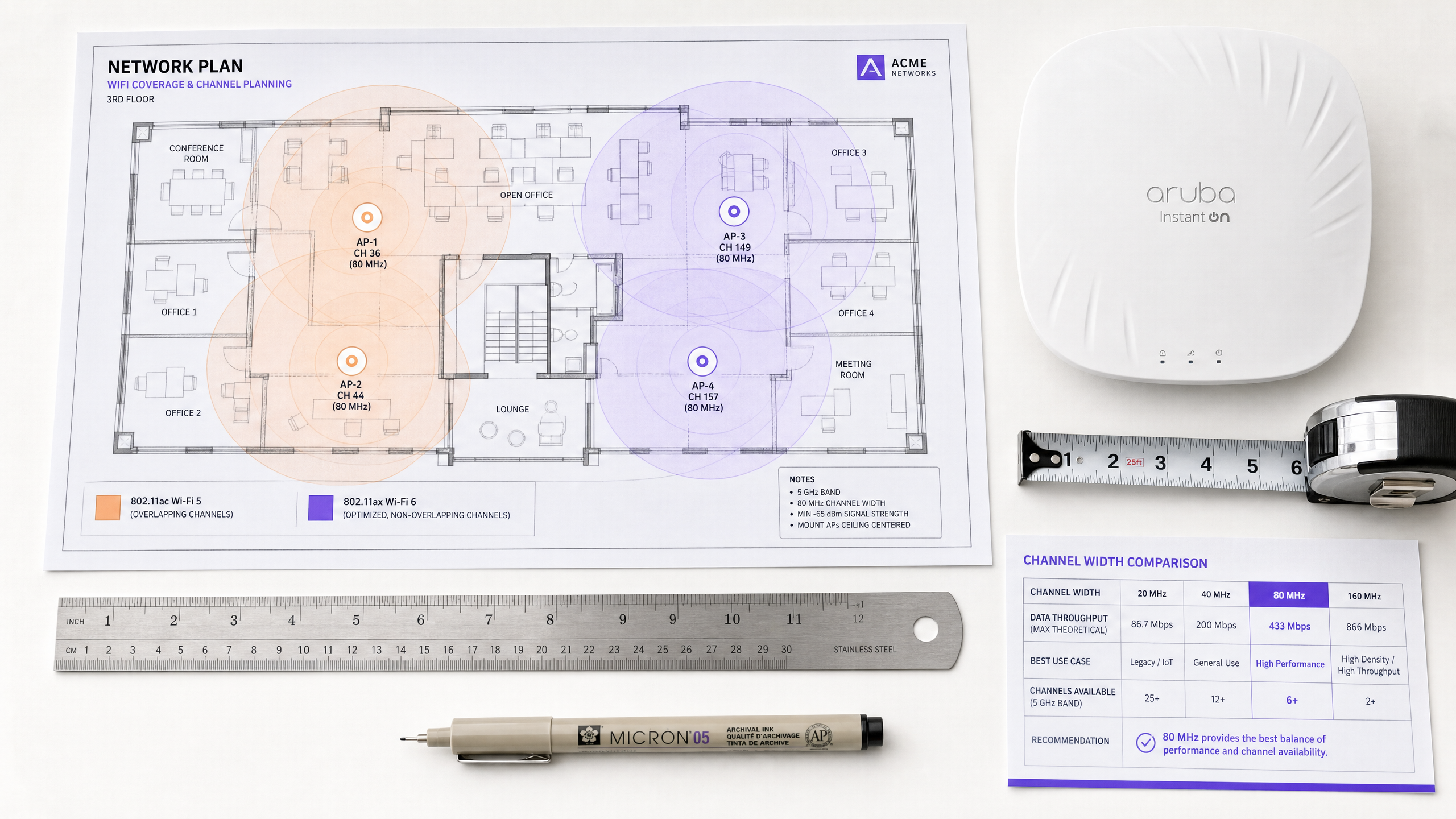
Sebbene il Wi-Fi 6 supporti canali da 160 MHz, la loro implementazione in ambienti aziendali è raramente consigliabile. Canali più ampi significano meno canali non sovrapposti disponibili, aumentando drasticamente l'interferenza co-canale.
Raccomandazione: Standardizzare su canali da 20 MHz o 40 MHz nella banda a 5 GHz per ambienti ad alta densità come stadi e centri congressi. Affidarsi all'OFDMA e a schemi di modulazione più elevati (1024-QAM) per fornire la velocità di trasmissione, piuttosto che forzarla con canali ampi.
Quando pianificate il vostro spettro, tenete presente DFS Channels: What They Are and When to Avoid Them . Sebbene il Wi-Fi 6 sia più efficiente, gli eventi di rilevamento radar forzeranno comunque i cambi di canale, interrompendo la connettività del client. Per i team di lingua italiana, la stessa guida è disponibile come Canali DFS: Cosa sono e quando evitarli .
2. Gestire la realtà dei client misti
La principale avvertenza delle funzionalità Wi-Fi 6 come OFDMA e BSS Coloring è che richiedono il supporto del client. In ambienti aperti al pubblico come Retail o Hospitality , non si controllano i dispositivi client. Quando si connettono dispositivi Wi-Fi 5 o Wi-Fi 4 legacy, la rete deve ripiegare su OFDM standard e meccanismi di contesa legacy per quelle specifiche trasmissioni. I benefici di mitigazione delle interferenze del Wi-Fi 6 scalano quindi proporzionalmente con la penetrazione dei client Wi-Fi 6 nel vostro ambiente.
3. Integrare l'intelligenza di rete
Per giustificare la spesa in conto capitale di un aggiornamento Wi-Fi 6, i responsabili IT necessitano di visibilità sull'utilizzo della rete e sulle capacità dei client. È qui che una piattaforma WiFi Analytics diventa essenziale. Integrando l'overlay di analisi di Purple, gli architetti di rete possono monitorare il tasso di adozione dei dispositivi compatibili con Wi-Fi 6 che entrano nelle loro sedi, correlare le metriche di performance della rete con i dati di affluenza e tempo di permanenza, e identificare zone specifiche dove i dispositivi legacy stanno causando una contesa sproporzionata.
Best Practice e Integrazione della Sicurezza
Onboarding senza interruzioni su larga scala
Man mano che si aggiorna l'infrastruttura per gestire una maggiore capacità, l'esperienza di onboarding deve scalare di conseguenza. Wi-Fi 6 impone il supporto per WPA3, fornendo una crittografia più forte. Per il Guest WiFi pubblico, l'industria si sta muovendo verso un'autenticazione sicura e senza interruzioni. Purple agisce come fornitore di identità gratuito per servizi come OpenRoaming sotto la licenza Connect, consentendo agli utenti di connettersi automaticamente e in sicurezza senza Captive Portal, sfruttando l'autenticazione 802.1X di livello enterprise. Questo è particolarmente rilevante mentre guardiamo al futuro della connettività — vedi le nostre recenti intuizioni su Come un assistente Wi-Fi abilita l'accesso senza password nel 2026 .
Ottimizzazione della banda a 2.4 GHz
A differenza del Wi-Fi 5, che operava solo nella banda a 5 GHz, il Wi-Fi 6 si applica sia a 2.4 GHz che a 5 GHz. Questo infonde nuova vita nello spettro affollato a 2.4 GHz, cruciale per le implementazioni IoT in Healthcare e nella logistica. BSS Coloring è particolarmente prezioso qui, dato il numero limitato di canali non sovrapposti (1, 6 e 11). Target Wake Time (TWT) estende anche drasticamente la durata della batteria dei sensori IoT e dei dispositivi di telemetria medica che operano in questa banda.
Considerazioni sulla Conformità
Per le implementazioni in settori regolamentati, i miglioramenti della sicurezza nel Wi-Fi 6 sono direttamente rilevanti per la postura di conformità. WPA3 con Simultaneous Authentication of Equals (SAE) affronta le vulnerabilità in WPA2-Personal che erano sfruttabili tramite attacchi a dizionario offline. Per ambienti soggetti a PCI DSS (elaborazione pagamenti al dettaglio) o GDPR (acquisizione dati ospiti), WPA3 rafforza lo strato di crittografia della rete wireless, riducendo l'ambito del rischio di conformità.
Risoluzione dei Problemi e Mitigazione del Rischio
Modalità di Guasto Comuni
La causa più comune di interferenza autoindotta nelle implementazioni Wi-Fi 6 è l'eccessivo provisioning della potenza di trasmissione. I team IT spesso lasciano la potenza di trasmissione degli AP su "Auto", il che si traduce in AP con celle di copertura sovrapposte che si sovrastano a vicenda. La mitigazione consiste nel regolare manualmente i limiti della potenza di trasmissione, assicurando che la sovrapposizione delle celle sia sufficiente per un roaming senza interruzioni ma abbastanza stretta da minimizzare l'interferenza co-canale.
Un secondo errore comune è progettare una rete assumendo che tutti i client supportino il Wi-Fi 6, il che porta a colli di bottiglia di capacità quando la realtà della prevalenza di dispositivi legacy diventa evidente. La mitigazione consiste nell'utilizzare l'analisi per comprendere il mix specifico dei vostri client prima di finalizzare il design RF.
Infine, un BSS Coloring mal configurato — dove gli AP non assegnano o coordinano correttamente gli identificatori di colore — significa che i benefici del riutilizzo spaziale semplicemente non vengono realizzati. Assicuratevi che il vostro controller LAN wireless o la piattaforma di gestione cloud stia eseguendo il firmware più recente e che BSS Coloring sia esplicitamente abilitato e monitorato tramite la console di gestione.
ROI e Impatto sul Business
Il caso aziendale per il Wi-Fi 6 si estende oltre le metriche IT. In grandi sedi, le prestazioni della rete influiscono direttamente sull'esperienza utente e sull'efficienza operativa. Ad esempio, in un ambiente stadio, abilitare una connettività senza interruzioni consente l'ordinazione dal posto e l'engagement in tempo reale. Combinando l'infrastruttura Wi-Fi 6 con la piattaforma di Purple, le sedi possono sfruttare servizi basati sulla posizione e la navigazione indoor — Purple ha recentemente lanciato Modalità Mappe Offline per una Navigazione Sicura e Senza Interruzioni verso gli Hotspot WiFi , estendendo questa capacità anche senza una connessione internet attiva.
Inoltre, l'espansione di Purple in nuovi settori — inclusa la recente nomina di Iain Fox come VP Growth per il Settore Pubblico per Promuovere l'Inclusione Digitale e l'Innovazione delle Smart City — evidenzia la crescente esigenza di connettività robusta e resistente alle interferenze nelle implementazioni municipali e di Transport , dove l'affidabilità della rete è una questione di sicurezza pubblica e di erogazione dei servizi.
Misurare il Successo: Dal lato tecnico, monitorare la riduzione delle percentuali di utilizzo del canale durante le ore di punta e la diminuzione dei tassi di ritrasmissione dei client. Dal lato business, misurare l'aumento degli utenti connessi contemporaneamente, tassi di acquisizione dati più elevati tramite il portale ospiti e punteggi di soddisfazione degli ospiti migliorati. Wi-Fi 6 non infrange le leggi della fisica — l'interferenza RF esiste ancora. Tuttavia, fornisce ai team IT strumenti sofisticati e deterministici per gestire tale interferenza, trasformando il wireless da un mezzo "best-effort" in un'utility aziendale affidabile.
Definizioni chiave
BSS Coloring (Spatial Reuse)
A Wi-Fi 6 mechanism that adds a 6-bit identifier to PHY headers, allowing devices to differentiate between their own network traffic and overlapping neighbour network traffic, thereby reducing unnecessary transmission deferrals and enabling simultaneous transmissions on the same channel.
Critical for high-density environments (stadiums, multi-tenant buildings) where co-channel interference previously crippled network capacity. Must be enabled explicitly on the wireless LAN controller.
OFDMA (Orthogonal Frequency-Division Multiple Access)
A multi-user technology that subdivides a Wi-Fi channel into smaller Resource Units (RUs), allowing an AP to communicate with multiple clients simultaneously within a single channel occupancy event.
Solves the inefficiency of Wi-Fi 5 OFDM, particularly for environments with many devices sending small amounts of data — IoT sensors, retail point-of-sale terminals, and mobile messaging applications.
Resource Unit (RU)
The smallest unit of frequency allocation in OFDMA. A 20 MHz channel can be divided into up to 9 RUs, each serving a different client simultaneously.
IT architects need to understand RUs to grasp how Wi-Fi 6 achieves its capacity improvements without requiring wider channels or additional spectrum.
Co-Channel Interference (CCI)
Performance degradation that occurs when multiple access points and clients operate on the exact same frequency channel within range of one another, forcing them to wait for clear airtime via CSMA/CA.
The primary enemy of high-density Wi-Fi design. Mitigated by careful channel planning, cell size management, and Wi-Fi 6 BSS Coloring.
Target Wake Time (TWT)
A Wi-Fi 6 feature that allows APs to negotiate scheduled wake windows with client devices, defining exactly when they will wake up to send or receive data.
Crucial for IoT deployments in healthcare and retail logistics, as it dramatically extends device battery life and reduces overall medium contention by preventing all devices from competing for airtime simultaneously.
Clear Channel Assessment (CCA)
The 'listen before talk' mechanism devices use to determine if the RF medium is busy before transmitting. In Wi-Fi 5, a single threshold applies to all detected energy. In Wi-Fi 6, BSS Coloring enables adaptive CCA thresholds based on the color of the detected transmission.
BSS Coloring modifies the CCA thresholds, allowing devices to be more aggressive in transmitting when the interfering signal originates from a different-color BSS.
1024-QAM (Quadrature Amplitude Modulation)
An advanced modulation scheme in Wi-Fi 6 that encodes 10 bits of data per symbol, a 25% increase over Wi-Fi 5's 256-QAM (8 bits per symbol).
Delivers higher peak throughput, but requires very high Signal-to-Noise Ratio (SNR). Clients must be in close proximity to the AP to benefit, making it most relevant for short-range, high-throughput use cases.
OpenRoaming
A federation standard built on Passpoint (802.11u/Hotspot 2.0) that allows users to seamlessly and securely connect to participating Wi-Fi networks without captive portals, using 802.1X authentication and roaming agreements between identity providers.
The future of enterprise guest access. Purple acts as a free identity provider for this service under the Connect license, streamlining the user journey while maintaining enterprise-grade security and enabling GDPR-compliant data capture.
Esempi pratici
A large conference centre is upgrading its main auditorium from Wi-Fi 5 to Wi-Fi 6. The current deployment uses 80 MHz channels to maximise marketing claims of 'gigabit speeds,' but during keynote speeches with 2,000 attendees, the network grinds to a halt due to co-channel interference. How should the new Wi-Fi 6 architecture be configured?
Step 1: Reduce channel width from 80 MHz to 20 MHz. This increases the number of available non-overlapping channels in the 5 GHz band from 6 to 25, drastically reducing co-channel interference. Step 2: Enable BSS Coloring on the wireless controller to allow spatial reuse among APs that must share a channel. Step 3: Implement OFDMA for both uplink and downlink to efficiently handle the high volume of small packets (social media updates, messaging) typical of conference environments. Step 4: Tune AP transmit power down to create smaller, denser micro-cells, minimising the RF footprint of each AP. Step 5: Disable legacy data rates (below 12 Mbps) to force clients to use more efficient modulation and clear the airtime faster.
A hospital IT director is deploying a new fleet of Wi-Fi 6 IoT telemetry monitors across a ward. The ward already has legacy Wi-Fi 4 guest devices operating heavily on the 2.4 GHz band. How does Wi-Fi 6 help, and what configuration is required?
Step 1: Unlike Wi-Fi 5, Wi-Fi 6 operates in the 2.4 GHz band. The new telemetry monitors can leverage OFDMA and Target Wake Time (TWT) in 2.4 GHz, dramatically extending battery life. Step 2: Configure a dedicated SSID for the IoT devices on a separate VLAN, steering them to specific AP radios if the hardware supports dual 5GHz or software-defined radios. Step 3: Enable BSS Coloring on the 2.4 GHz band to mitigate interference from the legacy guest devices and neighbouring wards. Step 4: Strictly enforce the 1, 6, 11 channel plan with 20 MHz channel widths on 2.4 GHz — do not use 40 MHz channels. Step 5: Integrate Purple's analytics to monitor the airtime utilisation of the legacy guest devices and ensure they are not starving the critical IoT traffic.
Domande di esercitazione
Q1. You are designing the Wi-Fi network for a high-density retail mall. You have deployed Wi-Fi 6 APs on 20 MHz channels. However, your analytics dashboard shows high latency and channel utilisation during peak trading hours. You verify that BSS Coloring is enabled and correctly configured. What is the most likely cause of the ongoing interference, and how do you investigate it?
Suggerimento: Consider the capabilities of the devices actually connecting to the network in a public retail space, and how legacy devices interact with Wi-Fi 6 efficiency features.
Visualizza risposta modello
The most likely cause is a high percentage of legacy (Wi-Fi 4 or Wi-Fi 5) client devices. BSS Coloring and OFDMA only mitigate interference when the client devices also support Wi-Fi 6. In a public retail environment, the network must fall back to legacy CSMA/CA contention mechanisms for older devices, negating many of the Wi-Fi 6 efficiency benefits. To investigate, use Purple's analytics to generate a client capability breakdown, segmenting devices by Wi-Fi generation. If less than 60-70% of clients are Wi-Fi 6 capable, the interference mitigation gains will be limited. The remediation is to increase AP density to create smaller cells, reduce transmit power further, and potentially implement band steering to push capable devices to less congested channels.
Q2. A stadium IT team is planning to use 80 MHz channels to support 4K video streaming for journalists in the press box. The press box has 15 APs deployed in close proximity across a 400 square metre area. Why is this a high-risk design, even with Wi-Fi 6, and what is the recommended alternative?
Suggerimento: Calculate how many non-overlapping 80 MHz channels exist in the 5 GHz band, then consider what happens when 15 APs must share those channels.
Visualizza risposta modello
Using 80 MHz channels in the 5 GHz band provides only 6 non-overlapping channels (including DFS). With 15 APs in a 400 square metre area, every channel must be reused multiple times in close proximity. Even with BSS Coloring, the noise floor will be elevated to the point where the adaptive CCA threshold cannot provide sufficient spatial reuse benefit — the signals will simply be too strong to ignore. The recommended alternative is to use 20 MHz channels (25 non-overlapping channels available), rely on OFDMA to handle the multi-stream video traffic efficiently, and configure the APs for micro-cell architecture with reduced transmit power. For the specific 4K streaming use case, the guaranteed throughput of a 20 MHz OFDMA channel serving a small number of dedicated journalists is more than sufficient.
Q3. You are configuring a new Wi-Fi 6 deployment in a hospital. The medical telemetry devices are legacy 2.4 GHz only (802.11n / Wi-Fi 4). How should you configure the 2.4 GHz radios on the new Wi-Fi 6 APs to support these devices while minimising interference? What compliance considerations apply?
Suggerimento: Focus on fundamental RF design principles for the 2.4 GHz band, which only has 3 non-overlapping channels, and consider the regulatory environment for medical devices.
Visualizza risposta modello
You must strictly adhere to the 1, 6, 11 channel plan using 20 MHz channel widths — never use 40 MHz channels in 2.4 GHz in a healthcare environment. Carefully tune transmit power down to minimise cell overlap. Disable lower data rates (1, 2, 5.5, 11 Mbps) to force clients to use more efficient modulation schemes, clearing the airtime faster. Enable BSS Coloring on the 2.4 GHz radios to help manage interference from neighbouring wards. From a compliance perspective, medical device wireless deployments must adhere to IEC 60601-1-2 (electromagnetic compatibility for medical electrical equipment). You should conduct a formal RF site survey before and after deployment, and document the interference environment as part of the device risk assessment. Ensure the telemetry devices are on a dedicated VLAN with QoS prioritisation, and that the network is segmented from general guest traffic in accordance with your healthcare data governance policy.