
WiFi Repeater vs. Extender: Casi d'uso aziendali
Questa guida di riferimento tecnico fornisce un confronto definitivo tra i ripetitori WiFi e gli extender per ambienti aziendali. Fornisce ai responsabili IT e agli architetti di rete i framework decisionali necessari per implementare l'hardware giusto per i requisiti specifici della sede, garantendo prestazioni ottimali, conformità e ROI.
Ascolta questa guida
Visualizza trascrizione del podcast
Riepilogo Esecutivo
Per le sedi aziendali—dagli stadi ad alta densità ai vasti spazi commerciali—la decisione tra l'implementazione di un ripetitore WiFi e un extender WiFi (access point) è una scelta infrastrutturale critica. Sebbene spesso usate in modo intercambiabile nei mercati consumer, queste tecnologie rappresentano architetture di rete fondamentalmente diverse. Un ripetitore WiFi cattura e ritrasmette un segnale esistente, dimezzando intrinsecamente il throughput. Al contrario, un extender WiFi, funzionando come access point cablato, fornisce una connessione dedicata alla rete centrale, garantendo la piena erogazione della larghezza di banda. Questa guida fornisce un'analisi tecnica approfondita di entrambe le architetture, fornendo ai leader IT i framework necessari per ottimizzare l'implementazione, mantenere la conformità (come PCI DSS e GDPR) e massimizzare il ROI attraverso una connettività robusta.
Approfondimento Tecnico: Architettura e Standard
Comprendere i livelli fisici e logici di questi dispositivi è essenziale per la progettazione di reti aziendali.
L'Architettura del Ripetitore WiFi
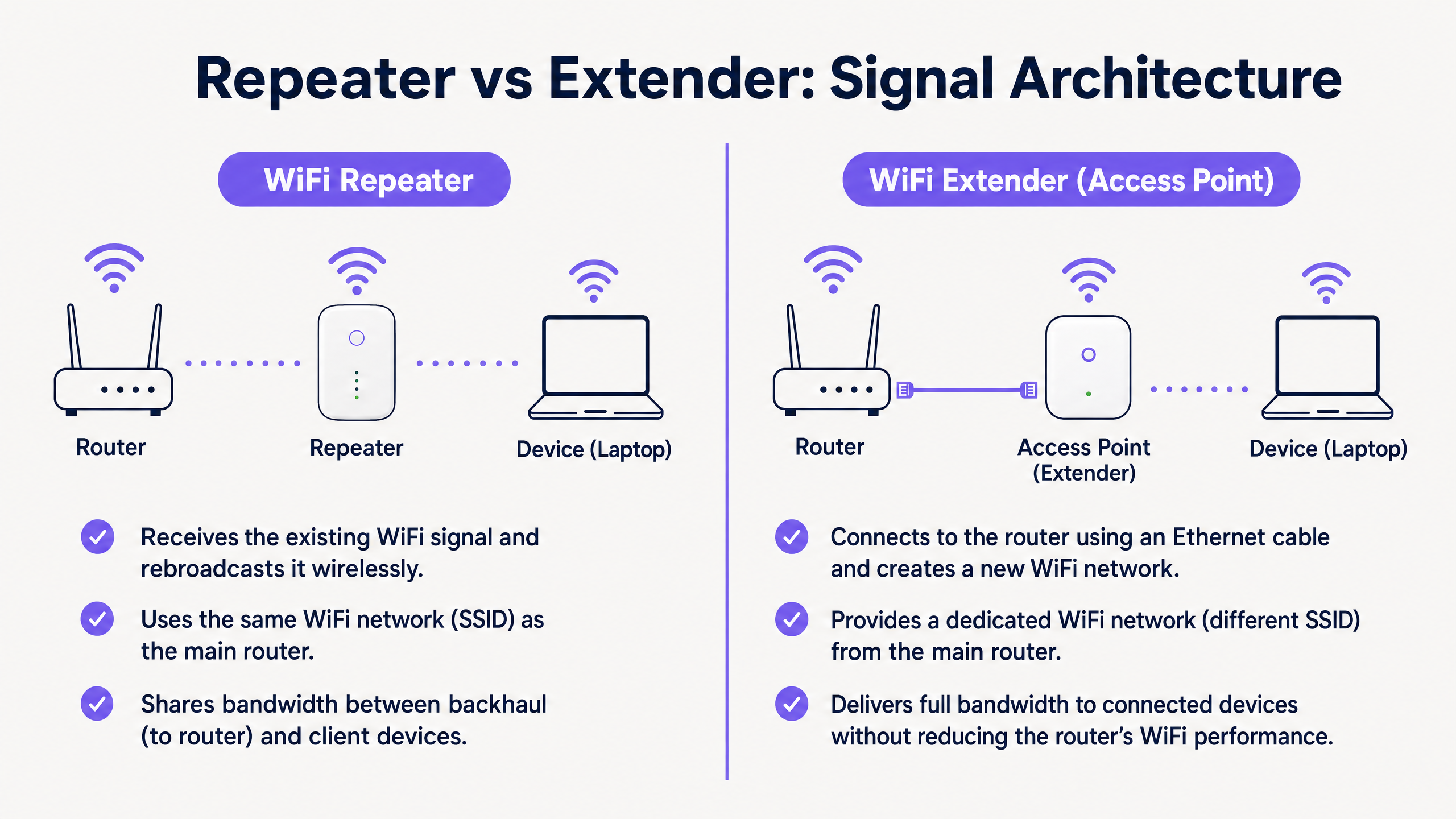
Un ripetitore WiFi opera interamente in modalità wireless. Contiene due radio wireless (o talvolta solo una, operante in modalità half-duplex). Si connette al router primario tramite WiFi e trasmette simultaneamente ai dispositivi client.
Poiché deve utilizzare la stessa radio sia per ricevere dati dal router che per trasmettere dati al client, la larghezza di banda disponibile viene effettivamente dimezzata. Questo è noto come la penalità half-duplex. Negli ambienti ad alta densità, questa latenza e il degrado del throughput sono inaccettabili.
L'Architettura dell'Extender WiFi (Access Point)
Un vero extender WiFi aziendale è un Access Point (AP). Si connette alla rete centrale tramite un cavo Ethernet fisico (Cat6 o superiore), spesso utilizzando il Power over Ethernet (PoE) per un'implementazione semplificata.
Utilizzando un backhaul cablato, l'AP dedica la sua intera capacità wireless al servizio dei dispositivi client. Questa architettura supporta un throughput elevato, un roaming senza interruzioni (utilizzando standard come IEEE 802.11r/k/v) e robusti protocolli di sicurezza come WPA3-Enterprise e l'autenticazione 802.1X.
Principali Differenze a Colpo d'Occhio
| Caratteristica | WiFi Repeater | WiFi Extender (Access Point) |
|---|---|---|
| Backhaul | Wireless | Cablato (Ethernet) |
| Throughput | Dimezzato (Half-duplex) | Piena capacità |
| SSID | Solitamente lo stesso del primario | Può essere uguale o distinto |
| Latenza | Alta | Bassa |
| Idoneità Aziendale | Solo temporaneo/bassa densità | Permanente/alta densità |
Guida all'Implementazione
Quando si progetta la rete per una sede commerciale, l'ambiente fisico detta la scelta dell'hardware.
Scenario 1: Lo Stadio ad Alta Densità
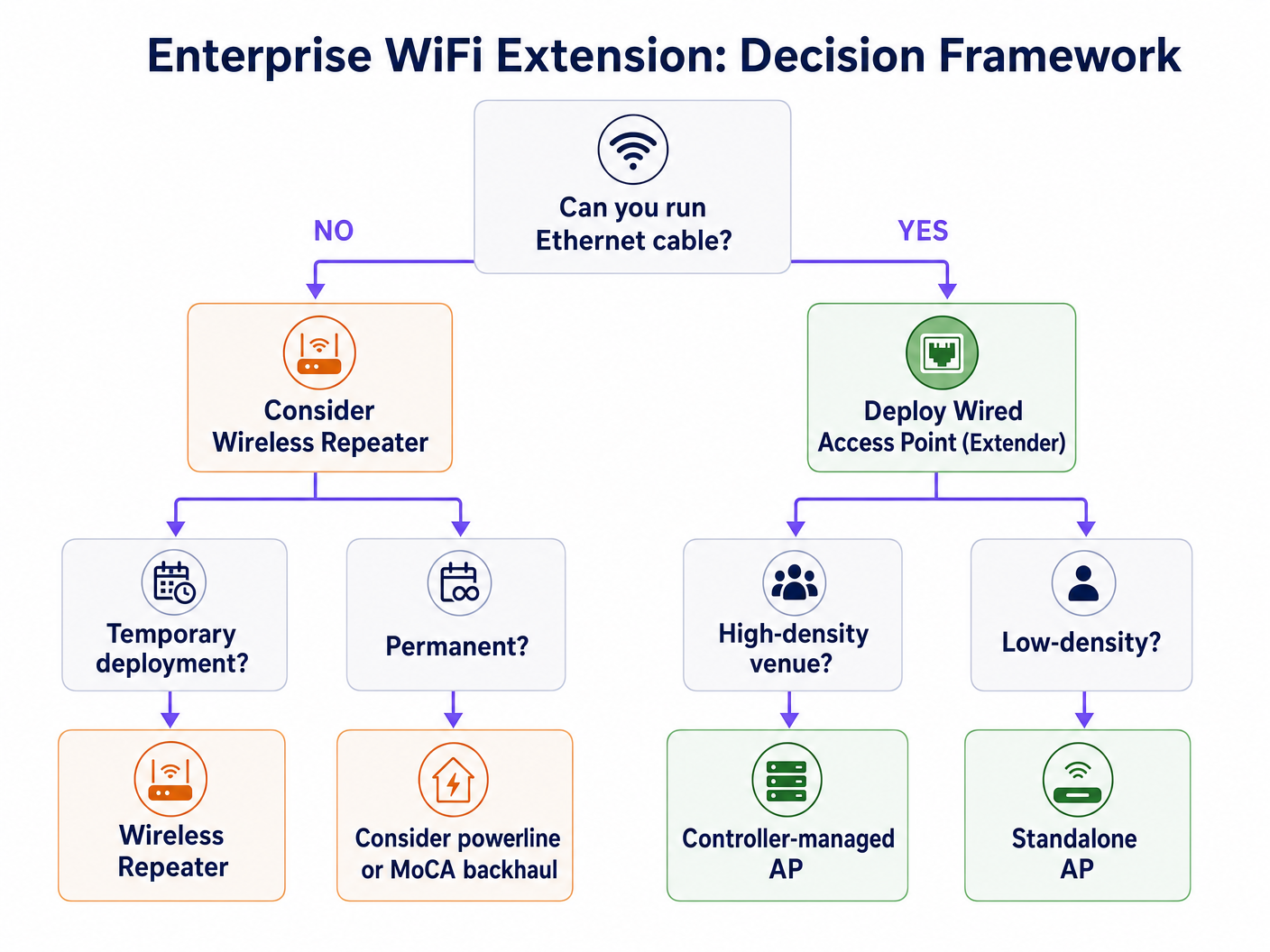
In uno stadio, migliaia di connessioni simultanee richiedono il massimo throughput. L'implementazione di ripetitori qui porterebbe a un immediato collasso della rete a causa dell'interferenza co-canale e della penalità half-duplex.
Raccomandazione: Implementare Access Point cablati (Extender) in una configurazione ad alta densità. Utilizzare antenne direzionali e garantire un robusto backhaul cablato. Questa infrastruttura è fondamentale per supportare WiFi Analytics avanzati e servizi basati sulla posizione.
Scenario 2: L'Hotel Storico
In un hotel storico dove l'installazione di nuovi cavi Ethernet è fisicamente impossibile o legalmente limitata, l'implementazione tradizionale di AP è impegnativa.
Raccomandazione: Sebbene un ripetitore wireless possa sembrare allettante, spesso è inadeguato per le aspettative degli ospiti. Considerare sistemi mesh avanzati con bande di backhaul wireless dedicate, o sfruttare l'infrastruttura coassiale esistente (MoCA) per fornire un backhaul cablato agli AP locali. Se si devono usare i ripetitori, assicurarsi che siano posizionati strategicamente al bordo dell'impronta del segnale primario, non nelle zone morte. Maggiori informazioni su Come Migliorare la Soddisfazione degli Ospiti: Il Playbook Definitivo .
Best Practice e Integrazione
Indipendentemente dall'hardware scelto, la piattaforma di gestione sovrapposta è dove si realizza il valore aziendale.
- Gestione Hardware-Agnostic: Assicurati che le tue soluzioni di analisi e Captive Portal siano hardware-agnostic. La piattaforma di Purple si integra perfettamente con i principali fornitori (Cisco, Aruba, Meraki), permettendoti di combinare AP e ripetitori a seconda delle esigenze dell'ambiente fisico senza perdere visibilità.
- Autenticazione Senza Interruzioni: Implementa robusti meccanismi di autenticazione. L'autenticazione basata su profilo, come OpenRoaming (dove Purple agisce come fornitore di identità gratuito sotto licenza Connect), fornisce un accesso sicuro e senza attriti per gli utenti, garantendo al contempo una sicurezza di livello aziendale. Scopri di più su Come un wi fi assistant Abilita l'Accesso Senza Password nel 2026 .
- Segregazione dei Dati: Per gli ambienti Retail e Hospitality , segregare rigorosamente il traffico Guest WiFi dal traffico operativo (es. sistemi PoS) utilizzando le VLAN per mantenere la conformità PCI DSS.
Risoluzione dei Problemi e Mitigazione dei Rischi
- Il Problema del 'Client Appiccicoso': I dispositivi spesso si aggrappano a un segnale debole da un AP distante piuttosto che effettuare il roaming verso uno più vicino. Assicurati che la tua infrastruttura supporti 802.11k/v per gestire attivamente il roaming dei client.
- Interferenza Co-Canale: I ripetitori che trasmettono sullo stesso canale del router primario aumentano il rumore. Un'attenta pianificazione dei canali è essenziale.
- Vulnerabilità di Sicurezza: I ripetitori spesso mancano di enterprise-gfunzionalità di sicurezza avanzate. Assicurati che tutti i dispositivi supportino WPA3 e possano integrarsi con il tuo server RADIUS centrale.
ROI e Impatto Commerciale
Investire nell'infrastruttura corretta ha un impatto diretto sui profitti. Una robusta rete AP cablata consente analisi avanzate della posizione. Comprendere le Differenze Tecniche tra Heatmapping e Presence Analytics consente alle strutture di ottimizzare la disposizione degli spazi e l'impiego del personale. Inoltre, una connessione stabile è un prerequisito per monetizzare la rete tramite media retail e engagement mirato.
Definizioni chiave
Half-Duplex
A communication mode where data can flow in both directions, but only one direction at a time.
This is the primary technical limitation of standard WiFi repeaters, resulting in halved throughput.
Backhaul
The connection between the access point/repeater and the core network router.
A wired backhaul (Ethernet) provides full capacity, while a wireless backhaul shares the radio spectrum with client devices.
SSID (Service Set Identifier)
The public name of a wireless network.
Repeaters often clone the primary SSID, while extenders can broadcast the same or a distinct SSID depending on the roaming configuration.
802.11r/k/v
A set of IEEE standards that facilitate fast and seamless roaming of client devices between different access points.
Essential for enterprise environments to prevent the 'sticky client' problem where devices cling to a weak signal.
PoE (Power over Ethernet)
A technology that allows network cables to carry electrical power.
Crucial for deploying wired access points in ceilings or high walls without requiring a separate electrical outlet.
RSSI (Received Signal Strength Indicator)
A measurement of the power present in a received radio signal.
Critical data point used by platforms like Purple for location analytics and heatmapping.
VLAN (Virtual Local Area Network)
A logical subnetwork that groups a collection of devices on a single physical LAN.
Mandatory for segregating guest traffic from operational traffic to maintain security and compliance (e.g., PCI DSS).
Mesh Network
A network topology where nodes connect directly, dynamically and non-hierarchically to as many other nodes as possible.
An advanced alternative to simple repeaters, often utilizing a dedicated radio band for the wireless backhaul to maintain throughput.
Esempi pratici
A 200-room heritage hotel needs to provide seamless WiFi coverage. Running new Ethernet cables to the guest rooms is prohibited due to the building's listed status. The current setup uses standard wireless repeaters in the hallways, resulting in poor speeds and frequent disconnects.
- Conduct a comprehensive RF site survey to identify existing signal propagation and dead zones.
- Abandon the standard wireless repeaters, as the half-duplex penalty is exacerbating the poor performance.
- Implement a managed mesh WiFi system that utilizes a dedicated, discrete 5GHz or 6GHz radio exclusively for wireless backhaul between nodes.
- Where possible, leverage existing coaxial cabling (using MoCA adapters) to provide a wired backhaul to strategic access points without drilling new holes.
- Configure the network to support 802.11r/k/v for seamless client roaming between nodes.
A large retail chain is deploying a new Guest WiFi network across 50 locations to support an indoor mapping and location-based marketing initiative. The IT director is considering using high-end wireless repeaters to save on cabling costs.
- Reject the use of wireless repeaters for this deployment.
- Specify the installation of enterprise-grade, wired Access Points (Extenders) with PoE (Power over Ethernet).
- Ensure AP placement is optimized for location analytics, not just coverage, requiring a higher density of APs.
- Integrate the hardware with a hardware-agnostic analytics platform (like Purple) to normalize the location data across all 50 sites.
- Implement strict VLAN segregation between the Guest WiFi and the PoS/operational network.
Domande di esercitazione
Q1. Your organisation is deploying a temporary pop-up retail store in a leased space for three weeks. The landlord provides a primary router in the back office, but the signal does not reach the point-of-sale terminals at the front. Running cables is prohibited. What is the most appropriate hardware solution?
Suggerimento: Consider the duration of the deployment and the physical constraints.
Visualizza risposta modello
In this specific, temporary scenario with physical constraints, a high-quality wireless repeater or a simple mesh system is appropriate. While a wired AP is always preferred for throughput, the temporary nature and cabling restrictions make a wireless solution the pragmatic choice, provided the PoS systems do not require massive bandwidth.
Q2. A hospital IT director needs to ensure seamless roaming for mobile medical carts (WoWs) moving between wards. The current infrastructure uses a mix of older routers configured as repeaters. Staff complain of dropped connections when moving. What architectural change is required?
Suggerimento: Focus on the 'sticky client' problem and backhaul architecture.
Visualizza risposta modello
The hospital must rip and replace the repeater infrastructure. They need to deploy enterprise-grade wired Access Points (Extenders) with a unified controller. Crucially, the new system must support IEEE 802.11r/k/v to actively manage client hand-offs between APs, eliminating the dropped connections experienced with the disjointed repeater setup.
Q3. You are tasked with implementing Purple's location analytics in a large shopping centre. The centre management wants to use cheaper wireless repeaters to expand coverage to the car park. Why should you advise against this?
Suggerimento: Consider how location analytics platforms calculate device position.
Visualizza risposta modello
You must advise against repeaters because they obscure accurate RSSI (Received Signal Strength Indicator) data. When a device connects to a repeater, the core network often sees the MAC address and signal strength of the repeater, not the client device. This renders precise location tracking and heatmapping impossible. Wired APs are mandatory for accurate analytics.