
Repetidor WiFi vs. Extensor: Casos de Uso Empresariais
Este guia de referência técnica oferece uma comparação definitiva entre repetidores WiFi e extensores para ambientes empresariais. Prepara gestores de TI e arquitetos de rede com os frameworks de decisão necessários para implementar o hardware certo para requisitos específicos de locais, garantindo desempenho ótimo, conformidade e ROI.
Ouça este guia
Ver transcrição do podcast
Resumo Executivo
Para locais empresariais — desde estádios de alta densidade a vastas áreas de retalho — a decisão entre implementar um repetidor WiFi versus um extensor WiFi (ponto de acesso) é uma escolha de infraestrutura crítica. Embora frequentemente usados de forma intercambiável nos mercados de consumo, estas tecnologias representam arquiteturas de rede fundamentalmente diferentes. Um repetidor WiFi capta e retransmite um sinal existente, reduzindo inerentemente a largura de banda para metade. Em contraste, um extensor WiFi, funcionando como um ponto de acesso com fios, fornece uma ligação dedicada à rede central, garantindo a entrega total da largura de banda. Este guia oferece uma análise técnica aprofundada de ambas as arquiteturas, equipando os líderes de TI com os frameworks necessários para otimizar a implementação, manter a conformidade (como PCI DSS e GDPR) e maximizar o ROI através de conectividade robusta.
Análise Técnica Aprofundada: Arquitetura e Normas
Compreender as camadas físicas e lógicas destes dispositivos é essencial para o design de redes empresariais.
A Arquitetura do Repetidor WiFi
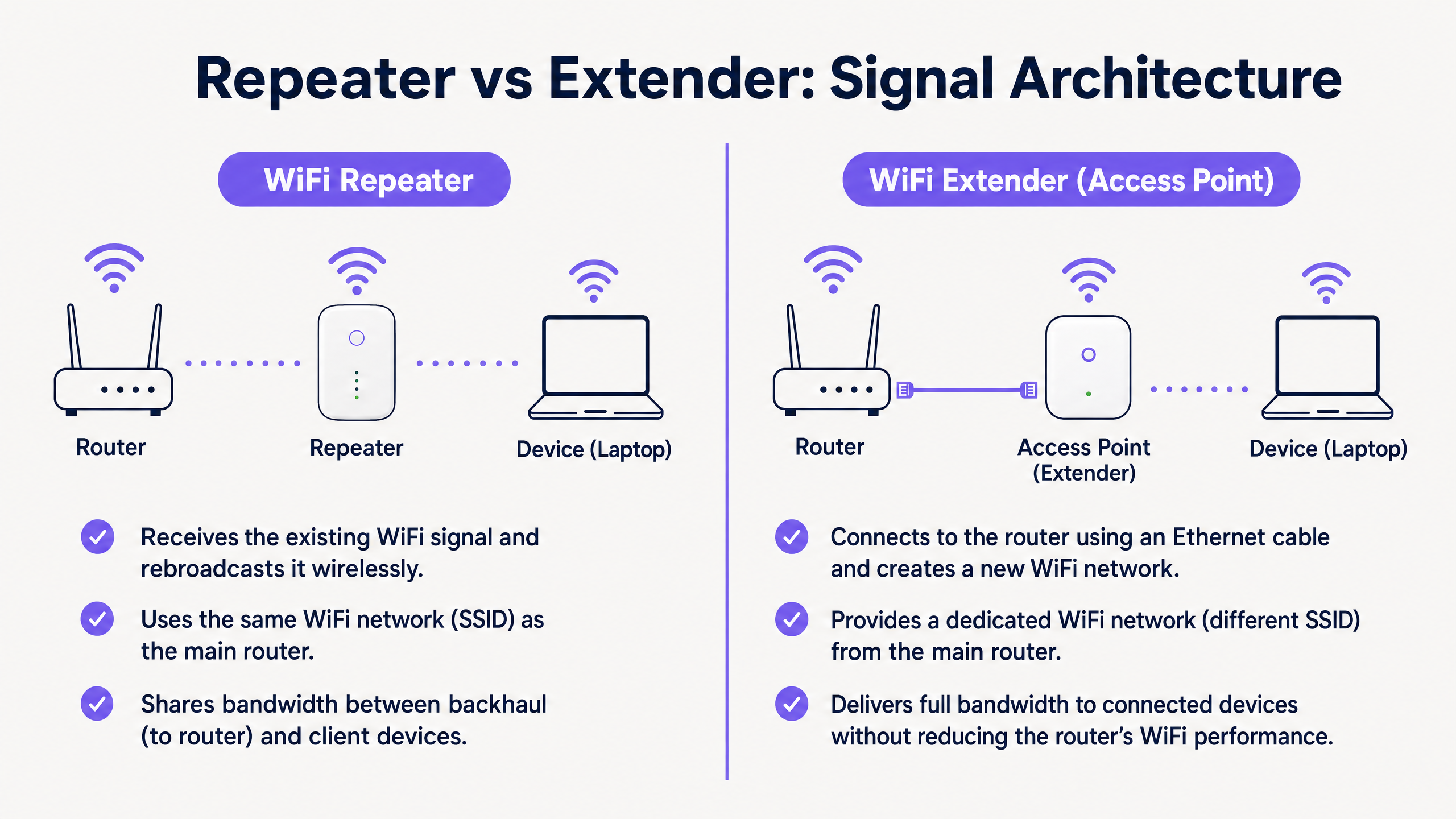
Um repetidor WiFi opera inteiramente sem fios. Contém duas rádios sem fios (ou, por vezes, apenas uma, operando em modo half-duplex). Conecta-se ao router principal via WiFi e transmite simultaneamente para os dispositivos cliente.
Como deve usar a mesma rádio para receber dados do router e transmitir dados para o cliente, a largura de banda disponível é efetivamente reduzida para metade. Isto é conhecido como a penalidade half-duplex. Em ambientes de alta densidade, esta degradação da latência e da largura de banda é inaceitável.
A Arquitetura do Extensor WiFi (Ponto de Acesso)
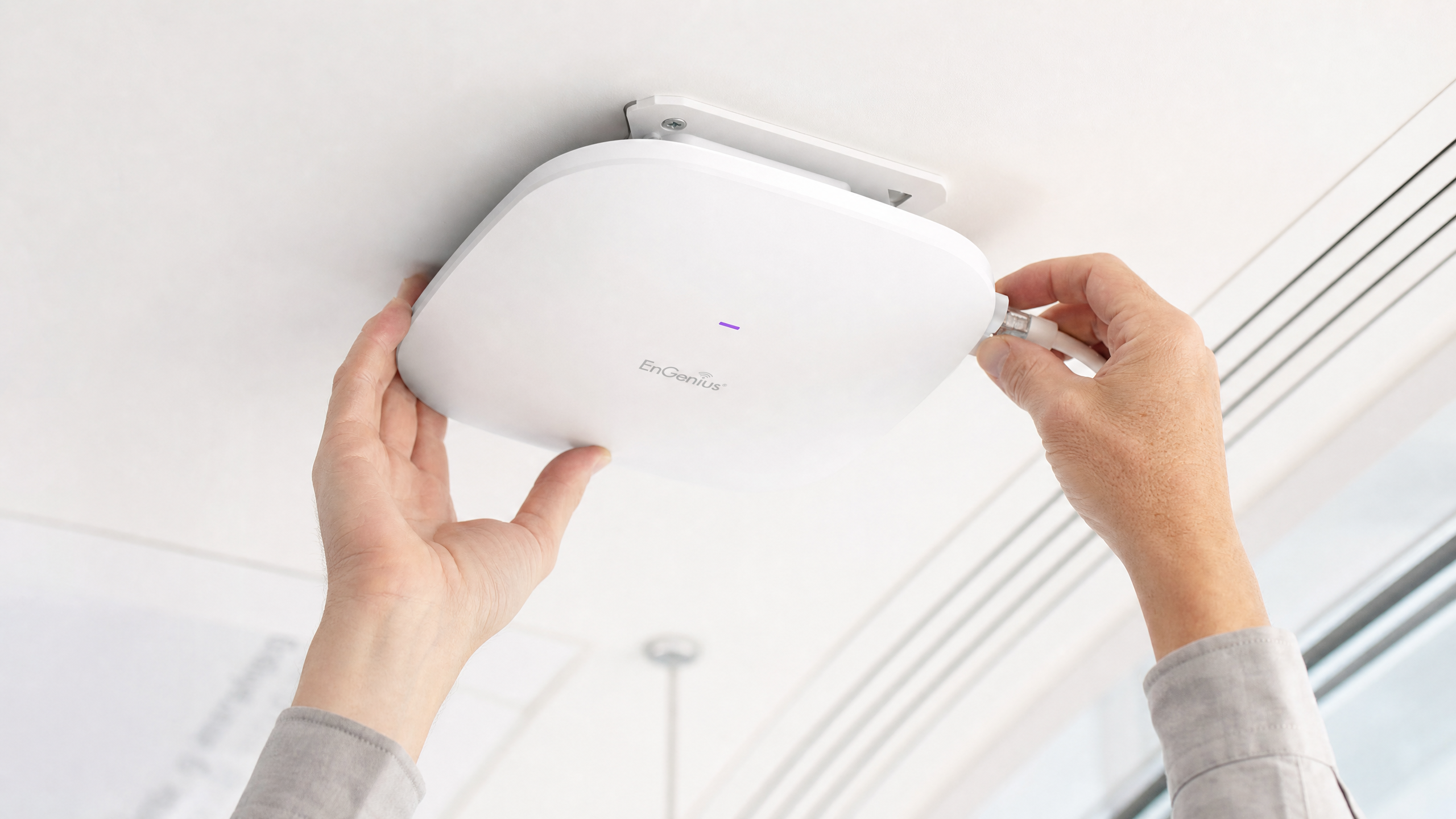
Um verdadeiro extensor WiFi empresarial é um Access Point (AP). Conecta-se à rede central através de um cabo Ethernet físico (Cat6 ou superior), frequentemente utilizando Power over Ethernet (PoE) para uma implementação simplificada.
Ao usar um backhaul com fios, o AP dedica toda a sua capacidade sem fios para servir os dispositivos cliente. Esta arquitetura suporta alta largura de banda, roaming contínuo (usando normas como IEEE 802.11r/k/v) e protocolos de segurança robustos como WPA3-Enterprise e autenticação 802.1X.
Diferenças Essenciais em Resumo
| Característica | Repetidor WiFi | Extensor WiFi (Ponto de Acesso) |
|---|---|---|
| Backhaul | Sem fios | Com fios (Ethernet) |
| Largura de Banda | Reduzida para metade (Half-duplex) | Capacidade total |
| SSID | Geralmente o mesmo que o principal | Pode ser o mesmo ou distinto |
| Latência | Alta | Baixa |
| Adequação Empresarial | Apenas temporário/baixa densidade | Permanente/alta densidade |
Guia de Implementação
Ao projetar a rede para um local comercial, o ambiente físico dita a escolha do hardware.
Cenário 1: O Estádio de Alta Densidade
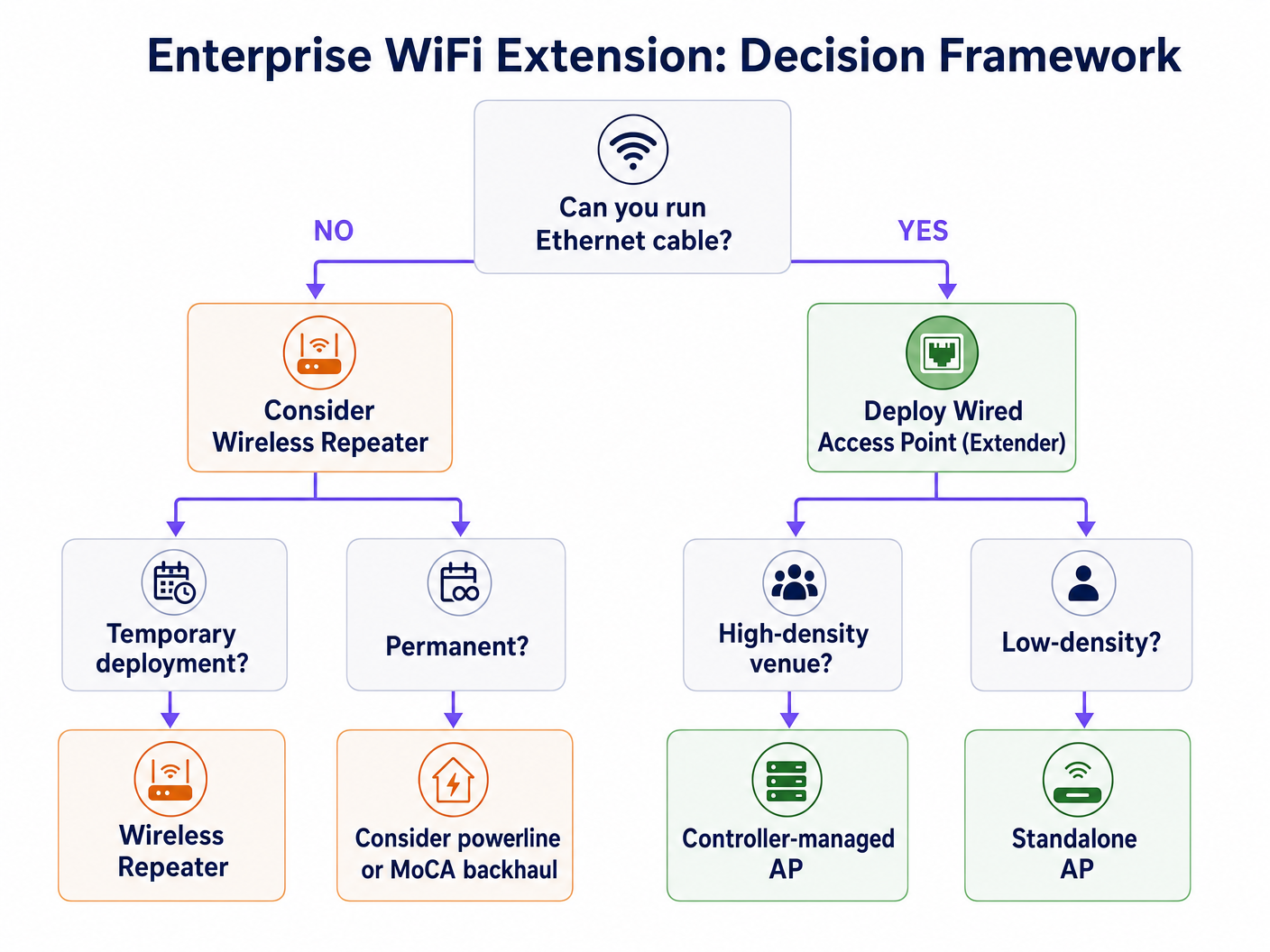
Num estádio, milhares de ligações simultâneas exigem a máxima largura de banda. Implementar repetidores aqui resultaria num colapso imediato da rede devido à interferência de co-canal e à penalidade half-duplex.
Recomendação: Implementar Pontos de Acesso (Extensores) com fios numa configuração de alta densidade. Utilizar antenas direcionais e garantir um backhaul com fios robusto. Esta infraestrutura é crítica para suportar WiFi Analytics avançados e serviços baseados em localização.
Cenário 2: O Hotel Histórico
Num hotel classificado como património, onde a passagem de novos cabos Ethernet é fisicamente impossível ou legalmente restrita, a implementação tradicional de APs é desafiadora.
Recomendação: Embora um repetidor sem fios possa parecer apelativo, é frequentemente inadequado para as expectativas dos hóspedes. Considerar sistemas mesh avançados com bandas de backhaul sem fios dedicadas, ou aproveitar a infraestrutura coaxial existente (MoCA) para fornecer um backhaul com fios a APs locais. Se tiver de usar repetidores, certifique-se de que estão estrategicamente colocados na extremidade da pegada do sinal primário, não em zonas mortas. Leia mais sobre Como Melhorar a Satisfação dos Hóspedes: O Guia Definitivo .
Melhores Práticas e Integração
Independentemente do hardware escolhido, a plataforma de gestão sobreposta é onde o valor de negócio é concretizado.
- Gestão Agnostic de Hardware: Garanta que as suas soluções de análise e Captive Portal são agnósticas de hardware. A plataforma da Purple integra-se perfeitamente com os principais fornecedores (Cisco, Aruba, Meraki), permitindo-lhe misturar e combinar APs e repetidores conforme as exigências do ambiente físico, sem perder visibilidade.
- Autenticação Contínua: Implemente mecanismos de autenticação robustos. A autenticação baseada em perfil, como o OpenRoaming (onde a Purple atua como um fornecedor de identidade gratuito sob a licença Connect), oferece acesso seguro e sem atritos para os utilizadores, garantindo segurança de nível empresarial. Saiba mais sobre Como um wi fi assistant Permite Acesso Sem Palavra-passe em 2026 .
- Segregação de Dados: Para ambientes de Retalho e Hotelaria , separe rigorosamente o tráfego de Guest WiFi do tráfego operacional (por exemplo, sistemas PoS) usando VLANs para manter a conformidade com PCI DSS.
Resolução de Problemas e Mitigação de Riscos
- O Problema do 'Cliente Preso': Os dispositivos frequentemente mantêm um sinal fraco de um AP distante em vez de fazerem roaming para um mais próximo. Garanta que a sua infraestrutura suporta 802.11k/v para gerir ativamente o roaming do cliente.
- Interferência de Co-Canal: Repetidores a transmitir no mesmo canal que o router principal aumentam o ruído. Um planeamento cuidadoso dos canais é essencial.
- Vulnerabilidades de Segurança: Os repetidores frequentemente carecem de segurança de nível empresarial-recursos de segurança de nível empresarial. Garanta que todos os dispositivos suportam WPA3 e podem integrar-se com o seu servidor RADIUS central.
ROI e Impacto no Negócio
Investir na infraestrutura correta impacta diretamente os resultados financeiros. Uma rede AP com fios robusta permite análises de localização avançadas. Compreender as Diferenças Técnicas entre Heatmapping e Análise de Presença permite que os locais otimizem os layouts de piso e a alocação de pessoal. Além disso, uma ligação estável é um pré-requisito para monetizar a rede através de media de retalho e envolvimento direcionado.
Definições Principais
Half-Duplex
A communication mode where data can flow in both directions, but only one direction at a time.
This is the primary technical limitation of standard WiFi repeaters, resulting in halved throughput.
Backhaul
The connection between the access point/repeater and the core network router.
A wired backhaul (Ethernet) provides full capacity, while a wireless backhaul shares the radio spectrum with client devices.
SSID (Service Set Identifier)
The public name of a wireless network.
Repeaters often clone the primary SSID, while extenders can broadcast the same or a distinct SSID depending on the roaming configuration.
802.11r/k/v
A set of IEEE standards that facilitate fast and seamless roaming of client devices between different access points.
Essential for enterprise environments to prevent the 'sticky client' problem where devices cling to a weak signal.
PoE (Power over Ethernet)
A technology that allows network cables to carry electrical power.
Crucial for deploying wired access points in ceilings or high walls without requiring a separate electrical outlet.
RSSI (Received Signal Strength Indicator)
A measurement of the power present in a received radio signal.
Critical data point used by platforms like Purple for location analytics and heatmapping.
VLAN (Virtual Local Area Network)
A logical subnetwork that groups a collection of devices on a single physical LAN.
Mandatory for segregating guest traffic from operational traffic to maintain security and compliance (e.g., PCI DSS).
Mesh Network
A network topology where nodes connect directly, dynamically and non-hierarchically to as many other nodes as possible.
An advanced alternative to simple repeaters, often utilizing a dedicated radio band for the wireless backhaul to maintain throughput.
Exemplos Práticos
A 200-room heritage hotel needs to provide seamless WiFi coverage. Running new Ethernet cables to the guest rooms is prohibited due to the building's listed status. The current setup uses standard wireless repeaters in the hallways, resulting in poor speeds and frequent disconnects.
- Conduct a comprehensive RF site survey to identify existing signal propagation and dead zones.
- Abandon the standard wireless repeaters, as the half-duplex penalty is exacerbating the poor performance.
- Implement a managed mesh WiFi system that utilizes a dedicated, discrete 5GHz or 6GHz radio exclusively for wireless backhaul between nodes.
- Where possible, leverage existing coaxial cabling (using MoCA adapters) to provide a wired backhaul to strategic access points without drilling new holes.
- Configure the network to support 802.11r/k/v for seamless client roaming between nodes.
A large retail chain is deploying a new Guest WiFi network across 50 locations to support an indoor mapping and location-based marketing initiative. The IT director is considering using high-end wireless repeaters to save on cabling costs.
- Reject the use of wireless repeaters for this deployment.
- Specify the installation of enterprise-grade, wired Access Points (Extenders) with PoE (Power over Ethernet).
- Ensure AP placement is optimized for location analytics, not just coverage, requiring a higher density of APs.
- Integrate the hardware with a hardware-agnostic analytics platform (like Purple) to normalize the location data across all 50 sites.
- Implement strict VLAN segregation between the Guest WiFi and the PoS/operational network.
Perguntas de Prática
Q1. Your organisation is deploying a temporary pop-up retail store in a leased space for three weeks. The landlord provides a primary router in the back office, but the signal does not reach the point-of-sale terminals at the front. Running cables is prohibited. What is the most appropriate hardware solution?
Dica: Consider the duration of the deployment and the physical constraints.
Ver resposta modelo
In this specific, temporary scenario with physical constraints, a high-quality wireless repeater or a simple mesh system is appropriate. While a wired AP is always preferred for throughput, the temporary nature and cabling restrictions make a wireless solution the pragmatic choice, provided the PoS systems do not require massive bandwidth.
Q2. A hospital IT director needs to ensure seamless roaming for mobile medical carts (WoWs) moving between wards. The current infrastructure uses a mix of older routers configured as repeaters. Staff complain of dropped connections when moving. What architectural change is required?
Dica: Focus on the 'sticky client' problem and backhaul architecture.
Ver resposta modelo
The hospital must rip and replace the repeater infrastructure. They need to deploy enterprise-grade wired Access Points (Extenders) with a unified controller. Crucially, the new system must support IEEE 802.11r/k/v to actively manage client hand-offs between APs, eliminating the dropped connections experienced with the disjointed repeater setup.
Q3. You are tasked with implementing Purple's location analytics in a large shopping centre. The centre management wants to use cheaper wireless repeaters to expand coverage to the car park. Why should you advise against this?
Dica: Consider how location analytics platforms calculate device position.
Ver resposta modelo
You must advise against repeaters because they obscure accurate RSSI (Received Signal Strength Indicator) data. When a device connects to a repeater, the core network often sees the MAC address and signal strength of the repeater, not the client device. This renders precise location tracking and heatmapping impossible. Wired APs are mandatory for accurate analytics.