
WiFi Repeater vs. Extender: Anwendungsfälle für Unternehmen
Dieser technische Leitfaden bietet einen umfassenden Vergleich zwischen WiFi Repeatern und Extendern für Unternehmensumgebungen. Er stattet IT-Manager und Netzwerkarchitekten mit den Entscheidungsrahmen aus, die für den Einsatz der richtigen Hardware für spezifische Standortanforderungen erforderlich sind, um optimale Leistung, Compliance und ROI zu gewährleisten.
Diesen Leitfaden anhören
Podcast-Transkript ansehen
Zusammenfassung für Führungskräfte
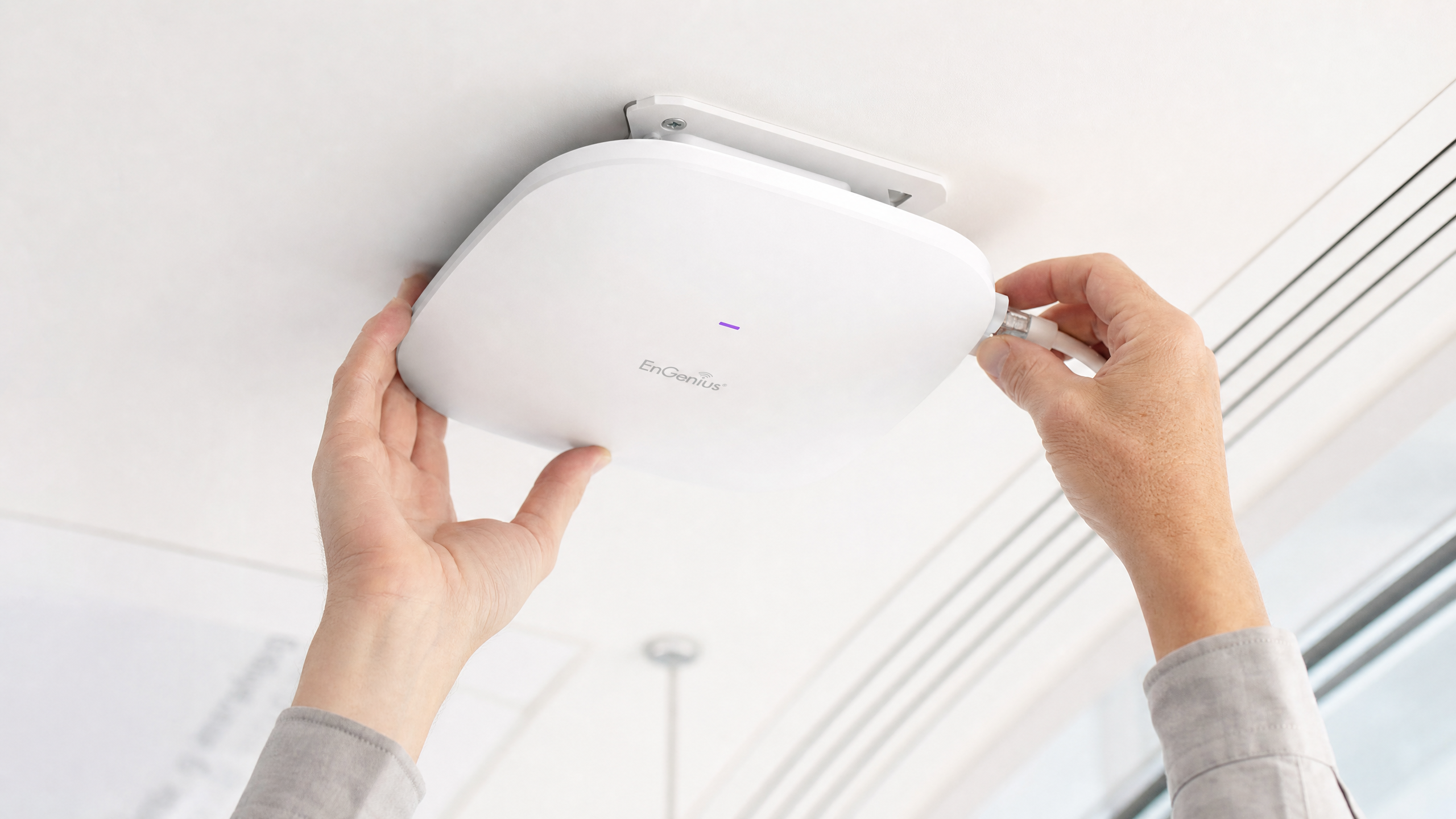
Für Unternehmensstandorte – von Stadien mit hoher Dichte bis hin zu weitläufigen Einzelhandelsflächen – ist die Entscheidung zwischen dem Einsatz eines WiFi Repeaters und eines WiFi Extenders (Access Point) eine kritische Infrastrukturentscheidung. Während sie in Verbrauchermärkten oft synonym verwendet werden, stellen diese Technologien grundlegend unterschiedliche Netzwerkarchitekturen dar. Ein WiFi Repeater erfasst ein bestehendes Signal und sendet es erneut aus, wodurch der Durchsatz naturgemäß halbiert wird. Im Gegensatz dazu bietet ein WiFi Extender, der als kabelgebundener Access Point fungiert, eine dedizierte Verbindung zum Kernnetzwerk und gewährleistet die volle Bandbreitenlieferung. Dieser Leitfaden bietet einen technischen Tiefenblick in beide Architekturen und stattet IT-Führungskräfte mit den Rahmenbedingungen aus, die zur Optimierung des Einsatzes, zur Einhaltung von Vorschriften (wie PCI DSS und GDPR) und zur Maximierung des ROI durch robuste Konnektivität erforderlich sind.
Technischer Tiefenblick: Architektur und Standards
Das Verständnis der physikalischen und logischen Schichten dieser Geräte ist für das Design von Unternehmensnetzwerken unerlässlich.
Die WiFi Repeater-Architektur
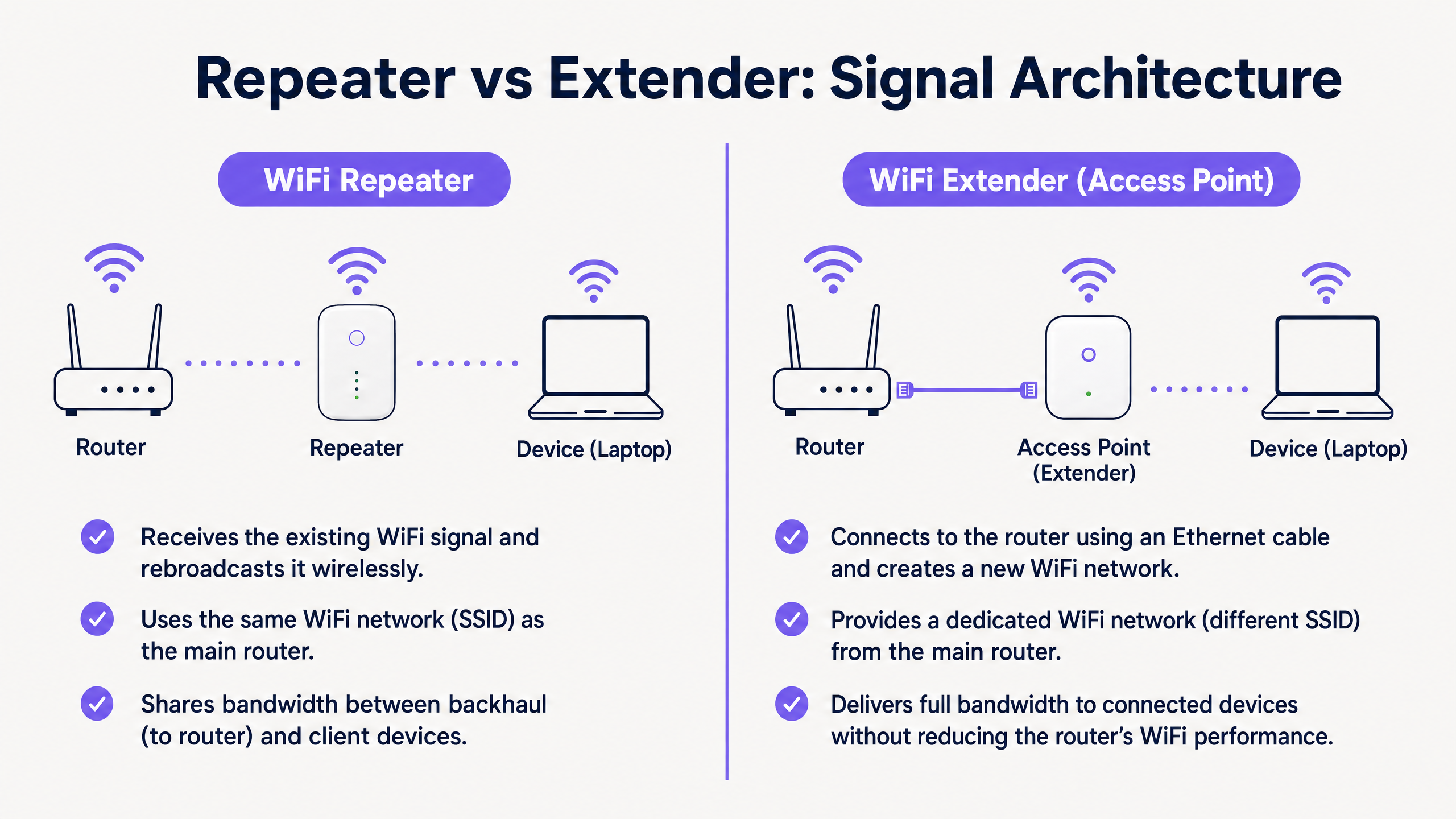
Ein WiFi Repeater arbeitet vollständig drahtlos. Er enthält zwei drahtlose Funkmodule (oder manchmal nur eines, das im Halbduplex-Modus arbeitet). Er verbindet sich über WiFi mit dem primären Router und sendet gleichzeitig an Client-Geräte.
Da er dasselbe Funkmodul sowohl zum Empfangen von Daten vom Router als auch zum Senden von Daten an den Client verwenden muss, wird die verfügbare Bandbreite effektiv halbiert. Dies wird als die Halbduplex-Strafe bezeichnet. In Umgebungen mit hoher Dichte sind diese Latenz- und Durchsatzverschlechterungen inakzeptabel.
Die WiFi Extender (Access Point)-Architektur
Ein echter Enterprise WiFi Extender ist ein Access Point (AP). Er verbindet sich über ein physisches Ethernet-Kabel (Cat6 oder besser) mit dem Kernnetzwerk und nutzt oft Power over Ethernet (PoE) für eine optimierte Bereitstellung.
Durch die Verwendung eines kabelgebundenen Backhauls widmet der AP seine gesamte drahtlose Kapazität der Versorgung von Client-Geräten. Diese Architektur unterstützt hohen Durchsatz, nahtloses Roaming (unter Verwendung von Standards wie IEEE 802.11r/k/v) und robuste Sicherheitsprotokolle wie WPA3-Enterprise und 802.1X-Authentifizierung.
Kernunterschiede auf einen Blick
| Merkmal | WiFi Repeater | WiFi Extender (Access Point) |
|---|---|---|
| Backhaul | Drahtlos | Kabelgebunden (Ethernet) |
| Durchsatz | Halbiert (Halbduplex) | Volle Kapazität |
| SSID | Normalerweise wie primär | Kann gleich oder unterschiedlich sein |
| Latenz | Hoch | Niedrig |
| Eignung für Unternehmen | Nur temporär/geringe Dichte | Permanent/hohe Dichte |
Implementierungsleitfaden
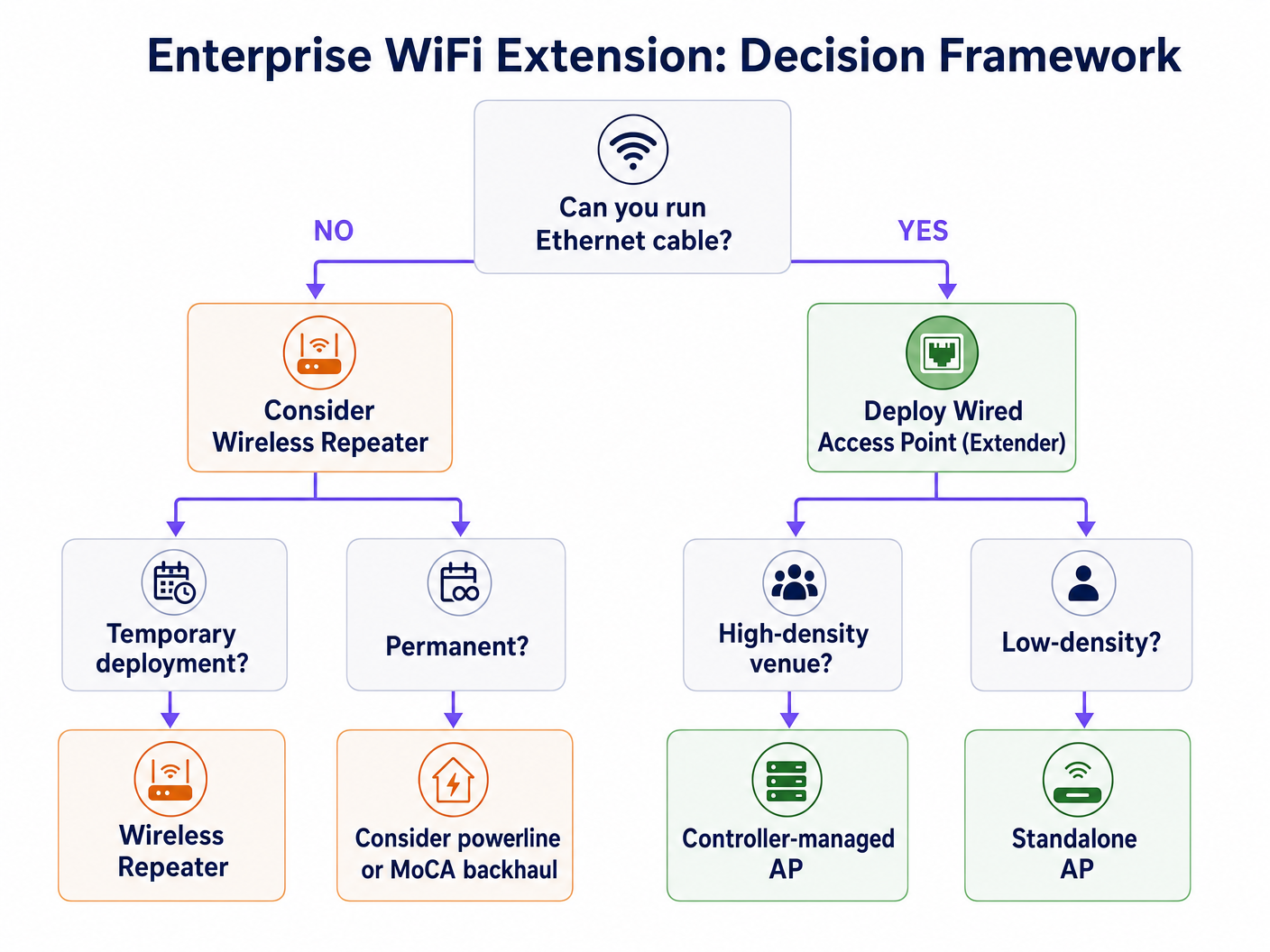
Bei der Gestaltung des Netzwerks für einen kommerziellen Standort bestimmt die physische Umgebung die Hardware-Wahl.
Szenario 1: Das Stadion mit hoher Dichte
In einem Stadion erfordern Tausende gleichzeitiger Verbindungen maximalen Durchsatz. Der Einsatz von Repeatern würde hier aufgrund von Gleichkanalinterferenzen und der Halbduplex-Strafe zu einem sofortigen Netzwerkausfall führen.
Empfehlung: Setzen Sie kabelgebundene Access Points (Extender) in einer Konfiguration mit hoher Dichte ein. Verwenden Sie gerichtete Antennen und stellen Sie einen robusten kabelgebundenen Backhaul sicher. Diese Infrastruktur ist entscheidend für die Unterstützung fortschrittlicher WiFi Analytics und standortbasierter Dienste.
Szenario 2: Das historische Hotel
In einem denkmalgeschützten Hotel, in dem das Verlegen neuer Ethernet-Kabel physisch unmöglich oder rechtlich eingeschränkt ist, ist der traditionelle AP-Einsatz eine Herausforderung.
Empfehlung: Obwohl ein drahtloser Repeater verlockend erscheinen mag, ist er oft unzureichend für die Erwartungen der Gäste. Ziehen Sie fortschrittliche Mesh-Systeme mit dedizierten drahtlosen Backhaul-Bändern in Betracht oder nutzen Sie die vorhandene Koaxialinfrastruktur (MoCA), um einen kabelgebundenen Backhaul zu lokalen APs bereitzustellen. Wenn Sie Repeater verwenden müssen, stellen Sie sicher, dass diese strategisch am Rande des primären Signalbereichs platziert werden, nicht in Funklöchern. Lesen Sie mehr unter So verbessern Sie die Gästezufriedenheit: Das ultimative Playbook .
Best Practices und Integration
Unabhängig von der gewählten Hardware wird der Geschäftswert auf der übergeordneten Managementplattform realisiert.
- Hardware-agnostisches Management: Stellen Sie sicher, dass Ihre Analyse- und Captive Portal-Lösungen hardware-agnostisch sind. Die Plattform von Purple integriert sich nahtlos mit führenden Anbietern (Cisco, Aruba, Meraki), sodass Sie APs und Repeater je nach physischer Umgebung mischen und anpassen können, ohne die Sichtbarkeit zu verlieren.
- Nahtlose Authentifizierung: Implementieren Sie robuste Authentifizierungsmechanismen. Profilbasierte Authentifizierung, wie OpenRoaming (wobei Purple als kostenloser Identitätsanbieter unter der Connect-Lizenz fungiert), bietet sicheren, reibungslosen Zugang für Benutzer und gewährleistet gleichzeitig Sicherheit auf Unternehmensniveau. Erfahren Sie mehr über Wie ein wi fi assistant passwortlosen Zugang im Jahr 2026 ermöglicht .
- Datensegregation: Für Einzelhandels- und Gastgewerbeumgebungen trennen Sie den Gast-WiFi-Verkehr strikt vom Betriebsverkehr (z.B. PoS-Systeme) mithilfe von VLANs, um die PCI DSS-Konformität zu gewährleisten.
Fehlerbehebung & Risikominderung
- Das 'Sticky Client'-Problem: Geräte halten oft an einem schwachen Signal eines entfernten AP fest, anstatt zu einem näheren zu wechseln. Stellen Sie sicher, dass Ihre Infrastruktur 802.11k/v unterstützt, um das Client-Roaming aktiv zu verwalten.
- Gleichkanalinterferenz: Repeater, die auf demselben Kanal wie der primäre Router senden, erhöhen das Rauschen. Eine sorgfältige Kanalplanung ist unerlässlich.
- Sicherheitslücken: Repeater fehlen oft Enterprise-gerweiterte Sicherheitsfunktionen. Stellen Sie sicher, dass alle Geräte WPA3 unterstützen und sich in Ihren zentralen RADIUS-Server integrieren lassen.
ROI & Geschäftsauswirkungen
Die Investition in die richtige Infrastruktur wirkt sich direkt auf das Geschäftsergebnis aus. Ein robustes kabelgebundenes AP-Netzwerk ermöglicht fortschrittliche Standortanalysen. Das Verständnis von Heatmapping vs. Präsenzanalyse: Technische Unterschiede ermöglicht es Veranstaltungsorten, Grundrisse und Personaleinsatz zu optimieren. Darüber hinaus ist eine stabile Verbindung eine Voraussetzung für die Monetarisierung des Netzwerks durch Retail Media und gezieltes Engagement.
Schlüsseldefinitionen
Half-Duplex
A communication mode where data can flow in both directions, but only one direction at a time.
This is the primary technical limitation of standard WiFi repeaters, resulting in halved throughput.
Backhaul
The connection between the access point/repeater and the core network router.
A wired backhaul (Ethernet) provides full capacity, while a wireless backhaul shares the radio spectrum with client devices.
SSID (Service Set Identifier)
The public name of a wireless network.
Repeaters often clone the primary SSID, while extenders can broadcast the same or a distinct SSID depending on the roaming configuration.
802.11r/k/v
A set of IEEE standards that facilitate fast and seamless roaming of client devices between different access points.
Essential for enterprise environments to prevent the 'sticky client' problem where devices cling to a weak signal.
PoE (Power over Ethernet)
A technology that allows network cables to carry electrical power.
Crucial for deploying wired access points in ceilings or high walls without requiring a separate electrical outlet.
RSSI (Received Signal Strength Indicator)
A measurement of the power present in a received radio signal.
Critical data point used by platforms like Purple for location analytics and heatmapping.
VLAN (Virtual Local Area Network)
A logical subnetwork that groups a collection of devices on a single physical LAN.
Mandatory for segregating guest traffic from operational traffic to maintain security and compliance (e.g., PCI DSS).
Mesh Network
A network topology where nodes connect directly, dynamically and non-hierarchically to as many other nodes as possible.
An advanced alternative to simple repeaters, often utilizing a dedicated radio band for the wireless backhaul to maintain throughput.
Ausgearbeitete Beispiele
A 200-room heritage hotel needs to provide seamless WiFi coverage. Running new Ethernet cables to the guest rooms is prohibited due to the building's listed status. The current setup uses standard wireless repeaters in the hallways, resulting in poor speeds and frequent disconnects.
- Conduct a comprehensive RF site survey to identify existing signal propagation and dead zones.
- Abandon the standard wireless repeaters, as the half-duplex penalty is exacerbating the poor performance.
- Implement a managed mesh WiFi system that utilizes a dedicated, discrete 5GHz or 6GHz radio exclusively for wireless backhaul between nodes.
- Where possible, leverage existing coaxial cabling (using MoCA adapters) to provide a wired backhaul to strategic access points without drilling new holes.
- Configure the network to support 802.11r/k/v for seamless client roaming between nodes.
A large retail chain is deploying a new Guest WiFi network across 50 locations to support an indoor mapping and location-based marketing initiative. The IT director is considering using high-end wireless repeaters to save on cabling costs.
- Reject the use of wireless repeaters for this deployment.
- Specify the installation of enterprise-grade, wired Access Points (Extenders) with PoE (Power over Ethernet).
- Ensure AP placement is optimized for location analytics, not just coverage, requiring a higher density of APs.
- Integrate the hardware with a hardware-agnostic analytics platform (like Purple) to normalize the location data across all 50 sites.
- Implement strict VLAN segregation between the Guest WiFi and the PoS/operational network.
Übungsfragen
Q1. Your organisation is deploying a temporary pop-up retail store in a leased space for three weeks. The landlord provides a primary router in the back office, but the signal does not reach the point-of-sale terminals at the front. Running cables is prohibited. What is the most appropriate hardware solution?
Hinweis: Consider the duration of the deployment and the physical constraints.
Musterlösung anzeigen
In this specific, temporary scenario with physical constraints, a high-quality wireless repeater or a simple mesh system is appropriate. While a wired AP is always preferred for throughput, the temporary nature and cabling restrictions make a wireless solution the pragmatic choice, provided the PoS systems do not require massive bandwidth.
Q2. A hospital IT director needs to ensure seamless roaming for mobile medical carts (WoWs) moving between wards. The current infrastructure uses a mix of older routers configured as repeaters. Staff complain of dropped connections when moving. What architectural change is required?
Hinweis: Focus on the 'sticky client' problem and backhaul architecture.
Musterlösung anzeigen
The hospital must rip and replace the repeater infrastructure. They need to deploy enterprise-grade wired Access Points (Extenders) with a unified controller. Crucially, the new system must support IEEE 802.11r/k/v to actively manage client hand-offs between APs, eliminating the dropped connections experienced with the disjointed repeater setup.
Q3. You are tasked with implementing Purple's location analytics in a large shopping centre. The centre management wants to use cheaper wireless repeaters to expand coverage to the car park. Why should you advise against this?
Hinweis: Consider how location analytics platforms calculate device position.
Musterlösung anzeigen
You must advise against repeaters because they obscure accurate RSSI (Received Signal Strength Indicator) data. When a device connects to a repeater, the core network often sees the MAC address and signal strength of the repeater, not the client device. This renders precise location tracking and heatmapping impossible. Wired APs are mandatory for accurate analytics.