
WiFi Repeater vs. Extender : Cas d'utilisation en entreprise
Ce guide de référence technique offre une comparaison définitive entre les WiFi repeaters et les extenders pour les environnements d'entreprise. Il fournit aux responsables informatiques et aux architectes réseau les cadres de décision nécessaires pour déployer le bon matériel en fonction des exigences spécifiques du site, garantissant des performances optimales, la conformité et un ROI.
Écouter ce guide
Voir la transcription du podcast
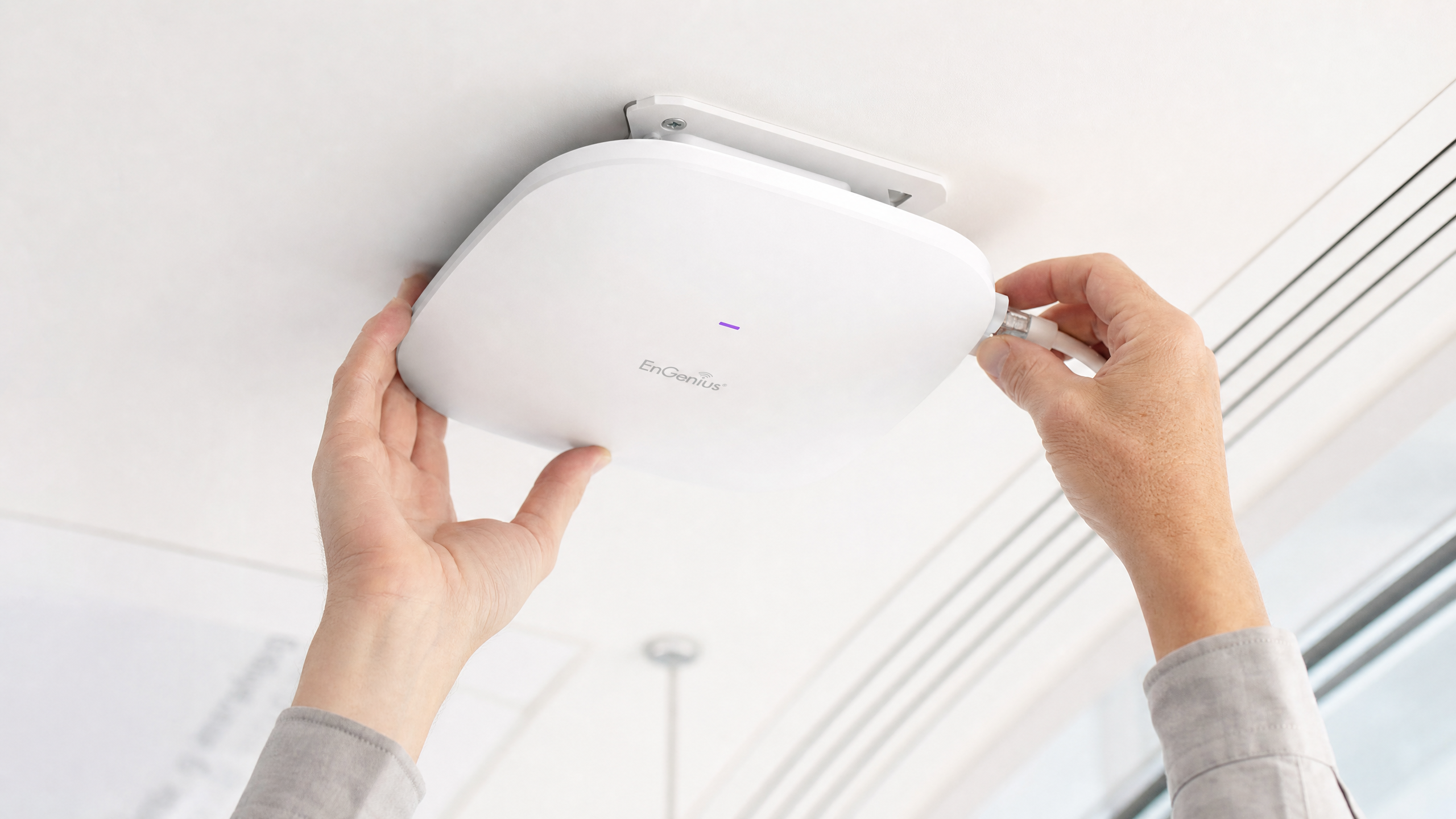
Résumé Exécutif
Pour les sites d'entreprise — des stades à haute densité aux vastes espaces de vente au détail — la décision de déployer un WiFi repeater ou un WiFi extender (point d'accès) est un choix d'infrastructure critique. Bien que souvent utilisés de manière interchangeable sur les marchés grand public, ces technologies représentent des architectures réseau fondamentalement différentes. Un WiFi repeater capture et rediffuse un signal existant, divisant intrinsèquement le débit par deux. En revanche, un WiFi extender, fonctionnant comme un point d'accès filaire, fournit une connexion dédiée au réseau central, garantissant une livraison de bande passante complète. Ce guide offre une analyse technique approfondie des deux architectures, fournissant aux leaders informatiques les cadres nécessaires pour optimiser le déploiement, maintenir la conformité (telle que PCI DSS et GDPR) et maximiser le ROI grâce à une connectivité robuste.
Analyse Technique Approfondie : Architecture et Normes
Comprendre les couches physiques et logiques de ces appareils est essentiel pour la conception de réseaux d'entreprise.
L'architecture du WiFi Repeater
Un WiFi repeater fonctionne entièrement sans fil. Il contient deux radios sans fil (ou parfois une seule, fonctionnant en mode semi-duplex). Il se connecte au routeur principal via WiFi et diffuse simultanément vers les appareils clients.
Parce qu'il doit utiliser la même radio pour recevoir les données du routeur et les transmettre au client, la bande passante disponible est effectivement divisée par deux. C'est ce qu'on appelle la pénalité semi-duplex. Dans les environnements à haute densité, cette dégradation de la latence et du débit est inacceptable.
L'architecture du WiFi Extender (Point d'Accès)
Un véritable WiFi extender d'entreprise est un point d'accès (AP). Il se connecte au réseau central via un câble Ethernet physique (Cat6 ou supérieur), utilisant souvent le Power over Ethernet (PoE) pour un déploiement simplifié.
En utilisant une liaison dorsale filaire, l'AP dédie toute sa capacité sans fil au service des appareils clients. Cette architecture prend en charge un débit élevé, une itinérance transparente (utilisant des normes comme IEEE 802.11r/k/v) et des protocoles de sécurité robustes comme WPA3-Enterprise et l'authentification 802.1X.
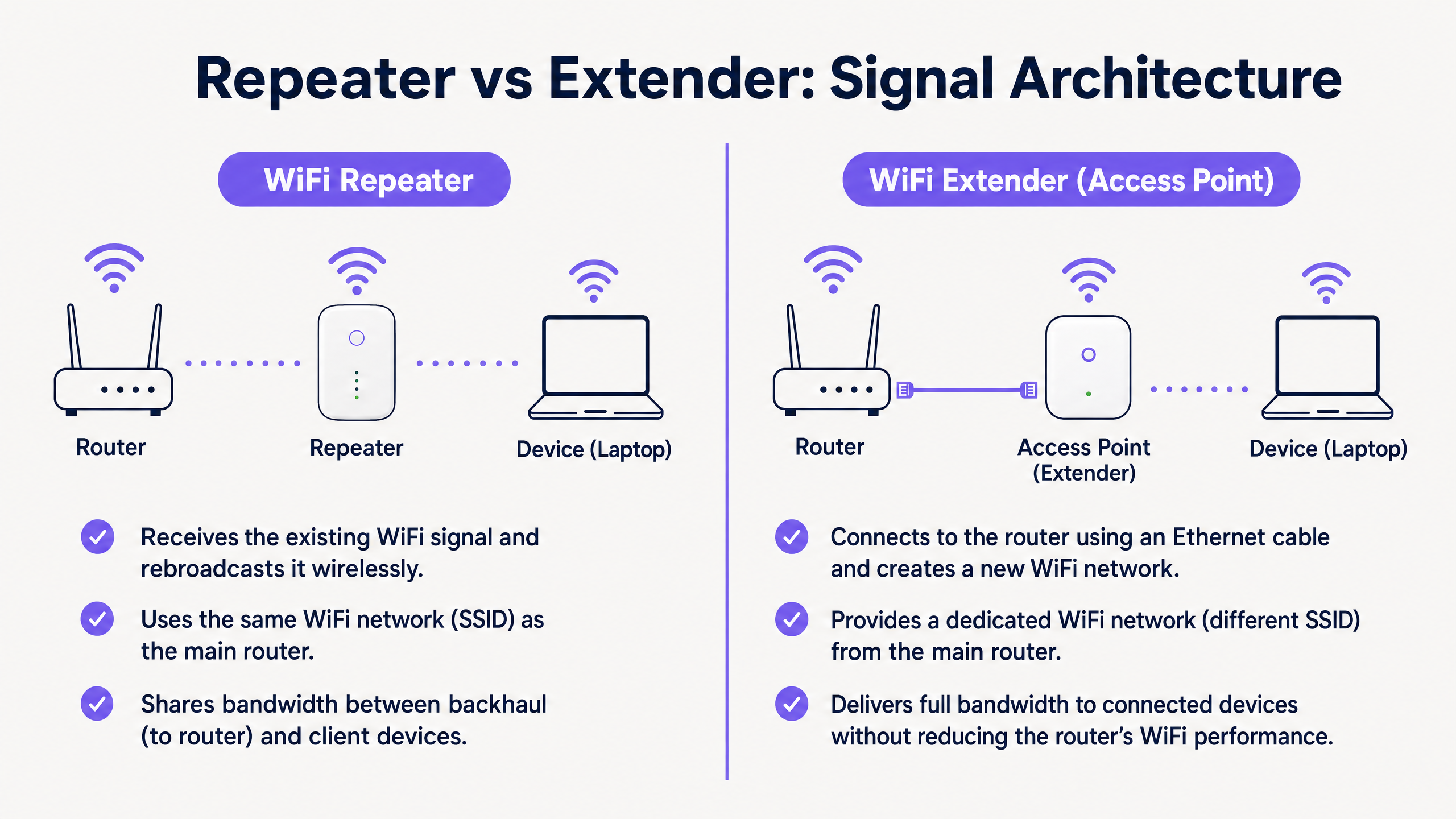
Principales différences en un coup d'œil
| Caractéristique | WiFi Repeater | WiFi Extender (Point d'Accès) |
|---|---|---|
| Liaison dorsale | Sans fil | Filaire (Ethernet) |
| Débit | Divisé par deux (Semi-duplex) | Capacité totale |
| SSID | Généralement le même que le principal | Peut être identique ou distinct |
| Latence | Élevée | Faible |
| Adéquation pour l'entreprise | Temporaire/Faible densité uniquement | Permanent/Haute densité |
Guide d'implémentation
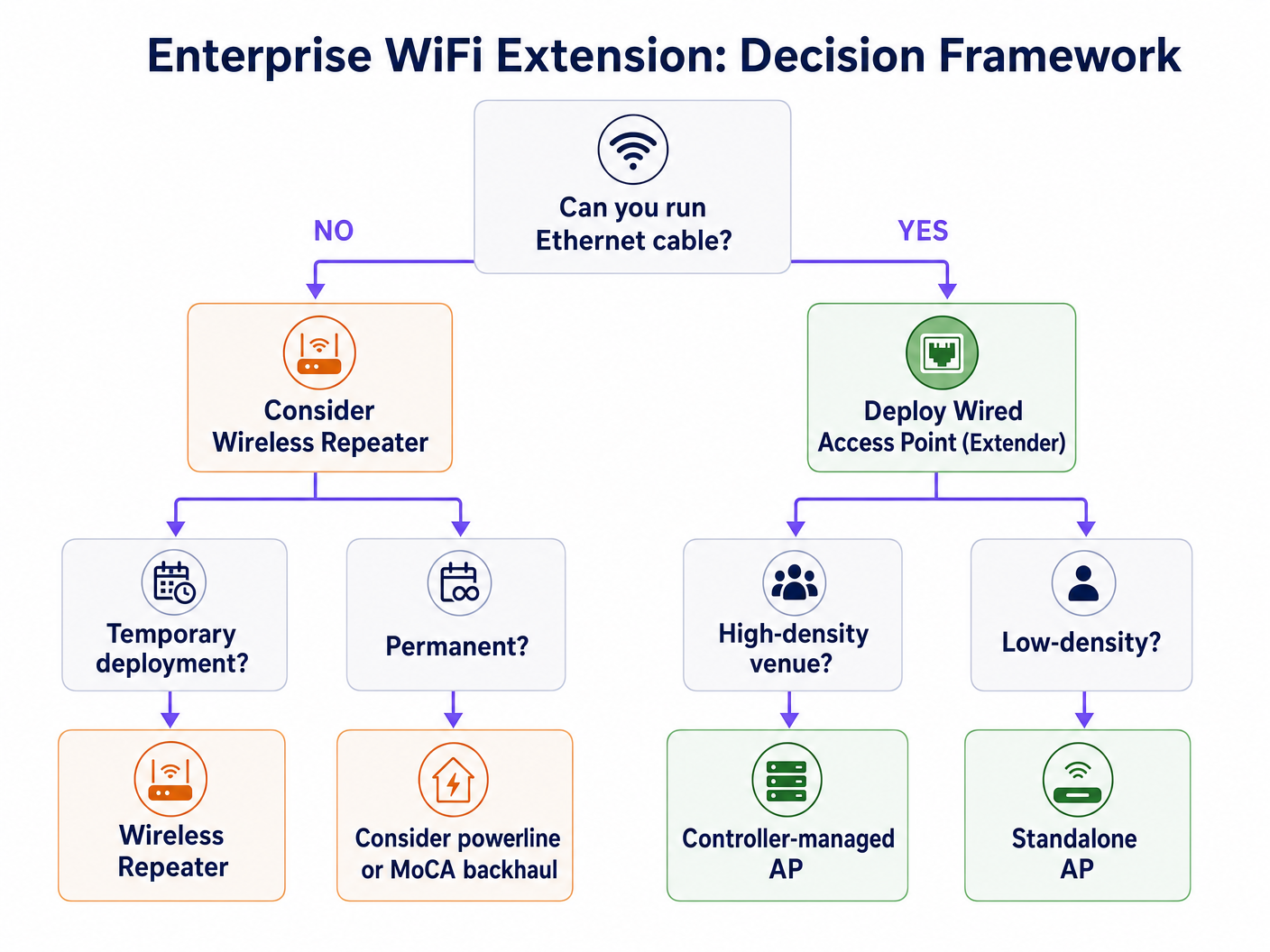
Lors de la conception du réseau pour un site commercial, l'environnement physique dicte le choix du matériel.
Scénario 1 : Le stade à haute densité
Dans un stade, des milliers de connexions simultanées exigent un débit maximal. Le déploiement de repeaters ici entraînerait un effondrement immédiat du réseau en raison des interférences de co-canal et de la pénalité semi-duplex.
Recommandation : Déployez des points d'accès filaires (Extenders) dans une configuration à haute densité. Utilisez des antennes directionnelles et assurez une liaison dorsale filaire robuste. Cette infrastructure est essentielle pour prendre en charge les WiFi Analytics avancés et les services basés sur la localisation.
Scénario 2 : L'hôtel historique
Dans un hôtel classé où l'installation de nouveaux câbles Ethernet est physiquement impossible ou légalement restreinte, le déploiement traditionnel d'AP est difficile.
Recommandation : Bien qu'un repeater sans fil puisse sembler attrayant, il est souvent insuffisant pour les attentes des clients. Envisagez des systèmes maillés avancés avec des bandes de liaison dorsale sans fil dédiées, ou l'exploitation de l'infrastructure coaxiale existante (MoCA) pour fournir une liaison dorsale filaire aux AP locaux. Si vous devez utiliser des repeaters, assurez-vous qu'ils sont stratégiquement placés à la limite de l'empreinte du signal primaire, et non dans des zones mortes. En savoir plus sur Comment améliorer la satisfaction des clients : Le guide ultime .
Bonnes pratiques et intégration
Quel que soit le matériel choisi, la plateforme de gestion superposée est l'endroit où la valeur commerciale est réalisée.
- Gestion indépendante du matériel : Assurez-vous que vos solutions d'analyse et de Captive Portal sont indépendantes du matériel. La plateforme de Purple s'intègre parfaitement avec les principaux fournisseurs (Cisco, Aruba, Meraki), vous permettant de combiner APs et repeaters selon les exigences de l'environnement physique sans perdre en visibilité.
- Authentification transparente : Mettez en œuvre des mécanismes d'authentification robustes. L'authentification basée sur le profil, telle qu'OpenRoaming (où Purple agit comme un fournisseur d'identité gratuit sous la licence Connect), offre un accès sécurisé et sans friction aux utilisateurs tout en garantissant une sécurité de niveau entreprise. En savoir plus sur How a wi fi assistant Enables Passwordless Access in 2026 .
- Ségrégation des données : Pour les environnements Retail et Hospitality , séparez strictement le trafic Guest WiFi du trafic opérationnel (par exemple, les systèmes PoS) à l'aide de VLANs pour maintenir la conformité PCI DSS.
Dépannage et atténuation des risques
- Le problème du "client collant" : Les appareils s'accrochent souvent à un signal faible d'un AP distant plutôt que de se connecter à un plus proche. Assurez-vous que votre infrastructure prend en charge le 802.11k/v pour gérer activement l'itinérance des clients.
- Interférence de co-canal : Les repeaters diffusant sur le même canal que le routeur principal augmentent le bruit. Une planification minutieuse des canaux est essentielle.
- Vulnérabilités de sécurité : Les repeaters manquent souvent de fonctionnalités de niveau entreprise-gdes fonctionnalités de sécurité de pointe. Assurez-vous que tous les appareils prennent en charge le WPA3 et peuvent s'intégrer à votre serveur RADIUS central.
ROI et impact commercial
Investir dans la bonne infrastructure a un impact direct sur les résultats financiers. Un réseau de points d'accès filaire robuste permet des analyses de localisation avancées. Comprendre les Heatmapping vs Presence Analytics : Différences techniques permet aux lieux d'optimiser l'aménagement des espaces et le déploiement du personnel. De plus, une connexion stable est une condition préalable à la monétisation du réseau via les médias de détail et l'engagement ciblé.
Définitions clés
Half-Duplex
A communication mode where data can flow in both directions, but only one direction at a time.
This is the primary technical limitation of standard WiFi repeaters, resulting in halved throughput.
Backhaul
The connection between the access point/repeater and the core network router.
A wired backhaul (Ethernet) provides full capacity, while a wireless backhaul shares the radio spectrum with client devices.
SSID (Service Set Identifier)
The public name of a wireless network.
Repeaters often clone the primary SSID, while extenders can broadcast the same or a distinct SSID depending on the roaming configuration.
802.11r/k/v
A set of IEEE standards that facilitate fast and seamless roaming of client devices between different access points.
Essential for enterprise environments to prevent the 'sticky client' problem where devices cling to a weak signal.
PoE (Power over Ethernet)
A technology that allows network cables to carry electrical power.
Crucial for deploying wired access points in ceilings or high walls without requiring a separate electrical outlet.
RSSI (Received Signal Strength Indicator)
A measurement of the power present in a received radio signal.
Critical data point used by platforms like Purple for location analytics and heatmapping.
VLAN (Virtual Local Area Network)
A logical subnetwork that groups a collection of devices on a single physical LAN.
Mandatory for segregating guest traffic from operational traffic to maintain security and compliance (e.g., PCI DSS).
Mesh Network
A network topology where nodes connect directly, dynamically and non-hierarchically to as many other nodes as possible.
An advanced alternative to simple repeaters, often utilizing a dedicated radio band for the wireless backhaul to maintain throughput.
Exemples concrets
A 200-room heritage hotel needs to provide seamless WiFi coverage. Running new Ethernet cables to the guest rooms is prohibited due to the building's listed status. The current setup uses standard wireless repeaters in the hallways, resulting in poor speeds and frequent disconnects.
- Conduct a comprehensive RF site survey to identify existing signal propagation and dead zones.
- Abandon the standard wireless repeaters, as the half-duplex penalty is exacerbating the poor performance.
- Implement a managed mesh WiFi system that utilizes a dedicated, discrete 5GHz or 6GHz radio exclusively for wireless backhaul between nodes.
- Where possible, leverage existing coaxial cabling (using MoCA adapters) to provide a wired backhaul to strategic access points without drilling new holes.
- Configure the network to support 802.11r/k/v for seamless client roaming between nodes.
A large retail chain is deploying a new Guest WiFi network across 50 locations to support an indoor mapping and location-based marketing initiative. The IT director is considering using high-end wireless repeaters to save on cabling costs.
- Reject the use of wireless repeaters for this deployment.
- Specify the installation of enterprise-grade, wired Access Points (Extenders) with PoE (Power over Ethernet).
- Ensure AP placement is optimized for location analytics, not just coverage, requiring a higher density of APs.
- Integrate the hardware with a hardware-agnostic analytics platform (like Purple) to normalize the location data across all 50 sites.
- Implement strict VLAN segregation between the Guest WiFi and the PoS/operational network.
Questions d'entraînement
Q1. Your organisation is deploying a temporary pop-up retail store in a leased space for three weeks. The landlord provides a primary router in the back office, but the signal does not reach the point-of-sale terminals at the front. Running cables is prohibited. What is the most appropriate hardware solution?
Conseil : Consider the duration of the deployment and the physical constraints.
Voir la réponse type
In this specific, temporary scenario with physical constraints, a high-quality wireless repeater or a simple mesh system is appropriate. While a wired AP is always preferred for throughput, the temporary nature and cabling restrictions make a wireless solution the pragmatic choice, provided the PoS systems do not require massive bandwidth.
Q2. A hospital IT director needs to ensure seamless roaming for mobile medical carts (WoWs) moving between wards. The current infrastructure uses a mix of older routers configured as repeaters. Staff complain of dropped connections when moving. What architectural change is required?
Conseil : Focus on the 'sticky client' problem and backhaul architecture.
Voir la réponse type
The hospital must rip and replace the repeater infrastructure. They need to deploy enterprise-grade wired Access Points (Extenders) with a unified controller. Crucially, the new system must support IEEE 802.11r/k/v to actively manage client hand-offs between APs, eliminating the dropped connections experienced with the disjointed repeater setup.
Q3. You are tasked with implementing Purple's location analytics in a large shopping centre. The centre management wants to use cheaper wireless repeaters to expand coverage to the car park. Why should you advise against this?
Conseil : Consider how location analytics platforms calculate device position.
Voir la réponse type
You must advise against repeaters because they obscure accurate RSSI (Received Signal Strength Indicator) data. When a device connects to a repeater, the core network often sees the MAC address and signal strength of the repeater, not the client device. This renders precise location tracking and heatmapping impossible. Wired APs are mandatory for accurate analytics.