
WiFi nei negozi retail: Costruire profili cliente dai dati di affluenza
Questa guida autorevole descrive in dettaglio come i team IT del settore retail enterprise possano trasformare l'infrastruttura WiFi esistente in un solido motore di raccolta dati di prima parte. Copre l'architettura tecnica, gli standard di conformità e le strategie di implementazione pratiche per creare profili cliente partendo dalle analisi di affluenza.
Video overview
Ascolta questa guida
Visualizza trascrizione del podcast
Parte della nostra serie principale: Guida alla WiFi Analytics →

Executive Summary
Per le moderne attività di vendita al dettaglio, l'ambiente del negozio fisico rimane un punto di contatto fondamentale, ma spesso è privo delle analisi dettagliate tipiche dell'e-commerce. Questa guida fornisce un framework tecnico completo per trasformare l'infrastruttura wireless standard in un motore di analisi di livello enterprise. Sfruttando le connessioni guest WiFi autenticate, i responsabili IT e i direttori operativi dei punti vendita possono raccogliere passivamente dati di prima parte ad alta precisione - inclusi la frequenza delle visite, il tempo di permanenza e l'analisi dei percorsi.
L'implementazione della WiFi analytics trasforma la rete da puro centro di costo a risorsa aziendale strategica. Questo documento descrive in dettaglio l'architettura tecnica essenziale, il passaggio dal rilevamento passivo dei MAC alle sessioni autenticate e i severi standard di conformità (GDPR, PCI-DSS, WPA3) richiesti per un'implementazione sicura negli ambienti retail e hospitality.
Approfondimento Tecnico
Metodologia di Raccolta Dati
Quando il dispositivo di un cliente entra in uno spazio di vendita, trasmette richieste di probe contenenti il proprio indirizzo Media Access Control (MAC). In passato, ciò consentiva il tracciamento passivo. Tuttavia, i moderni sistemi operativi implementano la randomizzazione degli indirizzi MAC per proteggere la privacy dell'utente. Per superare questa limitazione e garantire un'elevata precisione dei dati, le implementazioni enterprise devono affidarsi a connessioni autenticate.
Quando un utente si connette tramite un Captive Portal, il sistema acquisisce un'identità verificata e acconsentita. Questa identità viene mappata su un identificatore di dispositivo persistente, costituendo la base di una profilazione clienti affidabile.
Flussi di Dati Chiave
- Frequenza delle Visite: Tracciando gli eventi di riconnessione, il sistema crea un profilo a lungo termine della fidelizzazione del cliente.
- Tempo di Permanenza: La misurazione della durata delle sessioni attive fornisce informazioni sul coinvolgimento dei clienti e si correla fortemente con la probabilità di conversione.
- Analisi dei Percorsi: La mappatura del percorso fisico del cliente all'interno del negozio è abilitata tramite la trilaterazione su più access point (AP).
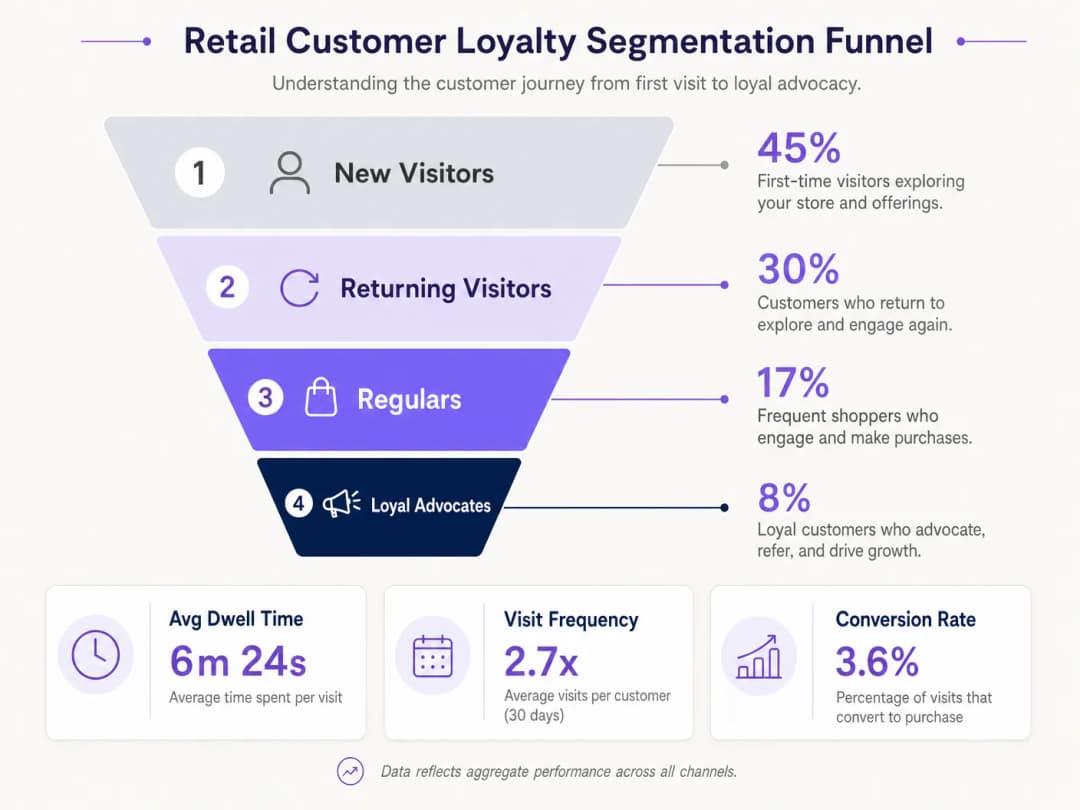
- Segmentazione della Fedeltà: L'aggregazione di frequenza e tempo di permanenza consente una segmentazione automatizzata (ad es. nuovi visitatori rispetto ai clienti più fedeli).
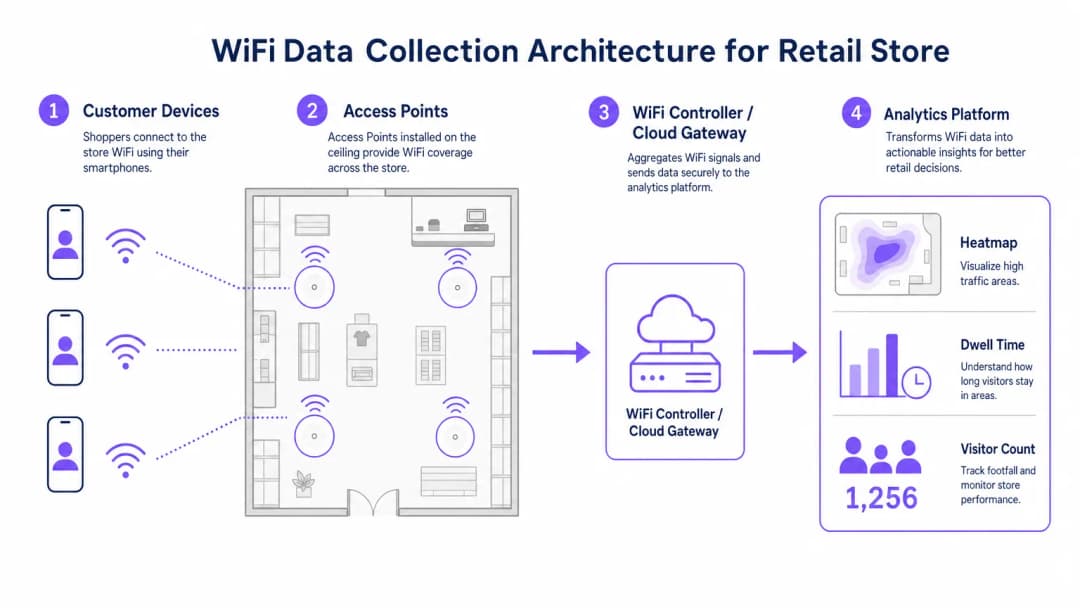
Architettura Enterprise
Un'implementazione affidabile di WiFi analytics per il retail comprende quattro livelli principali:
- Infrastruttura a Radiofrequenza: Le implementazioni ad alta densità richiedono access point 802.11ac Wave 2 o 802.11ax (WiFi 6). La raccomandazione standard è un AP ogni 150-200 metri quadrati, con adeguamenti per le zone ad alto traffico.
- Controller/Cloud Management Plane: Aggrega la telemetria dal livello RF e gestisce il roaming dei client.
- Analytics Platform: Acquisisce la telemetria di rete grezza (eventi di associazione, intensità del segnale) e la trasforma in informazioni strategiche e fruibili.
- Engagement Layer: Si integra con i sistemi CRM tramite API o webhook per attivare flussi di lavoro di marketing automatizzati basati su dati spaziali in tempo reale.
Ascolta il nostro briefing tecnico completo sulla distribuzione di queste architetture:
Hai domande sulla tua configurazione specifica?
Il nostro team collabora con gestori di sedi, responsabili IT e ingegneri di rete in 80.000 sedi. Prenota una chiamata di 20 minuti e ti mostreremo come altri professionisti come te hanno risolto il problema.
Guida all'implementazione
Un'implementazione di successo richiede l'allineamento tra l'ingegneria di rete e le operazioni aziendali.
- Ottimizzare il flusso di autenticazione: Implementa un Captive Portal fluido. Riduci al minimo i campi di inserimento per massimizzare i tassi di adesione, garantendo al contempo la presenza di chiari meccanismi di consenso. Considera l'integrazione delle credenziali dei programmi fedeltà esistenti.
- Progettare per la triangolazione: I design di copertura standard non sono sufficienti per l'analisi dei percorsi. Per consentire una trilaterazione accurata, assicuratevi che almeno tre access point forniscano una copertura sovrapposta nelle zone di tracciamento chiave.
- Definire i Key Performance Indicators (KPI): Stabilisci le metriche di base prima del lancio. I KPI comuni includono il tempo medio di permanenza per zona, il rapporto tra visitatori nuovi e di ritorno e le ore di picco di affluenza.
Best Practice
- Standardizzare l'hardware: Per semplificare la normalizzazione dei dati a livello di analytics, assicurate l'uso di hardware AP coerente in tutti i siti per mantenere una telemetria del segnale uniforme.
- Segregare le reti: Segrega rigorosamente il traffico degli ospiti dalle reti aziendali e dei punti vendita (POS) utilizzando VLAN e SSID dedicati per mantenere la conformità PCI-DSS.
- Automatizzare la conservazione dei dati: Configura la piattaforma di analytics per eliminare automaticamente i dati di sessione non elaborati dopo un periodo definito (ad esempio, 12 mesi) per mitigare i rischi di conformità ai sensi del GDPR.
Per un contesto di implementazione completo in diversi settori, consulta le nostre guide su Hospitality WiFi Solutions: What to Look for in a Provider e WiFi in Auto: The Complete 2026 Enterprise Guide.
Risoluzione dei problemi e mitigazione dei rischi
| Tipo di errore | Sintomi | Strategia di mitigazione |
|---|---|---|
| Scarsa precisione di triangolazione | I dati sulla posizione saltano in modo erratico sulla planimetria. | Esegui un'indagine predittiva del sito RF; aumenta la densità degli AP nelle zone critiche; assicurati che gli AP siano montati a un'altezza uniforme. |
| Bassi tassi di autenticazione | Elevata affluenza passiva ma basso numero di utenti registrati. | Semplifica l'interfaccia utente del Captive Portal; fornisci opzioni di accesso social; assicurati che la splash page sia completamente reattiva. |
| Silos di dati | I dati di analytics non raggiungono il CRM. | Verifica la connettività degli endpoint API; controlla i log di invio dei webhook; assicurati che i formati dei payload di dati corrispondano ai requisiti dello schema del CRM. |
ROI e impatto aziendale
La transizione a un'implementazione WiFi basata sugli analytics produce risultati aziendali misurabili. I retailer segnalano costantemente:
- Tassi di conversione aumentati: Direttamente correlati a strategie di engagement mirate basate sul tempo di permanenza.
- Layout dei negozi ottimizzati: Decisioni basate sui dati sul posizionamento dei prodotti derivate dall'analisi dei percorsi.
- Migliore fidelizzazione dei clienti: Campagne di re-engagement automatizzate attivate dal superamento di determinate soglie di assenza dei visitatori.
Colmando il divario tra operazioni fisiche e digital intelligence, l'analisi del WiFi aziendale offre un vantaggio competitivo definitivo nel moderno panorama del retail.
Definizioni chiave
Randomizzazione dell'indirizzo MAC
Una funzionalità di privacy presente nei moderni sistemi operativi che trasmette un indirizzo MAC fittizio durante la ricerca delle reti, impedendo il tracciamento passivo.
Costringe i team IT a fare affidamento su connessioni autenticate piuttosto che sul tracciamento passivo per ottenere analisi di affluenza precise.
Trilaterazione
Il processo di determinazione delle posizioni assolute o relative di punti tramite la misurazione delle distanze, utilizzando la geometria di cerchi, sfere o triangoli.
Utilizzata dalla piattaforma di analytics per calcolare la posizione fisica di un dispositivo in base alla potenza del segnale ricevuto da più AP.
Captive Portal
Una pagina web che l'utente di una rete ad accesso pubblico è obbligato a visualizzare e con cui deve interagire prima che venga concesso l'accesso.
Il meccanismo principale per acquisire il consenso e l'identità dell'utente al fine di costruire profili di dati di prima parte.
Tempo di permanenza
La durata totale in cui il dispositivo di un cliente rimane continuamente associato alla rete WiFi durante una singola visita.
Una metrica fondamentale per i team di marketing per valutare il coinvolgimento e l'intento dei clienti.
802.11ax (WiFi 6)
L'ultimo standard per le reti wireless, che offre un throughput più elevato, migliori prestazioni in ambienti densi e una maggiore efficienza energetica.
Lo standard hardware consigliato per gli ambienti retail enterprise che richiedono analisi ad alta densità.
PCI-DSS
Payment Card Industry Data Security Standard; un insieme di standard di sicurezza progettati per garantire che tutte le aziende che accettano, elaborano, memorizzano o trasmettono informazioni sulle carte di credito mantengano un ambiente sicuro.
Impone una rigorosa segregazione di rete tra il WiFi per gli ospiti e i sistemi POS (Point of Sale).
VLAN (Virtual Local Area Network)
Una sottorete logica che raggruppa una serie di dispositivi provenienti da LAN fisiche diverse.
Utilizzata per isolare in modo sicuro il traffico WiFi degli ospiti dalle reti aziendali interne.
Dati di prima parte
Informazioni che un'azienda raccoglie direttamente dai propri clienti e che possiede interamente.
Il risultato finale di un'implementazione di successo della WiFi analytics nel retail, di grande valore per il marketing mirato.
Esempi pratici
Una catena retail con 50 punti vendita deve implementare il tracciamento dei flussi per ottimizzare il personale, ma la rete attuale offre solo il rilevamento MAC passivo, generando dati molto imprecisi a causa della randomizzazione MAC.
Implementare un sistema di autenticazione tramite Captive Portal integrato con i controller WiFi esistenti. Configurare il portale in modo da richiedere una semplice registrazione via e-mail o social in cambio dell'accesso WiFi gratuito. Associare l'identità autenticata all'identificatore persistente del dispositivo, superando il problema dei MAC randomizzati. Integrare questo feed di dati tramite API nel sistema centrale di gestione del personale per allineare i turni di lavoro con i picchi di affluenza verificati.
Un grande centro congressi desidera tracciare il flusso dei partecipanti tra i diversi padiglioni espositivi per giustificare prezzi premium per determinati stand dei venditori.
Riprogettare il layout RF specificamente per la geolocalizzazione analitica piuttosto che per la semplice copertura. Installare access point 802.11ax aggiuntivi per garantire la sovrapposizione di almeno tre AP nei principali corridoi di transito, consentendo una trilaterazione accurata. Inviare la telemetria della potenza del segnale alla piattaforma di analytics per generare mappe di calore in tempo reale e report sull'analisi dei percorsi per il team degli eventi.
Domande di esercitazione
Q1. Il vostro team di marketing desidera implementare l'analisi dei percorsi per tracciare i movimenti dei clienti attorno a un nuovo espositore di prodotti. Il negozio dispone attualmente di due access point che forniscono una copertura di segnale adeguata per la connettività. Qual è la raccomandazione tecnica necessaria?
Suggerimento: Considerare i requisiti necessari per il calcolo spaziale.
Visualizza risposta modello
È necessario informare il team di marketing che l'analisi dei percorsi richiede la trilaterazione. Pertanto, è necessario implementare almeno un access point aggiuntivo per garantire che l'area target sia coperta da segnali sovrapposti provenienti da un minimo di tre AP.
Q2. Durante un controllo di sicurezza, si scopre che la rete WiFi per gli ospiti e i terminali POS funzionano sullo stesso switch fisico senza separazione logica. Quali sono il rischio di conformità immediato e la relativa soluzione?
Suggerimento: Pensate agli standard di sicurezza dei pagamenti.
Visualizza risposta modello
Questa configurazione viola i requisiti PCI-DSS. La soluzione immediata consiste nel configurare VLAN separate sullo switch per isolare logicamente il traffico degli ospiti dalla rete POS, garantendo l'impossibilità di movimenti laterali.
Q3. Il direttore delle operazioni nota che mentre il sistema rileva 1.000 visitatori al giorno in base al rilevamento passivo del MAC, il numero di utenti autenticati è solo 150. Come si spiega questa discrepanza?
Suggerimento: Considerate le funzionalità dei moderni sistemi operativi mobili.
Visualizza risposta modello
Spiegate che i moderni smartphone utilizzano la randomizzazione dell'indirizzo MAC durante la ricerca delle reti, il che gonfia artificialmente i conteggi passivi poiché un singolo dispositivo può trasmettere più MAC fittizi. Il conteggio di 150 utenti autenticati rappresenta il dato reale e ad alta fedeltà degli utenti che hanno interagito attivamente con il Captive Portal.
Continua a leggere questa serie
Misurare il ROI aziendale del guest WiFi e della Location analytics
Questa guida tecnica mostra ai team IT e ai gestori delle sedi come misurare il ROI del guest WiFi attraverso un percorso tracciabile che va dallo stato della rete e dai dati raccolti previo consenso fino ai risultati operativi o commerciali convalidati. Distingue le prove misurabili dalle ipotesi, associa Purple Connect, Capture e Engage al corretto livello di misurazione e fornisce scenari di pianificazione per hotel, complessi retail e spazi per eventi.
Privacy by Design: Anonimizzare i Dati WiFi per la Conformità al GDPR
Questa guida autorevole descrive dettagliatamente l'architettura tecnica e le strategie di implementazione per l'anonimizzazione dei dati WiFi al fine di garantire la conformità al GDPR. Fornisce ai responsabili IT e agli architetti di rete framework operativi per bilanciare analisi avanzate delle presenze e rigorosi requisiti di riservatezza dei dati.
Heatmapping vs Analisi delle Presenze: Differenze Tecniche
Questa guida tecnica autorevole illustra in dettaglio le differenze strutturali e operative fondamentali tra l'heatmapping WiFi e l'analisi delle presenze per i gestori di grandi spazi aziendali. Fornisce ai responsabili IT, ai progettisti di rete e ai direttori operativi schemi di implementazione pratici, scenari reali e best practice indipendenti dai fornitori per massimizzare il ROI dall'infrastruttura wireless esistente.
Hai domande sulla tua configurazione specifica?
Il nostro team collabora con gestori di sedi, responsabili IT e ingegneri di rete in 80.000 sedi. Prenota una chiamata di 20 minuti e ti mostreremo come altri professionisti come te hanno risolto il problema.