
WiFi in Retail Stores: Building Customer Profiles From Footfall Data
This authoritative guide details how enterprise retail IT teams can transform existing WiFi infrastructure into a robust first-party data collection engine. It covers technical architecture, compliance standards, and actionable deployment strategies for building customer profiles from footfall analytics.
Video overview
Listen to this guide
View podcast transcript
Part of our core series: WiFi Analytics Guide →

Executive Summary
For modern retail operations, the physical store environment remains a critical touchpoint, yet it often lacks the detailed analytics of e-commerce. This guide provides a comprehensive technical framework for transforming standard wireless infrastructure into an enterprise-grade analytics engine. By leveraging authenticated guest WiFi connections, IT leaders and venue operations directors can passively collect high-accuracy first-party data - including visit frequency, dwell time, and path analysis.
Deploying WiFi analytics transforms the network from purely a cost center into a strategic business asset. This document details the essential technical architecture, the transition from passive MAC detection to authenticated sessions, and the critical compliance standards (CCPA/CPRA, PCI-DSS, WPA3) required for secure implementation in retail and hospitality environments.
Technical Deep Dive
Data Collection Methodology
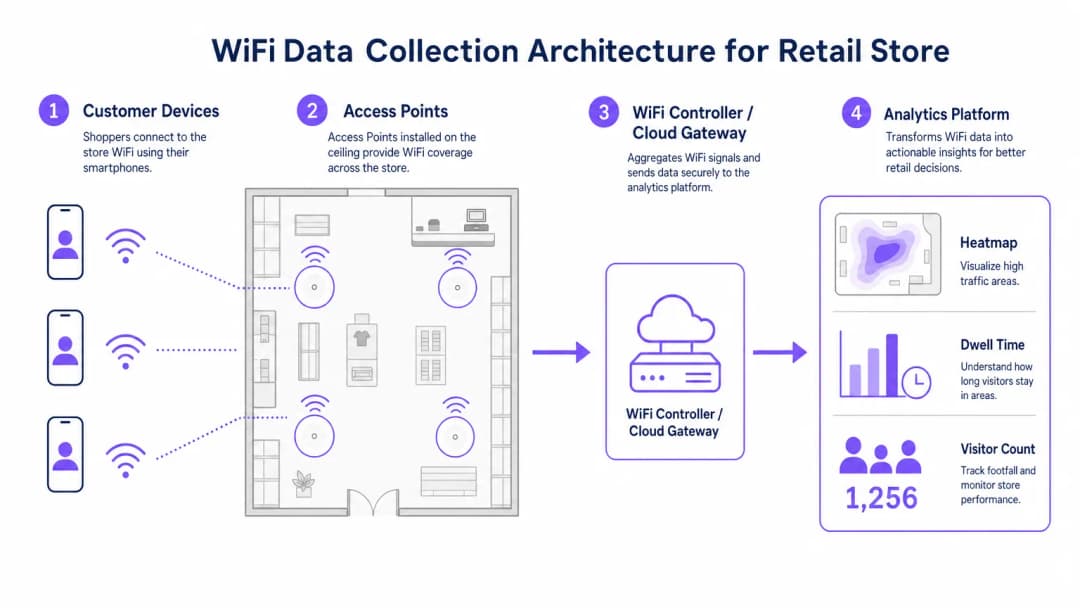
When a customer's device enters a retail space, it broadcasts probe requests containing its Media Access Control (MAC) address. Historically, this allowed for passive tracking. However, modern operating systems implement MAC address randomization to protect user privacy. To overcome this limitation and ensure high data accuracy, enterprise deployments must rely on authenticated connections.
When a user connects via a Captive Portal, the system captures a verified, consented identity. This identity is mapped to a persistent device identifier, forming the foundation of robust customer profiling.
Key Data Streams
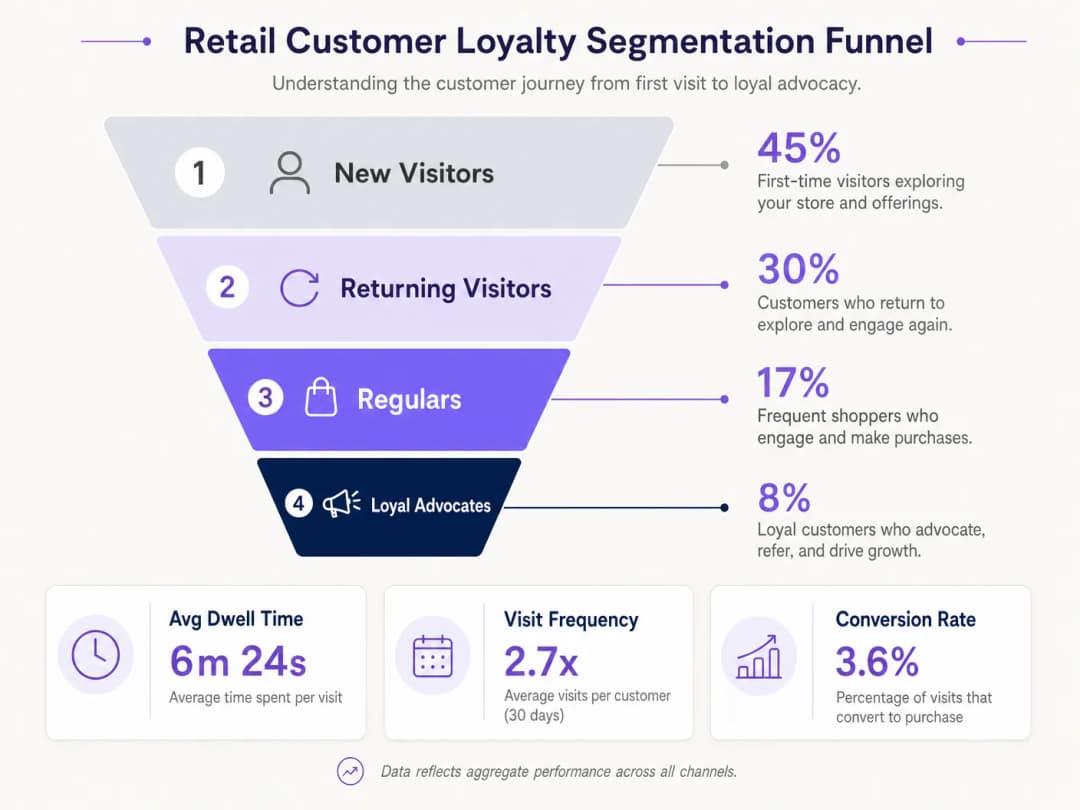
- Visit Frequency: By tracking reconnection events, the system builds a long-term profile of customer loyalty.
- Dwell Time: Measuring the duration of active sessions provides insights into customer engagement and strongly correlates with conversion probability.
- Path Analysis: Mapping the physical customer journey through the store is enabled using trilateration across multiple access points (APs).
- Loyalty Segmentation: Aggregating frequency and dwell time allows for automated segmentation (e.g. new visitors versus loyal advocates).
Enterprise Architecture
A robust retail WiFi analytics deployment comprises four primary layers:
- Radio Frequency Infrastructure: High-density deployments require 802.11ac Wave 2 or 802.11ax (WiFi 6) access points. The standard recommendation is one AP per 1,500 - 2,000 square feet, adjusted for high-traffic zones.
- Controller/Cloud Management Plane: Aggregates telemetry from the RF layer and manages client roaming.
- Analytics Platform: Ingests raw network telemetry (association events, signal strength) and transforms it into actionable intelligence.
- Engagement Layer: Integrates with CRM systems via APIs or webhooks to trigger automated marketing workflows based on real-time spatial data.
Listen to our full technical briefing on deploying these architectures:
Got questions about your specific setup?
Our team works with venue operators, IT managers, and network engineers across 80,000 venues. Book a 20-minute call and we will show you how others like you solved it.
Implementation Guide
Successful deployment requires alignment between network engineering and business operations.
- Optimize the Authentication Flow: Implement a seamless Captive Portal. Minimize input fields to maximize opt-in rates while ensuring clear consent mechanisms are in place. Consider integrating existing loyalty program credentials.
- Design for Triangulation: Standard coverage designs are insufficient for path analysis. To enable accurate trilateration, ensure that at least three access points provide overlapping coverage in key tracking zones.
- Define Key Performance Indicators (KPIs): Establish baseline metrics prior to launch. Common KPIs include average dwell time by zone, ratio of new versus returning visitors, and peak footfall hours.
Best Practices
- Standardize Hardware: To simplify data normalization at the analytics layer, ensure consistent AP hardware across all locations to maintain uniform signal telemetry.
- Segregate Networks: Strictly segregate guest traffic from corporate and point-of-sale (POS) networks using dedicated VLANs and SSIDs to maintain PCI-DSS compliance.
- Automate Data Retention: Configure the analytics platform to automatically delete raw session data after a defined period (e.g. 12 months) to mitigate compliance risk under CCPA/CPRA.
For comprehensive implementation context across different sectors, see our guides on Hospitality WiFi Solutions: What to Look for in a Provider and WiFi in Auto: The Complete 2026 Enterprise Guide.
Troubleshooting and Risk Mitigation
| Failure Type | Symptoms | Mitigation Strategy |
|---|---|---|
| Poor Triangulation Accuracy | Location data jumps erratically on the floor plan. | Conduct a predictive RF site survey; increase AP density in critical zones; ensure APs are mounted at a uniform height. |
| Low Authentication Rates | High passive footfall but low registered user count. | Simplify the Captive Portal UI; provide social login options; ensure the splash page is fully responsive. |
| Data Silos | Analytics data is not reaching the CRM. | Verify API endpoint connectivity; check webhook delivery logs; ensure data payload formats match CRM schema requirements. |
ROI and Business Impact
Transitioning to an analytics-driven WiFi deployment yields measurable business outcomes. Retailers consistently report:
- Increased Conversion Rates: Directly correlated with targeted engagement strategies based on dwell time.
- Optimized Store Layouts: Data-driven decisions on product placement derived from path analysis.
- Improved Customer Retention: Automated re-engagement campaigns triggered by missed visitor thresholds.
By bridging the gap between physical operations and digital intelligence, enterprise WiFi analytics delivers a definitive competitive advantage in the modern retail landscape.
Key Definitions
MAC Address Randomization
A privacy feature in modern operating systems that broadcasts a fake MAC address during network probing, preventing passive tracking.
Forces IT teams to rely on authenticated connections rather than passive listening for accurate footfall analytics.
Trilateration
The process of determining absolute or relative locations of points by measurement of distances, using the geometry of circles, spheres or triangles.
Used by the analytics platform to calculate a device's physical location based on signal strength received by multiple APs.
Captive Portal
A web page that the user of a public-access network is obliged to view and interact with before access is granted.
The primary mechanism for capturing user consent and identity to build first-party data profiles.
Dwell Time
The total duration a customer's device remains continuously associated with the WiFi network during a single visit.
A critical metric for marketing teams to gauge customer engagement and intent.
802.11ax (WiFi 6)
The latest standard for wireless networks, offering higher throughput, better performance in dense environments, and improved power efficiency.
The recommended hardware standard for enterprise retail environments requiring high-density analytics.
PCI DSS
Payment Card Industry Data Security Standard; a set of security standards designed to ensure that all companies that accept, process, store or transmit credit card information maintain a secure environment.
Mandates strict network segregation between guest WiFi and point-of-sale systems.
VLAN (Virtual Local Area Network)
A logical subnetwork that groups a collection of devices from different physical LANs.
Used to securely isolate guest WiFi traffic from internal corporate networks.
First-Party Data
Information a company collects directly from its customers and owns entirely.
The ultimate output of a successful retail WiFi analytics deployment, highly valuable for targeted marketing.
Worked Examples
A 50-store retail chain needs to implement footfall tracking to optimize staffing, but their current network only provides passive MAC detection, resulting in highly inaccurate data due to MAC randomization.
Deploy a captive portal authentication system integrated with the existing WiFi controllers. Configure the portal to require a simple email or social login in exchange for free WiFi access. Map the authenticated identity to the device's persistent identifier, bypassing the randomized MAC issue. Integrate this data feed via API into the central workforce management system to align staffing levels with verified peak footfall hours.
A large convention center wants to track attendee flow between different exhibition halls to justify premium pricing for certain vendor booths.
Redesign the RF layout specifically for location analytics rather than just coverage. Deploy additional 802.11ax access points to ensure at least three APs overlap in key transition corridors, enabling accurate trilateration. Feed the signal strength telemetry into the analytics platform to generate real-time heatmaps and path analysis reports for the events team.
Practice Questions
Q1. Your marketing team wants to implement path analysis to track customer movement around a new product display. The store currently has two access points providing adequate signal coverage for connectivity. What is the necessary technical recommendation?
Hint: Consider the requirements for spatial calculation.
View model answer
You must advise the marketing team that path analysis requires trilateration. Therefore, you need to deploy at least one additional access point to ensure the target area is covered by overlapping signals from a minimum of three APs.
Q2. During a security audit, it is discovered that the guest WiFi network and the POS terminals are operating on the same physical switch without logical separation. What is the immediate compliance risk and remediation?
Hint: Think about payment security standards.
View model answer
This configuration violates PCI-DSS requirements. The immediate remediation is to configure separate VLANs on the switch to logically isolate the guest traffic from the POS network, ensuring no lateral movement is possible.
Q3. The operations director notes that while the system reports 1,000 visitors per day based on passive MAC detection, the authenticated user count is only 150. How do you explain this discrepancy?
Hint: Consider modern mobile OS features.
View model answer
Explain that modern smartphones use MAC address randomization when probing for networks, which artificially inflates passive counts as a single device may broadcast multiple fake MACs. The authenticated count of 150 represents the true, high-fidelity data of users who actively engaged with the captive portal.
Continue reading in this series
Measuring the Business ROI of Guest WiFi and Location Analytics
This technical reference shows IT and venue teams how to measure the ROI of guest WiFi with a defensible chain from network health and consented data to validated operational or commercial outcomes. It separates measurable evidence from assumptions, maps Purple Connect, Capture, and Engage to the right measurement layer, and gives planning scenarios for hotels, retail estates, and event venues.
Privacy by Design: Anonymizing WiFi Data for GDPR Compliance
This authoritative guide details the technical architecture and implementation strategies for anonymising WiFi data to ensure GDPR compliance. It provides IT leaders and network architects with actionable frameworks for balancing robust venue analytics with strict data privacy requirements.
Heatmapping vs Presence Analytics: Technical Differences
This authoritative technical guide details the critical architectural and operational differences between WiFi heatmapping and presence analytics for enterprise venue operators. It provides IT leaders, network architects, and operations directors with actionable deployment frameworks, real-world implementation scenarios, and vendor-neutral best practices for extracting maximum ROI from their existing wireless infrastructure.
Got questions about your specific setup?
Our team works with venue operators, IT managers, and network engineers across 80,000 venues. Book a 20-minute call and we will show you how others like you solved it.