

Acesso Seguro para Convidados: Implementando NAC para Dispositivos Não Gerenciados
Este guia de referência técnica e autoritário detalha a arquitetura, implantação e considerações de conformidade para a implementação de Network Access Control (NAC) para proteger dispositivos de convidados não gerenciados. Ele oferece orientação prática para líderes de TI alcançarem acesso seguro para convidados sem comprometer a infraestrutura corporativa.
Listen to this guide
View podcast transcript
Resumo Executivo
Para locais empresariais — seja na hotelaria, varejo ou setor público — fornecer acesso WiFi contínuo a convidados e contratados é uma necessidade comercial. No entanto, dispositivos não gerenciados apresentam uma superfície de ataque significativa. Cada smartphone, tablet e dispositivo IoT que se conecta à sua rede é uma entidade desconhecida, operando fora do controle da sua infraestrutura de Mobile Device Management (MDM). O desafio para os líderes de TI é facilitar esse acesso, ao mesmo tempo em que segmentam rigorosamente esses dispositivos dos ativos corporativos e garantem a conformidade com estruturas como PCI DSS e GDPR.
Este guia oferece um aprofundamento na implementação de Network Access Control (NAC) especificamente para dispositivos não gerenciados. Vamos além das chaves pré-compartilhadas básicas para explorar a segmentação de rede orientada por identidade e imposta por políticas. Ao alavancar captive portals integrados com motores de política baseados em RADIUS, as organizações podem impor posturas de segurança rigorosas sem introduzir atrito inaceitável à experiência do usuário. Abordaremos o design arquitetônico, metodologias de implantação e a integração de plataformas como Guest WiFi para gerenciar identidade e consentimento em escala.
Aprofundamento Técnico: Arquitetura NAC para Dispositivos Não Gerenciados
Network Access Control é a imposição de acesso baseado em políticas a recursos de rede. Embora o 802.1X tradicional com EAP-TLS seja o padrão ouro para dispositivos gerenciados — frequentemente dependendo da implantação de certificados via SCEP (veja The Role of SCEP and NAC in Modern MDM Infrastructure ) — essa abordagem é inviável para convidados transitórios. Dispositivos não gerenciados exigem uma arquitetura que equilibre segurança robusta com um onboarding de baixa fricção.
A Arquitetura de Três Camadas
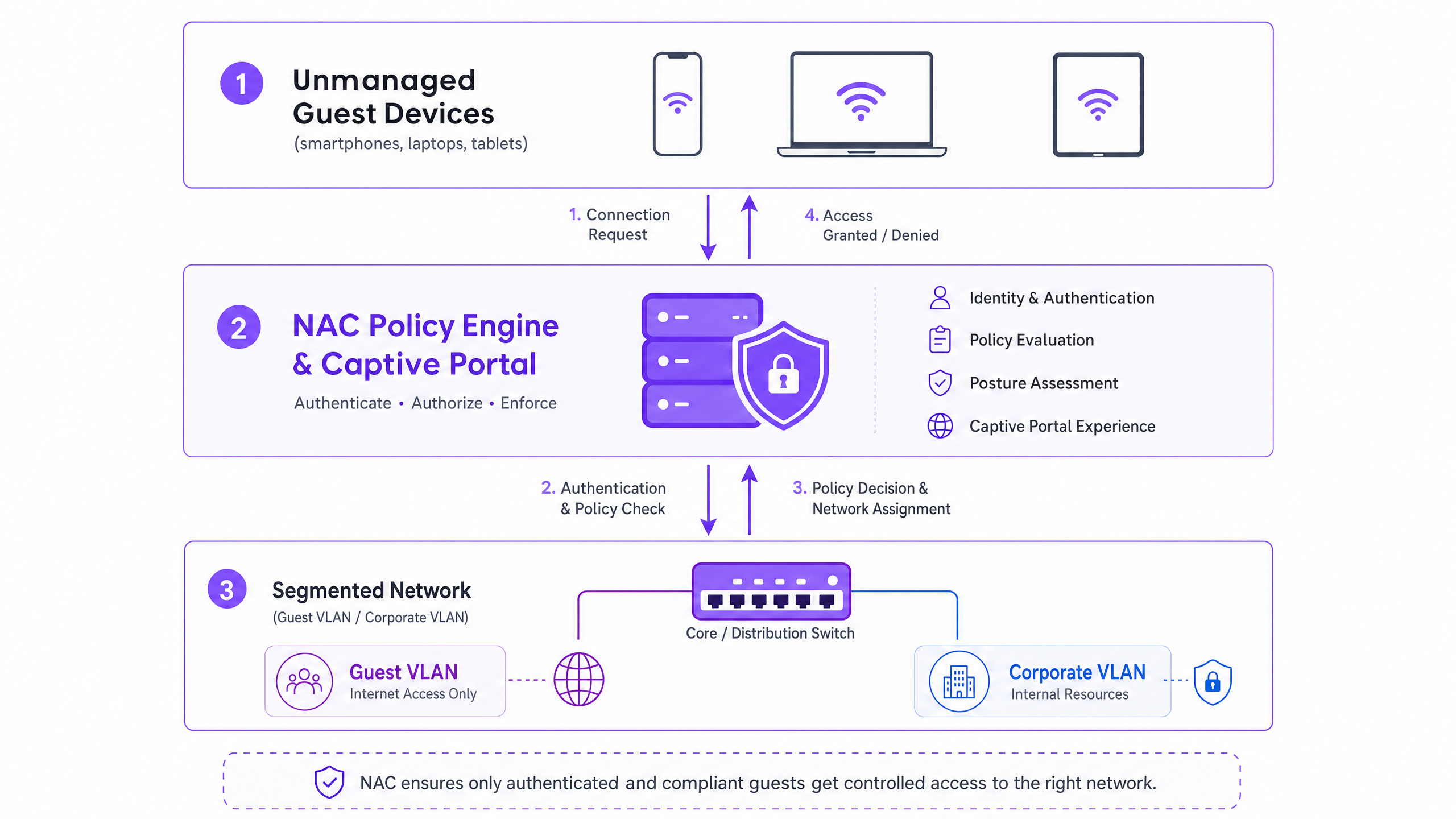
A arquitetura para acesso seguro de convidados compreende três camadas funcionais:
- Autenticação e Captura de Identidade: Como o 802.1X é impraticável para dispositivos não gerenciados, a camada de autenticação depende de um captive portal. Esta interface baseada na web intercepta a requisição HTTP/HTTPS inicial, redirecionando o usuário para um fluxo de autenticação. Aqui, plataformas como o Guest WiFi da Purple operam como o provedor de identidade, capturando credenciais via login social, verificação de e-mail ou SMS.
- Motor de Política (RADIUS/NAC): Uma vez que a identidade é estabelecida, o motor de política avalia a requisição contra as regras de acesso definidas. O sistema determina o segmento de rede apropriado com base na identidade autenticada, tipo de dispositivo ou hora do dia.
- Aplicação na Borda da Rede: Os pontos de acesso sem fio e os switches de borda aplicam a decisão da política. O sistema NAC se comunica via protocolo RADIUS. Após a autenticação bem-sucedida, uma mensagem
Access-Accepté retornada com atributos específicos de atribuição de VLAN, colocando o dispositivo no segmento designado.
WPA3 e Criptografia Sem Fio Oportunista (OWE)
A transição para WPA3 é crítica para a segurança sem fio moderna. Enquanto o WPA3-SAE substitui o vulnerável WPA2-PSK para redes pessoais, o WPA3-OWE (Opportunistic Wireless Encryption) é o padrão para redes públicas de convidados. OWE fornece criptografia de dados individualizada entre o dispositivo cliente e o ponto de acesso sem exigir uma senha. Isso elimina a vulnerabilidade de transmissão em texto claro inerente aos SSIDs de convidados abertos tradicionais, fornecendo uma base segura antes mesmo da aplicação da política NAC.
Randomização de Endereço MAC e Vinculação de Identidade
Sistemas operacionais modernos (iOS 14+, Android 10+, Windows 10) implementam a randomização de endereço MAC para proteger a privacidade do usuário. Os dispositivos geram um endereço MAC único e randomizado para cada SSID ao qual se conectam. Isso quebra fundamentalmente as políticas NAC legadas que dependem do endereço MAC como um identificador persistente para convidados recorrentes.
A solução arquitetônica é mudar o modelo de identidade do dispositivo para o usuário. Quando um convidado se autentica via captive portal, a sessão deve ser vinculada à sua identidade verificada (por exemplo, e-mail ou número de telefone) em vez do endereço MAC efêmero. A plataforma WiFi Analytics da Purple lida com isso nativamente, mantendo perfis de usuário persistentes e registros de conformidade em todas as sessões, independentemente da rotação do endereço MAC.
Guia de Implementação
A implantação de NAC para dispositivos não gerenciados requer uma abordagem sistemática para garantir a segurança sem interromper as operações.
Passo 1: Definir Segmentação de Rede e VLANs
Antes de configurar as políticas NAC, a segmentação de rede subjacente deve ser rigorosa.
- VLAN de Pré-Autenticação (Quarentena): Os dispositivos são colocados aqui na conexão inicial. Esta VLAN deve permitir apenas a resolução de DNS e o tráfego HTTP/HTTPS destinado aos endereços IP do captive portal. Todo o outro tráfego deve ser descartado.
- VLAN de Convidado: Após a autenticação, os dispositivos são movidos para cá. Esta VLAN deve ter acesso direto à internet, mas negar estritamente todo o roteamento para sub-redes corporativas (espaço RFC 1918) e outros clientes convidados (isolamento de cliente).
- VLAN de Contratado/Fornecedor: Um segmento separado para terceiros conhecidos que exigem acesso a recursos internos específicos, controlado por ACLs de firewall granulares.
Passo 2: Implantar e Configurar a Infraestrutura RADIUS
O servidor RADIUS atua como intermediário entre a borda da sua rede e o provedor de identidade. Para implantações empresariais, a integração de um serviço RADIUS hospedado na nuvem com sua plataforma de captive portal reduz a sobrecarga operacional e melhora a redundância. Garanta que os segredos compartilhados do RADIUS sejam criptograficamente fortes e rotacionados de acordo com sua política de segurança.
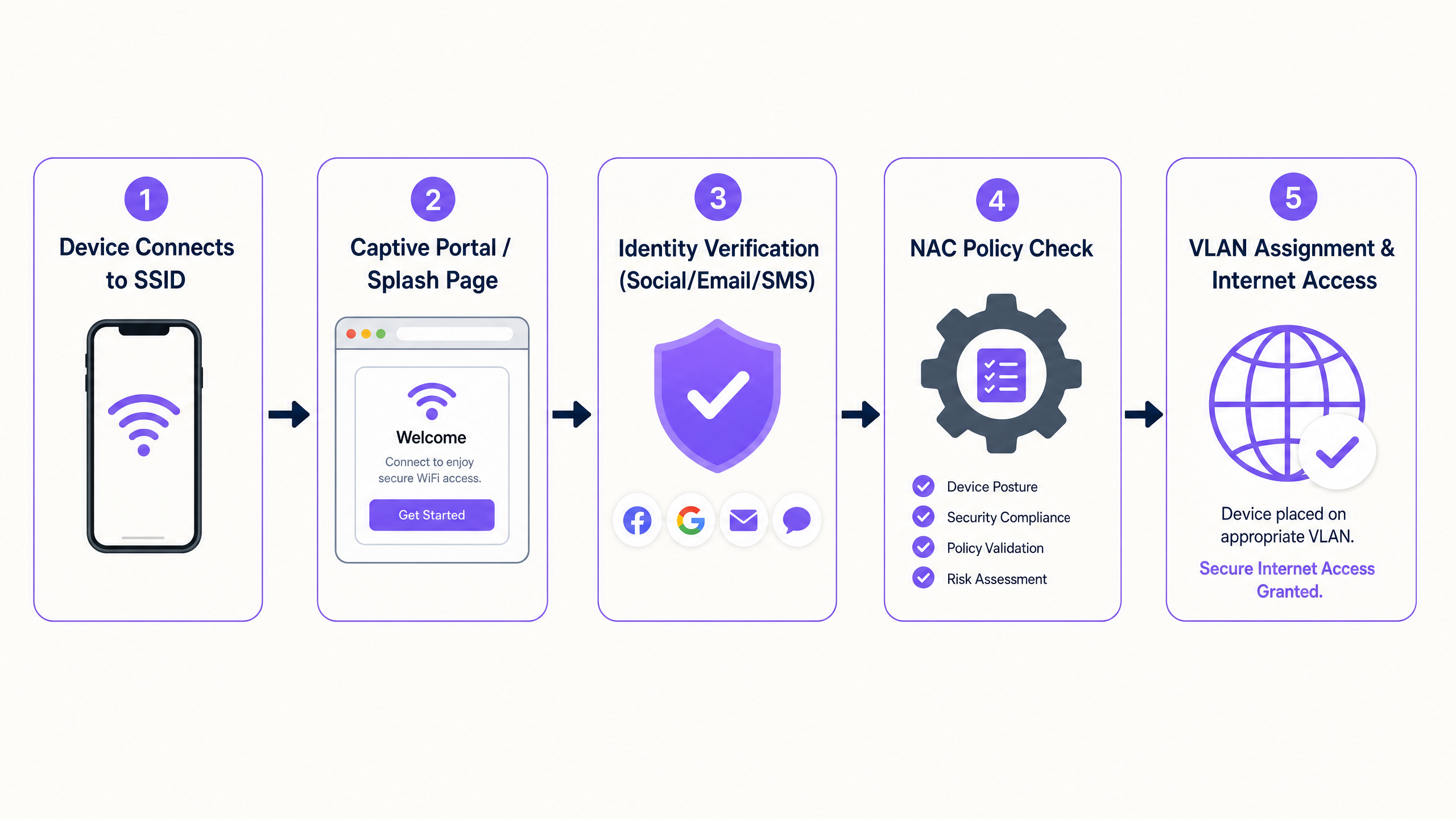
Passo 3: Configure o Captive Portal e o Fluxo de Identidade
Configure o Captive Portal para lidar com o fluxo de autenticação. Isso inclui a configuração do walled garden (a lista de endereços IP e domínios acessíveis antes da autenticação) para garantir que o portal seja carregado corretamente. Crucialmente, o DNS deve funcionar dentro da VLAN de pré-autenticação.
Passo 4: Teste e Validação Ponta a Ponta
Os testes devem validar tanto a experiência do usuário quanto os limites de segurança. Verifique se um dispositivo de teste completa com sucesso o fluxo do Captive Portal e recebe a atribuição de VLAN correta via atributos RADIUS. Mais importante, valide a segmentação: tente fazer ping ou rotear tráfego da VLAN de Convidado para um endereço IP corporativo conhecido. Isso deve falhar.
Melhores Práticas e Conformidade
- Conformidade com PCI DSS: Para estabelecimentos em Varejo e Hotelaria , o PCI DSS exige isolamento rigoroso do Ambiente de Dados do Titular do Cartão (CDE). O WiFi de convidado deve ser física ou logicamente separado do CDE, sem roteamento permitido. O NAC impõe isso na camada de acesso.
- GDPR e Privacidade de Dados: Ao capturar dados de convidados via portal, o consentimento explícito deve ser obtido. O Captive Portal deve apresentar termos de uso e políticas de privacidade claros. A plataforma subjacente deve suportar políticas automatizadas de retenção de dados e solicitações de acesso do titular.
- Gerenciamento de Sessões: Implemente tempos limite de sessão apropriados. Para ambientes de varejo, um tempo limite de 2 a 4 horas é típico. Para hotelaria, alinhe a duração da sessão com a estadia do hóspede. Sempre configure um tempo limite de inatividade (por exemplo, 30 minutos) para limpar sessões inativas e liberar concessões DHCP.
Solução de Problemas e Mitigação de Riscos
- Configuração Incorreta de Split-Tunnel: O risco mais grave é uma regra de firewall mal configurada que permite o tráfego da VLAN de Convidado para a rede corporativa. A auditoria automatizada regular das ACLs do firewall é essencial.
- Falhas na Resolução de DNS: Se os convidados reclamarem que a "página de login não carrega", o problema é quase sempre o DNS. Certifique-se de que o escopo DHCP para a VLAN de pré-autenticação forneça um servidor DNS confiável e que o firewall permita o tráfego DNS (porta UDP 53) para esse servidor.
- Tratamento de Tempo Limite RADIUS (Fail-Closed): Configure os pontos de acesso para "fail-closed" (falha fechada) se o servidor RADIUS se tornar inacessível. As configurações "fail-open" (falha aberta) concedem acesso não autenticado durante uma interrupção, representando um risco de segurança inaceitável.
ROI e Impacto nos Negócios
A implementação de acesso seguro para convidados via NAC oferece valor de negócio mensurável:
- Mitigação de Riscos: Redução quantificável da superfície de ataque, garantindo que dispositivos não gerenciados não possam sondar ativos corporativos.
- Eficiência Operacional: O onboarding automatizado reduz os tickets de helpdesk de TI relacionados ao acesso de convidados.
- Aquisição de Dados: Ao utilizar plataformas como Purple, o processo de onboarding seguro captura simultaneamente dados primários, alimentando a plataforma de WiFi Analytics para impulsionar o ROI de marketing.
Key Definitions
Network Access Control (NAC)
A security framework that enforces policy-based access to network resources, evaluating identity and posture before granting access.
Used to ensure that unmanaged guest devices are properly segmented and authenticated before accessing the network.
Captive Portal
A web page that a user of a public-access network is obliged to view and interact with before access is granted.
The primary authentication mechanism for unmanaged devices that cannot use 802.1X certificates.
RADIUS
Remote Authentication Dial-In User Service; a networking protocol that provides centralized Authentication, Authorization, and Accounting (AAA) management.
The protocol used by the NAC policy engine to communicate VLAN assignments to the wireless access points.
Dynamic VLAN Assignment
The process of assigning a network device to a specific Virtual Local Area Network based on authentication credentials rather than the physical port or SSID.
Allows a single guest SSID to securely serve different types of users (guests, contractors) by placing them on different network segments.
WPA3-OWE
Opportunistic Wireless Encryption; a WiFi standard that provides individualized data encryption for open networks without requiring a password.
Secures the wireless transmission for guest networks, preventing passive eavesdropping on public SSIDs.
MAC Address Randomisation
A privacy feature in modern operating systems where the device generates a temporary MAC address for each wireless network it connects to.
Breaks legacy systems that use MAC addresses to track returning guests, necessitating identity-based authentication.
Walled Garden
A restricted environment that controls the user's access to web content and services prior to full authentication.
Required to allow unauthenticated devices to access the captive portal and necessary identity providers (like Facebook or Google) during the login process.
Client Isolation
A wireless network security feature that prevents devices connected to the same access point from communicating directly with each other.
Essential for guest networks to prevent infected guest devices from spreading malware to other guests.
Worked Examples
A large retail chain is rolling out guest WiFi across 500 stores. They need to ensure PCI compliance for their Point of Sale (POS) systems while allowing guests to connect and authenticate via a captive portal. How should the network be segmented and authenticated?
The implementation requires strict logical separation using VLANs and firewall ACLs. 1. The POS systems are placed on a dedicated, highly restricted Corporate VLAN (e.g., VLAN 10). 2. A Pre-Authentication VLAN (VLAN 20) is created for unauthenticated guests, allowing only DNS and HTTPS traffic to the captive portal domain. 3. A Guest VLAN (VLAN 30) is created for authenticated guests, allowing outbound internet access but explicitly denying all RFC 1918 (internal) IP addresses. The NAC system uses RADIUS to move devices from VLAN 20 to VLAN 30 upon successful portal authentication.
A hospital provides WiFi for patients and visitors but is experiencing issues where returning patients must re-authenticate every day because their smartphones randomize their MAC addresses. How can the IT team provide a seamless experience without compromising security?
The IT team must shift the authentication binding from the MAC address to the user identity. They implement a captive portal integrated with a platform like Purple Guest WiFi. When a patient first connects, they authenticate via SMS or email. The platform creates a persistent user profile. Even when the device generates a new MAC address on subsequent visits, the platform recognizes the user upon re-authentication and seamlessly applies the correct NAC policy without requiring a full re-registration.
Practice Questions
Q1. A hotel IT manager is configuring the pre-authentication VLAN for a new captive portal deployment. Guests are reporting that their devices connect to the WiFi, but the login page never appears. What is the most likely configuration error?
Hint: Consider what network services a device needs before it can load a web page via a domain name.
View model answer
The most likely error is a DNS resolution failure within the pre-authentication VLAN. Before a device can load the captive portal, it must resolve the portal's domain name. The DHCP scope for the pre-authentication VLAN must provide a valid DNS server, and the firewall must allow UDP port 53 traffic to that server prior to authentication.
Q2. You are designing the network policy for a stadium. The requirement is to provide internet access to fans while ensuring that the stadium's ticketing scanners (which connect to the same physical access points) have access to internal servers. How do you achieve this securely?
Hint: How can a single physical infrastructure support different logical networks based on identity?
View model answer
Implement dynamic VLAN assignment using 802.1X for the ticketing scanners and a captive portal for the fans. The ticketing scanners authenticate via certificates (802.1X) and are assigned by the RADIUS server to a secure Operations VLAN. Fans connect to an open (or OWE) SSID, authenticate via the captive portal, and are assigned by RADIUS to an isolated Guest VLAN with internet-only access.
Q3. During a security audit, it is discovered that devices on the Guest WiFi can ping the management IP addresses of the network switches. What specific configuration is missing or misconfigured?
Hint: Think about how traffic is controlled between different network segments.
View model answer
The firewall or Layer 3 switch is missing the necessary Access Control Lists (ACLs) to restrict routing from the Guest VLAN. A rule must be implemented that explicitly denies traffic originating from the Guest VLAN subnet destined for any internal subnets (RFC 1918 space), followed by a rule permitting traffic to the internet (0.0.0.0/0).