
Canais DFS: O que São e Quando Evitá-los
Este guia definitivo analisa as realidades técnicas e operacionais dos canais de Seleção Dinâmica de Frequência (DFS) na banda de 5 GHz. Operadores de locais e equipes de TI aprenderão como avaliar o risco de radar, configurar Verificações de Disponibilidade de Canal (CAC) e implantar planos de contingência robustos para proteger ambientes sem fio de alta densidade contra quedas repentinas de conectividade.
Ouça este guia
Ver transcrição do podcast

Resumo Executivo
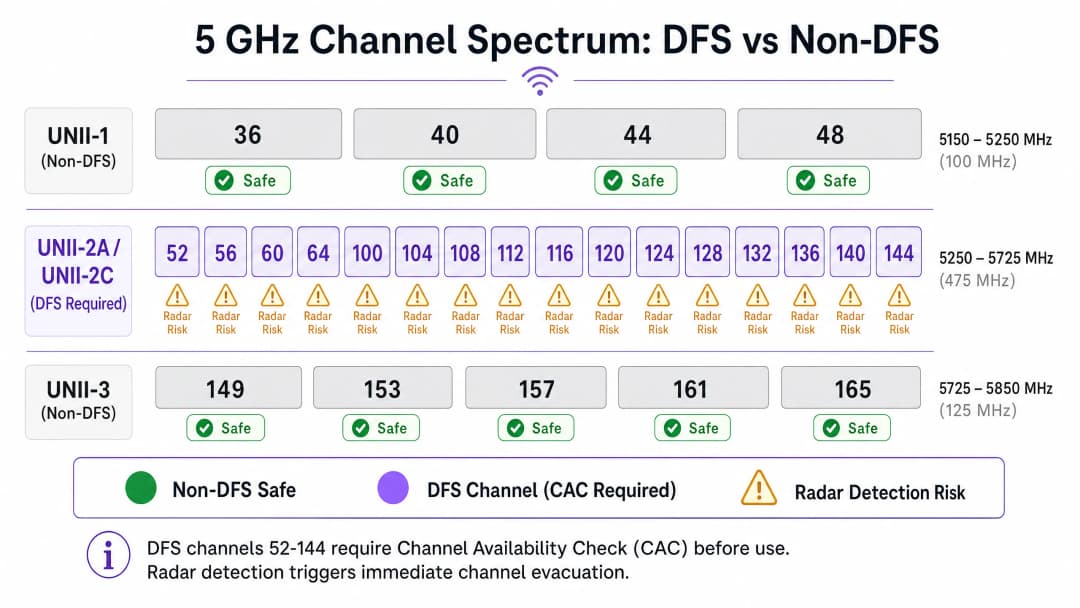
Para gerentes de TI e arquitetos de rede responsáveis por ambientes de alta densidade - como estádios, centros de convenções e grandes implantações de varejo - o espectro é a limitação mais crítica. A banda de 5 GHz oferece uma capacidade significativa, mas liberar todo o seu potencial exige o domínio do Dynamic Frequency Selection (DFS). Os canais DFS (52–144) fornecem um espectro adicional de 475 MHz, essencial para obter alta taxa de transferência em ambientes com alta densidade de clientes. No entanto, esse espectro vem com obrigações regulatórias rígidas projetadas para proteger os usuários primários, como sistemas de radar meteorológicos e militares.
Quando um ponto de acesso operando em um canal DFS detecta radar, as regulamentações (como as aplicadas pelo Ofcom, FCC e ETSI) exigem que ele desocupe o canal imediatamente. Isso força todos os clientes conectados a se desconectarem e se associarem novamente, impactando diretamente a experiência do usuário. Para locais que dependem de Guest WiFi para impulsionar o engajamento, ou ambientes de varejo dependentes de conectividade estável de ponto de venda, essas interrupções repentinas representam um risco operacional inaceitável. Este guia fornece uma estrutura técnica neutra em relação a fornecedores para decidir quando aproveitar os canais DFS e quando evitá-los, garantindo que você maximize a capacidade sem comprometer a confiabilidade.
Aprofundamento Técnico: Como o DFS Funciona
O Dynamic Frequency Selection é definido no padrão IEEE 802.11h. Sua função principal é evitar que as redes WiFi de 5 GHz interfiram nos sistemas de radar existentes. O espectro de 5 GHz é dividido em bandas Unlicensed National Information Infrastructure (UNII). UNII-1 (canais 36–48) e UNII-3 (canais 149–165) são geralmente livres de DFS, fornecendo nove canais de 20 MHz não sobrepostos. Por outro lado, UNII-2A e UNII-2C (canais 52–144) exigem DFS.
O Channel Availability Check (CAC)
Antes que um ponto de acesso (AP) possa transmitir em um canal DFS, ele deve realizar um Channel Availability Check (CAC). Durante esta fase, o AP ouve passivamente os sinais de radar. Ele não pode enviar beacons ou atender clientes.
- CAC Padrão: Para a maioria dos canais DFS, o CAC dura 60 segundos.
- CAC Estendido: Para canais que se sobrepõem ao radar meteorológico (geralmente canais 120, 124 e 128), o CAC se estende para 600 segundos (10 minutos).
Se um radar for detectado durante o CAC, ou em qualquer momento durante a operação, o AP deve executar uma mudança de canal dentro do prazo exigido (geralmente 10 segundos) e não deve retornar a esse canal por pelo menos 30 minutos (o período de não ocupação).
Falsos Positivos e EDFS
The detection algorithms on APs are highly sensitive. While modern enterprise-grade APs leverage Enhanced DFS (EDFS) to better distinguish genuine radar pulses from background RF noise, false positives remain a significant concern. Sources of false positives include poorly shielded microwave ovens, certain FHSS devices, and industrial equipment. Whether the detection is genuine or a false positive, the regulatory response is identical: immediate channel evacuation.
Tem dúvidas sobre a sua configuração específica?
A nossa equipa trabalha com operadores de espaços, gestores de TI e engenheiros de rede em 80.000 locais. Agende uma chamada de 20 minutos e mostraremos como outros profissionais na sua situação o resolveram.
Implementation Guide: A Deployment Framework
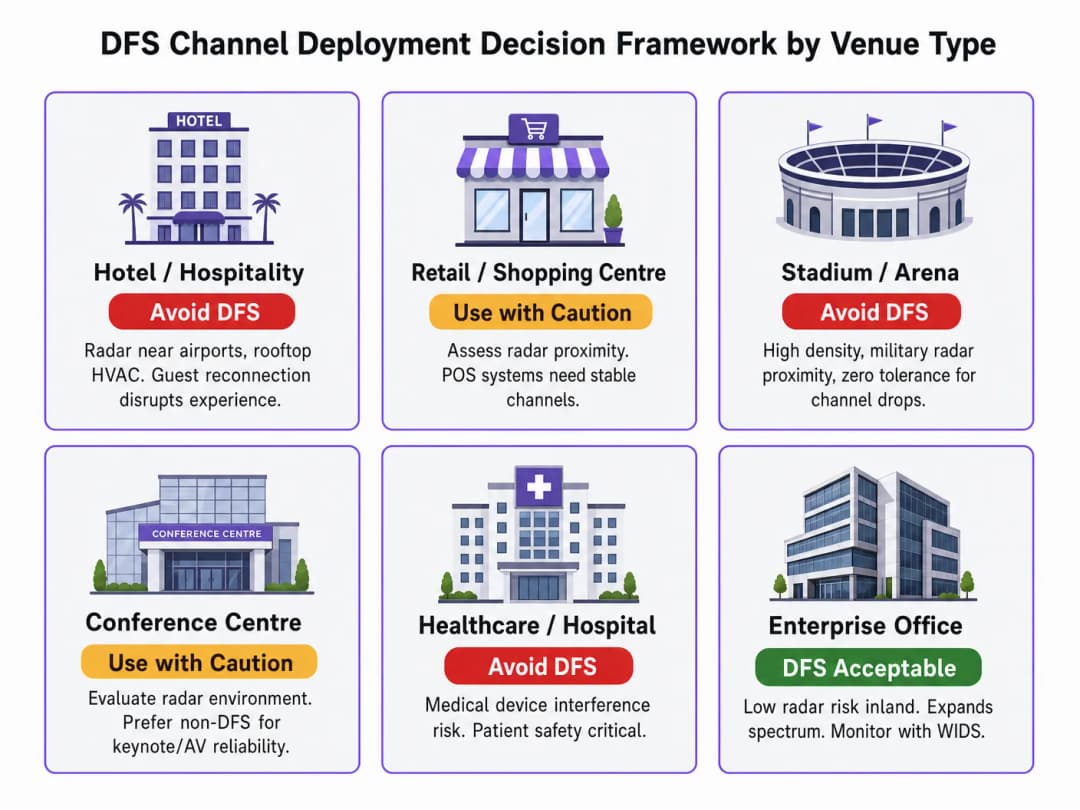
Deploying DFS channels requires a considered approach based on the venue's physical location and its operational tolerance for disruption.
Step 1: Radar Environment Assessment
Before designing a channel plan, you must analyse the RF environment. If your venue is within 30 - 50 km of an airport, military base, or weather radar installation, DFS channels carry high risk. Use national databases (such as Ofcom's in the UK) to cross-reference local radar installations against your venue coordinates.
Step 2: Establish a Non-DFS Baseline
In high-density environments like hospitality or transport hubs, build your foundational cell plan using UNII-1 and UNII-3 channels. Introduce DFS channels only when client density strictly demands more spectrum than the non-DFS bands can provide.
Step 3: Implement Fallback Mechanisms
If DFS channels must be used, ensure every AP is configured with a pre-defined non-DFS fallback channel. This minimises client downtime during a DFS event. Enterprise controllers allow you to define these fallback parameters, ensuring APs switch to a known-good channel rather than randomly scanning the spectrum.
Step 4: Constrain Channel Width
Chasing WiFi 6/6E throughput targets with 80 MHz or 160 MHz channels increases the risk of encountering a DFS trigger. An 80 MHz channel spans four 20 MHz sub-channels; if radar is detected on any one of those sub-channels, the entire 80 MHz block must be evacuated. In dense environments, it is often safer to constrain DFS channels to 20 MHz or 40 MHz widths to reduce the radar detection footprint.
Best Practices and Industry Standards
- Regulatory compliance: Always ensure your APs are configured with the correct regulatory domain (e.g. UK, EU, US). Using a default "World" setting can result in non-compliance with local transmit power limits and DFS enforcement rules.
- Continuous monitoring: Deploy a robust WiFi Analytics platform to log DFS events. You must be able to correlate AP channel changes with client disconnection metrics to accurately diagnose DFS-related issues.* Estratégia de WiFi 6E: A banda de 6 GHz não exige DFS. Para locais que enfrentam exaustão do espectro de 5 GHz e alta interferência de radar, acelerar a adoção do WiFi 6E é a solução arquitetônica mais eficaz. Conforme destacam os desenvolvimentos recentes do setor - como Purple Appoints Iain Fox as VP of Public Sector Growth to Drive Digital Inclusion and Smart City Innovation - o planejamento de infraestrutura moderna depende cada vez mais de um espectro limpo para implantações de cidades inteligentes.
Solução de Problemas e Mitigação de Riscos
Quando os usuários relatam quedas repentinas de conexão, o DFS é o principal suspeito.
- Verifique o tempo de atividade do AP versus o tempo de atividade do rádio: Se um AP está online há 30 dias, mas o tempo de atividade do rádio de 5 GHz é de apenas 15 minutos, é provável que o rádio tenha reiniciado ou alterado o canal devido a um evento de DFS.
- Analise os dados do syslog: Procure entradas de log específicas que indiquem "radar detectado" ou "CAC iniciado".
- Revise o ambiente: Se você encontrar frequentemente acionamentos de DFS em canais que normalmente não estão associados a radares meteorológicos (como o canal 52), investigue fontes locais de interferência de RF, como cozinhas comerciais ou sistemas sem fio antigos, que podem estar gerando falsos positivos.
Para uma análise mais detalhada das ferramentas que podem ajudar com isso, consulte nosso guia: The Best WiFi Analyzer Tools for Troubleshooting Channel Overlap .
ROI e Impacto nos Negócios
O impacto comercial de uma implantação de DFS mal planejada é imediato e mensurável. Em ambientes de saúde , uma desconexão pode interromper a telemetria médica crítica. No varejo, isso significa transações interrompidas.
Ao gerenciar proativamente o risco de DFS, as equipes de TI protegem a integridade da rede. O ROI é realizado por meio da redução de chamados de suporte, melhores índices de satisfação do usuário e a confiança para implantar serviços de alta largura de banda. Além disso, à medida que os locais avançam em direção a métodos avançados de autenticação - como os detalhados em How WiFi Assistant Enables Password-Free Access in 2026 - e serviços baseados em localização, como Purple Launches Offline Map Mode for Seamless, Secure Navigation to WiFi Hotspots , uma base de RF estável torna-se indispensável.
Briefing em Áudio: Análise Detalhada dos Canais DFS
Ouça nossa equipe de consultoria sênior detalhar as realidades operacionais dos canais DFS neste briefing técnico de dez minutos.
Definições principais
Dynamic Frequency Selection (DFS)
Um mecanismo regulatório que exige que dispositivos WiFi de 5 GHz detectem e evitem interferir com usuários primários, como radares militares e meteorológicos.
As equipes de TI devem levar em conta o DFS ao planejar as atribuições de canais, pois a detecção de radar força alterações imediatas de canal nos APs e desconecta os clientes.
Channel Availability Check (CAC)
Um período obrigatório de escuta passiva (geralmente de 60 ou 600 segundos) que um AP deve concluir antes de transmitir em um canal DFS.
Durante o CAC, o AP não pode atender aos clientes, resultando em uma lacuna de cobertura localizada se não houver APs sobrepostos disponíveis.
Non-Occupancy Period (NOP)
Uma janela obrigatória de 30 minutos durante a qual um AP não pode retornar a um canal DFS após detectar sinal de radar.
Isso evita que os APs retornem rapidamente a um canal que está sendo ativamente usado por radar, forçando a rede a depender de canais de fallback.
UNII-1
O segmento inferior da banda de 5 GHz (Canais 36-48) que não requer DFS.
Este é o espectro mais seguro para implantações de WiFi críticas, embora ofereça apenas quatro canais de 20 MHz.
UNII-2A / UNII-2C
Os segmentos intermediários da banda de 5 GHz (Canais 52-144) que exigem conformidade com DFS.
Essas bandas fornecem a maior parte da capacidade de 5 GHz, mas trazem o risco operacional de alterações de canal induzidas por radar.
UNII-3
O segmento superior da banda de 5 GHz (Canais 149-165) que normalmente é isento de DFS em muitos domínios regulatórios.
Combinado com o UNII-1, fornece a base para um plano de canais estável e sem DFS.
Enhanced DFS (EDFS)
Algoritmos avançados usados por APs corporativos para distinguir melhor entre pulsos de radar reais e ruído de RF.
Embora o EDFS reduza os falsos positivos (por exemplo, de micro-ondas), ele não elimina a exigência regulatória de desocupar o canal se houver suspeita de radar.
Falso Positivo
Quando um AP identifica incorretamente uma interferência de RF não proveniente de radar como uma assinatura de radar, acionando uma evacuação de canal DFS.
Comum em ambientes com maquinário pesado, cozinhas comerciais ou equipamentos sem fio antigos, levando a uma instabilidade de rede desnecessária.
Exemplos práticos
Um hotel de 300 quartos localizado a 24 quilômetros de um grande aeroporto regional está enfrentando reclamações intermitentes de hóspedes sobre a queda total do WiFi por 1 a 2 minutos, principalmente à noite. O projeto atual utiliza canais de 80 MHz em todo o espectro de 5 GHz para maximizar a taxa de transferência anunciada.
- Audite os logs da controladora para confirmar eventos de detecção de radar DFS nos APs que atendem as áreas afetadas.
- Reduza a largura do canal de 80 MHz para 40 MHz (ou 20 MHz, dependendo da densidade) para diminuir a pegada de RF exposta ao radar.
- Remova os canais de radar meteorológico (120-128) totalmente do pool de canais, pois o CAC de 10 minutos é inaceitável para o setor de hospitalidade.
- Configure canais de fallback explícitos não-DFS para quaisquer APs que permaneçam em canais DFS.
Um grande centro de conferências do setor público está se preparando para uma importante palestra de tecnologia. O auditório acomoda 2.000 pessoas. A equipe de TI precisa maximizar a capacidade, mas está preocupada com a estabilidade durante a transmissão ao vivo.
- Para os APs que cobrem fisicamente os assentos do auditório e o palco do apresentador, atribua estaticamente canais UNII-1 e UNII-3 (não-DFS).
- Utilize canais DFS (por exemplo, 52-64) apenas para APs que cobrem as áreas periféricas (lobbies, corredores) onde uma breve interrupção é menos crítica.
- Certifique-se de que o SSID dedicado do apresentador seja transmitido apenas em um canal não-DFS.
Questões práticas
Q1. Você está implantando WiFi em um hospital localizado a 5 milhas de um aeroporto regional. O hospital depende de WiFi para comunicações VoIP e carrinhos médicos móveis. O fornecedor recomenda o uso de canais de 80 MHz em toda a banda de 5 GHz para garantir o máximo desempenho. Você aceita essa recomendação?
Dica: Considere o impacto de uma evacuação de canal DFS em chamadas VoIP e a probabilidade de detecção de radar perto de um aeroporto.
Ver resposta modelo
Não. Dada a proximidade com o aeroporto, os registros de radar DFS são altamente prováveis. O uso de canais de 80 MHz aumenta a probabilidade de um registro (pois abrange quatro subcanais). Um evento DFS causará uma mudança repentina de canal, derrubando chamadas VoIP ativas e desconectando carrinhos médicos. O projeto deve restringir os canais a 20 MHz ou 40 MHz e priorizar canais UNII-1 e UNII-3 (não DFS) para SSIDs clínicos críticos.
Q2. Um AP que atende a um espaço de varejo de alta densidade está atribuído estaticamente ao Canal 124. O gerente da loja relata que o WiFi nessa zona cai completamente por exatamente 10 minutos a cada poucos dias antes de se recuperar. Qual é a causa provável?
Dica: Verifique os requisitos específicos de CAC para os canais 120 - 128.
Ver resposta modelo
O canal 124 está na banda de radar meteorológico. Quando o AP detecta uma assinatura de radar (ou um falso positivo), ele desocupa o canal. Se o AP tentar retornar a um canal de radar meteorológico, ele deverá realizar um Channel Availability Check estendido de 10 minutos (600 segundos), durante o qual não poderá atender aos clientes. A solução é mover o AP para um canal não DFS ou para um canal DFS padrão com um CAC de apenas 60 segundos.
Q3. Você está configurando uma nova implantação de WiFi 6E em um escritório corporativo. O arquiteto de rede sugere desabilitar completamente o DFS nos rádios de 5 GHz e depender da banda de 6 GHz para o tráfego de clientes de alta capacidade. Essa é uma estratégia válida?
Dica: Considere os requisitos regulatórios para a banda de 6 GHz em comparação com a de 5 GHz.
Ver resposta modelo
Sim, esta é uma estratégia altamente eficaz. A banda de 6 GHz não possui requisitos de DFS, o que significa que você pode executar canais amplos (80 MHz ou 160 MHz) sem o risco de evacuações de canal induzidas por radar. Ao restringir os rádios de 5 GHz a canais não DFS (UNII-1 e UNII-3), você fornece um backup altamente estável para clientes antigos, enquanto direciona os clientes compatíveis para o espectro limpo e livre de DFS de 6 GHz.
Continue a ler esta série
Entendendo RSSI e Intensidade de Sinal para o Planejamento de Canais Ideal
Este guia fornece uma análise técnica detalhada sobre RSSI, Relação Sinal-Ruído (SNR) e princípios de propagação de RF para um planejamento de canais ideal. Ele capacita gerentes de TI, arquitetos de rede e diretores de operações de locais com estratégias práticas para mitigar a Interferência de Co-Canal e Canal Adjacente, otimizar o posicionamento de APs e aproveitar as análises para um impacto de negócios mensurável em ambientes de hospitalidade, varejo e setor público.
20MHz vs 40MHz vs 80MHz: Qual largura de canal você deve usar?
Este guia fornece uma referência técnica definitiva e neutra em termos de fornecedor para gerentes de TI, arquitetos de rede e diretores de operações de locais sobre como selecionar a largura de canal WiFi correta - 20MHz, 40MHz ou 80MHz - em implantações corporativas nos setores de hotelaria, varejo, eventos e órgãos públicos. Ele aborda a mecânica subjacente da IEEE 802.11, os trade-offs de capacidade no mundo real e um passo a passo para implantação para ajudar as equipes a tomarem a decisão correta neste trimestre. Compreender a seleção da largura de canal é uma das decisões de maior impacto em qualquer projeto de rede LAN sem fio, influenciando diretamente a taxa de transferência, a interferência, o suporte à densidade de clientes e a confiabilidade dos serviços voltados para os hóspedes e visitantes.
WiFi 6 vs WiFi 5: Ele Resolve a Interferência de Canais?
Este guia oferece uma análise técnica aprofundada sobre como o WiFi 6 (802.11ax) lida com a interferência de canais em ambientes corporativos de alta densidade por meio de OFDMA e BSS Coloring. Ele capacita gerentes de TI, arquitetos de rede e CTOs com estratégias de implantação práticas, estudos de caso reais dos setores de hotelaria e saúde, e uma estrutura para avaliar o ROI de atualizações de infraestrutura em locais onde o desempenho sem fio é crítico para os negócios.
Tem dúvidas sobre a sua configuração específica?
A nossa equipa trabalha com operadores de espaços, gestores de TI e engenheiros de rede em 80.000 locais. Agende uma chamada de 20 minutos e mostraremos como outros profissionais na sua situação o resolveram.