
DFS-Kanäle: Was sie sind und wann man sie meiden sollte
Dieser fundierte Leitfaden erläutert die technischen und betrieblichen Realitäten von DFS (Dynamic Frequency Selection)-Kanälen im 5-GHz-Band. Betreiber von Veranstaltungsorten und IT-Teams lernen, wie sie das Radar-Risiko bewerten, Channel Availability Checks (CAC) konfigurieren und robuste Ausfallpläne implementieren, um drahtlose Umgebungen mit hoher Dichte vor plötzlichen Verbindungsabbrüchen zu schützen.
Diesen Leitfaden anhören
Podcast-Transkript ansehen

Executive Summary
Für IT-Manager und Netzwerkarchitekten, die für Umgebungen mit hoher Dichte - wie Stadien, Konferenzzentren und große Einzelhandelsinstallationen - verantwortlich sind, ist das Frequenzspektrum die kritischste Einschränkung. Das 5-GHz-Band bietet erhebliche Kapazitäten, aber um sein volles Potenzial auszuschöpfen, muss Dynamic Frequency Selection (DFS) beherrscht werden. DFS-Kanäle (52 - 144) bieten zusätzliche 475 MHz Spektrum, die für einen hohen Durchsatz in dichten Client-Umgebungen unerlässlich sind. Dieses Spektrum ist jedoch mit strengen regulatorischen Auflagen verbunden, die vorrangige Nutzer wie Wetter- und Militärradarsysteme schützen sollen.
Wenn ein Access Point, der auf einem DFS-Kanal betrieben wird, Radar erkennt, verlangen die Vorschriften (wie die von Ofcom, der FCC und ETSI durchgesetzten), dass er den Kanal unverzüglich räumt. Dies zwingt alle verbundenen Clients, die Verbindung zu trennen und sich neu zu verbinden, was sich direkt auf die Benutzererfahrung auswirkt. Für Veranstaltungsorte, die auf Guest WiFi angewiesen sind, um die Interaktion zu fördern, oder für den Einzelhandel , der eine stabile Anbindung der Kassensysteme benötigt, stellen diese plötzlichen Unterbrechungen ein unakzeptables Betriebsrisiko dar. Dieser Leitfaden bietet einen herstellerunabhängigen technischen Rahmen für die Entscheidung, wann DFS-Kanäle genutzt und wann sie vermieden werden sollten, um sicherzustellen, dass Sie die Kapazität maximieren, ohne die Zuverlässigkeit zu beeinträchtigen.
Technischer Deep-Dive: Wie DFS funktioniert
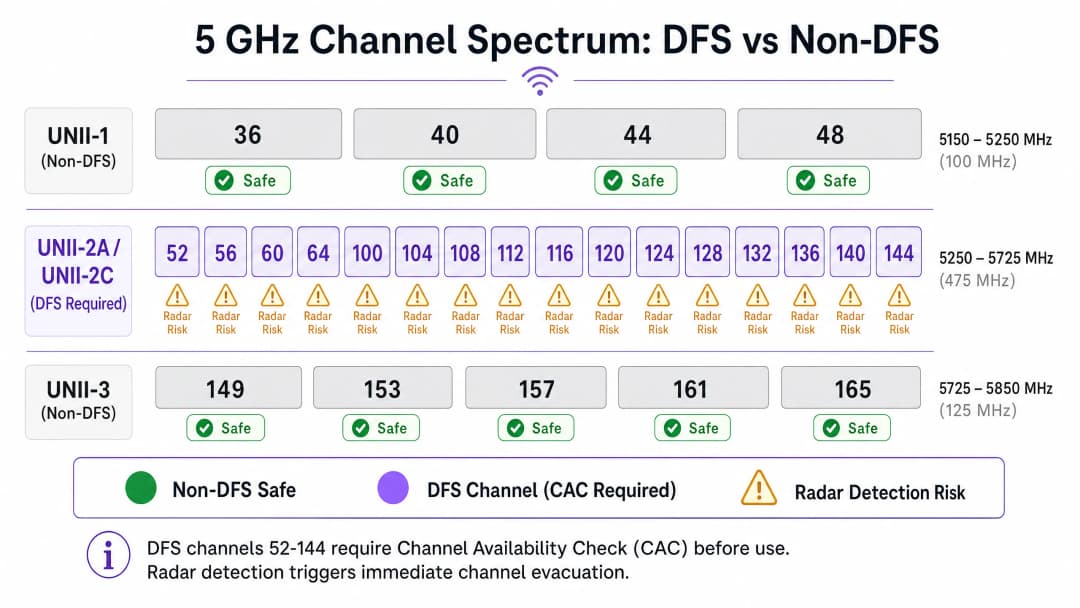
Dynamic Frequency Selection ist im Standard IEEE 802.11h definiert. Seine Hauptfunktion besteht darin, zu verhindern, dass 5-GHz-WiFi-Netzwerke bestehende Radarsysteme stören. Das 5-GHz-Spektrum ist in UNII-Bänder (Unlicensed National Information Infrastructure) unterteilt. UNII-1 (Kanäle 36 - 48) und UNII-3 (Kanäle 149 - 165) sind im Allgemeinen DFS-frei und bieten neun nicht überlappende 20-MHz-Kanäle. Im Gegensatz dazu erfordern UNII-2A und UNII-2C (Kanäle 52 - 144) DFS.
Die Kanalverfügbarkeitsprüfung (CAC - Channel Availability Check)
Bevor ein Access Point (AP) auf einem DFS-Kanal senden kann, muss er eine Kanalverfügbarkeitsprüfung (Channel Availability Check, CAC) durchführen. Während dieser Phase lauscht der AP passiv nach Radarsignalen. Er kann keine Beacons senden oder Clients bedienen.
- Standard-CAC: Für die meisten DFS-Kanäle dauert die CAC 60 Sekunden.
- Erweiterte CAC: Für Kanäle, die sich mit Wetterradar überschneiden (typischerweise die Kanäle 120, 124 und 128), verlängert sich die CAC auf 600 Sekunden (10 Minuten).
Wird während der CAC oder zu einem beliebigen Zeitpunkt des Betriebs ein Radar erkannt, muss der AP innerhalb des vorgeschriebenen Zeitraums (in der Regel 10 Sekunden) einen Kanalwechsel durchführen und darf für mindestens 30 Minuten (die Sperrzeit bzw. Non-Occupancy Period) nicht auf diesen Kanal zurückkehren.
Fehlalarme und EDFS
Die Erkennungsalgorithmen auf APs sind hochempfindlich. Während moderne APs der Enterprise-Klasse Enhanced DFS (EDFS) nutzen, um echte Radarimpulse besser von HF-Hintergrundrauschen zu unterscheiden, bleiben Fehlalarme ein erhebliches Problem. Zu den Quellen für Fehlalarme gehören schlecht abgeschirmte Mikrowellengeräte, bestimmte FHSS-Geräte und Industrieanlagen. Unabhängig davon, ob die Erkennung echt ist oder ein Fehlalarm vorliegt, ist die gesetzliche Reaktion identisch: sofortige Räumung des Kanals.
Haben Sie Fragen zu Ihrem spezifischen Setup?
Unser Team arbeitet mit Standortbetreibern, IT-Managern und Netzwerktechnikern an über 80.000 Standorten zusammen. Buchen Sie ein 20-minütiges Gespräch und wir zeigen Ihnen, wie andere diese Herausforderungen gelöst haben.
Implementierungsleitfaden: Ein Bereitstellungs-Framework
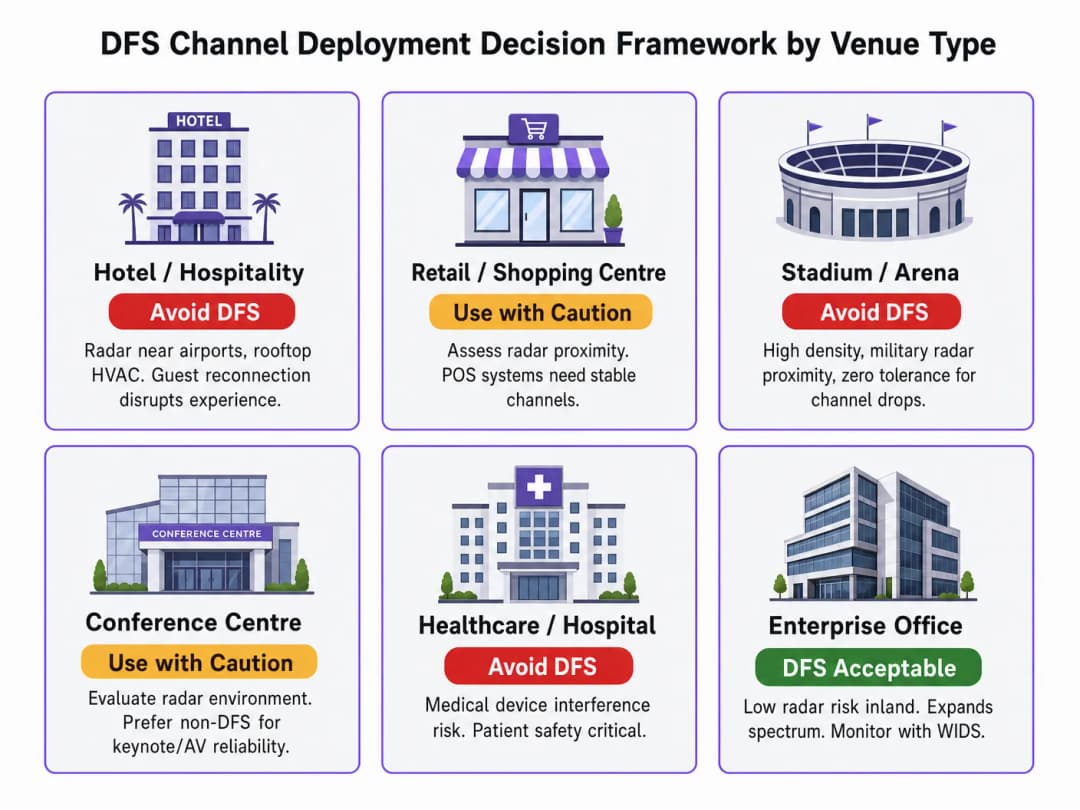
Die Bereitstellung von DFS-Kanälen erfordert einen durchdachten Ansatz, der auf dem physischen Standort des Veranstaltungsorts und seiner betrieblichen Toleranz gegenüber Unterbrechungen basiert.
Schritt 1: Bewertung der Radarumgebung
Vor dem Entwurf eines Kanalplans müssen Sie die HF-Umgebung analysieren. Wenn sich Ihr Veranstaltungsort in einem Umkreis von 30 bis 50 km von einem Flughafen, einem Militärstützpunkt oder einer Wetterradarstation befindet, stellen DFS-Kanäle ein hohes Risiko dar. Nutzen Sie nationale Datenbanken, um lokale Radarinstallationen mit den Koordinaten Ihres Veranstaltungsorts abzugleichen.
Schritt 2: Erstellung einer Nicht-DFS-Baseline
In Umgebungen mit hoher Dichte wie im Gastgewerbe oder an Transportknotenpunkten sollten Sie Ihren grundlegenden Funkzellenplan unter Verwendung von UNII-1- und UNII-3-Kanälen aufbauen. Führen Sie DFS-Kanäle nur dann ein, wenn die Client-Dichte zwingend mehr Spektrum erfordert, als die Nicht-DFS-Bänder bereitstellen können.
Schritt 3: Implementierung von Fallback-Mechanismen
Wenn DFS-Kanäle verwendet werden müssen, stellen Sie sicher, dass jeder AP mit einem vordefinierten Nicht-DFS-Fallback-Kanal konfiguriert ist. Dies minimiert die Ausfallzeit der Clients während eines DFS-Ereignisses. Enterprise-Controller ermöglichen Ihnen die Definition dieser Fallback-Parameter, um sicherzustellen, dass APs auf einen bekannten, funktionierenden Kanal wechseln, anstatt das Spektrum willkürlich zu scannen.
Schritt 4: Kanalbreite einschränken
Das Verfolgen von Durchsatzvorgaben für Wi-Fi 6/6E mit 80 MHz oder 160 MHz breiten Kanälen erhöht das Risiko, einen DFS-Trigger auszulösen. Ein 80-MHz-Kanal erstreckt sich über vier 20-MHz-Unterkanäle. Wenn auf einem einzigen dieser Unterkanäle Radar erkannt wird, muss der gesamte 80-MHz-Block geräumt werden. In dichten Umgebungen ist es oft sicherer, DFS-Kanäle auf 20 MHz oder 40 MHz Breite zu beschränken, um die Radar-Erkennungsfläche zu verringern.
Best Practices und Branchenstandards
- Einhaltung gesetzlicher Vorschriften: Stellen Sie stets sicher, dass Ihre APs mit der korrekten Regulierungsdomäne konfiguriert sind (z. B. UK, EU, US). Die Verwendung einer Standardeinstellung "World" kann zur Nichteinhaltung lokaler Sendeleistungsgrenzen und DFS-Erzwingungsregeln führen.
- Kontinuierliche Überwachung: Implementieren Sie eine robuste WiFi Analytics Plattform, um DFS-Ereignisse zu protokollieren. Sie müssen in der Lage sein, Kanalwechsel der APs mit Metriken zu Client-Trennungen zu korrelieren, um DFS-bezogene Probleme präzise zu diagnostizieren.* Wi-Fi 6E-Strategie: Das 6-GHz-Band erfordert kein DFS. Für Standorte, die mit einer Auslastung des 5-GHz-Spektrums und hohen Radarinterferenzen konfrontiert sind, ist die beschleunigte Einführung von Wi-Fi 6E die effektivste architektonische Lösung. Wie jüngste Branchenentwicklungen zeigen - wie beispielsweise in Purple Appoints Iain Fox as VP of Public Sector Growth to Drive Digital Inclusion and Smart City Innovation beschrieben - hängt die moderne Infrastrukturplanung zunehmend von sauberem Spektrum für Smart-City-Bereitstellungen ab.
Fehlerbehebung und Risikominderung
Wenn Benutzer plötzliche Verbindungsabbrüche melden, ist DFS eine der Hauptursachen.
- AP-Betriebszeit im Vergleich zur Funk-Betriebszeit prüfen: Wenn ein AP seit 30 Tagen online ist, die Betriebszeit des 5-GHz-Funkmoduls jedoch nur 15 Minuten beträgt, hat das Funkmodul wahrscheinlich aufgrund eines DFS-Ereignisses neu gestartet oder den Kanal gewechselt.
- Syslog-Daten analysieren: Suchen Sie nach spezifischen Log-Einträgen, die auf "radar detected" oder "CAC started" hinweisen.
- Die Umgebung überprüfen: Wenn Sie häufig DFS-Auslösungen auf Kanälen feststellen, die normalerweise nicht mit Wetterradar in Verbindung gebracht werden (wie Kanal 52), untersuchen Sie lokale Quellen von HF-Interferenzen wie Großküchen oder veraltete drahtlose Systeme, die Fehlalarme auslösen könnten.
Für einen tieferen Einblick in Tools, die hierbei helfen können, lesen Sie unseren Leitfaden: The Best WiFi Analyzer Tools for Troubleshooting Channel Overlap .
ROI und geschäftliche Auswirkungen
Die geschäftlichen Auswirkungen einer schlecht geplanten DFS-Bereitstellung sind unmittelbar und messbar. In healthcare -Umgebungen kann ein Verbindungsabbruch kritische medizinische Telemetrie unterbrechen. Im Einzelhandel bedeutet dies stockende Transaktionen.
Durch das proaktive Management von DFS-Risiken schützen IT-Teams die Integrität des Netzwerks. Der ROI zeigt sich in einer reduzierten Anzahl von Helpdesk-Tickets, verbesserten Benutzerzufriedenheitswerten und der Sicherheit bei der Bereitstellung von Diensten mit hoher Bandbreite. Darüber hinaus wird ein stabiles HF-Fundament unverzichtbar, wenn Standorte zu fortschrittlichen Authentifizierungsmethoden übergehen - wie den in How WiFi Assistant Enables Password-Free Access in 2026 beschriebenen - und standortbezogenen Diensten wie Purple Launches Offline Map Mode for Seamless, Secure Navigation to WiFi Hotspots .
Audio-Briefing: Deep-Dive zu DFS-Kanälen
Hören Sie sich dieses zehnminütige technische Briefing an, in dem unser Senior Advisory Team die betrieblichen Realitäten von DFS-Kanälen analysiert.
Schlüsseldefinitionen
Dynamic Frequency Selection (DFS)
Ein regulatorischer Mechanismus, der von 5-GHz-WiFi-Geräten verlangt, Primärnutzer wie Militär- und Wetterradar zu erkennen und deren Störung zu vermeiden.
IT-Teams müssen DFS bei der Planung von Kanalzuweisungen berücksichtigen, da die Radarerkennung sofortige AP-Kanalwechsel erzwingt und verbundene Clients trennt.
Channel Availability Check (CAC)
Eine obligatorische passive Abhörzeit (normalerweise 60 oder 600 Sekunden), die ein AP abschließen muss, bevor er auf einem DFS-Kanal sendet.
Während des CAC kann der AP keine Clients bedienen, was zu einem lokal begrenzten Abdeckungsloch führt, wenn keine überlappenden APs verfügbar sind.
Non-Occupancy Period (NOP)
Ein obligatorisches 30-minütiges Zeitfenster, in dem ein AP nach der Erkennung eines Radars nicht auf einen DFS-Kanal zurückkehren darf.
Dies verhindert, dass APs schnell wieder auf einen Kanal zurückwechseln, der aktiv von einem Radar genutzt wird, was das Netzwerk dazu zwingt, auf Ausfallkanäle auszuweichen.
UNII-1
Das untere Segment des 5-GHz-Bands (Kanäle 36 - 48), welches kein DFS erfordert.
Dies ist das sicherste Spektrum für geschäftskritische WiFi-Bereitstellungen, obwohl es nur vier 20-MHz-Kanäle bietet.
UNII-2A / UNII-2C
Die mittleren Segmente des 5-GHz-Bands (Kanäle 52 - 144), die die Einhaltung von DFS vorschreiben.
Diese Bänder stellen den Großteil der 5-GHz-Kapazität bereit, bergen jedoch das betriebliche Risiko von radarbedingten Kanalwechseln.
UNII-3
Das obere Segment des 5-GHz-Bands (Kanäle 149 - 165), das in vielen regulatorischen Bereichen typischerweise DFS-frei ist.
In Kombination mit UNII-1 bildet dies die Grundlage für einen stabilen, DFS-freien Kanalplan.
Enhanced DFS (EDFS)
Fortschrittliche Algorithmen, die von Enterprise APs verwendet werden, um besser zwischen tatsächlichen Radarimpulsen und HF-Rauschen zu unterscheiden.
Obwohl EDFS Fehlalarme (z. B. durch Mikrowellen) reduziert, entbindet es nicht von der gesetzlichen Verpflichtung, den Kanal zu räumen, wenn ein Radarverdacht besteht.
Fehlalarm
Wenn ein AP fälschlicherweise eine Nicht-Radar-HF-Interferenz als Radarsignatur identifiziert und eine DFS-Kanalräumung auslöst.
Häufig in Umgebungen mit schweren Maschinen, Großküchen oder älteren Wireless-Geräten, was zu unnötiger Netzwerkinstabilität führt.
Ausgearbeitete Beispiele
Ein Hotel mit 300 Zimmern, das sich 15 Meilen von einem großen Regionalflughafen entfernt befindet, stellt fest, dass sich Gäste zeitweise über einen vollständigen Ausfall des WiFi für 1 - 2 Minuten beschweren, hauptsächlich in den Abendstunden. Das aktuelle Design nutzt 80-MHz-Kanäle im gesamten 5-GHz-Spektrum, um den beworbenen Durchsatz zu maximieren.
- Überprüfen Sie die Controller-Protokolle, um DFS-Radarerkennungsereignisse auf den APs zu bestätigen, die die betroffenen Bereiche versorgen.
- Reduzieren Sie die Kanalbreite von 80 MHz auf 40 MHz (oder 20 MHz je nach Dichte), um den RF-Footprint, der dem Radar ausgesetzt ist, zu verringern.
- Entfernen Sie Wetterradarkanäle (120 - 128) vollständig aus dem Kanal-Pool, da der 10-minütige CAC für das Gastgewerbe inakzeptabel ist.
- Konfigurieren Sie explizite Nicht-DFS-Ausfallkanäle für alle APs, die auf DFS-Kanälen verbleiben.
Ein großes Konferenzzentrum im öffentlichen Sektor bereitet sich auf eine wichtige Technologie-Keynote vor. Das Auditorium bietet Platz für 2.000 Teilnehmer. Das IT-Team muss die Kapazität maximieren, sorgt sich jedoch um die Stabilität während des Live-Streams.
- Weisen Sie den APs, die den Publikumsbereich des Auditoriums und die Bühne des Präsentators physisch abdecken, statisch UNII-1- und UNII-3-Kanäle (Nicht-DFS) zu.
- Verwenden Sie DFS-Kanäle (z. B. 52 - 64) nur für APs, die die Randbereiche (Lobbys, Flure) abdecken, in denen eine kurze Unterbrechung weniger kritisch ist.
- Stellen Sie sicher, dass die dedizierte SSID des Präsentators nur auf einem Nicht-DFS-Kanal ausgestrahlt wird.
Übungsfragen
Q1. Sie stellen WiFi in einem Krankenhaus bereit, das sich 5 Meilen von einem Regionalflughafen entfernt befindet. Das Krankenhaus ist bei der Kommunikation auf WiFi für VoIP und mobile medizinische Wagen angewiesen. Der Anbieter empfiehlt die Verwendung von 80-MHz-Kanälen im gesamten 5-GHz-Band, um maximale Leistung zu gewährleisten. Nehmen Sie diese Empfehlung an?
Hinweis: Berücksichtigen Sie die Auswirkungen einer DFS-Kanalräumung auf VoIP-Anrufe und die Wahrscheinlichkeit einer Radarentdeckung in der Nähe eines Flughafens.
Musterlösung anzeigen
Nein. Aufgrund der Nähe zum Flughafen sind DFS-Radarerkennungen sehr wahrscheinlich. Die Verwendung von 80-MHz-Kanälen erhöht die Wahrscheinlichkeit einer Erkennung (da sie sich über vier Unterkanäle erstreckt). Ein DFS-Ereignis führt zu einem plötzlichen Kanalwechsel, wodurch aktive VoIP-Anrufe abgebrochen und medizinische Wagen getrennt werden. Das Design sollte Kanäle auf 20 MHz oder 40 MHz beschränken und UNII-1- und UNII-3-Kanäle (Nicht-DFS) für kritische klinische SSIDs priorisieren.
Q2. Ein AP, der eine hochfrequentierte Verkaufsfläche versorgt, ist statisch dem Kanal 124 zugewiesen. Der Filialleiter berichtet, dass das WiFi in dieser Zone alle paar Tage für genau 10 Minuten komplett ausfällt, bevor es sich wieder erholt. Was ist die wahrscheinliche Ursache?
Hinweis: Prüfen Sie die spezifischen CAC-Anforderungen für die Kanäle 120 - 128.
Musterlösung anzeigen
Kanal 124 befindet sich im Wetterradarband. Wenn der AP eine Radarsignatur (oder einen Fehlalarm) erkennt, räumt er den Kanal. Wenn der AP versucht, zu einem Wetterradarkanal zurückzukehren, muss er eine erweiterte 10-minütige (600 Sekunden) Channel Availability Check (CAC) durchführen, während der er keine Clients bedienen kann. Die Lösung besteht darin, den AP auf einen Nicht-DFS-Kanal oder einen Standard-DFS-Kanal mit nur einer 60-sekündigen CAC zu verschieben.
Q3. Sie konfigurieren eine neue WiFi 6E-Bereitstellung in einer Unternehmenszentrale. Der Netzwerkarchitekt schlägt vor, DFS auf den 5-GHz-Funkmodulen vollständig zu deaktivieren und sich für den hochkapazitiven Client-Verkehr auf das 6-GHz-Band zu verlassen. Ist dies eine valide Strategie?
Hinweis: Berücksichtigen Sie die regulatorischen Anforderungen für das 6-GHz-Band im Vergleich zu 5 GHz.
Musterlösung anzeigen
Ja, das ist eine äußerst effektive Strategie. Das 6-GHz-Band hat keine DFS-Anforderungen, was bedeutet, dass Sie breite Kanäle (80 MHz oder 160 MHz) ohne das Risiko von radarbedingten Kanalräumungen betreiben können. Indem Sie die 5-GHz-Funkmodule auf Nicht-DFS-Kanäle (UNII-1 und UNII-3) beschränken, bieten Sie eine hochstabile Ausweichlösung für ältere Clients, während Sie fähige Clients in das saubere, DFS-freie 6-GHz-Spektrum leiten.
Weiterlesen in dieser Reihe
Verständnis von RSSI und Signalstärke für eine optimale Kanalplanung
Dieser Leitfaden bietet einen umfassenden technischen Einblick in RSSI, Signal-Rausch-Verhältnis (SNR) und HF-Ausbreitungsprinzipien für eine optimale Kanalplanung. Er bietet IT-Managern, Netzwerkarchitekten und Leitern des Standortbetriebs umsetzbare Strategien zur Reduzierung von Co-Kanal- und Nachbarkanal-Interferenzen, zur Optimierung der AP-Platzierung und zur Nutzung von Analysen für messbare geschäftliche Auswirkungen in den Bereichen Gastgewerbe, Einzelhandel und im öffentlichen Sektor.
20MHz vs 40MHz vs 80MHz: Welche Kanalbreite sollten Sie nutzen?
Dieser Leitfaden bietet IT-Managern, Netzwerkarchitekten und Leitern des Standortbetriebs eine definitive, herstellerneutrale technische Referenz für die Auswahl der richtigen WiFi Kanalbreite - 20MHz, 40MHz oder 80MHz - bei Enterprise-Bereitstellungen in den Bereichen Hotellerie, Einzelhandel, Events und im öffentlichen Sektor. Er behandelt die zugrunde liegende IEEE 802.11-Mechanik, reale Kapazitätskompromisse und eine schrittweise Anleitung zur Bereitstellung, um Teams dabei zu helfen, in diesem Quartal die richtige Entscheidung zu treffen. Die Wahl der Kanalbreite gehört zu den Entscheidungen mit der größten Hebelwirkung bei jedem Wireless LAN Design, da sie sich direkt auf den Durchsatz, Interferenzen, die Client-Dichte und die Zuverlässigkeit von Services für Gäste auswirkt.
WiFi 6 vs. WiFi 5: Löst es Kanalinterferenzen?
Dieser Leitfaden bietet einen technischen Deep-Dive darüber, wie WiFi 6 (802.11ax) Kanalinterferenzen in High-Density-Unternehmensumgebungen durch OFDMA und BSS Coloring bewältigt. Er stattet IT-Manager, Netzwerkarchitekten und CTOs mit praxisnahen Bereitstellungsstrategien, realen Fallstudien aus dem Gastgewerbe und dem Gesundheitswesen sowie einem Framework zur Bewertung des ROI von Infrastruktur-Upgrades an Standorten aus, an denen die Wireless-Performance geschäftskritisch ist.
Haben Sie Fragen zu Ihrem spezifischen Setup?
Unser Team arbeitet mit Standortbetreibern, IT-Managern und Netzwerktechnikern an über 80.000 Standorten zusammen. Buchen Sie ein 20-minütiges Gespräch und wir zeigen Ihnen, wie andere diese Herausforderungen gelöst haben.