
Como Configurar Políticas de NAC para Direcionamento de VLAN no Cisco Meraki
Este guia definitivo oferece a líderes de TI, arquitetos de rede e diretores de operações de locais um framework prático e passo a passo para configurar políticas de NAC e direcionamento de VLAN em ambientes Cisco Meraki. O conteúdo abrange a implementação do 802.1X, o isolamento de dispositivos IoT via MAC Authentication Bypass e a integração contínua com a plataforma de analytics de WiFi para visitantes da Purple, garantindo uma segmentação de rede segura, em conformidade e de alto desempenho em implantações nos setores de hotelaria, varejo e setor público.
Ouça este guia
Ver transcrição do podcast
कार्यकारी सारांश
एंटरप्राइज़ स्थानों के लिए — हाई-डेंसिटी स्टेडियम से लेकर फैले हुए हॉस्पिटैलिटी कॉम्प्लेक्स तक — एक फ्लैट नेटवर्क एक समझौता किया गया नेटवर्क है। ट्रैफ़िक को सेगमेंट करने के लिए कई SSID ब्रॉडकास्ट करने से RF परफॉरमेंस कम होती है, कीमती एयरटाइम बर्बाद होता है, और एक ऐसा प्रशासनिक बोझ पैदा होता है जो मल्टी-साइट डिप्लॉयमेंट में खराब तरीके से स्केल होता है। आधुनिक मानक डायनामिक सेगमेंटेशन है: एक सुरक्षित SSID ब्रॉडकास्ट करना और डिवाइस को स्वचालित रूप से प्रोफ़ाइल करने, प्रमाणित करने और सही VLAN में स्टीयर करने के लिए नेटवर्क एक्सेस कंट्रोल (NAC) पर निर्भर रहना。
यह गाइड सीनियर IT आर्किटेक्ट्स और ऑपरेशंस डायरेक्टर्स को Cisco Meraki में VLAN स्टीयरिंग के लिए NAC पॉलिसी कॉन्फ़िगर करने का एक व्यावहारिक ब्लूप्रिंट प्रदान करती है। हम डिप्लॉयमेंट की वास्तविकताओं पर ध्यान केंद्रित करने के लिए अकादमिक थ्योरी को दरकिनार करते हैं: कॉर्पोरेट डिवाइस के लिए IEEE 802.1X लागू करना, हेडलेस IoT सिस्टम के लिए MAC ऑथेंटिकेशन बायपास (MAB) का उपयोग करना, और Retail , Hospitality , और अन्य एंटरप्राइज़ वातावरणों में सुरक्षित, कंप्लायंट एक्सेस सुनिश्चित करने के लिए Purple जैसे Guest WiFi प्लेटफ़ॉर्म के साथ सहजता से इंटीग्रेट करना। इन कॉन्फ़िगरेशन में महारत हासिल करके, संगठन सुरक्षा जोखिमों को कम कर सकते हैं, PCI DSS कंप्लायंस सुनिश्चित कर सकते हैं, और नेटवर्क थ्रूपुट को ऑप्टिमाइज़ कर सकते हैं — यह सब एक ही, केंद्रीय रूप से प्रबंधित SSID से।
तकनीकी डीप-डाइव
डायनामिक VLAN स्टीयरिंग का आर्किटेक्चर
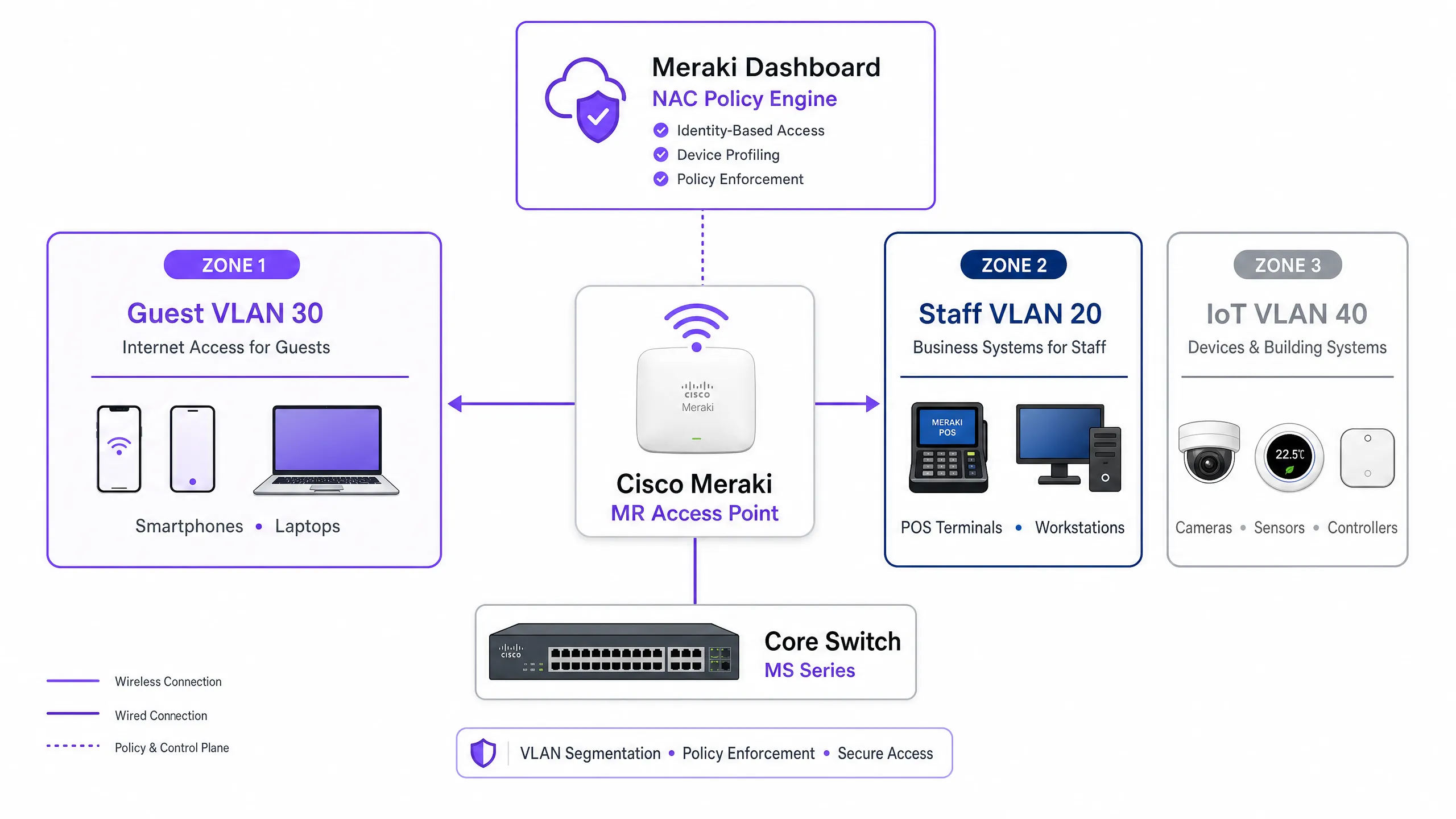
Meraki वातावरण में VLAN स्टीयरिंग तीन मुख्य घटकों के बीच इंटरैक्शन पर निर्भर करता है: Meraki एक्सेस पॉइंट (ऑथेंटिकेटर के रूप में कार्य करता है), क्लाइंट डिवाइस (सप्लिकेंट), और NAC/RADIUS सर्वर (ऑथेंटिकेशन सर्वर)। यह थ्री-पार्टी मॉडल IEEE 802.1X मानक द्वारा परिभाषित किया गया है और किसी भी एंटरप्राइज़-ग्रेड एक्सेस कंट्रोल डिप्लॉयमेंट की रीढ़ बनता है।
जब कोई डिवाइस नेटवर्क से जुड़ता है, तो AP ट्रैफ़िक को इंटरसेप्ट करता है और RADIUS सर्वर को एक Access-Request फॉरवर्ड करता है। सफल ऑथेंटिकेशन पर, RADIUS सर्वर Access-Accept संदेश के साथ प्रतिक्रिया देता है। महत्वपूर्ण रूप से, VLAN स्टीयरिंग होने के लिए, इस संदेश में विशिष्ट IETF मानक RADIUS एट्रिब्यूट्स शामिल होने चाहिए जो AP को निर्देश देते हैं कि कौन सा VLAN लागू करना है:
| RADIUS एट्रिब्यूट | ID | वैल्यू | उद्देश्य |
|---|---|---|---|
| Tunnel-Type | 64 | 13 (VLAN) | टनलिंग प्रोटोकॉल निर्दिष्ट करता है |
| Tunnel-Medium-Type | 65 | 6 (802) | ट्रांसपोर्ट मीडियम निर्दिष्ट करता है |
| Tunnel-Private-Group-ID | 81 | उदा., 20 |
लक्ष्य VLAN ID निर्दिष्ट करता है |
जब Meraki AP को ये एट्रिब्यूट्स प्राप्त होते हैं, तो यह स्विचपोर्ट पर फॉरवर्ड करने से पहले क्लाइंट के ट्रैफ़िक को निर्दिष्ट VLAN ID के साथ डायनामिक रूप से टैग करता है। यह प्रक्रिया एंड यूज़र के लिए पारदर्शी होती है और एसोसिएशन के कुछ मिलीसेकंड के भीतर पूरी हो जाती है।
ऑथेंटिकेशन मैकेनिज्म
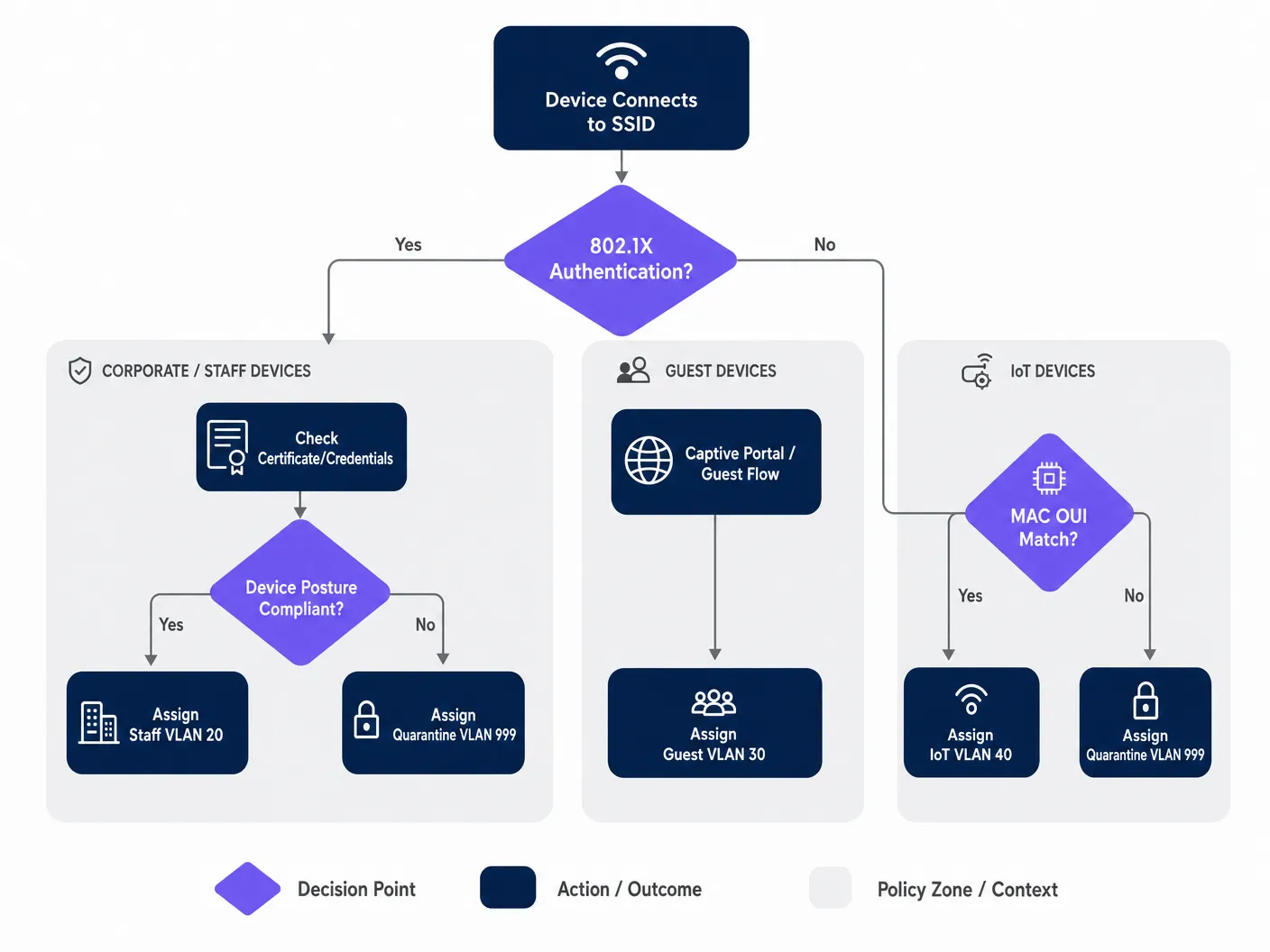
एंटरप्राइज़ नेटवर्क को आमतौर पर ऑथेंटिकेशन के लिए मल्टी-टियर दृष्टिकोण की आवश्यकता होती है, क्योंकि किसी भी दिए गए स्थान में डिवाइस की आबादी विषम (हेटेरोजेनियस) होती है। तीन प्राथमिक मैकेनिज्म हैं:
IEEE 802.1X (EAP-TLS या PEAP) कॉर्पोरेट और स्टाफ डिवाइस के लिए गोल्ड स्टैंडर्ड है। ऑथेंटिकेशन डिजिटल सर्टिफिकेट (EAP-TLS) या सुरक्षित क्रेडेंशियल्स (PEAP-MSCHAPv2) पर आधारित है, जो मजबूत एन्क्रिप्शन और पहचान सत्यापन प्रदान करता है। संगठन के MDM प्लेटफ़ॉर्म द्वारा प्रबंधित किसी भी डिवाइस के लिए यह अनुशंसित दृष्टिकोण है।
MAC ऑथेंटिकेशन बायपास (MAB) हेडलेस डिवाइस — IP कैमरे, POS टर्मिनल, बिल्डिंग मैनेजमेंट सेंसर और स्मार्ट टीवी — के लिए आवश्यक है जो 802.1X सप्लिकेंट नहीं चला सकते हैं। MAC एड्रेस का उपयोग आइडेंटिफायर के रूप में किया जाता है। हालांकि यह सर्टिफिकेट-आधारित ऑथेंटिकेशन (MAC एड्रेस को स्पूफ किया जा सकता है) की तुलना में कम सुरक्षित है, सख्त VLAN ACLs के साथ संयुक्त MAB आइसोलेटेड IoT सेगमेंट के लिए एक स्वीकार्य सुरक्षा स्थिति प्रदान करता है। इस विषय के व्यापक विवरण के लिए, Managing IoT Device Security with NAC and MPSK पर हमारी गाइड देखें।
Captive Portal ऑथेंटिकेशन का उपयोग गेस्ट एक्सेस के लिए किया जाता है। डिवाइस को तब तक प्रतिबंधित प्री-ऑथेंटिकेशन स्थिति में रखा जाता है जब तक कि उपयोगकर्ता लॉगिन फ्लो — आमतौर पर सोशल लॉगिन, ईमेल पंजीकरण, या एक साधारण क्लिक-थ्रू — पूरा नहीं कर लेता, जिसे Purple जैसे प्लेटफ़ॉर्म द्वारा होस्ट किया जाता है। यह डिवाइस को एक आइसोलेटेड गेस्ट VLAN में स्टीयर करते हुए फर्स्ट-पार्टी डेटा कैप्चर करता है।
इम्प्लीमेंटेशन गाइड
चरण 1: अपने VLAN आर्किटेक्चर की योजना बनाएं
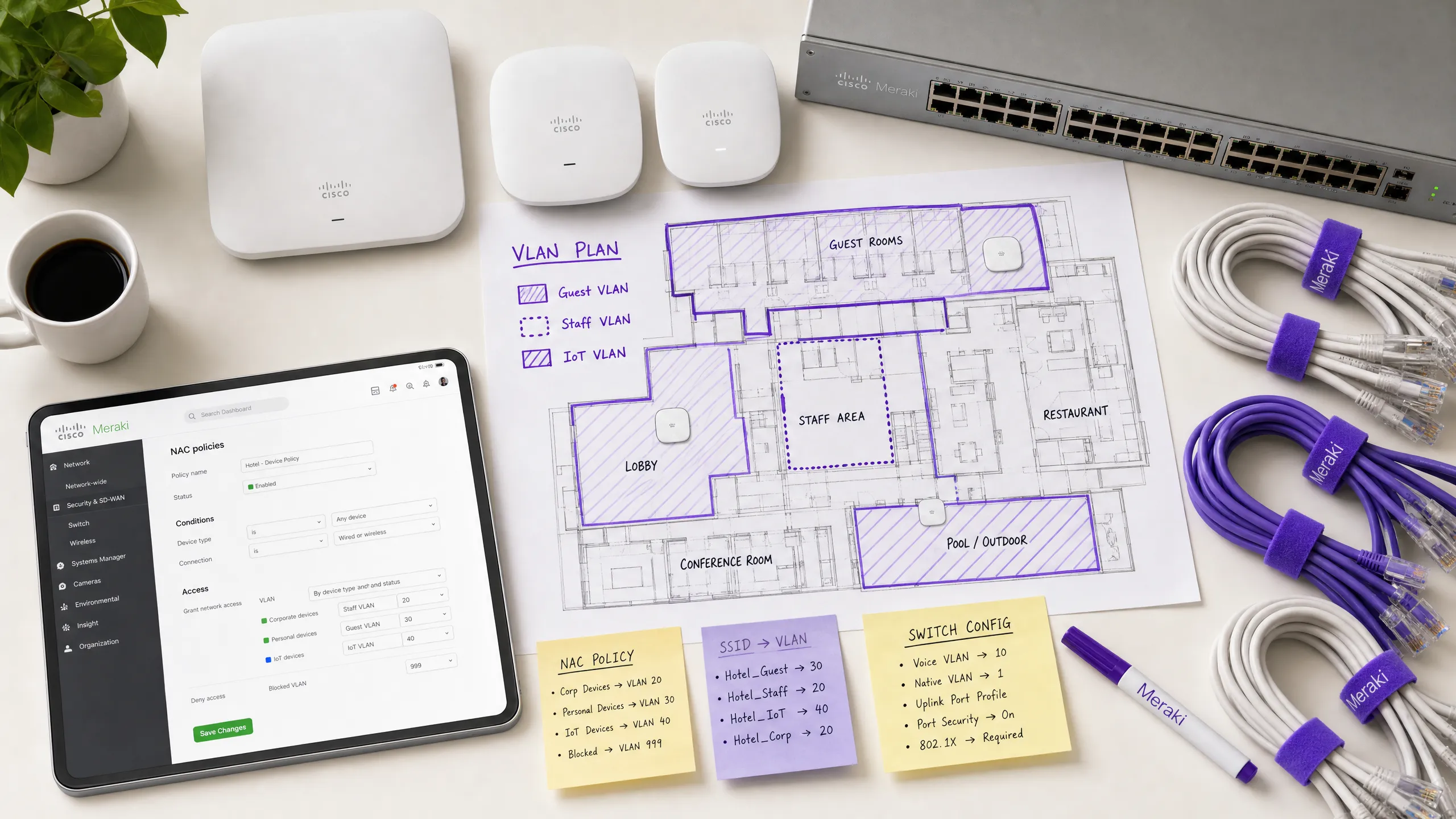
Meraki डैशबोर्ड को छूने से पहले, अपनी VLAN सेगमेंटेशन रणनीति को परिभाषित करें। एक विशिष्ट एंटरप्राइज़ वेन्यू डिप्लॉयमेंट निम्नलिखित संरचना का उपयोग करता है:
| VLAN ID | नाम | उद्देश्य | ऑथेंटिकेशन विधि |
|---|---|---|---|
| 10 | मैनेजमेंट | नेटवर्क इंफ्रास्ट्रक्चर | स्टैटिक |
| 20 | स्टाफ | कॉर्पोरेट डिवाइस, आंतरिक सिस्टम | 802.1X (EAP-TLS) |
| 30 | गेस्ट | विज़िटर इंटरनेट एक्सेस | Captive Portal (Purple) |
| 40 | IoT | कैमरे, सेंसर, स्मार्ट डिवाइस | MAB |
| 50 | POS | पेमेंट टर्मिनल (PCI स्कोप) | 802.1X (सर्टिफिकेट) |
| 999 | क्वारंटाइन | विफल ऑथेंटिकेशन, अज्ञात डिवाइस | कोई नहीं |
चरण 2: स्विच इंफ्रास्ट्रक्चर को कॉन्फ़िगर करें
वायरलेस सेटिंग्स को कॉन्फ़िगर करने से पहले, वायर्ड इंफ्रास्ट्रक्चर तैयार किया जाना चाहिए। Meraki APs से जुड़ने वाले स्विचपोर्ट्स को ट्रंक पोर्ट्स के रूप में कॉन्फ़िगर किया जाना चाहिए, जिससे उन सभी VLANs को अनुमति मिल सके जिन्हें AP डायनामिक रूप से असाइन कर सकता है। विफल डिप्लॉयमेंट में यह सबसे आम चूक है।
Meraki डैशबोर्ड में, Switch > Monitor > Switch ports पर नेविगेट करें, अपने APs से जुड़े पोर्ट्स का चयन करें, Type को Trunk पर सेट करें, Native VLAN (आमतौर पर आपका मैनेजमेंट VLAN) कॉन्फ़िगर करें, और Allowed VLANs फ़ील्ड में, सभी संभावित क्लाइंट VLANs को स्पष्ट रूप से निर्दिष्ट करें (उदा., 20,30,40,50,999)।
चरण 3: 802.1X के लिए Meraki SSID कॉन्फ़िगर करें
Wireless > Configure > Access control पर नेविगेट करें और लक्ष्य SSID का चयन करें। Network access के तहत, Enterprise with 802.1X चुनें। RADIUS servers सेक्शन तक नीचे स्क्रॉल करें और अपने NAC सर्वर का विवरण जोड़ें: IP एड्रेस, पोर्ट (ऑथेंटिकेशन के लिए डिफ़ॉल्ट 1812, अकाउंटिंग के लिए 1813), और शेयर्ड सीक्रेट। रिडंडेंसी के लिए, एक सेकेंडरी RADIUS सर्वर जोड़ें।
चरण 4: VLAN टैगिंग के लिए RADIUS ओवरराइड सक्षम करें
यह वह महत्वपूर्ण चरण है जो Meraki AP को NAC सर्वर से VLAN असाइनमेंट स्वीकार करने में सक्षम बनाता है। उसी Access control पेज पर, Addressing and traffic सेक्शन तक स्क्रॉल करें। Client IP assignment को Bridge mode पर सेट करें — यह सुनिश्चित करता है कि क्लाइंट्स को उनके असाइन किए गए VLAN पर स्थानीय DHCP सर्वर से IP एड्रेस प्राप्त हों, न कि AP के NAT से। VLAN tagging के तहत, Use VLAN tag from RADIUS चुनें।
चरण 5: Purple के साथ गेस्ट एक्सेस कॉन्फ़िगर करें
गेस्ट नेटवर्क के लिए, ओपन एसोसिएशन और Captive Portal इंटीग्रेशन के साथ कॉन्फ़िगर किया गया एक अलग SSID बनाएं। Network access को Open (no encryption) पर सेट करें और अपने Purple पोर्टल URL को पॉइंट करने के लिए Splash page कॉन्फ़िगर करें। सभी प्री-ऑथेंटिकेटेड ट्रैफ़िक को एक समर्पित, आइसोलेटेड गेस्ट VLAN (उदा., VLAN 30) में असाइन करने के लिए VLAN tagging सेट करें और गेस्ट डिवाइस के बीच लेटरल मूवमेंट को रोकने के लिए Client isolation सक्षम करें। Purple का WiFi Analytics प्लेटफ़ॉर्म ऑथेंटिकेशन फ्लो और डेटा कैप्चर को संभालेगा।
सर्वोत्तम प्रथाएं (Best Practices)
क्रिटिकल ऑथेंटिकेशन VLANs के साथ फेल-क्लोज़्ड पोस्चर लागू करें। यदि RADIUS सर्वर अनरीचेबल हो जाता है, तो फेल ओपन न करें और पूर्ण नेटवर्क एक्सेस न दें। एक क्रिटिकल ऑथेंटिकेशन VLAN कॉन्फ़िगर करें जो बुनियादी इंटरनेट कनेक्टिविटी प्रदान करता है लेकिन NAC सर्वर के रीस्टोर होने तक सभी आंतरिक संसाधनों तक पहुंच को ब्लॉक करता है। यह विशेष रूप से रिटेल वातावरण के लिए महत्वपूर्ण है जहां POS टर्मिनलों को RADIUS आउटेज के दौरान भी भुगतान प्रोसेस करना जारी रखना चाहिए।
निर्बाध रोमिंग के लिए Fast BSS Transition (802.11r) सक्षम करें। डायनामिक VLAN असाइनमेंट रोमिंग के दौरान लेटेंसी ला सकता है क्योंकि डिवाइस को प्रत्येक AP पर फिर से ऑथेंटिकेट करना होता है। 802.11r को सक्षम करने से पूरे स्थान पर वॉयस और वीडियो एप्लिकेशन के लिए निर्बाध हैंडऑफ़ सुनिश्चित होता है। यह हॉस्पिटैलिटी वातावरण के लिए गैर-परक्राम्य (non-negotiable) है जहां मेहमान संपत्ति में लगातार घूमते रहते हैं। Wi Fi Frequencies: A Guide to Wi-Fi Frequencies in 2026 को समझने से डेंस डिप्लॉयमेंट के लिए चैनल प्लानिंग को ऑप्टिमाइज़ करने में भी मदद मिल सकती है।
IoT ट्रैफ़िक को आक्रामक रूप से सेगमेंट करें। कभी भी IoT डिवाइस को कॉर्पोरेट या गेस्ट ट्रैफ़िक के साथ न मिलाएं। इन डिवाइस की पहचान करने के लिए MAB का उपयोग करें और उन्हें सख्त लेयर 3 फ़ायरवॉल नियमों के साथ समर्पित VLANs में स्टीयर करें जो केवल डिवाइस संचालन के लिए आवश्यक विशिष्ट पोर्ट्स और डेस्टिनेशन की अनुमति देते हैं। एक समझौता किया गया IP कैमरा कभी भी आपके POS नेटवर्क या कॉर्पोरेट फ़ाइल सर्वर तक पहुंचने में सक्षम नहीं होना चाहिए।
कॉर्पोरेट SSIDs पर WPA3 लागू करें। जहां डिवाइस कम्पैटिबिलिटी अनुमति देती है, WPA3-Enterprise का उपयोग करने के लिए कॉर्पोरेट SSIDs कॉन्फ़िगर करें। यह मजबूत एन्क्रिप्शन प्रदान करता है और WPA2 PMKID हमलों से जुड़ी कमजोरियों को समाप्त करता है。
समस्या निवारण और जोखिम न्यूनीकरण (Troubleshooting & Risk Mitigation)
सामान्य विफलता मोड (Common Failure Modes)
क्लाइंट्स IP एड्रेस प्राप्त करने में विफल रहते हैं। यह लगभग हमेशा एक स्विचपोर्ट कॉन्फ़िगरेशन समस्या है। सत्यापित करें कि AP से जुड़ा स्विचपोर्ट ट्रंक के रूप में कॉन्फ़िगर किया गया है और डायनामिक रूप से असाइन किए गए VLAN को उस ट्रंक पर अनुमति है। इसके अलावा, सत्यापित करें कि DHCP सर्वर में उस VLAN के लिए एक सक्रिय स्कोप है और DHCP रिले एजेंट (यदि लागू हो) सही ढंग से कॉन्फ़िगर किया गया है।
ऑथेंटिकेशन टाइमआउट। यदि 802.1X हैंडशेक के दौरान डिवाइस टाइम आउट हो रहे हैं, तो Meraki APs और RADIUS सर्वर के बीच नेटवर्क लेटेंसी की जांच करें। उच्च लेटेंसी के कारण EAP टाइमर समाप्त हो सकते हैं। यदि ऐसा हो रहा है तो Meraki डैशबोर्ड का Event Log 8021x_auth_timeout ईवेंट दिखाएगा।
गलत VLAN असाइनमेंट। RADIUS Access-Accept संदेश देखने के लिए Meraki डैशबोर्ड के Event Log का उपयोग करें। सत्यापित करें कि NAC सर्वर सही Tunnel-Private-Group-ID एट्रिब्यूट भेज रहा है। यदि यह गायब है या गलत है, तो समस्या NAC पॉलिसी कॉन्फ़िगरेशन में है, न कि Meraki AP में। अधिकांश NAC प्लेटफ़ॉर्म (Cisco ISE, ClearPass) विस्तृत RADIUS ऑथेंटिकेशन लॉग प्रदान करते हैं जो दिखाएंगे कि वास्तव में कौन से एट्रिब्यूट्स वापस किए गए थे।
MAC रैंडमाइज़ेशन MAB को तोड़ रहा है। आधुनिक iOS और Android डिवाइस डिफ़ॉल्ट रूप से अपने MAC एड्रेस को रैंडमाइज़ करते हैं। Purple द्वारा प्रबंधित गेस्ट नेटवर्क के लिए, इसे Captive Portal फ्लो के माध्यम से शालीनता से संभाला जाता है — पहचान उपयोगकर्ता के लॉगिन द्वारा स्थापित की जाती है, न कि MAC एड्रेस द्वारा। MAB का उपयोग करने वाले IoT डिवाइस के लिए, सुनिश्चित करें कि वास्तविक हार्डवेयर MAC एड्रेस एंडपॉइंट डेटाबेस में पंजीकृत है, क्योंकि ये डिवाइस रैंडमाइज़ नहीं करते हैं।
ROI और व्यावसायिक प्रभाव
NAC-संचालित VLAN स्टीयरिंग को लागू करने से कई आयामों में एंटरप्राइज़ स्थानों के लिए मापने योग्य व्यावसायिक मूल्य मिलता है:
| व्यावसायिक परिणाम | मैकेनिज्म | मापने योग्य प्रभाव |
|---|---|---|
| कम परिचालन ओवरहेड | प्रबंधित करने के लिए कम SSIDs | SSID गिनती में 60-70% की कमी |
| उन्नत सुरक्षा स्थिति | स्वचालित माइक्रो-सेगमेंटेशन | उल्लंघनों के लिए सीमित ब्लास्ट रेडियस |
| कंप्लायंस सक्षमता | पहचान-आधारित एक्सेस कंट्रोल | PCI DSS, GDPR, ISO 27001 अलाइनमेंट |
| गेस्ट डेटा कैप्चर | Purple Captive Portal इंटीग्रेशन | बड़े पैमाने पर फर्स्ट-पार्टी डेटा |
| नेटवर्क परफॉरमेंस | कम मैनेजमेंट फ्रेम ओवरहेड | हाई-डेंसिटी वाले क्षेत्रों में बेहतर थ्रूपुट |
Healthcare और Transport ऑपरेटरों के लिए, केवल कंप्लायंस का तर्क ही निवेश को सही ठहराता है। यह प्रदर्शित करने की क्षमता कि रोगी के रिकॉर्ड कड़ाई से आइसोलेटेड VLAN पर हैं, या कि टिकटिंग सिस्टम सार्वजनिक WiFi से अलग हैं, एक महत्वपूर्ण जोखिम न्यूनीकरण है जो आंतरिक ऑडिट और बाहरी नियामक आवश्यकताओं दोनों को संतुष्ट करता है।
हॉस्पिटैलिटी और रिटेल ऑपरेटरों के लिए, Purple के गेस्ट WiFi प्लेटफ़ॉर्म के साथ इंटीग्रेशन गेस्ट नेटवर्क को एक लागत केंद्र से राजस्व-उत्पन्न करने वाली संपत्ति में बदल देता है। प्रत्येक ऑथेंटिकेटेड गेस्ट सेशन एक डेटा पॉइंट बन जाता है, जो मार्केटिंग ऑटोमेशन, लॉयल्टी प्रोग्राम और वेन्यू एनालिटिक्स में फीड होता है — यह सब तब होता है जब अंतर्निहित NAC पॉलिसी यह सुनिश्चित करती है कि गेस्ट ट्रैफ़िक कभी भी आंतरिक सिस्टम को न छुए।
ब्रीफिंग सुनें
डिप्लॉयमेंट रणनीतियों और सामान्य नुकसानों में गहराई से जाने के लिए, हमारा 10 मिनट का तकनीकी ब्रीफिंग पॉडकास्ट सुनें:
Definições principais
Network Access Control (NAC)
Uma arquitetura de segurança que aplica políticas em dispositivos que buscam acessar recursos de rede, normalmente avaliando a identidade, a postura do dispositivo e o status de conformidade antes de conceder o acesso e atribuir um segmento de rede.
As equipes de TI implantam plataformas NAC (como Cisco ISE ou Aruba ClearPass) para atuar como o mecanismo de política central, decidindo em qual VLAN um dispositivo pertence com base em quem ou o que ele é, e em qual estado se encontra.
VLAN Steering (Dynamic VLAN Assignment)
O processo de atribuição automática de um dispositivo cliente a uma Rede Local Virtual (VLAN) específica após a autenticação bem-sucedida, independentemente de qual porta física ou SSID ele se conecte.
Essencial para locais de alta densidade para reduzir o número de SSIDs transmitidos, mantendo uma segmentação de segurança rigorosa entre as populações de convidados, funcionários e dispositivos IoT.
IEEE 802.1X
Um padrão IEEE para controle de acesso à rede baseado em porta que fornece um mecanismo de autenticação para dispositivos que desejam se conectar a uma LAN ou WLAN, usando a estrutura do Extensible Authentication Protocol (EAP).
O padrão de ouro para autenticação de laptops corporativos e smartphones de funcionários, garantindo que apenas usuários verificados com credenciais ou certificados válidos possam acessar recursos internos.
MAC Authentication Bypass (MAB)
Um método de autenticação alternativo no qual o endereço MAC de um dispositivo é usado como sua credencial de identidade quando ele não suporta 802.1X. O endereço MAC é enviado ao servidor RADIUS como nome de usuário e senha.
Crucial para a integração de dispositivos IoT sem interface de usuário — impressoras, câmeras, sensores e terminais de PDV — em uma rede segura e segmentada, sem a necessidade de intervenção do usuário.
RADIUS (Remote Authentication Dial-In User Service)
Um protocolo de rede que fornece gerenciamento centralizado de Autenticação, Autorização e Contabilização (AAA) para usuários e dispositivos que se conectam a um serviço de rede.
O protocolo usado pelo AP Meraki para se comunicar com o servidor NAC. O AP envia mensagens de Access-Request; o servidor NAC responde com Access-Accept (incluindo atributos de VLAN) ou Access-Reject.
Captive Portal
Uma página web que o usuário de uma rede de acesso público é obrigado a visualizar e interagir antes que o acesso total à rede seja concedido. Normalmente usada para aceitação de termos, login ou captura de dados.
O principal método para integração de usuários convidados em ambientes de hotelaria, varejo e setor público. Plataformas como a Purple hospedam o Captive Portal, capturando dados analíticos e aplicando os termos de serviço.
Client Isolation
Um recurso de segurança sem fio que impede que dispositivos conectados ao mesmo SSID ou VLAN se comuniquem diretamente entre si, forçando todo o tráfego a passar pelo gateway.
Uma configuração obrigatória para VLANs de convidados para evitar que agentes maliciosos verifiquem ou ataquem dispositivos de outros convidados. Deve ser ativada em qualquer SSID onde se espera a presença de dispositivos não confiáveis.
Fast BSS Transition (802.11r)
Uma emenda do padrão IEEE 802.11 que permite transições rápidas e seguras de um ponto de acesso para outro por meio do pré-armazenamento em cache de chaves de autenticação, reduzindo a latência de roaming de centenas de milissegundos para menos de 50ms.
Deve ser ativado ao usar 802.1X e atribuição dinâmica de VLAN em locais onde os usuários são móveis, para evitar que chamadas de voz ou transmissões de vídeo caiam enquanto os usuários se movem entre os pontos de acesso.
EAP-TLS (Extensible Authentication Protocol - Transport Layer Security)
Um método de autenticação mútua dentro da estrutura 802.1X que usa certificados digitais tanto no cliente quanto no servidor de autenticação, fornecendo o mais alto nível de segurança para autenticação sem fio.
O método de autenticação recomendado para dispositivos no escopo do PCI DSS e qualquer ambiente onde o roubo de credenciais seja um risco significativo. Requer uma infraestrutura PKI para emitir e gerenciar certificados de cliente.
Exemplos práticos
Um hotel de 400 quartos precisa implantar uma rede sem fio segura. Eles exigem que a equipe acesse os sistemas de reserva internos com segurança, que os hóspedes acessem a internet por meio de um Captive Portal personalizado e que as smart TVs nos quartos se conectem a um servidor de mídia local. Eles desejam minimizar a sobrecarga de transmissão de SSID para garantir o desempenho ideal em áreas de alta densidade.
A equipe de TI deve implantar dois SSIDs. SSID 1: 'Hotel_Secure' configurado para 802.1X. A equipe se autentica usando EAP-TLS com certificados corporativos emitidos pela PKI do hotel. O servidor NAC (Cisco ISE) reconhece a identidade da equipe e retorna atributos RADIUS atribuindo-os à VLAN 20 (Staff), que possui acesso total ao PMS e aos sistemas de reserva. As Smart TVs, que não possuem recursos 802.1X, são perfiladas usando MAC Authentication Bypass (MAB). O servidor NAC reconhece os prefixos MAC OUI das TVs e os atribui à VLAN 40 (IoT), que possui ACLs que permitem o acesso apenas ao servidor de mídia na porta 8080 e à internet. SSID 2: 'Hotel_Guest' configurado como Open com um Captive Portal Purple. Os hóspedes se conectam, são redirecionados para a splash page da Purple e, após o login social ou registro de e-mail bem-sucedido, são atribuídos à VLAN 30 (Guest) com o isolamento de cliente ativado. A plataforma Purple captura dados primários para o CRM e automação de marketing do hotel.
Uma rede de varejo está implantando novos terminais de Ponto de Venda (POS) sem fio em 50 locais. Esses dispositivos devem ser estritamente segmentados para cumprir os requisitos do PCI DSS. No entanto, a equipe de TI está preocupada com o que acontece se o servidor RADIUS central ficar offline durante os horários de pico de vendas.
Os terminais POS devem se conectar a um SSID habilitado para 802.1X, utilizando autenticação baseada em certificado (EAP-TLS) para garantir uma validação de identidade forte. A política do NAC direcionará esses dispositivos para uma VLAN POS dedicada e altamente restrita (VLAN 50) com regras de firewall de Camada 3 que permitem o tráfego apenas para os IPs do gateway de pagamento nas portas exigidas. Para mitigar o risco de falha do servidor RADIUS, a equipe de TI deve configurar uma VLAN de Autenticação Crítica nos pontos de acesso Meraki. Se o AP não conseguir alcançar o servidor RADIUS dentro do tempo limite configurado, ele colocará automaticamente os terminais POS nessa VLAN crítica. Essa VLAN deve ser configurada com ACLs estritas que permitem o tráfego apenas para os gateways de processamento de pagamento essenciais, garantindo que as transações possam continuar enquanto bloqueia qualquer outro acesso à rede. Um servidor RADIUS secundário em cada local fornece uma camada adicional de redundância.
Questões práticas
Q1. Um diretor de TI de um hospital relata que as câmeras IP sem fio recém-instaladas estão falhando ao se conectar ao SSID 'Med_Secure', que está configurado para 802.1X. As câmeras não suportam autenticação baseada em certificado e não possuem interface de usuário. Como a arquitetura de rede deve ser ajustada para integrar esses dispositivos com segurança?
Dica: Considere como os dispositivos headless são perfilados e autenticados quando não podem executar um suplicante 802.1X.
Ver resposta modelo
A equipe de TI deve utilizar o MAC Authentication Bypass (MAB) no servidor NAC. Os endereços MAC das câmeras devem ser adicionados ao banco de dados de endpoints e perfilados como 'IoT_Camera'. Quando uma câmera tenta se conectar, o servidor NAC usará o endereço MAC como credencial de autenticação e retornará os atributos RADIUS para direcionar a câmera para uma VLAN de IoT isolada. ACLs de Camada 3 estritas devem ser aplicadas a esta VLAN, permitindo o tráfego apenas para o servidor de gerenciamento de câmeras e bloqueando qualquer outro acesso à rede interna. O hospital também deve considerar o uso de fingerprinting DHCP como um método de perfilamento secundário para verificar se o tipo de dispositivo corresponde ao perfil esperado para o endereço MAC registrado.
Q2. Durante uma auditoria de rede em uma rede de varejo, descobre-se que os laptops dos funcionários na VLAN dinâmica estão se autenticando com sucesso via 802.1X (o Log de Eventos mostra mensagens de Access-Accept com o ID de VLAN correto), mas não estão recebendo endereços IP. Os dispositivos de convidados em um SSID separado estão funcionando normalmente. Qual é o erro de configuração mais provável e como você o resolveria?
Dica: A autenticação está ocorrendo com sucesso — o problema está no caminho de dados após a aplicação da tag VLAN.
Ver resposta modelo
O problema mais provável é que a porta física do switch que conecta o AP Meraki ao switch principal não está configurada corretamente. Embora o AP esteja autenticando o cliente com sucesso e marcando o tráfego com o ID da VLAN de funcionários, a porta do switch provavelmente está configurada como uma porta de acesso (ou uma porta de tronco que não possui a VLAN de funcionários em sua lista de permitidas). A porta do switch deve ser configurada como tronco, e a VLAN de funcionários atribuída dinamicamente deve ser explicitamente listada nas VLANs permitidas. A equipe de TI deve navegar para Switch > Monitor > Switch ports no Meraki Dashboard, selecionar a porta conectada ao AP, verificar se ela está definida como tipo Trunk e confirmar se o ID da VLAN de funcionários está incluído no campo Allowed VLANs.
Q3. Um estádio deseja oferecer WiFi contínuo para 50.000 torcedores durante os eventos, enquanto conecta com segurança os terminais de ponto de venda e a sinalização digital. A equipe de rede atual propõe a transmissão de cinco SSIDs diferentes para separar o tráfego. Por que este é um design ruim para um ambiente de alta densidade e qual é a arquitetura recomendada?
Dica: Considere o impacto dos frames de gerenciamento no tempo de transmissão sem fio em um ambiente de alta densidade.
Ver resposta modelo
A transmissão de cinco SSIDs cria uma sobrecarga excessiva de frames de gerenciamento — cada SSID requer seus próprios frames de beacon transmitidos em intervalos regulares por cada ponto de acesso. Em um ambiente de alta densidade como um estádio com centenas de APs, essa sobrecarga de frames de gerenciamento consome uma proporção significativa do tempo de transmissão disponível, reduzindo diretamente a taxa de transferência disponível para os dados do usuário. A abordagem recomendada é transmitir no máximo dois SSIDs: um SSID aberto com um Captive Portal Purple para os 50.000 torcedores, direcionando-os para uma VLAN de convidados com isolamento de cliente; e um SSID seguro habilitado para 802.1X para todos os dispositivos corporativos. A política do NAC irá, então, direcionar dinamicamente os terminais de PDV para uma VLAN em conformidade com PCI e a sinalização digital para uma VLAN de IoT com base em sua identidade, sem a necessidade de SSIDs adicionais.
Continue a ler esta série
O que é um WLC (Wireless LAN Controller) e você ainda precisa de um?
Este guia abrangente explora a evolução dos Wireless LAN Controllers (WLCs) e fornece uma estrutura técnica para determinar a arquitetura correta em 2026. Ele abrange modelos de hardware tradicional, gerenciados em nuvem e sem controladora, detalhando seu impacto na conformidade, escalabilidade e experiência do visitante.
Power over Ethernet (PoE) para Access Points: Um Guia de Implementação
Este guia fornece a técnicos de infraestrutura, arquitetos de rede e tomadores de decisão de TI uma referência técnica definitiva para a implantação de access points Power over Ethernet (PoE) em locais corporativos, incluindo hotéis, redes de varejo, estádios e instalações do setor público. Ele abrange os padrões IEEE de 802.3af a 802.3bt, cálculo de orçamento de energia, requisitos de cabeamento, segmentação de VLAN e conformidade de segurança, com cenários de implementação concretos e benchmarks de ROI mensuráveis. Compreender a arquitetura PoE é fundamental para qualquer implantação de [Guest WiFi](/guest-wifi) ou [WiFi Analytics](/guest-wifi-marketing-analytics-platform), pois a confiabilidade da camada física determina diretamente a qualidade da captura de dados, a experiência do usuário e o tempo de atividade operacional.
Mesh Network vs Access Points: Qual é o Melhor para Grandes Locais?
Este guia técnico oferece uma comparação definitiva entre redes mesh e access points cabeados tradicionais para locais de grande escala, cobrindo arquitetura, trade-offs de desempenho e estratégia de implantação. Ele equipa gerentes de TI, arquitetos de rede e CTOs com frameworks práticos para projetar infraestruturas de WiFi de alto desempenho e em conformidade para os setores de hotelaria, varejo, eventos e setor público. O guia também mapeia essas decisões arquitetônicas para a plataforma de análise e guest WiFi agnóstica de hardware da Purple, demonstrando como a escolha certa de infraestrutura gera resultados de negócios mensuráveis.