
Como Criar uma Página de Login WiFi Personalizada para Sua Marca
Este guia oferece uma referência abrangente e pronta para implementação para gerentes de TI, arquitetos de rede e diretores de operações de locais sobre como criar uma página de login de WiFi para convidados totalmente personalizada — cobrindo arquitetura de Captive Portal, personalização HTML/CSS, conformidade com GDPR e estratégia de captura de dados. Ele avança desde os fundamentos técnicos até cenários de implantação no mundo real em hotelaria e varejo, com resultados de negócios mensuráveis em cada etapa. Para organizações que utilizam a plataforma de WiFi para convidados da Purple, o guia se alinha diretamente com os recursos de construtor de portal, análise e gerenciamento de consentimento da plataforma.
Ouça este guia
Ver transcrição do podcast
Resumo Executivo
A página de login de WiFi para convidados — comumente referida como Captive Portal ou página de splash — é frequentemente a primeira interação digital de marca que um visitante tem com sua organização. Apesar disso, a maioria das implantações corporativas depende de telas de splash genéricas, fornecidas por fornecedores, que não carregam identidade de marca e não capturam dados úteis. Este guia aborda essa lacuna diretamente.
Uma experiência de login de Guest WiFi totalmente personalizada não é uma atualização cosmética. É um ativo de aquisição de dados, um sinal de confiança e um instrumento de conformidade simultaneamente. Quando implementado corretamente, pode aumentar as taxas de captura de e-mail de um dígito para 30-40% dos convidados que se conectam, alimentar dados primários diretamente em seu CRM e fornecer um registro de consentimento GDPR auditável para cada sessão de usuário. Para organizações que operam em ambientes de hospitalidade , varejo , saúde ou transporte , o caso comercial é direto.
Este guia abrange a arquitetura técnica que sustenta os Captive Portals, a camada de personalização HTML/CSS, o processo de implementação em cinco etapas, os requisitos de conformidade sob o GDPR e dois estudos de caso detalhados com resultados mensuráveis. A plataforma WiFi Analytics da Purple é referenciada ao longo do texto como um exemplo de implementação concreta.
Análise Técnica Aprofundada
Como um Captive Portal Funciona
Um Captive Portal opera na camada de rede, interceptando a requisição HTTP inicial de um dispositivo convidado e redirecionando-o para uma página de login antes de conceder acesso total à internet. O mecanismo é padronizado entre todos os principais fornecedores de LAN sem fio e opera independentemente do padrão de criptografia em uso — o que significa que é totalmente compatível com implantações WPA3 usando Simultaneous Authentication of Equals (SAE).
Os componentes centrais de uma arquitetura de Captive Portal moderna são ilustrados abaixo.
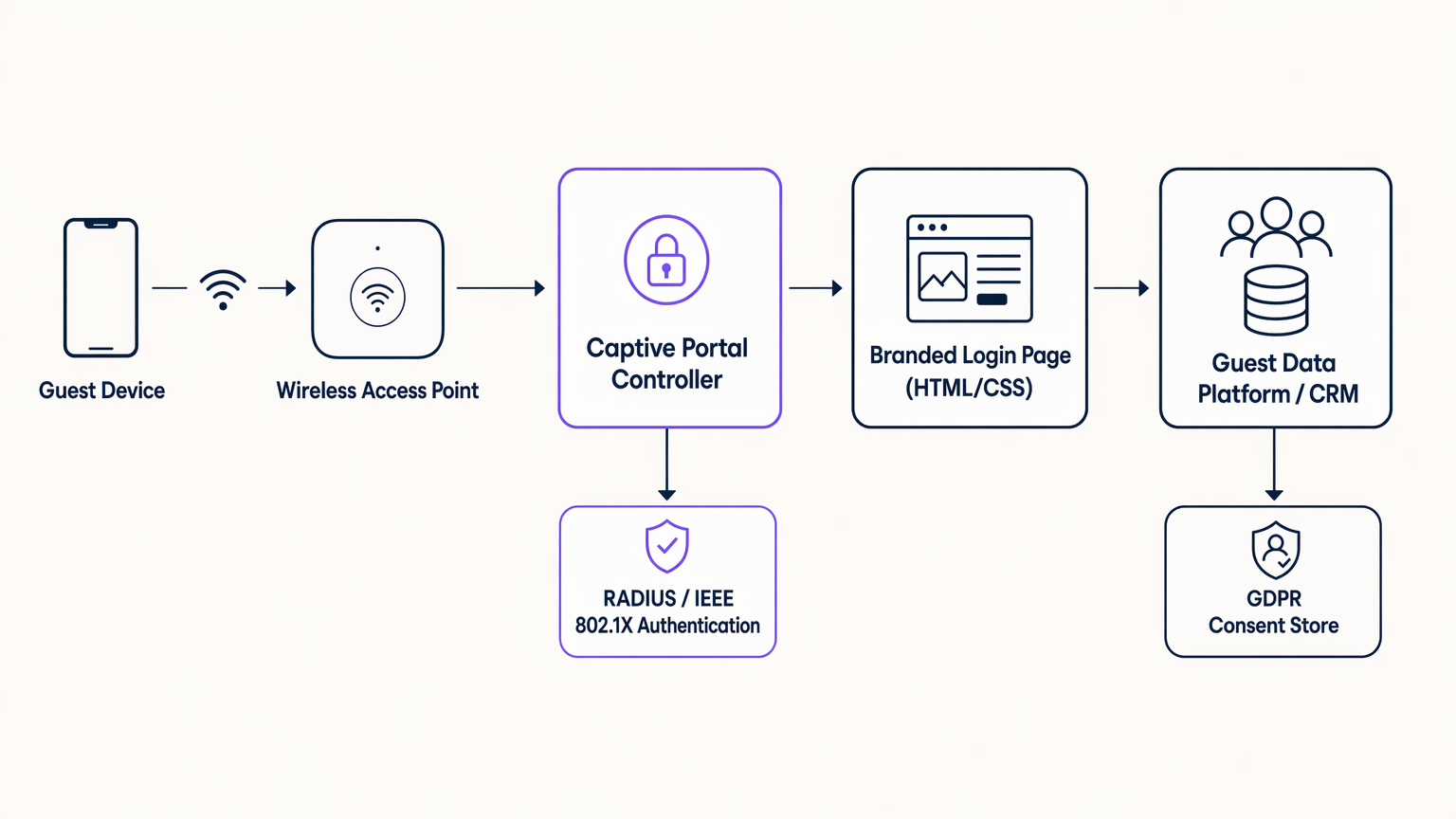
O fluxo é o seguinte. Quando um dispositivo convidado se associa ao ponto de acesso e tenta carregar qualquer URL HTTP, o controlador de LAN sem fio ou o appliance de gateway intercepta a requisição e emite um redirecionamento 302 para o controlador do Captive Portal. O controlador serve a página de login HTML/CSS personalizada. Uma vez que o usuário completa o fluxo de autenticação — seja por meio de um formulário de e-mail, login social (OAuth 2.0 via Facebook, Google ou Apple), ou um método contínuo como OpenRoaming — o controlador se comunica com um servidor RADIUS usando IEEE 802.1X ou MAC Authentication Bypass (MAB) para conceder ao dispositivo acesso à VLAN da internet. Os dados capturados durante a autenticação são simultaneamente roteados para a plataforma de dados de convidados ou CRM via uma chamada de API segura, com o registro de consentimento GDPR gravado em um armazenamento de dados compatível.
Vale a pena notar que a própria página do Captive Portal carrega em um ambiente de navegador restrito — o Captive Network Assistant (CNA) no iOS e Android — antes que o dispositivo tenha acesso total à internet. Isso tem uma implicação crítica para o desenvolvimento front-end: todos os ativos devem ser auto-hospedados no controlador do portal. Recursos de CDN externos, Google Fonts e bibliotecas JavaScript de terceiros falharão ao carregar neste ambiente. Cada folha de estilo, arquivo de fonte e imagem deve ser empacotado com a página do portal e servido a partir do próprio servidor web do controlador.
A Camada de Personalização HTML/CSS
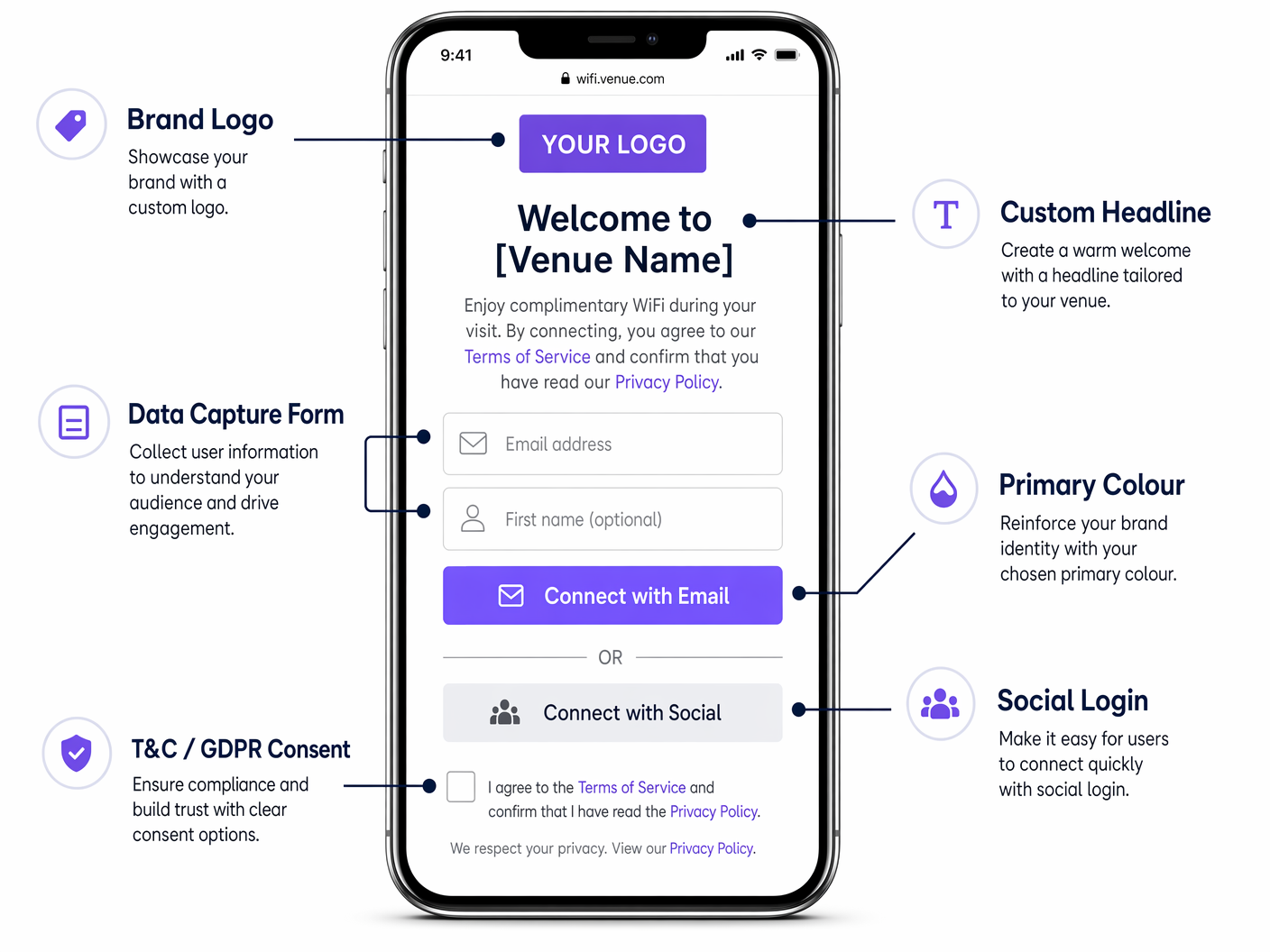
A própria página de login é um documento HTML5 padrão com uma folha de estilo CSS associada. Plataformas modernas de Captive Portal — incluindo a Purple — expõem um editor visual que gera este código, mas entender a estrutura subjacente é essencial para equipes de TI que precisam impor padrões de marca ou solucionar problemas de renderização.
As principais variáveis CSS a serem controladas são:
| Propriedade CSS | Elemento da Marca | Abordagem Recomendada |
|---|---|---|
background-color |
Fundo da página | Use um valor hexadecimal plano ou gradiente CSS; evite imagens rasterizadas |
font-family |
Tipografia | Incorpore arquivos de fonte WOFF2 localmente; não referencie Google Fonts |
color (títulos) |
Cor secundária da marca | Corresponda exatamente às diretrizes da marca |
background-color (botão CTA) |
Cor primária da marca | Use o valor hexadecimal exato das diretrizes da marca |
border-radius |
Forma de botão e contêiner | 12px para contêineres, 6px para elementos pequenos |
max-width (contêiner do formulário) |
Layout mobile-first | 480px máximo para renderização móvel ideal |
A restrição de peso da página é o requisito técnico mais comumente violado em implantações de Captive Portal. O limite prático é de 500 kilobytes no total para a página inteira, incluindo todos os ativos. Isso garante uma renderização confiável em conexões lentas ou congestionadas antes da autenticação. Use o formato SVG para logotipos (tipicamente 5–20 KB), WOFF2 incorporado localmente para fontes (tipicamente 30–80 KB por peso) e gradientes CSS ou cores planas em vez de fundos fotográficos.
Métodos de Autenticação
A escolha do método de autenticação tem um impacto direto tanto nas taxas de captura de dados quanto na postura de conformidade.
| Método | Dados Capturados | Taxa de Conversão | Notas de Conformidade |
|---|---|---|---|
| Formulário de e-mail | E-mail, nome, campos personalizados | Médio (25–40%) | Controle total do GDPR; recomendado |
| Login social (OAuth) | E-mail, nome, dados de perfil | Alto (35–55%) | Requer DPA com provedor social |
| SMS / OTP | Número de celular | Médio (20–35%) | Requer gateway SMS; PECR se aplica |
| Click-through (sem dados) | Nenhum | Muito alto (70–90%) | Sem dadum valor; usar apenas onde necessário |
| OpenRoaming / Passpoint | Identidade verificada pela operadora | Contínuo | Ecossistema Eduroam/WBA; uso empresarial |
Para a maioria das implementações comerciais, uma combinação de formulário de e-mail e login social — com uma caixa de seleção de consentimento GDPR claramente apresentada — oferece o equilíbrio ideal entre taxa de conversão e qualidade dos dados.
Guia de Implementação
Uma implementação bem-sucedida de Captive Portal segue cinco estágios distintos. Pular ou comprimir qualquer estágio é a principal causa de problemas pós-implementação.
Estágio 1 — Coleta de Requisitos. Reúna um grupo de trabalho multifuncional incluindo marketing (ativos de marca, texto, linguagem de consentimento), jurídico (revisão GDPR, política de privacidade) e engenharia de rede (arquitetura VLAN, configuração RADIUS, DNS whitelist). Defina os campos de dados exatos a serem capturados, a URL de redirecionamento pós-autenticação e a linguagem de opt-in para consentimento de marketing. Obtenha a aprovação por escrito do departamento jurídico sobre o mecanismo de consentimento antes do início do desenvolvimento.
Estágio 2 — Design e Desenvolvimento. Crie a página do portal como um documento HTML/CSS autônomo. Imponha o limite de peso da página de 500 KB. Teste a renderização no iOS Safari (CNA), Android Chrome (CNA) e navegadores de desktop. Valide a cadeia de certificados SSL — o domínio do portal deve ter um certificado confiável, pois um aviso de certificado não confiável fará com que a maioria dos usuários abandone o login. Garanta que o formulário seja totalmente acessível (WCAG 2.1 AA mínimo).
Estágio 3 — Integração. Conecte o portal à sua plataforma de dados de convidados ou CRM via API da plataforma. Configure o servidor RADIUS (ou use o serviço RADIUS hospedado da plataforma). Configure o redirecionamento pós-autenticação. Configure a segmentação VLAN para isolar o segmento de rede de pré-autenticação dos recursos internos. Teste o fluxo completo de ponta a ponta — associação de dispositivo, redirecionamento do portal, autenticação, autorização RADIUS, gravação de dados no CRM e redirecionamento pós-autenticação — em uma rede de teste antes de ir para produção.
Estágio 4 — Implantação Piloto. Implemente em um único local ou em um grupo piloto definido. Monitore quatro métricas chave nos primeiros 30 dias: taxa de sucesso de autenticação (meta >95%), tempo médio de carregamento da página (meta <3 segundos), taxa de captura de dados (medição de linha de base) e falhas de autorização RADIUS (meta <1%). Resolva quaisquer problemas antes de prosseguir para a implementação completa.
Estágio 5 — Otimização e Governança. Revise as taxas de captura de dados mensalmente. Teste variantes de texto de título e botão CTA. Atualize o design do portal quando as diretrizes de marca mudarem. Revise a linguagem de consentimento GDPR sempre que as atividades de processamento de dados mudarem. Conduza uma revisão de segurança anual da infraestrutura do portal, incluindo renovação de certificado SSL, aplicação de patches no servidor RADIUS e revisão da DNS whitelist.
Melhores Práticas
Fidelidade à Marca
O portal deve passar por uma Verificação de Fidelidade à Marca de cinco pontos antes da implantação: variante de logotipo correta no tamanho mínimo (30px digital); cor do botão principal correspondente ao valor hexadecimal exato da marca; família de fontes consistente com as diretrizes de marca digital; tom do título consistente com a voz da marca; e consistência visual com o site e aplicativo da marca. Qualquer portal que falhe nesta verificação deve ser retornado à fase de design.
Arquitetura de Conformidade GDPR
Sob o UK GDPR e o EU GDPR, o mecanismo de consentimento deve ser explícito, desagregado e granular. A aceitação dos termos de serviço e o opt-in para comunicações de marketing devem ser apresentados como caixas de seleção separadas e desmarcadas. Agrupá-los em uma única caixa de seleção não é compatível. Cada evento de consentimento deve ser registrado com um carimbo de data/hora, o texto exato do consentimento apresentado e o identificador do usuário. A plataforma da Purple armazena esses registros em um repositório de consentimento auditável que pode ser exportado para revisão regulatória.
Postura de Segurança
O segmento de rede de pré-autenticação deve ser isolado de todos os recursos internos via segmentação VLAN. Apenas as entradas da DNS whitelist necessárias para o funcionamento do portal — o domínio do controlador do portal, os endpoints OAuth de login social e quaisquer domínios CDN usados para ativos auto-hospedados — devem ser acessíveis antes da autenticação. Pós-autenticação, os convidados devem ser colocados em uma VLAN de convidado dedicada com acesso apenas à internet, sem rota para sub-redes internas. Esta arquitetura está alinhada com o Requisito 1.3 do PCI DSS para segmentação de rede.
Para uma comparação detalhada dos tipos de página do portal, consulte WiFi Landing Page vs. Splash Page: Qual a Diferença? .
Estudos de Caso Reais
Estudo de Caso 1: Rede de Hotéis do Reino Unido — Hospitalidade
Um grupo hoteleiro de médio porte, operando 45 propriedades em todo o Reino Unido, estava usando a splash page padrão fornecida por seu fornecedor de LAN sem fio. A página não tinha marca, carregava lentamente em dispositivos móveis e não apresentava formulário de captura de dados. Taxa de captura de e-mail: aproximadamente 8% dos hóspedes conectados.
A equipe de TI implementou a plataforma Guest WiFi da Purple em todas as 45 propriedades, substituindo a splash page do fornecedor por um Captive Portal totalmente personalizado. O novo portal utilizou as cores exatas da marca do grupo hoteleiro, tipografia Poppins e um layout de tela única com um campo de e-mail, um campo de primeiro nome e uma caixa de seleção de consentimento de marketing compatível com GDPR. O peso total da página foi otimizado para 380 KB. O redirecionamento pós-autenticação foi definido para a página de destino do programa de fidelidade do hotel.
Resultados em 90 dias: a taxa de captura de e-mail aumentou de 8% para 38% dos hóspedes conectados. Os dados capturados foram integrados ao CRM do grupo hoteleiro, permitindo uma campanha de e-mail de reengajamento direcionada a hóspedes anteriores. A receita de reservas diretas atribuível à campanha de e-mail aumentou em 14% ano a ano nas propriedades piloto. O repositório de consentimento GDPR forneceu um registro de auditoria completo para todos os 45 locais.
Estudo de Caso 2: Varejista de Moda Europeu — Varejo
Um varejista de moda operando 120 lojas em cinco mercados europeus estava implementando WiFi para convidados como parte de um programa de transformação digital. O requisito era um portal único, gerenciado centralmente e com marca, com idioma por mercadolocalização de idiomas (inglês, francês, alemão, espanhol, italiano) e uma única integração de CRM no Salesforce.
O varejista implementou uma plataforma de WiFi para convidados gerenciada em nuvem com uma configuração de portal centralizada. Ativos de marca e CSS foram gerenciados a partir de um único console de administração, com substituições por local e por região aplicadas para idioma e linguagem de consentimento localizada. A integração com o Salesforce utilizou o conector CRM nativo da plataforma.
Resultados em seis meses: um ativo de dados primários de mais de 400.000 perfis de convidados com opt-in foi construído em todas as 120 lojas. Campanhas de e-mail para este público alcançaram uma taxa de abertura média de 28%, em comparação com uma referência da indústria de 12% para o varejo. O varejista atribuiu um aumento de 9% nas visitas repetidas à loja nos seis meses seguintes à implementação, com base na modelagem de atribuição de CRM. Veja a plataforma WiFi Analytics da Purple para as capacidades de análise e atribuição usadas nesta implementação.
Solução de Problemas e Mitigação de Riscos
Portal não exibindo no iOS. O iOS usa um Captive Network Assistant (CNA) que renderiza o portal em uma visualização WebKit restrita. Certifique-se de que o domínio do portal não esteja na lista de redes conhecidas da Apple, que o portal responda corretamente à sonda de detecção de Captive Portal da Apple (/hotspot-detect.html) e que todos os ativos sejam servidos via HTTP (não HTTPS) no redirecionamento inicial — o CNA não segue redirecionamentos HTTPS na primeira solicitação.
Alta taxa de falha de autenticação. Verifique os logs do servidor RADIUS para códigos de erro específicos. Causas comuns incluem desvio de relógio entre o servidor RADIUS e o ponto de acesso (sincronização NTP necessária), certificados expirados no servidor RADIUS e incompatibilidades de formato de endereço MAC entre o ponto de acesso e o servidor RADIUS.
Baixa taxa de captura de dados apesar do alto volume de conexões. Revise a contagem de campos do formulário — cada campo adicional reduz a conversão em aproximadamente 5–10%. Revise o tempo de carregamento da página — se o portal demorar mais de 3 segundos para carregar, o abandono aumenta drasticamente. Revise a linguagem de consentimento — texto de consentimento excessivamente legalista reduz as taxas de opt-in.
Solicitação de auditoria GDPR. A plataforma da Purple exporta um registro de consentimento completo para qualquer endereço de e-mail ou intervalo de datas sob demanda. Certifique-se de que sua política de retenção de dados esteja configurada corretamente — sob o GDPR do Reino Unido, dados pessoais não devem ser retidos além do período necessário para a finalidade declarada.
Inconsistência de marca entre locais. Centralize o gerenciamento da configuração do portal. Qualquer personalização em nível de local deve ser limitada a texto e idioma localizados; cores da marca, tipografia e logotipo devem ser bloqueados no nível de configuração global.
ROI e Impacto nos Negócios
O ROI de um Captive Portal personalizado é medido em três dimensões: valor do ativo de dados, atribuição de receita direta e eficiência operacional.
Valor do Ativo de Dados. O principal resultado de uma implementação de Captive Portal é um ativo de dados primários — um banco de dados de perfis de convidados com opt-in e endereços de e-mail verificados. O valor deste ativo é determinado pela taxa de captura, pela taxa de opt-in e pela qualidade dos dados. Um local com 500 conexões diárias, uma taxa de captura de 35% e uma taxa de opt-in de 70% construirá um banco de dados de aproximadamente 44.000 perfis com opt-in por ano. Com um ROI de marketing por e-mail padrão da indústria de £42 por £1 gasto, o valor comercial deste ativo é substancial.
Atribuição Direta de Receita. A plataforma WiFi Analytics da Purple fornece relatórios de atribuição em nível de CRM, vinculando campanhas de e-mail específicas a visitas e transações no local. Isso permite um cálculo direto da receita atribuível ao programa de captura de dados do Captive Portal.
Eficiência Operacional. Uma plataforma de portal gerenciada centralmente elimina a necessidade de trabalho de configuração de TI por local quando as diretrizes da marca mudam. Uma única atualização de CSS se propaga por todos os locais simultaneamente, reduzindo a sobrecarga operacional de manter a consistência da marca em escala.
| Métrica | Portal Típico Sem Marca | Portal de Marca (Purple) | Aumento |
|---|---|---|---|
| Taxa de captura de e-mail | 5–10% | 30–40% | 3–4x |
| Taxa de opt-in de marketing | N/A | 60–75% of captures | — |
| Engajamento pós-autenticação | Nenhum | Página de fidelidade / oferta | Direto |
| Prontidão para auditoria GDPR | Manual | Exportação automatizada | Significativo |
| Consistência da marca | Nenhum | Imposta centralmente | Total |
Para contexto de arquitetura de rede relevante para implementações multi-site, consulte Os Principais Benefícios do SD-WAN para Empresas Modernas , que aborda como o SD-WAN simplifica a infraestrutura de rede para implementações distribuídas de Captive Portal.
Definições principais
Captive Portal
A network mechanism that intercepts a guest device's HTTP requests and redirects them to a login or authentication page before granting full internet access. Operates at the network layer, independent of the wireless encryption standard in use.
IT teams encounter this term when configuring wireless LAN controllers, cloud WiFi management platforms, or gateway appliances. It is the technical name for what end users experience as a 'WiFi login page'.
Captive Network Assistant (CNA)
A restricted browser environment built into iOS and Android that automatically opens when the operating system detects a captive portal. It renders the portal page in a sandboxed WebKit view with no access to cookies, local storage, or external CDN resources.
Critical for front-end developers building portal pages. Any asset that cannot be loaded from the portal controller itself will fail to render in the CNA, causing visual breakage or page load failures.
RADIUS (Remote Authentication Dial-In User Service)
A networking protocol that provides centralised authentication, authorisation, and accounting (AAA) for network access. In a captive portal deployment, the portal controller communicates with the RADIUS server to grant or deny network access after the user completes the authentication flow.
Network engineers configure RADIUS servers (or use a hosted RADIUS service provided by the portal platform) as part of the captive portal backend. IEEE 802.1X uses RADIUS as its authentication protocol.
IEEE 802.1X
An IEEE standard for port-based network access control that provides an authentication mechanism for devices connecting to a LAN or WLAN. In enterprise guest WiFi deployments, it is used in conjunction with a RADIUS server to authenticate users before granting network access.
Relevant when configuring enterprise-grade captive portals, particularly in environments where MAC Authentication Bypass (MAB) is insufficient and stronger identity verification is required.
MAC Authentication Bypass (MAB)
An authentication method in which a device's MAC address is used as its credential for network access. The access point sends the MAC address to the RADIUS server, which either approves or denies access based on a pre-configured allowlist.
Used in captive portal deployments to enable automatic re-authentication for returning devices without requiring the user to re-enter credentials. Commonly used for known corporate devices or returning guests.
GDPR Consent Record
A timestamped record of a user's explicit consent to data processing, including the exact consent text presented, the date and time of consent, and the user's identifier (typically email address). Required under UK GDPR and EU GDPR Article 7(1) as evidence that consent was obtained.
Captive portal platforms must generate and store a consent record for every user who opts in to marketing communications. This record must be exportable for regulatory audit purposes.
DNS Whitelist
A list of domain names that are accessible to a guest device before it has completed captive portal authentication. The whitelist must include the portal controller domain, any social login OAuth endpoints, and any CDN domains used for self-hosted portal assets.
Network engineers configure the DNS whitelist on the wireless LAN controller or gateway appliance. An incorrectly configured whitelist is a common cause of portal rendering failures, particularly for social login flows.
Post-Authentication Redirect
The URL to which a guest device's browser is redirected immediately after the user successfully completes the captive portal authentication flow. This is the first page the user sees with full internet access.
The post-authentication redirect is a high-value commercial touchpoint. It should be set to a landing page that drives a specific action — loyalty programme sign-up, app download, current promotion — rather than defaulting to the user's originally requested URL.
WPA3-SAE (Simultaneous Authentication of Equals)
The authentication protocol used in WPA3 Personal mode, replacing the Pre-Shared Key (PSK) handshake used in WPA2. SAE provides stronger resistance to offline dictionary attacks and forward secrecy. It is fully compatible with captive portal deployments.
IT teams evaluating network security upgrades should be aware that migrating from WPA2 to WPA3 does not require changes to the captive portal architecture. The portal mechanism operates at the network layer, above the encryption layer.
OpenRoaming
A WiFi roaming standard developed by the Wireless Broadband Alliance (WBA) that allows users to automatically connect to participating networks using their existing credentials (carrier, enterprise, or identity provider). Eliminates the need for manual captive portal authentication for enrolled users.
Relevant for enterprise and transport deployments where seamless connectivity is a priority. Purple operates as an identity provider within the OpenRoaming ecosystem under its Connect licence, enabling venues to offer automatic connection to enrolled users.
Exemplos práticos
A 200-room hotel in central London wants to replace its vendor-supplied splash page with a fully branded captive portal. The hotel's brand guidelines specify a dark navy primary colour (#011638), a gold accent (#C9A84C), and the Playfair Display serif font. The IT manager is concerned about iOS compatibility and GDPR compliance. How should this be approached?
Begin with a requirements workshop involving IT, marketing, and legal. Confirm the exact brand assets: SVG logo file, hex colour values, and font files (WOFF2 format for Playfair Display). For iOS compatibility, configure the wireless LAN controller to respond correctly to Apple's captive portal detection probe at /hotspot-detect.html, and ensure the initial redirect is HTTP (not HTTPS) — the CNA on iOS does not follow HTTPS redirects on the first request. The portal page itself should be served over HTTPS once the CNA has loaded it. For GDPR, present two separate, unticked checkboxes: one for terms of service acceptance (required to connect) and one for marketing communications (optional). Record each consent event with a timestamp and the exact consent text version. Optimise the page to under 500 KB by embedding the Playfair Display WOFF2 file locally (do not reference Google Fonts), using the SVG logo, and using a CSS gradient for the background rather than a photographic image. Set the post-authentication redirect to the hotel's loyalty programme or a current promotions page. Deploy to a single floor as a pilot, monitor authentication success rate and page load time for 14 days, then roll out to the full property.
A national retail chain with 85 stores wants to deploy a consistent branded captive portal across all locations. Each store has a different wireless LAN vendor (a mix of Cisco, Aruba, and Ruckus hardware from historical acquisitions). The marketing team wants to be able to update the portal design centrally without involving IT at each site. How should the architecture be designed?
Deploy a cloud-hosted captive portal platform — such as Purple — that operates as a vendor-neutral overlay, independent of the underlying wireless hardware. The platform communicates with each access point via a RADIUS proxy or a cloud RADIUS service, meaning the portal controller is entirely decoupled from the hardware vendor. The portal page is hosted on the platform's CDN (with all assets self-hosted on the platform, not on external CDNs), and the platform's admin console allows centralised management of brand assets, CSS, and copy. Per-store customisations (store name in the headline, localised promotions) are managed via venue-level variables in the platform's template engine. When the marketing team updates the brand CSS, the change propagates to all 85 stores within minutes, with no per-site IT intervention required. The CRM integration is configured once at the platform level and applies to all venues. VLAN configuration at each site is a one-time setup task handled by the local IT team or the platform's onboarding service.
A conference centre hosting 50 events per year wants to offer event sponsors a co-branded WiFi login experience — showing the sponsor's logo alongside the venue's own branding — for the duration of each event. The IT team needs to be able to switch portal configurations between events with minimal manual effort. How should this be implemented?
Configure the captive portal platform with a library of portal templates — one master template per event type (conference, exhibition, gala dinner) — with sponsor logo and colour variables that can be updated via the admin console or API. For each event, the event operations team updates the sponsor logo URL and primary accent colour in the admin console, and the portal updates in real time. If the platform supports it, configure SSID-to-portal mapping so that a sponsor-specific SSID (e.g., 'EventName-WiFi') serves the co-branded portal, while the venue's permanent SSID serves the standard venue portal. Set the portal to revert to the standard venue template at a scheduled time after the event ends. Ensure the sponsor's logo is provided in SVG format and is pre-approved by the venue's brand team to ensure it meets the page weight and quality standards. The post-authentication redirect for event portals should point to the event's own landing page or the sponsor's campaign URL, with UTM parameters for attribution tracking.
Questões práticas
Q1. Your marketing director has sent you a Figma mockup of the new branded captive portal. It includes a full-screen photographic background image (exported as a 4.2 MB JPEG), the brand's custom serif font loaded from Google Fonts, and a Facebook Login button. You need to implement this design. What changes must you make before development begins, and why?
Dica: Consider the technical constraints of the Captive Network Assistant environment and the page weight limit.
Ver resposta modelo
Three changes are required. First, the background image must be replaced with a CSS gradient or a heavily compressed WebP/SVG alternative under 100 KB — a 4.2 MB JPEG will cause the portal to time out on slow connections before it renders. Second, the Google Fonts reference must be replaced with a locally embedded WOFF2 font file served from the portal controller — the CNA environment has no internet access before authentication, so external font CDNs will fail to load. Third, the Facebook Login OAuth flow requires the Facebook OAuth endpoint domains to be added to the DNS whitelist on the wireless LAN controller, so the OAuth redirect can complete before full internet access is granted. Additionally, ensure the Facebook Login is accompanied by an email-based fallback option for users without Facebook accounts, and that the Facebook data processing agreement is in place with your legal team.
Q2. You are the IT manager for a hospital trust deploying guest WiFi across three sites. Your legal team has told you that the consent mechanism on the current portal is non-compliant with UK GDPR. You review the portal and find a single checkbox that reads: 'I agree to the Terms of Service and consent to receive marketing communications.' What is wrong with this, and how do you fix it?
Dica: Consider the GDPR requirements for consent to be freely given, specific, and granular.
Ver resposta modelo
The consent mechanism is non-compliant on two counts. First, it bundles terms of service acceptance (a contractual requirement for network access) with marketing communications consent (an optional data processing activity) into a single checkbox. Under UK GDPR Article 7 and Recital 43, consent is not freely given if it is bundled with a service that the user cannot access without consenting. Second, the checkbox appears to be pre-ticked or required — marketing consent must be presented as an unticked, optional checkbox. The fix is to separate the two into distinct checkboxes: one required checkbox for terms of service acceptance (worded as 'I agree to the Terms of Service and Privacy Policy'), and one separate, unticked, optional checkbox for marketing communications (worded as 'I would like to receive news and offers from [Organisation Name] by email'). The consent record stored for each user must capture which checkboxes were ticked, the exact text of each consent statement, and the timestamp of the consent event. In a healthcare environment, additional care must be taken to ensure the privacy policy accurately describes all data processing activities, including any sharing with third-party analytics platforms.
Q3. A stadium operator wants to deploy a branded captive portal for 40,000 concurrent users during match days. Their current wireless infrastructure supports a maximum of 500 concurrent RADIUS authentication requests per second. The match starts at 15:00, and the majority of fans arrive in the 30 minutes before kick-off. What are the key infrastructure risks, and how should they be mitigated?
Dica: Consider the authentication load profile and the impact of RADIUS server capacity on the user experience.
Ver resposta modelo
The primary risk is RADIUS server overload during the pre-match authentication surge. If 40,000 users attempt to authenticate in a 30-minute window, that is approximately 22 authentication requests per second on average — well within the 500 rps capacity. However, the arrival pattern will not be uniform: the peak surge in the final 5 minutes before kick-off could generate 5–10x the average rate, potentially exceeding 200 rps. Mitigations include: (1) deploying a load-balanced RADIUS cluster rather than a single server, with automatic failover; (2) configuring MAC Authentication Bypass (MAB) for returning devices, which bypasses the full authentication flow and significantly reduces RADIUS load for repeat visitors; (3) pre-caching the portal page on the wireless LAN controller to reduce portal controller load; (4) setting a short session timeout (e.g., 8 hours) so that devices that authenticated at a previous match do not consume RADIUS sessions unnecessarily; and (5) conducting a load test simulating the peak authentication rate before the first match day. Additionally, the portal page must be optimised for maximum performance — a slow-loading portal during a surge will cause users to abandon the login, reducing data capture rates and increasing support calls.
Continue a ler esta série
Como Configurar um Hotspot WiFi para o Seu Negócio
Este guia completo oferece a líderes de TI, arquitetos de rede e diretores de operações de locais um plano prático e neutro em relação a fornecedores para implantar hotspots de Guest WiFi seguros, compatíveis e que aprimoram os negócios. Ele aborda decisões arquitetônicas críticas — desde a segmentação de VLAN e configuração de Captive Portal até a conformidade com GDPR e modelagem de tráfego — e demonstra como transformar a infraestrutura de rede de um centro de custo em uma plataforma de análise geradora de receita usando os recursos de Guest WiFi e análise da Purple.
Purple vs. Cisco Spaces (DNA Spaces): Quando Escolher Cada Um
Este guia de referência técnica oferece uma comparação abrangente entre Purple e Cisco Spaces (anteriormente DNA Spaces) para implantações de portal cativo empresarial e WiFi para convidados. Ele avalia diferenças arquitetônicas, profundidade de automação de marketing e a questão crítica do aprisionamento de fornecedor de hardware para ajudar líderes de TI a tomar decisões de infraestrutura informadas.
Purple vs. GlobalReach Technology: WiFi de Nível Carrier Comparados
Este guia oferece uma comparação técnica aprofundada de Purple e GlobalReach Technology, abrangendo os recursos de Captive Portal, a prontidão para WBA OpenRoaming, a arquitetura de offload de operadora e os modelos comerciais. É destinado a gerentes de TI, arquitetos de rede e CTOs em hotéis, redes de varejo, estádios e municípios que precisam tomar uma decisão de plataforma neste trimestre. A principal conclusão é que, enquanto a GlobalReach se destaca no offload profundo de operadoras MNO e na autoria de padrões, a Purple inova no mercado com uma camada de inteligência agnóstica de hardware e um nível de Provedor de Identidade OpenRoaming genuinamente gratuito, tornando o WiFi de nível carrier acessível a qualquer local sem custos iniciais de licenciamento de software.