
Como implementar o SCEP para registro automatizado de certificados WiFi
Este guia explica como implementar o SCEP (Simple Certificate Enrollment Protocol) para registro automatizado de certificados WiFi em locais corporativos. Ele abrange o projeto de arquitetura completo — desde o design de PKI e integração de MDM até a sequência obrigatória de implantação em três etapas — e mostra a gerentes de TI e arquitetos de rede como eliminar credenciais compartilhadas, automatizar o gerenciamento do ciclo de vida de certificados e atender aos requisitos do PCI DSS e GDPR em escala.
Ouça este guia
Ver transcrição do podcast
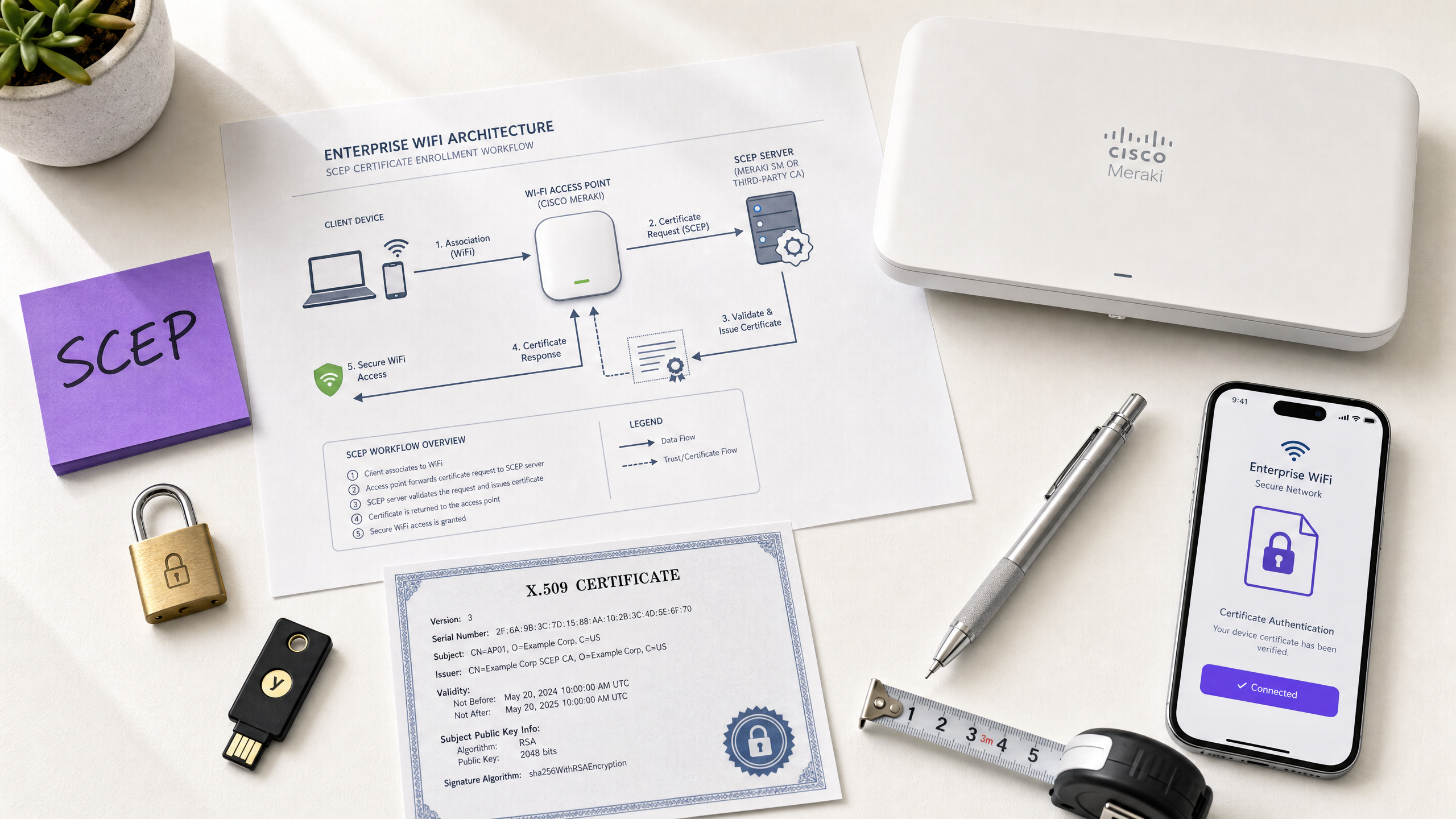
Resumo executivo
Para operadores de locais que executam Guest WiFi em hotéis, redes de varejo, estádios e centros de convenções, depender de chaves pré-compartilhadas ou de captive portals básicos para o acesso de funcionários à rede é um risco de segurança. A arquitetura de rede moderna exige autenticação 802.1X usando EAP-TLS (Extensible Authentication Protocol - Transport Layer Security), garantindo que cada dispositivo seja verificado criptograficamente antes de acessar a rede. O desafio é a distribuição: como implantar certificados de cliente exclusivos em milhares de dispositivos Windows, iOS e Android sem sobrecarregar seu suporte técnico?
A resposta é o SCEP — o Simple Certificate Enrollment Protocol. Formalizado pelo IETF como RFC 8894 em 2020, o SCEP automatiza o registro de certificados em frotas de dispositivos gerenciados. Quando integrado a uma plataforma MDM, como o Microsoft Intune ou Jamf, o SCEP oferece provisionamento de certificados sem toque (zero-touch): os dispositivos solicitam, recebem e renovam seus próprios certificados sem qualquer intervenção de TI. A chave privada é gerada localmente no dispositivo e nunca é transmitida pela rede — uma vantagem de segurança fundamental em relação à entrega baseada em PKCS.
Este guia detalha todo o fluxo de trabalho de implementação do SCEP: arquitetura de PKI, configuração do gateway NDES, a sequência obrigatória de implantação do MDM em três etapas e os controles operacionais — particularmente a verificação de CRL e o direcionamento de grupos — que determinam se uma implantação terá sucesso ou será interrompida. Dois cenários do mundo real ilustram a abordagem em ambientes de hotelaria e varejo. A Purple opera em mais de 80.000 locais ativos e atende a 350 milhões de usuários únicos; os padrões descritos aqui refletem o que funciona nessa escala.
Análise técnica detalhada
O que o SCEP realmente faz
O SCEP fica entre sua plataforma MDM e sua Autoridade de Certificação (CA). Ele fornece um mecanismo padronizado baseado em HTTP para que os dispositivos solicitem, recebam e renovem certificados X.509 sem a necessidade de uma credencial associada ao domínio ou envolvimento manual do administrador. O protocolo foi desenvolvido originalmente no início dos anos 2000 e ganhou ampla adoção em ambientes MDM corporativos antes de o IETF publicá-lo formalmente como RFC 8894.
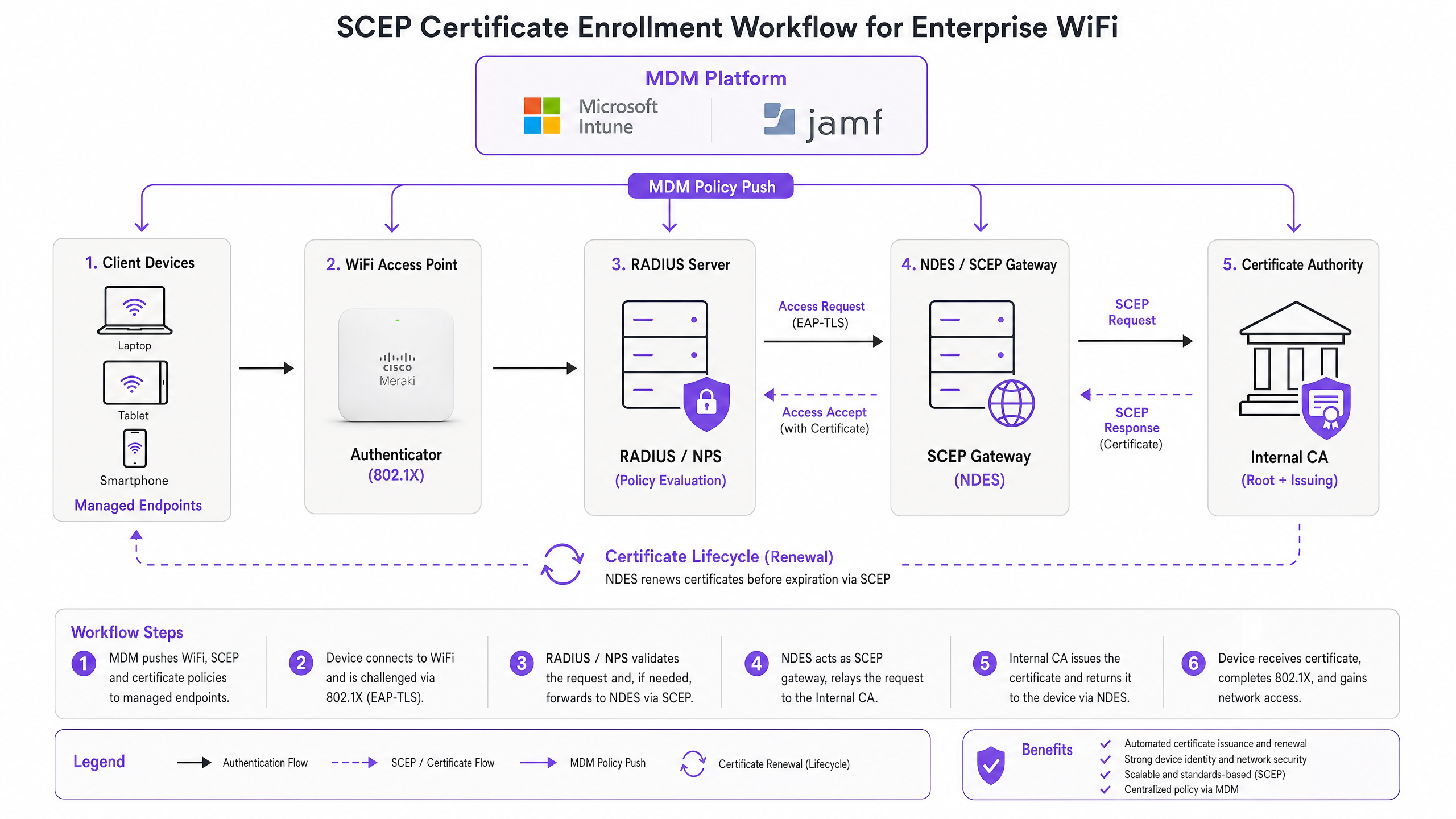
O fluxo de registro de seis etapas funciona da seguinte forma. Primeiro, o dispositivo gerenciado se conecta à URL do gateway SCEP pré-configurada em seu perfil de MDM. Segundo, o dispositivo gera um par de chaves privada/pública localmente e cria uma Solicitação de Assinatura de Certificado (CSR). Terceiro, o gateway SCEP valida a autorização do dispositivo usando uma senha de desafio ou OTP incorporada na política de MDM. Quarto, o gateway encaminha a CSR validada para a CA. Quinto, a CA assina o certificado e o devolve ao gateway. Sexto, o gateway entrega o certificado assinado ao dispositivo. As renovações futuras seguem o mesmo caminho automatizado — o dispositivo se registra novamente antes do vencimento, sem qualquer ação do usuário ou do administrador.
SCEP vs PKCS: a decisão que importa
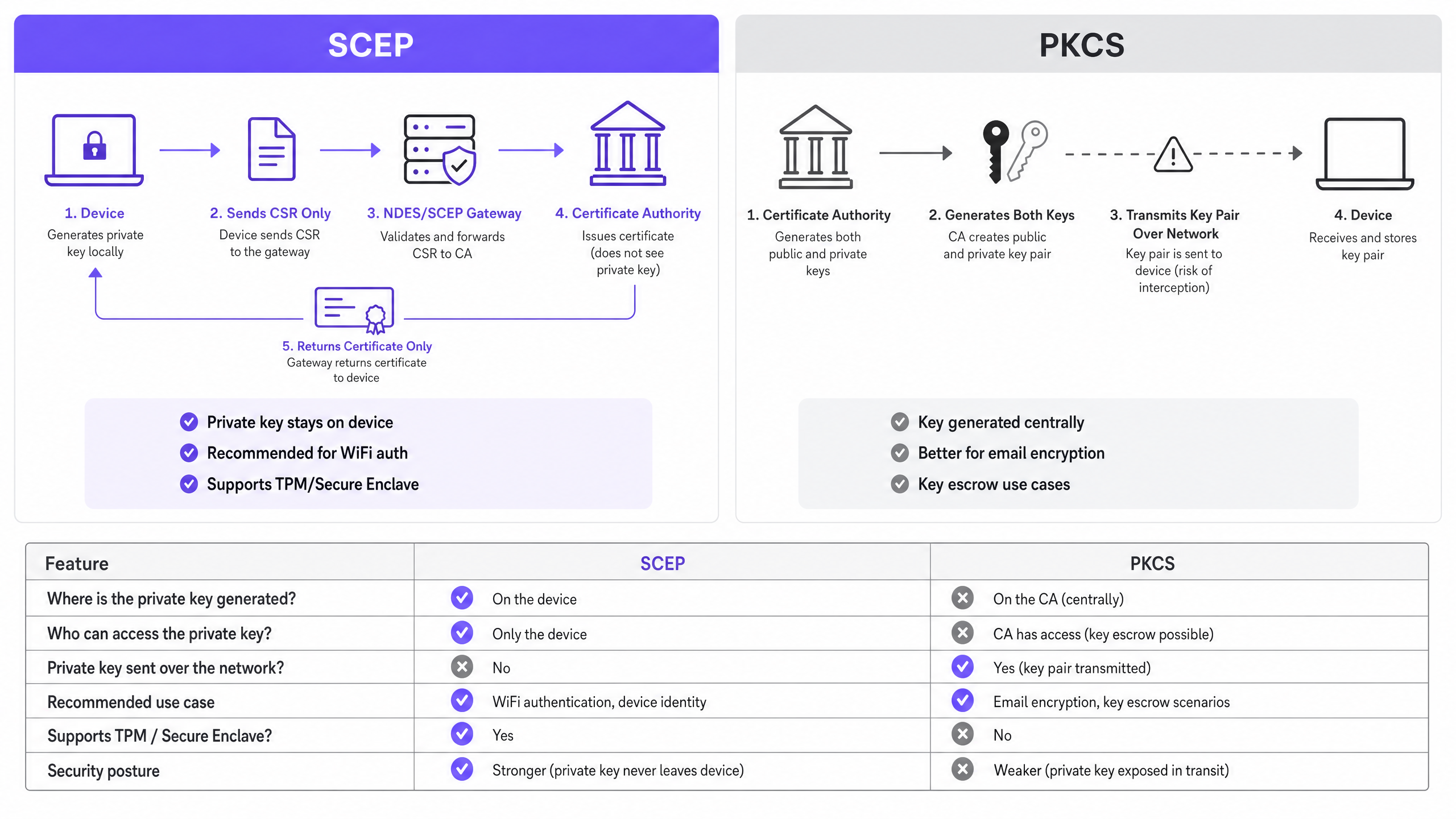
O Microsoft Intune e a maioria das plataformas MDM oferecem suporte a dois mecanismos de entrega de certificados: SCEP e PKCS. A distinção é arquitetônica, não cosmética.
Com o SCEP, a chave privada é gerada no dispositivo e permanece lá. A CA nunca a vê. O TPM do dispositivo (no Windows) ou o Secure Enclave (no iOS/macOS) protege a chave no nível do hardware. Com o PKCS, a CA gera o par de chaves centralmente e o transmite ao dispositivo pela rede. A CA retém uma cópia, permitindo o depósito de chaves (key escrow) — o que é útil para criptografia de e-mail S/MIME, mas introduz riscos desnecessários para a autenticação de rede.
Para autenticação WiFi 802.1X, use SCEP. A chave privada nunca sai do dispositivo. Essa é a regra.
| Critério | SCEP | PKCS |
|---|---|---|
| Chave privada gerada no | Dispositivo | CA (centralmente) |
| Chave privada transmitida pela rede | Nunca | Sim |
| Suporta TPM / Secure Enclave | Sim | Não |
| Recomendado para autenticação WiFi | Sim | Não |
| Recomendado para criptografia de e-mail (S/MIME) | Não | Sim |
| Depósito de chaves (key escrow) possível | Não | Sim |
802.1X e EAP-TLS: a estrutura de autenticação
O IEEE 802.1X é o padrão de controle de acesso à rede baseado em porta que fundamenta a segurança WiFi corporativa. Ele define três funções: o suplicante (o dispositivo cliente), o autenticador (o ponto de acesso — Cisco Meraki, HPE Aruba, Ruckus, Juniper Mist, Ubiquiti UniFi, Cambium, Extreme ou Fortinet) e o servidor de autenticação (um servidor RADIUS como Microsoft NPS, FreeRADIUS ou Cisco ISE).
O EAP-TLS é o método EAP mais seguro para 802.1X. Ambos os lados apresentam certificados: o servidor RADIUS apresenta seu certificado ao cliente, e o cliente apresenta seu certificado provisionado por SCEP ao servidor RADIUS. Nenhum dos lados pode se passar pelo outro sem um certificado válido e não revogado da hierarquia de CA confiável. Esse modelo de autenticação mútua elimina o roubo de credenciais, ataques de Evil Twin e riscos de pontos de acesso não autorizados em uma única decisão de arquitetura.
O EAP-TLS atende ao Requisito 8.6 do PCI DSS 4.0 para autenticação multifator na camada de rede. Ele é obrigatório para implantações WPA3 Enterprise de 192 bits (Suite B). Para qualquer rede sem fio no escopo do processamento de dados de portadores de cartão — varejo ponto de venda, recepção de hotel, bilheteria de estádio — o EAP-TLS é a escolha correta.
Para uma análise mais detalhada da arquitetura de WiFi seguro e de como a autenticação baseada em certificados se encaixa em uma postura de segurança mais ampla, consulte nosso guia essencial.
Guia de implementação
A sequência de implantação é inegociável. O Intune e o Jamf resolvem as dependências de perfil em ordem: o perfil de WiFi depende do perfil SCEP, que por sua vez depende do perfil de Raiz Confiável (Trusted Root). Se você os implantar fora de ordem, a aplicação do perfil de WiFi falhará.
Passo 1: Projete sua PKI
Antes de tocar em um console MDM, projete sua hierarquia de certificados. Uma PKI de duas camadas é o padrão: uma CA raiz offline e uma CA emissora online. A chave privada da CA raiz é a âncora de confiança mestre para toda a sua infraestrutura de certificados — mantenha-a isolada da rede (air-gapped). A CA emissora lida com a emissão diária de certificados e publica a Lista de Revogação de Certificados (CRL) e o respondedor OCSP.
Para a maioria das implantações em grandes locais corporativos, o Microsoft Active Directory Certificate Services (AD CS) executado no Windows Server fornece a CA emissora. Serviços de PKI hospedados na nuvem de provedores como SCEPman ou SecureW2 eliminam completamente a necessidade de infraestrutura local e valem a pena ser avaliados para implantações distribuídas em grupos hoteleiros, redes de varejo ou organizações do setor público com vários locais.
Passo 2: Implante o servidor NDES (ou gateway SCEP na nuvem)
O NDES (Network Device Enrollment Service) é a função do Microsoft Windows Server que atua como o gateway SCEP entre seu MDM e sua CA. Requisitos de configuração fundamentais:
- Publique a URL do NDES externamente via Azure AD Application Proxy (ou proxy reverso equivalente). Isso permite que dispositivos remotos se registrem antes de chegarem ao local, sem abrir portas de firewall de entrada.
- A conta de serviço do NDES requer permissões de Leitura e Registro (Read e Enroll) no modelo de certificado da CA.
- Configure o modelo de certificado com o Uso de Chave (Key Usage) definido como Assinatura Digital (Digital Signature) e Criptografia de Chave (Key Encipherment), e o Uso de Chave Estendido (Extended Key Usage) definido como Autenticação de Cliente (Client Authentication) (OID: 1.3.6.1.5.5.7.3.2).
- Defina um período de validade de certificado adequado. Um ano é o padrão para certificados de cliente; dois anos é aceitável para certificados de dispositivo em frotas estáveis.
Se preferir evitar a infraestrutura NDES local, os gateways SCEP na nuvem se integram diretamente ao Intune e à sua CA via API, eliminando completamente a dependência do IIS.
Passo 3: Implante o perfil de Certificado de Raiz Confiável (Trusted Root)
Na sua plataforma MDM, crie um perfil de Certificado Confiável e carregue o certificado da sua CA Raiz (e quaisquer certificados de CA Intermediária) como arquivos .cer. Implante este perfil nos seus grupos de dispositivos de destino antes de qualquer outro perfil de certificado ou de WiFi. Sem esta etapa, os dispositivos não conseguirão validar o certificado do servidor RADIUS durante o handshake EAP-TLS e não poderão confiar na CA emissora ao solicitar seu próprio certificado SCEP.
Regra geral: Sempre direcione para o mesmo grupo do Azure AD (seja Usuários ou Dispositivos) em todos os três perfis relacionados. Uma incompatibilidade aqui é a causa mais comum de falhas na implantação de perfis de WiFi.
Passo 4: Configure o perfil de Certificado SCEP
Crie um perfil de configuração de certificado SCEP no seu MDM:
- Formato do nome do assunto (Subject name format): Para autenticação orientada ao usuário, use
CN={{UserPrincipalName}}. Para autenticação de dispositivo (recomendado para dispositivos compartilhados e IoT), useCN={{AAD_Device_ID}}. - Uso de chave (Key usage): Assinatura Digital (Digital Signature), Criptografia de Chave (Key Encipherment).
- Uso de chave estendido (Extended key usage): Autenticação de Cliente (Client Authentication) (OID: 1.3.6.1.5.5.7.3.2).
- URL do servidor SCEP: A URL do NDES publicada externamente.
- Certificado raiz: Link para o perfil de Raiz Confiável (Trusted Root) do Passo 3.
- Período de validade do certificado: Deve corresponder ao modelo configurado na CA.
Passo 5: Implante o perfil de WiFi 802.1X
Crie um perfil de configuração de WiFi:
- SSID: Insira o nome da rede exatamente como transmitido pelos seus pontos de acesso.
- Tipo de segurança: WPA2-Enterprise ou WPA3-Enterprise.
- Tipo de EAP: EAP-TLS.
- Certificado de autenticação de cliente: Selecione o perfil de certificado SCEP do Passo 4.
- Validação do servidor: Especifique o certificado de Raiz Confiável (Trusted Root) do Passo 3 e insira o nome esperado do servidor RADIUS. Isso evita que os dispositivos se conectem a pontos de acesso invasores (rogue) que apresentem certificados fraudulentos.
Melhores práticas
Imponha uma verificação estrita de CRL no seu servidor RADIUS
A revogação de certificados é o controle operacional que elimina a lacuna entre desativar uma conta e bloquear o acesso à rede. Quando um dispositivo é perdido, roubado ou um funcionário sai da empresa, desative a conta do AD e revogue o certificado na CA. Seu servidor RADIUS deve ser configurado para verificar a CRL a cada tentativa de autenticação. Se a CRL estiver indisponível — porque o CDP (Ponto de Distribuição de CRL) está inacessível —, a maioria dos servidores RADIUS assume por padrão a falha aberta (fail open), o que representa um risco de segurança. Certifique-se de que seus CDPs tenham alta disponibilidade e que seu servidor RADIUS esteja configurado para falhar fechado (fail closed) se a CRL não puder ser obtida.
Para revogação em tempo real, configure o OCSP (Online Certificate Status Protocol) além da CRL. O OCSP fornece respostas de status por certificado sem exigir que o servidor RADIUS baixe e analise toda a CRL.
Use certificados de dispositivo para dispositivos compartilhados e IoT
Para dispositivos compartilhados — tablets de governança de hotéis, terminais de PDV de varejo, leitores de controle de acesso de estádios —, use certificados de dispositivo em vez de certificados de usuário. Os certificados de dispositivo estão vinculados à identidade da máquina, não a uma conta de usuário. Isso significa que o dispositivo se autentica independentemente de qual usuário esteja conectado, e a revogação fica vinculada ao registro do dispositivo, e não à saída de um funcionário.
Para implantações no varejo , os certificados de dispositivo em hardware de PDV também atendem ao requisito do PCI DSS para identidade de dispositivo na camada de rede, sem introduzir a complexidade de credenciais de usuário no ponto de venda.
Automatize a renovação de certificados
O SCEP suporta a renovação automática: o MDM instrui o dispositivo a se registrar novamente antes que o certificado expire. Configure seu perfil SCEP para acionar a renovação em 20% do período de validade restante do certificado. Para um certificado de um ano, a renovação começa aproximadamente 73 dias antes do vencimento. Essa janela oferece tempo suficiente para resolver quaisquer falhas de renovação antes que o certificado expire e os dispositivos percam o acesso à rede.
Certificados expirados que causam falhas de autenticação em massa são o incidente operacional mais comum em implantações 802.1X. A renovação automatizada via SCEP elimina esse risco inteiramente.
Segmentar redes por atributo de certificado
Os servidores RADIUS podem ler atributos de certificado - Subject, SAN ou OIDs personalizados - e usá-los para atribuir dispositivos a VLANs dinamicamente. Um tablet de governança com um certificado emitido a partir do modelo HousekeepingDevices vai para a VLAN de governança. Um terminal de PDV com um certificado do modelo RetailPOS vai para a VLAN de escopo PCI. Essa é uma segmentação de rede imposta criptograficamente - muito mais confiável do que abordagens baseadas em SSID ou baseadas em MAC.
Para operadores de hospitalidade que executam Guest WiFi junto com Staff WiFi na mesma infraestrutura física, a atribuição de VLAN por meio de atributos de certificado garante que os convidados e a equipe estejam sempre em segmentos de rede separados, independentemente de qual SSID um dispositivo se conecte.
Solução de problemas e mitigação de riscos
O perfil de WiFi mostra 'Erro' ou 'Não aplicável' no Intune
Causa raiz: Incompatibilidade de direcionamento de grupo. O perfil SCEP está atribuído a um grupo diferente do perfil de WiFi. O Intune não consegue resolver a dependência do certificado.
Correção: Audite todos os três perfis (Trusted Root, SCEP, WiFi). Certifique-se de que todos estejam atribuídos exatamente ao mesmo grupo do Azure AD. Se você estiver implantando para Usuários, todos os três perfis devem ter como alvo um grupo de Usuários. Se estiver implantando para Dispositivos, todos os três devem ter como alvo um grupo de Dispositivos.
NDES retorna erros HTTP 403
Causa raiz: A conta de serviço do Intune Certificate Connector não possui permissões de Leitura ou Inscrição no modelo de certificado da CA, ou o filtro de URL do firewall está bloqueando as strings de consulta SCEP.
Correção: Verifique se a conta do conector possui permissões de Leitura e Inscrição no modelo no console da CA. Verifique os logs do firewall para solicitações bloqueadas contendo ?operation=GetCACaps ou ?operation=PKIOperation. Essas strings de consulta devem passar sem modificação.
Os dispositivos não conseguem renovar os certificados antes do vencimento
Causa raiz: A janela de renovação do SCEP é muito curta ou o servidor NDES está inacessível no momento da renovação.
Correção: Defina o limite de renovação para 20% da validade do certificado. Certifique-se de que a URL do NDES seja publicada por meio de um proxy reverso de alta disponibilidade. Monitore os logs do IIS do NDES para falhas de solicitação de renovação e emita alertas proativamente.
O RADIUS rejeita certificados válidos
Causa raiz: O repositório de CA confiável do servidor RADIUS não inclui o certificado da CA emissora, ou a CRL está desatualizada.
Correção: Importe a cadeia de CA completa (Root CA + Issuing CA) para o repositório confiável do servidor RADIUS. Verifique se a CRL está sendo obtida com sucesso e se a URL do CDP está acessível a partir do servidor RADIUS. Verifique o carimbo de data/hora da próxima atualização da CRL - se já tiver passado, a CA precisará publicar uma nova CRL.
Para considerações mais amplas sobre o desempenho da rede juntamente com a segurança, consulte nosso guia de gerenciamento de largura de banda .
ROI e impacto nos negócios
O caso de negócios para o registro de certificados baseado em SCEP é simples. O WiFi baseado em senha gera um volume previsível de chamados de suporte: expirações de senha, bloqueios, compartilhamento de credenciais da equipe com convidados e fricção de integração para novos contratados. A autenticação baseada em certificado é invisível para o usuário final. Os dispositivos se conectam automaticamente. Não há senhas para expirar, compartilhar ou esquecer.
As organizações que migram do WiFi baseado em senha para EAP-TLS com SCEP normalmente relatam uma redução de 70 a 80% nos chamados de suporte relacionados ao WiFi (dados internos da Purple, 2024, com base em implantações em propriedades de hospitalidade e varejo). A economia apenas com o suporte frequentemente justifica o custo de implementação logo no primeiro ano.
O impacto na conformidade é igualmente concreto. O EAP-TLS atende ao Requisito 8.6 do PCI DSS 4.0 para autenticação multifator na camada de rede. Para ambientes de saúde , ele se alinha com os requisitos de salvaguarda técnica da HIPAA para acesso à rede sem fio. Para organizações do setor público, ele apoia os requisitos de certificação NCSC Cyber Essentials Plus para controle de acesso à rede.
Para operadores de transporte - concessões ferroviárias, operadores aeroportuários, redes de ônibus - a autenticação baseada em certificado nos dispositivos da equipe garante que as redes operacionais que transportam dados críticos de segurança sejam isoladas do WiFi dos passageiros e protegidas contra ataques baseados em credenciais.
A plataforma WiFi Analytics da Purple se integra com redes protegidas por 802.1X para fornecer insights de dados primários sem comprometer a postura de segurança da infraestrutura subjacente. Os 29 bilhões de pontos de dados coletados na rede da Purple demonstram que segurança e análise são objetivos complementares, não concorrentes.
Para gerenciamento de feedback e experiência juntamente com a implantação de sua rede segura, consulte nosso playbook de feedback do local .
Definições principais
SCEP (Simple Certificate Enrollment Protocol)
An IETF-standardised protocol (RFC 8894) that automates X.509 certificate enrollment for managed devices. The device generates its own private key locally and sends only a Certificate Signing Request to the CA via a gateway. The private key never leaves the device.
IT teams encounter SCEP when configuring MDM platforms (Intune, Jamf) to deploy WiFi authentication certificates at scale. It is the recommended mechanism for 802.1X EAP-TLS deployments because the private key is hardware-protected on the endpoint.
EAP-TLS (Extensible Authentication Protocol - Transport Layer Security)
The most secure 802.1X authentication method. Both the client device and the RADIUS server present X.509 certificates. Neither side can authenticate without a valid, non-revoked certificate from the trusted CA hierarchy.
EAP-TLS is the target authentication protocol that SCEP certificate deployment enables. It satisfies PCI DSS 4.0 Requirement 8.6 and is required for WPA3 Enterprise 192-bit (Suite B) deployments.
PKCS (Public Key Cryptography Standards)
A certificate delivery mechanism where the CA generates both the public and private key pair centrally and transmits them to the endpoint. The CA retains a copy of the private key, enabling key escrow.
IT teams choose between SCEP and PKCS when configuring certificate profiles in Intune. PKCS is appropriate for S/MIME email encryption where key escrow is required. It is not recommended for WiFi authentication because the private key is transmitted over the network.
NDES (Network Device Enrollment Service)
A Microsoft Windows Server role that acts as the SCEP gateway between an MDM platform and a Certificate Authority. It validates device enrollment requests and forwards CSRs to the CA.
NDES is a required infrastructure component for on-premises SCEP deployments with Microsoft Intune. It must be published externally via an application proxy to allow remote devices to enroll. Cloud SCEP gateways are an alternative that eliminates the on-premises NDES dependency.
CRL (Certificate Revocation List)
A list published by the CA containing the serial numbers of certificates that have been revoked before their expiry date. RADIUS servers check the CRL to ensure devices with revoked certificates cannot authenticate.
CRL checking is the operational control that enforces certificate revocation. IT teams must configure their RADIUS server to check the CRL on every authentication attempt and ensure the CRL Distribution Point (CDP) is highly available.
802.1X
An IEEE standard for port-based network access control. It defines the three-party authentication framework (supplicant, authenticator, authentication server) used in enterprise WiFi and wired networks.
802.1X is the framework within which EAP-TLS and SCEP operate. IT teams encounter it when configuring WPA2-Enterprise or WPA3-Enterprise SSIDs and when setting up RADIUS server policies.
RADIUS (Remote Authentication Dial-In User Service)
A networking protocol that provides centralised authentication, authorisation, and accounting (AAA) for network access. In 802.1X deployments, the RADIUS server validates client certificates and enforces VLAN assignment policies.
The RADIUS server is the authentication decision point in every 802.1X deployment. Common implementations include Microsoft NPS, FreeRADIUS, and Cisco ISE. It must be configured with the trusted CA chain and strict CRL or OCSP checking.
CSR (Certificate Signing Request)
A block of encoded text generated by a device that contains the device's public key and identity information. The device sends the CSR to the CA (via the SCEP gateway) to request a signed certificate. The corresponding private key is generated and retained on the device.
The CSR is the core artifact in the SCEP enrollment flow. IT teams configure the CSR format (subject name, key usage, EKU) in the SCEP certificate profile within their MDM platform.
PKI (Public Key Infrastructure)
The combination of hardware, software, policies, and procedures required to create, manage, distribute, and revoke digital certificates. A standard enterprise PKI consists of an offline root CA and an online issuing CA.
PKI is the prerequisite for any EAP-TLS deployment. IT teams must design and deploy a two-tier CA hierarchy before configuring SCEP. Cloud-hosted PKI services reduce the infrastructure burden for distributed estate deployments.
VLAN (Virtual Local Area Network)
A logical network segment that isolates traffic at Layer 2. In 802.1X deployments, RADIUS servers assign devices to VLANs dynamically based on certificate attributes, user identity, or policy.
VLAN assignment via RADIUS is the mechanism that enforces network segmentation in enterprise WiFi. IT teams use it to separate POS devices onto PCI-scoped VLANs, guest devices onto internet-only VLANs, and staff devices onto corporate VLANs - all from a single physical infrastructure.
Exemplos práticos
A 200-room Premier Inn property needs to deploy secure WiFi for 150 iOS housekeeping devices. Staff are currently sharing a WPA2-Personal password with guests, creating a compliance and operational risk. The IT Director needs to eliminate the shared password without disrupting daily operations.
The IT Director implements a Jamf-driven SCEP deployment in three phases. Phase one: the Root CA certificate is pushed to all 150 iOS devices via a Jamf Trusted Certificate profile, targeting the 'Housekeeping Devices' smart group. Phase two: a SCEP certificate profile is deployed, directing devices to an Azure AD App Proxy-published NDES server. The subject name uses CN={{SERIALNUMBER}} to tie the certificate to the device hardware. Phase three: a WPA2-Enterprise WiFi profile is pushed, specifying EAP-TLS and linking to the SCEP certificate. Devices authenticate silently. The shared password SSID is decommissioned. The RADIUS server is configured with strict CRL checking and VLAN assignment: housekeeping devices land on VLAN 20 (operations), guest devices on VLAN 10 (internet-only).
A retail chain with 500 locations needs to secure corporate WiFi for Windows POS tablets running payment processing software. PCI DSS 4.0 compliance requires multi-factor authentication at the network layer. The current WPA2-Personal setup fails the PCI DSS Requirement 8.6 assessment.
The network architect deploys EAP-TLS via Microsoft Intune and SCEP across all 500 locations. The deployment uses device certificates with CN={{AAD_Device_ID}} as the subject name, tying each certificate to the Intune device record. The three-profile sequence (Trusted Root, SCEP, WiFi) is deployed to the 'POS Devices' Azure AD group - the same group across all three profiles. The RADIUS server assigns POS devices to a dedicated PCI-scoped VLAN (VLAN 100) based on the certificate's issuing template. The CRL is published to a highly available CDN-hosted endpoint with a four-hour validity window. OCSP is enabled for real-time revocation checking. The deployment is validated against PCI DSS 4.0 Requirement 8.6 by the QSA.
Questões práticas
Q1. You have deployed Trusted Root and SCEP certificate profiles to the 'All Staff' user group in Intune. You then deploy the WiFi profile to the 'Corporate Devices' device group. Devices receive the certificates but the WiFi profile shows 'Error' in the Intune console. What is the most likely cause, and how do you fix it?
Dica: Consider how Intune resolves dependencies between profiles and what happens when profiles target different group types.
Ver resposta modelo
The root cause is a group targeting mismatch. The WiFi profile depends on the SCEP profile, which depends on the Trusted Root profile. Intune cannot resolve these dependencies when the profiles target different group types (Users vs Devices). Fix: redeploy all three profiles to the same group. If the WiFi profile targets 'Corporate Devices' (a device group), the SCEP and Trusted Root profiles must also target 'Corporate Devices'. Alternatively, move all three to a user group if user-based authentication is required.
Q2. A hotel housekeeper's iPad is reported stolen. You immediately disable the housekeeper's Active Directory account. The next morning, the stolen iPad is still connecting to the hotel's WPA2-Enterprise network. Why, and what two actions do you take to prevent this?
Dica: Think about what the RADIUS server actually validates during EAP-TLS authentication, and what controls govern certificate validity.
Ver resposta modelo
Disabling the AD account does not revoke the client certificate stored on the iPad. The RADIUS server validates the certificate, not the AD account status, during EAP-TLS authentication. The two required actions are: (1) revoke the device certificate at the CA - this adds the certificate serial number to the CRL; (2) ensure the RADIUS server is configured with strict CRL checking so it fetches the updated CRL and rejects the revoked certificate on the next authentication attempt. For faster revocation, configure OCSP on the RADIUS server for real-time certificate status checks.
Q3. A retail chain is deploying 802.1X WiFi to 500 POS locations. The security architect proposes using PKCS certificate delivery instead of SCEP to avoid deploying an NDES server. The QSA reviewing the PCI DSS 4.0 assessment raises a concern. What is the concern, and what is the correct recommendation?
Dica: Consider what PCI DSS says about private key handling and what PKCS does with the private key during delivery.
Ver resposta modelo
The QSA's concern is that PKCS transmits the private key over the network from the CA to the device. PCI DSS 4.0 Requirement 3.5 requires that private keys used for authentication are protected against disclosure. Transmitting the private key over the network - even encrypted - introduces a risk that SCEP eliminates entirely. The correct recommendation is to use SCEP, where the private key is generated on the POS device and never leaves it. To avoid on-premises NDES infrastructure, the architect should evaluate a cloud SCEP gateway service that integrates directly with Intune and the CA via API.
Q4. You are designing a WiFi network for a large conference centre that hosts 50+ events per year. Staff devices need to be on a secure 802.1X network. You want to ensure that if a contractor's device is compromised, it can be isolated from the network within 15 minutes. What certificate revocation mechanism do you configure, and why?
Dica: Compare CRL and OCSP in terms of revocation latency and what determines how quickly a RADIUS server acts on a revocation.
Ver resposta modelo
Configure OCSP (Online Certificate Status Protocol) on the RADIUS server. CRL-based revocation has a latency determined by the CRL's validity period - typically one to 24 hours - meaning a revoked certificate may still authenticate until the RADIUS server fetches the next CRL. OCSP provides real-time per-certificate status responses: when a certificate is revoked at the CA, the OCSP responder immediately returns a 'revoked' status on the next query. With OCSP configured on the RADIUS server, a revoked contractor certificate is blocked on the next authentication attempt, typically within seconds. Ensure the OCSP responder is highly available - if it is unreachable and the RADIUS server is configured to fail closed, all authentications will fail.
Continue a ler esta série
O Guia Corporativo do SCEP: Implantando o Simple Certificate Enrollment Protocol para Segurança Automatizada de WiFi em Campi
Este guia de referência técnica fornece um modelo de arquitetura definitivo e uma estratégia de implementação passo a passo para a implantação de certificados de WiFi corporativo usando SCEP. Ele aborda as diferenças críticas entre SCEP e PKCS, a sequência exata de implantação necessária para o sucesso e estratégias reais de mitigação de riscos para líderes de TI.
Por que meu WiFi de convidados não conecta? Solucionando problemas de Captive Portal
Este guia de referência técnica definitivo explica a mecânica subjacente da detecção de Captive Portal e detalha os seis principais modos de falha que impedem a conexão do WiFi de convidados. Ele fornece aos gerentes de TI e arquitetos de rede uma estrutura prática de solução de problemas para resolver problemas de redirecionamento HTTP, conflitos de DNS e desafios de randomização de MAC.
GDPR e Guest WiFi: Guia de Conformidade para Profissionais de Marketing de Locais e TI
Este guia oferece aos gerentes de TI e operadores de locais uma estrutura prática para garantir que os serviços de Guest WiFi estejam em total conformidade com o GDPR. Ele aborda arquitetura técnica, mecânica de consentimento, retenção de dados e como transformar a conformidade em um ativo seguro de dados primários (first-party).