

Corrigindo Alta Latência e Jitter no WiFi da Equipe
Este guia de referência técnica e autoritário examina as causas-raiz de alta latência e jitter em redes WiFi empresariais para funcionários, fornecendo a arquitetos de rede e diretores de TI estratégias acionáveis para diagnosticar e resolver a degradação de desempenho que afeta aplicações em tempo real como Microsoft Teams e Zoom. Ele abrange otimização do ambiente de RF, implementação de QoS de ponta a ponta, mecânicas de roaming e técnicas de gerenciamento de clientes. Operadores de locais e equipes de TI encontrarão orientações de implementação concretas, estudos de caso reais e benchmarks mensuráveis para garantir que sua infraestrutura sem fio suporte mobilidade e colaboração contínuas da equipe.
Ouça este guia
Ver transcrição do podcast
Resumo Executivo
Para locais empresariais — desde amplos pisos de Varejo até estádios de alta densidade e propriedades de Hotelaria — o desempenho do WiFi da equipe é uma dependência operacional crítica, não uma conveniência. Quando a latência unidirecional excede 50ms ou o jitter flutua além de 20ms, plataformas de comunicação em tempo real, incluindo Microsoft Teams e Zoom, degradam visivelmente: o áudio se torna robótico, o vídeo congela e as chamadas caem. Este guia fornece a arquitetos de rede e diretores de TI a profundidade técnica e as estratégias acionáveis necessárias para identificar, diagnosticar e resolver as causas-raiz de alta latência no WiFi em WLANs corporativas. Ao abordar a interferência de RF, implementar Quality of Service de ponta a ponta e ajustar os parâmetros de roaming em linha com IEEE 802.11r/k/v, as organizações podem oferecer uma experiência sem fio robusta que suporta a mobilidade contínua da equipe. O investimento é diretamente mensurável: tickets de helpdesk reduzidos, throughput operacional melhorado e uma infraestrutura de rede que escala com o negócio.
Análise Técnica Aprofundada
Latência e Jitter: A Distinção Essencial
Latência é o tempo necessário para um pacote de dados viajar da origem ao destino. Jitter é a variação nesse atraso entre pacotes consecutivos. No contexto de redes 802.11, ambas as métricas são fortemente influenciadas pela natureza half-duplex da transmissão sem fio e pelo protocolo Carrier Sense Multiple Access with Collision Avoidance (CSMA/CA) — o mecanismo pelo qual os dispositivos disputam o tempo de antena.
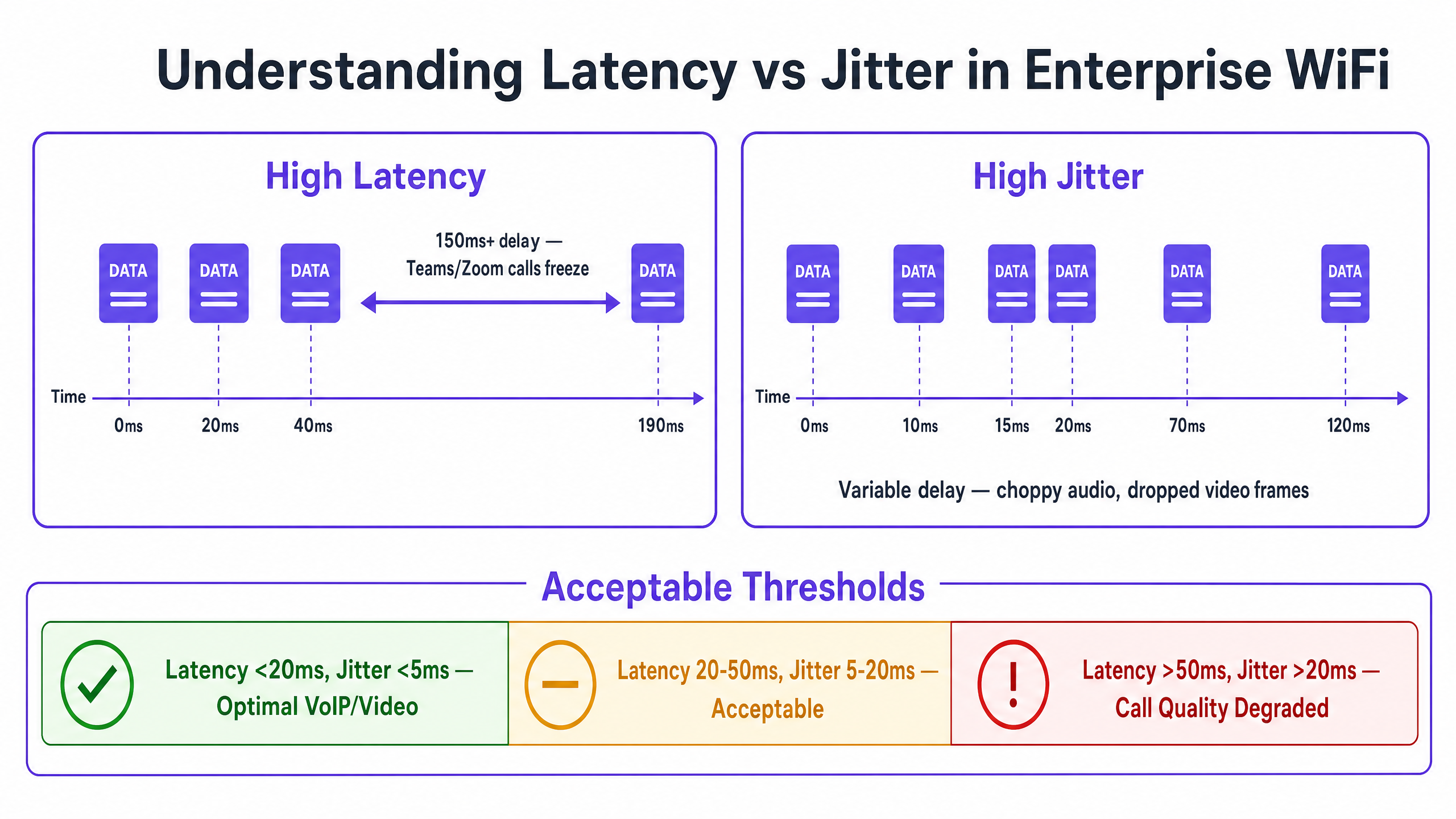
Codecs de voz e vídeo são projetados com buffers de jitter fixos. Quando o jitter excede a profundidade do buffer — tipicamente 20–30ms para VoIP de nível empresarial — os pacotes são descartados, produzindo o áudio característico picotado ou robótico que sinaliza uma chamada degradada. A alta latência, por outro lado, causa o atraso conversacional que dificulta a colaboração em tempo real. A recomendação ITU-T G.114 especifica um atraso unidirecional máximo de 150ms para qualidade de voz aceitável, com 50ms como meta para implantações empresariais.
| Métrica | Ótimo | Aceitável | Degradado |
|---|---|---|---|
| Latência Unidirecional | < 20ms | 20–50ms | > 50ms |
| Jitter | < 5ms | 5–20ms | > 20ms |
| Perda de Pacotes | < 0.1% | 0.1–1% | > 1% |
Causa-Raiz 1: Ambiente de RF e Interferência Co-Canal
A Interferência Co-Canal (CCI) é a principal causa de RF para latência elevada em implantações empresariais densas. Quando múltiplos Access Points operam no mesmo canal, eles compartilham o tempo de antena sob CSMA/CA. Cada AP deve adiar a transmissão quando detecta outro AP no mesmo canal transmitindo, serializando efetivamente o tráfego e aumentando o atraso na fila. Em uma loja de varejo com 20 APs em três canais de 2.4GHz não sobrepostos, cada canal pode ser compartilhado por seis ou sete APs — uma configuração que produzirá latência significativa sob carga.
A banda de 5GHz, com seu plano de canais mais amplo (até 25 canais de 20MHz não sobrepostos sob 802.11ac/ax em muitos domínios regulatórios), oferece substancialmente mais capacidade para o planejamento de reuso de canais. Compreender o panorama completo das frequências é essencial; o guia Wi Fi Frequencies: Um Guia para Frequências Wi-Fi em 2026 fornece uma referência abrangente para decisões de planejamento de frequência.
A Interferência de Canal Adjacente (ACI) apresenta um risco secundário. ACI ocorre quando os canais não estão suficientemente separados, causando sobreposição parcial que corrompe quadros e força retransmissões — cada retransmissão adicionando diretamente à latência observada.
Causa-Raiz 2: Taxas de Dados Legadas e Ineficiência do Tempo de Antena
Em um BSS 802.11 padrão, todos os clientes associados recebem oportunidades de transmissão. Um cliente transmitindo a 1 Mbps ocupa o canal por aproximadamente 100 vezes mais tempo do que um cliente transmitindo a 100 Mbps para enviar a mesma carga útil. Este consumo desproporcional de tempo de antena — causado por dispositivos legados ou clientes na borda da cobertura — aumenta o atraso na fila para todos os outros clientes no AP. Desabilitar taxas de dados abaixo de 12 Mbps na banda de 5GHz e abaixo de 5.5 Mbps na banda de 2.4GHz força os clientes a usar modulação mais eficiente, reduzindo o tempo de antena por quadro e melhorando a latência geral.
Causa-Raiz 3: Má Configuração de QoS
Sem Quality of Service, uma transferência de arquivo em massa é tratada de forma idêntica a uma chamada do Teams. Wi-Fi Multimedia (WMM), a implementação de QoS 802.11e, define quatro Categorias de Acesso: Voz (AC_VO), Vídeo (AC_VI), Best Effort (AC_BE) e Background (AC_BK). Cada categoria possui parâmetros de Contention Window distintos que determinam quão agressivamente ela disputa o tempo de antena. O tráfego de voz usa janelas de contenção menores e espaços inter-quadro de arbitragem (AIFS) mais curtos, dando-lhe prioridade estatística sobre dados em massa.
O detalhe crítico de implementação que muitas implantações ignoram é o limite de confiança na infraestrutura com fio. O WMM opera na Camada 2 dentro do domínio sem fio. Para que o QoS seja mantido de ponta a ponta, as portas do switch que conectam APs e Controladores de LAN Sem Fio devem ser configuradas para confiar nas marcações DSCP aplicadas pela infraestrutura sem fio. Sem isso, os pacotes são reclassificados para Best Effort no primeiro salto com fio, tornando a configuração de QoS sem fio ineficaz além do AP.
Para ambientes de Saúde onde as comunicações clínicas via VoWLAN são críticas para a segurança, esta cadeia de QoS de ponta a ponta é inegociável.
Causa-Raiz 4: Latência de Roaming e Sobrecarga de Autenticação
A latência induzida pelo roaming é a causa mais disruptiva operacionalmente da degradação da qualidade da chamada em ambientes de equipe móvel. Quando um cliente faz a transição entre APs, o processo envolve: ativa ou varredura passiva para descobrir APs candidatos, autenticação e re-associação. Sob WPA3-Enterprise com 802.1X, a fase de autenticação requer uma troca RADIUS completa, que pode levar de 300 a 800ms, dependendo do tempo de resposta do servidor RADIUS e da topologia da rede. Esse atraso é diretamente percebido como uma queda de chamada.
O IEEE 802.11r (Fast BSS Transition) aborda isso permitindo que o cliente pré-negocie a Pairwise Transient Key com o AP de destino antes do roaming, usando uma chave PMK-R1 em cache distribuída pelo WLC. Isso reduz a fase de autenticação para uma troca de dois quadros, diminuindo o tempo total de roaming para menos de 50ms. Para ambientes com mobilidade significativa da equipe — hubs de Transporte , enfermarias de hospitais, pisos de armazéns — o 802.11r não é opcional; é um requisito básico.
O IEEE 802.11k (Radio Resource Measurement) fornece aos clientes um Relatório de Vizinhos, eliminando a necessidade de escanear todos os canais possíveis para descobrir APs candidatos. O IEEE 802.11v (BSS Transition Management) permite que a rede sugira proativamente melhores APs aos clientes, abordando o problema do cliente "pegajoso". Para um tratamento abrangente da arquitetura de roaming, consulte Resolvendo Problemas de Roaming em WLANs Corporativas .
Guia de Implementação
Fase 1: Auditoria de RF e Planejamento de Canais
Comece com uma pesquisa abrangente do local sem fio usando um analisador de espectro para identificar fontes de interferência, incluindo fontes não-WiFi, como Bluetooth, telefones DECT e fornos de micro-ondas. Documente o posicionamento dos APs, os níveis de potência de transmissão e as atribuições de canais. Identifique APs com utilização de canal consistentemente acima de 50% — estes são seus principais pontos de acesso de latência.
Reduza a potência de transmissão do AP para o nível mínimo necessário para manter uma cobertura adequada (-67 dBm RSSI na borda da célula para aplicações de voz). Isso reduz a pegada de CCI de cada AP, permitindo um reuso de canal mais apertado. Habilite o gerenciamento de RF automatizado no WLC, mas configure restrições de horário para evitar mudanças de canal durante o horário comercial, o que pode causar breves interrupções de conectividade.
Fase 2: Otimização da Taxa de Dados
Na banda de 5GHz, desative todas as taxas obrigatórias e suportadas abaixo de 12 Mbps. Na banda de 2.4GHz, desative as taxas abaixo de 5.5 Mbps. Isso força os clientes a se associarem a taxas mais altas, reduzindo o consumo de tempo de transmissão por quadro. Habilite o Airtime Fairness para evitar que um único cliente monopolize o canal.
Fase 3: Implementação de QoS de Ponta a Ponta
Habilite WMM em todos os SSIDs corporativos. Configure os mapeamentos DSCP-para-WMM: DSCP EF (46) para AC_VO, DSCP AF41 (34) para AC_VI. Na infraestrutura com fio, configure as portas do switch que se conectam a APs e WLCs com mls qos trust dscp (sintaxe Cisco IOS) ou equivalente. Verifique a cadeia de QoS usando uma captura de pacotes no roteador WAN para confirmar que o tráfego de voz chega com as marcações DSCP corretas.
Use WiFi Analytics para identificar aplicações que consomem muita largura de banda e tempo de transmissão desproporcional, e aplique limites de taxa ou políticas de modelagem de tráfego para proteger o tráfego de voz e vídeo.
Fase 4: Otimização de Roaming
Habilite 802.11r, 802.11k e 802.11v no SSID da equipe. Observe que alguns clientes legados podem não suportar esses padrões; teste exaustivamente antes da implantação. Configure o WLC para desassociar clientes com RSSI abaixo de -75 dBm para lidar com clientes "pegajosos". Defina o limite mínimo de RSSI para associação em -80 dBm para evitar que os clientes se associem a APs distantes.
Melhores Práticas
Segurança e Desempenho: Implante WPA3-Enterprise com 802.1X para o SSID da equipe. Embora o 802.1X introduza uma sobrecarga de autenticação inicial, o 802.11r a elimina durante o roaming. Garanta que os servidores RADIUS sejam implantados com redundância e tempos de resposta abaixo de 100ms. A conformidade com GDPR e PCI DSS exige que o tráfego da equipe e do Guest WiFi seja logicamente separado usando VLANs e SSIDs distintos.
Segmentação de Rede: Mantenha uma separação rigorosa entre as redes da equipe e dos convidados. O tráfego de convidados deve ser isolado em um SSID dedicado com autenticação de Captive Portal, impedindo que dispositivos de convidados impactem o desempenho da rede da equipe. Isso é particularmente relevante para propriedades de Hotelaria onde a densidade de WiFi de convidados pode ser extremamente alta.
Monitoramento e Definição de Linha de Base: Estabeleça medições de latência e jitter de linha de base durante as horas de menor movimento. Configure traps SNMP ou telemetria de streaming para alertar sobre a utilização do canal excedendo 50% ou o RSSI do cliente caindo abaixo de -70 dBm. O monitoramento proativo evita a resolução de problemas reativa.
Para uma estratégia de conectividade no local de trabalho mais ampla, Office Wi Fi: Otimize Sua Rede Wi-Fi Moderna de Escritório oferece orientação complementar sobre o design de WLAN empresarial.
Solução de Problemas e Mitigação de Riscos
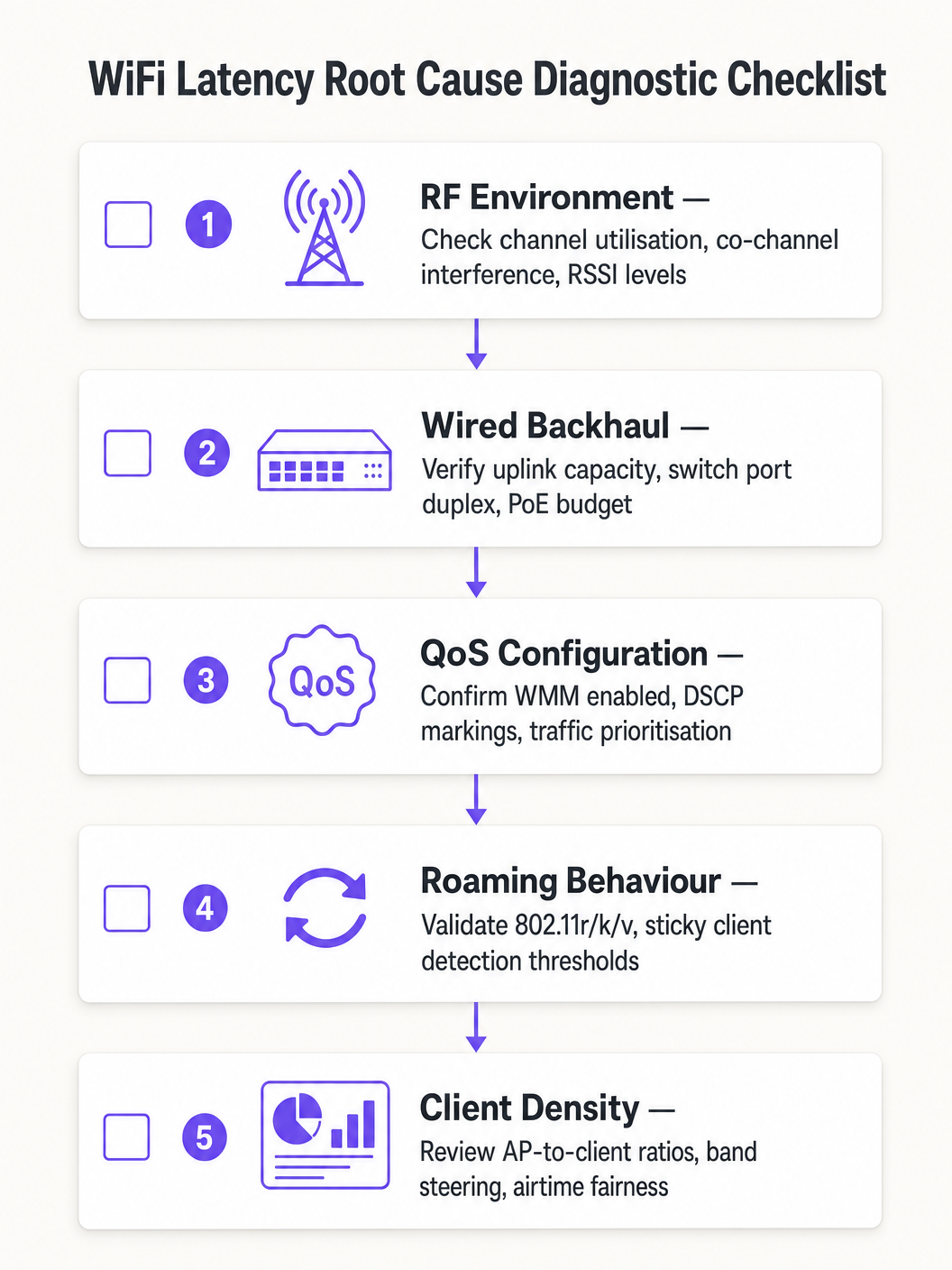
Siga uma abordagem diagnóstica estruturada para evitar atribuir incorretamente a causa raiz:
- Isole o domínio: Faça ping no gateway padrão local a partir do cliente afetado. Se a latência for baixa, a rede sem fio está funcionando adequadamente e o problema reside no domínio com fio ou WAN. Se a latência for alta, prossiga com o diagnóstico sem fio.
- Verifique a utilização do canal: Alta utilização (>50%) indica CCI ou restrições de capacidade. Baixa utilização com alta latência aponta para problemas de QoS ou roaming.
- Revise a associação do cliente: Identifique clientes associados a baixas taxas de dados ou com RSSI fraco. Estes provavelmente estão causando ineficiência no tempo de transmissão ou experimentando cobertura deficiente.
- Valide o QoS de ponta a ponta: Capture pacotes na interface WAN e verifique as marcações DSCP no tráfego de voz.
- Teste o roaming: Use uma ferramenta de diagnóstico WiFi para medir os tempos de transição de roaming. Qualquer valor acima de 100ms indica que o 802.11r não está funcionando corretamente.
Modos de Falha Comuns:
| Sintoma | Causa Provável | Resolução |
|---|---|---|
| Picos de latência durante horários de pico | CCI / alta utilização de canal | Reduzir potência do AP, migrar para 5GHz |
| Quedas de áudio ao caminhar | Roaming lento / 802.11r ausente | Habilitar 802.11r, ajustar limiares de RSSI |
| Latência alta consistente, baixa utilização | Limite de confiança QoS ausente | Configurar confiança DSCP nas portas do switch |
| Perda intermitente de pacotes | ACI / sobreposição de canal | Corrigir plano de canais, aumentar separação de canais |
ROI e Impacto nos Negócios
O caso de negócios para a otimização da latência do WiFi é direto. Em uma operação de armazém ou logística, reduzir a latência do scanner de 150ms para menos de 20ms pode aumentar o rendimento de coleta e embalagem em 10–15%, impactando diretamente os custos operacionais. Em um ambiente corporativo, a eliminação de chamadas do Teams perdidas reduz os tickets do helpdesk de TI — que normalmente custam £25–£50 por ticket para serem resolvidos — e melhora a produtividade de executivos e funcionários.
Para organizações de Saúde que implementam VoWLAN para comunicações clínicas, o valor da mitigação de riscos é ainda maior: comunicações não confiáveis em um ambiente clínico acarretam implicações de segurança do paciente que superam o custo da otimização da rede.
Meça o sucesso em relação a estes KPIs: latência média unidirecional para tráfego de voz, medições de jitter, tempos de transição de roaming, percentagens de utilização de canal e volume de tickets de helpdesk relacionados ao desempenho do WiFi. Estabeleça linhas de base pré e pós-otimização para quantificar a melhoria e construir o caso de negócios para investimento contínuo.
Definições principais
Latency
The one-way time delay for a data packet to travel from source to destination, measured in milliseconds.
High latency causes conversational delay in voice calls and video conferencing. The ITU-T G.114 standard specifies a maximum acceptable one-way latency of 150ms, with 50ms as the enterprise target.
Jitter
The statistical variation in packet arrival times, representing the inconsistency of latency across a stream of packets.
High jitter causes choppy or robotic audio as the receiving application's jitter buffer is overwhelmed and packets are discarded. Target jitter below 20ms for enterprise voice applications.
CSMA/CA (Carrier Sense Multiple Access with Collision Avoidance)
The medium access protocol used in 802.11 WiFi networks, where devices listen for channel activity before transmitting and back off randomly if the channel is busy.
The half-duplex nature of CSMA/CA means only one device can transmit at a time on a given channel. In dense environments, this contention mechanism is the primary source of variable latency.
Co-Channel Interference (CCI)
Interference caused when multiple Access Points or clients transmit on the same frequency channel within range of each other.
CCI forces APs to defer transmission, increasing queuing delay. It is the primary RF cause of high latency in dense enterprise deployments and is mitigated through careful channel planning and power management.
WMM (Wi-Fi Multimedia)
The 802.11e QoS implementation for wireless networks, defining four Access Categories (Voice, Video, Best Effort, Background) with differentiated contention parameters.
WMM is the mechanism that gives voice and video traffic statistical priority over bulk data on the wireless medium. It must be enabled on all SSIDs carrying real-time traffic.
802.11r (Fast BSS Transition)
An IEEE standard that allows a client to pre-negotiate security credentials with a target AP before roaming, eliminating the need for a full RADIUS re-authentication during the handoff.
Without 802.11r, roaming under WPA2/WPA3-Enterprise can take 300–800ms, causing audible call dropouts. With 802.11r, roaming completes in under 50ms.
Sticky Client
A wireless device that remains associated to an AP with a degraded signal, even when a closer AP with a stronger signal is available.
Sticky clients experience high latency due to poor signal quality and consume disproportionate airtime at low data rates. WLC-side RSSI threshold enforcement is required to force these clients to roam.
Airtime Fairness
A wireless scheduling mechanism that allocates equal transmission time to all associated clients, rather than equal numbers of transmission opportunities.
Without airtime fairness, a single slow client can monopolise the channel, increasing latency for all other clients on the AP. Enabling airtime fairness protects high-speed clients from the impact of legacy or distant devices.
DSCP (Differentiated Services Code Point)
A 6-bit field in the IP header used to classify and prioritise network traffic for QoS purposes.
DSCP EF (46) is used for voice traffic; DSCP AF41 (34) for video. These markings must be trusted by wired switches to maintain QoS end-to-end from the wireless client to the WAN.
Exemplos práticos
A 1,200-delegate conference centre reports that staff using mobile devices experience dropped Zoom calls when moving between exhibition halls. Signal strength is consistently above -65 dBm throughout the venue, and the wireless controller shows no obvious errors. The issue is intermittent and correlates with staff movement.
A wireless packet capture during a roaming event revealed that clients were taking 480–650ms to complete the roaming process due to full 802.1X re-authentication with the RADIUS server at each AP transition. The RADIUS server was located off-site, adding approximately 80ms of round-trip WAN latency to each authentication exchange.
The resolution involved three steps: First, enable 802.11r (Fast BSS Transition) on the staff SSID to eliminate full RADIUS re-authentication during roams. Second, deploy a local RADIUS proxy or cache to reduce authentication latency for initial associations. Third, enable 802.11k to provide clients with neighbour reports, reducing the scanning phase from 200ms+ to under 30ms. Post-implementation roaming times measured at 35–45ms, eliminating all call dropouts during staff movement.
A national retail chain with 85 stores reports that inventory management scanners on the warehouse floor experience severe latency (150–200ms) during peak trading hours, despite a recent AP hardware refresh. Signal strength is strong, and the WLC dashboard shows no alarms. The issue is worst between 10am and 2pm.
Analysis of the WLC RF dashboard revealed channel utilisation on the 2.4GHz band exceeding 75% during peak hours. The store had 18 APs deployed, all operating on the 2.4GHz band across channels 1, 6, and 11 — meaning six APs per channel were competing for airtime. Additionally, the scanner devices were legacy 802.11n devices operating at data rates as low as 6 Mbps.
The remediation plan: Migrate the scanner SSID exclusively to the 5GHz band, leveraging the wider channel plan to reduce co-channel contention. Disable data rates below 12 Mbps on the 5GHz SSID. Enable WMM and configure the scanner traffic (UDP, port 9100) to be marked as DSCP AF41 (Video class) at the WLC. Configure switch ports to trust DSCP. Post-implementation latency measured at 8–12ms during peak hours.
Questões práticas
Q1. You are the network architect for a 450-bed hospital deploying VoWLAN handsets for clinical staff across three floors. During UAT, nurses report that calls drop for approximately half a second when moving between wards. Signal strength throughout the building is consistently -62 to -68 dBm. The WLC shows no errors and channel utilisation is below 35%. What is the most likely root cause and what is your recommended resolution?
Dica: Consider what happens at the network layer when a client moves from one AP to another under WPA2-Enterprise authentication. Signal strength and channel utilisation are both healthy, so the issue is not RF-related.
Ver resposta modelo
The root cause is roaming latency caused by full 802.1X re-authentication at each AP transition. With healthy RSSI and low channel utilisation, the RF environment is not the issue. The half-second dropout is characteristic of a RADIUS authentication exchange occurring during the roam. The recommended resolution is to enable IEEE 802.11r (Fast BSS Transition) on the VoWLAN SSID, which pre-negotiates the PMK-R1 key with the target AP before the roam occurs, reducing transition time to under 50ms. Additionally, enable 802.11k to provide clients with neighbour reports and reduce scanning time, and verify that the RADIUS server response time is below 100ms. Test all handset models for 802.11r compatibility before full deployment.
Q2. A large retail distribution centre has 40 APs deployed across a 20,000 sq ft warehouse floor, all operating on the 2.4GHz band using channels 1, 6, and 11. Barcode scanners used by warehouse operatives are experiencing 120–180ms latency during peak shift hours, causing the inventory management system to time out. Signal strength is strong throughout. What is the primary architectural problem and what is the remediation strategy?
Dica: Calculate how many APs are sharing each channel. Consider the fundamental limitation of the 2.4GHz band in terms of non-overlapping channel availability.
Ver resposta modelo
The primary problem is severe Co-Channel Interference (CCI). With 40 APs sharing only three non-overlapping channels, approximately 13–14 APs are competing for airtime on each channel. Under CSMA/CA, this creates extreme contention and queuing delay, producing the observed 120–180ms latency. The remediation strategy is: (1) Migrate the scanner SSID exclusively to the 5GHz band, which provides up to 25 non-overlapping 20MHz channels in most regulatory domains, dramatically reducing per-channel AP density. (2) Disable data rates below 12 Mbps to reduce per-frame airtime consumption. (3) Enable WMM and mark scanner UDP traffic as DSCP AF41 to protect it from bulk data traffic. (4) Configure switch ports to trust DSCP markings. (5) Reduce AP transmit power to minimise the CCI footprint of each AP.
Q3. Your network team has implemented WMM on all corporate SSIDs and configured DSCP EF markings for Teams voice traffic at the wireless controller. However, a packet capture taken at the WAN firewall shows Teams voice traffic arriving with DSCP 0 (Best Effort). Helpdesk tickets for call quality issues have not reduced. What has been missed and how do you resolve it?
Dica: QoS is only effective if it is maintained end-to-end. Consider what happens to DSCP markings as packets traverse the wired network infrastructure between the AP and the WAN firewall.
Ver resposta modelo
The wired network infrastructure is not configured to trust the DSCP markings applied by the wireless controller. When packets leave the AP and traverse the access layer switches, the switch ports are re-marking all traffic to DSCP 0 (Best Effort) because they are not configured to trust incoming DSCP values. The resolution is to configure all switch ports connecting to APs and the WLC with DSCP trust (e.g., 'mls qos trust dscp' in Cisco IOS, or equivalent in other vendor platforms). Additionally, verify that distribution and core layer switches are configured to honour DSCP markings in their QoS policies. After implementing the trust boundary configuration, re-capture at the WAN firewall to confirm that Teams voice traffic is now arriving with DSCP EF (46).