
Gerenciamento de Largura de Banda e Qualidade de Serviço (QoS) em Espaços de Co-Working
Um guia de referência técnica definitivo para gerentes de TI, arquitetos de rede e diretores de operações de instalações sobre a implementação de frameworks robustos de Gerenciamento de Largura de Banda e Qualidade de Serviço (QoS) em ambientes de co-working. Este guia detalha a segmentação de rede, priorização de tráfego, configurações neutras de fornecedor e métricas reais de ROI para entregar conectividade de classe empresarial. Ele abrange os padrões IEEE 802.11e/WMM, design de VLAN, limitação de taxa por usuário e estratégias de resolução de problemas com resultados de negócios mensuráveis.
Ouça este guia
Ver transcrição do podcast
Parte da nossa série principal: Multi-Tenant WiFi Guide →

Resumo Executivo
Os espaços de coworking apresentam um ambiente de rede e de RF (radiofrequência) único e volátil. Diferente dos escritórios corporativos tradicionais com comportamento de usuário previsível, ou hotspots públicos com baixas expectativas de largura de banda, os espaços de coworking precisam suportar implantações multi-inquilino de alta densidade, onde os usuários exigem throughput de nível empresarial, baixa latência e confiabilidade excepcional. Um único inquilino realizando uma grande transferência de dados ou executando uma sincronização de backup irrestrita pode degradar a experiência sem fio de todo o local, levando à rotatividade de inquilinos e perda direta de receita.
Este guia fornece aos arquitetos de rede e diretores de TI uma estrutura prática e neutra em termos de fornecedor para implementar políticas de Gerenciamento de Largura de Banda e Qualidade de Serviço (QoS). Ao aproveitar a segmentação de rede avançada com Guest WiFi e VLANs seguras, integrando WiFi Analytics para monitorar a utilização em tempo real e aplicando padrões rígidos IEEE 802.11e/WMM, os operadores podem garantir Acordos de Nível de Serviço (SLAs) para inquilinos de alto valor, mantendo uma experiência básica fluida para visitantes casuais.
Aprofundamento Técnico
O Dilema da Rede Multi-Inquilino
Em um ambiente de coworking multi-inquilino, o principal desafio é a imprevisibilidade do tráfego. Em qualquer dia, a rede deve suportar simultaneamente comunicações unificadas sensíveis à latência como Serviço (UCaaS) (como Zoom ou Microsoft Teams), sincronizações de banco de dados em nuvem altamente instáveis, transferências de arquivos de alto throughput e streaming de vídeo recreativo. Sem um gerenciamento ativo, o agendamento "first-in, first-out" (FIFO) de switches de rede e pontos de acesso padrão inevitavelmente levará ao bufferbloat - um fenômeno no qual pacotes que não são de tempo real e de alta largura de banda saturam as filas de buffer, introduzindo jitter e latência que destroem a usabilidade de aplicativos em tempo real.
Para mitigar isso, os administradores de rede devem ir além do simples limite de taxa para uma arquitetura de Qualidade de Serviço (QoS) e modelagem de tráfego multicamadas. Isso começa com um design de rede físico e lógico adequado, aproveitando hardware de nível empresarial para segmentar e priorizar o tráfego.
Segmentação de Rede e Design de VLAN
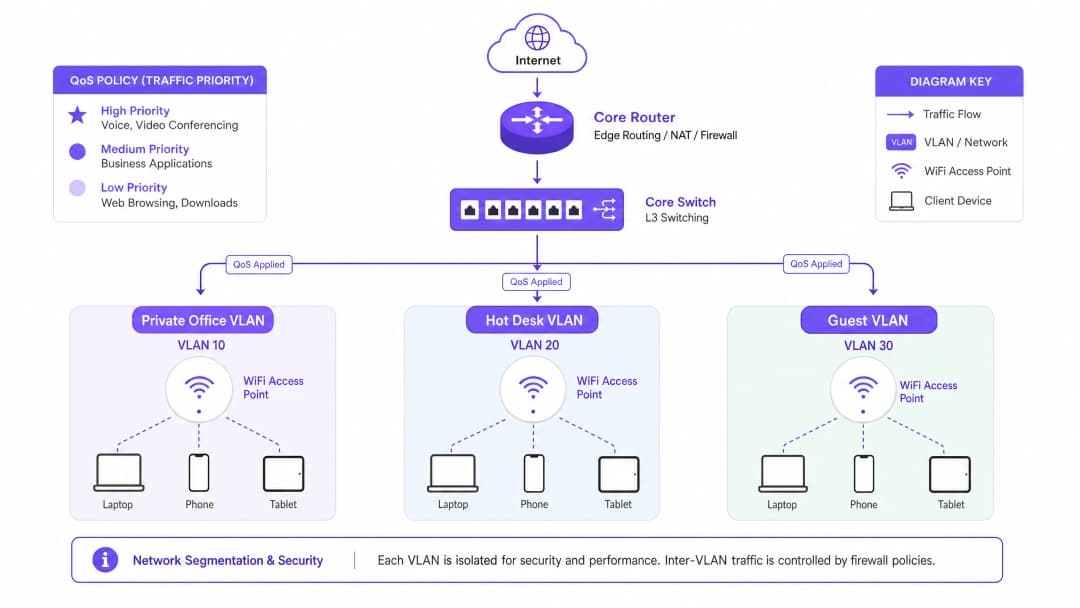
O gerenciamento eficaz da largura de banda é impossível sem o isolamento lógico estrito dos grupos de inquilinos. Recomendamos a implantação de no mínimo três Virtual Local Area Networks (VLANs) distintas, mapeadas para SSIDs separados usando Cisco Wireless APs de nível empresarial ou hardware semelhante:
| ID da VLAN | Nome do SSID | Público-Alvo | Mecanismo de Autenticação | Perfil de QoS |
|---|---|---|---|---|
| VLAN 10 | CoWork_Private |
Inquilinos de escritórios privados | WPA3-Enterprise (802.1X / Cloud RADIUS) | Platinum (Prioridade de Voz/Vídeo) |
| VLAN 20 | CoWork_HotDesk |
Membros hot-desk / flexíveis | WPA3-Enterprise ou WPA3-SAE com Portal | Gold (Aplicativos de negócios) |
| VLAN 30 | CoWork_Guest |
Visitantes diários / convidados | Captive Portal via Guest WiFi | Bronze (Melhor esforço / taxa limitada) |
Ao segmentar a rede, os administradores podem aplicar perfis de QoS personalizados no limite da VLAN, garantindo que o tráfego de convidados na VLAN 30 nunca congestione o tráfego crítico de negócios nas VLANs 10 e 20. A implementação dessas políticas de segurança requer a integração com uma solução robusta de Controle de Acesso à Rede (NAC) para atribuir VLANs de forma dinâmica com base nas credenciais do usuário. Para orientações detalhadas, consulte nosso guia completo: Como Implementar Autenticação 802.1X com Cloud RADIUS.
IEEE 802.11e e Wi-Fi Multimedia (WMM)
Na camada sem fio, o QoS é regido pelo padrão IEEE 802.11e, conhecido comercialmente como Wi-Fi Multimedia (WMM). O WMM substitui o legado Distributed Coordination Function (DCF) pelo Enhanced Distributed Channel Access (EDCA). O EDCA introduz quatro Categorias de Acesso (ACs), correspondentes a diferentes níveis de prioridade no meio:
Voz (WMM-AC_VO) tem a prioridade mais alta e é projetada para VoIP e áudio interativo em tempo real. Ela utiliza os temporizadores de backoff mais curtos para minimizar a latência. Vídeo (WMM-AC_VI) tem alta prioridade e é otimizada para videoconferências e streaming de mídia, equilibrando baixa latência com alta taxa de transferência. Melhor Esforço (WMM-AC_BE) é a categoria padrão para tráfego web padrão, e-mail e aplicativos gerais. Segundo Plano (WMM-AC_BK) tem a prioridade mais baixa e é reservada para transferências de dados não sensíveis ao tempo, atualizações de sistema e backups em segundo plano.
Para manter a clareza de voz e vídeo em ambientes de alta densidade, o WMM deve ser ativado globalmente em todos os pontos de acesso. Além disso, os mapeamentos DSCP (Differentiated Services Code Point) devem ser configurados para que as categorias WMM sem fio sejam traduzidas para pacotes IP cabeados à medida que atravessam switches e roteadores.
Guia de Implementação
Passo a Passo para Implantação de Traffic Shaping e QoS
A implementação do gerenciamento de largura de banda em um espaço de co-working requer uma abordagem sistemática. Siga estas etapas de implantação independentes de fabricante para estabelecer uma estratégia de traffic shaping de nível corporativo.
Passo 1: Estabelecer o orçamento de largura de banda WAN. Antes de configurar os limites internos, determine sua taxa de transferência total da WAN. Para um espaço de co-working típico de 200 pessoas, recomenda-se uma conexão de fibra simétrica de 1 Gbps / 1 Gbps. Reserve um limite rígido de 10% de buffer de sobrecarga no gateway WAN para evitar a saturação da interface e o bufferbloat. Isso deixa 900 Mbps de largura de banda alocável.
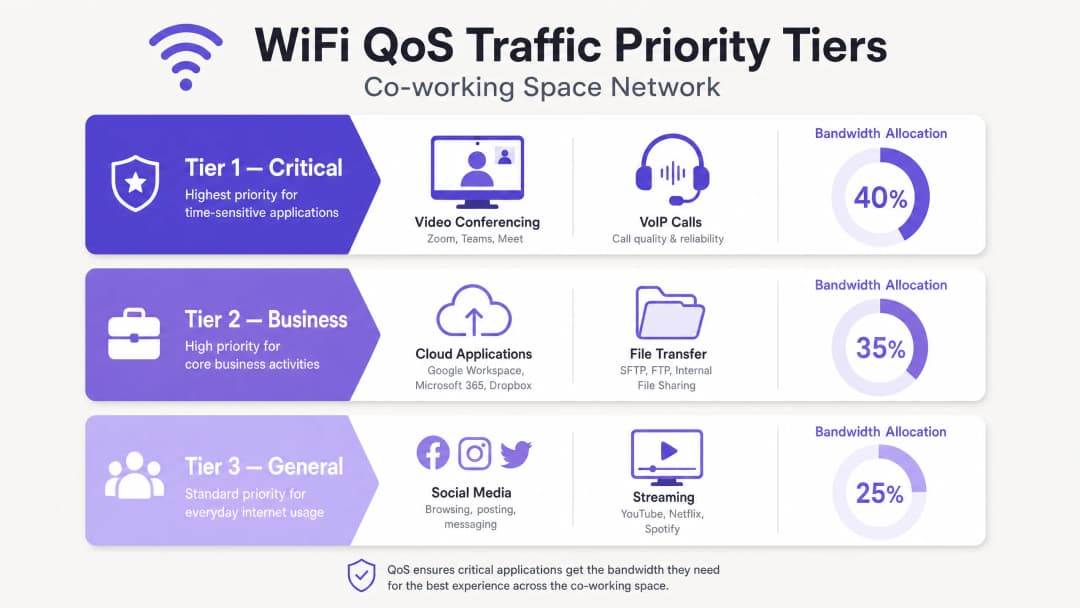
Passo 2: Defina classes de tráfego e filas de prioridade. Configure o Class-Based Weighted Fair Queueing (CBWFQ) ou Low Latency Queueing (LLQ) em seu gateway/firewall principal. Defina três classes primárias com base na VLAN de origem e assinaturas de aplicativos. A Classe 1 (Crítica) aloca 40% de largura de banda garantida para tráfego VoIP e UCaaS, mapeada para DSCP EF. A Classe 2 (Corporativa) aloca 35% para aplicativos em nuvem e tráfego web, mapeada para DSCP AF41. A Classe 3 (Geral/Visitante) aloca 25% com um limite agregado estrito, mapeada para DSCP CS1.
Passo 3: Configure a limitação de taxa por usuário (alocação dinâmica de largura de banda). Para evitar que "monopolizadores de banda" prejudiquem a qualidade da rede, implemente a limitação de taxa dinâmica por usuário em vez de limites estáticos sempre que possível. A limitação dinâmica permite que os usuários atinjam velocidades mais altas quando a rede está ociosa, mas os restringe a uma linha de base garantida durante períodos de pico. Para o SSID de hot-desk/flexível, configure um limite dinâmico de 50 Mbps de download / 20 Mbps de upload por cliente, com um mínimo garantido de 10 Mbps simétricos durante o pico de uso. Para o SSID de visitantes, aplique um limite estático estrito de 10 Mbps de download / 5 Mbps de upload por cliente.
Passo 4: Implemente a filtragem na camada de aplicação (Camada 7). Firewalls e APs modernos utilizam Deep Packet Inspection (DPI) para identificar aplicativos independentemente das portas que utilizam. Configure regras de Camada 7 para restringir o compartilhamento de arquivos peer-to-peer (P2P), downloads de BitTorrent e backups em nuvem pessoal a um máximo de 2 Mbps por usuário. Garanta que domínios UCaaS conhecidos (ex: *.zoom.us, *.microsoft.com) sejam marcados automaticamente como DSCP EF ou AF41.
-
Tem dúvidas sobre a sua configuração específica?
A nossa equipa trabalha com operadores de espaços, gestores de TI e engenheiros de rede em 80.000 locais. Agende uma chamada de 20 minutos e mostraremos como outros profissionais na sua situação o resolveram.
Melhores Práticas
Planejamento de RF Rigoroso e Reutilização de Canais
Espaços de co-working de alta densidade sofrem com Interferência de Co-Canal (CCI) quando múltiplos pontos de acesso operam no mesmo canal. Em um espaço de trabalho moderno, migre dispositivos legados para as bandas de 5 GHz e 6 GHz. Se o 2.4 GHz precisar continuar ativado para IoT, restrinja-o a um pequeno número de APs específicos utilizando canais que não se sobrepõem (1, 6, 11) com potência de transmissão mínima. Implante Wi-Fi 6E ou Wi-Fi 7 para aproveitar o recém-liberado espectro de 6 GHz, que oferece até 14 canais adicionais de 80 MHz e pode eliminar completamente a CCI. Mantenha uma largura de canal de 40 MHz na banda de 5 GHz para equilibrar a taxa de transferência com a disponibilidade de canais.
Airtime Fairness
Habilite o Airtime Fairness (ATF) em todos os APs de classe empresarial. O ATF aloca a todos os clientes o mesmo tempo de acesso ao canal, em vez de um número igual de pacotes. Isso evita que clientes legados lentos (operando em 802.11n ou padrões mais antigos) monopolizem o meio sem fio e arrastem para baixo o desempenho dos clientes modernos de alta velocidade Wi-Fi 6/7.
Análise e Monitoramento Contínuos
Aproveite o WiFi Analytics de nível empresarial para obter insights detalhados sobre o comportamento dos inquilinos, densidade de dispositivos e uso de aplicativos. Ao analisar as tendências históricas de tráfego, os administradores de TI podem ajustar proativamente as alocações de largura de banda antes que ocorram gargalos físicos. O mesmo se aplica a ambientes de Hospitalidade, implantações de Varejo e hubs de Transporte, onde a densidade sem fio multi-inquilino é um desafio operacional constante.
Solução de Problemas e Mitigação de Riscos
Mesmo com uma configuração robusta de QoS, as redes de co-working enfrentarão anomalias de desempenho. A tabela abaixo fornece uma matriz de diagnóstico para as falhas mais comuns relacionadas à largura de banda.
| Sintoma | Causa Raiz | Etapas de Diagnóstico | Ação de Mitigação |
|---|---|---|---|
| Chamadas de Zoom/Teams instáveis durante horários de pico | Bufferbloat no gateway WAN ou erros de mapeamento DSCP | Execute um teste de bufferbloat a partir de um dispositivo cliente; verifique as estatísticas de porta do switch para pacotes de saída descartados | Habilite LLQ para tráfego UCaaS no roteador; ajuste a reserva de overhead da WAN de 10% para 15% |
| Alta latência e perda de pacotes na banda de 5 GHz | Interferência de Co-Canal (CCI) causada por potência excessiva de transmissão do AP ou canais excessivamente largos | Realize uma vistoria de RF no local ou revise o mapa de canais e as métricas de interferência do controlador | Reduza a largura do canal de 80 MHz para 40 MHz; habilite a Atribuição Dinâmica de Canal (DCA) |
| Um inquilino específico relata velocidades lentas dentro de um escritório privado | Obstrução física ou o dispositivo cliente preso a um AP distante (sticky client) | Verifique o RSSI do cliente e a banda conectada no painel do controlador sem fio | Habilite o roaming rápido 802.11k/r/v; ajuste a taxa básica mínima para 12 Mbps ou 24 Mbps |
| O pico de uso da rede de convidados congestiona os inquilinos corporativos | Limites de taxa de convidados sendo ignorados ou tempos limite de sessão do Captive Portal configurados como longos demais | Verifique o consumo agregado de largura de banda da VLAN de convidados no painel do firewall | Aplique limites estritos de taxa por usuário (10/5 Mbps) no SSID de convidados; reduza o tempo limite da sessão para 4 horas |
Retorno sobre o Investimento (ROI) e Impacto no Negócio
Retenção de Inquilinos e Redução de Churn
A reclamação número um em espaços de co-working é a conectividade de rede ruim. Em um setor com baixos custos de migração e abundantes alternativas de espaços flexíveis, apenas uma semana de conectividade instável pode levar um inquilino corporativo de alto valor a rescindir o contrato. Com uma arquitetura de QoS implementada corretamente, os operadores relatam de forma consistente que o churn anual de inquilinos cai da média do setor de 18 - 22% para menos de 8%, representando uma receita de aluguel retida significativa.
Nova Receita Através de Planos Premium
Ao aproveitar um núcleo de rede robusto, os operadores de co-working podem transformar sua infraestrutura de WiFi de um centro de custo em uma fonte de receita de alta margem. Os operadores podem fazer o upsell de locatários de planos padrão para pacotes de rede premium, oferecendo VLANs dedicadas, SSIDs privados, largura de banda simétrica garantida e endereços IP estáticos por uma taxa mensal adicional.
| Nível do Plano | Recursos | Preço Indicativo |
|---|---|---|
| Padrão | SSID compartilhado de hot-desk, 50/20 Mbps, melhor QoS possível, login via Captive Portal | Incluído na assinatura básica |
| Premium | VLAN/SSID dedicado, 100/100 Mbps, QoS Platinum (prioridade VoIP), WPA3 | +£150 por mês |
| Enterprise | SSID privado personalizado, 200 Mbps simétricos, integração Cloud RADIUS, IP estático | +£450 por mês |
Eficiência Operacional
Ao automatizar a alocação de largura de banda e o controle de tráfego, o volume diário de chamados de suporte de TI de "rede lenta" pode ser reduzido em até 75%. Isso permite que os gerentes de comunidade locais foquem na hospitalidade e nas vendas, em vez de solucionar problemas de rede. Os mesmos princípios se aplicam a instalações de saúde e locais do setor público, onde a confiabilidade da rede é operacionalmente crítica. Para ler mais sobre estratégias de implantação sem fio de alta densidade, consulte nosso guia: WiFi em Escolas: O Guia de 2026 para Administradores e TI.
Ouça: O Podcast de Briefing Técnico
Referências
[1] Cisco Systems, "High Density Wi-Fi Deployment Guide," 2025. [2] Internet Engineering Task Force (IETF), "Controlled Delay Active Queue Management (CoDel)," RFC 8289, 2018. [3] IEEE Standards Association, "IEEE 802.11e-2005 - Amendment 8: Medium Access Control (MAC) Quality of Service Enhancements," 2005. [4] Aruba Networks, "Airtime Fairness Technology Whitepaper," 2024.
Definições principais
Bufferbloat
Alta latência e jitter causados por buffering excessivo de pacotes em equipamentos de rede, particularmente no limite da WAN. Quando o tráfego de alta largura de banda e que não é em tempo real satura esses buffers, os pacotes em tempo real (como VoIP e vídeo) são atrasados, causando grave degradação do desempenho.
As equipes de TI encontram bufferbloat quando os usuários reclamam de chamadas de vídeo instáveis, apesar de terem internet de fibra de alta velocidade. Isso é mitigado reservando uma margem de 10% na largura de banda da WAN e implementando gerenciamento ativo de fila (AQM), como o FQ-CoDel.
Quality of Service (QoS)
Um conjunto de tecnologias e técnicas usadas para gerenciar recursos de rede, priorizando tipos específicos de tráfego. Os mecanismos de QoS permitem que os administradores garantam largura de banda, minimizem a latência e controlem o jitter para aplicações críticas.
Essencial em espaços de co-working multi-tenant para garantir que as ferramentas de colaboração em tempo real (Zoom, Teams) tenham precedência sobre transferências de arquivos em segundo plano e streaming recreativo.
WiFi Multimedia (WMM)
Uma certificação de interoperabilidade da WiFi Alliance baseada no padrão IEEE 802.11e. Ela fornece recursos de Quality of Service (QoS) para redes WiFi ao priorizar o tráfego em quatro Categorias de Acesso: Voz, Vídeo, Melhor Esforço e Segundo Plano.
Deve ser ativado globalmente nos access points de co-working para garantir que os dispositivos sem fio possam priorizar pacotes de voz e vídeo antes que sejam transmitidos pelo ar.
Differentiated Services Code Point (DSCP)
Um campo de 6 bits no cabeçalho de um pacote IP usado para classificar e priorizar o tráfego de rede na Camada 3. As marcações padrão incluem EF (Expedited Forwarding para voz) e AF (Assured Forwarding para vídeo e aplicativos de negócios).
Usado para manter a prioridade de QoS à medida que o tráfego se move do AP sem fio, passa pelos switches cabeados e sai pelo roteador de gateway da WAN. As marcações DSCP devem ser preservadas de ponta a ponta para que o QoS funcione corretamente.
Airtime Fairness (ATF)
Um recurso sem fio corporativo que aloca o tempo de transmissão do canal (airtime) igualmente entre os clientes conectados, independentemente de sua velocidade de conexão ou padrão sem fio.
Evita que dispositivos antigos ou distantes com baixa intensidade de sinal consumam tempo excessivo do meio sem fio, protegendo a taxa de transferência de dispositivos WiFi 6/7 modernos em ambientes de coworking de alta densidade.
Alocação Dinâmica de Largura de Banda
Uma técnica de modelagem de tráfego que ajusta dinamicamente os limites de largura de banda de um usuário com base na utilização da rede em tempo real, permitindo altas velocidades de pico quando a rede está ociosa, ao mesmo tempo que aplica limites estritos durante as horas de pico.
Permite que os operadores de coworking ofereçam uma experiência de usuário responsiva e de alta velocidade sem arriscar a saturação total da rede durante os horários de pico.
Interferência de Cocanal (CCI)
Interferência que ocorre quando dois ou mais pontos de acesso sem fio em proximidade operam no mesmo canal de frequência, forçando-os a compartilhar o tempo de transmissão e reduzindo drasticamente a capacidade total de rede sem fio.
Um grande problema em espaços de coworking de alta densidade. Mitigado pelo planejamento adequado de canais, reduzindo as larguras de canal para 40 MHz e utilizando a banda de 6 GHz em implantações de WiFi 6E/7.
Isolamento de Clientes
Um recurso de segurança e desempenho em pontos de acesso sem fio que impede que clientes sem fio conectados se comuniquem diretamente entre si ou façam varreduras em outros dispositivos na mesma sub-rede.
Obrigatório para redes de convidados e SSIDs de estações de trabalho rotativas para proteger a segurança dos locatários e evitar que o tráfego de transmissão sem fio desnecessário (como ARP e mDNS) consuma o tempo de transmissão.
Exemplos práticos
Um espaço de co-working de alta densidade que abrange 1.400 metros quadrados em dois andares acomoda 250 membros ativos diariamente, incluindo 15 inquilinos de escritórios privados. Durante os horários de pico (das 10:00 às 15:00), os usuários enfrentam atrasos graves e perda de pacotes em chamadas do Microsoft Teams e Zoom. O local possui uma conexão de fibra simétrica de 500 Mbps. Projete uma estratégia de QoS e alocação de largura de banda neutra de fornecedor para resolver esse problema.
Para resolver a latência e os atrasos nos horários de pico, implemente uma estratégia tripla de QoS: enfileiramento em nível de WAN, modelagem de tráfego sem fio e segmentação lógica.
Limitação de Taxa e Enfileiramento em Nível de WAN: Defina um limite de largura de banda WAN no roteador gateway para 450 Mbps (90% do circuito de 500 Mbps) para evitar o congestionamento de buffer (bufferbloat). Configure o Enfileiramento de Baixa Latência (LLQ) na interface WAN com uma fila de prioridade estrita de 50 Mbps para tráfego de voz e videoconferência (identificado via assinaturas DPI de Camada 7 para Zoom, Teams e Webex), mapeado para DSCP EF. Configure o CBWFQ para os 400 Mbps restantes: a Classe-1 (VLAN 10 de Escritório Privado) recebe uma garantia de largura de banda de 50% (200 Mbps), podendo atingir até 450 Mbps, mapeada para DSCP AF41; a Classe-2 (VLAN 20 de Hot-Desk) recebe uma garantia de 35% (140 Mbps), podendo atingir até 300 Mbps, mapeada para DSCP AF21; a Classe-3 (VLAN 30 de Visitantes) recebe uma garantia de 15% (60 Mbps), estritamente limitada a 100 Mbps no total, mapeada para DSCP CS1.
Configuração da Camada Sem Fio (WMM e Roaming): Habilite o WiFi Multimedia (WMM) globalmente em todos os APs, mapeando as filas de voz e vídeo sem fio diretamente para as marcações DSCP EF e AF41 cabeadas. Force o Airtime Fairness (ATF) em todos os APs. Defina a Taxa Básica Mínima para 24 Mbps na banda de 5 GHz e desative a de 2.4 GHz em 80% dos APs.
Limitação de Taxa por Usuário: Aplique limitação dinâmica de taxa por usuário na VLAN 20 (Hot-Desks): 30 Mbps de download / 10 Mbps de upload por cliente, podendo atingir até 50 Mbps quando a utilização total da rede estiver abaixo de 60%. Aplique limites estáticos estritos por usuário na VLAN 30 (Visitantes): 10 Mbps de download / 3 Mbps de upload.
Um operador de co-working corporativo deseja realizar uma venda adicional para um inquilino de serviços financeiros de alto valor que exige uma rede dedicada e altamente segura para 30 funcionários dentro de um conjunto de escritórios privados. Eles exigem uma taxa de transferência simétrica garantida de 100 Mbps, um SSID dedicado e isolamento estrito de todos os outros inquilinos para cumprir com as regulamentações financeiras. Detalhe o modelo de configuração e implantação passo a passo para fornecer esse serviço usando uma infraestrutura física compartilhada.
Para fornecer esse serviço corporativo premium de forma segura e confiável em uma infraestrutura compartilhada, utilize o direcionamento dinâmico de VLAN, provisionamento de SSID dedicado e reserva estrita de largura de banda de QoS.
Segregação Lógica de Rede e Segurança: Crie uma VLAN dedicada (VLAN 105) no switch principal e no gateway de firewall. Configure um SSID dedicado chamado CoWork_FinSecure transmitido apenas pelos pontos de acesso próximos ao escritório privativo do locatário. Proteja o SSID usando autenticação WPA3-Enterprise integrada a um servidor Cloud RADIUS. Cada funcionário do locatário recebe credenciais 802.1X exclusivas; após a autenticação bem-sucedida, o servidor RADIUS retorna um atributo Tunnel-Private-Group-ID de 105, direcionando dinamicamente o dispositivo do usuário para a VLAN 105. Configure ACLs estritas no gateway de firewall para bloquear todo o tráfego inter-VLAN entre a VLAN 105 e quaisquer outras VLANs de locatários.
Reserva de Largura de Banda e Perfil de QoS: No gateway WAN, crie uma classe de tráfego dedicada para a VLAN 105. Configure uma política CBWFQ que garanta um throughput de WAN simétrico de 100 Mbps exclusivamente para a VLAN 105. Defina um limite rígido de modelagem de tráfego (traffic-shaping) de 100 Mbps na VLAN 105 para evitar que o locatário exceda o SLA contratado. Na VLAN 105, ative a tradução de marcação de QoS: mapeie as tags DSCP dos clientes (EF para VoIP, AF41 para vídeo) diretamente para as filas de WAN correspondentes.
Otimização no Nível do Cliente: Ative o isolamento de clientes no SSID CoWork_FinSecure para evitar que os dispositivos dentro da VLAN façam varreduras ou se comuniquem entre si, adicionando uma camada extra de conformidade regulatória.
Durante uma conferência de tecnologia de grande escala realizada no salão de eventos de um espaço de co-working, 150 participantes se conectam ao WiFi de convidados simultaneamente. Em 30 minutos, toda a rede fica inoperante. Os membros que utilizam as mesas compartilhadas em outras partes do edifício não conseguem carregar páginas da web básicas, e a recepção do local não consegue processar pagamentos com cartão de crédito. Diagnostique a falha de rede e descreva as medidas imediatas de mitigação de emergência e a solução arquitetônica de longo prazo.
Este é um caso clássico de tempestade de broadcast e falha por saturação do meio sem fio, agravado pela falta de isolamento de largura de banda no nível da WAN.
Análise Diagnóstica: 150 clientes ativos em um único AP de visitantes no salão de eventos saturam o meio sem fio. Se os clientes estiverem conectados na banda de 2.4 GHz ou usando canais largos de 80 MHz, a interferência de co-canal (CCI) aumenta drasticamente, causando retransmissões maciças de pacotes. Uma enxurrada de solicitações DHCP e tráfego de broadcast (ARP, mDNS) da rede de visitantes satura a CPU do roteador principal. A rede de visitantes carece de um limite de largura de banda agregada, permitindo que os dispositivos dos participantes da conferência consumam todo o circuito da WAN.
Mitigação de Emergência Imediata (Resolução em 15 minutos): Faça login no firewall principal e aplique imediatamente um limite de largura de banda agregada na VLAN de visitantes (VLAN 30), limitando-a a 50 Mbps no total. Defina um limite estrito por usuário de 3 Mbps de download / 1 Mbps de upload no SSID de visitantes. Ative o Client Isolation no SSID de visitantes para bloquear o tráfego sem fio ponto a ponto e impedir que pacotes de broadcast trafeguem pelas ondas de rádio.
Solução Arquitetônica de Longo Prazo: Implante Access Points dedicados de alta densidade (APs WiFi 6E/7 com antenas direcionais) especificamente para o salão de eventos em uma VLAN dedicada e separada (VLAN 40 - Espaço de Eventos). Configure o firewall principal para priorizar a VLAN 90 (PDV/Operações) com garantia de 10 Mbps (DSCP CS5) e a VLAN 20 (Estações de Trabalho Flexíveis) com garantia de 200 Mbps. Aplique um limite agregado rígido e não expansível de 150 Mbps na VLAN de Eventos (VLAN 40).
Questões práticas
Q1. Um operador de coworking percebe que a utilização da CPU de seu roteador gateway principal atinge um pico de 95% todas as terças e quintas-feiras à tarde, coincidindo com uma queda nas velocidades de rede para todos os locatários. Nenhuma transferência de arquivos grandes está ativa no momento. Qual é a causa mais provável e como o arquiteto de rede deve resolver isso?
Dica: Analise as configurações de segurança e protocolo nas redes de convidados e estações de trabalho rotativas. Picos na CPU sem alta taxa de transferência geralmente apontam para altas taxas de pacotes por segundo (PPS) decorrentes de tráfego de transmissão ou protocolos de descoberta de dispositivos.
Ver resposta modelo
A causa mais provável é uma tempestade de broadcast ou tráfego multicast excessivo (como os protocolos de descoberta mDNS, ARP ou Bonjour) originados dos SSIDs de Convidados e Estações Rotativas. Em ambientes de alta densidade com centenas de dispositivos, os protocolos de descoberta em segundo plano podem gerar milhares de pacotes por segundo. Como os pacotes de transmissão devem ser processados por todos os dispositivos e pelo gateway principal, isso satura a CPU do roteador sem gerar uma utilização significativa de largura de banda.
Para resolver isso: (1) Habilite o Isolamento de Clientes globalmente nos SSIDs de Convidados e Estações Rotativas. Isso bloqueia imediatamente a comunicação sem fio ponto a ponto e evita que pacotes de transmissão/multicast sejam repetidos no meio sem fio. (2) Habilite o IGMP Snooping em todos os switches para restringir o tráfego multicast apenas às portas que o solicitam ativamente, reduzindo a carga de CPU do switch e do roteador. (3) Configure o controlador sem fio para descartar ARP e outros quadros de transmissão no nível do AP, convertendo as solicitações ARP em unicast sempre que possível.
Q2. Um gerente de TI deseja implementar QoS para um espaço de coworking, mas descobre que seus switches antigos não oferecem suporte ao mapeamento DSCP, apenas à marcação básica de CoS (Classe de Serviço) 802.1p da Camada 2. Como eles devem adaptar seu design de QoS para manter a priorização de tráfego?
Dica: O CoS 802.1p opera na Camada 2 (quadro Ethernet), enquanto o DSCP opera na Camada 3 (cabeçalho IP). Quando o mapeamento da Camada 3 não está disponível, a priorização deve ser mantida dentro do domínio de transmissão local usando valores CoS.
Ver resposta modelo
Quando o mapeamento DSCP de Camada 3 não é suportado pelos switches de borda, o gerente de TI deve contar com a marcação de Classe de Serviço (CoS) 802.1p de Camada 2. Configure os Access Points sem fio para mapear as Categorias de Acesso WMM diretamente para as tags CoS 802.1p de Camada 2 à medida que o tráfego entra na rede cabeada. Por exemplo: WMM-AC_VO (Voz) mapeia para CoS 6; WMM-AC_VI (Vídeo) mapeia para CoS 5; WMM-AC_BE (Best Effort) mapeia para CoS 0. Nos switches antigos, configure o enfileiramento de saída com base nos valores de CoS usando Weighted Round Robin (WRR) ou enfileiramento de Prioridade Estrita (Strict Priority) nas portas de uplink do switch, atribuindo CoS 6 e 5 às filas de maior prioridade. No roteador de gateway principal (que suporta Camada 3), configure a switchport de entrada para ler as tags CoS de Camada 2 recebidas e remarcá-las para os valores DSCP de Camada 3 correspondentes (por exemplo, CoS 6 para DSCP EF, CoS 5 para DSCP AF41) antes de rotear o tráfego pela interface WAN.
Q3. Um espaço de co-working possui uma conexão de fibra simétrica de 1 Gbps. O operador deseja garantir que uma empresa de desenvolvimento de realidade virtual (VR) que ocupa uma suíte privada obtenha pelo menos 200 Mbps de throughput simétrico com menos de 5ms de latência. No entanto, eles também querem garantir que, se a empresa de VR não estiver usando sua largura de banda, outros inquilinos possam utilizá-la. Qual configuração específica de enfileiramento e modelagem de tráfego deve ser aplicada no gateway WAN?
Dica: Considere mecanismos de enfileiramento baseados em classes que suportem tanto um mínimo garantido (taxa de informação comprometida) quanto um limite máximo, permitindo o empréstimo de largura de banda não utilizada de um pool pai.
Ver resposta modelo
Implemente Class-Based Weighted Fair Queueing (CBWFQ) com Hierarchical Token Bucket (HTB) no gateway WAN. Defina o modelador pai para 900 Mbps (aplicando a regra de overhead de 10%). Para a Classe de Inquilino VR (VLAN 150), configure uma Taxa de Informação Comprometida (CIR) de 200 Mbps (largura de banda garantida) e uma Taxa de Informação de Pico (PIR) de 500 Mbps (limite máximo de burst), atribuída a uma fila de alta prioridade com características de baixa latência. Para a Classe de Inquilino Compartilhado (VLANs 10, 20, 30), configure uma CIR de 700 Mbps com um limite de burst de 900 Mbps. Ative o compartilhamento (empréstimo) de largura de banda sob o agendador HTB para que, quando a utilização da empresa de VR estiver abaixo de 200 Mbps, a capacidade não utilizada seja distribuída automaticamente entre as outras classes de inquilinos com base em seus pesos configurados. Assim que a empresa de VR iniciar uma transferência de alto throughput, o agendador recupera imediatamente a largura de banda até os 200 Mbps garantidos, priorizando-a sobre outras classes de tráfego sem derrubar conexões ativas.
Continue a ler esta série
Projetando Redes WiFi para Edifícios de Escritórios Multi-inquilinos
Este guia fornece a gerentes de TI, arquitetos de rede e CTOs um modelo neutro de fornecedor para projetar redes WiFi escaláveis, seguras e isoladas em edifícios de escritórios multi-inquilinos. Ele abrange segmentação de VLAN sob IEEE 802.1Q, Atribuição Dinâmica de VLAN via 802.1X e RADIUS, planejamento de RF para ambientes de alta densidade e considerações de conformidade sob GDPR e PCI DSS. Operadores de locais e administradores de edifícios encontrarão orientações de arquitetura acionáveis, estudos de caso reais e armadilhas de configuração a serem evitadas antes da implantação.
Mean time to innocence: como provar que o problema não é o WiFi
Mean time to innocence (MTTI) é a métrica crítica que define quanto tempo as equipes de TI gastam para provar que um problema de rede não é culpa delas. Este guia detalha uma metodologia de observabilidade em cinco etapas para eliminar o jogo de culpas em ambientes multi-tenant, substituindo acusações por evidências compartilhadas para reduzir o mean time to resolution (MTTR).
Requisitos Legais e de Conformidade para Infraestrutura de WiFi Compartilhada
Este guia de referência técnica autoritativo descreve os requisitos críticos legais, regulatórios e de arquitetura para implantar e gerenciar uma infraestrutura de WiFi compartilhada. Ele fornece aos gerentes de TI, arquitetos de rede e operadores de locais estruturas acionáveis para garantir uma proteção robusta de dados, conformidade estrita com segurança de pagamentos e isolamento de inquilinos de alto desempenho usando padrões corporativos.
Tem dúvidas sobre a sua configuração específica?
A nossa equipa trabalha com operadores de espaços, gestores de TI e engenheiros de rede em 80.000 locais. Agende uma chamada de 20 minutos e mostraremos como outros profissionais na sua situação o resolveram.