
Hotel WiFi: guia completo para hoteleiros
Descubra como projetar, implantar e monetizar redes WiFi de hotel de nível corporativo. Cobre integrações de PMS (Opera, Mews), ROI de largura de banda em camadas, conformidade PCI-DSS e captura de dados de hóspedes.
Video overview
Ouça este guia
Ver transcrição do podcast
Parte da nossa série principal: O Guia Definitivo de WiFi para Hóspedes →
Resumo Executivo
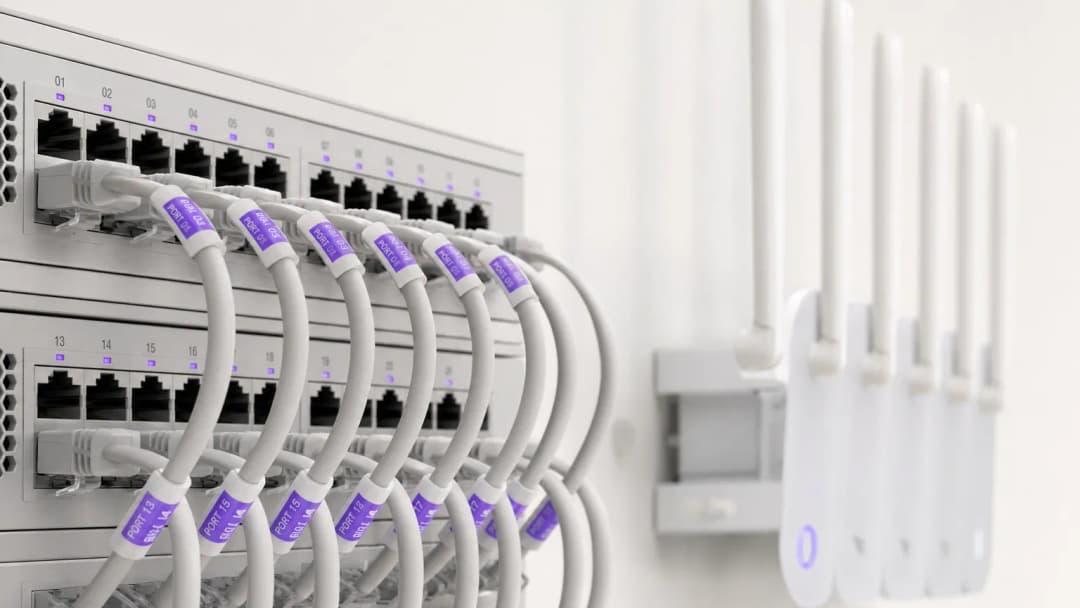
Para hoteleiros modernos, o WiFi para hóspedes é muito mais do que uma comodidade básica - é um dos principais fatores para as pontuações de satisfação dos hóspedes, reservas diretas recorrentes e eficiência operacional. Os hóspedes dos hotéis esperam conectividade perfeita e de alta velocidade em quartos, saguões, espaços de conferência e áreas de lazer ao ar livre. Ao mesmo tempo, os líderes seniores de TI precisam equilibrar as altas demandas de largura de banda simultânea com a conformidade de segurança PCI-DSS e as regulamentações de privacidade de dados.
Este guia completo oferece aos gerentes de TI de hotéis, diretores de operações de locais e gerentes gerais uma estrutura prática para projetar, implantar e monetizar redes WiFi corporativas para hotéis. Exploramos a arquitetura de pontos de acesso nos quartos, integrações com Sistemas de Gestão de Propriedades (PMS), modelos de receita de largura de banda em camadas e como converter logins de WiFi de hóspedes em dados de marketing primários verificados.
Ouça nossa transmissão complementar sobre os conceitos fundamentais de WiFi para hotéis:
Arquitetura Técnica e Segmentação de Rede
Segmentação Lógica de VLAN
A base do WiFi hoteleiro corporativo é uma segmentação lógica de rede rigorosa. Uma única infraestrutura física deve lidar com grupos de usuários distintos - hóspedes do hotel, operações de funcionários, terminais de ponto de venda (POS) e automação predial (IoT/HVAC) - sem comprometer a segurança ou o desempenho.
O tráfego de hóspedes deve ser isolado em Redes Locais Virtuais (VLANs) dedicadas. A separação do processamento de pagamentos (POS) e dos sistemas de gestão hoteleira (PMS) em VLANs criptografadas para funcionários é um requisito obrigatório para a conformidade com o PCI-DSS. Além disso, as VLANs de hóspedes devem impor o isolamento de clientes, impedindo que os dispositivos dos hóspedes se comuniquem entre si através da rede sem fio local.
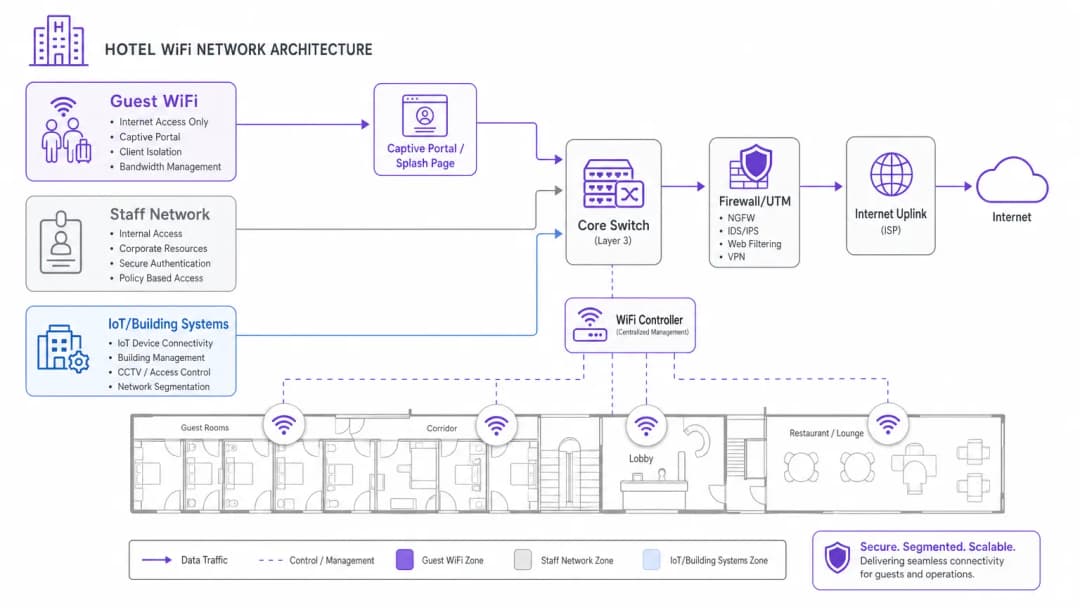
Densidade Sem Fio e Posicionamento de Pontos de Acesso
Os projetos legados de WiFi de hotéis dependiam de pontos de acesso (APs) montados em corredores, espaçados a cada 5 ou 7 quartos. Em edifícios de hotéis modernos com concreto armado, poços de elevador, banheiros revestidos de azulejos e isolamento térmico com face de alumínio, os sinais dos corredores atenuam rapidamente antes de chegar às camas e mesas dos hóspedes.
O padrão atual da indústria é a implantação de APs de parede em quartos (1 AP por quarto de hóspede ou 1 AP a cada 2 quartos). Os APs WiFi 6 de quarto oferecem cobertura limpa em 5GHz e 6GHz, baixa latência para chamadas de vídeo e portas Ethernet cabeadas integradas para smart TVs, telefones IP e linhas VoIP dedicadas.
Tem dúvidas sobre a sua configuração específica?
A nossa equipa trabalha com operadores de espaços, gestores de TI e engenheiros de rede em 80.000 locais. Agende uma chamada de 20 minutos e mostraremos como outros profissionais na sua situação o resolveram.
Integração de PMS e Portais de Hóspedes Autenticados
A integração do Captive Portal do seu WiFi de hóspedes com o seu Sistema de Gestão Hoteleira (PMS) - como Oracle Opera, Mews, Stayntouch ou Cloudbeds - transforma o simples acesso à rede em uma experiência de hóspede personalizada.
Como Funciona a Autenticação PMS
- Associação do Hóspede: O hóspede se conecta ao SSID do WiFi do hotel e é redirecionado para o Captive Portal personalizado.
- Verificação do Quarto: O hóspede insere o número do quarto e o sobrenome (ou código de reserva).
- Consulta de API: O portal consulta o banco de dados do PMS via API segura para verificar o status da estadia ativa.
- Mapeamento de Privilégios: A rede aplica políticas de largura de banda personalizadas com base no nível de fidelidade do hóspede (ex: acesso de alta velocidade de 50 Mbps para VIPs vs. 10 Mbps para hóspedes padrão).
Comparação de Modelos de Acesso WiFi para Hotéis
| Modelo de Acesso | Método de Autenticação | Experiência do Hóspede | Valor de Receita / Dados | Segurança e Conformidade |
|---|---|---|---|---|
| Autenticado por PMS | Número do Quarto + Sobrenome | Boas-vindas personalizadas e integradas | Alto (Sincroniza perfil e histórico de estadia) | Alto (Hóspedes do hotel verificados) |
| Opt-In Social / Formulário | E-mail, LinkedIn, Google | Login rápido com um único clique | Alto (Captura opt-ins de e-mail verificados) | Médio (Cliente isolado) |
| Passe Pago em Camadas | Cartão de Crédito / Cobrança no Quarto | Escolha de velocidades gratuitas vs. premium | Alto (Receita incremental direta) | Alto (Gateway de pagamento criptografado) |
| Clique Direto | Botão de aceitação de T&C | Acesso instantâneo | Baixo (Nenhum dado de contato coletado) | Básico (Cliente isolado) |
Monetização de WiFi para Hotéis e ROI de Largura de Banda em Camadas
O streaming de vídeo de alta largura de banda (Netflix 4K, YouTube, Twitch) e as videoconferências de trabalho remoto dominam o consumo da rede de hóspedes no período da noite. A largura de banda aberta e sem restrições leva à saturação do uplink e a avaliações ruins dos hóspedes.
Implementando Largura de Banda em Camadas
Os hoteleiros podem implementar um modelo de largura de banda em duas camadas:
- Camada Básica Gratuita: Velocidade simétrica de 5 a 10 Mbps por dispositivo - perfeita para navegação na web, e-mail e mensagens em redes sociais.
- Camada Premium de Alta Velocidade: Largura de banda de alta prioridade de 30 a 50 Mbps por R$ 7,99 a R$ 12,99 por 24 horas (ou de cortesia para membros do programa de fidelidade).
Essa estratégia garante um desempenho básico consistente para todos os hóspedes, ao mesmo tempo em que gera receita recorrente de viajantes a negócios e usuários avançados.
Para se aprofundar em estratégias de rede para hóspedes e segurança corporativa, explore nosso Guest WiFi Guide, WiFi Marketing Guide e Enterprise WiFi Security Guide.
Definições principais
Integração de PMS
Conectar Captive Portals de WiFi para hóspedes com Property Management Systems (ex.: Oracle Opera, Mews, Stayntouch) para autenticar hóspedes pelo número do quarto ou nome e sincronizar preferências de perfil.
Essencial para o check-in perfeito dos hóspedes, regras de largura de banda VIP e disparos automáticos de e-mails pós-estadia.
Isolamento de Cliente
Um recurso de segurança que impede que dispositivos de hóspedes conectados à mesma rede sem fio descubram ou se comuniquem entre si.
Obrigatório em redes de hóspedes de hotéis para evitar ataques cibernéticos laterais e espionagem de dados entre quartos.
Largura de Banda em Camadas
Alocação de diferentes limites e prioridades de largura de banda com base na camada do hóspede (ex.: 5 Mbps gratuitos para navegação padrão vs. 50 Mbps pagos para streaming em 4K e jogos).
Permite que os hoteleiros monetizem a alta demanda por largura de banda enquanto protegem a capacidade do link para todos os hóspedes.
Ponto de Acesso (AP) no Quarto
Implantação de pontos de acesso WiFi 6 de parede de perfil discreto dentro dos quartos dos hóspedes, em vez de instalações esparsas no teto dos corredores.
Elimina a atenuação do sinal no corredor causada por azulejos de banheiro, isolamento metálico e portas corta-fogo pesadas.
Exemplos práticos
Um hotel de negócios de 250 quartos enfrenta graves reclamações de hóspedes sobre a velocidade do WiFi durante os horários de pico da noite (19h às 22h). A propriedade atualmente conta com uma conexão de banda larga de 500 Mbps com pontos de acesso instalados em corredores centrais. Qual atualização de arquitetura de rede deve ser implementada?
- Atualizar o link de internet para uma linha dedicada de 1 Gbps com SLA garantido para suportar o pico de tráfego de streaming simultâneo. 2. Redesenhar a arquitetura sem fio para um modelo de AP no quarto (1 AP por quarto ou a cada 2 quartos) para eliminar a atenuação das paredes. 3. Implementar modelagem de largura de banda na VLAN de hóspedes (ex.: 10 Mbps de linha de base por cliente) junto com uma camada opcional paga de alta velocidade de 50 Mbps.
Um grupo de hotéis boutique deseja capturar dados de contato validados dos hóspedes para campanhas de reservas diretas, garantindo conformidade rigorosa com a GDPR e regulamentos de privacidade. Como o Captive Portal deve ser configurado?
Implantar um Captive Portal integrado ao Property Management System (PMS). Configurar a tela de login para exigir uma caixa de seleção de consentimento explícita e separada para comunicações de marketing, distinta dos termos de serviço da rede. O portal registra automaticamente as marcações de data/hora do consentimento, endereços IP e endereços MAC, sincronizando os perfis validados dos hóspedes na plataforma de marketing central.
Questões práticas
Q1. Seu diretor de operações hoteleiras deseja conectar novos tablets de ponto de venda (POS) móveis no terraço da piscina externa à rede WiFi de hóspedes existente. Como você deve responder?
Dica: Considere a conformidade com o PCI-DSS e a segmentação de rede.
Ver resposta modelo
Recuse a solicitação. Conectar terminais de pagamento a uma rede WiFi de hóspedes aberta viola as regras do PCI-DSS e expõe os dados do cartão de crédito a riscos. Os tablets de POS devem se conectar a uma VLAN dedicada e criptografada para funcionários/POS protegida com WPA3-Enterprise, totalmente isolada do tráfego de hóspedes.
Q2. Um designer de interiores insiste em ocultar pontos de acesso instalados no teto dentro de compartimentos decorativos de latão para preservar a estética do lobby do hotel. Qual é o impacto técnico?
Dica: Considere como compartimentos metálicos interagem com sinais de rádio.
Ver resposta modelo
Gabinetes metálicos agem como gaiolas de Faraday, bloqueando severamente os sinais de RF e criando zonas mortas. Os pontos de acesso devem ser montados externamente ou atrás de gabinetes transparentes a RF (como plástico ou gesso). Películas de vinil aprovadas pelo fabricante podem se adequar à decoração sem degradar o desempenho do WiFi.
Q3. O gerente de marketing do hotel solicita a inscrição automática de todos os hóspedes que se conectam ao WiFi de convidados na newsletter diária do hotel. Como isso deve ser tratado?
Dica: Considere os requisitos de consentimento explícito sob a GDPR e leis de privacidade.
Ver resposta modelo
O Captive Portal não pode inscrever os hóspedes de forma automática. O consentimento deve ser explícito, informado e desvinculado. A splash page deve apresentar uma caixa de seleção desmarcada para adesão ao marketing, separada da aceitação dos termos de serviço da rede.
Continue a ler esta série
Como Configurar WiFi de Visitantes: Um Guia de Configuração Corporativa Segura
Este guia definitivo oferece aos líderes de TI e arquitetos de rede um modelo claro para implantar WiFi de visitantes corporativo seguro. Ele aborda arquitetura essencial, migração para WPA3, segmentação de VLAN e integração de Captive Portal para proteger sistemas internos enquanto coleta dados primários em conformidade.
Como Corrigir WiFi Lento Sem Fazer Upgrade do Seu Plano de Internet
Um guia de referência técnica abrangente para gerentes de TI e arquitetos de rede sobre como otimizar o desempenho do WiFi corporativo sem aumentar a largura de banda do provedor de internet. Abrange ajuste de RF, gerenciamento de densidade de clientes, implementação de QoS e como utilizar WiFi analytics para diagnosticar e resolver gargalos.
Como construir uma rede WiFi de campus: Um guia de TI para universidades
Este guia técnico fornece um roteiro abrangente para projetar e implantar redes WiFi de campus de alta densidade, cobrindo desde pesquisas ativas de site e posicionamento de pontos de acesso até arquitetura de controladora, roaming contínuo e integração segura de convidados. Ele foi escrito para gerentes de TI, arquitetos de rede e CTOs de universidades e grandes locais que precisam de orientações práticas para planejar e executar uma implantação sem fio neste trimestre. O guia também mapeia a plataforma de análise e Guest WiFi da Purple para pontos de integração reais dentro do ciclo de vida da implantação.
Tem dúvidas sobre a sua configuração específica?
A nossa equipa trabalha com operadores de espaços, gestores de TI e engenheiros de rede em 80.000 locais. Agende uma chamada de 20 minutos e mostraremos como outros profissionais na sua situação o resolveram.