
Os Melhores Pontos de Acesso Wi-Fi para Empresas e Homelabs
Este guia técnico avalia os melhores pontos de acesso Wi-Fi empresariais para 2025-2026, cobrindo hardware Wi-Fi 6E e Wi-Fi 7 da Cisco, HPE Aruba, Ruckus, Juniper Mist e Ubiquiti em implantações de alta densidade em hospitalidade, varejo e locais públicos. Ele fornece estratégias de arquitetura acionáveis, comparações de fornecedores, estruturas de segurança e métricas de ROI para líderes de TI que constroem redes sem fio de próxima geração. A plataforma de guest WiFi e análise de dados agnóstica de hardware da Purple é mapeada em todo o guia como a camada de inteligência que transforma a infraestrutura de rede em um ativo de dados primários.
Ouça este guia
Ver transcrição do podcast
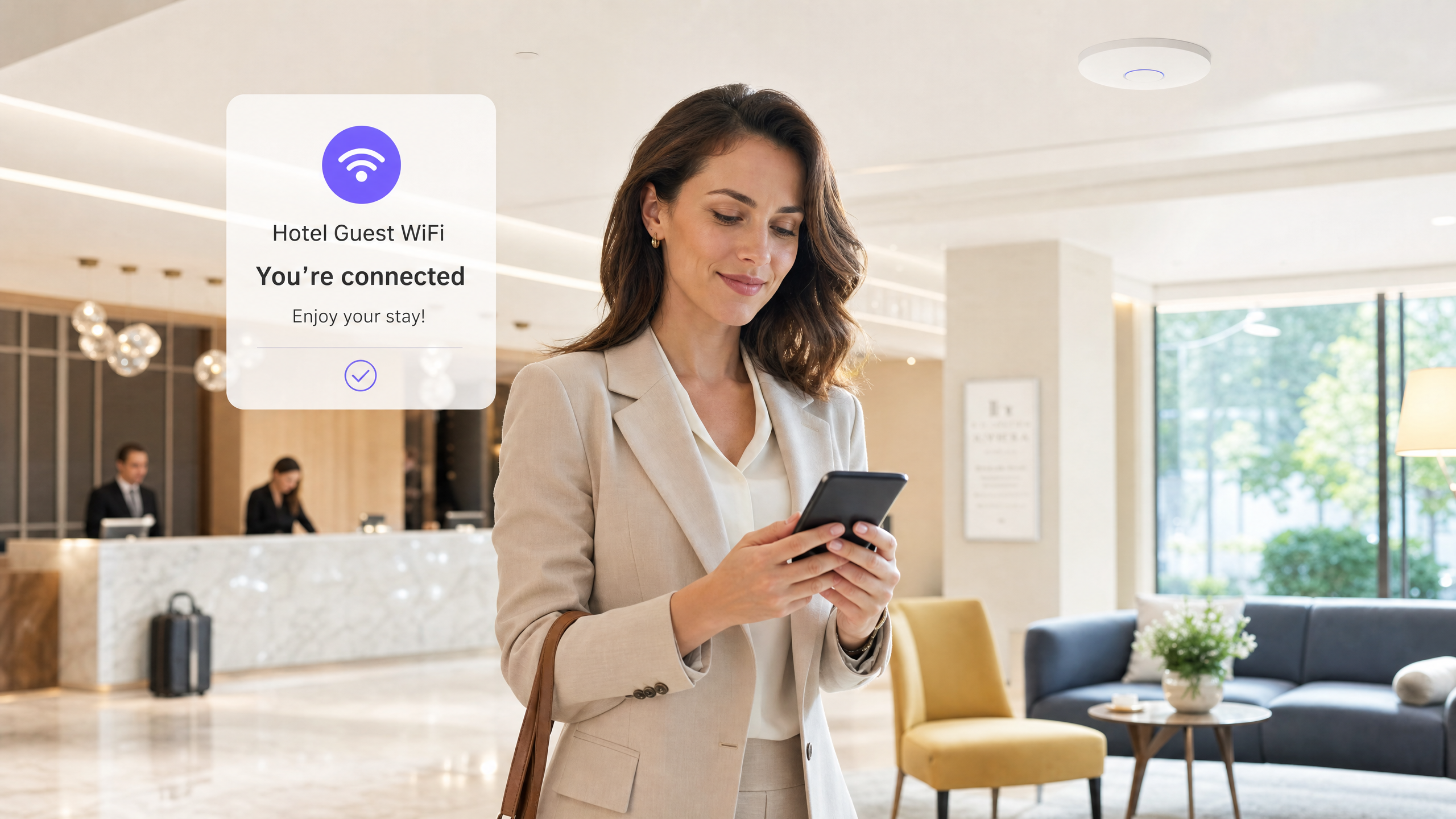
Resumo Executivo
Para CTOs e diretores de TI que gerenciam ambientes de alta densidade — desde corredores de estádios até extensos campi hospitalares — selecionar o melhor ponto de acesso não é mais apenas uma questão de throughput bruto. A mudança para o Wi-Fi 6E e o padrão emergente Wi-Fi 7 (IEEE 802.11be) alterou fundamentalmente o cenário das redes empresariais. Os pontos de acesso modernos devem lidar com densidade extrema de dispositivos, suportar roaming contínuo, integrar-se com plataformas de análise sofisticadas e manter protocolos de segurança rigorosos, incluindo WPA3-Enterprise e IEEE 802.1X.
Este guia fornece uma avaliação técnica rigorosa dos pontos de acesso empresariais de ponta da Cisco, HPE Aruba Networking, Ruckus, Juniper Mist e Ubiquiti. Exploramos considerações arquitetônicas, capacidades de Multi-Link Operation (MLO), orçamento de energia PoE++ e estratégias práticas de implantação para operações de locais. Também examinamos como a integração dessas soluções de hardware com uma sobreposição inteligente de Guest WiFi pode transformar a infraestrutura de rede de um custo irrecuperável em um ativo gerador de receita.
Análise Técnica Aprofundada: Arquitetura Wi-Fi 6E vs. Wi-Fi 7
O mercado de pontos de acesso sem fio empresariais está atualmente entre dois grandes padrões: o Wi-Fi 6E maduro e amplamente implantado (IEEE 802.11ax operando na banda de 6 GHz) e o Wi-Fi 7 (IEEE 802.11be) em rápida aceleração. Compreender as distinções técnicas é fundamental para arquitetos de rede que planejam ciclos de atualização de hardware com um horizonte de 3 a 5 anos.
Multi-Link Operation (MLO) e Throughput
O Wi-Fi 7 introduz o Multi-Link Operation (MLO), uma mudança de paradigma na forma como os dispositivos clientes interagem com os pontos de acesso. Ao contrário dos padrões legados, onde um cliente se conecta a uma única banda — 2.4 GHz, 5 GHz ou 6 GHz — o MLO permite a transmissão e recepção simultâneas em várias bandas concomitantemente. Isso reduz significativamente a latência e aumenta o throughput agregado, tornando-o essencial para ambientes de alta densidade, como centros de conferências e locais esportivos.
Além disso, o Wi-Fi 7 suporta larguras de canal de 320 MHz no espectro de 6 GHz e 4K-QAM (Quadrature Amplitude Modulation), proporcionando um aumento de até 20% nas taxas de dados de pico em comparação com o 1024-QAM do Wi-Fi 6. É importante notar que o 4K-QAM requer uma Relação Sinal-Ruído (SNR) muito alta para funcionar; em ambientes ruidosos e com alta interferência, a taxa de modulação diminuirá automaticamente. Não baseie o planejamento de capacidade em números teóricos de throughput de pico.
Panorama de Fornecedores e Especificações de Hardware
Ao comparar o melhor hardware de ponto de acesso, os arrays de antenas físicas, a arquitetura de rádio e as capacidades de processamento ditam o desempenho no mundo real muito mais do que os números de throughput de destaque.
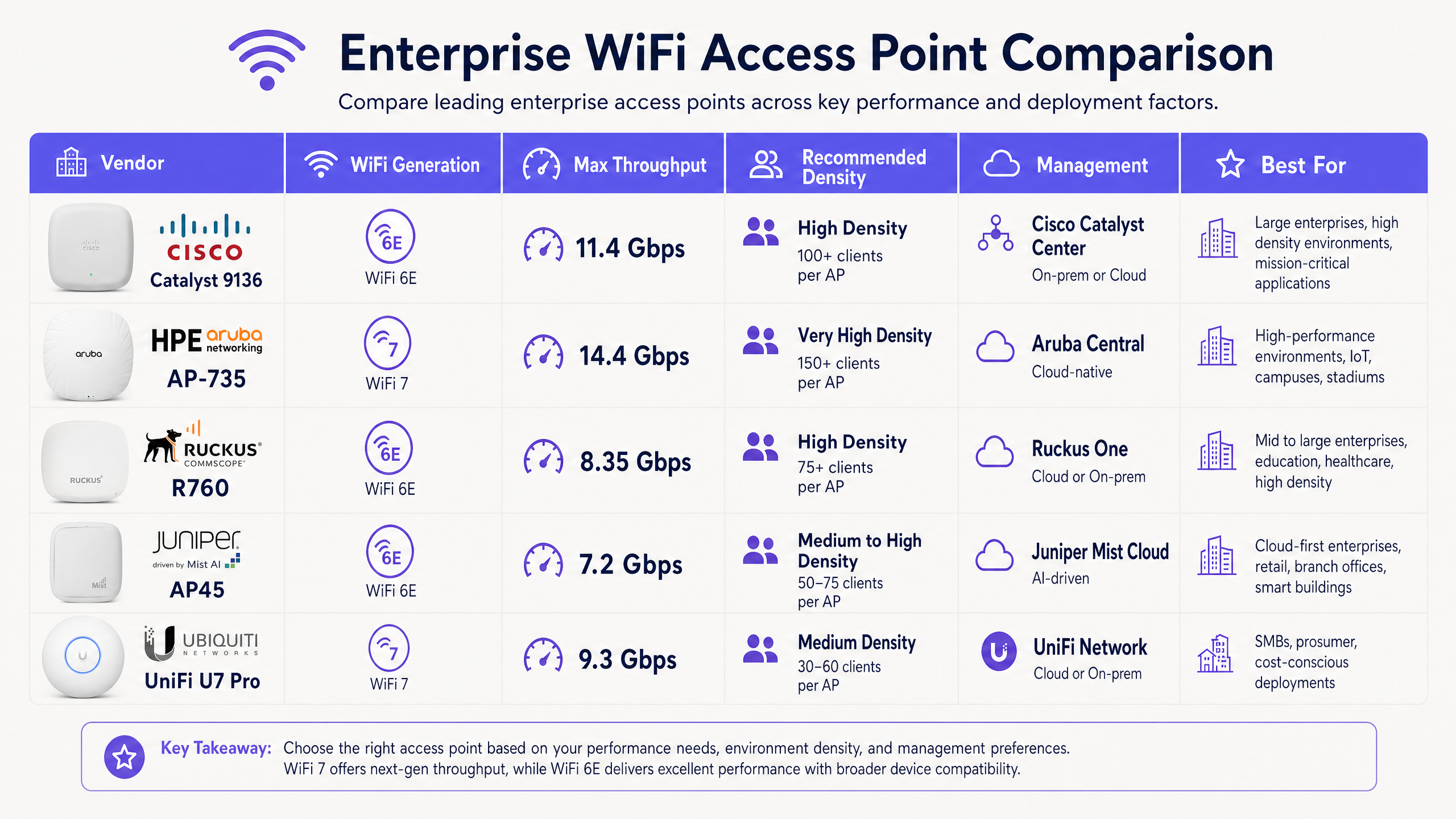
Cisco Catalyst 9136 Series é um peso-pesado na arena Wi-Fi 6E, apresentando uma robusta configuração MIMO 8x8 na banda de 5 GHz, tornando-o excepcionalmente capaz em salas de aula ou auditórios de alta densidade. Ele suporta operação tri-banda (2.4/5/6 GHz) e se integra nativamente com o Cisco Catalyst Center (anteriormente DNA Center) para gerenciamento on-premises ou Cisco Meraki para implantações gerenciadas na nuvem. Requer 802.3bt (PoE++) para operar todos os rádios em plena capacidade.
HPE Aruba Networking AP-735 é uma opção líder de Wi-Fi 7, oferecendo tri-rádio 2x2 MIMO com portas de uplink Ethernet duplas de 5 Gbps. A filtragem proprietária Ultra Tri-Band (UTB) da Aruba é altamente eficaz na minimização de interferências entre as bandas de 5 GHz e 6 GHz — um modo de falha comum em implantações densas. O AP-735 é gerenciado via Aruba Central, uma plataforma nativa da nuvem com AIOps integrado.
Ruckus R760 se destaca em ambientes com severa interferência de RF. O R760 (Wi-Fi 6E) utiliza a tecnologia de antena adaptativa BeamFlex+ proprietária da Ruckus, direcionando dinamicamente os sinais para os clientes e mitigando a interferência de co-canal. Isso o torna frequentemente o melhor ponto de acesso para ambientes físicos desafiadores, como armazéns, hotéis antigos com paredes de concreto espessas ou locais com reflexões multipath significativas. Ele suporta uplink de 10 GbE e é gerenciado via Ruckus One (nuvem) ou SmartZone (on-premises).
Juniper Mist AP45 é o carro-chefe da Juniper, impulsionado por IA. O AP45 (Wi-Fi 6E) inclui um quarto rádio dedicado para varredura de segurança e um array Bluetooth Low Energy (BLE) para serviços de localização interna, integrando-se perfeitamente com a plataforma de gerenciamento em nuvem Mist AI. O motor AIOps fornece análises preditivas, detecção proativa de anomalias e análise automatizada de causa raiz — reduzindo significativamente o tempo médio para resolução (MTTR).
Ubiquiti UniFi U7 Pro traz capacidades de Wi-Fi 7 a um preço disruptivo, tornando-o o melhor ponto de acesso para empresas conscientes do custo ou homelabs sofisticados. Embora não possua os SLAs de suporte empresarial da Cisco ou Aruba, seu uplink de 2.5 GbE e suporte total a 6 GHz o tornam altamente atraente para implantações de médio porte gerenciadas por equipes de TI internas capazes.
Para uma análise detalhada dos paradigmas de gerenciamento, consulte nosso guia sobre Comparando Pontos de Acesso Baseados em Controlador vs. Gerenciados na Nuvem .
Guia de Implementação: Implantação de Alta Densidade
A implantação de pontos de acesso empresariais requer planejamento meticuloso. Uma armadilha comum e custosa é a abordagem "mais é melhor", que leva a uma interferência excessiva de co-canal e a uma rede que tem um desempenho pior do que uma implantação bem projetada com menos APs.
1. Planejamento de Capacidade e Cálculos de Densidade
Não projete apenas para cobertura; projete para capacidade. Em um ambiente de alta densidade de Varejo , calcule o número esperado de dispositivos simultâneos, assumindo 2-3 dispositivos por usuário.
Como regra prática: para implantações empresariais padrão, almeje 30-50 clientes ativos por rádio. Em ambientes de alta densidade usando APs Wi-Fi 6E/7 com agendamento OFDMA avançado, isso pode escalar para 75-100 clientes por AP, desde que os orçamentos de uplink e PoE sejam suficientes. Sempre valide esses números com um levantamento de site RF preditivo usando ferramentas como Ekahau ou Hamina antes de solicitar o hardware.
2. Atualizações da Infraestrutura de Rede
A implantação de pontos de acesso Wi-Fi 7 em infraestruturas de switching legadas cria gargalos severos que anulam completamente o investimento em hardware.
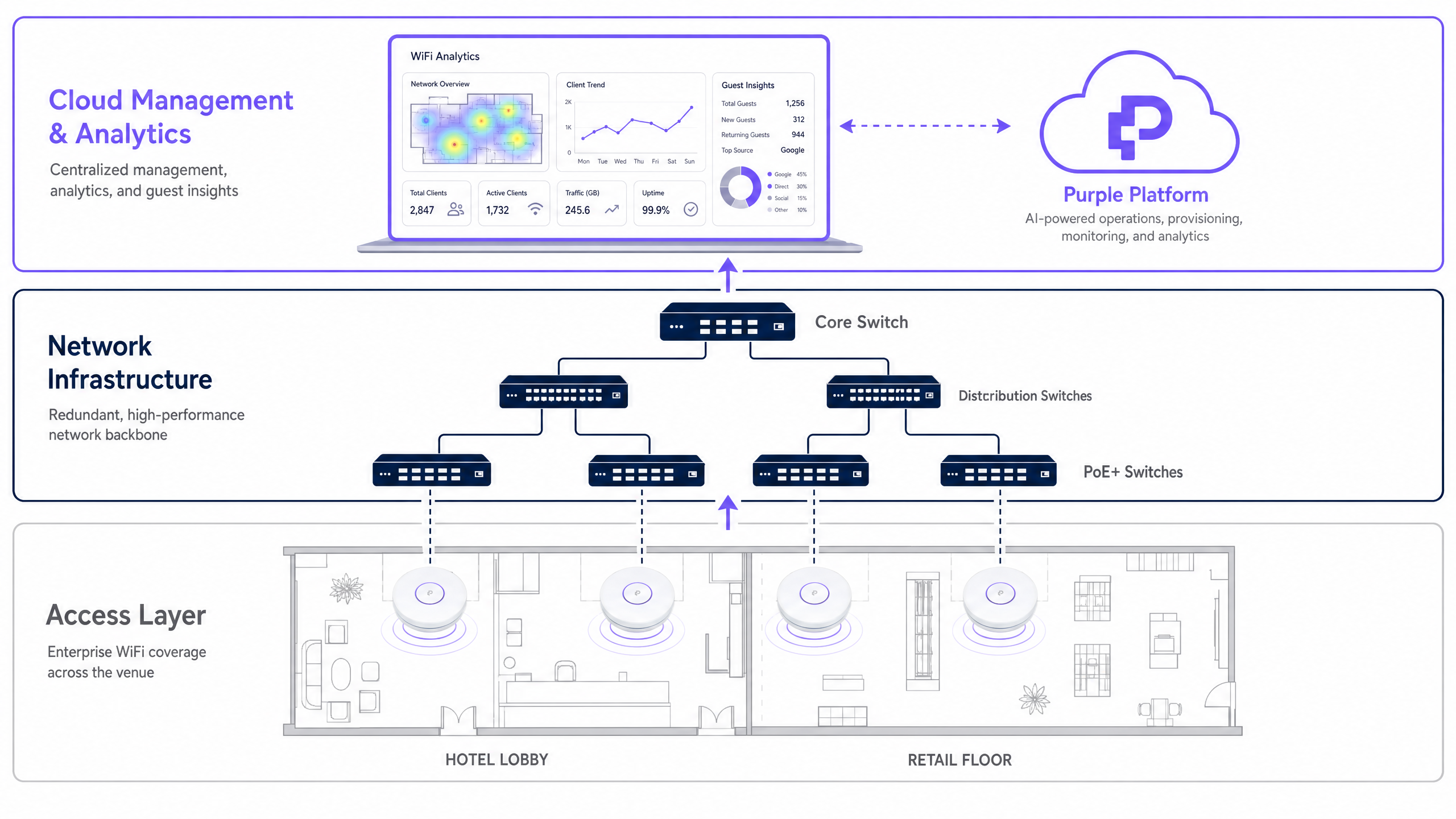
Pontos de acesso como o Aruba AP-735 ou Cisco 9136 exigem switches Multi-Gigabit (mGig) que suportam 2.5 Gbps, 5 Gbps ou 10 Gbps por porta na camada de acesso. No lado da energia, APs tri-band modernos consomem uma potência significativa. Garanta que seus switches de acesso suportem PoE++ (802.3bt, fornecendo até 60W Tipo 3 ou 90W Tipo 4 por porta). A operação desses APs em PoE+ padrão (802.3at, máximo de 30W) resultará em rádios desativados, desempenho da CPU limitado e alertas de modo degradado no seu painel de gerenciamento.
3. Gerenciamento de Identidade e Acesso
A segurança empresarial exige autenticação robusta. WPA3-Enterprise com IEEE 802.1X/RADIUS é o padrão para dispositivos corporativos, fornecendo chaves de criptografia por usuário e aplicação centralizada de políticas. O acesso de convidados requer uma abordagem diferente que equilibra segurança com atrito mínimo.
A implementação de um Captive Portal integrado a uma plataforma de WiFi Analytics permite que os locais ofereçam acesso seguro enquanto capturam dados primários valiosos para marketing. Para uma experiência mais fluida, considere implementar o OpenRoaming. Conforme detalhado em Como um wi fi assistant Habilita o Acesso Sem Senha em 2026 , a Purple atua como um provedor de identidade gratuito para o OpenRoaming sob a licença Connect, permitindo que os dispositivos se autentiquem automaticamente e com segurança sem interação manual com o portal.
Em ambientes de Transporte e setor público, este modelo de autenticação sem atrito é particularmente valioso para gerenciar o alto rendimento de usuários transitórios.
Melhores Práticas e Padrões da Indústria
Levantamentos de Site RF: Sempre conduza um levantamento preditivo antes da instalação e um levantamento de validação ativo após a instalação. Considere a atenuação de paredes, vidro e corpos humanos — uma multidão de pessoas absorve energia RF significativamente, razão pela qual um estádio que tem um bom desempenho durante um levantamento de site pode falhar catastroficamente durante um evento com ingressos esgotados.
Planejamento de Canais: Nas bandas de 5 GHz e 6 GHz, use larguras de canal de 40 MHz ou 80 MHz para implantações empresariais para equilibrar o throughput com a disponibilidade de canais. Evite larguras de 160 MHz ou 320 MHz, a menos que em ambientes isolados, pois elas limitam severamente o número de canais não sobrepostos e aumentam a probabilidade de interferência de co-canal.
Conformidade: Garanta que a arquitetura de rede esteja em conformidade com os padrões relevantes. O PCI DSS 4.0 exige segmentação de rede para qualquer sistema que processe pagamentos com cartão via Wi-Fi. Em ambientes de Saúde , o HIPAA exige controles rigorosos sobre a transmissão de dados. O GDPR se aplica a quaisquer dados pessoais capturados através de portais Wi-Fi de convidados em todos os setores.
Gerenciamento de Firmware: Estabeleça uma cadência disciplinada de aplicação de patches de firmware. Fornecedores de APs empresariais lançam regularmente patches de segurança que abordam vulnerabilidades. Plataformas gerenciadas em nuvem (Aruba Central, Mist AI, Meraki) podem automatizar este processo com janelas de manutenção configuráveis.
Resolução de Problemas e Mitigação de Riscos
Clientes Fixos (Sticky Clients): Um problema comum onde um dispositivo se recusa a fazer roaming para um ponto de acesso mais próximo, diminuindo o desempenho geral da célula. Mitigue implementando IEEE 802.11k (Medição de Recursos de Rádio) e IEEE 802.11v (Gerenciamento de Transição BSS) para auxiliar os clientes a tomar melhores decisões de roaming. Defina taxas de dados mínimas obrigatórias em cada SSID para forçar os clientes a se desconectarem quando o sinal cair abaixo de um limite utilizável — tipicamente 12 Mbps em 5 GHz.
Roteamento Assimétrico: O ponto de acesso pode transmitir mais longe do que o cliente móvel pode transmitir de volta, resultando no cliente exibindo força total de sinal, mas experimentando throughput próximo de zero. A mitigação é direta: não opere os pontos de acesso com potência máxima de transmissão. Ajuste a potência de transmissão (Tx) do AP à capacidade média do dispositivo móvel, tipicamente 12-15 dBm. Isso também reduz a interferência de co-canal entre APs adjacentes.
Esgotamento do Orçamento PoE: Em grandes implantações, é fácil exceder o orçamento total de energia PoE de um chassi de switch, mesmo que os orçamentos de porta individuais pareçam suficientes. Sempre calcule o consumo de energia agregado de todos os APs conectados em relação ao orçamento total de energia PoE do switch, e não apenas os limites por porta.
Proliferação de SSIDs: Cada SSID gera sobrecarga de gerenciamento (quadros de beacon) que consome tempo de transmissão. Limite os SSIDs a um máximo de 3-4 por AP. Consolide SSIDs de IoT, corporativos e de convidados em vez de criar redes por departamento.
ROI e Impacto nos Negócios
O caso de negócios para a atualização para o melhor hardware de ponto de acesso se estende muito além das métricas de desempenho de TI. No setor de Hospitalidade , o Wi-Fi confiável é consistentemente classificado entre os principais fatores nos índices de satisfação dos hóspedes. Uma falha de rede durante um grande evento de conferência pode impactar diretamente as taxas de remarcação e a reputação da marca.
Ao sobrepor uma plataforma de análise sofisticada sobre ae hardware, as equipes de TI podem demonstrar ROI direto para o negócio. A rede se torna um instrumento para entender padrões de tráfego de pedestres, tempos de permanência, períodos de pico de uso e dados demográficos dos clientes. Esses dados informam diretamente as decisões operacionais — desde níveis de pessoal até o posicionamento de merchandising no varejo.
Para orientação prática sobre como alavancar esses dados em um contexto de hospitalidade, consulte Como Melhorar a Satisfação do Hóspede: O Guia Definitivo . No setor público, uma infraestrutura sem fio robusta e inclusiva é cada vez mais central para as estratégias de inclusão digital, conforme destacado em Purple Nomeia Iain Fox como VP de Crescimento – Setor Público para Impulsionar a Inclusão Digital e a Inovação em Cidades Inteligentes .
Os resultados mensuráveis de uma implantação de Wi-Fi empresarial bem-sucedida com análises integradas geralmente incluem: uma redução de 15-25% nas reclamações de hóspedes relacionadas à conectividade, um aumento de 30-40% nas taxas de conversão do Captive Portal ao usar login social em vez de formulários apenas com e-mail, e um ativo de dados primários demonstrável que reduz a dependência de provedores de dados de terceiros em um ambiente pós-cookie.
Definições principais
Multi-Link Operation (MLO)
A Wi-Fi 7 (802.11be) feature allowing devices to simultaneously transmit and receive data across multiple frequency bands — for example, 5 GHz and 6 GHz concurrently.
Crucial for reducing latency and increasing throughput in dense enterprise environments. Requires both the AP and the client device to support Wi-Fi 7 to function.
4K-QAM (Quadrature Amplitude Modulation)
A modulation scheme used in Wi-Fi 7 that encodes 12 bits per symbol, compared to Wi-Fi 6's 1024-QAM (10 bits per symbol), delivering approximately 20% higher peak throughput.
Requires a very high Signal-to-Noise Ratio (SNR) to operate effectively. In noisy environments, the AP automatically falls back to lower modulation rates. Do not base capacity planning on 4K-QAM peak figures.
Spatial Streams (MIMO)
Multiple-Input Multiple-Output technology uses multiple antennas to transmit independent data streams simultaneously. Denoted as 2x2, 4x4, or 8x8 (transmit x receive antennas).
More spatial streams allow an AP to handle more simultaneous client connections and provide higher aggregate throughput. An 8x8 AP like the Cisco 9136 can serve significantly more concurrent clients than a 2x2 AP.
802.3bt (PoE++)
The Power over Ethernet standard capable of delivering up to 60W (Type 3) or 90W (Type 4) of DC power over twisted-pair Ethernet cables to powered devices.
Mandatory for powering modern, high-performance tri-band enterprise access points without compromising functionality. Deploying tri-band APs on 802.3at (PoE+, 30W) switches will result in degraded performance or disabled radios.
OpenRoaming
A Wi-Fi Alliance federation standard that allows users to automatically and securely connect to participating guest Wi-Fi networks without captive portals or manual password entry, using a pre-provisioned credential profile.
Purple acts as a free identity provider for OpenRoaming under the Connect licence, enabling venues to offer seamless, secure guest authentication. Particularly valuable in transport hubs and public sector venues with high volumes of transient users.
BSS Transition Management (802.11v)
An IEEE standard that allows the network infrastructure to send advisory messages to client devices, recommending a better access point to connect to based on signal strength and load.
Used by IT admins to mitigate 'sticky clients' and ensure load balancing across the wireless network. Works in conjunction with 802.11k (Radio Resource Measurement) to provide clients with a candidate list of APs.
Co-Channel Interference (CCI)
Interference caused when two or more access points operate on the exact same frequency channel and are within range of each other, forcing them to take turns transmitting via the CSMA/CA protocol.
CCI is the primary cause of performance degradation in over-deployed enterprise networks. Mitigated through careful channel planning, reducing transmit power, and using the wider 6 GHz band which offers more non-overlapping channels.
OFDMA (Orthogonal Frequency-Division Multiple Access)
A multi-user version of OFDM introduced in Wi-Fi 6 that divides a channel into smaller resource units (sub-carriers), allowing an AP to communicate with multiple clients simultaneously within a single transmission window.
Drastically improves efficiency in high-density environments with many small-packet transmissions, such as IoT devices or mobile applications sending frequent short bursts of data. Reduces latency and improves airtime efficiency.
BeamFlex+ (Ruckus Proprietary)
Ruckus Networks' adaptive antenna technology that dynamically selects the optimal antenna pattern for each individual client transmission, steering the signal to maximise SNR and minimise interference.
Particularly effective in challenging RF environments such as warehouses with metal racking or venues with significant multipath reflections. Provides a measurable performance advantage over standard omnidirectional antennas in these scenarios.
Exemplos práticos
A 400-room luxury hotel is experiencing severe guest complaints regarding Wi-Fi performance in the lobby and conference areas during peak evening hours. The current infrastructure uses Wi-Fi 5 (802.11ac) access points deployed in hallways. The IT Director needs a complete redesign. What is the recommended approach?
Step 1 — Shift from a coverage model to a capacity model. Remove APs from hallways, which cause 'sticky client' issues as guests move between rooms and the corridor. Replace with in-room wall-plate APs (e.g., Cisco 9105AXW or Aruba AP-303H) to create micro-cells that contain the RF domain within each room.
Step 2 — In the high-density lobby and conference areas, deploy Wi-Fi 6E or Wi-Fi 7 access points (e.g., Aruba AP-735 or Cisco 9136) using directional antennas if ceiling height exceeds 8 metres. Target one AP per 75-100 square metres in the lobby, and one AP per 50 attendees in conference rooms.
Step 3 — Upgrade edge switches to support mGig (2.5/5 Gbps) and PoE++ (802.3bt) to power the new tri-band APs without degraded mode.
Step 4 — Implement Purple's Guest WiFi captive portal to manage bandwidth allocation per user, enforce GDPR-compliant data capture, and gather analytics on conference attendee dwell times and repeat visit rates.
Step 5 — Enable 802.11k/v/r (Fast BSS Transition) to ensure seamless roaming between the lobby APs and conference room APs without session drops.
A large retail chain needs to deploy Wi-Fi across 50 new stores simultaneously. They require high reliability for handheld inventory scanners and POS terminals (PCI DSS compliance is mandatory), but also want to offer guest Wi-Fi to shoppers to capture first-party marketing data. Budget is constrained. What is the recommended architecture?
Step 1 — Deploy mid-tier Wi-Fi 6E access points (e.g., Juniper Mist AP45 or Ruckus R560) to balance cost and performance. The Mist AI platform's AIOps capabilities reduce ongoing IT management overhead across 50 sites, which is a significant operational cost saving.
Step 2 — Segment the network using VLANs and separate SSIDs: a WPA3-Enterprise SSID with 802.1X authentication for corporate devices and POS terminals (isolated on a dedicated VLAN with no inter-VLAN routing to guest traffic), and a separate open SSID with client isolation for guests.
Step 3 — For the guest network, implement Purple's captive portal. Configure the portal to require a social login or email address in exchange for access, enabling the marketing team to build a first-party CRM database. Apply bandwidth limits per client (e.g., 10 Mbps down / 5 Mbps up) to prevent any single user from saturating the uplink.
Step 4 — Utilise the BLE capabilities of the APs to track inventory scanner asset locations and analyse shopper foot traffic patterns for merchandising optimisation.
Step 5 — Standardise the configuration template across all 50 sites using the Mist AI zero-touch provisioning workflow, reducing per-site deployment time from days to hours.
Questões práticas
Q1. You are designing the Wi-Fi network for a high-density university lecture theatre seating 300 students. You plan to deploy three Wi-Fi 6E access points. What is the single most critical RF design consideration to prevent performance degradation, and how do you address it?
Dica: Consider what happens when multiple APs are in the same physical space and how they share airtime on the same frequency channel.
Ver resposta modelo
The most critical consideration is mitigating Co-Channel Interference (CCI). With three APs in the same physical space, you must ensure they are configured on non-overlapping channels — particularly on the 5 GHz and 6 GHz bands. In the 6 GHz band, there are up to 59 non-overlapping 20 MHz channels, providing significantly more flexibility than 5 GHz. Additionally, you must significantly reduce the transmit (Tx) power of each AP so their cell sizes do not overlap excessively. If two APs can clearly hear each other on the same channel, they will defer transmissions via CSMA/CA, effectively reducing three APs to the capacity of a single AP. A secondary consideration is using directional antennas aimed downward toward the seating area rather than omnidirectional antennas, to contain the RF domain within the room.
Q2. A client wants to upgrade their warehouse Wi-Fi to support new automated guided vehicles (AGVs) requiring sub-50ms latency and consistent roaming. The warehouse has high metal racking and severe multipath interference. They are considering Ubiquiti UniFi U7 Pro for cost savings. What is your recommendation and reasoning?
Dica: Evaluate whether the hardware's antenna technology is suited to the specific RF environment, and consider the roaming requirements of the AGVs.
Ver resposta modelo
While the U7 Pro is cost-effective, it is not the right choice for this environment. Metal racking creates severe multipath interference that standard omnidirectional antennas struggle to overcome. I recommend the Ruckus R760 or equivalent, specifically for its BeamFlex+ adaptive antenna technology, which dynamically adjusts antenna patterns to steer signals around physical obstacles and mitigate multipath reflections. For the AGV roaming requirement, implement 802.11r (Fast BSS Transition) to enable sub-50ms roaming handoffs between APs — this is critical for AGVs moving at speed through the warehouse. The Ruckus platform also supports 802.11k/v to assist the AGV clients in identifying the optimal AP before initiating a roam.
Q3. Your team has deployed new tri-band Wi-Fi 7 access points across a corporate campus. During the pilot phase, the 6 GHz radios are not broadcasting and the APs are reporting 'degraded mode' in the cloud management dashboard. The APs are connected to existing PoE+ switches. What is the root cause and what is the remediation path?
Dica: Review the physical infrastructure requirements for powering modern, high-performance tri-band access points.
Ver resposta modelo
The root cause is insufficient Power over Ethernet budget. The existing PoE+ switches (802.3at) provide a maximum of 30W per port. Modern tri-band Wi-Fi 7 APs typically require 802.3bt (PoE++) — up to 60W or 90W per port — to operate all three radios simultaneously at full capacity. When the AP detects insufficient power, it automatically enters a degraded mode, disabling the most power-hungry components first, which is typically the 6 GHz radio and secondary Ethernet port. The remediation path is to replace the access layer switches with 802.3bt-capable models. As an interim measure, some APs support a power injector (midspan) to supplement PoE+ switch output, but this is not a scalable long-term solution.
Q4. A conference centre hosts events with up to 2,000 concurrent attendees in a single hall. During a recent event, the Wi-Fi performed well during setup but degraded severely once the hall filled to capacity. The RF site survey was conducted with the hall empty. What went wrong and how do you prevent it in future deployments?
Dica: Consider how the physical environment changes between an empty hall and a full one, and what effect this has on RF propagation.
Ver resposta modelo
The issue is that human bodies absorb RF energy significantly — particularly at 5 GHz and 6 GHz frequencies. A hall filled with 2,000 people creates a dramatically different RF environment than an empty hall. The predictive site survey, conducted with the hall empty, did not account for this attenuation. The result is that APs that appeared to have sufficient coverage in the empty hall now have reduced effective range, leading to higher client counts per AP, increased retry rates, and degraded throughput. Prevention requires: (1) conducting a loaded site survey with the hall at or near capacity, or using simulation tools that model human body attenuation; (2) increasing AP density beyond what the empty-hall survey suggests; (3) deploying APs at lower heights (e.g., under-seat or under-balcony mounting) to reduce the distance between AP and client, compensating for body attenuation.