
SonicWall TZ and SonicWave Integration with Purple WiFi
Esta referência técnica detalha a integração dos firewalls SonicWall TZ e APs SonicWave com a plataforma Purple WiFi. Ela fornece etapas de configuração práticas para redirecionamento de Captive Portal, exceções de walled garden, autenticação 802.1X e direcionamento dinâmico de VLAN usando Private Pre-Shared Keys (PPSK).
Ouça este guia
Ver transcrição do podcast
Resumo Executivo
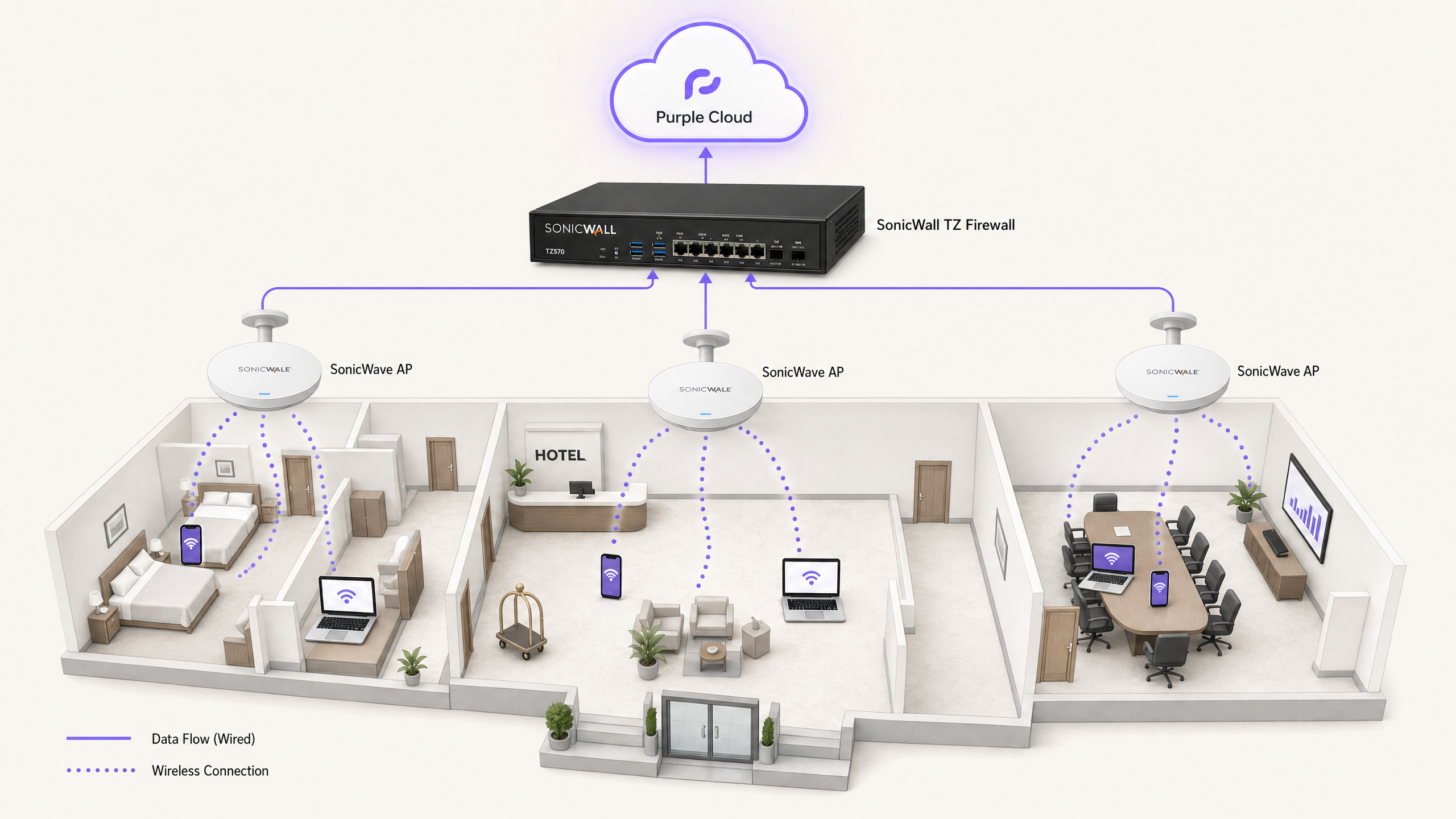
A integração da infraestrutura de rede SonicWall com a sobreposição de nuvem da Purple oferece controle de acesso de nível empresarial junto com captura sofisticada de dados primários (first-party). Este guia aborda a implementação técnica de quatro casos de uso distintos: WiFi de convidados com redirecionamento de Captive Portal, exceções de Walled Garden, WiFi seguro para funcionários usando 802.1X e isolamento multi-tenant usando Private Pre-Shared Keys (PPSK) da SonicWall com direcionamento dinâmico de VLAN.
Processamos 440 milhões de logins anualmente em mais de 80.000 locais ativos. A arquitetura detalhada abaixo é comprovada em escala nos setores de hotelaria, varejo e setor público. Ela permite que você mantenha seu hardware SonicWall existente enquanto transfere o gerenciamento de identidade, a hospedagem de splash pages e a autenticação RADIUS para a nuvem da Purple.
Análise Técnica Detalhada
A integração depende de dois mecanismos principais: Lightweight Hotspot Messaging (LHM) para redirecionamento de Captive Portal e RADIUS para autenticação 802.1X e PPSK.
Redirecionamento de Captive Portal via LHM
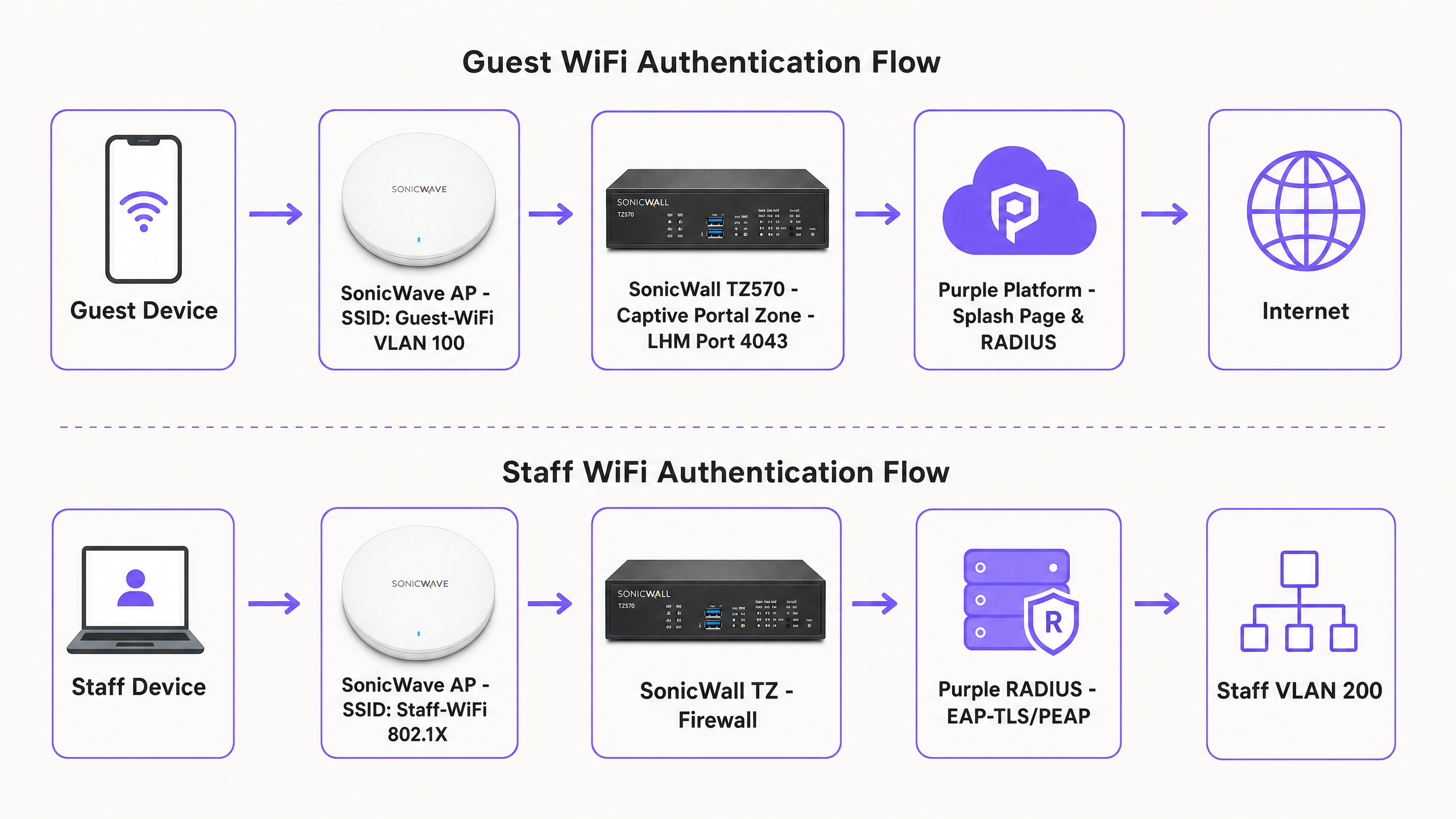
O SonicOS usa LHM para lidar com redirecionamentos de Captive Portal externos. Quando um dispositivo de convidado não autenticado tenta acessar a internet, o firewall SonicWall TZ intercepta a solicitação HTTP e redireciona o cliente para a splash page hospedada da Purple. O convidado conclui o fluxo de autenticação (por exemplo, login social, preenchimento de formulário). A Purple então envia um pacote de autorização LHM de volta para o SonicWall na porta TCP 4043. Ao receber este pacote, o SonicWall atualiza sua lista de controle de acesso interna, permitindo que o endereço MAC do dispositivo acesse a internet.
Arquitetura de Walled Garden
Antes da autenticação, o dispositivo do convidado é mantido em uma zona restrita. O walled garden é o conjunto específico de Fully Qualified Domain Names (FQDNs) que o dispositivo tem permissão para acessar para renderizar a splash page e concluir o processo de login. Isso inclui a CDN da Purple (cdn.purple.ai), a API de autenticação (api.purple.ai) e os domínios exigidos por provedores de identidade de terceiros, como Google Workspace, Microsoft Entra ID e Meta.
O SonicOS implementa walled gardens usando objetos de endereço FQDN. O firewall realiza a resolução DNS dinâmica nesses objetos, atualizando os intervalos de IP permitidos automaticamente. Isso é essencial porque os provedores de identidade e CDNs usam alocação dinâmica de IP; as listas de permissões de IP estático inevitavelmente falharão.
WiFi Seguro para Funcionários e 802.1X
Para redes de funcionários, os APs SonicWave agem como o autenticador 802.1X, fazendo o proxy das solicitações para o servidor RADIUS da Purple. Recomendamos EAP-TLS para dispositivos gerenciados usando certificados, ou PEAP-MSCHAPv2 para autenticação de usuário/senha em diretórios como o Microsoft Entra ID. Após a autenticação bem-sucedida, a Purple retorna os atributos RADIUS padrão (Tunnel-Type, Tunnel-Medium-Type e Tunnel-Private-Group-ID) para atribuir dinamicamente o dispositivo à VLAN de funcionários correta.
Isolamento Multi-Tenant com PPSK
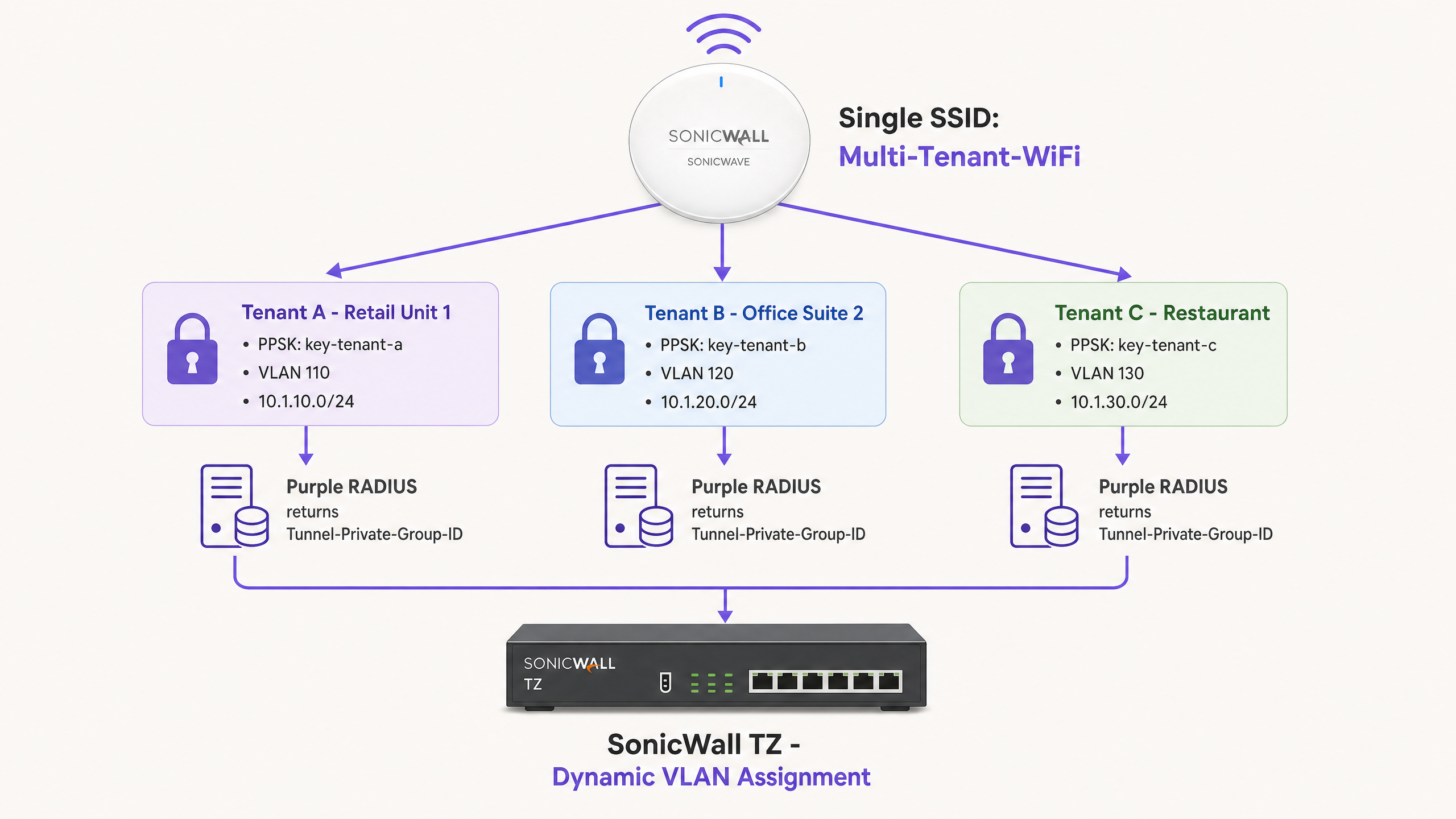
As Redes Baseadas em Identidade eliminam a necessidade de implantações complexas de múltiplos SSIDs. Usando o SonicWall PPSK, um único SSID (por exemplo, "Multi-Tenant-WiFi") é transmitido por todo o local. Cada locatário recebe uma senha exclusiva. Quando um dispositivo se associa usando um PPSK específico, o AP SonicWave valida a chave no servidor RADIUS da Purple. A Purple identifica o locatário e retorna o ID da VLAN associada. O SonicWall então direciona o tráfego para a VLAN isolada do locatário.
Guia de Implementação
1. Configurando o Captive Portal do SonicWall (LHM)
Para configurar o Captive Portal externo em uma série SonicWall TZ executando o SonicOS 7.x:
- Navegue até Object > Match Objects > Zones. Edite a zona atribuída à sua rede de convidados (por exemplo, WLAN).
- Na guia Guest Services, ative Enable Guest Services e External Guest Authentication.
- Navegue até Configure > Guest Services > General.
- Defina o Client Redirect Protocol como HTTP.
- Defina o endereço do Web Server como
portal.purple.ai. - Defina a Port como
4043. - Na guia Auth Pages, defina a Login URL para a URL específica da splash page fornecida no painel do seu local da Purple.
- Salve a configuração. O SonicOS gerará automaticamente uma política NAT e uma regra de acesso WAN-to-WAN para permitir a porta TCP 4043. Não modifique essas regras geradas automaticamente.
2. Construindo o Walled Garden
Crie objetos de endereço FQDN para os domínios necessários e adicione-os a um grupo de endereços. Aplique este grupo a uma regra de permissão em sua zona de convidados.
Domínios Obrigatórios da Purple:
*.purple.ai*.purpleportal.net
Sondas de Captive Portal do SO:
captive.apple.com(iOS/macOS)connectivitycheck.gstatic.com(Android)msftconnecttest.com(Windows)
Domínios de Login Social Comuns (Google):
accounts.google.comoauth2.googleapis.comapis.google.com*.gstatic.com
3. Configurando o RADIUS para APs SonicWave
Para integrar os APs SonicWave com o RADIUS da Purple por meio do Wireless Network Manager:
- Navegue até Policies > Policy Hierarchy e selecione sua AP Policy.
- Selecione a guia 802.1X.
- Insira o endereço IP do servidor RADIUS da Purple (encontrado no seu painel da Purple).
- Insira o segredo compartilhado gerado pela Purple.
- Defina a Authentication Port como
1812e a Accounting Port como1813. - Selecione o método EAP apropriado com base no seu provedor de identidade.
4. Configurando o Direcionamento Dinâmico de VLAN
Certifique-se de que as VLANs de destino existam como subinterfaces no firewall SonicWall TZ antes de ativar a atribuição dinâmica.
No painel da Purple, mapeie o grupo de usuários ou PPSK para o ID da VLAN de destino. A Purple retornará os seguintes atributos após a autenticação bem-sucedida:
Tunnel-Type = VLAN (13)Tunnel-Medium-Type = 802 (6)Tunnel-Private-Group-ID = [VLAN ID](ex: "110")
Melhores Práticas
- Testar a Visibilidade da Porta LHM: A porta TCP 4043 deve estar acessível a partir da internet para a interface WAN do SonicWall. Teste isso usando um scanner de portas externo antes de entrar em operação. Se o provedor de internet (ISP) bloquear essa porta, o pacote de autorização será descartado e os visitantes ficarão retidos na splash page.
- Pré-provisionar Subinterfaces VLAN: O direcionamento dinâmico de VLAN falhará silenciosamente se a subinterface VLAN de destino não estiver configurada no SonicWall antes do evento de autenticação. O dispositivo reverterá para a VLAN padrão não marcada (untagged).
- Forçar OAuth Baseado na Web: Certifique-se de que a configuração da sua splash page force fluxos de OAuth baseados na web. Links diretos (deep-linking) para aplicativos nativos de redes sociais (como o aplicativo do Facebook para iOS) frequentemente interrompem a sequência do Captive Portal porque o tráfego do aplicativo nativo é bloqueado pelo walled garden.
- Otimizar Intervalos de Atualização de DNS: O SonicOS resolve objetos FQDN periodicamente. Em ambientes de alta rotatividade, como estádios ou hubs de transporte, defina o intervalo de atualização de DNS para objetos do walled garden para 60 segundos para garantir que as alterações de IP da CDN sejam rastreadas com precisão.
Solução de Problemas e Mitigação de Riscos
Symptom: O visitante conclui o login na splash page, mas não tem acesso à internet. Cause: O pacote de autorização LHM na porta TCP 4043 não está chegando ao SonicWall. Resolution: Verifique se a regra de acesso WAN-para-WAN gerada automaticamente existe. Verifique os roteadores do provedor de internet (ISP) upstream quanto ao bloqueio de portas. Certifique-se de que o IP WAN do SonicWall esteja registrado corretamente no painel da Purple.
Symptom: A splash page não carrega ou os botões de login social retornam erros de CORS. Cause: Configuração incompleta do walled garden. Resolution: Conecte um dispositivo de teste em um estado não autenticado. Use as ferramentas de desenvolvedor do navegador (guia Rede) para identificar solicitações HTTPS bloqueadas. Adicione os domínios com falha como objetos de endereço FQDN no SonicOS.
Symptom: Os dispositivos dos funcionários se autenticam via 802.1X, mas recebem um endereço IP da VLAN padrão em vez da VLAN atribuída.
Cause: A subinterface VLAN de destino não existe no SonicWall ou os atributos RADIUS estão malformados.
Resolution: Verifique se a subinterface VLAN está ativa. Verifique os logs do RADIUS da Purple para confirmar se o Tunnel-Private-Group-ID está sendo enviado como um valor de string correspondente ao ID da VLAN.
ROI e Impacto nos Negócios
A implantação da infraestrutura SonicWall com a Purple transforma um centro de custo de rede padrão em um ativo de negócios mensurável.
Para uma rede de varejo com 200 locais, a transição de chaves pré-compartilhadas genéricas para um Captive Portal personalizado normalmente resulta em um aumento de 40% nos perfis de clientes conhecidos em seis meses. Esses dados primários (first-party data) integram-se diretamente aos sistemas de CRM, impulsionando campanhas de marketing direcionadas e aumentando o fluxo de clientes recorrentes.
Em ambientes multi-inquilino, como espaços de coworking ou alojamentos estudantis, o PPSK com direcionamento dinâmico de VLAN elimina a sobrecarga operacional de gerenciar hardware dedicado por inquilino. Você implanta uma rede física e a segmenta logicamente por meio de identidade. Isso reduz as despesas de capital com hardware (CapEx) em até 60%, mantendo um isolamento de rede rigoroso em conformidade com a norma ISO 27001.
Definições principais
Lightweight Hotspot Messaging (LHM)
A protocol used by SonicWall to communicate with external captive portals. It handles the redirect and authorisation handshake.
Required for integrating SonicOS with cloud-managed guest WiFi platforms like Purple.
Walled Garden
A specific set of domains or IP addresses that unauthenticated devices are permitted to access.
Critical for allowing guest devices to load the splash page, access CDNs, and complete social login OAuth flows before gaining full internet access.
Private Pre-Shared Key (PPSK)
A security method where multiple unique passphrases are valid on a single SSID, with each passphrase tied to a specific user or policy.
Used in multi-tenant environments to isolate traffic without broadcasting multiple SSIDs.
Captive Network Assistant (CNA)
The built-in OS mechanism (on iOS, Android, Windows) that detects a captive portal and automatically opens a limited browser window for authentication.
If the OS probe domains (e.g., captive.apple.com) are not in the walled garden, the CNA will not trigger, and guests will think the WiFi is broken.
Dynamic VLAN Steering
The process of assigning a device to a specific VLAN based on its identity or credentials, rather than the SSID it connected to.
Managed by Purple RADIUS returning the Tunnel-Private-Group-ID attribute to the SonicWall.
FQDN Address Object
A firewall object based on a Fully Qualified Domain Name rather than a static IP address.
SonicOS resolves these objects dynamically, making them essential for robust walled garden configurations.
Identity-Based Network
A network architecture where access policies and segmentation are applied based on the authenticated user or device, rather than physical ports or SSIDs.
Achieved by combining Purple RADIUS with SonicWall PPSK and 802.1X.
Tunnel-Private-Group-ID
The standard RFC 2868 RADIUS attribute used to specify the VLAN ID for a connecting device.
Must be returned by Purple as a string value (e.g., '100') to instruct the SonicWall to steer the device.
Exemplos práticos
A 150-room hotel (Premier Inn) needs to provide free Guest WiFi via a splash page and a secure Staff WiFi network for housekeeping devices. They have a SonicWall TZ570 and 40 SonicWave APs. How should they segment this traffic?
Deploy two SSIDs. SSID 1: 'Guest-WiFi' mapped to VLAN 100. Configure the SonicWall WLAN zone for External Guest Authentication pointing to portal.purple.ai on TCP 4043. Configure the walled garden FQDNs for Purple and social logins. SSID 2: 'Staff-WiFi' mapped to VLAN 200 using 802.1X. Point the SonicWave AP policy to Purple's RADIUS server. Configure Purple to authenticate housekeeping devices via MAC address bypass (MAB) or PEAP-MSCHAPv2, returning Tunnel-Private-Group-ID '200'.
A coworking space manages 15 different companies sharing one open-plan office. They want to provide secure, isolated networks for each company without broadcasting 15 different SSIDs from their SonicWave APs.
Deploy a single SSID named 'Workspace-Secure' using WPA2-Enterprise with PPSK. Create 15 VLAN sub-interfaces on the SonicWall TZ firewall (e.g., VLANs 101-115). In the Purple dashboard, generate a unique PPSK for each company and map it to their specific VLAN ID. When a user connects using their company's PPSK, Purple RADIUS returns the corresponding Tunnel-Private-Group-ID, and the SonicWall steers the device into the isolated VLAN.
Questões práticas
Q1. You have configured the SonicWall guest zone for External Guest Authentication and set the web server to portal.purple.ai. Guests are redirected to the splash page and can log in successfully, but they never gain internet access. What is the most likely cause?
Dica: Think about how Purple tells the SonicWall that the authentication was successful.
Ver resposta modelo
The LHM authorisation packet is being blocked. TCP port 4043 must be open on the SonicWall WAN interface to receive the success signal from Purple. Check upstream firewalls or ISP configurations for port blocking.
Q2. A venue wants to offer Facebook login on their splash page. You add www.facebook.com to the walled garden FQDN address group. Guests report that the Facebook login page loads, but the styling is broken and the login button does not work.
Dica: Modern web applications load assets from multiple domains.
Ver resposta modelo
The walled garden is incomplete. You must also whitelist the domains that serve Facebook's CSS, JavaScript, and API calls, specifically graph.facebook.com, connect.facebook.net, and the CDN domain (e.g., *.fbcdn.net).
Q3. You are deploying PPSK for a multi-tenant office. You configure the SSID for WPA2-Enterprise with PPSK and point the RADIUS server to Purple. You create a PPSK in Purple mapped to VLAN 50. When a user connects with that PPSK, they receive an IP address from VLAN 10 instead. Why?
Dica: The SonicWall needs to know where to send the traffic before the RADIUS request completes.
Ver resposta modelo
VLAN 50 has not been created as a sub-interface on the SonicWall TZ firewall. Dynamic VLAN steering requires the target VLAN to exist on the firewall beforehand; if it does not, the device falls back to the default untagged VLAN (in this case, VLAN 10).
Continue a ler esta série
Integração de Access Points Allied Telesis com o Purple WiFi
Este guia fornece um manual de configuração abrangente para integrar os access points Allied Telesis Série TQ com o Purple WiFi. Ele aborda o redirecionamento de Captive Portal externo, autenticação RADIUS 802.1X e direcionamento dinâmico de VLAN usando Private Pre-Shared Keys (PPSK) para implantações seguras de múltiplos inquilinos (multi-tenant).
Integração do Huawei AirEngine e CloudCampus com o Purple WiFi
Este guia fornece instruções passo a passo para integrar os access points Huawei AirEngine e o iMaster NCE-Campus com o Purple WiFi. Ele aborda a configuração de Captive Portal, autenticação de funcionários via 802.1X e direcionamento dinâmico de VLAN por PPSK para redes corporativas.
EnGenius Cloud Access Points Integration with Purple WiFi
Esta referência técnica detalha a integração passo a passo dos Access Points EnGenius Cloud e switches ECS com a plataforma de guest WiFi da Purple. Ela cobre o redirecionamento do guest Captive Portal por meio de uma splash page externa, configuração de Walled Garden, WiFi seguro para funcionários usando IEEE 802.1X e isolamento de rede multi-tenant usando EnGenius MyPSK com atribuição dinâmica de VLAN. Instaladores de TI e arquitetos de rede encontrarão sequências de configuração práticas, estudos de caso reais e uma estrutura de solução de problemas para implantar a Purple em parques de hardware EnGenius.