
Minimizando Distrações de Alunos com Bloqueio de Anúncios em Nível de Rede
Este guia de referência técnica autoritativo detalha a arquitetura, implantação e impacto comercial do bloqueio de anúncios em nível de rede em ambientes educacionais. Ele fornece aos gerentes de TI e arquitetos de rede estratégias acionáveis para recuperar largura de banda, fortalecer a conformidade e eliminar riscos de malvertising.
Ouça este guia
Ver transcrição do podcast
Parte da nossa série principal: Enterprise WiFi Security Guide →
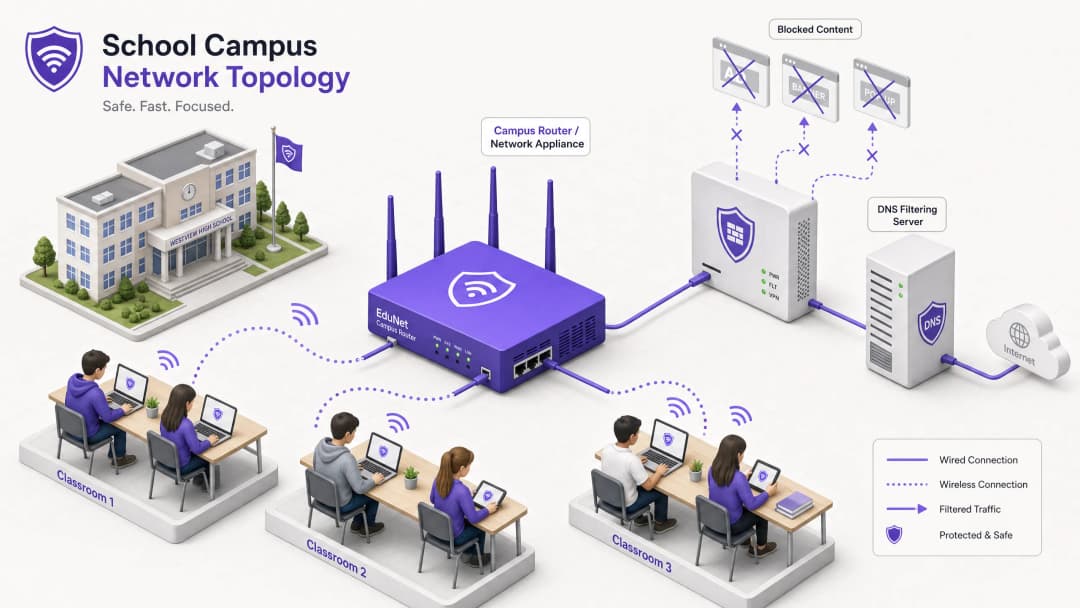
Resumo Executivo
Para diretores de TI e arquitetos de rede que gerenciam ambientes educacionais, a proliferação de dispositivos criou uma grande crise de consumo de largura de banda, riscos de segurança e lacunas de conformidade. Com os alunos trazendo uma média de 2,5 dispositivos para o campus, o gerenciamento de filtragem baseado em endpoint não é mais uma estratégia operacional viável.
O bloqueio de anúncios em nível de rede representa uma mudança fundamental do gerenciamento de endpoint para o controle na camada de infraestrutura. Ao interceptar o tráfego no nível de DNS ou proxy antes que ele atinja o dispositivo do cliente, as equipes de TI podem eliminar unilateralmente até 30% do consumo de largura de banda não educacional, mitigar riscos de malvertising e impor a conformidade com estruturas de proteção de dados como GDPR e COPPA.
Este guia de referência técnica descreve a arquitetura, a metodologia de implantação e a medição de ROI para implementar o bloqueio de anúncios em nível de rede em campi de ensino fundamental, médio e universitário, com base em implantações do mundo real em ambientes de alta densidade.
Ouça nosso podcast complementar para uma visão geral estratégica:
Detalhamento Técnico
A implementação do bloqueio de anúncios na camada de rede requer uma abordagem arquitetônica em camadas para lidar com a diversidade do tráfego web moderno, particularmente a ubiquidade do HTTPS e dos protocolos emergentes de DNS criptografados.
Arquitetura de Filtragem em Nível de DNS
A camada fundamental do bloqueio de anúncios na rede é a filtragem de DNS. Quando um dispositivo cliente tenta resolver domínios associados a redes de anúncios, telemetria ou rastreamento, o resolvedor de DNS da rede intercepta a consulta e a verifica em relação a listas de bloqueio dinâmicas.

Essa abordagem é altamente eficiente porque evita que a conexão seja estabelecida em primeiro lugar. O payload do anúncio nunca é baixado e os scripts de rastreamento nunca são executados. No entanto, as implantações modernas devem levar em conta o DNS-over-HTTPS (DoH) e o DNS-over-TLS (DoT). Se os dispositivos clientes contornarem os resolvedores locais usando DNS criptografado, a camada de filtragem será contornada. Os arquitetos de rede devem configurar firewalls de perímetro para bloquear endpoints DoH/DoT conhecidos (como 8.8.8.8 na porta 443) para forçar um fallback para o DNS padrão (porta 53), ou implantar uma solução de gateway que inspecione nativamente o tráfego DoH.
Inspeção de Proxy e SSL
Embora o filtragem de DNS lide com a maior parte do tráfego de anúncios, o proxy HTTP/HTTPS transparente oferece controle granular sobre URLs específicas em vez de domínios inteiros. Como a maior parte do tráfego da web é criptografada, a implantação da inspeção SSL (descriptografia Man-in-the-Middle) é necessária para a inspeção profunda de pacotes.
Isso exige a implantação de um certificado raiz confiável em todos os dispositivos gerenciados. Apesar de ser uma prática padrão em ambientes corporativos, a inspeção SSL em ambientes educacionais exige um escopo cuidadoso para evitar a descriptografia de tráfego confidencial (por exemplo, portais bancários ou de saúde) e deve estar alinhada com a política de uso aceitável da organização.
Integração com Controle de Acesso à Rede (NAC)
Uma filtragem eficaz exige políticas que reconheçam a identidade. A integração com IEEE 802.1X permite que a rede imponha políticas de filtragem diferenciadas com base no perfil do usuário ou dispositivo autenticado. Um aluno que se conecta à rede via WPA3-Enterprise recebe uma política restritiva, enquanto um membro da equipe recebe uma política diferente, e um visitante na rede Guest WiFi recebe uma política de conformidade básica.
Tem dúvidas sobre a sua configuração específica?
A nossa equipa trabalha com operadores de espaços, gestores de TI e engenheiros de rede em 80.000 locais. Agende uma chamada de 20 minutos e mostraremos como outros profissionais na sua situação o resolveram.
Guia de Implementação
A implantação do bloqueio de anúncios em nível de rede exige uma abordagem em fases para evitar a interrupção de atividades educacionais legítimas.
Passo 1: Auditoria de Tráfego e Definição de Linha de Base
Antes de impor qualquer regra de bloqueio, implante a solução de filtragem no modo de monitoramento passivo (apenas registro de logs) por 14 a 21 dias. Isso estabelece uma linha de base do volume e da categorização atual de consultas DNS. Use esses dados para identificar as principais redes de anúncios e domínios de rastreamento que atualmente consomem largura de banda. Essa linha de base é crucial para cálculos subsequentes de ROI e relatórios de WiFi Analytics.
Passo 2: Implantação Piloto
Selecione um segmento de rede representativo - como uma única VLAN de estudantes ou um edifício específico - para a fase piloto. Aplique as políticas iniciais de lista de bloqueio direcionadas a redes de anúncios e rastreadores conhecidos.
Passo Crítico: Estabeleça um processo de solicitação de lista de permissões de resposta rápida. Os professores inevitavelmente encontrarão falsos positivos em que conteúdos educacionais legítimos estão hospedados em domínios categorizados como publicidade ou rastreamento. O suporte de TI deve estar preparado para avaliar e liberar domínios rapidamente na lista de permissões para manter a confiança das partes interessadas.
Passo 3: Implantação Completa e Ajuste de Políticas
Expanda a implantação por todos os segmentos de rede relevantes, impondo políticas diferenciadas por meio da integração com 802.1X. Monitore os logs continuamente durante as primeiras 48 horas para identificar quaisquer problemas sistêmicos.
Garanta que a implantação esteja alinhada com políticas de segurança mais amplas, como manter um Explain what is audit trail for IT Security in 2026 para demonstrar conformidade com os requisitos de segurança.
Boas Práticas
- Defesa em Camadas: Não confie apenas na filtragem de DNS. Combine-a com o gerenciamento de endpoints para dispositivos de propriedade da escola e regras robustas de firewall para bloquear tentativas de desvio (por exemplo, protocolos VPN, DoH).
- Segurança Padronizada: Garanta que todas as novas implantações de redes sem fio utilizem WPA3 para proteger contra o roubo de credenciais, que é um vetor comum para estudantes que tentam acessar redes de funcionários para burlar a filtragem.
- Alinhamento de Conformidade: No Reino Unido, certifique-se de que suas políticas de filtragem atendam aos requisitos básicos descritos em IWF Compliance for Public WiFi Networks in the UK (ou Cumplimiento IWF para redes WiFi públicas en el Reino Unido para operações em espanhol).
- Revisões Regulares: As redes de anúncios mudam constantemente de domínio para evitar listas de bloqueio. Garanta que sua solução de filtragem utilize feeds de inteligência de ameaças atualizados dinamicamente, em vez de listas estáticas.
Solução de Problemas e Mitigação de Riscos
| Modo de Falha | Causa Raiz | Estratégia de Mitigação |
|---|---|---|
| Burla via DNS Criptografado | Os estudantes estão configurando navegadores para usar DoH/DoT (ex: Cloudflare, Google DNS). | Bloqueie os endereços IP de provedores de DoH conhecidos no firewall; force a resolução de DNS local via DHCP. |
| Burla via VPN | Uso de clientes de VPN comerciais ou extensões de navegador. | Bloqueie protocolos comuns de VPN (IPsec, OpenVPN, WireGuard) e domínios de provedores de VPN conhecidos na VLAN de estudantes. |
| Bloqueio Excessivo (Falsos Positivos) | A filtragem heurística agressiva está bloqueando conteúdo educacional. | Implemente um processo simplificado e respaldado por SLA para solicitações de lista de permissões feitas pela equipe docente; teste as políticas exaustivamente antes da implantação completa. |
| Vazamento de IPv6 | A filtragem é aplicada apenas ao IPv4, permitindo burlas via resolução de DNS IPv6. | Garanta que a solução de filtragem e a infraestrutura de rede suportem totalmente e apliquem políticas em toda a pilha IPv6. |
Retorno sobre o Investimento (ROI) e Impacto nos Negócios
A viabilidade comercial do bloqueio de anúncios em nível de rede vai além da segurança; ela proporciona uma eficiência operacional mensurável.
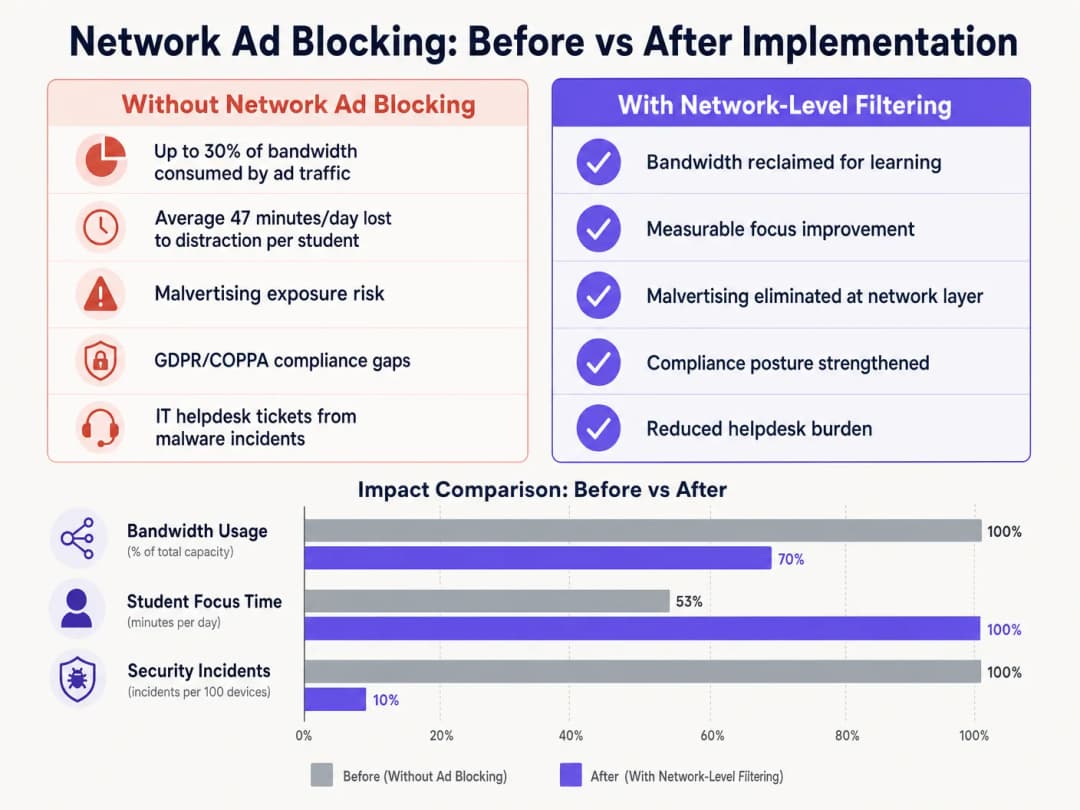
Ao eliminar o carregamento de anúncios e scripts de rastreamento no limite da rede, os locais normalmente recuperam de 15% a 30% de sua largura de banda total. Essa capacidade recuperada adia a necessidade de atualizações caras de circuito e melhora o desempenho de aplicações cruciais em nuvem. Além disso, o bloqueio de domínios de malvertising em nível de DNS reduz significativamente o volume de incidentes de malware, diminuindo diretamente o volume de chamados no suporte de TI e os custos de remediação. Seja na implantação em escolas, otimizando o Office Wi Fi: Optimise Your Modern Office Wi-Fi Network ou gerenciando ambientes de alta densidade em Varejo, Saúde, Hospitalidade ou Transporte, compreender a camada física, como as Wi Fi Frequencies: A Guide to Wi-Fi Frequencies in 2026, e proteger a camada lógica por meio de filtragem de DNS são componentes essenciais de uma arquitetura de rede moderna.
Definições principais
Filtragem DNS
O processo de usar o Domain Name System para bloquear sites maliciosos e filtrar conteúdo prejudicial ou indesejado, retornando um endereço IP nulo para domínios bloqueados.
O principal mecanismo para bloqueio de anúncios em nível de rede, operando a montante dos dispositivos clientes.
DNS-over-HTTPS (DoH)
Um protocolo para realizar a resolução remota do Domain Name System por meio do protocolo HTTPS, criptografando os dados entre o cliente DoH e o resolvedor DNS baseado em DoH.
Um método comum usado para burlar as políticas locais de filtragem DNS da rede.
Malvertising
O uso de publicidade online para espalhar malware, muitas vezes através de redes de publicidade legítimas, sem o conhecimento do editor.
Um risco de segurança fundamental mitigado pelo bloqueio de anúncios em nível de rede.
Inspeção SSL
O processo de interceptar, descriptografar e inspecionar o tráfego HTTPS em busca de conteúdo malicioso ou violações de política antes de criptografá-lo novamente e encaminhá-lo.
Necessária para inspeção profunda de pacotes de tráfego web criptografado, embora complexa de implantar em ambientes BYOD.
IEEE 802.1X
Um padrão IEEE para Controle de Acesso à Rede baseado em porta (PNAC), fornecendo um mecanismo de autenticação para dispositivos que desejam se conectar a uma LAN ou WLAN.
Usado para identificar usuários e dispositivos para aplicar políticas de filtragem diferenciadas.
WPA3-Enterprise
A geração mais recente de segurança WiFi, fornecendo força criptográfica aprimorada e protegendo contra ataques de dicionário.
Essencial para proteger redes de campus e garantir que os usuários não possam falsificar identidades facilmente para burlar a filtragem.
VLAN (Virtual Local Area Network)
Uma sub-rede lógica que agrupa uma coleção de dispositivos de diferentes redes locais físicas.
Usada para segmentar o tráfego de alunos, funcionários e convidados para aplicar diferentes políticas de segurança e filtragem.
Proxy Transparente
Um sistema intermediário que se posiciona entre o usuário e o provedor de conteúdo, interceptando requisições sem exigir configuração no lado do cliente.
Usado para aplicar políticas de filtragem em nível de URL sem a necessidade de implantar agentes de endpoint.
Exemplos práticos
Uma grande associação multiescolas com 15.000 alunos em 12 campi precisa implementar o bloqueio de anúncios. Atualmente, eles utilizam uma mistura de Chromebooks fornecidos pela escola e uma política de BYOD para alunos do ensino médio. A rede está enfrentando congestionamento de largura de banda durante os horários de pico.
- Implante uma solução de filtragem DNS gerenciada na nuvem em todos os 12 campi, direcionando todas as configurações de DNS atribuídas por DHCP para os resolvedores na nuvem.
- Configure o firewall para bloquear o tráfego de saída da porta 53 para qualquer IP externo que não seja os resolvedores de nuvem aprovados para evitar substituições manuais de DNS.
- Bloqueie IPs de provedores de DoH conhecidos no firewall.
- Integre a solução de filtragem DNS com o Active Directory da associação via 802.1X para aplicar diferentes políticas de filtragem: uma política rigorosa para a VLAN do Chromebook e uma política ligeiramente mais permissiva para a VLAN do BYOD, mantendo o bloqueio principal de anúncios e malvertising em ambas.
A equipe de TI de um campus universitário recebe reclamações do corpo docente de Ciência da Computação de que a nova solução de bloqueio de anúncios na rede está impedindo o acesso a ferramentas de desenvolvimento legítimas e APIs usadas nos cursos.
- Revise os logs de consulta DNS para a VLAN de Ciência da Computação para identificar os domínios específicos que estão sendo bloqueados.
- Crie um grupo de políticas dedicado para as VLANs do corpo docente e dos alunos de Ciência da Computação.
- Implemente uma lista de permissões restrita para os domínios de desenvolvimento necessários, aplicando-a apenas ao grupo de políticas de Ciência da Computação para manter a segurança no restante do campus.
- Estabeleça uma categoria de tíquete de TI de canais rápidos especificamente para 'Bloqueio de Conteúdo Educacional' para lidar com solicitações futuras com um SLA de 2 horas.
Questões práticas
Q1. Você implantou a filtragem de DNS em toda a rede do campus, mas o monitoramento mostra que um número significativo de dispositivos BYOD de alunos ainda está carregando anúncios e acessando conteúdo restrito. Qual é a causa mais provável e como você deve resolver isso?
Dica: Considere como os navegadores modernos lidam com consultas DNS de forma independente das configurações de rede do sistema operacional.
Ver resposta modelo
A causa mais provável é que os navegadores modernos nos dispositivos BYOD estão usando DNS-over-HTTPS (DoH) para burlar o resolvedor DNS da rede local. Para resolver isso, configure o firewall de perímetro para bloquear os endereços IP de provedores de DoH conhecidos e descartar o tráfego de saída na porta 53 que não se origine dos resolvedores DNS aprovados do campus. Isso força os dispositivos a recorrerem à infraestrutura de DNS local filtrada.
Q2. A equipe de liderança da escola deseja bloquear todas as redes sociais e redes de anúncios globalmente em todo o campus para garantir o máximo de conformidade. Como Diretor de TI, por que você desaconselharia uma única política global e qual arquitetura proporia em seu lugar?
Dica: Considere os diferentes grupos de usuários no campus e suas necessidades específicas.
Ver resposta modelo
Uma única política global inevitavelmente causará atrito operacional. Os funcionários podem precisar de acesso a redes sociais para comunicações ou marketing, e certas redes de anúncios podem ser necessárias para ferramentas educacionais legítimas. Em vez disso, proponha uma arquitetura segmentada usando integração 802.1X para aplicar políticas baseadas em identidade. Crie VLANs e grupos de políticas distintos para Alunos, Funcionários e Convidados, aplicando bloqueios rígidos aos alunos enquanto permite o acesso necessário para a equipe de funcionários.
Q3. Antes de alternar a nova solução de filtragem de DNS para o modo de aplicação ativa, qual processo operacional crítico deve ser estabelecido com a equipe de suporte de TI?
Dica: Pense no impacto dos falsos positivos sobre a equipe docente.
Ver resposta modelo
Deve ser estabelecido um processo de solicitação de lista de permissões de resposta rápida. A filtragem heurística inevitavelmente bloqueará alguns recursos educacionais legítimos (falsos positivos). Sem um processo rápido e baseado em SLA para que os professores solicitem o desbloqueio de domínios, a implantação interromperá o aprendizado e causará resistência por parte dos envolvidos.
Continue a ler esta série
Cyber Essentials e WiFi para Funcionários: Passando nos Cinco Controles em Sua Rede Sem Fio
Você será capaz de mapear cada um dos cinco controles do Cyber Essentials para o seu WiFi de funcionários e corrigir as falhas que os avaliadores encontram. Você poderá escolher entre 802.1X, iPSK e uma rede WPA2-PSK segregada para cada classe de dispositivo. Finalmente, você saberá como preparar pontos de acesso, controladores e BYOD para uma auditoria Cyber Essentials Plus.
HPE Aruba Central presence analytics: setup, exports and limits
Você poderá habilitar o HPE Aruba Central presence analytics por local, calibrar o limite de RSSI e os limites de permanência em relação a uma contagem real e exportar agregados em nível de local por meio da REST API do Central. Você também saberá onde o presence analytics nativo termina e quando uma camada de plataforma independente de hardware como o Purple se faz necessária em seus pontos de acesso Aruba existentes.
Conformidade com a CIPA: checklist de conformidade para operadores de locais
Você será capaz de decidir se a CIPA se aplica ao seu WiFi, depois segmentar redes, rotear o DNS através do Purple Shield e fechar rotas de desvio. Você também saberá quais evidências guardar para a certificação do Formulário 486 ou Formulário 479. O checklist atribui cada requisito a um responsável, para que sua certificação do próximo ano de financiamento não tenha nenhuma pendência.
Tem dúvidas sobre a sua configuração específica?
A nossa equipa trabalha com operadores de espaços, gestores de TI e engenheiros de rede em 80.000 locais. Agende uma chamada de 20 minutos e mostraremos como outros profissionais na sua situação o resolveram.