
NHS Staff WiFi: Como Implementar Redes Sem Fio Seguras na Saúde
Este guia de referência técnica detalha a arquitetura, protocolos de segurança e estratégias de implementação para NHS Staff WiFi, cobrindo autenticação 802.1X, segmentação de VLAN, políticas BYOD e conformidade com o DSP Toolkit. Ele fornece orientação prática para líderes de TI sobre a implementação de redes sem fio de nível empresarial que atendem usuários clínicos, administrativos e convidados em infraestrutura física compartilhada sem comprometer a segurança. Seja você planejando uma nova implementação ou fortalecendo uma infraestrutura existente, este guia oferece as estruturas de decisão e as etapas de implementação necessárias para agir neste trimestre.
Ouça este guia
Ver transcrição do podcast
Resumo Executivo
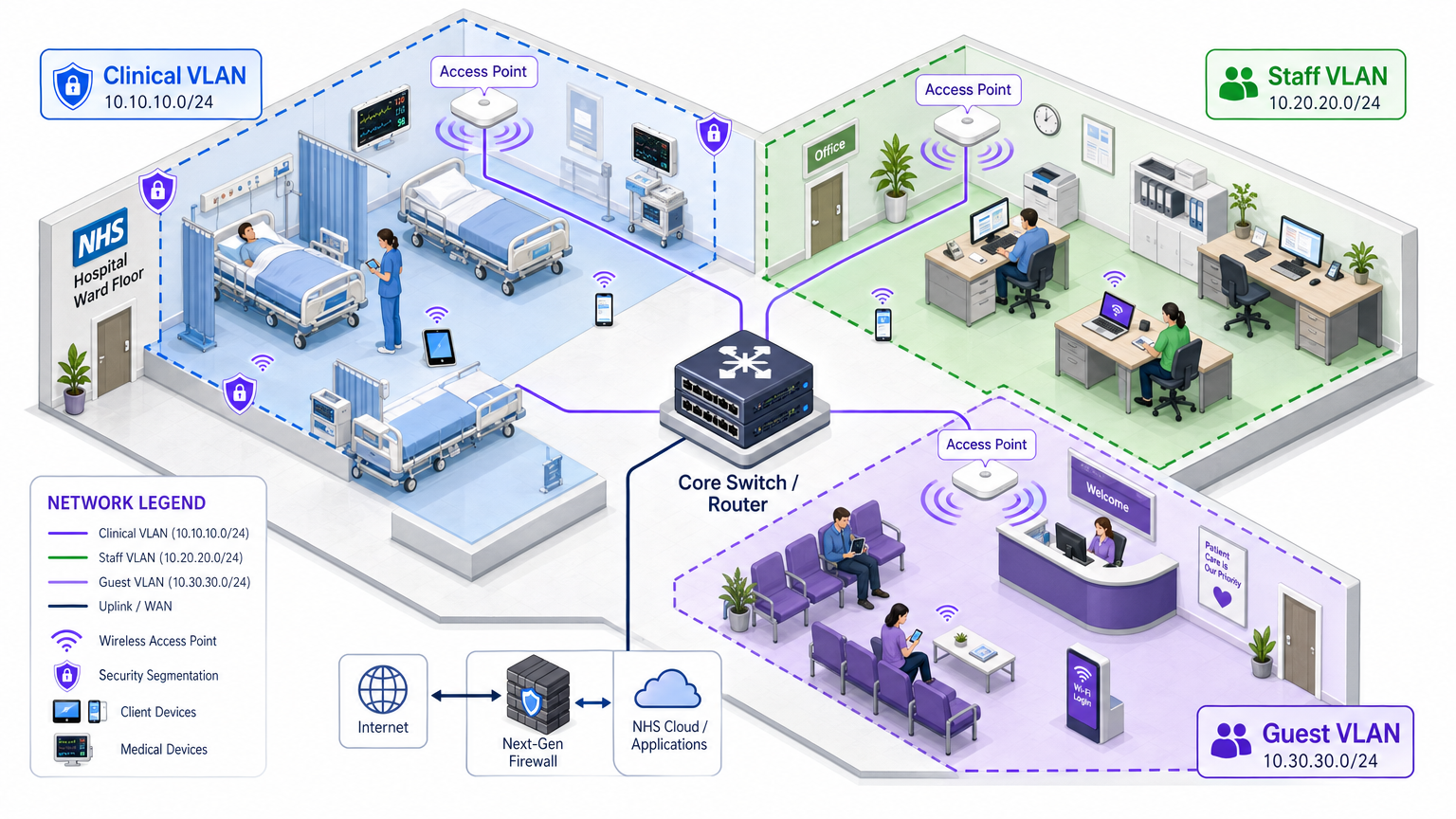
Implementar WiFi seguro e confiável em todas as instalações do NHS não é mais uma comodidade opcional — é uma infraestrutura clínica crítica. A mudança para o atendimento ao paciente focado em dispositivos móveis, prontuários eletrônicos (EHR) e dispositivos médicos conectados exige uma arquitetura sem fio que equilibre o roaming contínuo com controles de segurança rigorosos.
Para gerentes de TI, arquitetos de rede e CTOs, o principal desafio é acomodar diversos grupos de usuários — equipe clínica, pessoal administrativo, pacientes e convidados — em infraestrutura física compartilhada sem comprometer os requisitos do NHS Data Security and Protection (DSP) Toolkit. Este guia detalha os requisitos técnicos para NHS Staff WiFi, focando em estruturas de autenticação robustas como IEEE 802.1X, segmentação de rede lógica via VLANs e o onboarding seguro de endpoints Bring Your Own Device (BYOD).
Ao se afastar das chaves pré-compartilhadas (PSK) legadas e adotar políticas de acesso baseadas em identidade, as organizações de saúde podem mitigar o risco de violação, reduzir o atrito operacional e fornecer a base sem fio para programas de transformação digital. O caso comercial é igualmente forte: redução da sobrecarga do helpdesk, conformidade demonstrável com o DSP Toolkit e uma rede capaz de suportar futuras inovações clínicas sem exigir uma reconstrução completa da infraestrutura.
Análise Técnica Detalhada
Autenticação e Controle de Acesso
A base de uma rede sem fio segura na área da saúde é o controle de acesso baseado em identidade. Redes WPA2-Personal legadas que utilizam chaves pré-compartilhadas são fundamentalmente inadequadas para ambientes clínicos. Elas não oferecem responsabilidade individual, complicam o processo de desligamento de funcionários e representam um único ponto de falha se a credencial for comprometida ou compartilhada além do grupo pretendido.
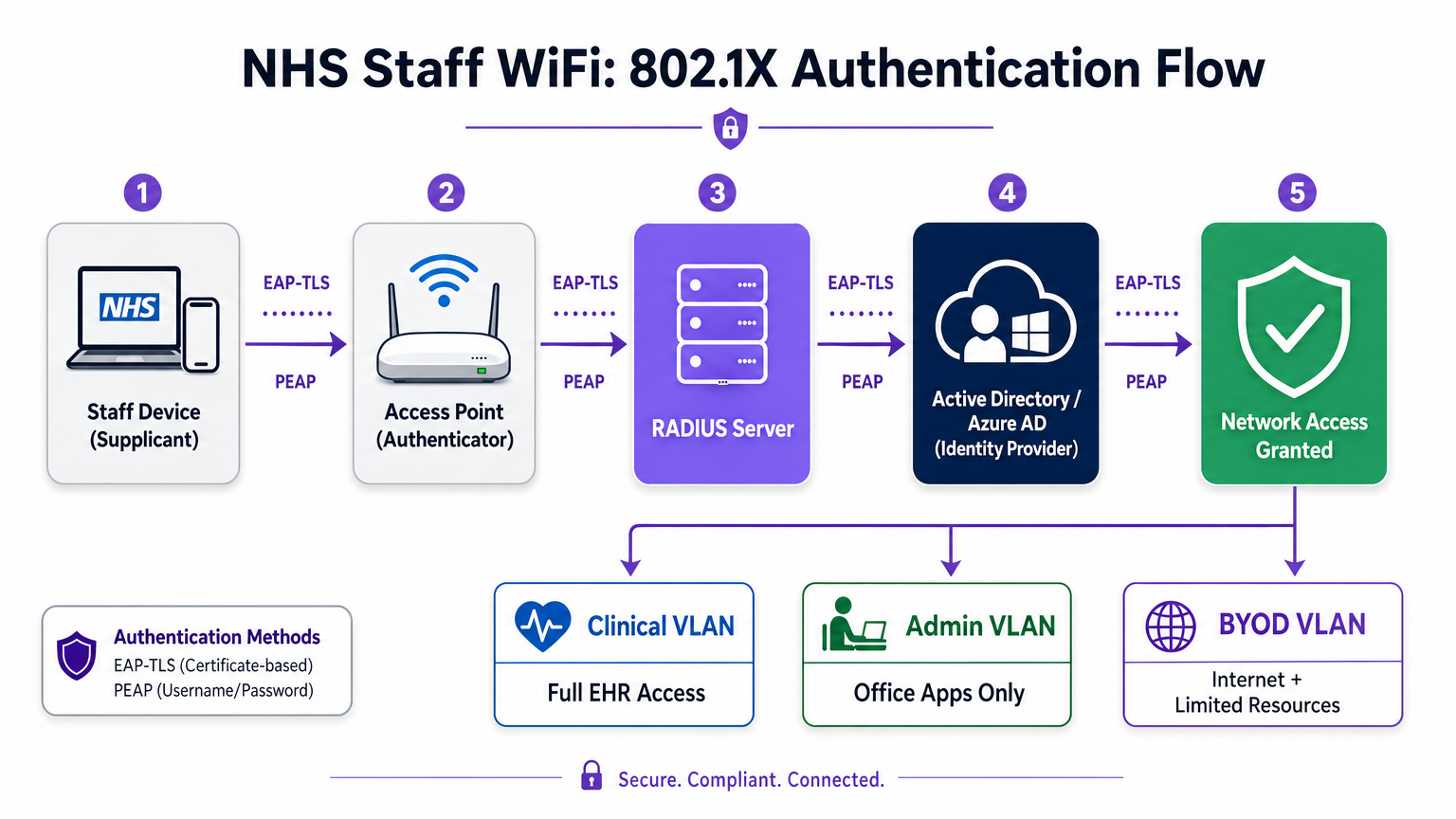
As implementações modernas do NHS devem exigir WPA3-Enterprise (ou WPA2-Enterprise como um estado de transição mínimo) usando autenticação IEEE 802.1X. Esta estrutura exige que cada usuário ou dispositivo apresente credenciais únicas antes que o acesso à rede seja concedido, e o resultado dessa autenticação determina em qual segmento de rede lógico o dispositivo é colocado.
Dois métodos EAP dominam as implementações na área da saúde:
| Método EAP | Mecanismo de Autenticação | Mais Adequado Para | Nível de Segurança |
|---|---|---|---|
| EAP-TLS | Certificado digital do lado do cliente | Dispositivos clínicos gerenciados pela empresa | Mais Alto — sem senha para phishing |
| PEAP-MSCHAPv2 | Nome de usuário/senha em túnel criptografado | BYOD, equipe administrativa, dispositivos legados | Alto — credenciais protegidas por TLS |
EAP-TLS é o padrão ouro para dispositivos corporativos. Os certificados são distribuídos via plataformas de Mobile Device Management (MDM), permitindo autenticação sem toque — o dispositivo autentica-se silenciosamente em segundo plano. PEAP-MSCHAPv2 tunela com segurança credenciais do Active Directory ou Azure AD dentro de uma sessão TLS criptografada, tornando-o adequado para cenários BYOD onde o gerenciamento de certificados é impraticável.
Integrar a infraestrutura sem fio com o provedor de identidade central (IdP) da organização garante que o acesso seja automaticamente revogado quando a conta AD de um membro da equipe é desativada, satisfazendo diretamente os requisitos do DSP Toolkit para gerenciamento do ciclo de vida do acesso.
Segmentação de Rede e Zonas de Confiança
Pontos de acesso físicos transmitem por todo o andar do hospital, mas a segmentação lógica garante que o tráfego permaneça isolado com base no princípio do menor privilégio. Uma arquitetura de rede plana em um ambiente de saúde é uma vulnerabilidade de segurança grave, permitindo que um dispositivo de convidado comprometido ou um sensor IoT vulnerável possa potencialmente acessar sistemas clínicos.
A melhor prática dita a criação de Virtual Local Area Networks (VLANs) distintas mapeadas para SSIDs específicos, com regras de firewall que impõem limites de tráfego entre elas:
| Zona | SSID | Autenticação | Acesso | Prioridade QoS |
|---|---|---|---|---|
| Clínica | NHS-Clinical | EAP-TLS (certificado) | EHR, PACS, mensagens clínicas | Mais Alta |
| Administrativa | NHS-Staff | PEAP (credenciais AD) | Aplicativos de escritório, internet | Média |
| IoT Médico | Oculto/MAB | MAC Authentication Bypass | Somente controlador de dispositivo | Alta |
| Convidado / Paciente | NHS-Guest | Captive portal | Somente internet | Baixa |
| BYOD | NHS-BYOD | PEAP (credenciais AD) | Internet, VDI limitado | Baixa |
A VLAN de IoT Médico merece atenção especial. Muitos dispositivos médicos conectados — bombas de infusão, monitores de pacientes, sistemas de chamada sem fio — não suportam 802.1X. MAC Authentication Bypass (MAB) é o recurso de fallback, mas deve ser combinado com Listas de Controle de Acesso (ACLs) de firewall rigorosas que restringem esses dispositivos a se comunicarem apenas com seus servidores de gerenciamento designados.
O Desafio BYOD
As políticas de Bring Your Own Device são cada vez mais comuns para a equipe administrativa e clínicos visitantes. No entanto, dispositivos pessoais não gerenciados representam um risco significativo se permitidos em segmentos de rede confiáveis.
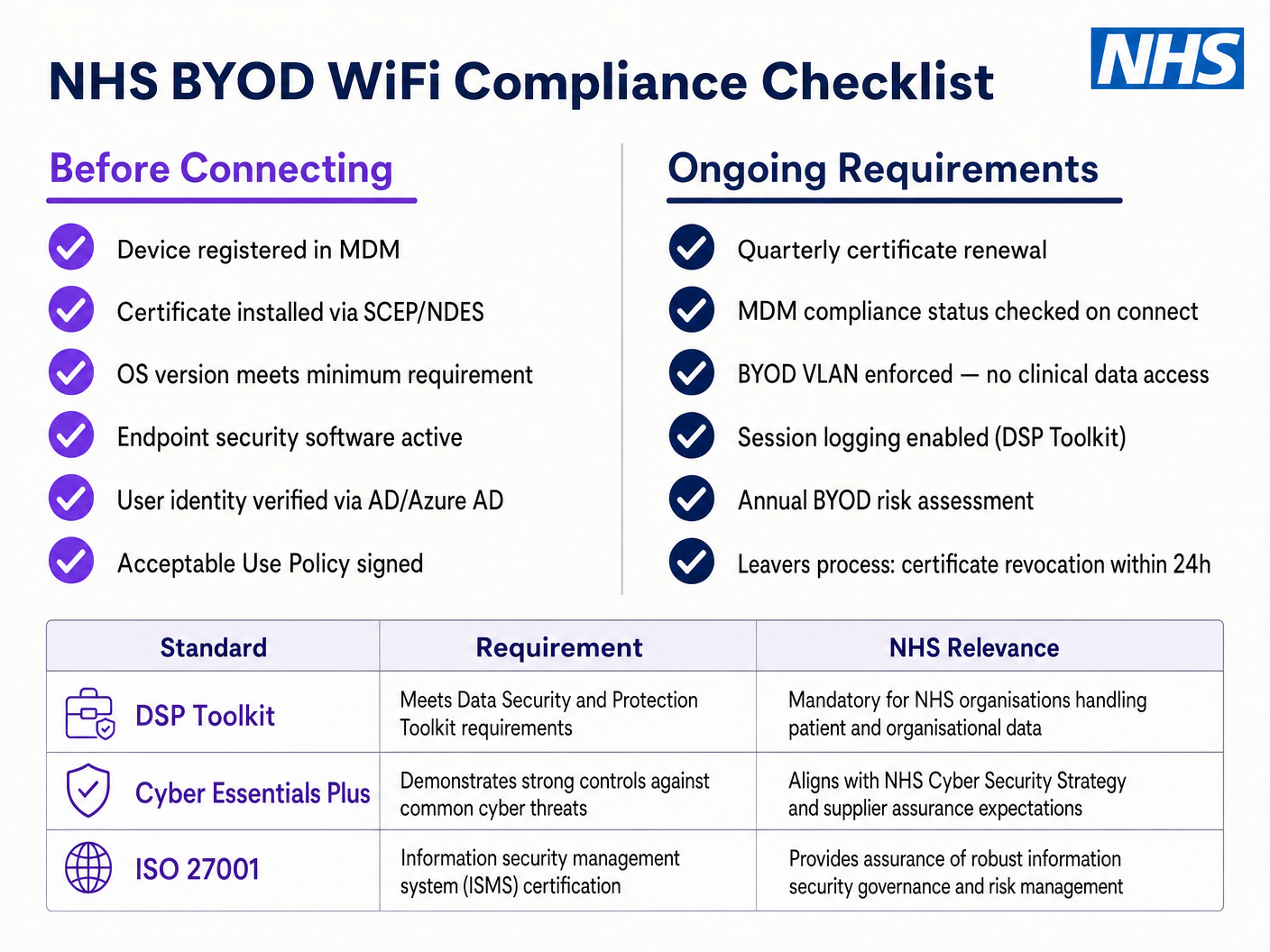
Uma implementação BYOD segura envolve o onboarding desses dispositivos em uma VLAN BYOD dedicada. Esta zona fornece acesso à internet e talvez acesso limitado a recursos internos específicos e não sensíveis via um gateway seguro ou Virtual Desktop Infrastructure (VDI). Ela não deve, em hipótese alguma, ter roteamento direto para sistemas clínicos ou armazenamentos de dados de pacientes.
Guia de Implementação
A implantação de uma arquitetura segura de NHS Staff WiFi requer uma abordagem faseada para minimizar a interrupção das operações clínicas em curso.
Fase 1: Avaliação e Design
Comece com um levantamento abrangente do local sem fio. Ambientes de saúde são notoriamente difíceis para a propagação de RF devido a paredes revestidas de chumbo, máquinas pesadas e alta ocupação. O design deve considerar a capacidade, não apenas a cobertura, garantindo densidade suficiente de pontos de acesso em áreas de alto tráfego, como departamentos de emergência e clínicas ambulatoriais.
Defina os SSIDs necessários e mapeie-os para as VLANs e políticas de segurança correspondentes. Mantenha o número de SSIDs transmitidos ao mínimo — idealmente não mais do que quatro — para reduzir a sobrecarga de gerenciamento e minimizar o congestionamento de quadros de beacon, o que degrada o desempenho geral da rede.
Fase 2: Configuração da Infraestrutura
Configure a infraestrutura central de switching e roteamento para suportar as VLANs definidas. Implemente regras de firewall nas fronteiras entre os segmentos para impor o princípio do menor privilégio. Configure o servidor RADIUS (por exemplo, Cisco ISE, Aruba ClearPass ou um RADIUS-as-a-Service baseado em nuvem) e integre-o com o provedor de identidade central. Para ambientes onde a plataforma Purple é implantada, a integração de WiFi Analytics nesta fase proporciona visibilidade sobre a utilização da rede, padrões de roaming e pontos de acesso de capacidade.
Fase 3: Aplicação de Políticas e Onboarding
Implante as políticas de autenticação. Para dispositivos corporativos, utilize a solução MDM para enviar os perfis sem fio e certificados de cliente necessários (para EAP-TLS). Isso garante que os dispositivos gerenciados se conectem automaticamente e com segurança, sem intervenção do usuário.
Para BYOD, estabeleça um fluxo de trabalho de onboarding claro — tipicamente um portal de onboarding que guia o usuário através da autenticação com suas credenciais corporativas, aceitando uma Política de Uso Aceitável e movendo o dispositivo para a VLAN BYOD segura. A plataforma Guest WiFi da Purple pode ser implantada como a camada de captive portal para o SSID de pacientes e convidados, lidando com a captura de dados em conformidade com a GDPR e a aceitação de termos em escala.
Fase 4: Testes e Validação
Antes do lançamento, conduza testes de ponta a ponta de cada caminho de autenticação, atribuição de VLAN e regra de firewall. Valide especificamente o comportamento de roaming caminhando pelo andar clínico com um dispositivo de teste enquanto monitora eventos de reautenticação. Confirme se os protocolos de roaming rápido (802.11r e 802.11k) estão funcionando corretamente e se as sessões de aplicativos sobrevivem às transições de AP.
Melhores Práticas
Elimine Chaves Pré-Compartilhadas. Transicione todas as redes de funcionários e clínicas para autenticação 802.1X para garantir responsabilidade individual e controle de acesso centralizado. Este é um requisito não negociável para a conformidade com o DSP Toolkit.
Imponha Segmentação Estrita. Nunca permita tráfego de convidados, BYOD ou IoT no mesmo segmento lógico que dados clínicos. Use firewalls com estado para controlar o roteamento inter-VLAN, com regras de negação explícitas como política padrão.
Priorize o Tráfego Clínico. Implemente políticas de QoS nos controladores e switches sem fio para priorizar aplicativos clínicos — voz sobre WLAN, acesso a EHR — sobre tráfego de convidados ou administrativo, especialmente durante períodos de alta congestionamento.
Habilite o Roaming Rápido. Implante 802.11r (Fast BSS Transition) e 802.11k (Radio Resource Measurement) para garantir que a equipe clínica possa se mover pela instalação sem experimentar timeouts de aplicativos ou quedas de conexão.
Monitoramento Contínuo. Utilize plataformas de análise para monitorar a saúde da rede, identificar pontos de acesso não autorizados e rastrear o comportamento de roaming do usuário. Compreender o fluxo de pessoas e os padrões de uso — uma técnica comprovada em ambientes de Varejo e Hotelaria — é igualmente valiosa em um ambiente hospitalar para planejamento de capacidade e solução de problemas.
Auditoria Regular. Conduza avaliações anuais de risco sem fio para garantir a conformidade contínua com o DSP Toolkit, Cyber Essentials Plus e ISO 27001, quando aplicável.
Solução de Problemas e Mitigação de Riscos
Timeouts de Autenticação
Em ambientes com alta densidade de clientes, os servidores RADIUS podem ficar sobrecarregados, levando a timeouts de autenticação e quedas de conexão. Garanta que a infraestrutura RADIUS esteja adequadamente dimensionada e altamente disponível. Implemente balanceamento de carga entre vários servidores de autenticação e monitore os tempos de resposta do RADIUS como uma métrica operacional chave.
Problemas de Roaming
A equipe clínica que se move rapidamente entre enfermarias pode experimentar quedas de conexão se a infraestrutura sem fio não suportar protocolos de roaming rápido. Habilite 802.11r e 802.11k nos controladores sem fio e garanta que os dispositivos cliente suportem esses padrões. Conduza pesquisas de roaming pós-implantação para identificar e resolver lacunas de cobertura ou problemas de 'sticky client', onde um dispositivo se apega a um AP distante e mais fraco em vez de fazer roaming para um mais próximo.
Incompatibilidade com Dispositivos Legados
Dispositivos médicos mais antigos podem não suportar protocolos de segurança modernos como WPA3 ou 802.1X. Isole esses dispositivos em uma VLAN IoT dedicada usando MAB. Implemente regras de firewall rigorosas para restringir sua comunicação apenas aos servidores de gerenciamento necessários. Considere atualizações de hardware ou bridges sem fio para dispositivos críticos que não podem ser protegidos nativamente.
Expiração de Certificados
Implantações EAP-TLS dependem de certificados com períodos de expiração definidos. Se os certificados expirarem sem renovação, os dispositivos falharão na autenticação, causando interrupção clínica generalizada. Implemente a renovação automatizada de certificados via SCEP (Simple Certificate Enrolment Protocol) através da plataforma MDM e monitore proativamente as datas de expiração dos certificados.
ROI e Impacto nos Negócios
Investir em uma arquitetura sem fio segura e de nível empresarial oferece retornos mensuráveis em domínios clínicos, operacionais e de TI.
Eficiência Clínica. Confiaba conectividade garante que os médicos tenham acesso imediato aos registros dos pacientes no ponto de atendimento, reduzindo o tempo gasto na busca de informações ou lidando com conexões perdidas. Isso impacta diretamente o fluxo de pacientes e a qualidade da prestação de cuidados.
Redução da Sobrecarga de TI. A transição de senhas compartilhadas e integração manual para autenticação automatizada baseada em certificados reduz significativamente os tickets de helpdesk relacionados a redefinições de senha e problemas de conectividade. Um NHS Trust relatou uma redução de 40% nas chamadas de helpdesk relacionadas a redes sem fio após uma migração para 802.1X.
Mitigação de Riscos. A segmentação rigorosa e a autenticação robusta são fundamentais para atender aos requisitos do DSP Toolkit, mitigando os riscos financeiros e de reputação associados a violações de dados ou falhas de conformidade. O custo de uma violação de dados excede em muito o investimento em uma infraestrutura sem fio adequadamente arquitetada.
Preparação para o Futuro. Uma rede sem fio bem projetada fornece a base para futuras iniciativas de saúde digital — serviços baseados em localização, rastreamento de ativos em tempo real, aplicativos avançados de telessaúde — alinhando-se com objetivos estratégicos mais amplos em Saúde e setores relacionados como Transporte , onde a conectividade móvel sustenta a eficiência operacional.
Para organizações que buscam entender como a plataforma da Purple se alinha à camada de WiFi para convidados e pacientes desta arquitetura, a página da indústria de Saúde oferece uma visão detalhada do captive portal compatível com o NHS, análises e recursos de tratamento de dados em conformidade com a GDPR. Os mesmos princípios de análise que impulsionam o engajamento do cliente no Varejo se traduzem diretamente em inteligência operacional para as equipes de gestão hospitalar.
Definições principais
IEEE 802.1X
An IEEE standard for port-based Network Access Control (PNAC). It provides an authentication mechanism to devices wishing to attach to a LAN or WLAN, requiring each device to present credentials before being granted access.
This is the mandatory standard for replacing insecure shared passwords with individual, identity-based logins for staff and clinical devices. It is the cornerstone of a DSP Toolkit-compliant wireless architecture.
VLAN (Virtual Local Area Network)
A logical subnetwork that groups a collection of devices from different physical network segments. VLANs allow network administrators to partition a single switched network to match the functional and security requirements of different user groups.
VLANs are essential for segmenting clinical traffic from guest and administrative traffic, limiting the blast radius of a potential security breach and enforcing the principle of least privilege.
RADIUS (Remote Authentication Dial-In User Service)
A networking protocol that provides centralised Authentication, Authorisation, and Accounting (AAA) management for users who connect and use a network service.
The RADIUS server acts as the decision engine between the wireless access points and the central identity database (Active Directory), deciding who gets access and to which VLAN they are assigned.
EAP-TLS (Extensible Authentication Protocol - Transport Layer Security)
An EAP method that relies on client and server certificates to establish a secure, mutually authenticated connection. Neither party trusts the other without a valid certificate.
The most secure method for authenticating hospital-owned devices. Certificates distributed via MDM ensure that only managed, trusted endpoints can access the clinical network, with no password to phish or share.
MAB (MAC Authentication Bypass)
A method of authenticating devices based on their hardware MAC address, used as a fallback for devices that do not support 802.1X.
Necessary for legacy medical IoT devices that need network access but cannot handle complex authentication protocols. Must always be paired with strict firewall ACLs to contain the device to its permitted communication paths.
DSP Toolkit (Data Security and Protection Toolkit)
An online self-assessment tool mandated by NHS England that all organisations must complete if they have access to NHS patient data and systems. It maps to the National Data Guardian's ten data security standards.
Compliance with the DSP Toolkit is mandatory for NHS organisations and their suppliers. Robust wireless security — including 802.1X, segmentation, and access lifecycle management — is a critical component of demonstrating compliance.
SSID (Service Set Identifier)
The primary name associated with an 802.11 wireless local area network, broadcast by access points to allow client devices to identify and connect to the network.
Hospitals should minimise the number of broadcast SSIDs (e.g., NHS-Clinical, NHS-Guest) to reduce management overhead and RF overhead. Each SSID should map to a specific security policy and VLAN.
QoS (Quality of Service)
Technologies that manage data traffic to reduce packet loss, latency, and jitter on a network by prioritising certain types of traffic over others.
Crucial in healthcare to ensure that life-critical clinical applications and voice communications are always prioritised over less important traffic such as guest video streaming or software updates.
802.11r (Fast BSS Transition)
An IEEE amendment that enables fast roaming between access points by pre-authenticating the client to the target AP before the physical transition occurs, dramatically reducing roaming latency.
Essential for clinical environments where staff are constantly moving. Without 802.11r, devices must perform a full RADIUS re-authentication on every AP transition, which can cause application sessions to time out.
Exemplos práticos
An NHS Trust is deploying new mobile workstations (Workstations on Wheels) across multiple wards. The IT team needs to ensure these devices maintain connectivity as nurses move between access points, while also guaranteeing that only authorised devices can access the clinical VLAN containing the Electronic Health Record system.
The Trust should implement an 802.1X authentication framework using EAP-TLS. The IT team will use their MDM solution to push a unique client certificate and the corresponding wireless profile to each workstation. The wireless controllers will be configured to authenticate these devices against a RADIUS server, which verifies the certificate against the internal PKI. Upon successful authentication, the RADIUS server dynamically assigns the workstation to the dedicated Clinical VLAN via a RADIUS attribute (e.g., Tunnel-Private-Group-ID). To address the roaming requirement, 802.11r (Fast BSS Transition) and 802.11k (Radio Resource Measurement) must be enabled on the wireless infrastructure to allow the workstations to transition seamlessly between access points without performing a full re-authentication cycle against the RADIUS server each time.
A hospital needs to provide internet access for visiting locum doctors using their personal laptops (BYOD). These doctors need to access cloud-based medical reference tools but must be strictly prohibited from accessing the hospital's internal patient databases.
The hospital should deploy a dedicated BYOD SSID mapped to an isolated BYOD VLAN. Authentication should be handled via 802.1X using PEAP-MSCHAPv2, allowing the locums to log in using temporary Active Directory credentials provided by HR upon arrival. The core firewall must be configured with an ACL that explicitly denies any routing from the BYOD VLAN to the Clinical or Administrative VLANs, permitting only outbound traffic to the internet. Additionally, a captive portal can be utilised upon initial connection to enforce an Acceptable Use Policy before granting full internet access. When the locum's temporary AD account is disabled at the end of their engagement, their wireless access is automatically revoked.
Questões práticas
Q1. A new wing is being added to the hospital, and the facilities team wants to deploy wireless temperature sensors in the medication storage fridges. These sensors only support WPA2-Personal (Pre-Shared Key) and cannot use 802.1X. How should the network architect integrate these securely?
Dica: Consider the principle of least privilege and how to isolate non-compliant devices from clinical systems.
Ver resposta modelo
The architect should create a dedicated, hidden SSID mapped to a specific 'Facilities IoT' VLAN. The sensors will connect using the PSK. Crucially, strict firewall ACLs must be applied to this VLAN, allowing the sensors to communicate only with their specific central management server and denying all other traffic — particularly routing to the Clinical VLAN or the internet. MAC Authentication Bypass (MAB) should also be configured to ensure only the specific MAC addresses of the purchased sensors are permitted on that VLAN, preventing rogue devices from joining using the same PSK.
Q2. During a busy morning shift, nurses report that their tablets are frequently dropping connection to the EHR system as they walk the length of the ward, requiring them to log in again. The wireless coverage survey shows strong signal strength throughout the ward. What is the likely cause and solution?
Dica: Strong signal does not guarantee seamless transitions between access points. Consider the authentication overhead on each AP transition.
Ver resposta modelo
The likely cause is a lack of fast roaming protocols. As the tablet moves out of range of one AP and connects to the next, it is being forced to perform a full 802.1X re-authentication against the RADIUS server, which introduces enough latency to cause the EHR application session to time out. The solution is to enable 802.11r (Fast BSS Transition) on the wireless controllers, which allows the client to securely roam between APs without the latency of a full re-authentication cycle. 802.11k should also be enabled to help the device identify the optimal target AP before the transition occurs.
Q3. An NHS Trust is preparing for its annual DSP Toolkit assessment. The auditor notes that the administrative staff use a shared password to access the Staff WiFi network. What is the primary risk identified here, and what is the recommended remediation?
Dica: Focus on individual accountability and the access lifecycle when staff leave the organisation.
Ver resposta modelo
The primary risk is a lack of individual accountability and poor access lifecycle management. If an administrative staff member leaves the Trust, the shared password remains valid, potentially allowing unauthorised access. Furthermore, it is impossible to audit which specific user performed an action on the network. The remediation is to deprecate the shared password (PSK) network and migrate administrative staff to an 802.1X authenticated network using PEAP-MSCHAPv2 with their Active Directory credentials. This ensures individual accountability and automatic access revocation when their AD account is disabled upon leaving, directly addressing the DSP Toolkit's requirements for access control and audit logging.
Continue a ler esta série
O Futuro da Segurança Wi-Fi: NAC Orientado por IA e Detecção de Ameaças
Este guia abrangente explora a evolução da segurança Wi-Fi empresarial, desde o WPA2 legado até o Network Access Control (NAC) orientado por IA e a detecção de ameaças. Projetado para líderes de TI, ele oferece estratégias de implantação acionáveis para proteger ambientes de alta densidade, como varejo, hotelaria e estádios, usando as redes baseadas em identidade da Purple.
Gerenciando a Segurança de Dispositivos IoT com NAC e MPSK
Este guia técnico detalha como ambientes corporativos podem proteger dispositivos IoT sem interface de usuário (headless) usando a arquitetura Multiple Pre-Shared Key (MPSK) e Network Access Control (NAC). Ele fornece etapas de implementação acionáveis para alcançar micro-segmentação, conter raios de explosão de segurança e manter a conformidade sem sacrificar a escalabilidade.
RadSec: Como o RADIUS sobre TLS Melhora a Segurança da Autenticação WiFi
Esta referência técnica autoritária explica como o RadSec (RFC 6614) protege a autenticação WiFi empresarial ao encapsular o tráfego RADIUS tradicional em criptografia TLS. Projetado para gerentes de TI e arquitetos de rede, ele aborda arquitetura, estratégias de implantação e etapas práticas para mitigar os riscos do tráfego RADIUS UDP não criptografado em redes corporativas e de convidados.