

O que é Filtragem DNS? Como Bloquear Conteúdo Prejudicial em WiFi para Convidados
Este guia técnico abrangente explica como a filtragem DNS opera na camada de rede para proteger o WiFi empresarial para convidados, cobrindo arquiteturas de implantação, prevenção de evasão e integração de Captive Portal. Ele fornece orientação de implementação acionável para líderes de TI em varejo, hotelaria e locais do setor público que precisam aplicar políticas de conteúdo, proteger a reputação da marca e demonstrar conformidade com PCI DSS e GDPR. Estudos de caso reais de ambientes de hotelaria e varejo ilustram as compensações práticas e as decisões de configuração que determinam o sucesso da implantação.
Ouça este guia
Ver transcrição do podcast
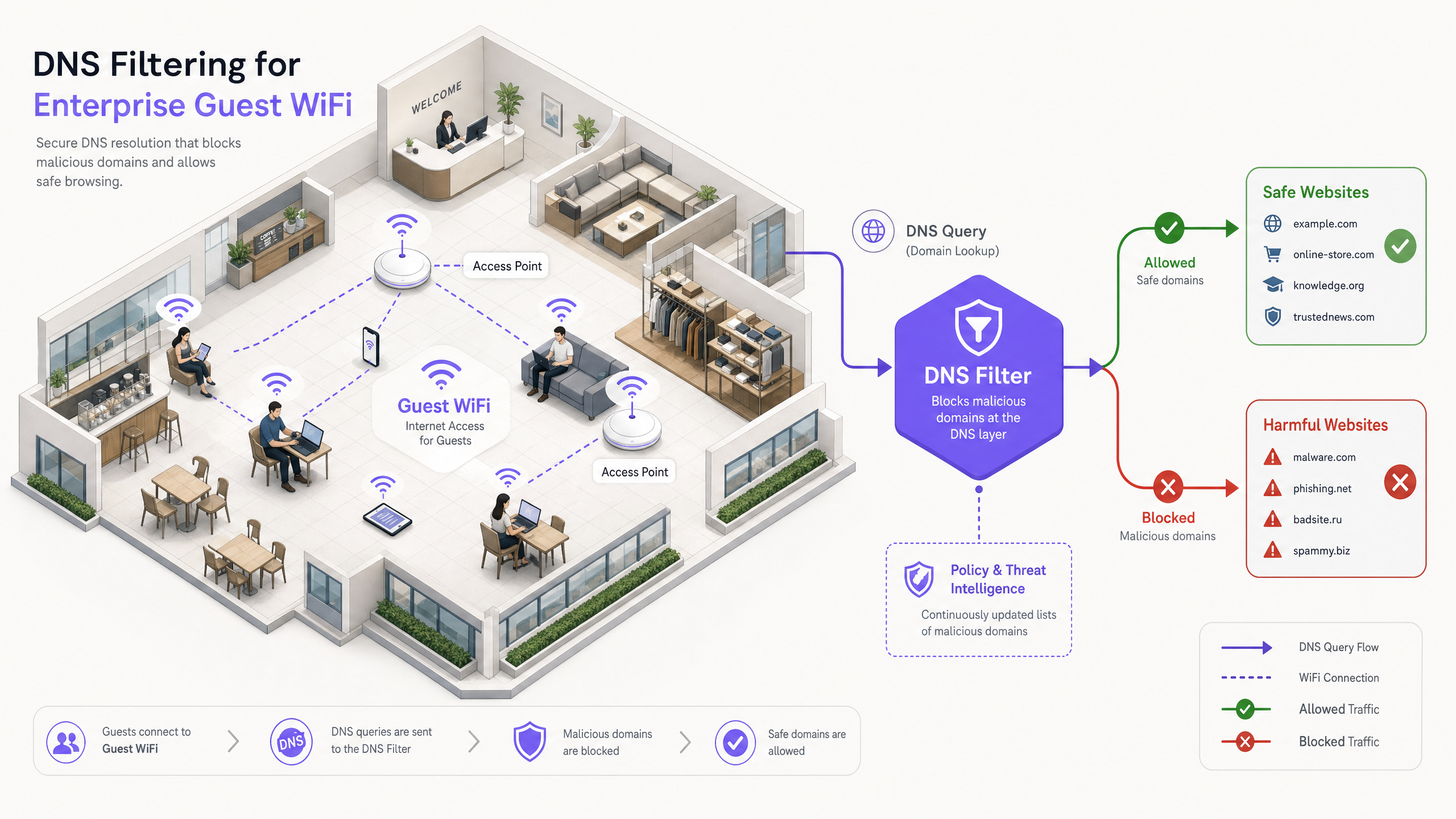
Resumo Executivo
Para líderes de TI empresariais que gerenciam redes públicas em larga escala, garantir uma experiência de navegação segura, compatível e de alto desempenho é um mandato operacional crítico. As redes WiFi para convidados em hotelaria, varejo e locais públicos são alvos principais para atividades maliciosas e violações de políticas — desde tráfego de comando e controle de botnets até streaming ilegal e conteúdo inadequado. Este guia fornece uma referência técnica definitiva sobre filtragem DNS: o mecanismo mais eficiente para bloquear conteúdo prejudicial e mitigar riscos na borda da rede.
Ao contrário da Inspeção Profunda de Pacotes (DPI) que consome muitos recursos ou das listas de bloqueio de IP rígidas, a filtragem DNS intercepta a solicitação inicial de resolução de domínio. Ao avaliar consultas contra feeds de inteligência de ameaças em tempo real, ela impede conexões a domínios maliciosos ou inadequados antes que qualquer carga útil seja trocada. Essa abordagem garante alta taxa de transferência e latência mínima — essencial para ambientes que suportam milhares de usuários simultâneos.
A implementação de uma filtragem DNS robusta não apenas protege a reputação do local, mas também apoia a conformidade com regulamentações de proteção de dados e políticas de uso familiar. Para organizações que utilizam soluções como Guest WiFi e WiFi Analytics , a integração de controles em nível de DNS é um requisito de segurança fundamental que sustenta todas as outras camadas da pilha de rede para convidados.
Análise Técnica Aprofundada: Como a Filtragem DNS Opera
A filtragem DNS funciona como uma camada de segurança proativa dentro da arquitetura de rede. Quando um dispositivo cliente tenta acessar um domínio, o resolvedor DNS local intercepta a consulta. Em vez de retornar imediatamente o endereço IP, a consulta é encaminhada para um motor de filtragem que a avalia em relação à política e à inteligência de ameaças antes de decidir se a resolve ou a bloqueia.
O Pipeline de Resolução
O pipeline de resolução de filtragem DNS opera em quatro estágios distintos. Primeiro, interceptação de consulta: o dispositivo convidado se conecta à rede e recebe a configuração de IP via DHCP, que especifica o servidor de filtragem DNS como o resolvedor principal. Segundo, avaliação de política: o motor de filtragem recebe a consulta (por exemplo, malicious-domain.com) e a compara com listas de bloqueio categorizadas e feeds de inteligência de ameaças dinâmicos atualizados em tempo real. Terceiro, resolução ou sinkholing: se o domínio for benigno, o motor resolve o endereço IP real e a conexão prossegue normalmente. Se o domínio violar a política, o motor retorna um endereço IP não roteável — uma técnica conhecida como sinkholing — ou redireciona o usuário para uma página de bloqueio personalizada. Quarto, registro: cada consulta, seja resolvida ou bloqueada, é registrada para fins de auditoria e análise.
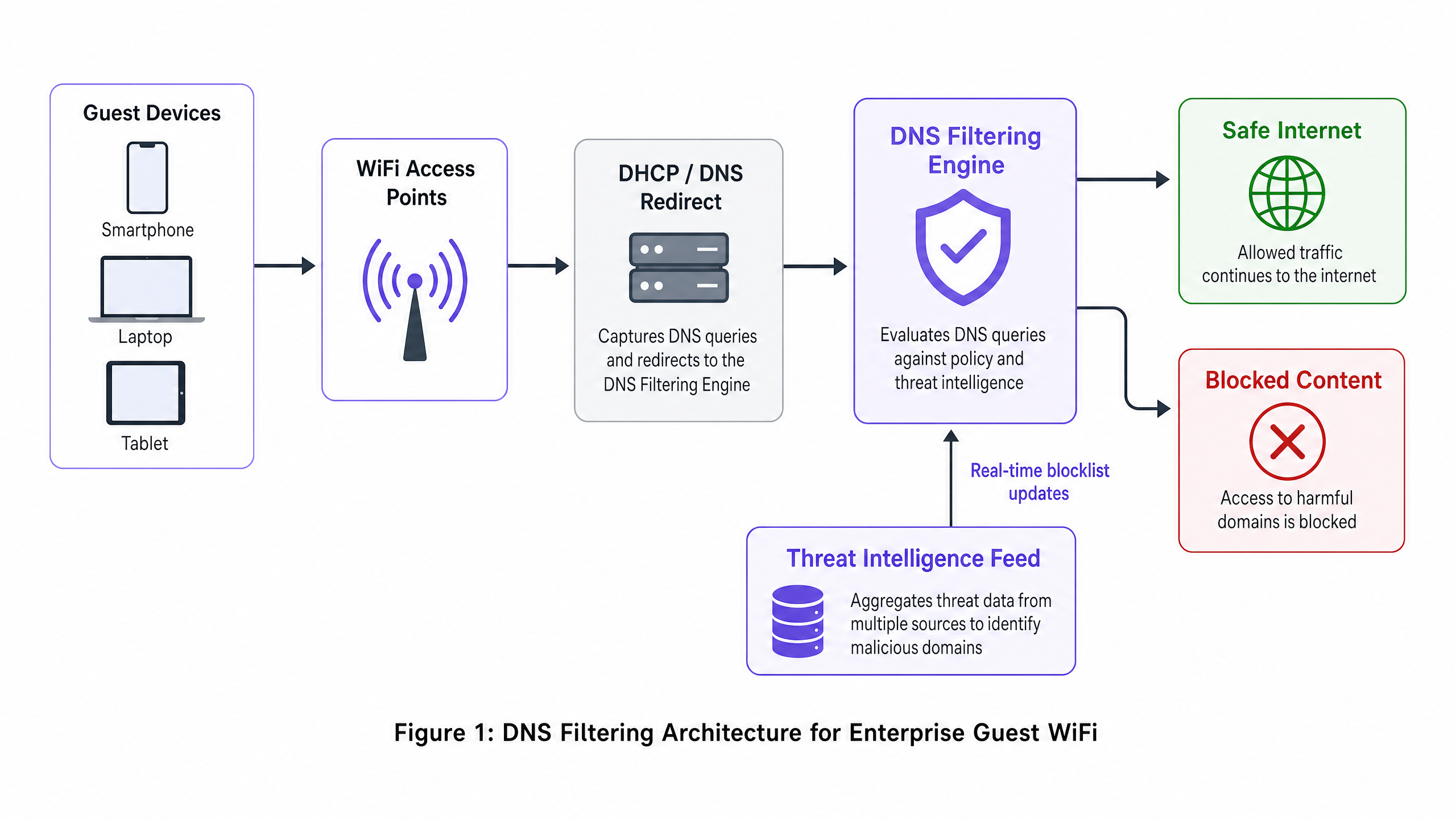
Vantagens Arquitetônicas
A implantação de filtragem DNS oferece vantagens distintas sobre métodos alternativos de controle de conteúdo. A sobrecarga de latência é desprezível — as consultas DNS são pacotes UDP leves, e avaliá-los adiciona menos de 2ms, imperceptível para o usuário final. A abordagem também é agnóstica ao protocolo: como a filtragem ocorre antes que a conexão seja estabelecida, ela é eficaz independentemente do protocolo de aplicação subjacente (HTTP, HTTPS, FTP) ou número da porta. Esta é uma vantagem significativa sobre a filtragem de proxy baseada em URL, que não pode inspecionar o tráfego HTTPS criptografado sem implantar um certificado raiz personalizado em cada endpoint — uma impossibilidade em dispositivos de convidados não gerenciados.
A escalabilidade é outra força central. Um único cluster DNS robusto pode lidar com milhões de consultas por segundo, tornando-o ideal para ambientes de alta densidade como estádios, grandes centros de conferências ou implantações multi-site de Varejo . Para topologias multi-tenant complexas, a filtragem DNS se integra perfeitamente com estratégias de segmentação baseadas em VLAN, conforme detalhado em Projetando uma Arquitetura WiFi Multi-Tenant para MDU .
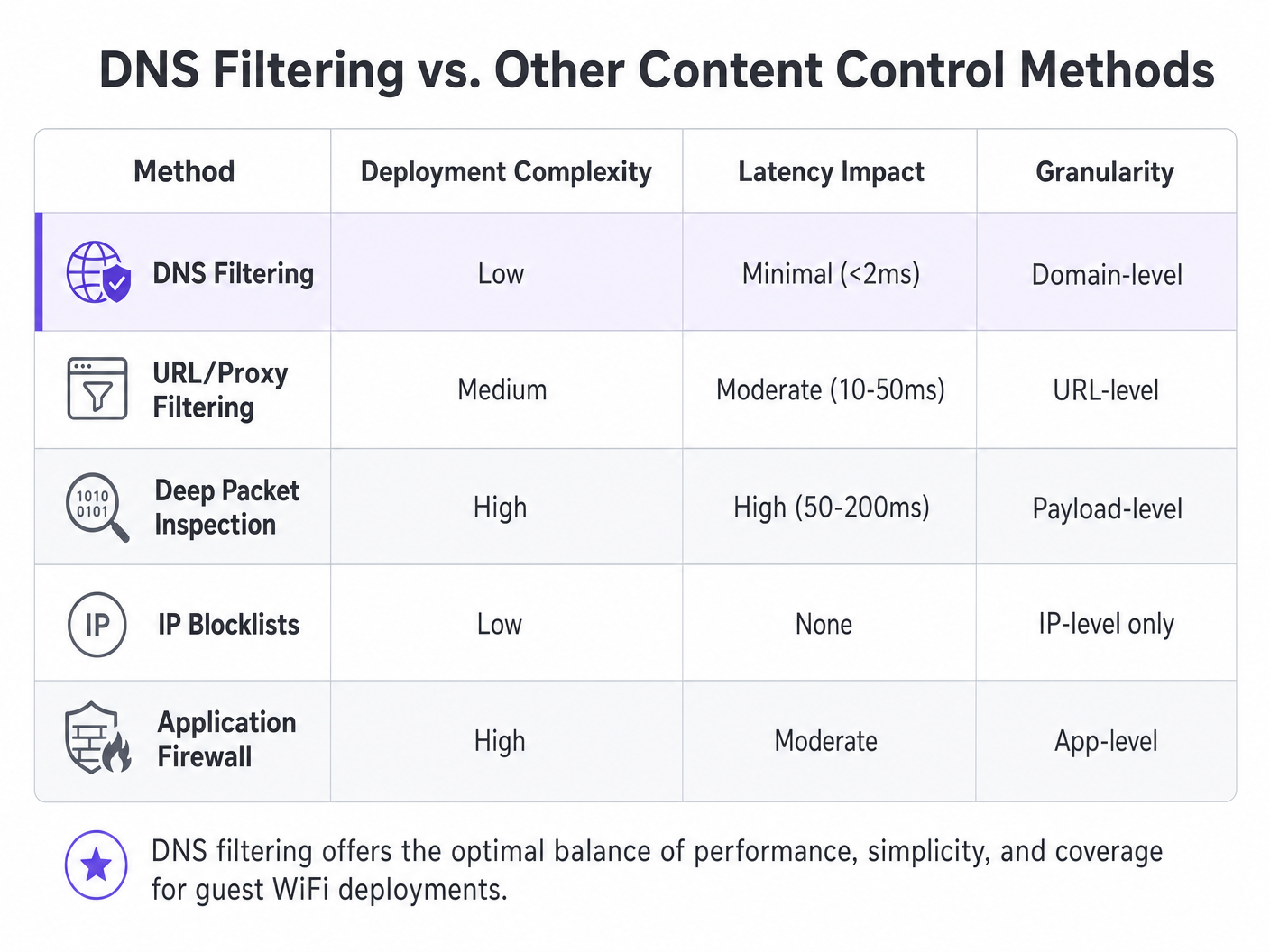
| Método | Complexidade de Implantação | Impacto na Latência | Granularidade | Adequação para Rede de Convidados |
|---|---|---|---|---|
| Filtragem DNS | Baixa | Mínima (<2ms) | Nível de domínio | Recomendado |
| Filtragem de URL/Proxy | Média | Moderada (10–50ms) | Nível de URL | Limitada (problemas de HTTPS) |
| Inspeção Profunda de Pacotes | Alta | Alta (50–200ms) | Nível de carga útil | Não recomendado |
| Listas de Bloqueio de IP | Baixa | Nenhuma | Apenas nível de IP | Apenas suplementar |
| Firewall de Aplicação | Alta | Moderada | Nível de aplicativo | Complementar |
Guia de Implementação
A implantação da filtragem DNS requer planejamento cuidadoso para garantir cobertura abrangente sem interromper o tráfego legítimo. Os passos a seguir descrevem uma estratégia de implantação neutra em relação ao fornecedor, aplicável em ambientes de Hotelaria , Saúde , Transporte e varejo.
Passo 1: Segmentação de Rede e Configuração DHCP
O método de implantação mais robusto é configurar o gateway de rede ou o servidor DHCP para distribuir os endereços IP do servidor de filtragem DNS para todos os clientes convidados. Isso garante que qualquer dispositivo que se conecte à rede utilize automaticamente o resolvedor seguro, sem a necessidade de instalação de nenhum agente no endpoint.
Para ambiententes com topologias complexas — como as descritas em Projetando uma Arquitetura WiFi Multi-Tenant para MDU — garantem que as VLANs dedicadas ao tráfego de convidados sejam estritamente roteadas através do DNS filtrado, enquanto as VLANs operacionais (PMS, POS, gerenciamento de edifícios) continuam a usar resolvedores internos. Este isolamento baseado em VLAN é um pré-requisito para a conformidade com o PCI DSS, que exige segmentação de rede rigorosa entre ambientes de dados de titulares de cartão e redes de convidados não confiáveis.
Passo 2: Prevenção de Evasão — Bloquear Porta 53
Esta etapa é onde muitas implementações falham. Atribuir os servidores DNS via DHCP sozinho é insuficiente. Um usuário com configurações de DNS personalizadas configuradas em seu dispositivo — apontando para 8.8.8.8 ou 1.1.1.1 — ignorará o filtro completamente. A mitigação é simples: implemente regras de firewall no gateway que bloqueiem todo o tráfego de saída na porta 53 (UDP e TCP) para qualquer endereço IP que não seja os servidores de filtragem designados. Isso força todo o tráfego DNS através do resolvedor controlado.
Além disso, considere bloquear DNS sobre HTTPS (DoH). O DoH criptografa a consulta DNS dentro do tráfego HTTPS na porta 443, tornando-o indistinguível do tráfego web normal no nível da rede. A contramedida mais eficaz é manter uma lista de bloqueio de endereços IP de provedores DoH conhecidos (Cloudflare, Google, NextDNS) e bloqueá-los no firewall.
Passo 3: Definição de Política e Gerenciamento de Categorias
Estabeleça políticas granulares com base nos requisitos e público do local. Uma política de linha de base típica para WiFi público inclui o bloqueio de ameaças de segurança (malware, phishing, servidores C2 de botnet), conteúdo adulto e atividades ilegais (pirataria, streaming ilegal). Em setores específicos, categorias adicionais podem ser apropriadas: jogos de azar e armas para instalações de Saúde , ou mídias sociais durante o horário comercial para redes de convidados corporativas.
Passo 4: Integração do Captive Portal — O Walled Garden
Este é o aspecto tecnicamente mais complexo da implementação. Captive portals exigem que os convidados se autentiquem antes de receber acesso total à internet. Durante a fase de pré-autenticação, o dispositivo do convidado está em um estado restrito — ele só pode alcançar o próprio Captive Portal. Se a filtragem DNS estiver ativa durante esta fase, ela pode bloquear os domínios externos necessários para login social (Google OAuth, Facebook Login) ou páginas de aceitação de termos de serviço.
A solução é um walled garden configurado corretamente: um conjunto de domínios que são explicitamente permitidos na política de filtragem DNS antes que a autenticação seja concluída. Esta lista deve incluir o próprio domínio do Captive Portal, quaisquer domínios de provedores de identidade OAuth e quaisquer endpoints CDN necessários para renderizar os ativos do portal. A falha em configurar isso corretamente é a causa mais comum de experiências de integração de convidados quebradas. Esta consideração de integração se aplica igualmente a ambientes de escritório, conforme discutido em Office Wi Fi: Otimize Sua Rede Wi-Fi de Escritório Moderna .
Passo 5: Personalização da Página de Bloqueio e Comunicação com o Usuário
Forneça páginas de bloqueio claras e com a marca que expliquem por que o conteúdo foi restrito e ofereçam um caminho para solicitar uma revisão caso o bloqueio seja um falso positivo. Isso reduz significativamente os tickets de suporte e reforça o compromisso do local com um ambiente de navegação seguro. Uma página de bloqueio bem projetada transforma uma restrição em um ponto de contato da marca.
Melhores Práticas
Para maximizar a eficácia da filtragem DNS, siga as seguintes recomendações padrão da indústria.
Arquitetura de Alta Disponibilidade: Configure resolvedores DNS secundários e terciários. Se o motor de filtragem primário se tornar inacessível, o tráfego deve fazer o failover de forma transparente para um resolvedor secundário. Evite configurar o resolvedor padrão do ISP como fallback, pois isso ignoraria a filtragem completamente durante uma interrupção.
Auditorias de Política Regulares: Revise continuamente logs e análises para identificar falsos positivos e padrões de ameaças emergentes. Integre logs de consulta DNS com sua plataforma de WiFi Analytics para correlacionar o comportamento de navegação com métricas de desempenho de rede.
Qualidade do Feed de Inteligência de Ameaças: A eficácia da filtragem DNS é diretamente proporcional à qualidade e atualidade do feed de inteligência de ameaças. Avalie os fornecedores pela frequência das atualizações do feed (horária é a linha de base; em tempo real é preferível), a amplitude da cobertura de categorias e a taxa de falsos positivos.
Validação DNSSEC: Onde suportado, habilite a validação DNSSEC no resolvedor de filtragem. Isso previne ataques de envenenamento de cache DNS, onde um invasor injeta registros DNS falsos para redirecionar usuários a sites maliciosos.
Solução de Problemas e Mitigação de Riscos
Mesmo com uma arquitetura robusta, surgem problemas operacionais. A seguir estão os modos de falha mais comuns e suas mitigações.
Falsos Positivos: Domínios legítimos categorizados erroneamente como maliciosos ou violadores de política. Mantenha um processo de gerenciamento de lista de permissões facilmente acessível e um SLA de resposta rápida para relatórios de usuários. Monitore a proporção de consultas bloqueadas em relação ao total; uma taxa de bloqueio incomumente alta é um forte indicador de configurações de política excessivamente agressivas.
Falha do Captive Portal: Conforme descrito acima, isso é causado pela falta de entradas no walled garden. Diagnostique capturando consultas DNS de um dispositivo de teste durante a fase de pré-autenticação e identificando quais consultas estão sendo bloqueadas. Adicione esses domínios à lista de permissões de pré-autenticação.
Degradação de Desempenho: Uma infraestrutura DNS inadequada pode levar a uma navegação lenta, manifestando-se como tempos de carregamento de página altos em vez de falhas completas. Implante resolvedores de cache locais para reduzir a carga de consulta nos motores de filtragem upstream. Monitore os tempos de resposta das consultas DNS; qualquer coisa acima de 50ms justifica investigação.
Bypass de DoH: Se as análises mostrarem tráfego para provedores DoH conhecidos, apesar das regras de firewall, verifique se a lista de bloqueio de IPs de provedores DoH está atualizada e se as regras de firewall se aplicam a todas as VLANs de convidados epontos de acesso.
ROI e Impacto nos Negócios
O retorno sobre o investimento para o filtro DNS vai muito além da simples mitigação de riscos. Para estabelecimentos de Hotelaria , garantir um ambiente familiar impacta diretamente a reputação da marca e os Net Promoter Scores. Um único incidente de um hóspede — particularmente um menor — acessando conteúdo inadequado na rede de um estabelecimento pode gerar uma exposição reputacional e legal significativa.
Ao bloquear streaming ilícito que consome muita largura de banda, os estabelecimentos também podem otimizar o desempenho da rede, atrasando atualizações de infraestrutura caras. Em um hotel de 500 quartos onde uma proporção significativa de hóspedes estava transmitindo de sites de pirataria, a implantação de filtro DNS para bloquear esses domínios pode reduzir a utilização de largura de banda de pico em 20–35%, melhorando diretamente a experiência para todos os hóspedes e adiando a necessidade de capacidade de uplink adicional.
De uma perspectiva de conformidade, demonstrar controles robustos de segurança de rede é frequentemente um pré-requisito para a certificação PCI DSS e apoia o princípio GDPR de proteção de dados por design. O custo de uma implantação de filtro DNS — tipicamente uma fração de um centavo por usuário por mês para soluções baseadas em nuvem — é insignificante em comparação com o custo potencial de uma multa regulatória ou um incidente de segurança que prejudique a marca.
Para equipes de TI que gerenciam implantações de alta frequência em vários locais, a sobrecarga operacional é mínima. Soluções de filtro DNS baseadas em nuvem não exigem hardware no local, atualizam a inteligência de ameaças automaticamente e fornecem gerenciamento centralizado de políticas em centenas de locais a partir de um único painel.
Definições principais
DNS Filtering
A security technique that intercepts DNS queries and evaluates them against policy and threat intelligence before resolving or blocking the requested domain.
The primary mechanism for content control on enterprise guest WiFi networks, operating at the network layer without requiring endpoint agents.
DNS Sinkholing
The practice of returning a false, non-routable IP address in response to a DNS query for a malicious or policy-violating domain, preventing the connection from being established.
Used to neutralise malware command-and-control traffic and prevent access to harmful sites without the user receiving a standard connection error.
Captive Portal
A web page that a user of a public-access network is required to interact with before full internet access is granted, typically used for terms acceptance, authentication, or data capture.
Crucial for guest onboarding and data collection; must be carefully integrated with DNS filtering to prevent the walled garden catch-22.
Walled Garden
A set of domains that are explicitly allowed in the DNS filtering policy during the pre-authentication phase, enabling the captive portal and authentication services to function before the user has accepted terms.
Misconfiguration of the walled garden is the most common cause of broken captive portal experiences in DNS-filtered guest networks.
Deep Packet Inspection (DPI)
A form of network packet filtering that examines the data payload of packets as they pass through an inspection point, enabling content-level analysis.
A more resource-intensive alternative to DNS filtering; impractical for high-throughput guest networks and unable to inspect encrypted HTTPS traffic without certificate interception.
DNS over HTTPS (DoH)
A protocol that encrypts DNS queries within HTTPS traffic, preventing network-level interception of DNS lookups.
Can be used to bypass traditional DNS filtering; administrators should block known DoH provider IPs at the firewall to maintain filtering coverage.
VLAN (Virtual Local Area Network)
A logical network segment that groups devices independently of their physical location, enforced at the switch or router level.
Essential for isolating guest WiFi traffic from internal corporate or operational networks, a prerequisite for PCI DSS compliance.
Threat Intelligence Feed
A continuously updated data stream containing information about known malicious domains, IP addresses, and URLs, used to power security systems.
The quality and freshness of the threat intelligence feed directly determines the effectiveness of a DNS filtering deployment against newly registered malicious domains.
DNSSEC (DNS Security Extensions)
A suite of IETF specifications that add cryptographic authentication to DNS responses, preventing cache poisoning and spoofing attacks.
Should be enabled on DNS filtering resolvers where supported to prevent attackers from injecting false DNS records to redirect users.
Exemplos práticos
A 500-room luxury hotel chain needs to implement content filtering on their guest WiFi. They currently experience high bandwidth utilisation due to illegal streaming and have received complaints about inappropriate content accessible in public areas. They require a solution that does not impact the performance of their property management system (PMS) which shares the same physical infrastructure via VLANs.
- Deploy a cloud-based DNS filtering solution. Configure the DHCP scope for the Guest WiFi VLAN to assign the cloud DNS filtering IPs as the primary and secondary resolvers. 2. Implement firewall rules on the gateway to block all outbound UDP and TCP traffic on port 53 from the Guest VLAN to any external IP other than the approved DNS filtering servers. 3. Create a content filtering policy blocking 'Adult Content', 'Piracy/Copyright Theft', 'Malware/Phishing', and 'Botnet C2'. 4. Configure a branded block page with the hotel's logo and a clear message. 5. Critically, ensure the PMS VLAN DHCP scope continues to use the internal DNS servers. The firewall rules blocking port 53 must be scoped exclusively to the Guest VLAN, not applied globally. 6. Monitor DNS query logs for the first 30 days to identify and resolve any false positives affecting legitimate guest services.
A large retail shopping centre wants to offer free public WiFi but must comply with strict family-friendly corporate policies. They also need to gather demographic data through a captive portal with social login options. How should they configure DNS filtering to support both requirements without breaking the onboarding flow?
- Integrate the DNS filtering solution with the existing network gateway, assigning filtering DNS IPs via DHCP on the guest SSID. 2. Before applying any blocking policy, configure the walled garden. Add the following to the pre-authentication allowlist: the captive portal's own domain and CDN endpoints, Google OAuth domains (accounts.google.com, oauth2.googleapis.com), Facebook Login domains ( www.facebook.com , graph.facebook.com), and any other identity providers in use. 3. Apply the content filtering policy (adult, gambling, malware, piracy categories) to activate only after successful authentication. 4. Implement port 53 egress blocking on the guest VLAN. 5. Customise the block page with the retail centre's branding and a clear, friendly message about family-friendly browsing. 6. Test the complete onboarding flow with multiple device types (iOS, Android, Windows) before go-live.
Questões práticas
Q1. A stadium IT director reports that since deploying DNS filtering on the guest WiFi, guests are unable to complete the social login process on the captive portal. The portal uses Google and Facebook OAuth. What is the most likely architectural flaw and how would you resolve it?
Dica: Consider what external resources are required during the pre-authentication phase, before the user has accepted the terms of service.
Ver resposta modelo
The social login domains (accounts.google.com, oauth2.googleapis.com, www.facebook.com , graph.facebook.com) have not been added to the walled garden — the pre-authentication allowlist in the DNS filtering policy. The filter is blocking these queries because the user has not yet authenticated, creating a catch-22. The resolution is to explicitly add all required OAuth and identity provider domains to the pre-authentication allowlist, then re-test the full onboarding flow across iOS, Android, and Windows devices before re-deploying.
Q2. To improve network performance, a network architect proposes implementing a transparent HTTPS proxy to inspect all guest traffic instead of DNS filtering. Why is this approach fundamentally unsuitable for a public guest WiFi environment?
Dica: Think about the requirements for inspecting encrypted HTTPS traffic and the nature of unmanaged guest devices.
Ver resposta modelo
Transparent HTTPS inspection requires deploying a custom root certificate to every client device to perform a man-in-the-middle decryption of TLS traffic. On a managed corporate network this is achievable via MDM or Group Policy. On a public guest network, the venue has no control over guest endpoints, making certificate deployment impossible. Without the certificate, the proxy will generate severe TLS certificate warnings on every HTTPS site, completely breaking the browsing experience. DNS filtering is the correct approach for BYOD environments as it requires no endpoint agent or certificate.
Q3. A retail chain has deployed DNS filtering by assigning the filtering DNS IPs via DHCP on the guest SSID. Analytics show that a significant volume of adult content is still being accessed. What network configuration step was most likely missed, and what is the remediation?
Dica: How might a technically capable user override the DNS settings assigned by DHCP?
Ver resposta modelo
The network administrator failed to implement outbound firewall rules blocking port 53 (UDP and TCP) from the guest VLAN to any external IP other than the approved DNS filtering servers. Users with custom DNS settings hardcoded on their devices (e.g., 8.8.8.8) are bypassing the DHCP-assigned filtering resolvers entirely. The remediation is to add gateway firewall rules that redirect or drop all outbound port 53 traffic not destined for the filtering servers. Additionally, consider blocking known DoH provider IPs on port 443 to prevent encrypted DNS bypass.
Q4. A conference centre is planning a major international event. They expect 8,000 concurrent WiFi users over three days. Their current DNS infrastructure consists of a single on-premises filtering appliance. What architectural risks does this present and what changes would you recommend?
Dica: Consider both performance capacity and availability. What happens if the single appliance fails or becomes overloaded?
Ver resposta modelo
The single on-premises appliance presents two critical risks: a single point of failure (if it goes offline, all DNS resolution fails, taking down the entire guest network) and potential performance bottleneck under peak load. Recommendations: 1) Migrate to a cloud-based DNS filtering service with geographically distributed resolver infrastructure, capable of handling millions of queries per second. 2) Configure at least two resolver IPs in the DHCP scope (primary and secondary) pointing to different cloud resolver endpoints. 3) Implement local caching resolvers at the venue to reduce upstream query load and improve response times. 4) Conduct a load test prior to the event simulating peak concurrent users to validate the architecture.