
Projetando uma Arquitetura WiFi Multi-Tenant para MDU
Este guia definitivo fornece um modelo arquitetônico para implantar redes WiFi escaláveis, seguras e isoladas em várias unidades em um MDU. Ele aborda considerações críticas, incluindo segmentação de VLAN, planejamento de RF, autenticação 802.1X e como equilibrar o isolamento do locatário com o gerenciamento centralizado para um melhor ROI.
Video overview
Ouça este guia
Ver transcrição do podcast
Parte da nossa série principal: Guia de WiFi Multi-Tenant →

Resumo Executivo
Os CTOs e arquitetos líderes que gerenciam unidades multi-residenciais (MDUs) - sejam eles vastos complexos hoteleiros, ambientes de varejo de uso misto ou habitações do setor público - enfrentam o mesmo desafio constante: fornecer conectividade segura e de alto desempenho para inquilinos independentes sobre uma infraestrutura física compartilhada. Os designs de rede tradicionais de inquilino único colapsam sob o peso dos requisitos de MDU, levando a vulnerabilidades de segurança, saturação do domínio de transmissão e custos operacionais de suporte insustentáveis.
Projetar uma arquitetura de WiFi multi-tenant exige uma mudança do isolamento físico para a segmentação lógica. Este guia de referência descreve o modelo arquitetônico definitivo para implantações de MDU. Examinaremos a implementação da marcação de VLAN IEEE 802.1Q para isolamento estrito de tráfego, a necessidade de autenticação 802.1X RADIUS para controle de acesso e o papel crítico dos controladores em nuvem centralizados na manutenção da visibilidade operacional. Ao adotar esses princípios neutros de fornecedor, os operadores de locais podem mitigar riscos de conformidade (como PCI-DSS e GDPR), reduzir as despesas operacionais (OpEx) e transformar a conectividade de um centro de custo em uma camada de serviço monetizável.
Aprofundamento Técnico
A Pedra Angular: Segmentação Lógica via VLANs
A pedra angular de qualquer arquitetura multi-tenant é a segmentação rigorosa de rede. Em um ambiente físico compartilhado, implantar switches e cabeamento separados para cada inquilino é comercialmente inviável. Em vez disso, o isolamento é alcançado na Camada 2 usando Redes Locais Virtuais (VLANs) IEEE 802.1Q.
Neste modelo, um único Ponto de Acesso (AP) transmite múltiplos SSIDs para atender a diferentes perfis de inquilinos, ou utiliza atribuição dinâmica de VLAN via RADIUS. Quando um cliente se conecta à rede, seu tráfego é marcado com um ID de VLAN específico na borda do AP. Essa marcação persiste à medida que o quadro atravessa os links de tronco em toda a estrutura de switch compartilhada, garantindo que o Inquilino A (ex: VLAN 10) permaneça completamente isolado do Inquilino B (ex: VLAN 20) na camada de link de dados.
No entanto, as VLANs fornecem isolamento, não segurança inerente. Para evitar a movimentação lateral entre as redes de inquilinos, o roteamento inter-VLAN deve ser estritamente controlado por meio de políticas de firewall na camada de distribuição ou de núcleo. Uma abordagem de Zero Trust dita que o tráfego entre VLANs de inquilinos seja completamente negado, a menos que explicitamente permitido para serviços específicos e necessários.

Padrões de Autenticação e Criptografia
Para ambientes multi-tenant de nível empresarial, as Chaves Pré-Compartilhadas (PSKs) são inadequadas. Elas são facilmente compartilhadas, difíceis de alterar sem impactar todos os usuários e não oferecem responsabilidade individual. O padrão de arquitetura é o IEEE 802.1X com autenticação RADIUS.
Sob o 802.1X, cada usuário ou dispositivo se autentica individualmente usando credenciais exclusivas ou certificados digitais. O servidor RADIUS não apenas verifica a identidade, mas também pode retornar Atributos Específicos do Fabricante (VSAs) para o autenticador (AP ou switch), atribuindo dinamicamente o usuário ao seu VLAN designado, independentemente de qual SSID ele se conecte. Isso reduz significativamente a proliferação de SSIDs, o que é fundamental para manter a eficiência do tempo de transmissão de dados (airtime).
Para criptografia, o WPA3-Enterprise é o mandato atual. Ele fornece uma suíte de segurança robusta de 192 bits para ambientes altamente confidenciais e atenua os ataques de dicionário offline que assolavam o WPA2.
Isolamento de Visitantes e IoT
Além do tráfego corporativo ou de inquilinos, uma arquitetura MDU deve acomodar dois perfis de tráfego distintos: visitantes e dispositivos de Internet das Coisas (IoT).
- Rede de Visitantes: Os visitantes exigem acesso sem atrito à internet, mas devem ser completamente isolados dos dados dos inquilinos. Isso é normalmente gerenciado por meio de um Captive Portal. Para obter informações detalhadas sobre como gerenciar essa camada e aproveitá-la para inteligência de negócios, consulte nossa visão geral abrangente de Guest WiFi e os recursos associados de WiFi Analytics.
- Dispositivos IoT: Os MDUs modernos estão equipados com termostatos inteligentes, câmeras IP e sistemas de gerenciamento predial. Esses dispositivos geralmente são headless, difíceis de atualizar e apresentam uma grande superfície de ataque. Eles devem ser isolados em VLANs de IoT dedicadas com filtragem de saída rigorosa, permitindo a comunicação apenas com servidores de gerenciamento específicos.
Tem dúvidas sobre a sua configuração específica?
A nossa equipa trabalha com operadores de espaços, gestores de TI e engenheiros de rede em 80.000 locais. Agende uma chamada de 20 minutos e mostraremos como outros profissionais na sua situação o resolveram.
Guia de Implementação
A implantação dessa arquitetura requer uma abordagem sistemática, passando do design lógico para a validação física.
Passo 1: Design Lógico da Rede
Comece definindo o esquema de endereçamento IP e o mapeamento de VLAN. Uma abordagem estruturada evita sub-redes sobrepostas e simplifica o roteamento.
- VLAN de Gerenciamento (ex: VLAN 1): Estritamente para infraestrutura de rede (APs, switches). Sem acesso de usuários.
- VLANs de Inquilinos (ex: VLANs 100-199): Sub-redes dedicadas para inquilinos individuais ou unidades de negócios.
- VLAN de Visitantes (ex: VLAN 200): Acesso exclusivo à internet, altamente restrito.
- VLAN de IoT/Instalações (ex: VLAN 300): Para sistemas de gerenciamento predial.
Passo 2: Planejamento de RF e Levantamento do Local
Em ambientes de alta densidade, como Hospitality ou Retail, a interferência de canal compartilhado (CCI) é o principal fator de baixo desempenho. Um levantamento preditivo é insuficiente; um levantamento de RF ativo e no local é obrigatório para considerar a atenuação das paredes e a interferência vizinha.
- Priorização de 5 GHz / 6 GHz: Direcione os clientes para a banda de 5 GHz, ou para a banda de 6 GHz ao usar o WiFi 6E, para aproveitar mais canais que não se sobrepõem. Para uma compreensão mais profunda do gerenciamento de espectro, consulte nosso guia sobre Wi Fi Frequencies: A Guide to Wi-Fi Frequencies in 2026.
- Larguras de canal: Em MDUs densos, restrinja as larguras de canal a 20 MHz na banda de 2.4 GHz e a 40 MHz na banda de 5 GHz para maximizar a reutilização de canais.
- Se você estiver enfrentando problemas de desempenho em uma implantação existente, consulte How to Analyze and Change Your WiFi Channel for Maximum Speed (ou a versão em italiano: Come analizzare e modificare il canale WiFi per la massima velocità).
Passo 3: Configuração da infraestrutura
- Switch Fabric: Configure cuidadosamente as portas de tronco. Certifique-se de que apenas as VLANs necessárias sejam permitidas nos uplinks entre os switches de acesso e o core.
- Access Points: Implante APs capazes de suportar múltiplos BSSIDs e de se integrarem com o controlador em nuvem. Limite o número de SSIDs de transmissão a um máximo de 3-4 por rádio para conservar o tempo de transmissão.
- Políticas do controlador: Defina limites de largura de banda por locatário ou por usuário para evitar que um único cliente agressivo sature o uplink de WAN compartilhado.
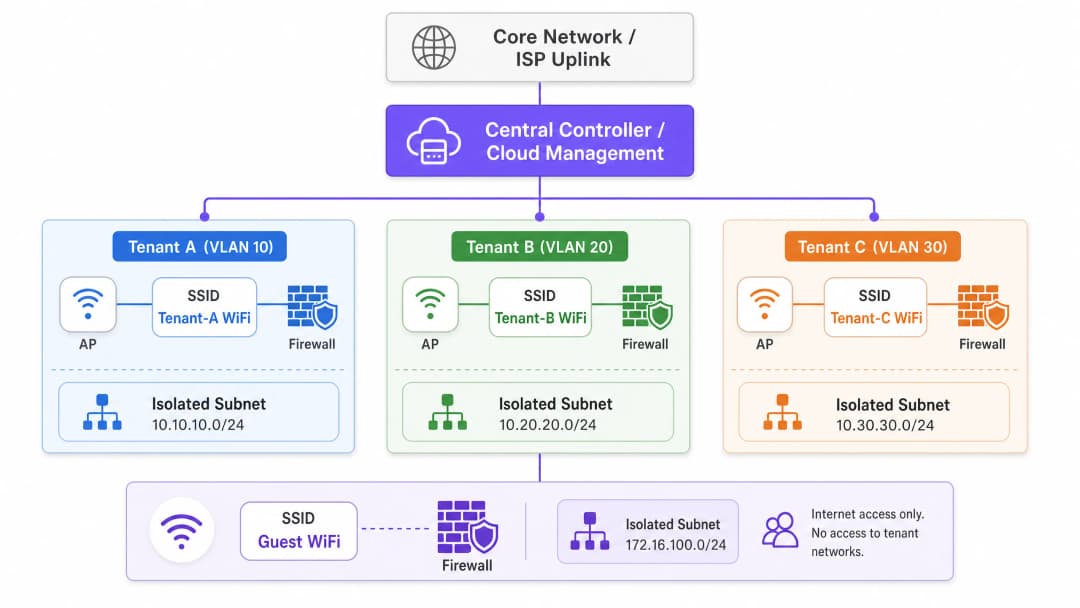
Melhores Práticas
- Gerenciamento centralizado em nuvem: O custo operacional de gerenciar um ambiente MDU distribuído sem um painel único é insustentável. Um controlador em nuvem permite provisionamento zero-touch, gerenciamento de firmware e aplicação centralizada de políticas.
- Atribuição dinâmica de VLAN: Em vez de transmitir "Tenant_A_WiFi", "Tenant_B_WiFi", etc., transmita um único SSID "MDU_Secure" e use 802.1X/RADIUS para atribuir dinamicamente os usuários autenticados à sua VLAN correta. Isso reduz significativamente a sobrecarga de beacons.
- Serviços baseados em localização: Aproveite o BLE (Bluetooth Low Energy) integrado em APs modernos para rastreamento de ativos ou navegação interna. Para saber mais sobre isso, leia BLE Low Energy Explained for Enterprise.
- Otimize para o ambiente: Um espaço de escritório MDU exige um ajuste específico adaptado ao seu layout físico. Consulte Office Wi Fi: Optimize Your Modern Office Wi-Fi Network para ajustes específicos de ambiente.
Resolução de problemas e mitigação de riscos
Modos de falha comuns
- Configuração incorreta da porta de tronco: A causa mais comum de "conectado, sem internet" em configurações multi-tenant. Se uma VLAN estiver ausente no link de tronco entre o AP e o gateway, as solicitações DHCP falharão.
- Mitigação: Implemente auditoria de configuração automatizada e documente rigorosamente a topologia de spanning tree.2. Sobrecarga de SSID: Transmitir 10 SSIDs em um único AP significa que o rádio passa uma parte significativa de seu tempo transmitindo apenas pacotes de sinalização (beacon frames), deixando pouquíssimo tempo de antena para a transmissão real de dados.
- Mitigação: Consolide SSIDs e utilize atribuição dinâmica de VLAN.
- Exposição do Plano de Gerenciamento: Se um locatário puder fazer ping ou acessar a interface de gerenciamento de um AP ou switch, a rede estará fundamentalmente comprometida.
- Mitigação: Utilize uma VLAN de gerenciamento dedicada e fora de banda (out-of-band) e implemente Listas de Controle de Acesso (ACLs) rígidas bloqueando todo o tráfego RFC 1918 das sub-redes dos locatários para a sub-rede de gerenciamento.
ROI e Impacto nos Negócios
A transição para uma arquitetura multi-tenant robusta transforma a rede de um mal necessário em um ativo estratégico.
- OpEx Reduzido: O gerenciamento centralizado e a segmentação lógica reduzem a necessidade de visitas presenciais de técnicos. As centrais de suporte podem diagnosticar problemas remotamente, identificando se a falha está na infraestrutura compartilhada ou na configuração específica do locatário.
- Conformidade e Redução de Riscos: Ao isolar dados do PCI-DSS (por exemplo, em unidades de varejo) ou dados confidenciais de pacientes (por exemplo, em instalações de Saúde localizadas em edifícios de uso misto), o escopo das auditorias de conformidade é significativamente reduzido, economizando taxas substanciais de consultoria.
- Monetização: Com uma arquitetura estável e segmentada, os operadores do local podem oferecer pacotes de largura de banda baseados em camadas para os locatários, gerando receita recorrente. Além disso, a rede de visitantes pode ser aproveitada para captura de dados e marketing, transformando o fluxo de pessoas em inteligência prática.
Ouça nosso podcast de briefing técnico abaixo para uma discussão aprofundada sobre estes princípios de arquitetura:
Definições principais
VLAN (Virtual Local Area Network)
Um agrupamento lógico de dispositivos de rede que parecem estar na mesma LAN local, independentemente de sua localização física.
Usada em MDUs para separar logicamente o tráfego de diferentes locatários que compartilham os mesmos switches físicos e APs, reduzindo o tráfego de transmissão e melhorando o desempenho.
IEEE 802.1Q
O padrão de rede que suporta VLANs em uma rede Ethernet inserindo uma etiqueta de 32 bits no frame Ethernet.
Este é o protocolo subjacente que permite que um único cabo de tronco transporte tráfego para várias redes de locatários isoladas.
IEEE 802.1X
Um padrão IEEE para controle de acesso à rede baseado em porta (PNAC), que fornece um mecanismo de autenticação para dispositivos que desejam se conectar a uma LAN ou WLAN.
Essencial para implantações corporativas de MDU, permite a autenticação individual de usuários (via RADIUS) em vez de depender de uma senha compartilhada, viabilizando a atribuição dinâmica de VLAN.
RADIUS (Remote Authentication Dial-In User Service)
Um protocolo de rede que fornece gerenciamento centralizado de Autenticação, Autorização e Contabilização (AAA) para usuários que se conectam e utilizam um serviço de rede.
O componente de servidor em uma implantação 802.1X que verifica as credenciais e informa ao AP qual VLAN atribuir ao dispositivo do locatário.
Porta Trunk
Uma porta de switch de rede configurada para transmitir tráfego de várias VLANs simultaneamente, usando tags 802.1Q para manter o tráfego separado.
O link crítico entre os switches de acesso e a rede principal. A configuração incorreta de uma porta trunk é a causa mais comum de falhas de conectividade dos locatários.
Interferência de Co-Canal (CCI)
Interferência que ocorre quando dois ou mais pontos de acesso estão transmitindo exatamente no mesmo canal de frequência dentro do alcance de escuta um do outro.
Um grande problema em MDUs densas (como hotéis ou blocos de apartamentos) que faz com que os dispositivos esperem o canal ficar livre, reduzindo drasticamente a taxa de transferência da rede.
Atribuição Dinâmica de VLAN
O processo em que um servidor RADIUS instrui o dispositivo de acesso à rede (AP ou switch) a colocar um usuário autenticado em uma VLAN específica com base em sua identidade.
Permite que os operadores do local transmitam um único SSID seguro para todos os locatários, atribuindo-os às suas redes isoladas após a autenticação, economizando assim o tempo de transmissão de RF.
Captive Portal
Uma página web que o usuário de uma rede de acesso público é obrigado a visualizar e interagir antes que o acesso seja concedido.
Utilizado na VLAN de convidados em uma MDU para impor termos de serviço, coletar dados de marketing ou processar pagamentos antes de conceder acesso à internet.
Exemplos práticos
Um complexo de uso misto de varejo e escritórios (MDU) precisa fornecer WiFi seguro para 15 locatários varejistas independentes, um espaço de escritório corporativo compartilhado e WiFi para convidados público. O operador do local deseja usar uma única infraestrutura de rede física para reduzir custos, mas deve garantir a conformidade PCI-DSS para os varejistas.
- Implante APs de classe empresarial gerenciados por um controlador em nuvem central.
- Crie uma VLAN de 'Gerenciamento' (VLAN 10) estritamente para dispositivos de rede.
- Crie uma VLAN de 'Convidados' (VLAN 20) com isolamento de cliente ativado e um Captive Portal. Roteie esse tráfego diretamente para a internet, ignorando as redes internas.
- Para o espaço de escritório, crie uma VLAN 'Corporativa' (VLAN 30) usando autenticação 802.1X.
- Para os locatários varejistas, implemente a Atribuição Dinâmica de VLAN. Transmita um único SSID 'Retail_Secure' usando 802.1X. Quando um dispositivo de varejo se autentica por meio do servidor RADIUS central, o servidor passa um Atributo Específico do Fornecedor (VSA) que atribui o dispositivo à sua VLAN de locatário específica (por exemplo, VLANs 101 a 115).
- Configure o firewall principal para bloquear todo o roteamento entre VLANs das redes de varejo, garantindo o isolamento estrito exigido pelo PCI-DSS.
Um hotel com 400 quartos (Hospitality) está atualizando sua rede. Eles precisam dar suporte a dispositivos de hóspedes, tablets da equipe para governança e novos termostatos inteligentes IoT em todos os quartos. Atualmente, eles enfrentam quedas frequentes de conexão durante os horários de pico da noite.
- Realize uma pesquisa ativa de local de RF para identificar interferências e planejar a colocação dos APs (provavelmente mudando de implantações em corredores para implantações dentro dos quartos ou a cada dois quartos para lidar com a densidade).
- Segmente o tráfego de forma lógica: Convidados (VLAN 100), Equipe (VLAN 200), IoT (VLAN 300).
- Implemente limitação de largura de banda por usuário no SSID de Convidados (por exemplo, 10 Mbps de download / 5 Mbps de upload) para evitar que alguns usuários de alto consumo saturem o link de WAN durante as horas de pico.
- Para os termostatos de IoT, use um SSID oculto dedicado com WPA3-Personal (se houver suporte) ou MAC Authentication Bypass (MAB) se eles não tiverem suplicantes avançados. Aplique filtragem de saída estrita na VLAN 300 para que os termostatos só consigam se comunicar com o servidor de gerenciamento de nuvem específico.
Questões práticas
Q1. Você está projetando a arquitetura de WiFi para um novo complexo de apartamentos premium com 50 unidades. O incorporador quer oferecer "Gigabit WiFi Incluso" como um diferencial de vendas. Ele propõe a instalação de um roteador sem fio padrão de consumo no armário de telecomunicações de cada apartamento, todos conectados a um switch central não gerenciado. Quais são as principais falhas de arquitetura nessa proposta e qual é a alternativa corporativa?
Dica: Considere a interferência de RF, a sobrecarga de gerenciamento e o tamanho do domínio de broadcast.
Ver resposta modelo
O design proposto apresenta falhas graves. 1) Interferência de RF: 50 roteadores domésticos independentes causarão uma enorme Interferência de Co-Canal (CCI), degradando severamente o desempenho. 2) Gerenciamento: Não há visibilidade centralizada; a solução de problemas exige o acesso a 50 roteadores individuais. 3) Segurança: Um switch não gerenciado significa que todos os apartamentos compartilham um único domínio de broadcast, permitindo que os locatários interceptem o tráfego uns dos outros.
A alternativa corporativa é implantar APs de classe corporativa gerenciados centralmente (por exemplo, Wi-Fi 6/6E) nos apartamentos, conectados a switches PoE gerenciados. Implemente a autenticação 802.1X com Atribuição Dinâmica de VLAN para que cada locatário seja isolado logicamente em sua própria VLAN, independentemente de qual AP ele se conecte. Isso proporciona visibilidade centralizada, coordenação de RF e um isolamento de segurança rigoroso.
Q2. Durante a fase de comissionamento de um edifício de escritórios multi-inquilino, o Locatário A (na VLAN 10) relata que não consegue acessar a internet. Você verifica que o AP está transmitindo o SSID, o cliente se conecta com sucesso e a autenticação 802.1X é aprovada. No entanto, o dispositivo cliente está atribuindo a si mesmo um endereço APIPA (169.254.x.x). Qual é o erro de configuração mais provável na infraestrutura?
Dica: Siga o caminho da solicitação DHCP do AP até o servidor DHCP.
Ver resposta modelo
O problema mais provável é uma porta de tronco configurada incorretamente entre o Access Point e o switch de acesso, ou entre o switch de acesso e o switch Core/Distribuição. Como o cliente recebe um endereço APIPA, o broadcast de DHCP Discover não está chegando ao servidor DHCP. Se a autenticação passa, o servidor RADIUS está atribuindo corretamente a VLAN 10, mas se a VLAN 10 não estiver explicitamente permitida nos links de tronco 802.1Q ao longo do caminho, o tráfego é descartado na porta do switch. O engenheiro deve verificar a configuração 'switchport trunk allowed vlan' em todos os uplinks.
Q3. Um estádio (hub de Transport / espaço de eventos) exige uma rede multi-tenant para a equipe de operações, fornecedores de bilheteria e WiFi de convidados públicos. Para economizar tempo, o engenheiro júnior sugere a criação de três SSIDs usando WPA2-PSK, com uma senha diferente para cada grupo. Por que isso é inaceitável para os fornecedores de bilheteria e o que deve ser implementado em seu lugar?
Dica: Considere os requisitos de conformidade para o processamento de pagamentos.
Ver resposta modelo
O uso de WPA2-PSK é inaceitável para os fornecedores de bilheteria porque eles processam pagamentos, sujeitando-os à conformidade com o PCI-DSS (Payment Card Industry Data Security Standard). As PSKs oferecem segurança fraca, são facilmente compartilhadas e não fornecem responsabilidade individual do usuário. Além disso, uma rede PSK compartilhada não impede inerentemente que os dispositivos se comuniquem entre si (isolamento de cliente).
Em vez disso, a arquitetura deve implementar 802.1X com autenticação RADIUS (de preferência usando WPA3-Enterprise) para fornecer acesso individual e auditável. Os fornecedores de bilheteria devem ser colocados em uma VLAN dedicada e estritamente isolada, com regras de firewall de core negando explicitamente qualquer roteamento entre a VLAN de bilheteria e as VLANs de convidados ou operações.
Continue a ler esta série
Gerenciando a Largura de Banda em Redes de Acomodações Estudantis
Este guia fornece aos gerentes de TI, arquitetos de rede e diretores de operações de propriedades uma referência técnica independente de fornecedor para gerenciar a largura de banda WiFi em ambientes de acomodação estudantil de alta densidade. Ele abrange segmentação de VLAN, design de políticas de Quality of Service (QoS), modelagem de tráfego baseada em identidade e visibilidade na camada de aplicação - os quatro pilares de uma rede escalável e de acesso justo. Com cenários de implantação do mundo real, resultados mensuráveis e frameworks de decisão, este é o manual operacional para qualquer equipe responsável pela infraestrutura de rede residencial em escala.
WPA2-Enterprise vs Personal para Apartamentos e Co-Working
Este guia de referência técnica definitivo avalia o WPA2-Enterprise em relação ao WPA2-Personal para ambientes multi-inquilino, como apartamentos e espaços de co-working. Ele fornece aos arquitetos de rede e gerentes de TI insights práticos sobre autenticação 802.1X, atribuição dinâmica de VLAN e conformidade de segurança, demonstrando por que senhas compartilhadas introduzem riscos inaceitáveis em locais compartilhados modernos. Os operadores de locais encontrarão orientações de implementação concretas, estudos de caso do mundo real e análises de ROI para apoiar a decisão de migração neste trimestre.
Melhores Práticas de Micro-Segmentação para Redes WiFi Compartilhadas
Este guia de referência técnica fornece estratégias práticas para a implementação de micro-segmentação em infraestruturas de WiFi compartilhadas. Ele detalha como gerentes de TI e arquitetos de rede podem isolar de forma segura o tráfego de convidados, IoT e funcionários para mitigar riscos, garantir conformidade e otimizar o desempenho da rede.
Tem dúvidas sobre a sua configuração específica?
A nossa equipa trabalha com operadores de espaços, gestores de TI e engenheiros de rede em 80.000 locais. Agende uma chamada de 20 minutos e mostraremos como outros profissionais na sua situação o resolveram.