
Wi-Fi 6 vs Wi-Fi 5: Isso resolve a interferência de canal?
Este guia oferece uma análise técnica aprofundada sobre como o Wi-Fi 6 (802.11ax) aborda a interferência de canal em ambientes corporativos de alta densidade por meio de OFDMA e BSS Coloring. Ele capacita gerentes de TI, arquitetos de rede e CTOs com estratégias de implantação acionáveis, estudos de caso reais de hospitalidade e saúde, e uma estrutura para avaliar o ROI de atualizações de infraestrutura em locais onde o desempenho sem fio é crítico para os negócios.
Ouça este guia
Ver transcrição do podcast
Resumo Executivo
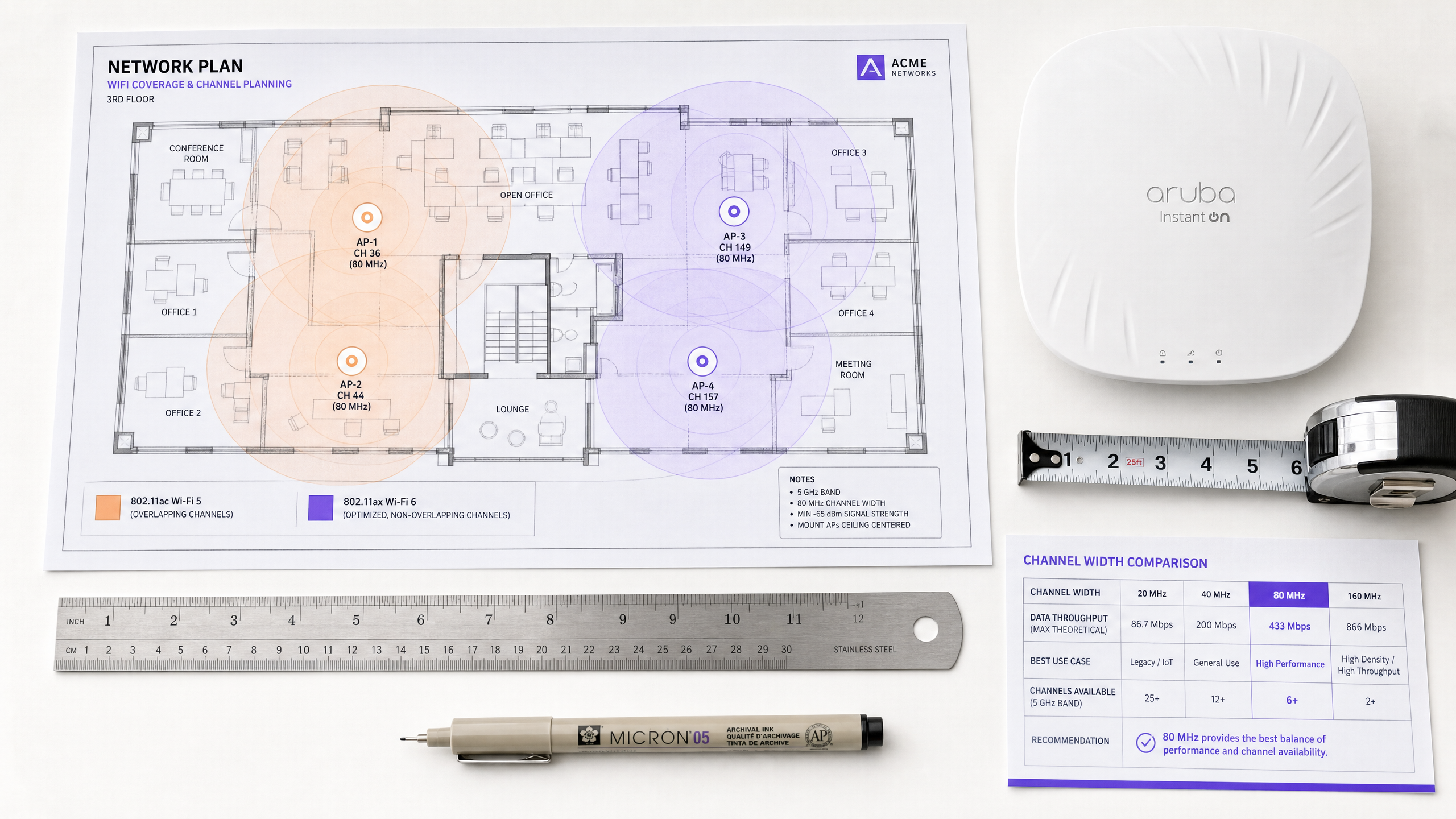
Para diretores de TI e arquitetos de rede que gerenciam ambientes de alta densidade — seja em hospitalidade, varejo ou grandes locais públicos — a interferência de co-canal continua sendo o principal gargalo para o desempenho sem fio. A abordagem tradicional de mitigar a interferência reduzindo a potência de transmissão ou desativando rádios de 2.4 GHz em pontos de acesso alternados atingiu seu limite lógico.
A transição do Wi-Fi 5 (802.11ac) para o Wi-Fi 6 (802.11ax) representa uma mudança arquitetônica fundamental. Em vez de simplesmente aumentar o throughput teórico, o Wi-Fi 6 foi projetado especificamente para abordar a capacidade e a eficiência em espaços aéreos congestionados. Através da introdução do Orthogonal Frequency-Division Multiple Access (OFDMA) e do Basic Service Set (BSS) Coloring, o Wi-Fi 6 oferece mecanismos determinísticos para gerenciar a interferência, em vez de apenas reagir a ela.
Este guia explora as realidades técnicas da mitigação de interferência do Wi-Fi 6, fornecendo estratégias de implantação acionáveis para equipes de TI corporativas. Examinamos como esses padrões operam em ambientes de clientes mistos e como a integração de plataformas de inteligência como análises de Guest WiFi pode validar o ROI da sua atualização de infraestrutura.
Análise Técnica Aprofundada: Como o Wi-Fi 6 Muda as Regras
Para entender como o Wi-Fi 6 aborda a interferência, devemos primeiro examinar as limitações de seu predecessor.
O Problema de Contenção do Wi-Fi 5
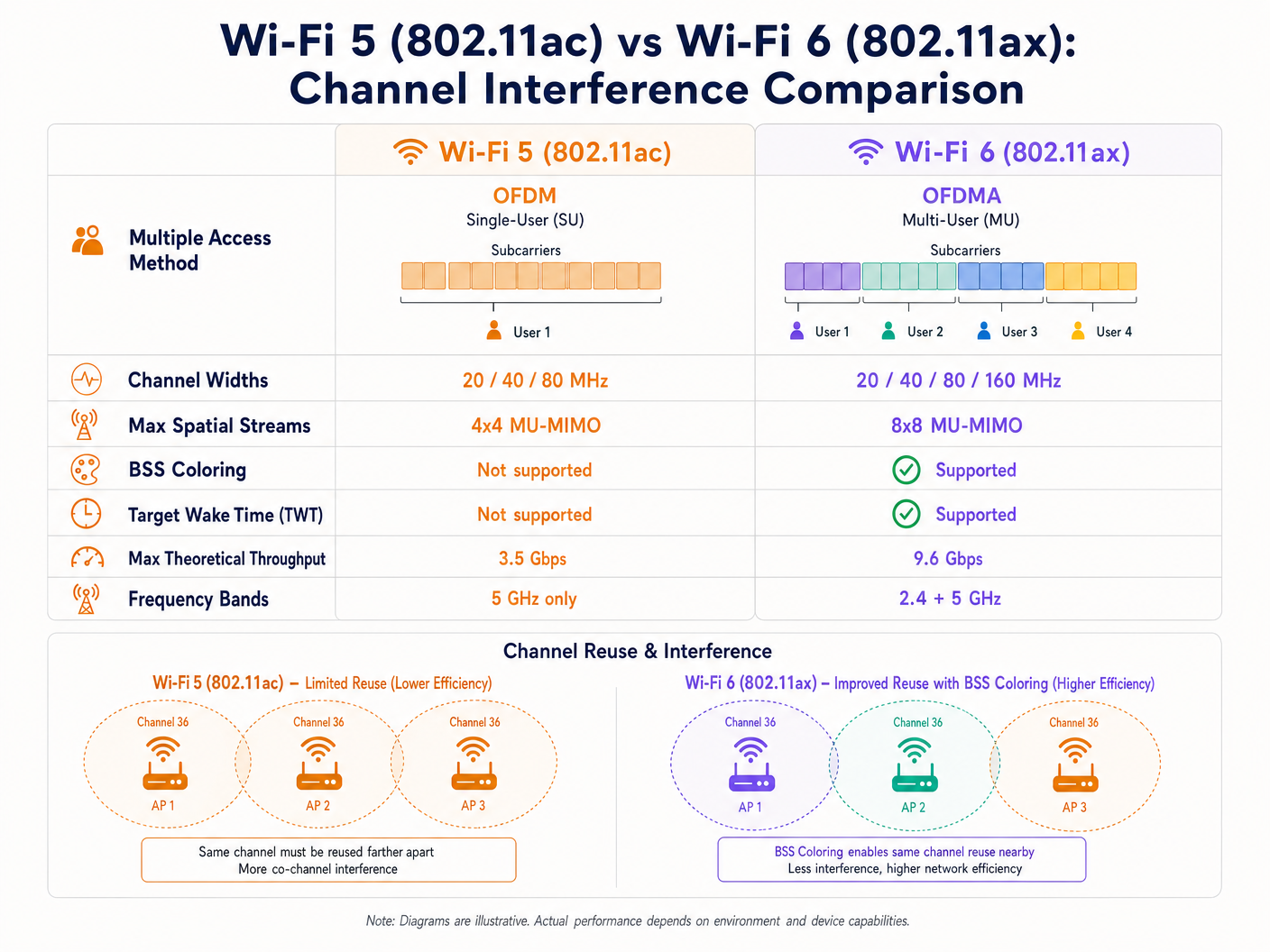
O Wi-Fi 5 depende do Orthogonal Frequency-Division Multiplexing (OFDM). Neste modelo de usuário único, um Access Point (AP) deve alocar toda a largura de banda do canal — seja 20, 40 ou 80 MHz — para um único cliente para uma determinada transmissão, independentemente do tamanho do payload. Isso é altamente ineficiente para pequenos pacotes de dados, como aqueles gerados por dispositivos IoT ou telemetria em tempo real.
Além disso, o Wi-Fi 5 utiliza um mecanismo rigoroso de Carrier Sense Multiple Access with Collision Avoidance (CSMA/CA). Se um AP ou cliente detecta energia de RF em seu canal acima de um limite específico (tipicamente -82 dBm), ele adia a transmissão. Em implantações densas, áreas de cobertura sobrepostas resultam em significativa interferência de co-canal (CCI), onde os dispositivos passam mais tempo esperando do que transmitindo. Este é o problema central que o Wi-Fi 6 foi projetado para resolver.
OFDMA: Alocação Granular de Espectro
O Wi-Fi 6 introduz o OFDMA, que divide o canal em subportadoras menores e discretas chamadas Resource Units (RUs). Em vez de dedicar um canal inteiro de 20 MHz a um único dispositivo, um AP pode subdividir esse canal em até nove RUs distintas, transmitindo para ou recebendo de múltiplos clientes simultaneamente. Isso reduz drasticamente a sobrecarga de contenção e a latência. Embora o OFDMA não elimine a interferência externa, ele torna a rede muito mais eficiente, reduzindo o tempo total em que o meio é ocupado e, consequentemente, a probabilidade de colisão.
BSS Coloring: Reutilização Espacial em Ação
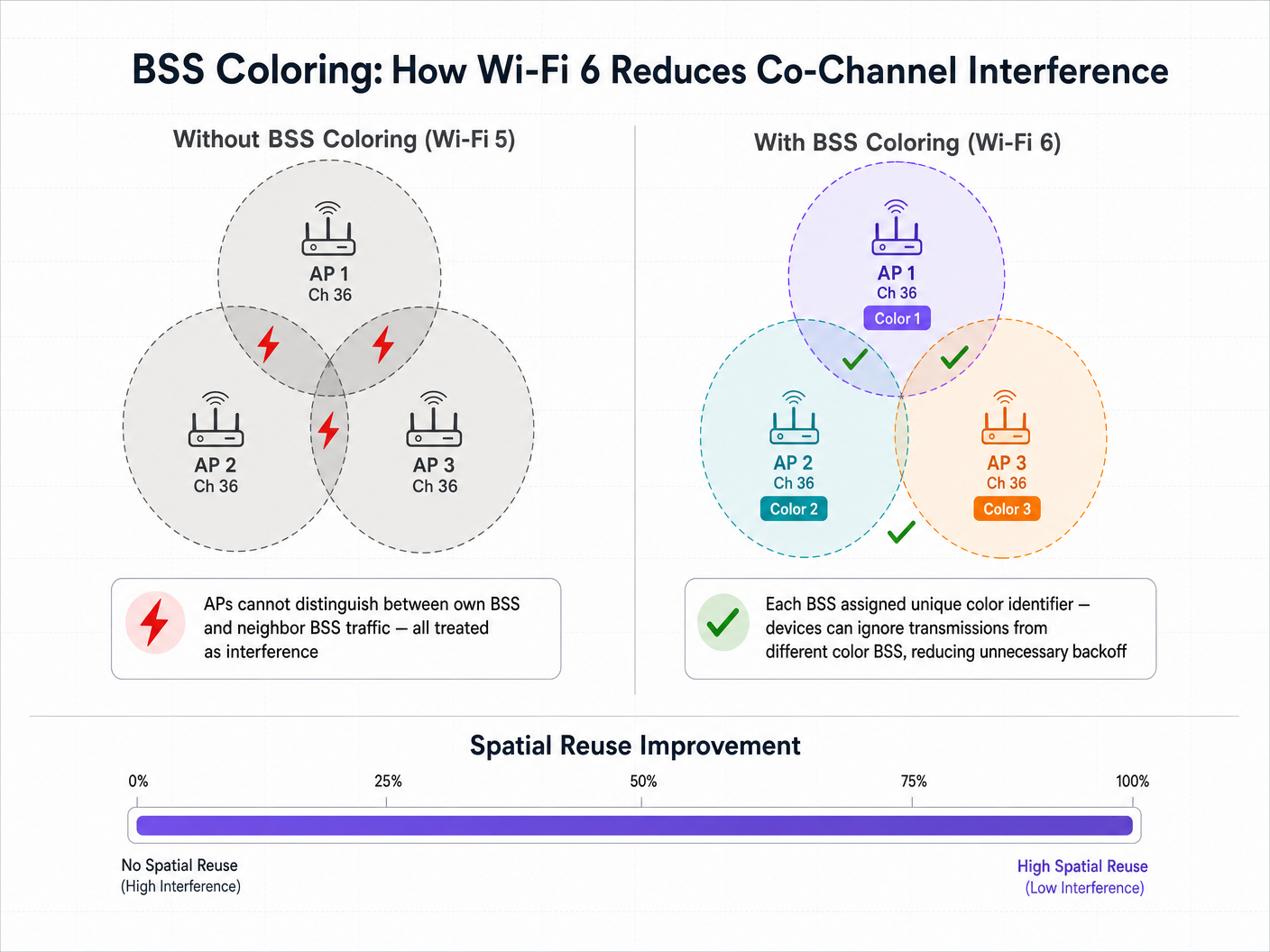
A funcionalidade que mais diretamente visa a interferência de co-canal é o BSS Coloring, formalmente conhecido como Reutilização Espacial. Em uma implantação densa, múltiplos APs frequentemente operam no mesmo canal devido à disponibilidade limitada de espectro. No Wi-Fi 5, um dispositivo cliente não consegue distinguir entre o tráfego destinado ao seu próprio AP (seu Basic Service Set) e o tráfego de um AP vizinho no mesmo canal. Ele trata todo o tráfego como interferência e adia a transmissão, independentemente de quão fraco o sinal interferente realmente seja.
O Wi-Fi 6 adiciona um identificador de 6 bits — a "cor" — ao cabeçalho da camada física (PHY). Os dispositivos agora podem diferenciar entre tráfego intra-BSS (mesma cor) e tráfego inter-BSS (cor diferente). Se um dispositivo detecta uma transmissão com uma cor diferente, ele aplica um limite adaptativo de Clear Channel Assessment (CCA). Se o sinal interferente for relativamente fraco, o dispositivo pode ignorá-lo e transmitir simultaneamente, aumentando significativamente a capacidade geral da rede através da reutilização espacial.
Guia de Implementação: Implantação para Alta Densidade
A implantação do Wi-Fi 6 exige uma mudança estratégica de um design focado na cobertura para uma arquitetura focada na capacidade. As seguintes recomendações se aplicam a ambientes de Hospitalidade , Varejo e setor público.
1. Estratégia de Largura de Canal
Embora o Wi-Fi 6 suporte canais de 160 MHz, implantá-los em ambientes corporativos raramente é aconselhável. Canais mais largos significam menos canais não sobrepostos disponíveis, aumentando drasticamente a interferência de co-canal.
Recomendação: Padronize em canais de 20 MHz ou 40 MHz na banda de 5 GHz para ambientes de alta densidade, como estádios e centros de conferências. Conte com OFDMA e esquemas de modulação mais altos (1024-QAM) para entregar throughput, em vez de forçar com canais largos.
Ao planejar seu espectro, esteja atento aos Canais DFS: O Que São e Quando Evitá-los . Embora o Wi-Fi 6 seja mais eficiente, eventos de detecção de radar ainda forçarão mudanças de canal, interrompendo a conectividade do cliente. Para equipes de língua italiana, a mesma orientação está disponível como Canali DFS: Cosa sono e quando evitarli .
2. Gerenciando a Realidade de Clientes Mistos
A principal ressalva dos recursos do Wi-Fi 6, como OFDMA e BSS Coloring, é que eles exigem suporte do cliente. Em ambientes de atendimento ao público, como Varejo ou Hotelaria , você não controla os dispositivos do cliente. Quando dispositivos legados Wi-Fi 5 ou Wi-Fi 4 se conectam, a rede deve retornar ao OFDM padrão e aos mecanismos de contenção legados para essas transmissões específicas. Os benefícios de mitigação de interferência do Wi-Fi 6, portanto, escalam proporcionalmente com a penetração de clientes Wi-Fi 6 em seu ambiente.
3. Integrando Inteligência de Rede
Para justificar o investimento de capital em uma atualização para Wi-Fi 6, os líderes de TI precisam de visibilidade sobre a utilização da rede e as capacidades dos clientes. É aqui que uma plataforma de WiFi Analytics se torna essencial. Ao integrar a sobreposição de análise da Purple, os arquitetos de rede podem rastrear a taxa de adoção de dispositivos compatíveis com Wi-Fi 6 que entram em seus locais, correlacionar métricas de desempenho da rede com dados de fluxo de pessoas e tempo de permanência, e identificar zonas específicas onde dispositivos legados estão causando contenção desproporcional.
Melhores Práticas e Integração de Segurança
Onboarding Contínuo em Escala
À medida que você atualiza a infraestrutura para lidar com maior capacidade, a experiência de onboarding deve escalar de acordo. O Wi-Fi 6 exige suporte para WPA3, fornecendo criptografia mais forte. Para Guest WiFi público, a indústria está se movendo em direção a uma autenticação contínua e segura. A Purple atua como um provedor de identidade gratuito para serviços como OpenRoaming sob a licença Connect, permitindo que os usuários se conectem automaticamente e com segurança sem captive portals, aproveitando a autenticação 802.1X de nível empresarial. Isso é particularmente relevante à medida que olhamos para o futuro da conectividade — veja nossos insights recentes sobre Como um wi fi assistant Habilita o Acesso Sem Senha em 2026 .
Otimizando a Banda de 2.4 GHz
Ao contrário do Wi-Fi 5, que operava apenas na banda de 5 GHz, o Wi-Fi 6 se aplica tanto a 2.4 GHz quanto a 5 GHz. Isso dá nova vida ao espectro de 2.4 GHz, que é crucial para implantações de IoT em Saúde e logística. O BSS Coloring é particularmente valioso aqui, dado o número limitado de canais não sobrepostos (1, 6 e 11). O Target Wake Time (TWT) também estende drasticamente a vida útil da bateria de sensores IoT e dispositivos de telemetria médica operando nesta banda.
Considerações de Conformidade
Para implantações em indústrias regulamentadas, as melhorias de segurança no Wi-Fi 6 são diretamente relevantes para a postura de conformidade. O WPA3 com Simultaneous Authentication of Equals (SAE) aborda vulnerabilidades no WPA2-Personal que eram exploráveis por meio de ataques de dicionário offline. Para ambientes sujeitos a PCI DSS (processamento de pagamentos de varejo) ou GDPR (captura de dados de convidados), o WPA3 fortalece a camada de criptografia da rede sem fio, reduzindo o escopo do risco de conformidade.
Solução de Problemas e Mitigação de Riscos
Modos de Falha Comuns
A causa mais comum de interferência autoinduzida em implantações de Wi-Fi 6 é o superdimensionamento da potência de transmissão. As equipes de TI frequentemente deixam a potência de transmissão do AP em "Auto", resultando em APs com células de cobertura sobrepostas que "gritam" umas sobre as outras. A mitigação é ajustar manualmente os limites de potência de transmissão, garantindo que a sobreposição de células seja suficiente para roaming contínuo, mas apertada o suficiente para minimizar a interferência de co-canal.
Uma segunda falha comum é projetar uma rede assumindo que todos os clientes suportam Wi-Fi 6, o que leva a gargalos de capacidade quando a realidade da prevalência de dispositivos legados se torna aparente. A mitigação é usar análises para entender sua combinação específica de clientes antes de finalizar o design de RF.
Finalmente, o BSS Coloring mal configurado — onde os APs não estão atribuindo ou coordenando corretamente os identificadores de cor — significa que os benefícios de reutilização espacial simplesmente não são realizados. Certifique-se de que seu controlador de LAN sem fio ou plataforma de gerenciamento em nuvem esteja executando o firmware mais recente e que o BSS Coloring esteja explicitamente ativado e monitorado através do console de gerenciamento.
ROI e Impacto nos Negócios
O caso de negócios para o Wi-Fi 6 vai além das métricas de TI. Em grandes locais, o desempenho da rede impacta diretamente a experiência do usuário e a eficiência operacional. Por exemplo, em um ambiente de estádio, habilitar a conectividade contínua permite pedidos no assento e engajamento em tempo real. Ao combinar a infraestrutura Wi-Fi 6 com a plataforma da Purple, os locais podem aproveitar serviços baseados em localização e navegação interna — a Purple lançou recentemente o Modo de Mapas Offline para Navegação Contínua e Segura para WiFi Hotspots , estendendo essa capacidade mesmo sem uma conexão ativa com a internet.
Além disso, a expansão da Purple para novos setores — incluindo a recente nomeação de Iain Fox como VP de Crescimento para o Setor Público para Impulsionar a Inclusão Digital e a Inovação em Cidades Inteligentes — destaca a crescente necessidade de conectividade robusta e resistente a interferências em implantações municipais e de Transporte , onde a confiabilidade da rede é uma questão de segurança pública e prestação de serviços.
Medindo o Sucesso: No lado técnico, acompanhe a redução nas porcentagens de utilização do canal durante as horas de pico e a diminuição nas taxas de nova tentativa do cliente. No lado dos negócios, meça o aumento de usuários conectados simultaneamente, taxas mais altas de captura de dados através do portal de convidados e pontuações aprimoradas de satisfação do convidado. O Wi-Fi 6 não quebra as leis da física — a interferência de RF ainda existe. No entanto, ele fornece às equipes de TI ferramentas sofisticadas e determinísticas para gerenciar essa interferência, transformando o wireless de um meio de "melhor esforço" em uma utilidade empresarial confiável.
Definições principais
BSS Coloring (Spatial Reuse)
A Wi-Fi 6 mechanism that adds a 6-bit identifier to PHY headers, allowing devices to differentiate between their own network traffic and overlapping neighbour network traffic, thereby reducing unnecessary transmission deferrals and enabling simultaneous transmissions on the same channel.
Critical for high-density environments (stadiums, multi-tenant buildings) where co-channel interference previously crippled network capacity. Must be enabled explicitly on the wireless LAN controller.
OFDMA (Orthogonal Frequency-Division Multiple Access)
A multi-user technology that subdivides a Wi-Fi channel into smaller Resource Units (RUs), allowing an AP to communicate with multiple clients simultaneously within a single channel occupancy event.
Solves the inefficiency of Wi-Fi 5 OFDM, particularly for environments with many devices sending small amounts of data — IoT sensors, retail point-of-sale terminals, and mobile messaging applications.
Resource Unit (RU)
The smallest unit of frequency allocation in OFDMA. A 20 MHz channel can be divided into up to 9 RUs, each serving a different client simultaneously.
IT architects need to understand RUs to grasp how Wi-Fi 6 achieves its capacity improvements without requiring wider channels or additional spectrum.
Co-Channel Interference (CCI)
Performance degradation that occurs when multiple access points and clients operate on the exact same frequency channel within range of one another, forcing them to wait for clear airtime via CSMA/CA.
The primary enemy of high-density Wi-Fi design. Mitigated by careful channel planning, cell size management, and Wi-Fi 6 BSS Coloring.
Target Wake Time (TWT)
A Wi-Fi 6 feature that allows APs to negotiate scheduled wake windows with client devices, defining exactly when they will wake up to send or receive data.
Crucial for IoT deployments in healthcare and retail logistics, as it dramatically extends device battery life and reduces overall medium contention by preventing all devices from competing for airtime simultaneously.
Clear Channel Assessment (CCA)
The 'listen before talk' mechanism devices use to determine if the RF medium is busy before transmitting. In Wi-Fi 5, a single threshold applies to all detected energy. In Wi-Fi 6, BSS Coloring enables adaptive CCA thresholds based on the color of the detected transmission.
BSS Coloring modifies the CCA thresholds, allowing devices to be more aggressive in transmitting when the interfering signal originates from a different-color BSS.
1024-QAM (Quadrature Amplitude Modulation)
An advanced modulation scheme in Wi-Fi 6 that encodes 10 bits of data per symbol, a 25% increase over Wi-Fi 5's 256-QAM (8 bits per symbol).
Delivers higher peak throughput, but requires very high Signal-to-Noise Ratio (SNR). Clients must be in close proximity to the AP to benefit, making it most relevant for short-range, high-throughput use cases.
OpenRoaming
A federation standard built on Passpoint (802.11u/Hotspot 2.0) that allows users to seamlessly and securely connect to participating Wi-Fi networks without captive portals, using 802.1X authentication and roaming agreements between identity providers.
The future of enterprise guest access. Purple acts as a free identity provider for this service under the Connect license, streamlining the user journey while maintaining enterprise-grade security and enabling GDPR-compliant data capture.
Exemplos práticos
A large conference centre is upgrading its main auditorium from Wi-Fi 5 to Wi-Fi 6. The current deployment uses 80 MHz channels to maximise marketing claims of 'gigabit speeds,' but during keynote speeches with 2,000 attendees, the network grinds to a halt due to co-channel interference. How should the new Wi-Fi 6 architecture be configured?
Step 1: Reduce channel width from 80 MHz to 20 MHz. This increases the number of available non-overlapping channels in the 5 GHz band from 6 to 25, drastically reducing co-channel interference. Step 2: Enable BSS Coloring on the wireless controller to allow spatial reuse among APs that must share a channel. Step 3: Implement OFDMA for both uplink and downlink to efficiently handle the high volume of small packets (social media updates, messaging) typical of conference environments. Step 4: Tune AP transmit power down to create smaller, denser micro-cells, minimising the RF footprint of each AP. Step 5: Disable legacy data rates (below 12 Mbps) to force clients to use more efficient modulation and clear the airtime faster.
A hospital IT director is deploying a new fleet of Wi-Fi 6 IoT telemetry monitors across a ward. The ward already has legacy Wi-Fi 4 guest devices operating heavily on the 2.4 GHz band. How does Wi-Fi 6 help, and what configuration is required?
Step 1: Unlike Wi-Fi 5, Wi-Fi 6 operates in the 2.4 GHz band. The new telemetry monitors can leverage OFDMA and Target Wake Time (TWT) in 2.4 GHz, dramatically extending battery life. Step 2: Configure a dedicated SSID for the IoT devices on a separate VLAN, steering them to specific AP radios if the hardware supports dual 5GHz or software-defined radios. Step 3: Enable BSS Coloring on the 2.4 GHz band to mitigate interference from the legacy guest devices and neighbouring wards. Step 4: Strictly enforce the 1, 6, 11 channel plan with 20 MHz channel widths on 2.4 GHz — do not use 40 MHz channels. Step 5: Integrate Purple's analytics to monitor the airtime utilisation of the legacy guest devices and ensure they are not starving the critical IoT traffic.
Questões práticas
Q1. You are designing the Wi-Fi network for a high-density retail mall. You have deployed Wi-Fi 6 APs on 20 MHz channels. However, your analytics dashboard shows high latency and channel utilisation during peak trading hours. You verify that BSS Coloring is enabled and correctly configured. What is the most likely cause of the ongoing interference, and how do you investigate it?
Dica: Consider the capabilities of the devices actually connecting to the network in a public retail space, and how legacy devices interact with Wi-Fi 6 efficiency features.
Ver resposta modelo
The most likely cause is a high percentage of legacy (Wi-Fi 4 or Wi-Fi 5) client devices. BSS Coloring and OFDMA only mitigate interference when the client devices also support Wi-Fi 6. In a public retail environment, the network must fall back to legacy CSMA/CA contention mechanisms for older devices, negating many of the Wi-Fi 6 efficiency benefits. To investigate, use Purple's analytics to generate a client capability breakdown, segmenting devices by Wi-Fi generation. If less than 60-70% of clients are Wi-Fi 6 capable, the interference mitigation gains will be limited. The remediation is to increase AP density to create smaller cells, reduce transmit power further, and potentially implement band steering to push capable devices to less congested channels.
Q2. A stadium IT team is planning to use 80 MHz channels to support 4K video streaming for journalists in the press box. The press box has 15 APs deployed in close proximity across a 400 square metre area. Why is this a high-risk design, even with Wi-Fi 6, and what is the recommended alternative?
Dica: Calculate how many non-overlapping 80 MHz channels exist in the 5 GHz band, then consider what happens when 15 APs must share those channels.
Ver resposta modelo
Using 80 MHz channels in the 5 GHz band provides only 6 non-overlapping channels (including DFS). With 15 APs in a 400 square metre area, every channel must be reused multiple times in close proximity. Even with BSS Coloring, the noise floor will be elevated to the point where the adaptive CCA threshold cannot provide sufficient spatial reuse benefit — the signals will simply be too strong to ignore. The recommended alternative is to use 20 MHz channels (25 non-overlapping channels available), rely on OFDMA to handle the multi-stream video traffic efficiently, and configure the APs for micro-cell architecture with reduced transmit power. For the specific 4K streaming use case, the guaranteed throughput of a 20 MHz OFDMA channel serving a small number of dedicated journalists is more than sufficient.
Q3. You are configuring a new Wi-Fi 6 deployment in a hospital. The medical telemetry devices are legacy 2.4 GHz only (802.11n / Wi-Fi 4). How should you configure the 2.4 GHz radios on the new Wi-Fi 6 APs to support these devices while minimising interference? What compliance considerations apply?
Dica: Focus on fundamental RF design principles for the 2.4 GHz band, which only has 3 non-overlapping channels, and consider the regulatory environment for medical devices.
Ver resposta modelo
You must strictly adhere to the 1, 6, 11 channel plan using 20 MHz channel widths — never use 40 MHz channels in 2.4 GHz in a healthcare environment. Carefully tune transmit power down to minimise cell overlap. Disable lower data rates (1, 2, 5.5, 11 Mbps) to force clients to use more efficient modulation schemes, clearing the airtime faster. Enable BSS Coloring on the 2.4 GHz radios to help manage interference from neighbouring wards. From a compliance perspective, medical device wireless deployments must adhere to IEC 60601-1-2 (electromagnetic compatibility for medical electrical equipment). You should conduct a formal RF site survey before and after deployment, and document the interference environment as part of the device risk assessment. Ensure the telemetry devices are on a dedicated VLAN with QoS prioritisation, and that the network is segmented from general guest traffic in accordance with your healthcare data governance policy.