
WiFi em Lojas de Varejo: Construindo Perfis de Clientes a Partir de Dados de Fluxo de Pessoas
Este guia completo detalha como as equipes de TI de varejo corporativo podem transformar a infraestrutura WiFi existente em um robusto motor de coleta de dados primários. Ele abrange arquitetura técnica, padrões de conformidade e estratégias de implantação acionáveis para construir perfis de clientes a partir de análises de fluxo de pessoas.
Ouça este guia
Ver transcrição do podcast
Resumo Executivo
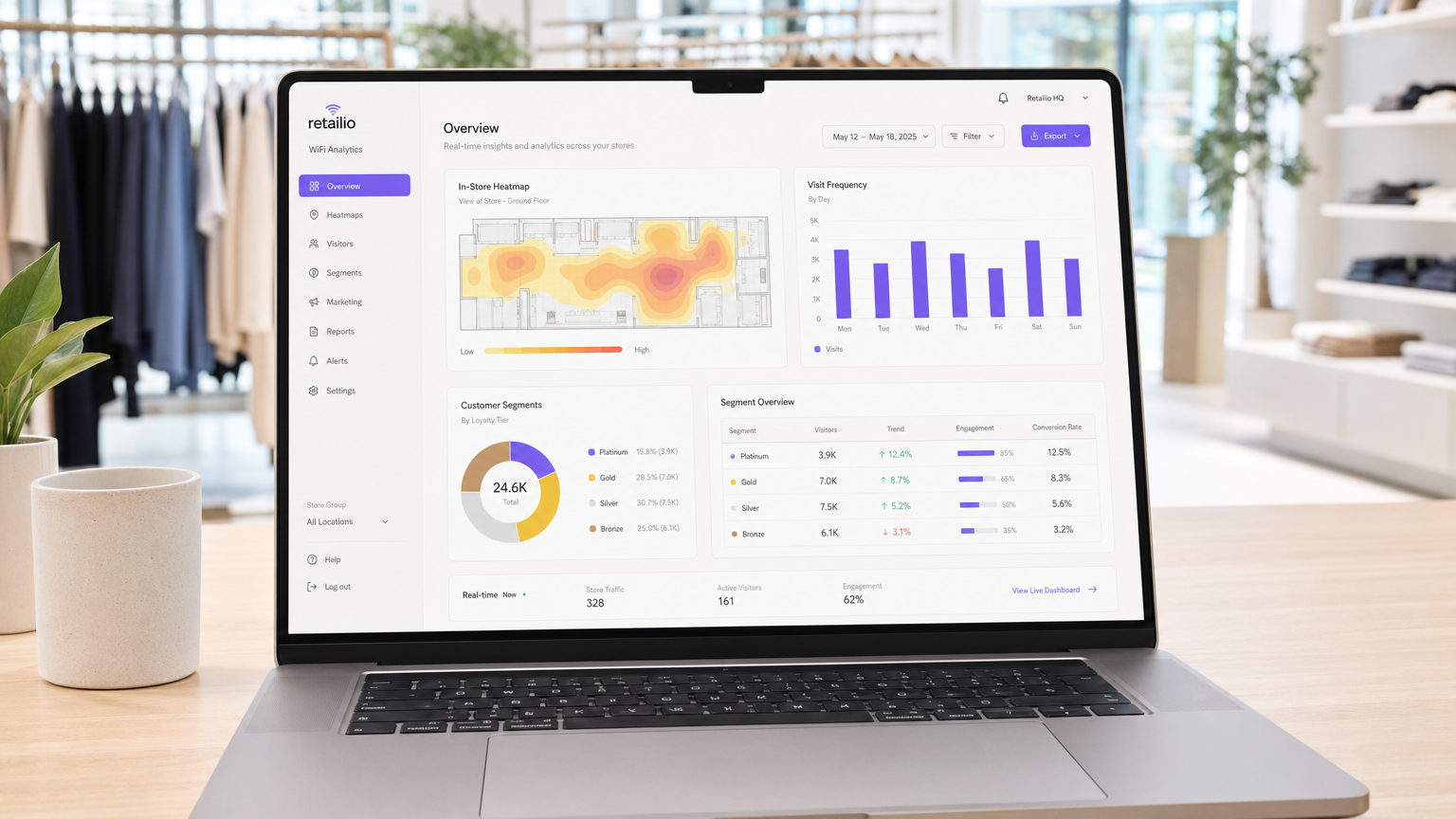
Para as operações de varejo modernas, o ambiente da loja física permanece um ponto de contato crítico, mas muitas vezes carece das análises granulares nativas do e-commerce. Este guia fornece uma estrutura técnica abrangente para transformar a infraestrutura sem fio padrão em um motor de análise de nível empresarial. Ao aproveitar as conexões autenticadas de Guest WiFi , líderes de TI e diretores de operações de locais podem coletar passivamente dados primários de alta fidelidade — incluindo frequência de visitas, tempo de permanência e análise de caminho.
A implantação de WiFi Analytics transforma a rede de um puro centro de custo em um ativo estratégico de negócios. Este documento detalha a arquitetura técnica necessária, a mudança da detecção passiva de MAC para sessões autenticadas e os padrões críticos de conformidade (GDPR, PCI DSS, WPA3) exigidos para uma implementação segura em ambientes de Varejo e Hotelaria .
Análise Técnica Aprofundada
A Mecânica da Coleta de Dados
Quando o dispositivo de um cliente entra em um espaço de varejo, ele transmite solicitações de sondagem contendo um endereço Media Access Control (MAC). Historicamente, isso permitia o rastreamento passivo. No entanto, sistemas operacionais modernos impõem a randomização de endereços MAC para proteger a privacidade do usuário. Para superar essa limitação e garantir alta fidelidade de dados, as implantações corporativas devem depender de conexões autenticadas.
Quando um usuário se conecta via um Captive Portal, o sistema captura uma identidade verificada e consentida. Essa identidade é mapeada para um identificador de dispositivo persistente, formando a base para um perfil robusto do cliente.
Fluxos de Dados Essenciais
- Frequência de Visitas: Ao rastrear eventos de reconexão, o sistema constrói um perfil longitudinal de lealdade do cliente.
- Tempo de Permanência: Medir a duração das sessões ativas fornece insights sobre o engajamento do cliente e se correlaciona fortemente com a probabilidade de conversão.
- Análise de Caminho: A utilização da trilateração em múltiplos pontos de acesso (APs) permite o mapeamento das jornadas físicas dos clientes pela loja.
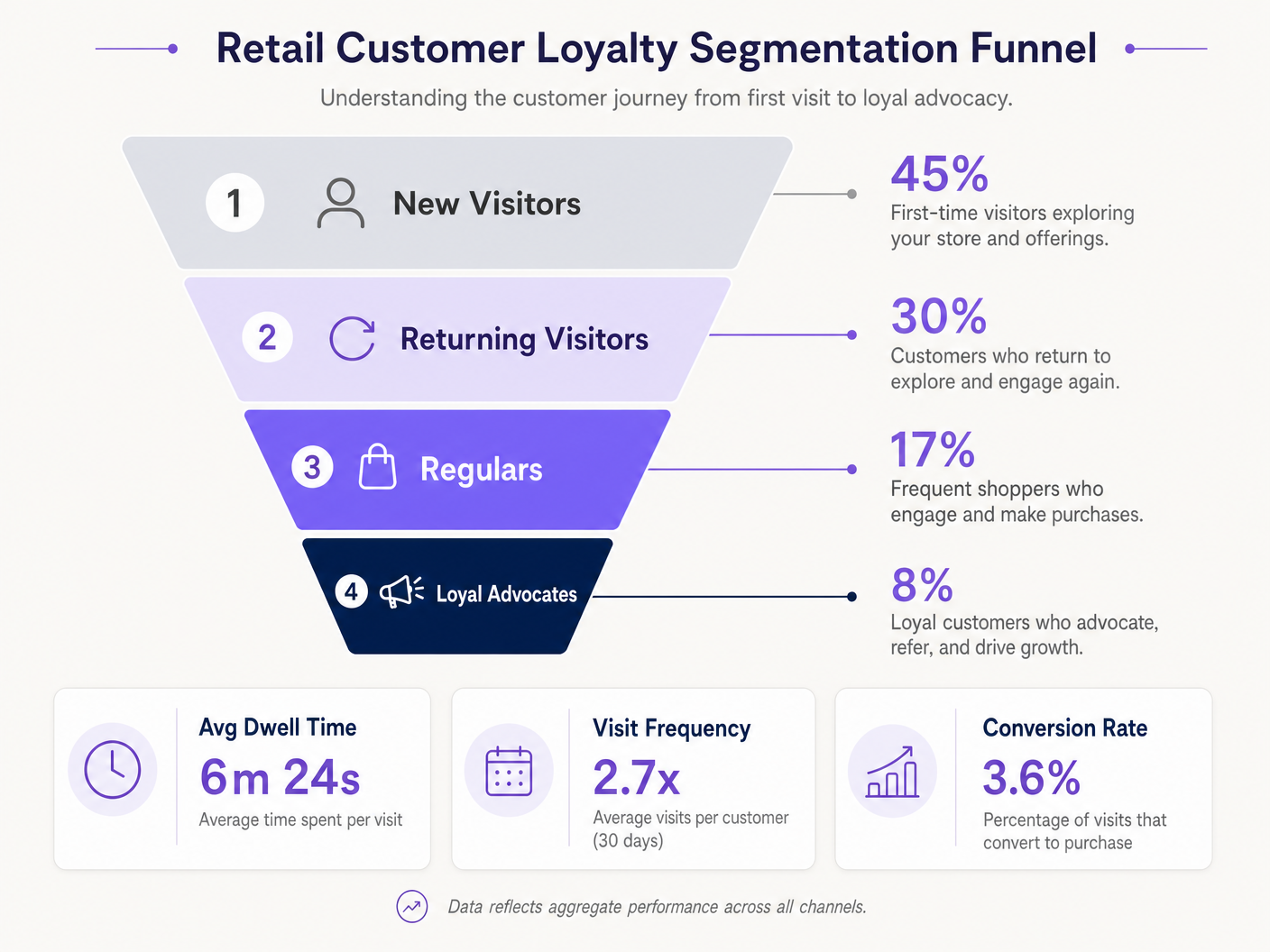
- Segmentação de Lealdade: A agregação de frequência e tempo de permanência permite a segmentação automatizada (por exemplo, novos visitantes vs. defensores leais).
Arquitetura Empresarial
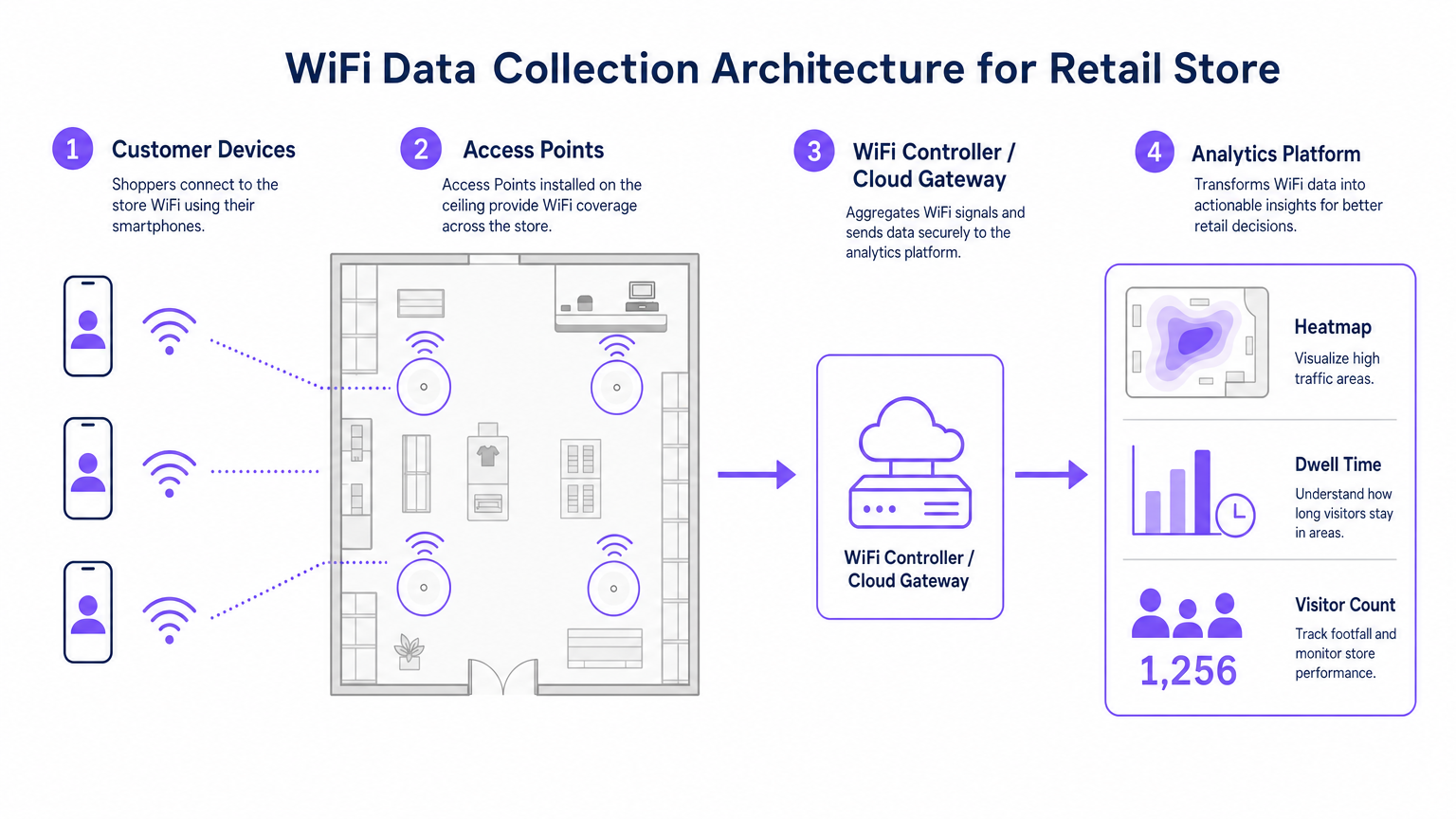
Uma implantação robusta de análise de WiFi para varejo consiste em quatro camadas primárias:
- Infraestrutura de Radiofrequência: Implantações de alta densidade exigem pontos de acesso 802.11ac Wave 2 ou 802.11ax (WiFi 6). A recomendação padrão é um AP por 1.500–2.000 pés quadrados, ajustado para zonas de alto tráfego.
- Plano de Gerenciamento de Controlador/Nuvem: Agrega telemetria da camada de RF e gerencia o roaming do cliente.
- Plataforma de Análise: Ingesta telemetria de rede bruta (eventos de associação, força do sinal) e a transforma em inteligência acionável.
- Camada de Engajamento: Integra-se via APIs ou webhooks com sistemas CRM para acionar fluxos de trabalho de marketing automatizados baseados em dados espaciais em tempo real.
Ouça nosso briefing técnico completo sobre a implantação dessas arquiteturas:
Guia de Implementação
A implantação bem-sucedida requer alinhamento entre a engenharia de rede e as operações de negócios.
- Otimize o Fluxo de Autenticação: Implemente um Captive Portal sem atrito. Minimize os campos de entrada para maximizar as taxas de adesão, garantindo que mecanismos claros de consentimento estejam em vigor. Considere integrar credenciais de programas de fidelidade existentes.
- Projete para Triangulação: Designs de cobertura padrão são insuficientes para análise de caminho. Garanta que pelo menos três pontos de acesso forneçam cobertura sobreposta em zonas de rastreamento chave para permitir uma trilateração precisa.
- Defina Indicadores Chave de Desempenho (KPIs): Estabeleça métricas de linha de base antes do lançamento. KPIs comuns incluem tempo médio de permanência por zona, proporções de visitantes novos vs. recorrentes e horas de pico de fluxo de pessoas.
Melhores Práticas
- Padronize o Hardware: Garanta hardware de AP consistente em todos os locais para manter telemetria de sinal uniforme, simplificando a normalização de dados na camada de análise.
- Isole Redes: Segregue estritamente o tráfego de convidados das redes corporativas e de Ponto de Venda (POS) usando VLANs e SSIDs dedicados para manter a conformidade com PCI DSS.
- Automatize a Retenção de Dados: Configure a plataforma de análise para purgar automaticamente os dados brutos da sessão após um período definido (por exemplo, 12 meses) para minimizar o risco de conformidade sob o GDPR.
Para um contexto de implementação mais amplo em diferentes setores, consulte nossos guias sobre Soluções WiFi para Hotelaria: O que Procurar em um Provedor e Wi Fi em Automóveis: O Guia Completo para Empresas 2026 .
Solução de Problemas e Mitigação de Riscos
| Modo de Falha | Sintoma | Estratégia de Mitigação |
|---|---|---|
| Precisão de Triangulação Ruim | Dados de localização saltam erraticamente pelo layout da planta. | Realize um levantamento preditivo de RF do local; aumente a densidade de APs em zonas críticas; garanta que os APs sejam montados em alturas uniformes. |
| Baixas Taxas de Autenticação | Alto fluxo de pessoas passivo, mas baixa contagem de usuários registrados. | Simplifique a UI do Captive Portal; ofereça opções de login social; garanta que a página de splash seja totalmente responsiva. |
| Silos de Dados | Os dados de análise não estão chegando ao CR"M. | Verificar conectividade do endpoint da API; verificar logs de entrega de webhook; garantir que os formatos de payload de dados correspondam aos requisitos de esquema do CRM. |
ROI e Impacto nos Negócios
A transição para uma implementação de WiFi orientada por análise gera resultados de negócios mensuráveis. Varejistas relatam consistentemente:
- Taxas de Conversão Aumentadas: Correlacionadas diretamente com estratégias de engajamento direcionadas baseadas no tempo de permanência.
- Layouts de Loja Otimizados: Decisões baseadas em dados sobre a colocação de produtos, derivadas da análise de percurso.
- Retenção de Clientes Aprimorada: Campanhas automatizadas de reengajamento acionadas por limites de visitantes inativos.
Ao preencher a lacuna entre operações físicas e inteligência digital, a análise de WiFi empresarial oferece uma vantagem competitiva definitiva no cenário de varejo moderno.
Definições principais
MAC Address Randomisation
A privacy feature in modern operating systems that broadcasts a fake MAC address during network probing, preventing passive tracking.
Forces IT teams to rely on authenticated connections rather than passive listening for accurate footfall analytics.
Trilateration
The process of determining absolute or relative locations of points by measurement of distances, using the geometry of circles, spheres or triangles.
Used by the analytics platform to calculate a device's physical location based on signal strength received by multiple APs.
Captive Portal
A web page that the user of a public-access network is obliged to view and interact with before access is granted.
The primary mechanism for capturing user consent and identity to build first-party data profiles.
Dwell Time
The total duration a customer's device remains continuously associated with the WiFi network during a single visit.
A critical metric for marketing teams to gauge customer engagement and intent.
802.11ax (WiFi 6)
The latest standard for wireless networks, offering higher throughput, better performance in dense environments, and improved power efficiency.
The recommended hardware standard for enterprise retail environments requiring high-density analytics.
PCI DSS
Payment Card Industry Data Security Standard; a set of security standards designed to ensure that all companies that accept, process, store or transmit credit card information maintain a secure environment.
Mandates strict network segregation between guest WiFi and point-of-sale systems.
VLAN (Virtual Local Area Network)
A logical subnetwork that groups a collection of devices from different physical LANs.
Used to securely isolate guest WiFi traffic from internal corporate networks.
First-Party Data
Information a company collects directly from its customers and owns entirely.
The ultimate output of a successful retail WiFi analytics deployment, highly valuable for targeted marketing.
Exemplos práticos
A 50-store retail chain needs to implement footfall tracking to optimize staffing, but their current network only provides passive MAC detection, resulting in highly inaccurate data due to MAC randomization.
Deploy a captive portal authentication system integrated with the existing WiFi controllers. Configure the portal to require a simple email or social login in exchange for free WiFi access. Map the authenticated identity to the device's persistent identifier, bypassing the randomized MAC issue. Integrate this data feed via API into the central workforce management system to align staffing levels with verified peak footfall hours.
A large conference centre wants to track attendee flow between different exhibition halls to justify premium pricing for certain vendor booths.
Redesign the RF layout specifically for location analytics rather than just coverage. Deploy additional 802.11ax access points to ensure at least three APs overlap in key transition corridors, enabling accurate trilateration. Feed the signal strength telemetry into the analytics platform to generate real-time heatmaps and path analysis reports for the events team.
Questões práticas
Q1. Your marketing team wants to implement path analysis to track customer movement around a new product display. The store currently has two access points providing adequate signal coverage for connectivity. What is the necessary technical recommendation?
Dica: Consider the requirements for spatial calculation.
Ver resposta modelo
You must advise the marketing team that path analysis requires trilateration. Therefore, you need to deploy at least one additional access point to ensure the target area is covered by overlapping signals from a minimum of three APs.
Q2. During a security audit, it is discovered that the guest WiFi network and the POS terminals are operating on the same physical switch without logical separation. What is the immediate compliance risk and remediation?
Dica: Think about payment security standards.
Ver resposta modelo
This configuration violates PCI DSS requirements. The immediate remediation is to configure separate VLANs on the switch to logically isolate the guest traffic from the POS network, ensuring no lateral movement is possible.
Q3. The operations director notes that while the system reports 1,000 visitors per day based on passive MAC detection, the authenticated user count is only 150. How do you explain this discrepancy?
Dica: Consider modern mobile OS features.
Ver resposta modelo
Explain that modern smartphones use MAC address randomisation when probing for networks, which artificially inflates passive counts as a single device may broadcast multiple fake MACs. The authenticated count of 150 represents the true, high-fidelity data of users who actively engaged with the captive portal.
Continue a ler esta série
Privacidade desde a Concepção: Anonimizando Dados WiFi para Conformidade com a GDPR
Este guia autorizado detalha a arquitetura técnica e as estratégias de implementação para anonimizar dados WiFi, garantindo a conformidade com a GDPR. Ele fornece a líderes de TI e arquitetos de rede estruturas acionáveis para equilibrar análises robustas de locais com requisitos rigorosos de privacidade de dados.
Heatmapping vs Presence Analytics: Diferenças Técnicas
Este guia técnico e autoritário detalha as diferenças arquitetônicas e operacionais críticas entre WiFi heatmapping e presence analytics para operadores de locais empresariais. Ele fornece a líderes de TI, arquitetos de rede e diretores de operações estruturas de implantação acionáveis, cenários de implementação reais e melhores práticas neutras em relação a fornecedores para extrair o ROI máximo de sua infraestrutura sem fio existente.
Como Calcular o Tempo de Permanência Usando Análise de Localização WiFi
Este guia oferece uma referência técnica abrangente para calcular o tempo de permanência WiFi usando análise de localização WiFi, cobrindo a arquitetura completa, desde a captura de solicitações de sondagem 802.11, passando pela trilateração baseada em RSSI, até a análise de zonas geocercadas. Ele é projetado para gerentes de TI, arquitetos de rede e diretores de operações de locais que precisam implantar inteligência de localização precisa e escalável em ambientes de varejo, hotelaria, saúde e setor público. Os leitores obterão orientação de implementação acionável, estudos de caso reais e uma estrutura clara para traduzir dados espaciais brutos em resultados de negócios mensuráveis.