

WiFi para Pacientes: Um Guia Completo para NHS Trusts e Operadores Hospitalares
Um guia técnico e comercial definitivo para NHS Trusts e operadores hospitalares sobre como implantar, proteger e monetizar o WiFi para pacientes. Abrange segmentação de rede, conformidade com DSPT, filtragem de conteúdo e aproveitamento de análises para melhorar os resultados dos pacientes.
Listen to this guide
View podcast transcript
Resumo Executivo
Fornecer WiFi para pacientes robusto, seguro e em conformidade não é mais uma comodidade "agradável de ter" para NHS Trusts e operadores de hospitais privados — é um requisito de infraestrutura crítico. Os pacientes esperam conectividade para gerenciar suas vidas, comunicar-se com a família e acessar serviços de saúde digitais durante sua estadia. No entanto, fornecer essa conectividade em um ambiente clínico introduz desafios técnicos e de governança significativos.
Este guia fornece uma estrutura abrangente para gerentes de TI, arquitetos de rede e CTOs para projetar, implantar e gerenciar redes WiFi para pacientes. Exploramos a necessidade de segmentação de rede rigorosa, as complexidades da conformidade com o Data Security and Protection Toolkit (DSPT), a implementação de filtragem de conteúdo rigorosa e os modelos comerciais que sustentam essas implantações. Ao tratar o WiFi para pacientes como um serviço de nível empresarial, em vez de uma sobreposição de banda larga para consumidores, os Trusts podem mitigar riscos, garantir a integridade do sistema clínico e aproveitar plataformas como Guest WiFi para capturar insights acionáveis e melhorar a satisfação do paciente.
Análise Técnica Aprofundada: Arquitetura e Padrões
A base de qualquer implantação de WiFi hospitalar é a segregação absoluta entre o tráfego de pacientes e os sistemas clínicos. Um hospital é um ambiente de RF de alta densidade e alta interferência, onde dispositivos críticos para a vida operam em estreita proximidade com smartphones de consumo.
Segmentação de Rede e Design de VLAN
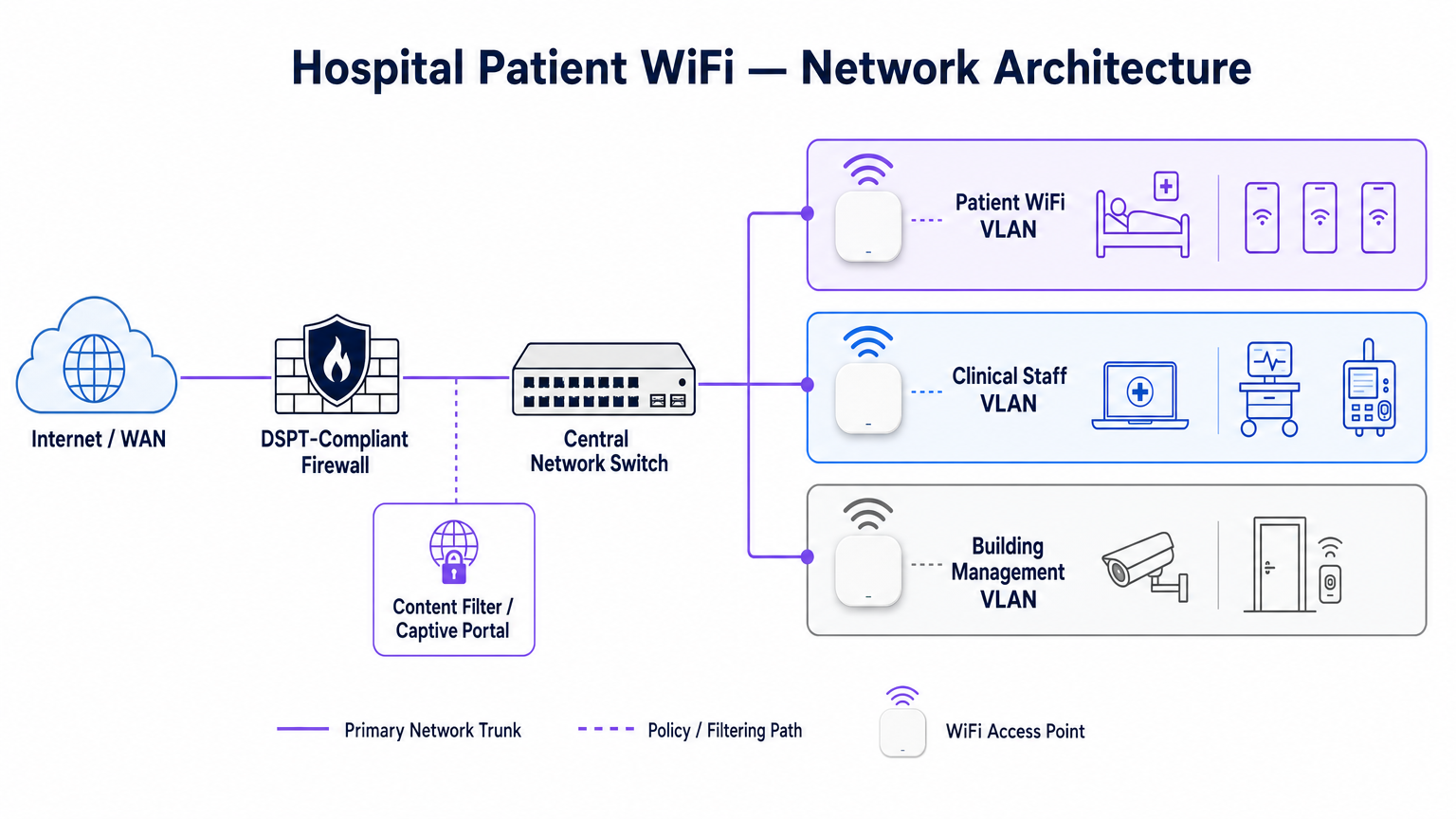
Para proteger a integridade clínica, o WiFi para pacientes deve operar em uma Virtual Local Area Network (VLAN) dedicada. A arquitetura empresarial padrão dita um mínimo de três segmentos distintos:
- VLAN de Pacientes/Convidados: Roteia através de um captive portal, impõe filtragem de conteúdo rigorosa e fornece acesso apenas à internet.
- VLAN Clínica: Dedicada a dispositivos de equipe e equipamentos médicos (por exemplo, bombas de infusão, estações de trabalho móveis). Ignora o captive portal e roteia através de um caminho monitorado e seguro.
- VLAN de Gerenciamento Predial: Suporta dispositivos IoT, CCTV e controles ambientais.
O tráfego na VLAN de Pacientes deve ser isolado no nível do switch e restrito por regras de firewall que negam explicitamente o roteamento para sub-redes internas.
Densidade de Pontos de Acesso e Planejamento de RF
A implantação de WiFi em um hospital exige a superação de barreiras físicas significativas — paredes revestidas de chumbo, máquinas pesadas e concreto denso. Confiar na "cobertura de corredor" é um modo de falha comum. Uma pesquisa de RF preditiva, seguida por uma validação ativa pós-instalação, é obrigatória.
Para novas implantações, IEEE 802.11ax (Wi-Fi 6) é o padrão de linha de base. Sua implementação de Orthogonal Frequency-Division Multiple Access (OFDMA) e BSS Colouring é crucial para lidar com a alta densidade de dispositivos típica de enfermarias hospitalares modernas, reduzindo a latência e mitigando a interferência de sistemas de telemetria médica operando na banda de 2.4 GHz.
Requisitos de Backhaul e Throughput
Um erro comum é provisionar pontos de acesso de nível empresarial, mas privá-los de backhaul insuficiente. Um hospital de 500 leitos pode facilmente gerar 1 Gbps de demanda concorrente durante as horas de pico da noite. Os operadores devem provisionar linhas dedicadas e não contestadas, em vez de circuitos de banda larga compartilhados, para garantir o throughput e evitar gargalos na rede principal. Para mais contexto sobre conectividade dedicada, consulte O Que É uma Linha Dedicada? Internet Empresarial Dedicada .
Guia de Implementação: Conformidade e Filtragem
Implantar a infraestrutura física é apenas metade do desafio; a sobreposição de governança e conformidade é igualmente crítica.
Conformidade com DSPT
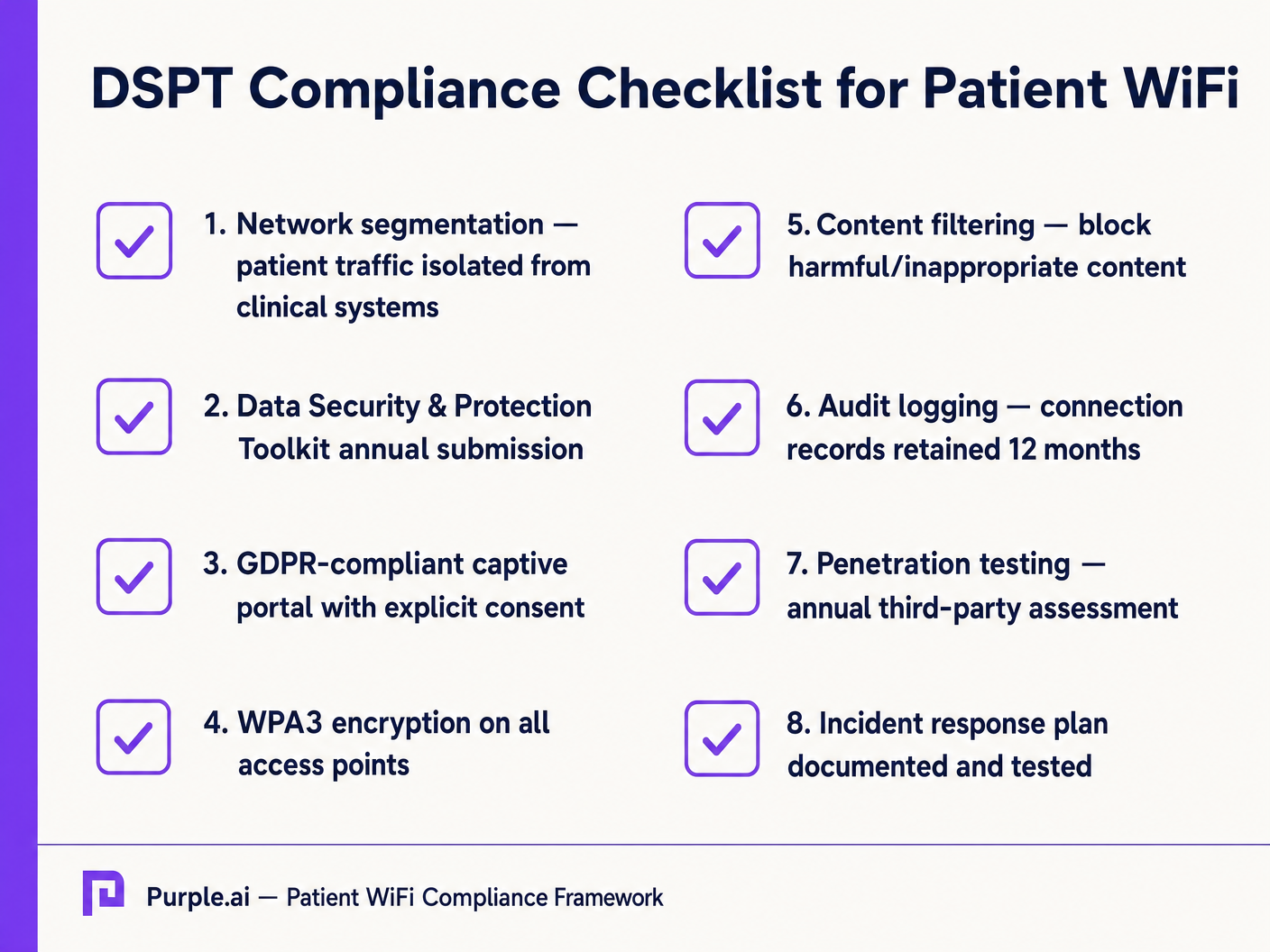
Para NHS Trusts, a adesão ao Data Security and Protection Toolkit (DSPT) é inegociável. As implantações de WiFi para pacientes devem evidenciar:
- Segmentação de rede rigorosa.
- Controles de acesso robustos e registro de auditoria (logs de conexão retidos por um mínimo de 12 meses).
- Testes de penetração anuais por terceiros.
Filtragem de Conteúdo
A orientação do NHS exige que o WiFi para pacientes bloqueie o acesso a conteúdo inadequado ou prejudicial, incluindo material adulto, sites extremistas e plataformas de jogos de azar. Isso é tipicamente alcançado via filtragem baseada em DNS ou proxy aplicada diretamente à VLAN de Pacientes. A solução de filtragem deve ingerir feeds de inteligência de ameaças em tempo real para bloquear dinamicamente domínios maliciosos recém-identificados.
Captive Portals e GDPR
O captive portal é a porta de entrada para a rede e o principal mecanismo para capturar o consentimento do usuário. Sob o GDPR, os Trusts devem obter consentimento explícito e informado antes de processar dados pessoais (como endereços MAC ou endereços de e-mail). O portal deve apresentar uma política de privacidade clara e opt-ins explícitos. A utilização de uma plataforma robusta garante a conformidade, ao mesmo tempo em que permite a coleta de dados demográficos valiosos.
ROI e Impacto nos Negócios: Modelos Gratuitos vs. Pagos
A estratégia comercial por trás do WiFi para pacientes define sua sustentabilidade a longo prazo.
O Modelo de WiFi Gratuito
A grande maioria dos NHS Trusts oferece WiFi para pacientes gratuitamente no ponto de uso. Este modelo é tipicamente financiado através de despesas de capital ou orçamentos operacionais. O ROI é medido pela satisfação do paciente (muitas vezes refletida em Friends e pontuações do Teste Familiar) e a redução da carga administrativa sobre a equipe clínica, que não precisa mais lidar com reclamações de conectividade.
O Modelo de Concessionária
Alguns Trusts maiores empregam um modelo de concessionária, onde um provedor de serviços gerenciados (MSP) terceirizado financia a infraestrutura em troca de direitos de monetização. Isso pode envolver a veiculação de publicidade direcionada através do captive portal ou a oferta de um serviço em camadas (navegação básica gratuita, streaming premium pago). Ao adotar este modelo, os Trusts devem garantir que o conteúdo publicitário seja rigorosamente verificado para se alinhar aos valores do NHS e que as práticas de monetização de dados estejam em conformidade com o GDPR.
Ao integrar WiFi Analytics , os Trusts podem monitorar a utilização da rede, rastrear o tempo de permanência dos pacientes e acionar pesquisas de feedback automatizadas pós-conexão, transformando um centro de custo em um ativo estratégico para melhoria operacional. Essa abordagem baseada em dados espelha implementações bem-sucedidas em outros setores, como Saúde e Varejo .
Key Definitions
VLAN (Virtual Local Area Network)
A logical subnetwork that groups a collection of devices from different physical LANs. Essential for isolating patient traffic from clinical systems.
Used by network architects to ensure that a compromised patient device cannot access sensitive medical equipment or electronic health records.
DSPT (Data Security and Protection Toolkit)
An online self-assessment tool that allows NHS organisations to measure their performance against the National Data Guardian's 10 data security standards.
Mandatory for all NHS Trusts; failure to properly segment patient WiFi or log access can result in a failed DSPT submission.
Captive Portal
A web page that a user of a public-access network is obliged to view and interact with before access is granted.
The primary interface for capturing user consent, presenting terms of use, and applying brand identity to the WiFi experience.
802.11ax (Wi-Fi 6)
The sixth generation of the Wi-Fi standard, designed specifically to improve performance in high-density environments.
Crucial for hospital wards where dozens of patients, visitors, and staff devices are competing for airtime simultaneously.
OFDMA (Orthogonal Frequency-Division Multiple Access)
A feature of Wi-Fi 6 that allows a single transmission to deliver data to multiple devices simultaneously.
Reduces latency and improves efficiency in crowded hospital environments, preventing the network from grinding to a halt during peak hours.
Content Filtering
The use of software or hardware to restrict the content that a reader is authorised to access over the network.
Required by NHS guidance to prevent access to illegal, extremist, or adult content on patient networks.
Leased Line
A dedicated, fixed-bandwidth, symmetric data connection connecting a business directly to the internet exchange.
Necessary for hospital WiFi backhaul to ensure guaranteed throughput, avoiding the contention issues of shared broadband.
MAC Address
A unique identifier assigned to a network interface controller (NIC) for use as a network address in communications.
Considered personal data under GDPR; its collection and storage by the WiFi analytics platform requires explicit user consent.
Worked Examples
A 400-bed NHS Trust is experiencing severe network congestion on its legacy patient WiFi during the hours of 6 PM to 9 PM, leading to patient complaints and staff distraction. The current setup uses a shared 500 Mbps broadband connection and Wi-Fi 4 (802.11n) access points in the corridors.
- Upgrade backhaul to a dedicated 1 Gbps symmetrical leased line to guarantee peak-hour throughput. 2. Replace corridor-based Wi-Fi 4 APs with in-room Wi-Fi 6 (802.11ax) APs to improve RF penetration and handle high device density via OFDMA. 3. Implement traffic shaping on the firewall to cap individual user bandwidth at 5 Mbps, preventing single users from monopolising the connection with 4K streaming.
A private hospital group wants to deploy a new patient WiFi network but is concerned about the DSPT compliance implications of capturing patient data on the captive portal.
Deploy a GDPR-compliant captive portal solution (like Purple) that separates authentication data from clinical data. Configure the portal to require explicit opt-in for any data processing beyond the minimum required for network access. Ensure the Patient VLAN is strictly isolated from the Clinical VLAN via the core firewall. Implement DNS-based content filtering to block malicious and inappropriate categories.
Practice Questions
Q1. An NHS Trust wants to implement a single SSID for both staff and patients to 'simplify the user experience'. They plan to use a captive portal to differentiate user types. Is this approach recommended?
Hint: Consider the DSPT requirements for network segmentation and the risk of a compromised patient device.
View model answer
No, this approach is highly discouraged and introduces significant security risks. Patient and clinical staff traffic must be segregated at the VLAN level with separate SSIDs. Relying solely on a captive portal for differentiation does not provide adequate Layer 2 isolation, putting clinical systems at risk from malware or lateral movement originating from untrusted patient devices.
Q2. A hospital is planning to upgrade its patient WiFi and wants to ensure adequate coverage. The IT manager suggests placing access points in the main corridors to cover the adjacent patient rooms and save on hardware costs. What is the flaw in this plan?
Hint: Think about the physical construction of hospital environments and RF attenuation.
View model answer
Corridor placement is a flawed strategy in hospitals. Hospital walls often contain lead lining (for X-ray rooms), heavy concrete, and dense infrastructure that severely attenuates RF signals. This results in poor in-room coverage, high latency, and dropped connections. Access points should be deployed inside patient rooms or wards based on a professional predictive RF survey.
Q3. A Trust has deployed patient WiFi but is receiving complaints about slow speeds during the evening. The APs are Wi-Fi 6, and the core switches are 10G capable. The internet connection is a 1 Gbps shared broadband line. What is the likely bottleneck?
Hint: Differentiate between local network capacity and WAN backhaul.
View model answer
The bottleneck is the shared broadband internet connection. Even with high-capacity local infrastructure (Wi-Fi 6 and 10G switches), a shared broadband line suffers from contention ratios, meaning the bandwidth is shared with other premises in the area. During evening peak hours, this contention severely degrades throughput. The Trust should upgrade to a dedicated, uncontended leased line.