
WiFi Universitário: Como Construir uma Rede Sem Fio em Todo o Campus
Este guia abrangente oferece a profissionais de TI seniores estratégias acionáveis para projetar, implantar e gerenciar uma rede sem fio robusta em todo o campus. Ele aborda arquitetura de rede hierárquica, padrões de segurança (IEEE 802.1X, WPA3, GDPR) e como alavancar análises para impulsionar o ROI em ambientes de ensino superior. Seja para atualizar a infraestrutura legada ou construir do zero, este guia mapeia cada ponto de decisão, desde o levantamento do local até a otimização contínua.
Ouça este guia
Ver transcrição do podcast
Resumo Executivo
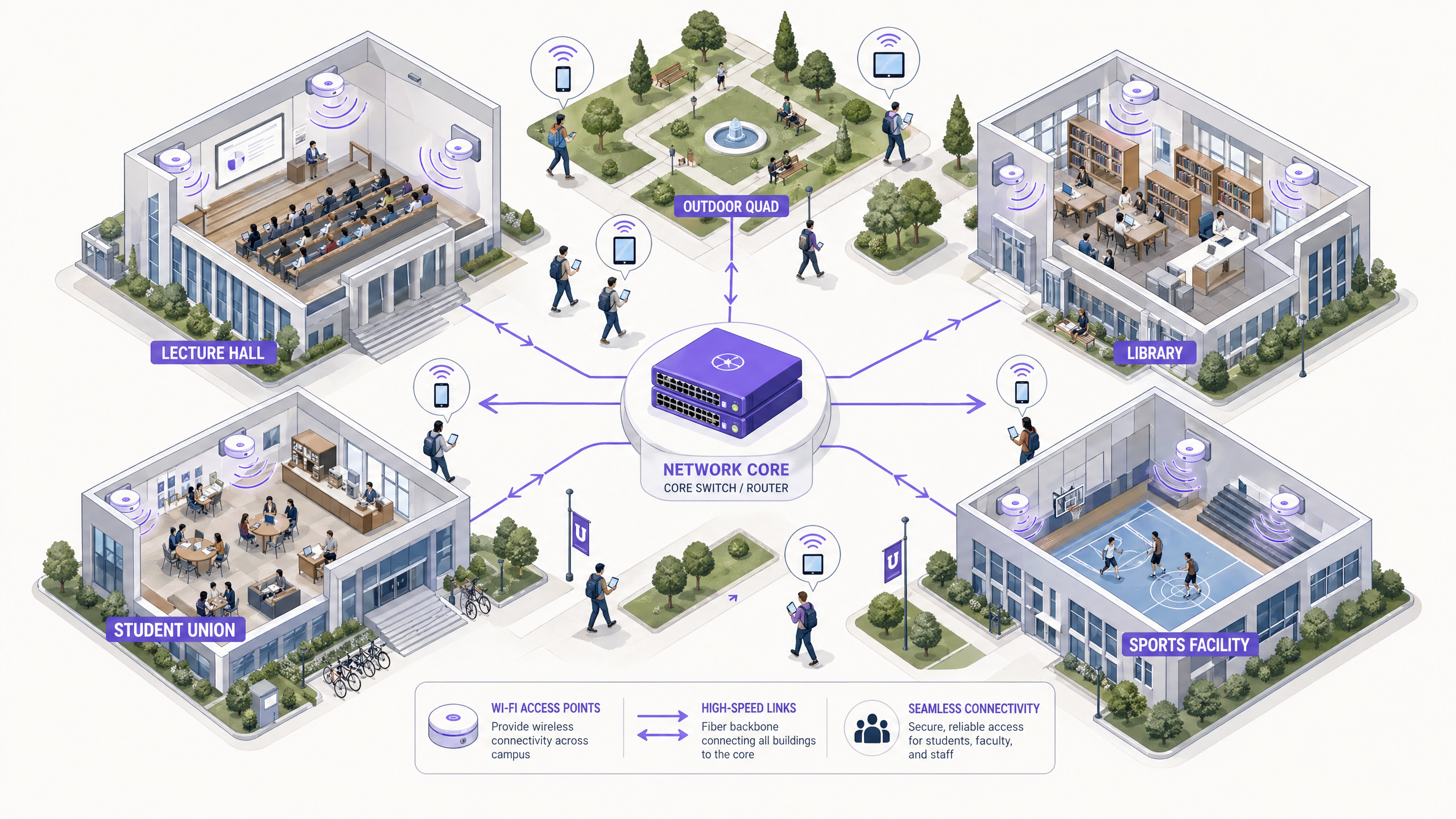
Para instituições de ensino superior, uma rede sem fio confiável em todo o campus não é mais uma comodidade — é uma infraestrutura crítica, no mesmo nível de energia e água. Universidades modernas devem suportar ambientes de alta densidade, roaming contínuo em vastas áreas físicas e acesso seguro para uma base de usuários diversificada, abrangendo estudantes, professores, pesquisadores e convidados. Este guia fornece a gerentes de TI, arquitetos de rede e CTOs um plano autorizado para implantar e gerenciar uma rede WiFi universitária de alto desempenho. Ao focar em uma arquitetura hierárquica robusta, protocolos de segurança rigorosos, incluindo IEEE 802.1X e WPA3 Enterprise, e integração estratégica de análises, as instituições podem garantir conectividade ideal, mitigando riscos e comprovando um ROI mensurável. Exploramos fases práticas de implantação, desde levantamentos iniciais do local até a otimização contínua, usando plataformas como o Guest WiFi e WiFi Analytics da Purple.
Análise Técnica Aprofundada
Arquitetura e Topologia de Rede
Construir uma rede sem fio em todo o campus requer uma arquitetura escalável e hierárquica. A abordagem padrão envolve três camadas distintas: as camadas Core, Distribuição e Acesso.
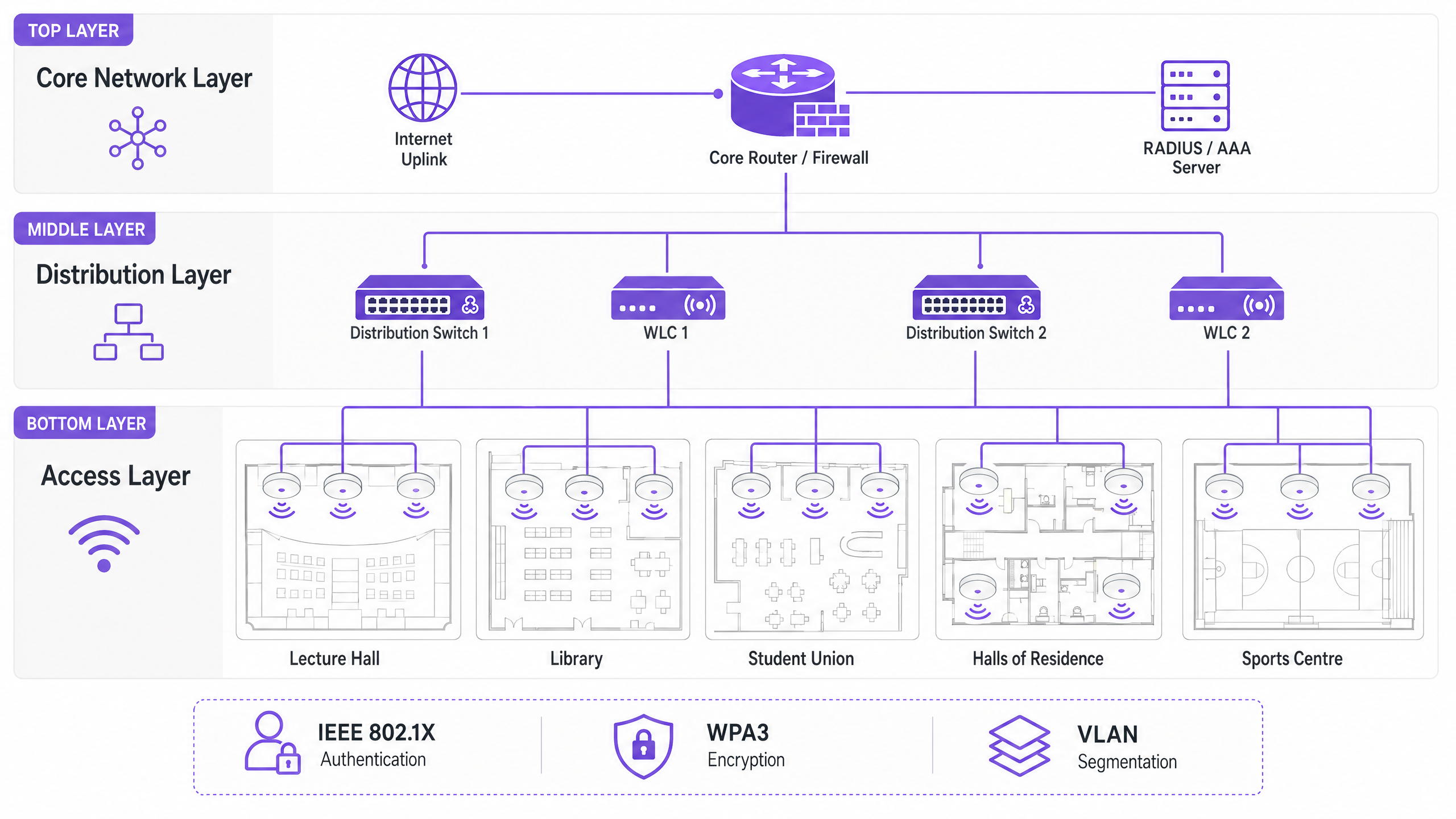
A Camada Core forma a espinha dorsal de alta velocidade da rede. Ela lida com o roteamento de tráfego entre diferentes partes do campus e para a internet. Alta disponibilidade e redundância são primordiais aqui — roteadores e firewalls core devem ser capazes de lidar com um throughput massivo sem introduzir latência. Uplinks dual-homed e fontes de alimentação redundantes são práticas padrão.
A Camada de Distribuição atua como intermediária, agregando tráfego de switches de acesso e aplicando políticas de rede. Controladores de LAN sem fio (WLCs) geralmente residem aqui, gerenciando a frota de Access Points (APs), lidando com o gerenciamento de RF e garantindo roaming contínuo para usuários que se movem entre edifícios. Esta camada também é onde as políticas de Qualidade de Serviço (QoS) são aplicadas.
A Camada de Acesso é a borda da rede onde os dispositivos clientes se conectam. Ela consiste em switches PoE (Power over Ethernet) e os APs físicos implantados em salas de aula, bibliotecas, centros estudantis e áreas externas. APs de alta densidade que suportam Wi-Fi 6 (802.11ax) ou Wi-Fi 6E são essenciais para áreas com grande número de dispositivos simultâneos.
Padrões de Segurança e Autenticação
Proteger uma rede universitária envolve equilibrar proteção robusta com acessibilidade do usuário em um ambiente complexo e multi-tenant.
WPA3 Enterprise e IEEE 802.1X são inegociáveis para proteger as conexões de funcionários e estudantes. O 802.1X fornece Controle de Acesso à Rede (NAC) baseado em porta, garantindo que apenas usuários e dispositivos autenticados possam acessar a rede. Ele se integra a um servidor RADIUS central (como FreeRADIUS ou Microsoft NPS) vinculado ao Active Directory ou diretório LDAP da universidade. Isso significa que as credenciais de rede de um estudante são as mesmas de seu login universitário — reduzindo drasticamente a sobrecarga do helpdesk.
Acesso para Convidados e Captive Portals atendem visitantes, participantes de conferências e futuros estudantes. Um captive portal seguro garante a conformidade com o GDPR, ao mesmo tempo em que oferece uma experiência de integração controlada. A integração com soluções como a Purple permite acesso contínuo para convidados, enquanto captura dados primários valiosos para uso em marketing e operações. Para uma análise mais aprofundada sobre como proteger a base da rede, consulte Proteja Sua Rede com DNS e Segurança Fortes .
A Segmentação de VLAN é essencial para isolar tipos de tráfego. O tráfego de estudantes, recursos de professores, dispositivos IoT (sensores de edifícios inteligentes, controladores HVAC) e acesso de convidados devem residir em VLANs separadas. Isso contém possíveis violações de segurança, evita tempestades de broadcast e permite o gerenciamento granular de largura de banda por classe de usuário.
Guia de Implementação
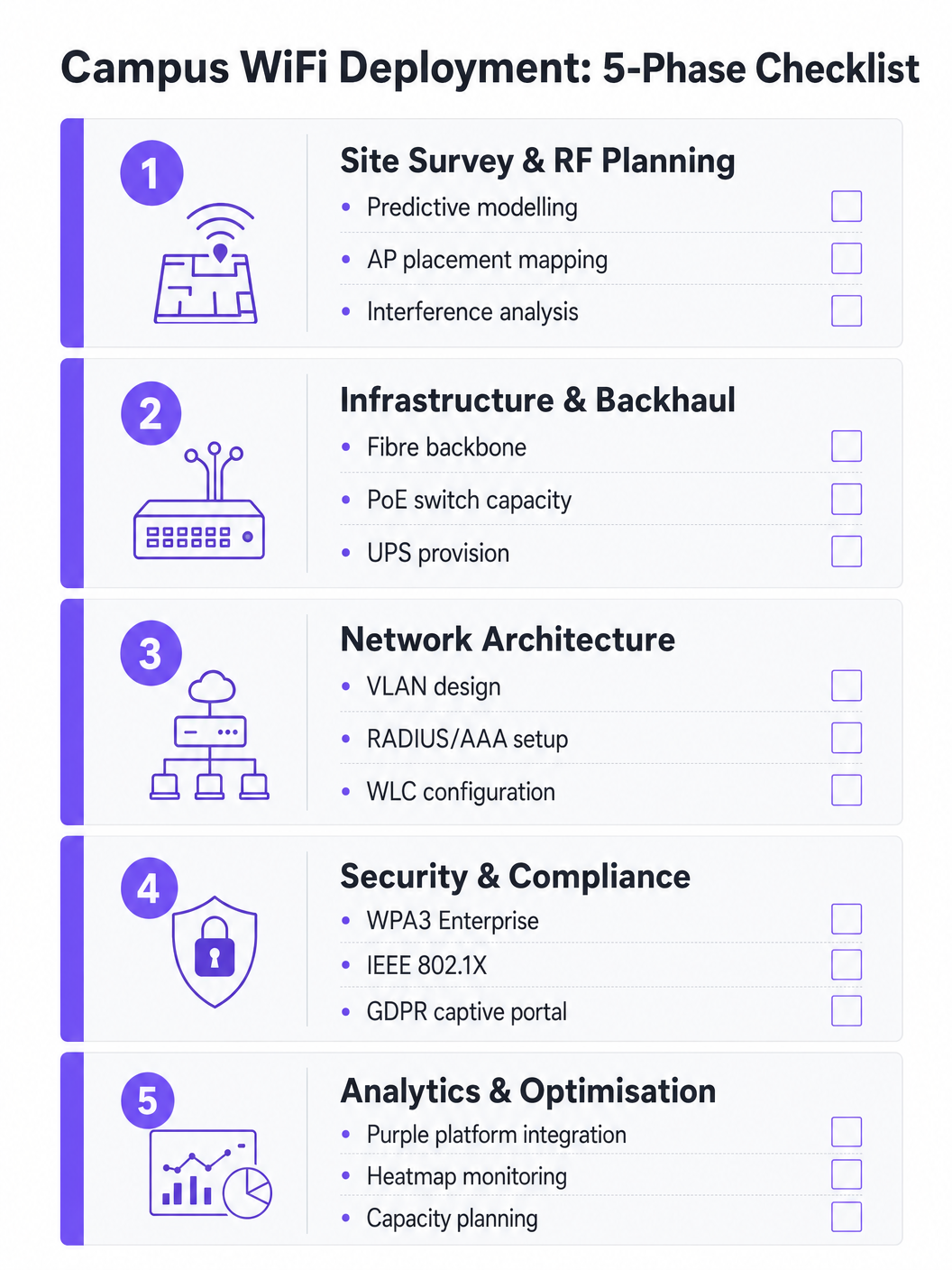
Fase 1: Levantamento do Local e Planejamento de RF
Nunca adivinhe o posicionamento dos APs. Um levantamento de local preditivo e ativo abrangente é o investimento mais importante do projeto. Ferramentas como Ekahau ou AirMagnet devem ser usadas para mapear o ambiente físico, considerando materiais de construção (concreto, vidro, metal), fontes de interferência (dispositivos Bluetooth legados, fornos de micro-ondas, redes vizinhas) e a densidade esperada de usuários por zona. O objetivo é garantir cobertura e capacidade adequadas sem causar interferência de co-canal. Modelos preditivos devem ser validados com levantamentos ativos assim que os APs iniciais forem implantados.
Fase 2: Atualizações de Infraestrutura e Backhaul
Antes de implantar novos APs, a infraestrutura cabeada subjacente deve ser avaliada e atualizada onde for necessário. Garanta que o cabeamento CAT6A seja implantado para suportar Multi-Gigabit Ethernet (mGig) exigido pelos APs Wi-Fi 6/6E modernos. Verifique se os switches de borda podem fornecer energia PoE+ ou PoE++ suficiente para os novos modelos de AP. A rede core deve ter largura de banda suficiente — considere conexões de internet dedicadas para empresas para resiliência. Para contexto sobre opções de backhaul, revise O Que É uma Linha Dedicada? Internet Empresarial Dedicada .
Fase 3: Configuração da Arquitetura de Rede
Configure os WLCs e APs de acordo com o parquitetura projetada. Implemente políticas de QoS para priorizar tráfego crítico (VoIP, videoconferência, transferências de dados de pesquisa) sobre downloads em massa e streaming. Garanta que os protocolos de roaming contínuo (802.11r para transição rápida de BSS, 802.11k para relatórios de vizinhos e 802.11v para gerenciamento de transição de BSS) estejam configurados corretamente, permitindo que os dispositivos transitem entre APs sem perder a conexão.
Fase 4: Reforço de Segurança e Conformidade
Implemente WPA3 Enterprise nos SSIDs de funcionários e estudantes. Configure IEEE 802.1X com EAP-TLS ou PEAP-MSCHAPv2 dependendo das capacidades de gerenciamento de dispositivos. Implemente um Captive Portal compatível com GDPR para SSIDs de convidados. Garanta que todas as interfaces de gerenciamento estejam seguras com credenciais fortes e autenticação baseada em certificado. Realize um teste de penetração antes de entrar em produção.
Fase 5: Integração de Análises e Otimização Contínua
Integre a rede com uma plataforma de análise para obter visibilidade sobre a saúde dos APs, densidade de clientes, padrões de roaming e utilização da largura de banda. A plataforma WiFi Analytics da Purple oferece painéis operacionais que beneficiam tanto a equipe de TI quanto as operações do local. Este não é um exercício único — os ambientes de RF mudam à medida que os edifícios são reformados e os tipos de dispositivos evoluem.
Melhores Práticas
Projete para Capacidade, Não Apenas Cobertura. No ensino superior, a cobertura é fácil; a capacidade é difícil. Um auditório pode ter sinal forte em todos os lugares, mas se 300 estudantes se conectarem simultaneamente a um único AP, a rede falhará. Implante APs de alta densidade e utilize recursos como band steering para direcionar clientes capazes para as bandas menos congestionadas de 5 GHz ou 6 GHz. Desative as taxas de dados legadas (1, 2, 5.5 e 11 Mbps) para forçar clientes 'sticky' a fazer roaming para APs mais próximos.
Implemente Monitoramento Contínuo. A rede não é uma implantação de 'configurar e esquecer'. Utilize plataformas de análise para monitorar a saúde dos APs, densidade de clientes e padrões de roaming em tempo real. As análises da Purple podem fornecer insights sobre como os espaços são utilizados, informando futuras decisões de infraestrutura e estratégias de utilização do espaço.
Aproveite o OpenRoaming para Onboarding Sem Complicações. Para acadêmicos visitantes e estudantes de instituições parceiras, a implementação do OpenRoaming remove o atrito do login manual na rede. A Purple atua como um provedor de identidade gratuito para OpenRoaming sob a licença Connect, permitindo que usuários de instituições participantes se conectem automaticamente e com segurança — uma melhoria significativa na experiência do visitante.
Segmente Tudo. Nunca permita tráfego de convidados na mesma VLAN que recursos internos. Use SSIDs, VLANs e regras de firewall separadas para cada classe de usuário. Aplique limites de largura de banda às VLANs de convidados para evitar que um único usuário sature o uplink durante períodos de pico.
Solução de Problemas e Mitigação de Riscos
Interferência Co-Canal (CCI) ocorre quando múltiplos APs no mesmo canal podem se 'ouvir', fazendo com que transmitam alternadamente e degradando severamente o desempenho. Esta é a causa mais comum de WiFi ruim em implantações densas. A mitigação envolve planejamento de RF adequado, utilizando recursos de atribuição dinâmica de canais (DCA) no WLC e reduzindo a potência de transmissão em APs em áreas densas.
Clientes 'Sticky' são dispositivos que se recusam a fazer roaming para um AP mais próximo, mantendo uma conexão fraca com um distante. Isso é particularmente comum com smartphones e laptops mais antigos. A mitigação envolve o ajuste das taxas de dados mínimas obrigatórias — desabilitar taxas mais baixas força o driver do cliente a procurar uma conexão melhor.
Esgotamento de DHCP é um modo de falha surpreendentemente comum em áreas de alta rotatividade, como pátios externos e centros estudantis. Quando o pool de DHCP fica sem endereços IP, novos dispositivos não conseguem se conectar, apesar de terem um sinal forte. A mitigação envolve a implementação de tempos de concessão de DHCP mais curtos (uma a duas horas) para VLANs de convidados e estudantes, e garantindo que os escopos de DHCP sejam dimensionados corretamente para o número máximo de dispositivos simultâneos.
Pontos de Acesso Maliciosos (Rogue Access Points) representam um risco de segurança significativo. Um funcionário ou estudante conectando um roteador de nível de consumidor cria um ponto de entrada inseguro. A mitigação envolve a habilitação da detecção de APs maliciosos no WLC e a realização de auditorias físicas periódicas.
ROI e Impacto nos Negócios
Uma rede WiFi robusta no campus oferece retornos mensuráveis além da conectividade básica. Ao integrar plataformas como a Purple, as universidades podem quantificar os seguintes resultados:
| Métrica | Abordagem de Medição | Resultado Típico |
|---|---|---|
| Satisfação do Estudante | Pesquisas NPS, volume de tickets do helpdesk de TI | Redução de reclamações relacionadas ao WiFi |
| Utilização do Espaço | Análise de mapa de calor, dados de tempo de permanência | Alocação otimizada de espaços de biblioteca e estudo |
| Eficiência Operacional de TI | Volume de tickets do helpdesk, tempo de onboarding | Redução da sobrecarga de provisionamento manual |
| Captura de Dados de Convidados | Registros no Captive Portal | Crescimento do banco de dados de marketing de primeira parte |
| Tempo de Atividade da Rede | Monitoramento de SLA, relatórios de incidentes | Melhoria na adesão ao SLA |
As capacidades de análise e dados de convidados da plataforma Purple também abrem oportunidades de receita — particularmente durante grandes eventos públicos no campus, onde modelos de acesso em camadas podem ser implantados. Estruturas de ROI semelhantes se aplicam em ambientes de Varejo , Hotelaria , Saúde e Transporte onde a Purple opera. Para uma perspectiva mais ampla sobre implantações de WiFi em grandes locais, consulte WiFi em Aeroportos: Como os Operadores Fornecem Conectividade entre Terminais e WiFi Aeroportuale: Come gli Operatori Forniscono Conectividade tra i Terminal .
Definições principais
IEEE 802.1X
A standard for port-based Network Access Control (NAC) that provides an authentication mechanism for devices wishing to connect to a LAN or WLAN. It requires a supplicant (client device), an authenticator (the AP or switch), and an authentication server (RADIUS).
Used to authenticate students and staff before they are allowed onto the network, integrating with a RADIUS server and Active Directory for credential validation. Eliminates shared PSK passwords and enables per-user policy enforcement.
WLC (Wireless LAN Controller)
A centralised hardware or software appliance that manages and configures multiple Access Points from a single point of control. It handles RF management, roaming, firmware updates, and policy enforcement across the AP fleet.
Essential for large deployments to ensure consistent policy enforcement, dynamic channel assignment, and seamless roaming across the campus. Can be physical hardware or a cloud-managed virtual instance.
Co-Channel Interference (CCI)
Interference that occurs when two or more APs operating on the same frequency channel are within range of each other. Both APs must wait for the channel to be clear before transmitting, severely reducing throughput.
The primary cause of poor performance in dense deployments. Mitigated by careful channel planning, dynamic channel assignment (DCA) on the WLC, and reducing AP transmit power.
Band Steering
A technique used by APs to encourage dual-band capable client devices to connect to the 5 GHz or 6 GHz band rather than the more congested 2.4 GHz band, by delaying or suppressing probe responses on 2.4 GHz.
Critical for maximising capacity and throughput in high-density areas. The 5 GHz and 6 GHz bands offer more non-overlapping channels and higher throughput, but shorter range.
Captive Portal
A web page that users are redirected to before gaining full network access. It typically requires acceptance of terms of service, authentication, or data capture before the user's MAC address is permitted through the firewall.
Used for guest access management, GDPR-compliant data collection, and branded onboarding experiences. Platforms like Purple provide customisable captive portal solutions with analytics integration.
VLAN (Virtual Local Area Network)
A logical grouping of network devices that behave as if they are on the same physical network, regardless of their actual physical location. VLANs are defined at Layer 2 and are used to segment broadcast domains.
Used to isolate different user classes (students, staff, guests, IoT devices) for security and performance. Prevents guest traffic from reaching internal resources and allows per-VLAN bandwidth policies.
PoE (Power over Ethernet)
A technology that passes electrical power along with data on twisted-pair Ethernet cabling, allowing a single cable to provide both data connection and electrical power to devices such as APs.
Allows APs to be installed in locations without dedicated power outlets. IT teams must verify that edge switches have sufficient PoE budget (total watts) to power all connected APs, particularly with power-hungry Wi-Fi 6E models requiring PoE++ (802.3bt).
OpenRoaming
A global WiFi roaming federation built on the Hotspot 2.0 (Passpoint) standard, allowing users to automatically and securely connect to participating networks without manual login, using their existing identity credentials.
Improves the experience for visiting academics and students from partner institutions. Purple can act as an identity provider for OpenRoaming under the Connect licence, enabling automatic secure connections for eligible users.
WPA3 Enterprise
The latest generation of the Wi-Fi Protected Access security protocol for enterprise networks. It uses 192-bit minimum-strength security protocols and mandates the use of Protected Management Frames (PMF), providing stronger protection against offline dictionary attacks.
The recommended security standard for all staff and student SSIDs. Replaces WPA2 Enterprise and provides significantly stronger protection for sensitive research and personal data transmitted over the wireless network.
RADIUS (Remote Authentication Dial-In User Service)
A networking protocol that provides centralised Authentication, Authorisation, and Accounting (AAA) management for users who connect and use a network service.
The backbone of 802.1X authentication on campus networks. The RADIUS server validates credentials against Active Directory and returns the appropriate VLAN assignment and access policy for each authenticated user.
Exemplos práticos
A large university is upgrading its main lecture theatre (capacity 500) to Wi-Fi 6. The previous deployment used 4 APs mounted on the high ceiling, resulting in poor performance and frequent disconnects during peak times. What is the correct approach?
The IT team must shift from a coverage-centric design to a capacity-centric one. First, conduct a new site survey specifically for the lecture theatre, modelling the expected device count (assume 1,000+ devices given 2+ devices per student). Replace the ceiling-mounted omni-directional APs with either under-seat AP deployments or directional (patch) antenna arrays mounted on the side walls, creating smaller, focused micro-cells. Increase the AP count to 8-12 Wi-Fi 6 APs, each serving a defined section of seating. Disable 2.4 GHz radios on alternating APs to reduce co-channel interference, relying primarily on 5 GHz and 6 GHz bands. Implement strict band steering and disable legacy data rates below 12 Mbps. Configure the WLC to use 20 MHz channel widths in the 5 GHz band (rather than 40 or 80 MHz) to allow more non-overlapping channels and reduce interference.
A campus network is experiencing intermittent connectivity issues in the outdoor quad area. Users report strong signal but inability to load web pages during the lunch period (12:00-13:30). What is the diagnostic approach?
Strong signal with no connectivity is a Layer 2/3 issue, not an RF problem. The diagnostic sequence should be: (1) Check the DHCP scope for the outdoor VLAN — query the DHCP server for scope utilisation. If it is above 80%, DHCP exhaustion is the likely cause. Reduce lease times to 1 hour and expand the scope if possible. (2) If DHCP is healthy, check the uplink capacity of the outdoor distribution switch. If the APs are connected via a congested uplink, the bottleneck is wired, not wireless. (3) Analyse the RF environment for external interference using a spectrum analyser — municipal WiFi networks or nearby businesses may be causing noise floor elevation. (4) Review the firewall and NAT table for session exhaustion during peak periods.
Questões práticas
Q1. A university is planning to deploy WiFi in a newly constructed outdoor sports stadium with a capacity of 8,000 spectators. The stadium has no roof and an open bowl design. What is the most critical RF consideration and how should AP placement be approached?
Dica: Consider the lack of physical boundaries, signal propagation in an open environment, and the extreme device density during events.
Ver resposta modelo
The most critical consideration is controlling signal propagation and minimising Co-Channel Interference in an environment with no natural RF attenuation. Unlike indoor environments, the open bowl means signals travel freely, causing APs to interfere with each other across the entire space. The correct approach is to use directional (sector) antennas mounted under the seating tiers, pointing downward into the seating rows to create highly focused micro-cells. Transmit power must be carefully tuned to limit cell size. Wi-Fi 6 APs with OFDMA and BSS Colouring features should be specified to handle the extreme device density. Separate SSIDs and VLANs should be configured for event staff, media, and public attendees.
Q2. During a network upgrade, the IT team notices that older IoT devices (legacy HVAC sensors and door access controllers) are failing to connect to the new campus WiFi network after the security upgrade to WPA3 Enterprise.
Dica: Consider the security protocol compatibility of legacy embedded devices and the need to maintain security for other user classes.
Ver resposta modelo
The new network enforcing WPA3 Enterprise is incompatible with older IoT devices that only support WPA2 or earlier protocols. The solution is to create a dedicated, isolated SSID and VLAN specifically for legacy IoT devices, utilising WPA2-PSK with a strong, rotated passphrase, or MAC Authentication Bypass (MAB) for devices that cannot support any EAP method. This VLAN must be tightly firewalled — IoT devices should only be able to communicate with their specific management servers, not the broader campus network. The main student and staff SSIDs remain on WPA3 Enterprise, maintaining security for the primary user population.
Q3. The university wants to monetise its guest WiFi network during large public events (open days, graduation ceremonies, public lectures) while remaining GDPR-compliant. What is the recommended architecture?
Dica: Consider data capture requirements, consent mechanisms, and the difference between free and premium access tiers.
Ver resposta modelo
Deploy a captive portal solution such as Purple integrated with the guest VLAN. Configure a tiered access model: a free tier offering basic internet access (with bandwidth caps) in exchange for email address and explicit GDPR-compliant marketing consent, and an optional premium tier offering higher bandwidth for a fee (processed via a payment gateway integration). The captive portal must display a clear privacy notice and record consent timestamps to satisfy GDPR Article 7 requirements. Captured first-party data feeds into the university's CRM for post-event marketing. All guest traffic must be isolated from internal university systems via firewall rules, and data retention policies must be documented and enforced.
Q4. The IT team receives complaints that WiFi performance in the main library is poor between 10:00 and 14:00 on weekdays, despite the network showing healthy AP status in the management console. How should the team approach diagnosis?
Dica: Consider time-based patterns and what changes between off-peak and peak hours.
Ver resposta modelo
The time-based pattern is the key diagnostic clue — the issue only occurs during peak occupancy hours, suggesting a capacity problem rather than a hardware or configuration fault. The diagnostic sequence should be: (1) Check per-AP client association counts during the problem window — if any AP is serving more than 30-40 clients simultaneously, it is overloaded. (2) Review DHCP scope utilisation for the library VLAN. (3) Check uplink utilisation on the distribution switch serving the library — the wired backhaul may be saturated. (4) Review the channel utilisation and retry rates on the APs using the WLC's RF statistics. The likely resolution is either deploying additional APs to distribute the client load, or implementing stricter band steering and minimum data rate policies to improve per-client throughput.
Continue a ler esta série
Como reduzir o número de SSIDs de WiFi usando PSK por dispositivo (iPSK, DPSK, MPSK)
Este guia de referência técnica definitivo explica como as equipes de TI podem eliminar a degradação de desempenho do WiFi causada pelo overhead de beacons de SSID, colapsando múltiplas redes dedicadas em um único SSID usando PSK por dispositivo (xPSK). Ele abrange o ecossistema de fornecedores, incluindo Cisco iPSK, HPE Aruba MPSK, Ruckus DPSK, Juniper Mist PPSK e Ubiquiti UniFi PPSK, com orientações práticas de implementação sobre atribuição dinâmica de VLAN, integração de IoT e conformidade com o PCI DSS. Operadores de locais em hotelaria, varejo, estádios e organizações do setor público encontrarão orientações de arquitetura acionáveis e exemplos práticos do mundo real.
O que é uma Solicitação de Sondagem (Probe Request)? Entendendo Como os Dispositivos Descobrem Redes
Este guia de referência técnica oferece uma análise aprofundada das solicitações de sondagem IEEE 802.11, varredura ativa versus passiva e o impacto da randomização de MAC na análise de locais. Ele fornece estratégias de implementação acionáveis para arquitetos de rede otimizarem implantações de alta densidade, mitigarem tempestades de sondagem e garantirem a coleta de dados precisa e em conformidade com o GDPR usando camadas de identidade autenticadas.
Como Corrigir WiFi Lento Sem Fazer Upgrade do Seu Plano de Internet
Um guia de referência técnica abrangente para gerentes de TI e arquitetos de rede sobre como otimizar o desempenho de WiFi empresarial sem aumentar a largura de banda do ISP. Abrange ajuste de RF, gerenciamento de densidade de clientes, implementação de QoS e como aproveitar a análise de WiFi para diagnosticar e resolver gargalos.