
Melhores Práticas de Segmentação de VLAN para Ambientes Multi-Tenant
Este guia fornece a gestores de TI, arquitetos de rede, CTOs e diretores de operações de recintos um plano autoritário e independente de fabricante para implementar a segmentação de VLAN em ambientes WiFi multi-tenant. Aborda a norma IEEE 802.1Q, a Atribuição Dinâmica de VLAN via 802.1X e RADIUS, e orientações de implementação passo a passo para recintos de hotelaria, retalho, estádios e setor público. A segmentação de VLAN adequada é o controlo fundamental para a conformidade com PCI-DSS e GDPR, prevenção de movimentos laterais e fornecimento de conectividade sem fios de alto desempenho em infraestruturas físicas partilhadas.
Video overview
Ouça este guia
Ver transcrição do podcast
Parte da nossa série principal: Guia de WiFi Multi-Tenant →
Resumo Executivo
Para os modernos recintos físicos empresariais - desde portefólios multi-site de Retail e vastas propriedades de Hospitality até estádios de alta densidade e instalações de Healthcare - a segmentação de rede já não é uma boa prática opcional; é um requisito arquitetónico fundamental. Gerir um ambiente multi-inquilino numa única rede física plana é uma vulnerabilidade operacional crítica. Expõe dados corporativos confidenciais a ameaças de segurança lateral, degrada o desempenho sem fios devido ao congestionamento de transmissões e complica as auditorias de conformidade regulamentar.
As Redes Locais Virtuais (VLANs), definidas sob a norma IEEE 802.1Q, fornecem a partição lógica necessária para isolar diferentes grupos de utilizadores, organizações inquilinas e tipos de dispositivos sobre uma infraestrutura física partilhada. Ao mapear Identificadores de Conjunto de Serviços (SSIDs) sem fios específicos para VLANs dedicadas, os arquitetos de rede podem aplicar políticas de segurança granulares e contenção de tráfego na estrutura de comutação com fios. Além disso, a implementação de técnicas avançadas como a Atribuição Dinâmica de VLAN através de IEEE 802.1X e RADIUS permite que os recintos consolidem o seu ambiente de radiofrequência (RF) num único SSID seguro, eliminando a grave degradação de desempenho causada pela transmissão de múltiplos SSIDs.
Este guia serve como uma referência técnica autoritária para gestores de TI, arquitetos de rede, CTOs e diretores de operações de recintos. Fornece planos de ação neutros em relação ao fornecedor para conceber e implementar uma arquitetura de segmentação de VLAN segura e escalável. Ao integrar estas práticas com as plataformas empresariais de Guest WiFi e WiFi Analytics da Purple, as organizações podem alcançar um isolamento robusto de Camada 2, simplificar a conformidade com PCI-DSS e GDPR, e proporcionar uma experiência sem fios segura e de alto desempenho que impulsiona o ROI do recinto.
Análise Técnica Detalhada
A transição de uma rede de ocupante único para uma arquitetura multi-inquilino segura exige uma mudança de um modelo de confiança implícita plano para uma estrutura de confiança zero segmentada. O objetivo é garantir que múltiplos inquilinos independentes, redes de convidados e dispositivos operacionais coexistam numa infraestrutura física partilhada sem comprometer a segurança, o desempenho ou a privacidade.
O Protocolo de Identificação de VLAN 802.1Q
A base da segmentação de rede lógica é a Rede Local Virtual (VLAN), padronizada sob a norma IEEE 802.1Q. Numa trama Ethernet padrão, um cabeçalho 802.1Q insere uma etiqueta de 4 bytes entre os campos de Endereço MAC de Origem e EtherType. Esta etiqueta contém um VLAN Identifier (VID) de 12 bits, que suporta até 4.094 segmentos lógicos únicos (os IDs de VLAN 1 e 4095 são reservados). Quando um cliente sem fios se liga a um Access Point (AP), o AP associa o tráfego desse cliente a um SSID específico. O AP encapsula então as tramas sem fios do cliente em tramas Ethernet, identificando-as com o VLAN ID mapeado antes de as encaminhar para a porta do switch. As portas físicas do switch que se ligam aos APs têm de ser configuradas como 802.1Q Trunk Ports para transportar simultaneamente tráfego de múltiplas VLANs, enquanto as portas que se ligam a dispositivos com fios de um único inquilino são configuradas como Access Ports atribuídas a uma única VLAN.
O Custo de Desempenho e de Sobrecarga de Múltiplos SSIDs
Uma abordagem comum mas ineficaz para a segmentação multi-inquilino é transmitir um SSID exclusivo para cada inquilino (por exemplo, TenantA_WiFi, TenantB_WiFi, TenantC_WiFi). Cada SSID transmitido por um AP tem de transmitir tramas beacon - normalmente a cada 102,4 milissegundos - à taxa de dados básica obrigatória mais baixa (frequentemente 1 Mbps ou 6 Mbps) para garantir a compatibilidade com clientes antigos.
À medida que o número de SSIDs aumenta, o tempo de antena consumido pela sobrecarga de gestão cresce substancialmente. A transmissão de 8 SSIDs num único AP pode consumir até 30% do tempo de antena WiFi disponível apenas para a sobrecarga de beacons, restando apenas 70% para os dados reais dos utilizadores. Em ambientes de alta densidade, como centros comerciais ou centros de conferências, isto resulta em latência elevada, perda de pacotes e uma degradação severa do débito. As boas práticas ditam a limitação do número de SSIDs transmitidos a um máximo de 3 a 4 por banda de rádio.
Atribuição Dinâmica de VLAN via 802.1X e RADIUS
Para contornar as limitações de múltiplos SSIDs mantendo um isolamento rigoroso dos inquilinos, os arquitetos de rede implementam a Atribuição Dinâmica de VLAN (DVA). Esta arquitetura consolida o ambiente sem fios num único SSID seguro (por exemplo, Enterprise_Secure) utilizando a autenticação IEEE 802.1X.
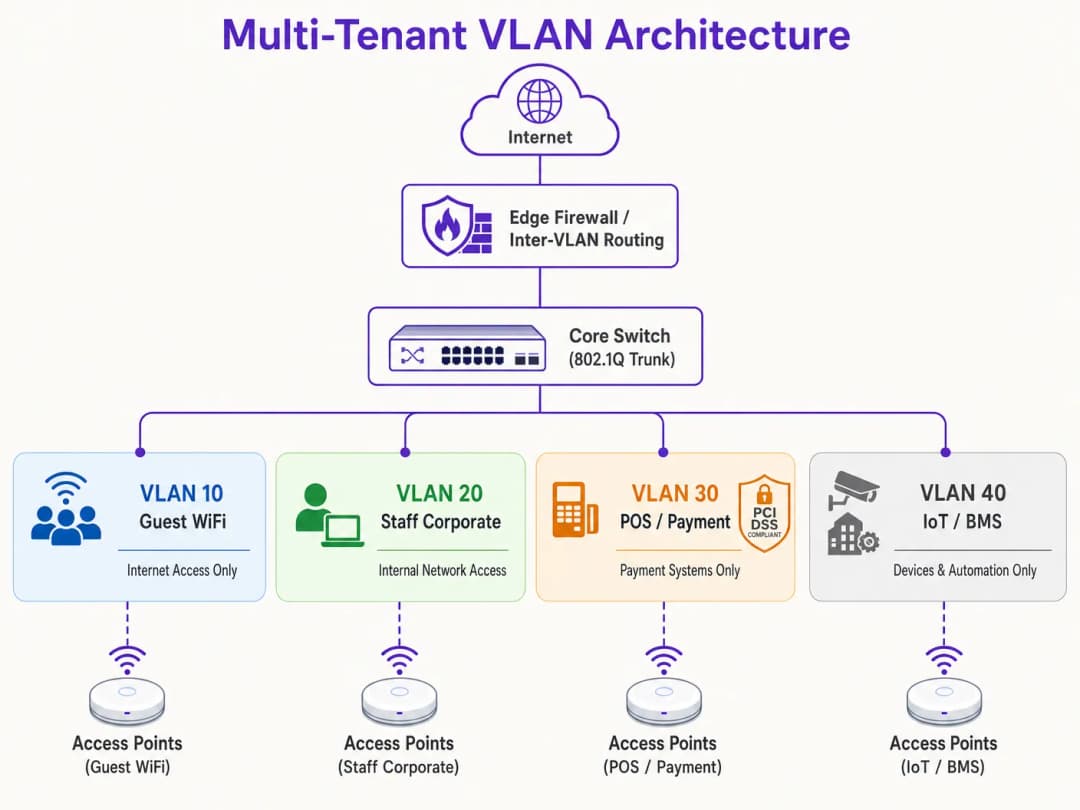
O ecossistema 802.1X é composto por três elementos-chave:
- Supplicant: O dispositivo do cliente que executa software compatível com 802.1X (por exemplo, Windows, macOS, iOS, Android).
- Authenticator: O AP sem fios ou o controlador LAN sem fios (WLC) que bloqueia todo o tráfego não relacionado com autenticação do cliente até que este seja autorizado.
- Authentication Server: Um servidor RADIUS (Remote Authentication Dial-In User Service) integrado com um repositório de identidades (por exemplo, Active Directory, LDAP ou fornecedores de identidade na nuvem).
Durante o processo de autenticação, o cliente liga-se ao SSID seguro único e fornece credenciais ou um certificado de cliente (via EAP-TLS ou PEAP). O AP encaminha estes dados para o servidor RADIUS. Após a validação bem-sucedida, o servidor RADIUS devolve uma mensagem Access-Accept contendo atributos padrão IETF específicos que instruem o AP a atribuir dinamicamente a sessão do cliente à sua VLAN designada:
- Tunnel-Type (64): Definido como
VLAN(Valor 13) - Tunnel-Medium-Type (65): Definido como
802(Valor 6) - Tunnel-Private-Group-ID (81): Definido para a string específica de ID da VLAN (ex.,
"101"para o Tenant A,"102"para o Tenant B)
O AP recebe estes atributos, desbloqueia a porta e mapeia todo o tráfego subsequente do endereço MAC desse cliente para a VLAN especificada. Isto permite que centenas de utilizadores de diferentes organizações se liguem exatamente ao mesmo SSID no mesmo AP físico, permanecendo completamente isolados uns dos outros na Camada 2. Para um guia detalhado sobre como implementar esta arquitetura, consulte o guia sobre Como Implementar Autenticação 802.1X com Cloud RADIUS.
Contenção de Domínio de Broadcast e Segurança de Camada 2
Ao segmentar uma rede física em VLANs lógicas mais pequenas, os domínios de broadcast ficam limitados. Os protocolos de rede padrão como ARP, DHCP e mDNS dependem de tramas de broadcast que são enviadas para todos os dispositivos no domínio de broadcast. Numa rede grande e plana com milhares de dispositivos, esta "conversa" consome tempo de antena sem fios substancial e ciclos de processamento nos dispositivos clientes. Limitar os broadcasts a sub-redes VLAN individuais reduz drasticamente a sobrecarga, previne tempestades de broadcast e aumenta o desempenho global da rede.
Além disso, o isolamento de Camada 2 é reforçado ao ativar o Isolamento de Clientes (também conhecido como Bloqueio Peer-to-Peer) em SSIDs de convidados. Isto impede que os clientes sem fios na mesma VLAN comuniquem diretamente entre si, mitigando o risco de varrimento lateral, interceção de pacotes (packet sniffing) e ataques man-in-the-middle.
Tem dúvidas sobre a sua configuração específica?
A nossa equipa trabalha com operadores de espaços, gestores de TI e engenheiros de rede em 80.000 espaços. Agende uma chamada de 20 minutos e mostraremos como outros profissionais na sua área o resolveram.
Guia de Implementação
Implementar uma arquitetura VLAN multi-tenant segura requer uma configuração coordenada em toda a infraestrutura sem fios, switches com fios e firewall principal. O seguinte plano de implementação passo a passo é neutro em relação a fabricantes e está alinhado com os padrões empresariais.
Passo 1: Desenho Lógico e Alocação de Sub-redes IP
Antes de configurar qualquer hardware, estabeleça um mapa de rede lógico abrangente. Atribua IDs de VLAN, sub-redes IP e zonas de segurança distintas a cada classe de tráfego.
| Nome do Segmento | ID da VLAN | Sub-rede IP / CIDR | Zona de Segurança | Autenticação Primária |
|---|---|---|---|---|
| Gestão de Rede | VLAN 10 | 10.10.10.0/24 | Gestão | Estática / Out-of-Band |
| WiFi de Convidados (Purple) | VLAN 20 | 172.16.0.0/20 | Convidados (Apenas Internet) | Aberta + Captive Portal |
| Pessoal Corporativo | VLAN 30 | 10.10.30.0/23 | Corporativa Interna | WPA3-Enterprise (802.1X) |
| POS / Pagamentos | VLAN 40 | 192.168.40.0/24 | PCI-CDE (Restrita) | WPA3-Enterprise / MAB |
| IoT / Sistemas do Edifício | VLAN 50 | 10.10.50.0/24 | IoT (Restrita) | WPA3-SAE / Dynamic PSK |
Regra Crítica: Nunca utilize a VLAN 1 para qualquer tráfego ativo ou gestão. Desative a VLAN 1 em todas as portas trunk e altere a VLAN Nativa para um ID de VLAN não utilizado e não encaminhável (ex., VLAN 999) para evitar ataques de VLAN hopping.
Passo 2: Configuração da Infraestrutura de Switches com Fios
Configure os switches de core, distribuição e acesso para suportar a estrutura lógica de VLAN. As portas do switch ligadas diretamente aos APs devem transportar múltiplas VLANs e devem ser configuradas como portas trunk 802.1Q. Defina explicitamente quais as VLANs permitidas em cada trunk para minimizar a superfície de exposição de segurança. As portas que ligam a dispositivos com fios únicos (como um terminal POS estático ou o PC de um recepcionista) devem ser definidas para o modo de acesso e atribuídas a uma única VLAN.
Passo 3: Controlador LAN Sem Fios e Configuração de AP
Mapeie os SSIDs sem fios para as respetivas VLANs e configure os controlos de segurança de extremidade. Para o Guest SSID, configure a segurança para Aberta ou WPA3-Enhanced Open (OWE) para fornecer encriptação sem fios oportunista, ative o Client Isolation e redirecione para o Captive Portal gerido na nuvem da Purple para integração de utilizadores e análise de dados em conformidade com o GDPR. Para o SSID Corporativo, configure WPA3-Enterprise com 802.1X, defina os endereços dos servidores RADIUS primário e secundário e ative o 802.11r Fast BSS Transition e o Opportunistic Key Caching para um roaming contínuo. Para dispositivos IoT, implemente WPA3-SAE com uma frase de acesso forte e rotativa, ou implemente Multi-PSK (MPSK) para atribuir chaves exclusivas a dispositivos individuais e mapeá-los dinamicamente para sub-VLANs.
Passo 4: Firewall Core e Política de Encaminhamento Inter-VLAN
A segurança de uma arquitetura VLAN depende inteiramente das regras de firewall que regem o encaminhamento inter-VLAN. Deve ser aplicada uma política estrita de Default-Deny na firewall, sendo permitidos apenas fluxos explicitamente autorizados.

Para a Zona Guest (VLAN 20), permita tráfego de saída para a WAN nas portas 80 e 443, e permita tráfego UDP para os serviços DNS e DHCP. Recuse todo o tráfego para sub-redes internas. Para a Zona POS (VLAN 40), permita tráfego TCP de saída apenas para os endereços IP designados do gateway de pagamento na porta 443, e recuse todo o tráfego de e para todas as outras VLANs. Para a Zona IoT (VLAN 50), permita tráfego de saída apenas para servidores de atualização específicos de fabricantes e controladores de gestão local, e recuse todo o outro tráfego interno e externo.
Melhores Práticas
Para garantir estabilidade a longo prazo, elevado desempenho e segurança rigorosa, cumpra estes princípios de design de VLAN padrão do setor.
O Isolamento do Plano de Gestão é inegociável. Nunca permita tráfego de utilizador final na VLAN de gestão da rede. Os APs, switches, routers e WLCs devem obter os seus endereços IP numa VLAN de Gestão dedicada e altamente restrita. O acesso a esta VLAN deve ser limitado a dispositivos de administradores autorizados, idealmente através de uma VPN segura ou de uma porta de consola física. Se um atacante obtiver acesso ao plano de gestão, terá o controlo efetivo de toda a infraestrutura de rede.
Standardised VLAN Schema is essential for multi-site operators. For organisations managing multi-site portfolios - such as a retail chain with 500 stores or a hotel brand with 50 properties - implement a templated VLAN schema applied consistently across every site. Using a consistent third octet in the IP address to match the VLAN ID simplifies remote troubleshooting, WLC template deployment, and firewall rule management across the entire estate. This approach also dramatically reduces the time required to onboard new sites.
DHCP Lease Time Optimisation prevents IP address exhaustion. In high-density environments, DHCP lease times must be carefully managed. For the Guest WiFi segment, where users frequently cycle in and out, set the DHCP Lease Time to 1 to 2 hours. For internal corporate networks, a standard lease time of 8 to 24 hours is appropriate. Ensure that local DNS servers are not exposed to guest networks; configure guest VLANs to use public, filtered DNS resolvers to reduce internal server load.
Compliance Alignment must be built into the architecture from day one. PCI-DSS Requirement 1.2 mandates the installation of firewalls to restrict traffic between the Cardholder Data Environment (CDE) and other networks. By isolating POS terminals on a dedicated VLAN, the rest of the venue's network is excluded from the rigorous and costly PCI compliance assessment. GDPR's "Privacy by Design" principle is satisfied by isolating guest user traffic and managing consent via Purple's captive portal. WPA3 adoption should be accelerated across all SSIDs, as WPA3-Personal's Simultaneous Authentication of Equals (SAE) protocol eliminates the offline dictionary attack vulnerability present in WPA2-PSK. For further guidance on access control architecture, see the 10 Best Network Access Control (NAC) Solutions for 2026.
Troubleshooting & Risk Mitigation
Even a meticulously designed VLAN architecture can encounter operational issues. The following are the most common failure modes and their technical mitigations.
VLAN Leakage and Misconfigured Trunk Ports is the most frequent root cause of post-deployment support tickets. The symptom is wireless clients authenticating successfully to a specific SSID but failing to receive an IP address. The root cause is that the switch port connected to the AP is misconfigured: either the target VLAN is not allowed on the 802.1Q trunk, or the VLAN has not been created in the switch's local database. Verify the switch trunk configuration and ensure that the allowed VLAN list on the switch port matches the SSIDs configured on the AP. Always audit switch configurations after any change and validate them during commissioning.
As Falhas de DHCP Relay ocorrem quando uma VLAN recém-criada não tem um IP Helper Address correspondente configurado na interface Layer 3. Uma vez que os pedidos de DHCP são pacotes de transmissão (broadcast), não conseguem ultrapassar as barreiras da VLAN sem um agente de retransmissão (relay). Se o servidor DHCP residir numa VLAN diferente da dos clientes, o router ou switch Layer 3 deve ser configurado com um IP Helper Address a apontar para o servidor DHCP centralizado.
A Expiração do Certificado RADIUS é um risco silencioso que pode fazer com que toda uma rede empresarial falhe em simultâneo. O sintoma é que todos os clientes autenticados via 802.1X falham repentinamente a ligação, apresentando erros de aviso de certificado nos dispositivos dos clientes. Implemente alertas de monitorização automatizados que sejam acionados 30 dias antes da expiração do certificado e implemente fluxos de renovação automática de certificados para evitar falhas manuais.
A Proliferação de SSID e Congestionamento de RF manifesta-se através de elevada latência e velocidades lentas, apesar de uma excelente força de sinal e de um backhaul de alta velocidade. A causa principal é a utilização excessiva do canal devido a custos de gestão e interferência de co-canal. Consolide os SSIDs, mude para a Atribuição Dinâmica de VLAN, desative o rádio de 2.4 GHz num subconjunto de APs em áreas de alta densidade e force o band steering para direcionar os clientes de banda dupla para as bandas mais limpas de 5 GHz e 6 GHz.
-
ROI e Impacto no Negócio
A implementação de uma estratégia robusta de segmentação de VLAN proporciona um valor comercial significativo e mensurável para operadores de espaços e organizações empresariais.
A Minimização do Âmbito de Auditoria PCI oferece poupanças diretas de custos. Para espaços que processam pagamentos com cartão de crédito, uma rede plana coloca toda a infraestrutura sob o âmbito da conformidade com a norma PCI DSS. Isto significa que cada switch, AP, servidor e PC de escritório tem de ser auditado, custando dezenas de milhares de libras anualmente em avaliações de conformidade, testes de intrusão e custos administrativos. Ao segmentar a rede e isolar o Ambiente de Dados do Titular do Cartão para uma VLAN de POS dedicada com controlos rigorosos de firewall, o âmbito da auditoria fica restrito exclusivamente a essa VLAN. Esta redução de âmbito pode diminuir os custos de conformidade em até 70% e reduzir drasticamente o risco de penalizações por incumprimento.
A Mitigação do Custo de Brechas de Segurança é o resultado de segurança de maior valor. O principal motor de brechas de dados graves é o movimento lateral, onde um atacante obtém acesso a um dispositivo de baixa segurança e navega através de uma rede plana para comprometer bases de dados de elevado valor ou sistemas POS. A segmentação de VLAN, combinada com regras rigorosas de firewall inter-VLAN, elimina completamente este vetor. Se um dispositivo IoT na VLAN 50 for comprometido, o atacante fica preso dentro desse segmento lógico. O raio de impacto da brecha é minimizado, protegendo os ativos corporativos sensíveis.Guest Analytics and Revenue Monetisation transforma a rede de um centro de custo num ativo estratégico. Uma rede devidamente segmentada permite que os operadores de espaços ofereçam, em total segurança, um Guest WiFi de alta qualidade sem colocar em risco a segurança interna. Ao encaminhar o tráfego de convidados através de uma VLAN dedicada para a plataforma da Purple, os espaços podem capturar dados primários valiosos dos clientes através de um portal cativo personalizado, integrado diretamente com plataformas de CRM e automação de marketing. Isto possibilita campanhas de marketing direcionadas, aumenta a fidelização dos clientes e permite aos operadores rentabilizar a sua infraestrutura sem fios através de upgrades de largura de banda em pacotes e publicidade na página splash do portal cativo. Para compreender melhor como a análise de dados impulsiona os resultados de negócio, consulte a documentação da plataforma de WiFi Analytics da Purple.
Referências
- Cisco Wireless APs: 2026 Guide to Products & Deployment
- 10 Best Network Access Control (NAC) Solutions for 2026
- WiFi in Schools: The 2026 Administrator & IT Guide
- How to Implement 802.1X Authentication with Cloud RADIUS
- Purple Guest WiFi Platform
- Purple WiFi Analytics Platform
- Hospitality WiFi Solutions
- Retail WiFi Solutions
- Transport WiFi Solutions
Definições Principais
VLAN (Virtual Local Area Network)
Um agrupamento lógico de dispositivos de rede que comunicam como se estivessem na mesma LAN física, independentemente da sua localização física. Definidas sob a norma IEEE 802.1Q, as VLANs dividem uma única estrutura de switch físico em múltiplos domínios de transmissão isolados utilizando um Identificador de VLAN (VID) de 12 bits incorporado no cabeçalho da trama Ethernet.
As equipas de TI encontram as VLANs como o principal mecanismo para separar o tráfego de convidados, pessoal, POS e IoT numa infraestrutura física partilhada. Sem VLANs, todos os dispositivos partilham um único domínio de transmissão, criando riscos de segurança e desempenho.
Porta Trunk 802.1Q
Uma porta de switch configurada para encaminhar tráfego de múltiplas VLANs em simultâneo, identificando cada frame Ethernet com o respetivo VLAN ID. A porta trunk encaminha frames etiquetados entre switches e para pontos de acesso, enquanto as portas de acesso encaminham apenas frames não etiquetados para uma única VLAN.
Os engenheiros de rede configuram portas trunk nas interfaces do switch ligadas aos pontos de acesso e portas de ligação ascendente entre switches. Uma porta trunk mal configurada - onde a lista de VLANs permitidas não inclui uma VLAN necessária - é a causa mais comum de falhas de conectividade pós-implementação.
Dynamic VLAN Assignment (DVA)
Uma arquitetura que utiliza a autenticação IEEE 802.1X e um servidor RADIUS para atribuir dinamicamente um cliente sem fios a uma VLAN específica com base na sua identidade autenticada, em vez do SSID ao qual se ligou. O servidor RADIUS devolve atributos padrão da IETF (Tunnel-Type, Tunnel-Medium-Type, Tunnel-Private-Group-ID) na mensagem Access-Accept para instruir o AP sobre qual VLAN deve atribuir.
O DVA é a abordagem recomendada para edifícios de múltiplos inquilinos onde a transmissão de múltiplos SSIDs degradaria o desempenho de RF. Permite que um único SSID sirva várias organizações inquilinas com total isolamento de Camada 2 entre elas.
RADIUS (Remote Authentication Dial-In User Service)
Um protocolo de rede cliente - servidor que fornece gestão centralizada de Autenticação, Autorização e Auditoria (AAA) para acesso à rede. No contexto de WiFi, o controlador sem fios atua como o cliente RADIUS, reencaminhando pedidos de autenticação de clientes sem fios para o servidor RADIUS, que valida as credenciais num repositório de identidades (Active Directory, LDAP, etc.) e devolve atributos de autorização, incluindo atribuições de VLAN.
O RADIUS é a espinha dorsal da segurança de WiFi empresarial. As equipas de TI implementam servidores RADIUS (como o Microsoft NPS, FreeRADIUS ou serviços RADIUS na nuvem) para aplicar políticas de rede por utilizador e por dispositivo, incluindo Dynamic VLAN Assignment e autenticação baseada em certificados.
PCI DSS (Payment Card Industry Data Security Standard)
Um conjunto de normas de segurança concebido para garantir que todas as empresas que aceitam, processam, armazenam ou transmitem informações de cartões de crédito mantêm um ambiente seguro. O Requisito 1 do PCI DSS exige a instalação e manutenção de controlos de segurança de rede, incluindo firewalls que restringem o tráfego entre o Ambiente de Dados do Titular do Cartão (CDE) e outras redes.
Os operadores de espaços com terminais POS ou sistemas de processamento de pagamentos devem cumprir o PCI DSS. A segmentação adequada de VLANs isola o CDE numa VLAN dedicada, reduzindo o âmbito da auditoria PCI apenas a esse segmento e às políticas de firewall que o regem, em vez de abranger toda a rede.
Domínio de Difusão (Broadcast Domain)
O conjunto de todos os dispositivos de rede que receberão um frame de difusão enviado por qualquer um dos dispositivos do grupo. Numa rede plana e não segmentada, todos os dispositivos partilham um único domínio de difusão. As VLANs dividem a rede em domínios de difusão mais pequenos, limitando o tráfego de difusão (ARP, DHCP, mDNS) apenas aos dispositivos pertencentes a essa VLAN.
Em espaços de alta densidade com centenas ou milhares de dispositivos ligados, um único domínio de difusão de grande dimensão gera volumes enormes de tráfego de difusão que consome largura de banda sem fios e degrada o desempenho. Reduzir o tamanho do domínio de difusão através de VLANs é uma técnica fundamental de otimização de desempenho.
WPA3-Enterprise
O atual padrão de segurança de WiFi de nível empresarial, que utiliza a autenticação IEEE 802.1X e o protocolo EAP (Extensible Authentication Protocol) para autenticação por utilizador ou por dispositivo. O WPA3-Enterprise fornece proteção criptográfica de 128 bits (padrão) ou 192 bits (modo de alta segurança) e elimina as vulnerabilidades associadas ao handshake de 4 vias do WPA2.
As equipas de TI devem implementar o WPA3-Enterprise em todos os SSIDs corporativos e regulados (pessoal, POS). Este requer um servidor RADIUS e certificados de cliente (EAP-TLS) ou credenciais de utilizador/palavra-passe (PEAP-MSCHAPv2). O WPA3-Enterprise é o padrão de autenticação exigido para implementações sem fios em conformidade com o PCI DSS.
Isolamento de Clientes (Peer-to-Peer Blocking)
Uma funcionalidade de ponto de acesso sem fios que impede dispositivos ligados ao mesmo SSID de comunicarem diretamente entre si na Camada 2. Quando ativada, todo o tráfego entre clientes é bloqueado no AP, forçando-o a atravessar o firewall antes de chegar a outro dispositivo.
O isolamento de clientes é uma configuração obrigatória em todos os SSIDs de WiFi de convidados. Sem esta, um utilizador malicioso na rede de convidados pode fazer uma varredura, sondar e atacar outros dispositivos de convidados no mesmo SSID. É também um requisito para a conformidade com o GDPR, pois impede que um convidado intersete o tráfego não encriptado de outro convidado.
MAC Authentication Bypass (MAB)
Um mecanismo de autenticação alternativo que permite a dispositivos incapazes de realizar autenticação 802.1X (como impressoras, smart TVs e sensores IoT) autenticarem-se na rede usando o seu endereço MAC. O servidor RADIUS é pré-preenchido com os endereços MAC dos dispositivos autorizados e devolve a atribuição de VLAN apropriada após um pedido MAB bem-sucedido.
As equipas de TI utilizam MAB para IoT e dispositivos antigos em ambientes multi-tenant. Como os endereços MAC podem ser falsificados, o MAB deve ser sempre combinado com ACLs de firewall estritas na VLAN atribuída, limitando o acesso à rede do dispositivo apenas aos serviços externos específicos de que necessita.
VLAN Nativa
A VLAN atribuída ao tráfego sem etiqueta numa porta trunk 802.1Q. Por predefinição na maioria dos switches, a VLAN 1 é a VLAN nativa. As tramas sem etiqueta que chegam a uma porta trunk são atribuídas à VLAN nativa. Este é um vetor de ataque bem conhecido para o salto de VLAN (VLAN hopping), onde um atacante envia tramas com etiqueta dupla para escapar da sua VLAN.
A melhor prática é alterar a VLAN nativa em todas as portas trunk para um ID de VLAN não utilizado e não encaminhável (ex. VLAN 999) e garantir que nenhum dispositivo ativo é atribuído à VLAN 1. Este é um passo de endurecimento obrigatório em qualquer design de rede em conformidade com PCI-DSS.
Exemplos Práticos
Um grupo hoteleiro de 350 quartos que opera 12 propriedades precisa de consolidar a sua infraestrutura de rede. Atualmente, cada propriedade executa uma única rede plana que serve quartos de hóspedes, computadores portáteis da equipa, terminais POS de restaurantes, câmaras de CCTV, controladores de AVAC e um centro de conferências com múltiplos organizadores de eventos em simultâneo. O diretor de TI assinalou que toda a rede está no âmbito da conformidade com PCI-DSS, custando ao grupo aproximadamente £45.000 por ano em taxas de auditoria e trabalho de remediação. Como deve a rede ser redesenhada?
A solução é uma arquitetura de cinco VLANs implementada de forma consistente em todas as 12 propriedades através de um modelo padronizado. A VLAN 10 (Gestão, 10.XX.10.0/24) transporta apenas tráfego de gestão de switches, APs e WLCs, acessível exclusivamente através de uma VPN de administração dedicada. A VLAN 20 (WiFi de Hóspedes, 172.16.0.0/20) encaminha todo o tráfego de hóspedes através do Captive Portal da Purple para integração e análise de dados em conformidade com o GDPR, com isolamento de clientes ativado e um tempo de concessão DHCP de 2 horas para evitar a exaustão de IPs. A VLAN 30 (Corporativa da Equipa, 10.XX.30.0/23) utiliza WPA3 com autenticação 802.1X contra o Azure AD do grupo através de um serviço RADIUS na nuvem. A VLAN 40 (POS/Pagamentos, 192.168.40.0/24) é um segmento PCI-CDE estritamente isolado com uma política de firewall de rejeição por predefinição que permite apenas HTTPS de saída para os endereços IP do fornecedor de gateway de pagamento. A VLAN 50 (IoT/BMS, 10.XX.50.0/24) isola todos os dispositivos de CCTV, AVAC, fechaduras inteligentes e gestão de edifícios com filtragem de saída restrita às respetivas plataformas de gestão. O centro de conferências é gerido através do aprovisionamento de VLANs de eventos temporárias (VLAN 60-99) através do painel de controlo da WLC, cada uma com um Captive Portal da Purple personalizado e limites de largura de banda. O esquema IP padronizado no terceiro octeto (XX = número do site) permite à equipa do NOC identificar o site e o segmento de qualquer dispositivo apenas a partir do seu endereço IP, reduzindo drasticamente o tempo de resolução de problemas.
Uma cadeia nacional de retalho com 220 lojas está a registar reclamações generalizadas sobre o desempenho do WiFi. Apesar de possuir ligações de fibra de 200 Mbps em cada loja, os clientes e o pessoal reportam velocidades inferiores a 5 Mbps. Uma auditoria revela que os pontos de acesso de cada loja estão a transmitir 9 SSIDs: um para clientes, um para o pessoal, um para POS, um para CCTV, um para sinalização digital, um para dispositivos portáteis de gestão de stock, um para um parceiro de logística externo, um para uma concessão de cafetaria e um SSID legado de um fornecedor anterior que nunca foi desativado. Como deve a rede ser reformulada para resolver os problemas de desempenho mantendo a segurança?
A solução é uma consolidação em três fases. Fase 1 (Imediata): Desativar imediatamente o SSID legado e quaisquer SSIDs com zero clientes ativos. Isto, por si só, reduz a sobrecarga de beacons de 9 SSIDs para 7. Fase 2 (implementação em 30 dias): Consolidar os SSIDs do pessoal, dos dispositivos portáteis de gestão de stock, do parceiro de logística e da sinalização digital num único SSID empresarial utilizando Atribuição Dinâmica de VLAN via 802.1X e RADIUS. Cada grupo de utilizadores autentica-se com as suas credenciais corporativas ou certificado de dispositivo, e o servidor RADIUS devolve o atributo Tunnel-Private-Group-ID apropriado para os atribuir à sua VLAN dedicada (VLAN 30 para o pessoal, VLAN 50 para IoT/dispositivos portáteis, VLAN 60 para logística, VLAN 70 para sinalização). Isto reduz o número de SSIDs de 7 para 4. Fase 3 (implementação em 60 dias): Migrar a concessão da cafetaria para uma VLAN dedicada com uma instância separada do captive portal da Purple, e consolidar os SSIDs de POS e CCTV nas suas respetivas VLANs isoladas. A arquitetura final transmite 3 SSIDs: um SSID empresarial com Atribuição Dinâmica de VLAN, um WiFi de convidado/cliente através do captive portal da Purple e um SSID de POS. Ative o band steering em todos os APs para direcionar os clientes de banda dupla para 5 GHz, e configure a limitação de largura de banda por cliente na VLAN de convidados (10 Mbps de download) para evitar que um único utilizador sature a ligação ascendente.
Perguntas de Prática
Q1. O operador de um centro de conferências gere um espaço de 50.000 pés quadrados com 200 pontos de acesso. Atualmente transmitem 6 SSIDs: um para os participantes do evento, um para os expositores, um para a equipa do espaço, um para equipamento audiovisual, um para terminais POS de catering e um para sistemas de gestão do edifício. O gestor de TI relata que o desempenho do WiFi é fraco durante grandes eventos, com velocidades médias de clientes a caírem para menos de 3 Mbps apesar de uma ligação de fibra de 1 Gbps. O espaço está também a preparar-se para uma auditoria PCI-DSS. Como redesenharia a arquitetura sem fios para resolver os problemas de desempenho e conformidade?
Dica: Considere quais SSIDs podem ser consolidados usando a Atribuição Dinâmica de VLAN, quais classes de tráfego têm implicações de PCI-DSS e como a sobrecarga de beacons de SSID contribui para o problema de desempenho num ambiente de alta densidade.
Ver resposta modelo
O novo design consolida 6 SSIDs para 3 usando Atribuição Dinâmica de VLAN para os segmentos corporativos. SSID 1 (Participantes do Evento): SSID aberto com WPA3-Enhanced Open, mapeado para a VLAN 20, encaminhado através do Captive Portal da Purple para adesão em conformidade com o GDPR e limitação de largura de banda por cliente (10 Mbps de download). Isolamento de clientes ativado. SSID 2 (Empresarial Seguro): SSID único WPA3-Enterprise usando 802.1X com Atribuição Dinâmica de VLAN. Os expositores autenticam-se com credenciais temporárias emitidas no registo e são colocados na VLAN 60 (apenas internet, isolada). A equipa do espaço autentica-se com credenciais AD corporativas e é colocada na VLAN 30 (acesso interno). O equipamento audiovisual utiliza MAC Authentication Bypass e é colocado na VLAN 50 (restrito a servidores de gestão audiovisual). SSID 3 (POS Seguro): SSID dedicado WPA3-Enterprise para terminais POS de catering, mapeado para a VLAN 40 (PCI-CDE). Regras de firewall estritas permitem apenas HTTPS de saída para o gateway de pagamento. Os sistemas de gestão do edifício são migrados para uma ligação com fios na VLAN 50, sempre que possível, ou para um SSID IoT dedicado se for necessária ligação sem fios. Reduzir de 6 para 3 SSIDs elimina aproximadamente 15 a 20% da sobrecarga de beacons, melhorando diretamente o tempo de antena disponível e o débito dos clientes. O âmbito da auditoria PCI é reduzido para a VLAN 40 e as suas políticas de firewall, satisfazendo os Requisitos 1.2 e 1.3 do PCI-DSS.
Q2. Um arquiteto de rede está a desenhar a infraestrutura de WiFi para um novo edifício comercial de uso misto com 80 unidades. O edifício irá albergar 15 empresas clientes independentes, um café no rés-do-chão e espaços de co-working partilhados. Cada cliente exige isolamento total de rede em relação aos outros, a sua própria alocação de largura de banda e a capacidade de ligar os seus próprios dispositivos. O proprietário do edifício pretende gerir toda a infraestrutura de forma centralizada e integrar novos clientes em menos de 30 minutos. Que arquitetura recomendaria e quais são as principais decisões de design?
Dica: Considere as compensações entre VLANs por cliente com SSIDs dedicados versus a Atribuição Dinâmica de VLAN com um único SSID. Pense nos requisitos operacionais para uma integração rápida de clientes e gestão centralizada.
Ver resposta modelo
A arquitetura recomendada é um modelo de Atribuição Dinâmica de VLAN com um único SSID empresarial para todos os clientes comerciais, complementado por um SSID de convidados separado para o café e espaços de co-working. A cada cliente é atribuído um ID de VLAN exclusivo (ex. VLAN 101-115 para clientes, VLAN 200 para co-working, VLAN 201 para café). O servidor RADIUS é integrado com um fornecedor de identidade na nuvem que suporta diretórios de utilizadores por cliente. Quando um novo cliente é integrado, o administrador cria uma nova VLAN no switch central, configura um intervalo DHCP para a nova sub-rede, adiciona a VLAN à lista de permitidas em todas as portas de trunk, cria um novo grupo de clientes no fornecedor de identidade e configura o servidor RADIUS para devolver o novo ID de VLAN para os utilizadores desse cliente. Todo este processo pode ser baseado em modelos e concluído em menos de 30 minutos. A VLAN de cada cliente é isolada de todas as outras VLANs de clientes através de uma política de firewall inter-VLAN de negação por predefinição. As políticas de largura de banda por cliente são aplicadas no WLC utilizando perfis de QoS, garantindo a cada cliente o seu nível de largura de banda contratado. O SSID de convidados do café e do co-working encaminha o tráfego através do Captive Portal da Purple na VLAN 200, fornecendo ao proprietário do edifício dados analíticos de visitantes e uma experiência de integração personalizada. A principal decisão de design é utilizar um único SSID empresarial em vez de SSIDs por cliente, o que exigiria a transmissão de até 15 SSIDs e degradaria gravemente o desempenho de RF no ambiente de alta densidade do edifício.
Q3. Um gestor de TI numa grande cadeia de retalho descobre, durante uma auditoria de rede de rotina, que a VLAN 1 está a ser utilizada como a VLAN nativa em todas as portas de trunk de 300 lojas, e que o SSID de gestão para aceder aos controladores sem fios está na mesma sub-rede que a rede de WiFi de convidados. A equipa de segurança sinalizou isto como uma vulnerabilidade crítica. Que medidas imediatas de mitigação devem ser tomadas e qual é o risco se estes problemas não forem resolvidos?
Dica: Considere os vetores de ataque específicos que a VLAN 1 como VLAN nativa ativa (salto de VLAN) e as implicações de o tráfego de gestão estar acessível a partir da rede de convidados. Priorize as etapas de mitigação pela gravidade do risco.
Ver resposta modelo
Remediação imediata por ordem de prioridade: Passo 1 (Crítico - mesmo dia): Isolar o SSID de gestão. Desativar completamente o SSID de gestão se este for acessível a partir da rede de convidados. Mover todo o acesso de gestão do controlador sem fios para uma VLAN de Gestão dedicada (ex. VLAN 10) com acesso restrito a dispositivos de administrador através de uma VPN site-to-site ou estações de trabalho de gestão dedicadas. Isto elimina o risco mais crítico: um utilizador convidado ou atacante na rede de convidados obter acesso aos controladores sem fios e reconfigurar ou desativar toda a infraestrutura sem fios. Passo 2 (Alto - no prazo de 1 semana): Alterar a VLAN nativa em todas as portas trunk da VLAN 1 para uma VLAN não utilizada e não encaminhável (ex. VLAN 999). Garantir que nenhum dispositivo ativo está atribuído à VLAN 1. Isto mitiga o vetor de ataque de VLAN hopping, onde um atacante envia tramas 802.1Q com dupla etiqueta para escapar da sua VLAN e obter acesso ao tráfego de outra VLAN. Passo 3 (Médio - no prazo de 30 dias): Realizar uma auditoria completa às portas trunk em todas as 300 lojas para verificar se a lista de VLANs permitidas em cada porta trunk está explicitamente definida e corresponde à documentação do projeto. Remover quaisquer VLANs das portas trunk que não sejam necessárias nessa localização. O risco de deixar estes problemas sem resolução é grave: um atacante na rede WiFi de convidados poderia potencialmente alcançar a interface de gestão do controlador sem fios, modificar configurações de SSID, extrair chaves pré-partilhadas, redirecionar tráfego ou desativar toda a infraestrutura sem fios. A vulnerabilidade da VLAN nativa VLAN 1 poderia permitir que um atacante escapasse da VLAN de convidados e acedesse a terminais POS ou servidores internos, resultando numa violação do PCI-DSS com potenciais multas de até £100.000 por mês de não conformidade.
Continue a ler esta série
Conceção de Redes WiFi para Edifícios de Escritórios Multi-Inquilino
Este guia fornece aos gestores de TI, arquitetos de rede e CTOs um plano neutro em termos de fornecedor para conceber redes WiFi escaláveis, seguras e isoladas em edifícios de escritórios multi-inquilino. Aborda a segmentação de VLAN sob IEEE 802.1Q, a Atribuição Dinâmica de VLAN através de 802.1X e RADIUS, o planeamento de RF para ambientes de alta densidade e considerações de conformidade sob GDPR e PCI-DSS. Os operadores de espaços e gestores de edifícios encontrarão orientações de arquitetura práticas, estudos de caso do mundo real e erros de configuração a evitar antes da implementação.
Tempo médio para a inocência: como provar que a culpa não é do WiFi
O tempo médio para a inocência (MTTI) é a métrica crítica que define quanto tempo as equipas de TI passam a provar que um problema de rede não é culpa delas. Este guia detalha uma metodologia de observabilidade em cinco etapas para eliminar o jogo da culpa em ambientes multi-tenant, substituindo a troca de acusações por provas partilhadas para reduzir o tempo médio de resolução (MTTR).
Requisitos Legais e de Conformidade para Infraestruturas Partilhadas de WiFi
Este guia de referência técnica e de autoridade descreve os requisitos legais, regulamentares e de arquitetura críticos para a implementação e gestão de infraestruturas partilhadas de WiFi. Fornece aos gestores de TI, arquitetos de rede e operadores de recintos estruturas de ação práticas para garantir uma proteção de dados robusta, conformidade rigorosa com a segurança de pagamentos e isolamento de inquilinos de alto desempenho utilizando padrões empresariais.
Tem dúvidas sobre a sua configuração específica?
A nossa equipa trabalha com operadores de espaços, gestores de TI e engenheiros de rede em 80.000 espaços. Agende uma chamada de 20 minutos e mostraremos como outros profissionais na sua área o resolveram.