
Best Practice di Segmentazione VLAN per Ambienti Multi-Tenant
Questa guida fornisce a IT manager, architetti di rete, CTO e direttori operativi delle location un modello autorevole e indipendente dai vendor per implementare la segmentazione VLAN in ambienti WiFi multi-tenant. Copre lo standard IEEE 802.1Q, l'Assegnazione Dinamica delle VLAN tramite 802.1X e RADIUS, e una guida passo-passo alla distribuzione per strutture ricettive, retail, stadi e spazi del settore pubblico. Una corretta segmentazione VLAN costituisce il controllo fondamentale per la conformità PCI-DSS e GDPR, la prevenzione dei movimenti laterali e l'erogazione di connettività wireless ad alte prestazioni su un'infrastruttura fisica condivisa.
Video overview
Ascolta questa guida
Visualizza trascrizione del podcast
Parte della nostra serie principale: Guida al WiFi Multi-Tenant →
Multi-tenant WiFi VLAN segmentation architect
Model isolated Layer 2 broadcast domains, Dynamic VLAN Assignment, subnet sizing, and switch trunking for residential MDUs, commercial offices, and mixed-use real estate.
Dynamic RADIUS attributes (RFC 2868 / 3580)
Pass these standard IETF attributes from Cloud RADIUS in the Access-Accept packet to dynamically steer authenticated tenant clients into isolated VLANs without broadcasting multiple SSIDs.
Cisco Meraki switch & AP trunk template
MS Cloud-Managed Switches & MR Access Points
Per-tenant VLAN mechanism: Identity PSK (iPSK) with RADIUS or Group Policies
Trunk form: Switchport mode trunk, allowed VLANs all / native VLAN 999
# Cisco Meraki dashboard configuration (MS switches + MR access points)
# Meraki MS is dashboard-managed: there is no switch CLI to paste into.
# Apply the following in the Meraki dashboard.
#
# Switch > Switch ports > (select AP uplink ports) > Edit:
#   Type:            Trunk
#   Native VLAN:     999 (unused, so untagged frames are discarded)
#   Allowed VLANs:   10,20,25,30,99,101-180
#   RSTP:            Enabled
#   Port isolation:  Disabled (an AP trunk carries many client MACs;
#                    do not apply port security to it)
#
# Wireless > SSIDs:
#   VLAN 10 - Property Staff & Leasing Operations
#   VLAN 20 - Building Operations (HVAC, CCTV, Elevators)
#   VLAN 25 - Smart Infrastructure & Door Access IoT
#   VLAN 30 - Visitor & Shared Amenity WiFi
#   VLAN 99 - Network Infrastructure & AP Management
#   Resident SSID -> WPA2/WPA3-Personal with Identity PSK (iPSK),
#                    per-tenant VLAN from the 101-180 pool
#   Staff SSID    -> WPA3-Enterprise 802.1X, VLAN 10
# Guest SSID -> Open + Purple captive portal, VLAN 30, client isolation ONDeploy automated multi-tenant WiFi with Purple
Eliminate resident WiFi friction and secure your property infrastructure. Speak with Purple's network solutions engineers to deploy automated iPSK onboarding, Cloud RADIUS Dynamic VLAN Assignment, and unified guest WiFi management across your property portfolio.
Executive Summary
Per le moderne strutture fisiche aziendali - che spaziano da portafogli Retail multi-sito e vasti complessi nel settore Hospitality a stadi ad alta densità e strutture di Healthcare - la segmentazione della rete non è più una best practice facoltativa; si tratta di un requisito architetturale fondamentale. Gestire un ambiente multi-tenant su un'unica rete fisica piatta rappresenta un grave rischio operativo. Espone i dati aziendali sensibili a minacce di sicurezza laterali, riduce le prestazioni wireless a causa della congestione del traffico broadcast e complica gli audit di conformità normativa.
Le Virtual Local Area Networks (VLAN), definite secondo lo standard IEEE 802.1Q, forniscono il partizionamento logico necessario per isolare gruppi di utenti distinti, organizzazioni tenant e tipi di dispositivi su un'infrastruttura fisica condivisa. Mappando specifici Service Set Identifiers (SSIDs) wireless a VLAN dedicate, i progettisti di rete possono applicare policy di sicurezza granulari e il contenimento del traffico a livello di switch cablati. Inoltre, l'implementazione di tecniche avanzate come il Dynamic VLAN Assignment tramite IEEE 802.1X e RADIUS consente alle strutture di consolidare il proprio ambiente a radiofrequenza (RF) in un unico SSID sicuro, eliminando il grave degrado delle prestazioni causato dalla trasmissione di SSID multipli.
Questa guida funge da riferimento tecnico autorevole per IT manager, network architect, CTO e direttori operativi delle strutture. Fornisce progetti operativi e indipendenti dai singoli vendor per progettare e implementare un'architettura di segmentazione VLAN sicura e scalabile. Integrando queste pratiche con le piattaforme aziendali Purple di Guest WiFi e WiFi Analytics, le organizzazioni possono ottenere un isolamento Layer 2 robusto, semplificare la conformità con PCI-DSS e GDPR, e offrire un'esperienza wireless sicura e ad alte prestazioni che incrementa il ROI della struttura.
-
Technical Deep-Dive
Il passaggio da una rete a singolo utente a un'architettura multi-tenant sicura richiede una transizione da un modello piatto a fiducia implicita a un framework segmentato zero-trust. L'obiettivo è garantire che più tenant indipendenti, reti ospiti e dispositivi operativi coesistano su un'infrastruttura fisica condivisa senza compromettere sicurezza, prestazioni o privacy.
Il protocollo di tagging VLAN 802.1Q
La base della segmentazione logica della rete è la Virtual Local Area Network (VLAN), standardizzata secondo lo standard IEEE 802.1Q. In un frame Ethernet standard, un'intestazione 802.1Q inserisce un tag di 4 byte tra i campi Source MAC Address ed EtherType. Questo tag contiene un VLAN Identifier (VID) a 12 bit, che supporta fino a 4.094 segmenti logici unici (gli ID VLAN 1 e 4095 sono riservati).
Quando un client wireless si connette a un Access Point (AP), l'AP associa il traffico di quel client a un SSID specifico. L'AP incapsula quindi i frame wireless del client in frame Ethernet, taggandoli con l'ID VLAN mappato prima di inoltrarli alla porta dello switch. Le porte fisiche dello switch che si collegano agli AP devono essere configurate come 802.1Q Trunk Ports per trasportare simultaneamente il traffico di più VLAN, mentre le porte che si collegano a dispositivi cablati a tenant singolo sono configurate come Access Ports assegnate a una singola VLAN.
Il sovraccarico e i costi in termini di prestazioni di più SSID
Un approccio comune ma inefficiente per la segmentazione multi-tenant consiste nel trasmettere un SSID univoco per ogni tenant (ad es. TenantA_WiFi, TenantB_WiFi, TenantC_WiFi). Ogni SSID trasmesso da un AP deve inviare frame di beacon - in genere ogni 102,4 millisecondi - alla velocità di trasmissione dati minima obbligatoria (spesso 1 Mbps o 6 Mbps) per garantire la compatibilità con i client legacy.
All'aumentare del numero di SSID, il tempo di trasmissione (airtime) consumato dal sovraccarico di gestione cresce in modo sostanziale. La trasmissione di 8 SSID su un singolo AP può consumare fino al 30% dell'airtime wireless disponibile solo per il sovraccarico dei beacon, lasciando solo il 70% per i dati effettivi degli utenti. In ambienti ad alta densità come centri commerciali o centri congressi, ciò comporta un'elevata latenza, perdita di pacchetti e un grave degrado del throughput. Le best practice consigliano di limitare il numero di SSID trasmessi a un massimo di 3 o 4 per banda radio.
Assegnazione dinamica delle VLAN tramite 802.1X e RADIUS
Per aggirare i limiti di più SSID mantenendo un rigoroso isolamento dei tenant, i progettisti di rete implementano l'Assegnazione Dinamica delle VLAN (DVA). Questa architettura consolida l'ambiente wireless in un unico SSID sicuro (ad es. Enterprise_Secure) utilizzando l'autenticazione IEEE 802.1X.
Il framework 802.1X comprende tre componenti chiave:
- Supplicant: Il dispositivo client che esegue un software che supporta lo standard 802.1X (ad es. Windows, macOS, iOS, Android).
- Authenticator: L'AP wireless o il controller LAN wireless (WLC) che blocca tutto il traffico di non autenticazione dal client fino all'avvenuta autorizzazione.
- Authentication Server: Un server RADIUS (Remote Authentication Dial-In User Service) integrato con un archivio di identità (ad es. Active Directory, LDAP o provider di identità cloud).
Durante l'handshake di autenticazione, il client si connette al singolo SSID sicuro e fornisce le credenziali o un certificato client (tramite EAP-TLS o PEAP). L'AP inoltra questa richiesta al server RADIUS. Una volta completata con successo la convalida, il server RADIUS restituisce un messaggio di Access-Accept contenente attributi standard IETF specifici che indicano all'AP di assegnare dinamicamente la sessione del client alla VLAN designata:
- Tunnel-Type (64): Impostato su
VLAN(Valore 13) - Tunnel-Medium-Type (65): impostare su
802(Valore 6) - Tunnel-Private-Group-ID (81): impostare sulla stringa specifica dell'ID VLAN (ad es.,
"101"per Tenant A,"102"per Tenant B)
L'AP riceve questi attributi, sblocca la porta e mappa tutto il traffico successivo proveniente dall'indirizzo MAC di quel client sulla VLAN specificata. Ciò consente a centinaia di utenti di diverse organizzazioni di connettersi esattamente allo stesso SSID sullo stesso AP fisico, rimanendo completamente isolati tra loro a livello Layer 2. Per una guida dettagliata sulla distribuzione di questa architettura, consulta la guida su Come implementare l'autenticazione 802.1X con Cloud RADIUS.
Contenimento del dominio di broadcast e sicurezza Layer 2
Segmentando una rete fisica in VLAN logiche più piccole, i domini di broadcast vengono limitati. I protocolli di rete standard come ARP, DHCP e mDNS si affidano a frame di broadcast che vengono inviati a ogni dispositivo nel dominio di broadcast. Su una rete ampia e piatta con migliaia di dispositivi, questo "chiacchiericcio" consuma una quantità sostanziale di tempo di trasmissione wireless e cicli di elaborazione sui dispositivi client. Limitare i broadcast a singole sottoreti VLAN riduce drasticamente l'overhead, previene le tempeste di broadcast e aumenta il throughput complessivo della rete.
Inoltre, l'isolamento Layer 2 viene potenziato abilitando il Client Isolation (noto anche come Peer-to-Peer Blocking) sugli SSID guest. Ciò impedisce ai client wireless sulla stessa VLAN di comunicare direttamente tra loro, mitigando il rischio di scansioni laterali, packet sniffing e attacchi man-in-the-middle.
-
Guida all'implementazione
La distribuzione di un'architettura VLAN multi-tenant sicura richiede una configurazione coordinata tra l'edge wireless, l'infrastruttura di switch cablata e il firewall centrale. Il seguente piano di implementazione passo dopo passo è indipendente dal fornitore e allineato agli standard aziendali.
Passaggio 1: Progettazione logica e allocazione delle sottoreti IP
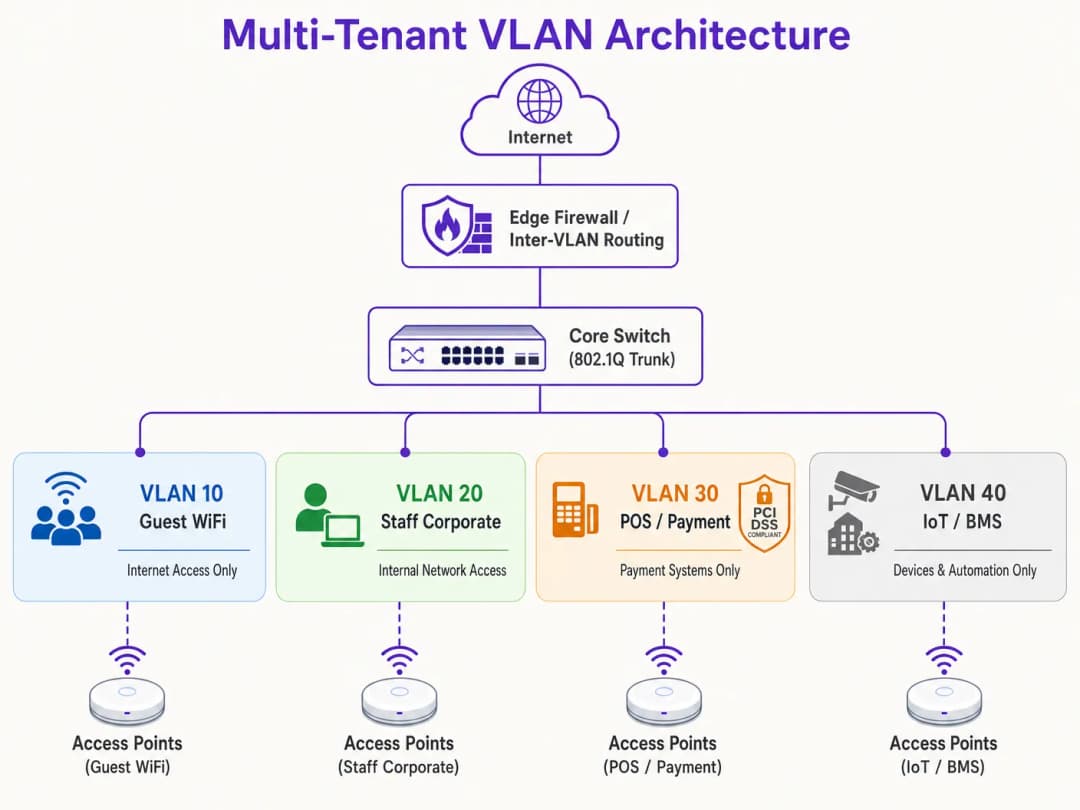
Prima di configurare qualsiasi hardware, stabilisci una mappa di rete logica completa. Assegna ID VLAN, sottoreti IP e zone di sicurezza distinti a ciascuna classe di traffico.
| Nome del segmento | ID VLAN | Sottorete IP / CIDR | Zona di sicurezza | Autenticazione primaria |
|---|---|---|---|---|
| Network Management | VLAN 10 | 10.10.10.0/24 | Gestione | Statica / Out-of-Band |
| Guest WiFi (Purple) | VLAN 20 | 172.16.0.0/20 | Guest (Solo Internet) | Open + Captive Portal |
| Personale aziendale | VLAN 30 | 10.10.30.0/23 | Aziendale interna | WPA3-Enterprise (802.1X) |
| POS / Pagamenti | VLAN 40 | 192.168.40.0/24 | PCI-CDE (Limitata) | WPA3-Enterprise / MAB |
| IoT / Sistemi dell'edificio | VLAN 50 | 10.10.50.0/24 | IoT (Limitata) | WPA3-SAE / Dynamic PSK |
Regola fondamentale: non utilizzare mai la VLAN 1 per il traffico attivo o la gestione. Disabilita la VLAN 1 su tutte le porte trunk e cambia la VLAN nativa in un ID VLAN non utilizzato e non instradabile (ad es., VLAN 999) per prevenire attacchi di VLAN hopping.
Passaggio 2: Configurazione dell'infrastruttura di switch cablata
Configura gli switch di core, distribuzione e accesso per supportare la struttura logica delle VLAN. Le porte degli switch collegate direttamente agli AP devono gestire più VLAN e devono essere configurate come porte trunk 802.1Q. Definisci esplicitamente quali VLAN sono consentite su ciascun trunk per ridurre al minimo la superficie di esposizione della sicurezza. Le porte che collegano singoli dispositivi cablati (come un terminale POS statico o il PC della reception) devono essere impostate in modalità di accesso e assegnate a una singola VLAN.
Step 3: Configurazione del Wireless LAN Controller e degli AP
Mappa gli SSID wireless sulle rispettive VLAN e configura i controlli di sicurezza edge. Per l'SSID Guest, configura la sicurezza su Open o WPA3-Enhanced Open (OWE) per fornire una crittografia wireless opportunistica, abilita il Client Isolation e reindirizza al Captive Portal gestito in cloud di Purple per l'onboarding degli utenti e l'analisi dei dati in conformità con il GDPR. Per l'SSID Corporate, configura WPA3-Enterprise con 802.1X, definisci gli indirizzi dei server RADIUS primario e secondario e abilita 802.11r Fast BSS Transition e Opportunistic Key Caching per un roaming fluido. Per i dispositivi IoT, distribuisci WPA3-SAE con una passphrase robusta e a rotazione, oppure implementa Multi-PSK (MPSK) per assegnare chiavi univoche ai singoli dispositivi e mapparle dinamicamente sulle sub-VLAN.
Step 4: Firewall di Core e Politica di Routing Inter-VLAN
La sicurezza di un'architettura VLAN dipende interamente dalle regole del firewall che regolano il routing inter-VLAN. Sul firewall deve essere applicata una rigorosa politica di Default-Deny, consentendo solo i flussi esplicitamente autorizzati.

Per la Zona Guest (VLAN 20), consenti il traffico in uscita verso la WAN sulle porte 80 e 443 e consenti il traffico UDP verso i servizi DNS e DHCP. Nega tutto il traffico verso le sottoreti interne. Per la Zona POS (VLAN 40), consenti il traffico TCP in uscita solo verso gli indirizzi IP dei gateway di pagamento designati sulla porta 443 e nega tutto il traffico da e verso tutte le altre VLAN. Per la Zona IoT (VLAN 50), consenti il traffico in uscita solo verso specifici server di aggiornamento dei produttori e controller di gestione locali e nega tutto l'altro traffico interno ed esterno.
Hai domande sulla tua configurazione specifica?
Il nostro team collabora con gestori di sedi, responsabili IT e ingegneri di rete in 80.000 sedi. Prenota una chiamata di 20 minuti e ti mostreremo come altri professionisti come te hanno risolto il problema.
Best Practice
Per garantire stabilità a lungo termine, prestazioni elevate e una sicurezza rigorosa, attieniti a questi principi di progettazione delle VLAN standard del settore.
L'Isolamento del Management Plane non è negoziabile. Non consentire mai il traffico degli utenti finali sulla VLAN di gestione della rete. AP, switch, router e WLC dovrebbero ottenere i propri indirizzi IP su una VLAN di gestione dedicata e altamente limitata. L'accesso a questa VLAN deve essere limitato ai soli dispositivi amministrativi autorizzati, idealmente tramite una VPN sicura o una porta console fisica. Se un utente malintenzionato ottiene l'accesso al piano di gestione, avrà il controllo effettivo sull'intera infrastruttura di rete.
Standardised VLAN Schema è essenziale per gli operatori multi-sito. Per le organizzazioni che gestiscono portafogli multi-sito - come una catena di vendita al dettaglio con 500 negozi o un marchio alberghiero con 50 proprietà - è fondamentale implementare uno schema VLAN basato su modelli applicato in modo coerente in ogni sito. L'utilizzo di un terzo ottetto coerente nell'indirizzo IP per corrispondere all'ID VLAN semplifica la risoluzione dei problemi a distanza, l'implementazione dei modelli WLC e la gestione delle regole del firewall in tutto il patrimonio. Questo approccio riduce anche drasticamente il tempo necessario per integrare nuovi siti.
DHCP Lease Time Optimisation previene l'esaurimento degli indirizzi IP. In ambienti ad alta densità, i tempi di lease DHCP devono essere gestiti con attenzione. Per il segmento WiFi per gli ospiti, dove gli utenti entrano ed escono frequentemente, impostare il tempo di lease DHCP da 1 a 2 ore. Per le reti aziendali interne, è appropriato un tempo di lease standard da 8 a 24 ore. Assicurarsi che i server DNS locali non siano esposti alle reti ospiti; configurare le VLAN degli ospiti per utilizzare resolver DNS pubblici e filtrati per ridurre il carico del server interno.
Compliance Alignment deve essere integrato nell'architettura fin dal primo giorno. Il requisito PCI-DSS 1.2 impone l'installazione di firewall per limitare il traffico tra il Cardholder Data Environment (CDE) e altre reti. Isolando i terminali POS su una VLAN dedicata, il resto della rete della struttura viene escluso dalla rigorosa e costosa valutazione di conformità PCI. Il principio di "Privacy by Design" del GDPR è soddisfatto isolando il traffico degli utenti ospiti e gestendo il consenso tramite il Captive Portal di Purple. L'adozione di WPA3 dovrebbe essere accelerata su tutti gli SSID, poiché il protocollo SAE (Simultaneous Authentication of Equals) di WPA3-Personal elimina la vulnerabilità agli attacchi di dizionario offline presente in WPA2-PSK. Per ulteriori indicazioni sull'architettura del controllo degli accessi, consultare i 10 Best Network Access Control (NAC) Solutions for 2026.
-
Troubleshooting & Risk Mitigation
Anche un'architettura VLAN progettata meticolosamente può riscontrare problemi operativi. Di seguito sono riportate le modalità di guasto più comuni e le relative mitigazioni tecniche.
VLAN Leakage and Misconfigured Trunk Ports è la causa principale più frequente dei ticket di supporto post-implementazione. Il sintomo consiste in client wireless che si autenticano correttamente su uno specifico SSID ma non riescono a ricevere un indirizzo IP. La causa principale è che la porta dello switch collegata all'AP è configurata in modo errato: la VLAN di destinazione non è consentita sul trunk 802.1X o la VLAN non è stata creata nel database locale dello switch. Verificare la configurazione del trunk dello switch e assicurarsi che l'elenco delle VLAN consentite sulla porta dello switch corrisponda agli SSID configurati sull'AP. Controllare sempre le configurazioni dello switch dopo ogni modifica e convalidarle durante la messa in servizio.I guasti del DHCP Relay si verificano quando una VLAN appena creata non ha un IP Helper Address corrispondente configurato sull'interfaccia di Layer 3. Poiché le richieste DHCP sono pacchetti broadcast, non possono superare i limiti della VLAN senza un relay agent. Se il server DHCP risiede su una VLAN diversa rispetto ai client, il router o lo switch Layer 3 deve essere configurato con un IP Helper Address che punti al server DHCP centralizzato.
La scadenza del certificato RADIUS è un rischio silenzioso che può causare il blocco simultaneo di un'intera rete aziendale. Il sintomo consiste nel fatto che tutti i client autenticati tramite 802.1X non riescono improvvisamente a connettersi, con errori di avviso sul certificato che compaiono sui dispositivi client. È fondamentale implementare avvisi di monitoraggio automatizzati che si attivano 30 giorni prima della scadenza del certificato e configurare pipeline di rinnovo automatico dei certificati per prevenire sviste manuali.
La proliferazione degli SSID e la congestione RF si manifestano con un'elevata latenza e velocità ridotte, nonostante un'eccellente potenza del segnale e un backhaul ad alta velocità. La causa principale è l'utilizzo eccessivo del canale dovuto al sovraccarico di gestione e all'interferenza co-canale. Consolidate gli SSID, passate al Dynamic VLAN Assignment, disattivate la radio a 2.4 GHz su un sottoinsieme di AP in aree ad alta densità e applicate il band steering per spingere i client dual-band verso le bande più pulite a 5 GHz e 6 GHz.
ROI e impatto sul business
L'implementazione di una solida strategia di segmentazione delle VLAN offre un valore aziendale significativo e misurabile per i gestori di location e le organizzazioni aziendali.
La minimizzazione dell'ambito di audit PCI offre risparmi diretti sui costi. Per le location che elaborano pagamenti con carta di credito, una rete flat include l'intera infrastruttura nell'ambito della conformità PCI-DSS. Ciò significa che ogni switch, AP, server e PC d'ufficio deve essere sottoposto a audit, con un costo di decine di migliaia di sterline all'anno in valutazioni di conformità, penetration test e sovraccarico amministrativo. Segmentando la rete e isolando il Cardholder Data Environment in una VLAN POS dedicata con rigidi controlli firewall, l'ambito dell'audit viene limitato esclusivamente a quella VLAN. Questa riduzione dell'ambito può diminuire i costi di conformità fino al 70% e ridurre drasticamente il rischio di sanzioni per mancata conformità.
La mitigazione dei costi di violazione dei dati è il risultato di sicurezza a più alto valore. Il fattore principale delle gravi violazioni di dati è il movimento laterale, in cui un utente malintenzionato ottiene l'accesso a un dispositivo a bassa sicurezza e si sposta all'interno di una rete flat per compromettere database di alto valore o sistemi POS. La segmentazione delle VLAN, combinata con rigide regole firewall inter-VLAN, elimina completamente questo vettore. Se un dispositivo IoT sulla VLAN 50 viene compromesso, l'attaccante rimane bloccato all'interno di quel segmento logico. Il raggio d'azione della violazione viene ridotto al minimo, proteggendo le risorse aziendali sensibili. Guest Analytics and Revenue Monetisation trasforma la rete da centro di costo in risorsa strategica. Una rete correttamente segmentata consente ai gestori delle location di offrire in sicurezza un servizio Guest WiFi di alta qualità senza rischiare la sicurezza interna. Instradando il traffico degli ospiti attraverso una VLAN dedicata alla piattaforma di Purple, le location possono acquisire preziosi dati dei clienti di prima parte tramite un Captive Portal personalizzato, integrato direttamente con CRM e piattaforme di marketing automation. Ciò consente campagne di marketing mirate, aumenta la fedeltà dei clienti e permette ai gestori di monetizzare la propria infrastruttura wireless attraverso upgrade di banda a livelli e pubblicità sulla splash page del Captive Portal. Per approfondire come l'analisi dei dati guidi i risultati aziendali, consulta la documentazione della piattaforma WiFi Analytics di Purple.
-
References
- Cisco Wireless APs: 2026 Guide to Products & Deployment
- 10 Best Network Access Control (NAC) Solutions for 2026
- WiFi in Schools: The 2026 Administrator & IT Guide
- How to Implement 802.1X Authentication with Cloud RADIUS
- Purple Guest WiFi Platform
- Purple WiFi Analytics Platform
- Hospitality WiFi Solutions
- Retail WiFi Solutions
- Transport WiFi Solutions
Definizioni chiave
VLAN (Virtual Local Area Network)
Un raggruppamento logico di dispositivi di rete che comunicano come se si trovassero sulla stessa LAN fisica, indipendentemente dalla loro posizione fisica. Definite sotto lo standard IEEE 802.1Q, le VLAN partizionano una singola struttura di switch fisico in molteplici domini di broadcast isolati utilizzando un identificatore VLAN (VID) a 12 bit integrato nell'intestazione del frame Ethernet.
I team IT incontrano le VLAN come meccanismo principale per separare il traffico di ospiti, personale, POS e IoT su un'infrastruttura fisica condivisa. Senza VLAN, tutti i dispositivi condividono un unico dominio di broadcast, creando rischi per la sicurezza e le prestazioni.
Porta Trunk 802.1Q
Una porta dello switch configurata per trasportare simultaneamente il traffico di più VLAN, contrassegnando ogni frame Ethernet con il rispettivo ID VLAN. La porta trunk trasporta i frame taggati tra gli switch e verso gli access point, mentre le porte di accesso trasportano solo frame non taggati per una singola VLAN.
Gli ingegneri di rete configurano le porte trunk sulle interfacce degli switch collegate agli access point e sulle porte di uplink tra gli switch. Una porta trunk configurata in modo errato - dove l'elenco delle VLAN consentite non include una VLAN richiesta - è la causa più comune di errori di connettività post-installazione.
Dynamic VLAN Assignment (DVA)
Un'architettura che utilizza l'autenticazione 802.1X e un server RADIUS per assegnare dinamicamente un client wireless a una specifica VLAN in base alla sua identità autenticata, anziché all'SSID a cui si è connesso. Il server RADIUS restituisce gli attributi standard IETF (Tunnel-Type, Tunnel-Medium-Type, Tunnel-Private-Group-ID) nel messaggio Access-Accept per indicare all'AP quale VLAN assegnare.
Il DVA è l'approccio consigliato per gli edifici multi-tenant in cui la trasmissione di più SSID comprometterebbe le prestazioni delle radiofrequenze. Consente a un singolo SSID di servire più organizzazioni di tenant garantendo un isolamento completo a livello Layer 2 tra di esse.
RADIUS (Remote Authentication Dial-In User Service)
Un protocollo di rete client-server che fornisce una gestione centralizzata di Authentication, Authorisation, and Accounting (AAA) per l'accesso alla rete. In un contesto WiFi, il controller wireless funge da client RADIUS, inoltrando le richieste di autenticazione dei client wireless al server RADIUS, che convalida le credenziali rispetto a un archivio di identità (Active Directory, LDAP, ecc.) e restituisce gli attributi di autorizzazione, incluse le assegnazioni di VLAN.
RADIUS è la spina dorsale della sicurezza delle reti WiFi aziendali. I team IT distribuiscono server RADIUS (come Microsoft NPS, FreeRADIUS o servizi cloud RADIUS) per applicare criteri di rete per utente e per dispositivo, inclusi il Dynamic VLAN Assignment e l'autenticazione basata su certificati.
PCI DSS (Payment Card Industry Data Security Standard)
Un insieme di standard di sicurezza progettati per garantire che tutte le aziende che accettano, elaborano, memorizzano o trasmettono informazioni sulle carte di credito mantengano un ambiente sicuro. Il requisito 1 del PCI DSS impone l'installazione e la manutenzione di controlli di sicurezza della rete, compresi i firewall che limitano il traffico tra il Cardholder Data Environment (CDE) e le altre reti.
I gestori di sedi con terminali POS o sistemi di elaborazione dei pagamenti devono essere conformi allo standard PCI DSS. Una corretta segmentazione VLAN isola il CDE in una VLAN dedicata, riducendo l'ambito dell'audit PCI al solo segmento interessato e alle regole firewall che lo disciplinano, anziché all'intera rete.
Dominio di broadcast
L'insieme di tutti i dispositivi di rete che riceveranno un frame di broadcast inviato da un qualsiasi dispositivo del gruppo. Su una rete piatta e non segmentata, tutti i dispositivi condividono un unico dominio di broadcast. Le VLAN suddividono la rete in domini di broadcast più piccoli, limitando il traffico di broadcast (ARP, DHCP, mDNS) ai soli dispositivi all'interno di quella VLAN.
Nelle sedi ad alta densità con centinaia o migliaia di dispositivi connessi, un unico grande dominio di broadcast genera enormi volumi di traffico di broadcast che consumano il tempo di trasmissione wireless e riducono le prestazioni. Ridurre le dimensioni del dominio di broadcast tramite le VLAN è una tecnica fondamentale di ottimizzazione delle prestazioni.
WPA3-Enterprise
L'attuale standard di sicurezza WiFi di livello aziendale, che utilizza l'autenticazione 802.1X e il protocollo EAP (Extensible Authentication Protocol) per l'autenticazione per utente o per dispositivo. WPA3-Enterprise offre una protezione crittografica a 128 bit (standard) o a 192 bit (modalità ad alta sicurezza) ed elimina le vulnerabilità associate all'handshake a 4 vie di WPA2.
I team IT dovrebbero implementare WPA3-Enterprise su tutti gli SSID aziendali e regolamentati (personale, POS). Richiede un server RADIUS e certificati client (EAP-TLS) o credenziali nome utente/password (PEAP-MSCHAPv2). WPA3-Enterprise è lo standard di autenticazione richiesto per le installazioni wireless conformi a PCI DSS.
Isolamento dei client (Peer-to-Peer Blocking)
Una funzionalità dell'access point wireless che impedisce ai dispositivi connessi allo stesso SSID di comunicare direttamente tra loro a livello Layer 2. Quando è abilitata, tutto il traffico tra i client viene bloccato sull'AP, costringendolo ad attraversare il firewall prima di raggiungere un altro dispositivo.
L'isolamento dei client è una configurazione obbligatoria su tutti gli SSID WiFi per gli ospiti. Senza di esso, un utente malintenzionato sulla rete ospiti può scansionare, sondare e attaccare altri dispositivi ospiti sullo stesso SSID. È anche un requisito per la conformità GDPR, in quanto impedisce a un ospite di intercettare il traffico non crittografato di un altro ospite.
MAC Authentication Bypass (MAB)
Un meccanismo di autenticazione di fallback che consente ai dispositivi non in grado di eseguire l'autenticazione 802.1X (come stampanti, smart TV e sensori IoT) di autenticarsi alla rete utilizzando il proprio indirizzo MAC. Il server RADIUS viene precompilato con gli indirizzi MAC dei dispositivi autorizzati e restituisce l'assegnazione VLAN appropriata in seguito a una richiesta MAB andata a buon fine.
I team IT utilizzano il MAB per i dispositivi IoT e legacy in ambienti multi-tenant. Poiché gli indirizzi MAC possono essere contraffatti, il MAB dovrebbe sempre essere combinato con rigide ACL del firewall sulla VLAN assegnata, limitando l'accesso alla rete del dispositivo ai soli servizi esterni specifici di cui necessita.
Native VLAN
La VLAN assegnata al traffico non taggato su una porta trunk 802.1Q. Per impostazione predefinita sulla maggior parte degli switch, la VLAN 1 è la native VLAN. I frame non taggati che arrivano su una porta trunk vengono assegnati alla native VLAN. Questo è un vettore di attacco ben noto per il VLAN hopping, in cui un utente malintenzionato invia frame con doppio tag per sfuggire alla propria VLAN.
La best practice consiste nel modificare la native VLAN su tutte le porte trunk impostandola su un ID VLAN non utilizzato e non instradabile (ad esempio, VLAN 999) e nell'assicurarsi che nessun dispositivo attivo sia assegnato alla VLAN 1. Questo è un passaggio di hardening obbligatorio in qualsiasi progettazione di rete conforme a PCI DSS.
Esempi pratici
Un gruppo alberghiero con 350 camere che gestisce 12 strutture deve consolidare la propria infrastruttura di rete. Attualmente, ogni struttura gestisce un'unica rete piatta che serve camere degli ospiti, laptop del personale, terminali POS del ristorante, telecamere CCTV, controller HVAC e un centro congressi con più organizzatori di eventi simultanei. Il direttore IT ha segnalato che l'intera rete rientra nell'ambito della conformità PCI-DSS, con un costo per il gruppo di circa £45.000 all'anno in tariffe di audit e interventi di adeguamento. Come dovrebbe essere riprogettata la rete?
La soluzione è un'architettura a cinque VLAN distribuita in modo coerente in tutte le 12 strutture utilizzando un modello standardizzato. La VLAN 10 (Gestione, 10.XX.10.0/24) trasporta solo il traffico di gestione di switch, AP e WLC, accessibile esclusivamente tramite una VPN amministrativa dedicata. La VLAN 20 (WiFi Ospiti, 172.16.0.0/20) instradata tutto il traffico degli ospiti attraverso il Captive Portal di Purple per un onboarding e analisi conformi al GDPR, con isolamento dei client abilitato e un tempo di lease DHCP di 2 ore per prevenire l'esaurimento degli IP. La VLAN 30 (Personale Aziendale, 10.XX.30.0/23) utilizza WPA3-Enterprise con autenticazione 802.1X rispetto ad Azure AD del gruppo tramite un servizio RADIUS in cloud. La VLAN 40 (POS/Pagamenti, 192.168.40.0/24) è un segmento PCI-CDE rigorosamente isolato con una policy firewall di tipo "default-deny" che consente solo HTTPS in uscita verso gli indirizzi IP del fornitore del gateway di pagamento. La VLAN 50 (IoT/BMS, 10.XX.50.0/24) isola tutti i dispositivi CCTV, HVAC, serrature intelligenti e sistemi di gestione dell'edificio con filtro in uscita limitato alle rispettive piattaforme di gestione. Il centro congressi viene gestito tramite la predisposizione di VLAN temporanee per eventi (VLAN 60-99) tramite la dashboard WLC, ciascuna con un Captive Portal Purple personalizzato e limiti di larghezza di banda. Lo schema IP standardizzato con il terzo ottetto (XX = numero del sito) consente al team NOC di identificare il sito e il segmento di qualsiasi dispositivo solo dal suo indirizzo IP, riducendo drasticamente i tempi di risoluzione dei problemi.
Una catena di vendita al dettaglio nazionale con 220 negozi sta riscontrando lamentele diffuse sulle prestazioni del WiFi. Nonostante disponga di connessioni in fibra da 200 Mbps in ogni negozio, clienti e personale segnalano velocità inferiori a 5 Mbps. Un audit rivela che gli access point di ciascun negozio trasmettono 9 SSID: uno per i clienti, uno per il personale, uno per il POS, uno per la TVCC, uno per la segnaletica digitale, uno per i palmari di gestione del magazzino, uno per un partner logistico terzo, uno per la concessione di una caffetteria e un SSID legacy di un precedente fornitore che non è mai stato dismesso. Come dovrebbe essere riprogettata la rete per risolvere i problemi di prestazioni mantenendo al contempo la sicurezza?
La soluzione è un consolidamento in tre fasi. Fase 1 (Immediata): Dismettere immediatamente l'SSID legacy e tutti gli SSID con zero client attivi. Questo da solo riduce l'overhead dei beacon da 9 SSID a 7. Fase 2 (rollout a 30 giorni): Consolidare gli SSID del personale, dei palmari per la gestione del magazzino, del partner logistico e della segnaletica digitale in un unico SSID aziendale utilizzando il Dynamic VLAN Assignment tramite 802.1X e RADIUS. Ciascun gruppo di utenti si autentica con le proprie credenziali aziendali o con il certificato del dispositivo, e il server RADIUS restituisce l'attributo Tunnel-Private-Group-ID appropriato per assegnarli alla loro VLAN dedicata (VLAN 30 per il personale, VLAN 50 per IoT/palmari, VLAN 60 per la logistica, VLAN 70 per la segnaletica). Questo riduce il numero di SSID da 7 a 4. Fase 3 (rollout a 60 giorni): Migrare la concessione della caffetteria su una VLAN dedicata con un'istanza di captive portal Purple separata e consolidare gli SSID POS e TVCC sulle rispettive VLAN isolate. L'architettura finale trasmette 3 SSID: un SSID aziendale con Dynamic VLAN Assignment, un WiFi per ospiti/clienti tramite il captive portal di Purple e un SSID POS. Abilitare il band steering su tutti gli AP per spingere i client dual-band a 5 GHz e configurare la limitazione della velocità per client sulla VLAN ospiti (10 Mbps in downstream) per evitare che un singolo utente saturi l'uplink.
Domande di esercitazione
Q1. Un operatore di un centro congressi gestisce una struttura di circa 4.600 mq con 200 access point. Attualmente trasmette 6 SSID: uno per i partecipanti all'evento, uno per gli espositori, uno per il personale della struttura, uno per le apparecchiature AV, uno per i terminali POS della ristorazione e uno per i sistemi di gestione dell'edificio. Il responsabile IT segnala che le prestazioni del WiFi sono scarse durante i grandi eventi, con velocità medie dei client che scendono sotto i 3 Mbps nonostante un uplink in fibra da 1 Gbps. La struttura si sta inoltre preparando per un audit PCI DSS. Come riprogetteresti l'architettura wireless per risolvere sia i problemi di prestazioni che quelli di conformità?
Suggerimento: Considera quali SSID possono essere consolidati utilizzando il Dynamic VLAN Assignment, quali classi di traffico hanno implicazioni per la conformità PCI DSS e come l'overhead dei beacon SSID contribuisce al problema delle prestazioni in un ambiente ad alta densità.
Visualizza risposta modello
La riprogettazione consolida i 6 SSID riducendoli a 3 utilizzando il Dynamic VLAN Assignment per i segmenti aziendali. SSID 1 (Partecipanti all'evento): SSID aperto con WPA3-Enhanced Open, mappato sulla VLAN 20, instradato attraverso il captive portal di Purple per un onboarding conforme al GDPR e limitazione della velocità per singolo client (10 Mbps in downstream). Isolamento dei client abilitato. SSID 2 (Enterprise Secure): Singolo SSID WPA3-Enterprise che utilizza 802.1X con Dynamic VLAN Assignment. Gli espositori si autenticano con credenziali temporanee rilasciate alla registrazione e vengono inseriti nella VLAN 60 (solo internet, isolata). Il personale della struttura si autentica con le credenziali AD aziendali e viene inserito nella VLAN 30 (accesso interno). Le apparecchiature AV utilizzano il MAC Authentication Bypass e vengono inserite nella VLAN 50 (limitata ai server di gestione AV). SSID 3 (POS Secure): SSID WPA3-Enterprise dedicato per i terminali POS della ristorazione, mappato sulla VLAN 40 (PCI-CDE). Rigide regole del firewall consentono solo HTTPS in uscita verso il gateway di pagamento. I sistemi di gestione dell'edificio vengono migrati a una connessione cablata sulla VLAN 50, se possibile, o a un SSID IoT dedicato se è richiesto il wireless. Ridurre gli SSID da 6 a 3 elimina circa il 15 - 20% dell'overhead dei beacon, migliorando direttamente l'airtime disponibile e il throughput dei client. L'ambito dell'audit PCI viene ridotto alla VLAN 40 e alle sue policy del firewall, soddisfacendo i requisiti PCI DSS 1.2 e 1.3.
Q2. Un progettista di rete sta definendo l'infrastruttura WiFi per un nuovo edificio commerciale a uso misto di 80 unità. L'edificio ospiterà 15 tenant commerciali indipendenti, una caffetteria al piano terra e spazi di co-working condivisi. Ciascun tenant richiede il completo isolamento di rete dagli altri, la propria allocazione di banda e la possibilità di connettere i propri dispositivi. Il proprietario dell'edificio desidera gestire l'intera infrastruttura centralmente e abilitare i nuovi tenant in meno di 30 minuti. Quale architettura consiglieresti e quali sono le decisioni di progettazione chiave?
Suggerimento: Considera i compromessi tra VLAN per singolo tenant con SSID dedicati e l'assegnazione dinamica delle VLAN con un unico SSID. Pensa ai requisiti operativi per l'onboarding rapido dei tenant e la gestione centralizzata.
Visualizza risposta modello
L'architettura consigliata è un modello di assegnazione dinamica delle VLAN con un singolo SSID aziendale per tutti i tenant commerciali, integrato da un SSID guest separato per la caffetteria e gli spazi di co-working. A ogni tenant viene assegnato un ID VLAN univoco (es. VLAN 101-115 per i tenant, VLAN 200 per il co-working, VLAN 201 per la caffetteria). Il server RADIUS è integrato con un provider di identità cloud che supporta directory utenti per singolo tenant. Quando viene registrato un nuovo tenant, l'amministratore crea una nuova VLAN sullo switch principale, configura uno scope DHCP per la nuova subnet, aggiunge la VLAN all'elenco di quelle consentite su tutte le porte trunk, crea un nuovo gruppo di tenant nel provider di identità e configura il server RADIUS per restituire il nuovo ID VLAN per gli utenti di quel tenant. Questo intero processo può essere basato su modelli e completato in meno di 30 minuti. La VLAN di ciascun tenant è isolata da tutte le altre VLAN dei tenant tramite una policy firewall inter-VLAN con negazione predefinita. Le policy di larghezza di banda per tenant vengono applicate sul WLC utilizzando profili QoS, garantendo a ciascun tenant il livello di banda contrattualizzato. L'SSID guest della caffetteria e del co-working reindirizza al Captive Portal di Purple sulla VLAN 200, offrendo al proprietario dell'edificio analisi sui visitatori e un'esperienza di onboarding personalizzata con il proprio brand. La decisione di progettazione chiave è quella di utilizzare un unico SSID aziendale anziché SSID dedicati per ciascun tenant, il che richiederebbe la trasmissione di un massimo di 15 SSID, compromettendo gravemente le prestazioni RF nell'ambiente ad alta densità dell'edificio.
Q3. Durante un audit di rete ordinario, un IT manager di una grande catena di vendita al dettaglio scopre che la VLAN 1 viene utilizzata come VLAN nativa su tutte le porte trunk in 300 negozi e che l'SSID di gestione per l'accesso ai controller wireless si trova sulla stessa subnet della rete WiFi guest. Il team di sicurezza ha segnalato questa situazione come una vulnerabilità critica. Quali misure correttive immediate dovrebbero essere adottate e qual è il rischio se questi problemi non vengono risolti?
Suggerimento: Considera gli specifici vettori di attacco abilitati dalla VLAN 1 come VLAN nativa (VLAN hopping) e le implicazioni derivanti dall'accesso al traffico di gestione dalla rete guest. Dai la priorità alle fasi di riparazione in base alla gravità del rischio.
Visualizza risposta modello
Risoluzione immediata in ordine di priorità: Passaggio 1 (Critico - stesso giorno): Isolare l'SSID di gestione. Disabilitare completamente l'SSID di gestione se è accessibile dalla rete guest. Spostare tutto l'accesso di gestione del controller wireless a una VLAN di gestione dedicata (ad es. VLAN 10) con accesso limitato ai dispositivi dell'amministratore tramite una VPN site-to-site o workstation di gestione dedicate. Questo elimina il rischio più critico: un utente guest o un utaccante sulla rete guest che ottiene l'accesso ai controller wireless e riconfigura o disabilita l'intera infrastruttura wireless. Passaggio 2 (Alto - entro 1 settimana): Modificare la VLAN nativa su tutte le porte trunk dalla VLAN 1 a una VLAN inutilizzata e non instradabile (ad es. VLAN 999). Assicurarsi che nessun dispositivo attivo sia assegnato alla VLAN 1. Questo mitiga il vettore di attacco VLAN hopping, in cui un utente malintenzionato invia pacchetti 802.1Q con doppio tag per sfuggire alla propria VLAN e ottenere l'accesso al traffico di un'altra VLAN. Passaggio 3 (Medio - entro 30 giorni): Condurre un audit completo delle porte trunk in tutti i 300 negozi per verificare che l'elenco delle VLAN consentite su ciascuna porta trunk sia definito esplicitamente e corrisponda alla documentazione di progettazione. Rimuovere dalle porte trunk tutte le VLAN che non sono richieste in quella sede. Il rischio di lasciare questi problemi irrisolti è grave: un utente malintenzionato sulla rete WiFi guest potrebbe potenzialmente raggiungere l'interfaccia di gestione del controller wireless, modificare le configurazioni SSID, estrarre chiavi precondivise, reindirizzare il traffico o disabilitare l'intera infrastruttura wireless. La vulnerabilità della VLAN nativa VLAN 1 potrebbe consentire a un utente malintenzionato di sfuggire alla VLAN guest e accedere ai terminali POS o ai server interni, con conseguente violazione del PCI DSS e potenziali sanzioni fino a £100.000 per ogni mese di non conformità.
Domande frequenti
Come si configurano reti separate su una connessione internet condivisa per residenti, personale dell'ufficio locazioni e dispositivi smart building?
Per isolare diversi gruppi di utenti su un uplink ad alta velocità condiviso senza implementare più reti fisiche, configura il tagging VLAN IEEE 802.1Q sullo switch centrale e sui punti di accesso wireless. Crea VLAN dedicate con subnet IP private: ad esempio, VLAN 10 per lo staff dell'ufficio locazioni (autenticato tramite 802.1X/WPA3-Enterprise), VLAN 20 per i sistemi di gestione dell'edificio e IoT (utilizzando il MAC Authentication Bypass e ACL in uscita rigorose), VLAN 30 per il WiFi ospite pubblico (con isolamento dei client a Layer 2 e un Captive Portal) e VLAN dinamiche per ciascun tenant (VLAN 100-500) per i residenti che utilizzano Identity PSK (iPSK) o Dynamic VLAN Assignment. Imponi regole di firewall inter-VLAN stateful che impediscano il traffico tra i segmenti consentendo al contempo l'accesso a internet WAN in uscita.
Qual è la differenza tra la codifica VLAN basata su SSID e l'Assegnazione VLAN Dinamica (DVA)?
Il tagging VLAN basato su SSID associa staticamente un SSID specifico a un singolo ID VLAN. In ambienti multi-tenant con decine o centinaia di tenant, la creazione di SSID separati per ciascun tenant genera un pesante sovraccarico nella gestione delle radiofrequenze, congestione dei beacon e riduzione dell'efficienza del tempo di trasmissione. Il Dynamic VLAN Assignment (DVA) risolve questo problema trasmettendo un unico SSID comune. Quando un utente si connette e si autentica tramite 802.1X, il server RADIUS centrale esamina la sua identità e restituisce gli attributi RFC 2868 e RFC 3580 (Tunnel-Type = VLAN, Tunnel-Medium-Type = 802, Tunnel-Private-Group-ID = VLAN_ID), indirizzando dinamicamente quel client nella sua VLAN dedicata e isolata senza consumare ulteriore tempo di trasmissione per il broadcast.
In che modo l'isolamento dei client Layer 2 impedisce il movimento laterale tra i tenant?
L'isolamento dei client Layer 2 (chiamato anche Private VLAN o isolamento delle stazioni) impone agli access point e alle porte degli switch di scartare i frame unicast, multicast e broadcast peer-to-peer diretti tra i dispositivi connessi alla stessa radio wireless o dominio di broadcast. Ciò impedisce ad attori malintenzionati o endpoint compromessi di eseguire ARP poisoning, scansioni delle porte, attacchi man-in-the-middle (MITM) o di rilevare servizi di rete non crittografati sui dispositivi residenti vicini. Tutte le comunicazioni vengono forzate a monte verso il gateway predefinito Layer 3, dove le regole del firewall stateful ispezionano o bloccano il traffico tra i dispositivi.
In che modo la segmentazione VLAN protegge i dati dei titolari di carta (PCI-DSS 4.0) in immobili ad uso misto commerciale e uffici?
Il requisito 1 del PCI-DSS 4.0 impone severi controlli di sicurezza di rete per isolare il Cardholder Data Environment (CDE) da tutte le reti non affidabili e non essenziali. Posizionando i terminali POS, i gateway di pagamento e l'hardware dei commercianti su una VLAN dedicata e isolata (ad esempio, la VLAN 40), le organizzazioni garantiscono che i dispositivi dei tenant, le workstation degli uffici aziendali e la rete WiFi per gli ospiti pubblica abbiano zero accesso Layer 2 o Layer 3 ai sistemi di pagamento. Le liste di controllo degli accessi (ACL) dei firewall stateful devono limitare il traffico in entrata e in uscita esclusivamente agli endpoint di elaborazione dei pagamenti autorizzati e ai canali TLS crittografati in uscita.
Come si impedisce al traffico mDNS di Apple AirPlay, Chromecast e dispositivi smart home di propagarsi tra le unità dei diversi tenant?
I dispositivi IoT e di streaming per la smart home si affidano al DNS multicast (mDNS) e al Simple Service Discovery Protocol (SSDP) sui domini di broadcast locali (224.0.0.251 / UDP 5353). In una rete multi-tenant non segmentata o piatta, ogni tenant vedrebbe e controllerebbe ogni Apple TV, stampante e altoparlante intelligente vicino nell'intero edificio. Isolare ciascun tenant nella propria micro-VLAN o utilizzare Identity PSK (iPSK) con contenimento Personal Area Network (PAN) confina i pacchetti multicast e broadcast rigorosamente ai dispositivi autorizzati di quel tenant, impedendo la trasmissione tra unità diverse e violazioni della privacy.
Continua a leggere questa serie
Perché il WiFi per gli ospiti in stile hotel non funziona negli edifici residenziali
Sarai in grado di diagnosticare il motivo per cui i residenti nei blocchi BTR, negli alloggi per studenti e nei complessi residenziali (MDU) continuano a segnalare problemi di rete e di scegliere il modello di autenticazione ideale per risolverli. La risposta è una chiave iPSK per nucleo familiare sui tuoi access point esistenti, mantenendo una rete Captive Portal separata per i visitatori.
Progettazione di reti WiFi per edifici per uffici multi-tenant
Questa guida fornisce a responsabili IT, architetti di rete e CTO un modello indipendente dal fornitore per la progettazione di reti WiFi scalabili, sicure e isolate in edifici per uffici multi-tenant. Copre la segmentazione VLAN in conformità a IEEE 802.1Q, l'assegnazione dinamica delle VLAN tramite 802.1X e RADIUS, la pianificazione RF per ambienti ad alta densità e le considerazioni di conformità ai sensi di GDPR e PCI DSS. Gli operatori delle strutture e i gestori degli edifici troveranno linee guida sull'architettura pratiche, casi di studio reali ed errori di configurazione da evitare prima della distribuzione.
Mean time to innocence: come dimostrare che non è colpa del WiFi
Il Mean time to innocence (MTTI) è la metrica critica che definisce il tempo speso dai team IT per dimostrare che un problema di rete non è di loro responsabilità. Questa guida descrive una metodologia di osservabilità in cinque passaggi per eliminare il rimpallo di responsabilità negli ambienti multi-tenant, sostituendo le accuse con prove condivise per ridurre il mean time to resolution (MTTR).
Hai domande sulla tua configurazione specifica?
Il nostro team collabora con gestori di sedi, responsabili IT e ingegneri di rete in 80.000 sedi. Prenota una chiamata di 20 minuti e ti mostreremo come altri professionisti come te hanno risolto il problema.