

Como a Atribuição Dinâmica de VLAN Funciona em Edifícios Multi-Inquilinos
Este guia de referência técnica detalha a arquitetura e implementação da Atribuição Dinâmica de VLAN utilizando 802.1X e RADIUS em ambientes multi-inquilinos. Fornece orientação acionável para gestores de TI e arquitetos de rede para reduzir a sobrecarga de SSID, impor o isolamento da Camada 2 e garantir conectividade segura e escalável em edifícios partilhados.
Ouça este guia
Ver transcrição do podcast
Resumo Executivo
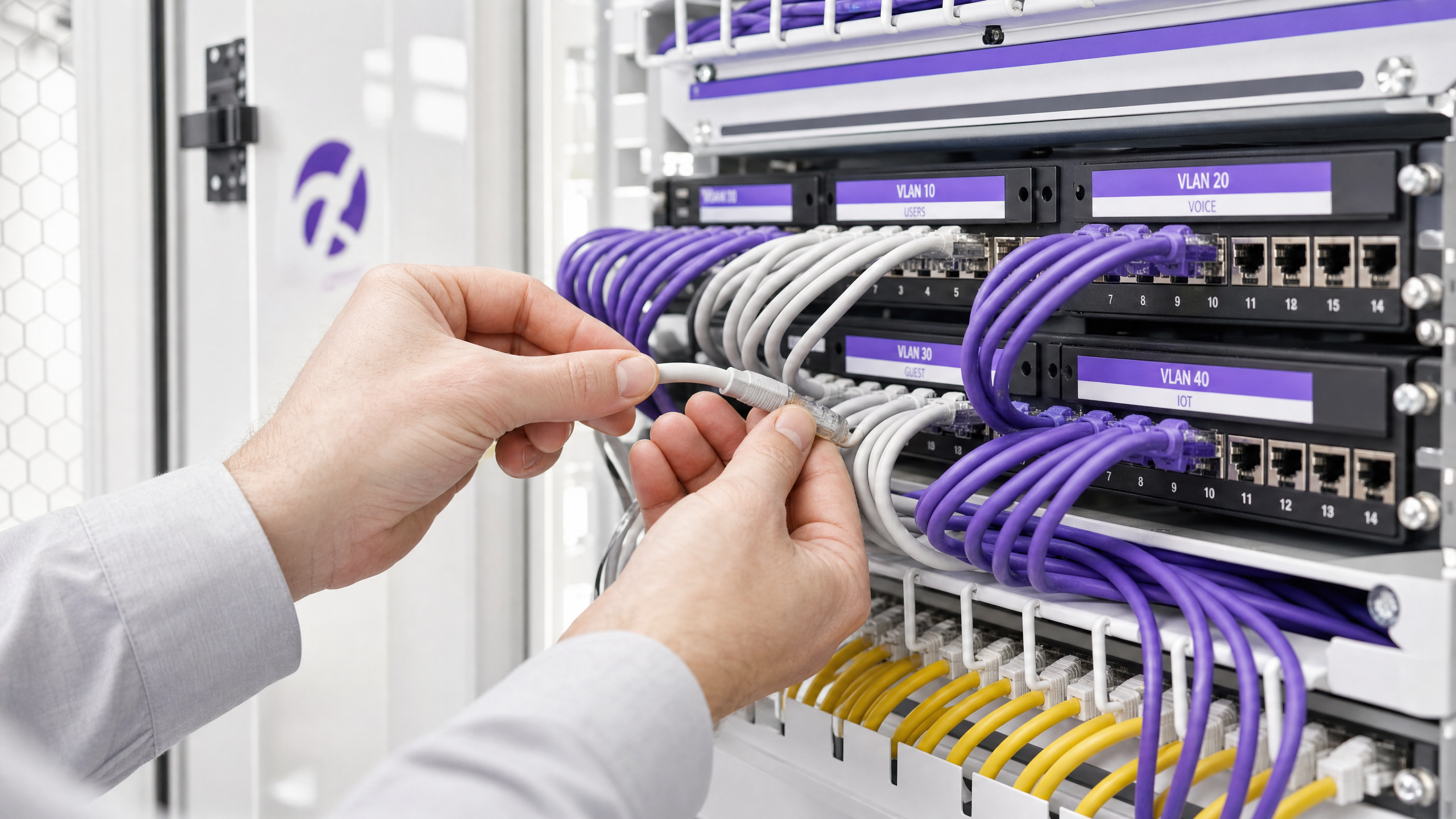
Para gestores de TI e arquitetos de rede que supervisionam edifícios multi-inquilinos — como escritórios comerciais, complexos de retalho ou grandes espaços de hospitalidade — gerir a segmentação de rede é um desafio crítico. Historicamente, isolar o tráfego de inquilinos significava implementar infraestruturas físicas separadas ou difundir um SSID único para cada inquilino. Ambas as abordagens são fundamentalmente falhas. A separação física é proibitiva em termos de custos e inflexível, enquanto a difusão de múltiplos SSIDs degrada severamente o desempenho de RF devido à sobrecarga excessiva de frames de gestão.
A Atribuição Dinâmica de VLAN resolve isto ao consolidar o ambiente sem fios num único SSID seguro. Alavancando a autenticação IEEE 802.1X e RADIUS, a rede atribui dinamicamente os utilizadores à sua Rede Local Virtual (VLAN) dedicada com base na sua identidade, e não na rede que escolhem. Este guia fornece uma análise técnica aprofundada e abrangente sobre a arquitetura, implementação e resolução de problemas da atribuição dinâmica de VLAN, garantindo isolamento seguro da Camada 2, conformidade com padrões como PCI DSS e GDPR, e um ROI robusto para os operadores de espaços.
Análise Técnica Aprofundada
O Problema com Múltiplos SSIDs
Num edifício partilhado, é comum ver dezenas de SSIDs difundidos (por exemplo, "TenantA_Corp", "TenantB_Secure", "Building_Guest"). Cada SSID difundido por um Ponto de Acesso (AP) deve transmitir frames de beacon à taxa de dados obrigatória mais baixa (tipicamente 1 Mbps ou 6 Mbps). À medida que o número de SSIDs aumenta, a proporção de tempo de antena consumida pela sobrecarga de gestão cresce exponencialmente, deixando menos tempo de antena para a transmissão real de dados. Isto resulta em alta latência, baixo débito e uma experiência de utilizador deficiente, independentemente da velocidade da ligação à internet subjacente.
A Arquitetura 802.1X e RADIUS
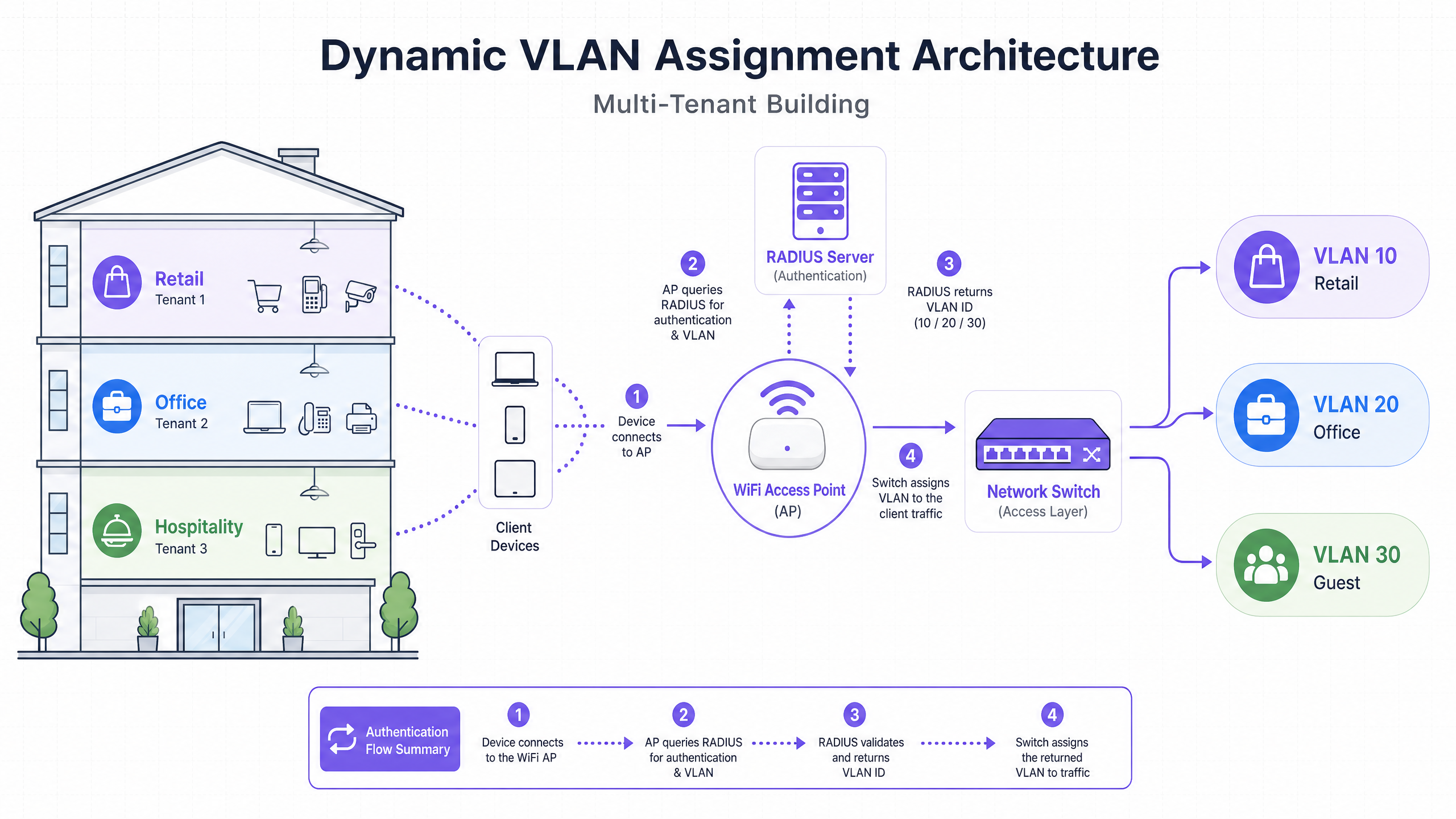
A Atribuição Dinâmica de VLAN desloca a lógica de segmentação da camada RF para a camada de autenticação. Baseia-se no padrão IEEE 802.1X para controlo de acesso à rede baseado em porta, integrado com um servidor RADIUS (Remote Authentication Dial-In User Service).
A arquitetura consiste em três componentes principais:
- Suplicante: O dispositivo cliente (portátil, smartphone) que solicita acesso à rede.
- Autenticador: O dispositivo de acesso à rede, tipicamente o Ponto de Acesso WiFi ou controlador sem fios, que bloqueia o tráfego até que a autenticação seja bem-sucedida.
- Servidor de Autenticação: O servidor RADIUS que valida as credenciais contra um repositório de identidades (por exemplo, Active Directory, LDAP) e dita as políticas de rede.
O Fluxo de Autenticação
Quando um suplicante tenta ligar-se ao SSID unificado, ocorre o seguinte fluxo:
- Inicialização EAPOL: O suplicante liga-se ao AP. O AP bloqueia todo o tráfego, exceto os pacotes EAPOL (Extensible Authentication Protocol over LAN).
- RADIUS Access-Request: O AP encapsula os dados EAP e reencaminha-os para o servidor RADIUS como um
Access-Request. - Validação de Credenciais: O servidor RADIUS verifica as credenciais do utilizador (via EAP-TLS, PEAP, etc.).
- RADIUS Access-Accept: Após validação bem-sucedida, o servidor RADIUS responde com uma mensagem
Access-Accept. Crucialmente, esta mensagem inclui atributos RADIUS padrão IETF específicos que instruem o AP sobre qual VLAN atribuir ao utilizador.
Os atributos RADIUS críticos necessários para a atribuição dinâmica de VLAN são:
Tunnel-Type(64): Definido comoVLAN(Valor 13)Tunnel-Medium-Type(65): Definido como802(Valor 6)Tunnel-Private-Group-ID(81): Definido para o ID de VLAN específico (por exemplo, "20" para o Inquilino A, "30" para o Inquilino B)
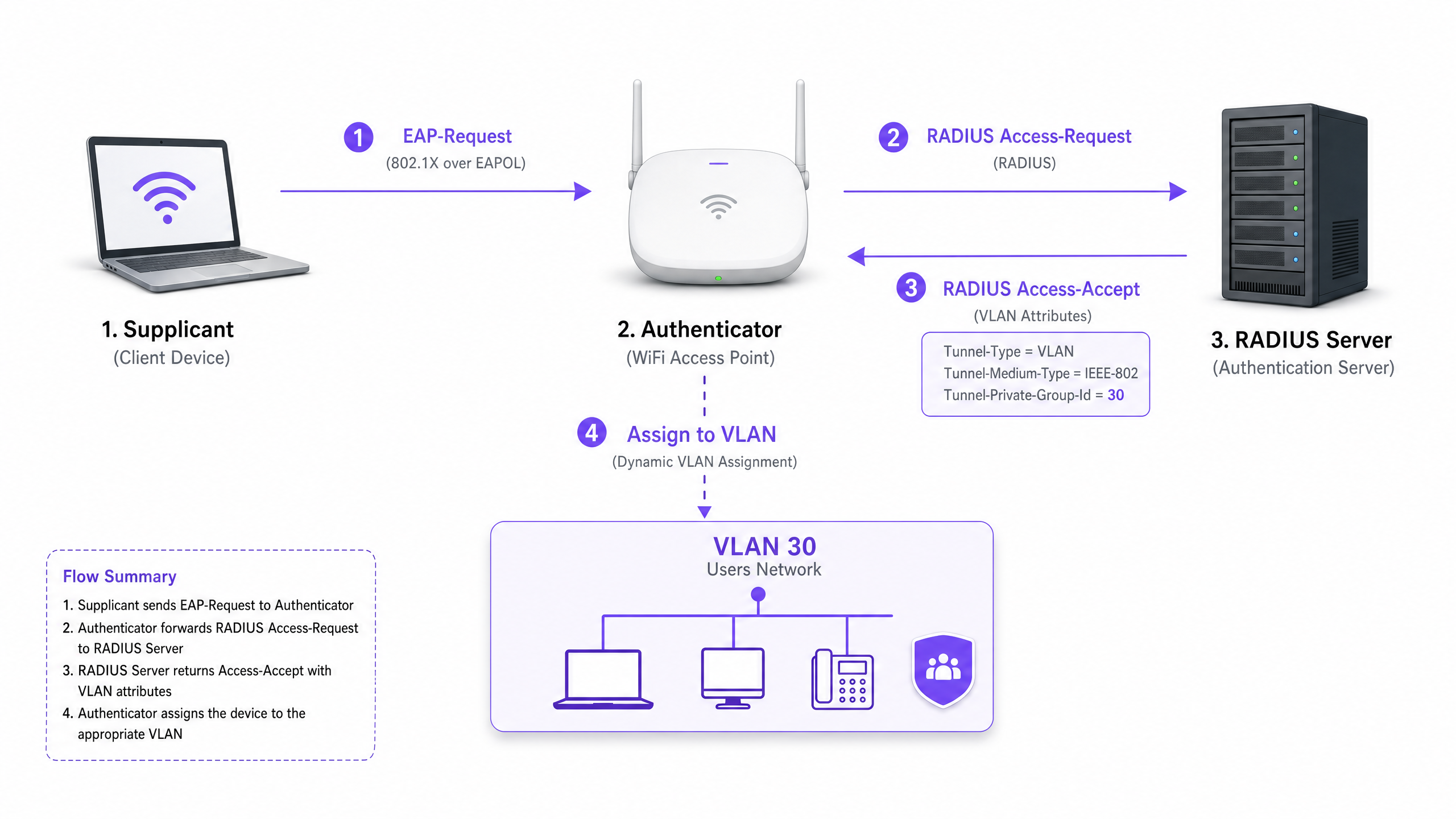
Assim que o AP recebe estes atributos, direciona o tráfego do utilizador diretamente para a VLAN especificada. Os switches de rede a montante tratam então o tráfego como se o utilizador estivesse fisicamente ligado a uma porta dedicada para esse inquilino, garantindo isolamento completo da Camada 2.
Guia de Implementação
A implementação da atribuição dinâmica de VLAN requer uma coordenação cuidadosa entre a infraestrutura sem fios, os switches de borda e o fornecedor de identidade. Siga esta sequência de implementação neutra em relação ao fornecedor.
Fase 1: Preparação da Infraestrutura de Rede
- Provisionamento de VLAN: Defina e crie as VLANs necessárias na sua infraestrutura de encaminhamento central e servidores DHCP. Garanta que cada VLAN de inquilino tem a sua própria sub-rede distinta e políticas de encaminhamento apropriadas (por exemplo, encaminhamento para a internet, mas descartando o tráfego inter-VLAN).
- Trunking de Switch: Este é um passo crítico. As portas do switch que se ligam aos seus Pontos de Acesso devem ser configuradas como portas trunk 802.1Q. Deve etiquetar todas as VLANs de inquilino potenciais que o AP possa precisar de atribuir. Se o servidor RADIUS atribuir a VLAN 40, mas a VLAN 40 não estiver etiquetada na porta do switch, o cliente autenticará, mas falhará em receber um endereço IP.
- Configuração do AP: Configure os APs para difundir um único SSID ativado para 802.1X (por exemplo, WPA3-Enterprise). Ative a configuração específica no seu controlador sem fios ou APs que lhes permite aceitar atributos de substituição RADIUS (muitas vezes rotulados como "AAA Override" ou "Dynamic VLAN").
Fase 2: Integração de RADIUS e Identidade
- Integração do Repositório de Identidades: Ligue o seu servidor RADIUS ao serviço de diretório que contém as identidades dos utilizadores e as suas associações de inquilino.
- Criação de Políticas de Rede: Crie políticas dentro do servidor RADIUS que mapeiam grupos de utilizadores para IDs de VLAN. Por exemplo, uma política que declare: Se o Utilizador pertencer ao Grupo 'Retail_Staff', retornar Tunnel-Private-Group-ID = 10.
- Gestão de Certificados: Se estiver a usar EAP-TLS (recomendado para dispositivos corporativos), implemente certificados de cliente. Se estiver a usar PEAP-MSCHAPv2 (comum para BYOD), certifique-se de que um certificado de servidor válido e fidedigno está instalado no servidor RADIUS.
Fase 3: Testes e Implementação Faseada
- Testes Piloto: Teste com um pequeno grupo de dispositivos em diferentes inquilinos. Verifique se, após a ligação, o dispositivo recebe um endereço IP da sub-rede correta e não consegue fazer ping a dispositivos noutras VLANs de inquilinos.
- Dispositivos IoT e Sem Interface: Para dispositivos que não suportam 802.1X (impressoras, smart TVs), implemente o MAC Authentication Bypass (MAB). O servidor RADIUS autentica o dispositivo com base no seu endereço MAC e atribui a VLAN apropriada. Nota: Coloque estes dispositivos em VLANs estritamente isoladas, uma vez que os endereços MAC podem ser falsificados.
Melhores Práticas
- Consolidar SSIDs: Procure um máximo absoluto de três SSIDs: um SSID 802.1X para todos os inquilinos, um para dispositivos IoT legados (usando PSK ou MAB) e um para Guest WiFi (usando um Captive Portal).
- Impor Isolamento de Cliente: Dentro da rede de convidados e redes de inquilinos não fidedignos, ative o isolamento de cliente da Camada 2 ao nível do AP para evitar que os dispositivos comuniquem entre si, mitigando riscos de movimento lateral.
- Aproveitar Análises Avançadas: Integre o seu fluxo de autenticação com uma plataforma robusta de WiFi Analytics para obter visibilidade sobre a utilização do local, tempos de permanência e desempenho da rede do inquilino.
- Padronizar em WPA3: Onde o suporte do cliente o permitir, torne obrigatório o WPA3-Enterprise para o SSID 802.1X para garantir o mais alto nível de encriptação e proteção contra ataques de dicionário.
- Contexto da Indústria: Adapte a implementação ao setor. Em ambientes de Retalho , garanta que os sistemas POS estão numa VLAN estritamente isolada para manter a conformidade com o PCI DSS. Em Hotelaria , garanta que as VLANs de convidados estão completamente separadas das operações de bastidores.
Resolução de Problemas e Mitigação de Riscos
Modos de Falha Comuns
O Cenário "Autenticado mas Sem IP":
- Sintoma: O cliente liga-se, a autenticação é bem-sucedida, mas o dispositivo autoatribui um endereço APIPA (169.254.x.x).
- Causa Raiz: O servidor RADIUS atribuiu uma VLAN, mas essa VLAN não foi criada no servidor DHCP, ou mais comummente, a VLAN não está etiquetada na porta trunk que liga o switch ao AP.
- Correção: Verifique as configurações de trunk 802.1Q no switch de borda.
Tempo Limite RADIUS / Inacessível:
- Sintoma: Os clientes ficam presos em "A ligar..." ou são repetidamente solicitados a introduzir credenciais.
- Causa Raiz: O AP não consegue alcançar o servidor RADIUS, ou o segredo partilhado RADIUS não corresponde entre o AP e o servidor.
- Correção: Verifique a conectividade de rede entre o IP de gestão do AP e o servidor RADIUS. Verifique novamente o segredo partilhado.
Expiração de Certificado:
- Sintoma: Falhas de autenticação súbitas e generalizadas para todos os utilizadores em PEAP ou EAP-TLS.
- Causa Raiz: O certificado do servidor RADIUS expirou, fazendo com que os clientes rejeitem a ligação.
- Correção: Implemente monitorização e alertas agressivos para certificados RADIUS. Renove os certificados pelo menos 30 dias antes da expiração.
Estratégias de Mitigação de Riscos
- Fail-Open vs. Fail-Closed: Defina uma política clara para quando o servidor RADIUS está inacessível. Para redes corporativas de inquilinos, fail-closed (negar acesso) é necessário por questões de segurança. Para acesso de convidados, pode configurar uma política fail-open que coloca os utilizadores numa VLAN de "quarentena" altamente restrita, apenas com acesso à internet.
- Redundância: Implemente sempre servidores RADIUS num par de alta disponibilidade (HA), preferencialmente distribuídos geograficamente se suportar vários locais.
ROI e Impacto no Negócio
A implementação da atribuição dinâmica de VLANs proporciona resultados de negócio significativos e mensuráveis para os operadores de espaços:
- OpEx Reduzido: A gestão centralizada de um único SSID reduz drasticamente a sobrecarga de TI associada ao aprovisionamento, atualização e resolução de problemas de redes de inquilinos individuais.
- Espectro RF Otimizado: A eliminação do excesso de SSIDs recupera tempo de antena valioso. Para um guia sobre gestão de espectro, consulte o nosso artigo sobre Wi Fi Frequencies: A Guide to Wi-Fi Frequencies in 2026 . Isto leva a um maior débito e menos tickets de suporte relacionados com "WiFi lento".
- Segurança e Conformidade Melhoradas: O isolamento rigoroso da Camada 2 garante que uma falha na rede de um inquilino não se propaga a outros. Isto é crítico para cumprir requisitos regulamentares como PCI DSS e GDPR.
- Escalabilidade: A integração de um novo inquilino não requer alterações na infraestrutura física ou na configuração sem fios; é simplesmente uma questão de criar uma nova política no servidor RADIUS.
Para estratégias mais abrangentes sobre o design de redes para espaços partilhados, consulte o nosso guia sobre Designing a Multi-Tenant WiFi Architecture for MDU .
Definições Principais
802.1X
An IEEE standard for port-based network access control that provides an authentication mechanism to devices wishing to attach to a LAN or WLAN.
The foundational protocol that allows the network to demand identity before granting access, enabling dynamic policies.
RADIUS (Remote Authentication Dial-In User Service)
A networking protocol that provides centralized Authentication, Authorization, and Accounting (AAA) management for users who connect and use a network service.
The decision engine that validates credentials and tells the network which VLAN to assign to a user.
Supplicant
The client device (e.g., laptop, smartphone) or software that requests access to the network and provides credentials.
The endpoint that must be configured to support 802.1X (e.g., selecting PEAP or EAP-TLS in WiFi settings).
Authenticator
The network device (e.g., WiFi Access Point or switch) that facilitates the authentication process by relaying messages between the supplicant and the authentication server.
The gatekeeper that blocks traffic until RADIUS gives the green light, and then applies the assigned VLAN.
EAP (Extensible Authentication Protocol)
An authentication framework frequently used in wireless networks and point-to-point connections, supporting multiple authentication methods (e.g., EAP-TLS, PEAP).
The language spoken between the supplicant and the RADIUS server to securely exchange credentials.
MAB (MAC Authentication Bypass)
A technique used to authenticate devices that do not support 802.1X by using their MAC address as the credential.
Used for onboarding legacy IoT devices, printers, or smart TVs in a multi-tenant environment.
Tunnel-Private-Group-ID
The specific RADIUS attribute (Attribute 81) used to transmit the VLAN ID from the RADIUS server to the Authenticator.
The critical piece of data that actually dictates which network segment the user is dropped into.
Layer 2 Isolation
A security measure that prevents devices on the same network segment or VLAN from communicating directly with each other.
Essential for guest networks and untrusted tenant networks to prevent lateral movement of malware or unauthorized access.
Exemplos Práticos
A large conference centre hosts three simultaneous events. Event A requires secure corporate access, Event B requires open access for attendees, and Event C requires access to specific internal presentation servers. How should the network architect deploy this using dynamic VLANs?
The architect configures a single 802.1X SSID for staff and secure attendees, and a separate open SSID with a captive portal for general guests.
For the 802.1X SSID, the RADIUS server is configured with three policies:
- If User Group = 'Event_A_Staff', assign VLAN 100 (Internet + Corporate VPN access).
- If User Group = 'Event_C_Presenters', assign VLAN 102 (Internet + Presentation Server access).
For Event B, attendees use the open Guest SSID, which drops them into VLAN 101 (Internet only, client isolation enabled).
A retail chain operates a shared building with a coffee shop, a clothing store, and a pharmacy. The pharmacy must comply with HIPAA, and the clothing store requires PCI DSS compliance for its wireless POS terminals. How is isolation guaranteed?
The IT team deploys a single WPA3-Enterprise SSID.
- Pharmacy staff authenticate via 802.1X, and RADIUS assigns them to VLAN 50, which has strict firewall rules preventing access to any other internal subnets.
- The clothing store's POS terminals authenticate using EAP-TLS (certificate-based) and are assigned to VLAN 60. VLAN 60 is routed directly to the payment processor gateway and isolated from all other traffic.
- The coffee shop uses a separate Guest SSID for patrons, terminating on VLAN 70 with client isolation.
Perguntas de Prática
Q1. A tenant reports that they can successfully authenticate to the 802.1X SSID, but their device self-assigns an IP address (169.254.x.x) and cannot reach the internet. What is the most likely configuration error?
Dica: Think about the path between the Access Point and the core network services.
Ver resposta modelo
The most likely cause is that the VLAN assigned by the RADIUS server is not tagged on the 802.1Q trunk port connecting the edge switch to the Access Point. The AP is trying to drop the traffic onto the correct VLAN, but the switch drops the frames because it is not configured to accept them on that port.
Q2. You are designing a multi-tenant network for a shared office space. The client wants to broadcast a unique SSID for each of the 15 tenants to 'make it easy for them to find their network'. How do you advise the client?
Dica: Consider the impact of management frame overhead on RF performance.
Ver resposta modelo
Advise the client strongly against this approach. Broadcasting 15 SSIDs will consume a massive amount of airtime with beacon frames, severely degrading network performance, increasing latency, and reducing throughput for all users. Recommend deploying a single 802.1X SSID and using Dynamic VLAN Assignment via RADIUS to securely segment the tenants on the backend.
Q3. A multi-tenant building requires network access for several headless IoT devices (e.g., smart thermostats, digital signage) that do not support 802.1X supplicants. How can these devices be securely onboarded onto the correct tenant VLANs?
Dica: Consider alternative authentication methods supported by RADIUS.
Ver resposta modelo
Implement MAC Authentication Bypass (MAB). The Access Point will send the device's MAC address to the RADIUS server as the username and password. The RADIUS server can be configured to recognize these specific MAC addresses and return the appropriate VLAN ID. Because MAC addresses can be spoofed, these devices should be placed in strictly isolated VLANs with limited network access.