
DNS Over HTTPS (DoH): Implicações para a Filtragem de WiFi Público
Este guia de referência técnica explica como o DNS over HTTPS (DoH) contorna a filtragem de conteúdos tradicional na porta 53 em redes WiFi públicas. Oferece estratégias de mitigação acionáveis e neutras em termos de fornecedor para arquitetos de rede e gestores de TI recuperarem a visibilidade, garantirem a conformidade e protegerem o acesso de convidados em ambientes empresariais.
Video overview
Ouça este guia
Ver transcrição do podcast
Parte da nossa série principal: Guia de Segurança de WiFi Empresarial →
Resumo Executivo
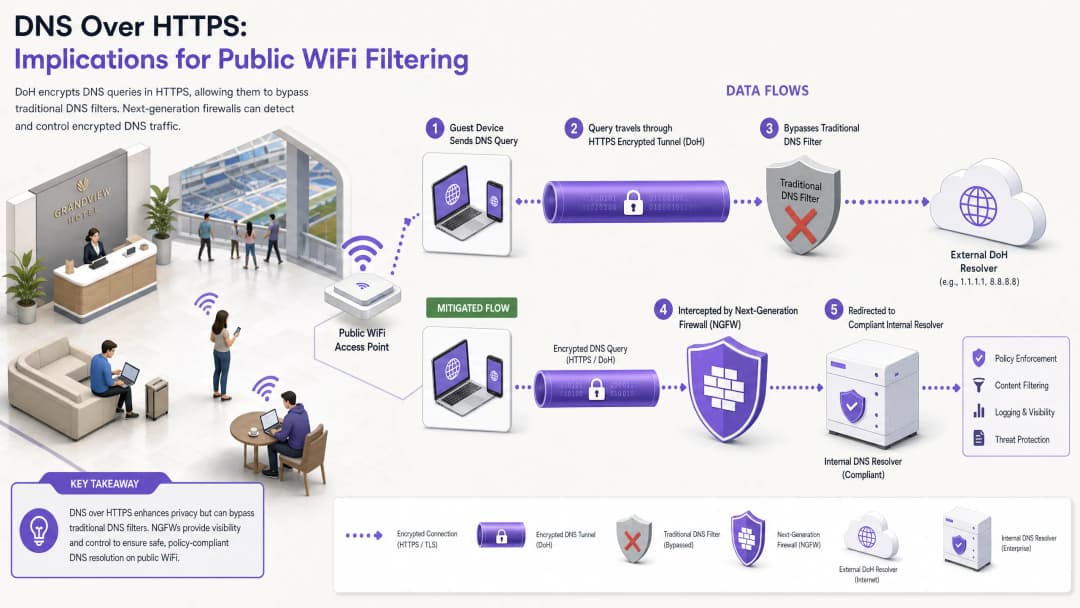
Durante quase uma década, a filtragem de DNS tradicional na porta 53 serviu como o principal mecanismo para aplicar políticas de conteúdo e mitigar ameaças de malware em redes WiFi públicas. No entanto, a adoção generalizada do DNS over HTTPS (DoH) pelos principais navegadores e sistemas operativos perturba fundamentalmente este modelo. Ao encapsular as consultas de DNS no tráfego HTTPS padrão na porta 443, o DoH torna estas consultas invisíveis para as técnicas tradicionais de interceção de rede.
Para os gestores de TI empresariais e arquitetos de rede que gerem o WiFi de convidados em áreas como Hotelaria, Retalho, estádios e espaços do setor público, isto cria uma lacuna significativa de conformidade e segurança. Quando os dispositivos dos convidados contornam silenciosamente os resolvedores de DNS designados do local, as políticas de utilização aceitável cuidadosamente elaboradas falham, expondo a rede a tráfego de malware de comando e controlo (C2) e a conteúdos inadequados. Este guia detalha o funcionamento do vetor de desvio de DoH e fornece uma arquitetura em camadas de defesa em profundidade para restaurar a visibilidade da rede, garantir a conformidade regulamentar e manter uma segurança robusta de Guest WiFi.
Análise Técnica Profunda: Mecanismos de Desvio de DoH
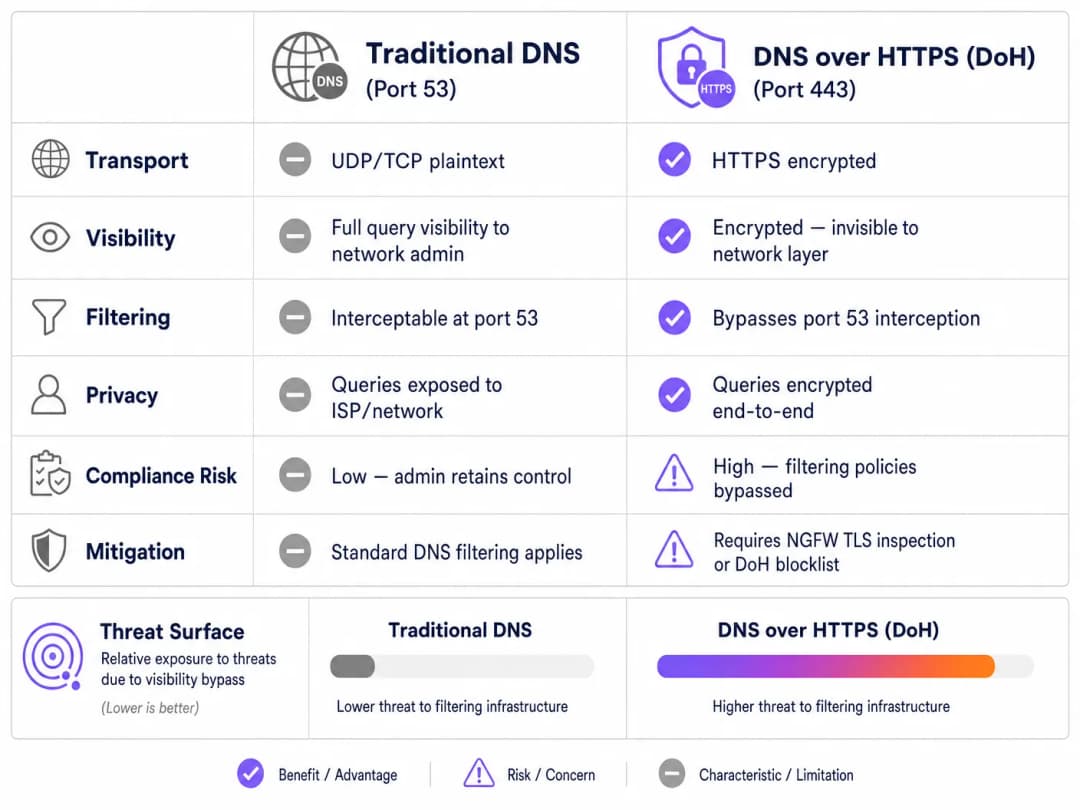
Para compreender o vetor de ameaça do DoH, é necessário primeiro analisar a arquitetura de base da filtragem de DNS tradicional. Historicamente, quando um dispositivo convidado se ligava a uma rede pública e solicitava um domínio, a consulta era transmitida em texto limpo através da porta UDP ou TCP 53. Os administradores de rede podiam facilmente intercetar este tráfego na firewall ou no controlador sem fios e redirecioná-lo para um resolvedor de DNS em conformidade, que verificava o domínio solicitado contra fluxos de inteligência de ameaças e políticas de categorização de conteúdo.
O DNS over HTTPS ignora todo este plano de controlo. Por conceção, o DoH encripta a consulta de DNS e transmite-a para um resolvedor externo (como o 1.1.1.1 da Cloudflare ou o 8.8.8.8 da Google) utilizando a encriptação TLS padrão na porta 443. Do ponto de vista da infraestrutura de rede do local, uma consulta de DoH é indistinguível de um utilizador a navegar num site seguro ou a ver um vídeo em streaming.
Padrões de Implementação: DoH ao Nível da Aplicação vs Sistema Operativo
Os desafios para os administradores de rede são ainda mais agravados pela forma como o DoH é implementado em diferentes plataformas. Existem dois padrões de implementação principais:
- DoH ao nível da aplicação: Neste modelo, a aplicação mantém a sua própria configuração de DoH independentemente do sistema operativo anfitrião. O Mozilla Firefox é um exemplo clássico; quando o DoH está ativado, o Firefox ignora os servidores de DNS atribuídos por DHCP e encaminha todas as consultas para o seu fornecedor de DoH preferido. As regras de interceção da porta 53 do local são completamente contornadas.
- DoH ao nível do SO (Oportunista): Os sistemas operativos modernos, incluindo o Windows 11 e o Android, utilizam DoH oportunista. O SO verifica se o resolvedor DNS atribuído por DHCP tem um endpoint DoH conhecido. Se for encontrada uma correspondência, o SO atualiza automaticamente a ligação para DoH. Embora isto preserve a escolha do resolvedor por parte do administrador, desloca o tráfego para a porta 443, o que pode contornar as ferramentas de monitorização antigas que esperam tráfego na porta 53.
Além disso, os administradores devem considerar o DNS over TLS (DoT), que funciona na porta 853. Embora o DoT seja mais fácil de bloquear devido à sua porta dedicada, é o padrão predefinido para a funcionalidade "Private DNS" do Android e representa um risco de desvio semelhante se a porta 853 permanecer aberta na VLAN de convidados.
Guia de Implementação: Uma Arquitetura de Defesa em Profundidade
Recuperar o controlo sobre a resolução de DNS exige uma estratégia de mitigação multicamadas. Confiar num único ponto de controlo é insuficiente contra protocolos modernos e encriptados. Para proteger o acesso de convidados e garantir a conformidade com frameworks como PCI-DSS e GDPR, os arquitetos de rede devem implementar a seguinte arquitetura.
Camada 1: Bloquear Endpoints de Resolvedores DoH Conhecidos
A mitigação mais imediata e eficaz é bloquear o tráfego HTTPS de saída para resolvedores DoH públicos conhecidos na periferia da rede. Embora o tráfego DoH se misture com o HTTPS padrão, os endereços IP e domínios de destino dos principais fornecedores de DoH são bem conhecidos.
Ao configurar firewalls de próxima geração (NGFWs) para descartar ligações a estes endpoints específicos (por exemplo, dns.google, cloudflare-dns.com), os administradores forçam a falha da resolução DoH do dispositivo cliente. Na maioria das implementações, quando o DoH falha, o cliente recorre naturalmente ao DNS tradicional e não encriptado na porta 53, que pode então ser interceptado e filtrado.
Nota de Implementação: Esta abordagem requer a manutenção de uma lista de bloqueio atualizada. Os fornecedores de firewalls empresariais disponibilizam frequentemente feeds de ameaças dinâmicos que atualizam automaticamente os endpoints DoH conhecidos, reduzindo significativamente a carga de trabalho operacional.
Camada 2: Forçar Interceção e Redirecionamento da Porta 53
Bloquear o DoH só é eficaz se o tráfego alternativo for gerido corretamente. A rede deve ser configurada para intercetar todo o tráfego UDP e TCP de saída na porta 53 com origem na VLAN de convidados. Este tráfego deve ser redirecionado à força (através de regras de NAT/encaminhamento de portas) para o resolvedor DNS autorizado e em conformidade do espaço.
Este passo é crucial porque muitos dispositivos ou aplicações maliciosas codificam servidores DNS públicos (como o 8.8.8.8) diretamente nas suas pilhas de rede, ignorando as definições fornecidas por DHCP. Sem a interceção forçada, estes dispositivos conseguirão contornar as políticas de filtragem do espaço, mesmo que o DoH esteja bloqueado.
Camada 3: Bloquear Porta 853 (DNS over TLS)
Para mitigar o vetor de desvio de DoT, os administradores têm de bloquear explicitamente o tráfego de saída na porta TCP 853 a partir da rede de convidados. Semelhante à mitigação de DoH, o bloqueio de DoT força os dispositivos Android e outros clientes compatíveis com DoT a recorrer ao DNS padrão da porta 53.

Tem dúvidas sobre a sua configuração específica?
A nossa equipa trabalha com operadores de espaços, gestores de TI e engenheiros de rede em 80.000 espaços. Agende uma chamada de 20 minutos e mostraremos como outros profissionais na sua área o resolveram.
Melhores Práticas e Considerações de Conformidade
A implementação da mitigação de DoH não é apenas uma tarefa técnica; é um requisito fundamental para manter a conformidade regulamentar e aplicar políticas de utilização aceitável.
- Documentação de Políticas: Certifique-se de que os termos e condições do Captive Portal do local indicam explicitamente que a filtragem de DNS está ativa para fins de segurança e conformidade. Isto fornece suporte legal ao abrigo do GDPR e do Online Safety Act do Reino Unido ao bloquear protocolos de DNS encriptados.
- Segmentação de Rede: Isole estritamente o WiFi de convidados das redes corporativas e de pagamento utilizando VLANs e regras de firewall. Este é um requisito fundamental da PCI-DSS v4.0, que também exige uma monitorização robusta do tráfego de rede - monitorização que se torna impossível se o DoH for autorizado a contornar os controlos de segurança.
- Monitorização Contínua: Aproveite as capacidades de relatório do seu serviço de filtragem de DNS empresarial para monitorizar os volumes de consultas e detetar padrões anómalos. Uma queda súbita no tráfego da porta 53 a partir de uma sub-rede específica indica frequentemente que os dispositivos dos clientes estão a utilizar um novo resolvedor DoH não bloqueado.
- Integração com Analytics: Ao implementar o acesso seguro de convidados, considere como os fluxos de autenticação se integram com os objetivos de negócio mais amplos. Utilizar um WiFi Assistant para autenticação segura baseada em perfis garante que os utilizadores se ligam em segurança, ajudando ao mesmo tempo o local a compreender o fluxo de pessoas e os tempos de permanência com o WiFi Analytics, tal como o Offline Maps Mode melhora a experiência do visitante.
Resolução de Problemas e Mitigação de Riscos
Ao implementar a mitigação de DoH, as equipas de rede encontram frequentemente modos de falha específicos. Antecipar estes problemas minimiza o tempo de inatividade e o inconveniente para os convidados.
Regras de Interceção Incompletas
A falha de implementação mais comum é a interceção incompleta da porta 53. Os administradores podem configurar o servidor DHCP para fornecer os IPs de DNS corretos, mas falhar na implementação das regras de firewall NAT necessárias para capturar pedidos de DNS hardcoded. Mitigação: Teste sempre a implementação configurando um dispositivo cliente com um servidor DNS externo estático (por exemplo, 9.9.9.9) e verifique se os pedidos ainda são encaminhados com sucesso para o serviço de filtragem do local.
Negligência de IPv6
À medida que as redes transitam para configurações de dupla pilha (dual-stack), as regras de firewall são frequentemente escritas exclusivamente para IPv4. Se as listas de bloqueio de DoH e as regras de interceção da porta 53 não cobrirem o IPv6, os dispositivos modernos irão contornar sem problemas os controlos IPv4 utilizando a sua pilha IPv6. Mitigação: Garanta que todas as listas de bloqueio de DoH, regras de redirecionamento da porta 53 e regras de descarte da porta 853 sejam aplicadas igualmente em ambas as tabelas de encaminhamento IPv4 e IPv6.
Quebra de Aplicações
O bloqueio agressivo de DoH pode ocasionalmente quebrar aplicações móveis específicas que dependem exclusivamente das suas próprias implementações de DoH e se recusam a recorrer ao DNS padrão. Mitigação: Mantenha um processo de exceção documentado. Se uma aplicação crítica para o negócio quebrar, em vez de abrir o DoH globalmente, utilize a inspeção TLS (se disponível na NGFW) para permitir seletivamente o tráfego DoH para o resolvedor dessa aplicação específica.
ROI e Impacto no Negócio
O caso de negócio para uma mitigação robusta de DoH baseia-se na prevenção de riscos e na garantia de conformidade. Um único incidente - como um inquérito regulatório resultante de um convidado que acede a conteúdos ilegais, ou um dispositivo IoT comprometido que estabelece uma ligação C2 através de DoH - pode incorrer em custos que excedem em muito o tempo de engenharia necessário para implementar os controlos adequados.
Para uma empresa que opera em múltiplos locais, a padronização da arquitetura de mitigação de DoH garante uma aplicação de políticas consistente. Esta padronização reduz a carga operacional nas equipas de suporte de TI, uma vez que as notificações de abuso dos ISPs caem para zero e o desempenho da rede é mantido ao bloquear conteúdos inadequados de alta largura de banda. Em última análise, proteger a camada DNS garante que o investimento do local em Guest WiFi continue a ser um ativo seguro e em conformidade, em vez de uma responsabilidade.
Definições Principais
DNS over HTTPS (DoH)
Um protocolo para realizar a resolução remota do Domain Name System (DNS) através do protocolo HTTPS, encriptando os dados entre o cliente DoH e o resolvedor de DNS baseado em DoH.
Quando as equipas de TI implementam filtragem de conteúdos, o DoH funciona como um mecanismo de desvio, ocultando as consultas de DNS dentro do tráfego web encriptado padrão.
DNS over TLS (DoT)
Um protocolo de segurança para encriptar e encapsular consultas e respostas de DNS através do protocolo Transport Layer Security (TLS), operando numa porta dedicada (853).
Frequentemente ativado por padrão em dispositivos Android modernos (DNS Privado), o DoT deve ser bloqueado na firewall para garantir que as consultas revertam para o DNS filtrado do local.
DoH Oportunista
Um comportamento onde um sistema operativo ou navegador atualiza automaticamente as consultas de DNS padrão para DoH se detetar que o resolvedor de DNS configurado suporta o protocolo encriptado.
Esta funcionalidade, comum no Windows 11 e Chrome, significa que mesmo que um local atribua um IP de DNS padrão, o tráfego pode ainda assim migrar para a porta encriptada 443, contornando a monitorização tradicional.
Interceção da Porta 53
Uma configuração de firewall de rede que capta todo o tráfego de saída na porta UDP/TCP 53 e o redireciona obrigatoriamente para um resolvedor de DNS designado, independentemente do IP de destino solicitado pelo cliente.
Essencial para capturar consultas de DNS de dispositivos com definições de DNS codificadas rigidamente ou daqueles que reverteram a partir de uma ligação DoH falhada.
Next-Generation Firewall (NGFW)
Um dispositivo de segurança de rede que oferece capacidades que vão além de um firewall tradicional com controlo de estado, incluindo inspeção profunda de pacotes, deteção de aplicações e desencriptação TLS/SSL.
Os NGFWs são fundamentais para a mitigação de DoH, pois conseguem identificar e bloquear o tráfego de DoH com base em assinaturas de aplicações e não apenas em endereços IP.
Comportamento de Recuo
A resposta programada de um dispositivo cliente quando o seu protocolo de DNS encriptado preferido (DoH ou DoT) falha na ligação, resultando normalmente na reversão do dispositivo para o DNS padrão e não encriptado.
Os arquitetos de rede dependem deste comportamento; ao interromperem intencionalmente as ligações DoH/DoT, forçam o dispositivo a utilizar a porta 53 intercetável.
Command-and-Control (C2)
A infraestrutura utilizada por atacantes para comunicar com dispositivos comprometidos (malware/botnets) dentro de uma rede alvo.
O malware moderno utiliza cada vez mais DoH para ocultar as comunicações C2 dos monitores de rede empresariais, tornando a mitigação de DoH um requisito de segurança crítico.
Captive Portal
Uma página web que o utilizador de uma rede de acesso público é obrigado a visualizar e com a qual deve interagir antes de lhe ser concedido acesso.
O Captive Portal é o local legalmente adequado para informar os utilizadores de que o seu tráfego de DNS está a ser filtrado e que os protocolos de DNS encriptados estão bloqueados.
Exemplos Práticos
Um hotel com 400 quartos implementou recentemente um serviço de filtragem de DNS baseado na nuvem para cumprir as normas da marca relativamente a conteúdos adequados para famílias. No entanto, o gestor de TI nota que uma parte significativa do tráfego de convidados continua a aceder a sites de conteúdo para adultos, e o painel de filtragem de DNS mostra volumes de consultas inferiores ao esperado. Como deve o arquiteto de rede remediar este desvio?
- Auditar Regras de Firewall: O arquiteto deve primeiro verificar se a porta de saída TCP/UDP 53 está a ser intercetada e redirecionada por NAT para o serviço de DNS na nuvem.
- Bloquear Resolvedores DoH: Implementar uma lista de bloqueio de NGFW para rejeitar o tráfego de saída HTTPS (porta 443) destinado a provedores de DoH conhecidos (ex. Cloudflare, Google, Quad9).
- Bloquear DoT: Adicionar uma regra de firewall para rejeitar todo o tráfego de saída na porta TCP 853 para evitar o desvio por DNS Privado do Android.
- Verificar IPv6: Garantir que todas as regras acima são aplicadas tanto ao tráfego IPv4 como IPv6.
Uma cadeia de lojas com 150 localizações precisa de implementar filtragem de DNS para bloquear malware e phishing no seu WiFi de convidados. Utilizam firewalls de filial básicas sem capacidades avançadas de inspeção TLS. Como podem mitigar o DoH de forma eficaz sem atualizar o hardware?
Sem inspeção TLS, a cadeia deve confiar em encaminhamento robusto e listas de bloqueio.
- Implementar uma lista de bloqueio dinâmica de IPs/Domínios de DoH nas firewalls das filiais, configurada para atualizar automaticamente através de um feed de ameaças externo.
- Implementar um redirecionamento NAT rigoroso da porta 53 para o filtro de DNS empresarial.
- Bloquear totalmente la porta 853.
- Atualizar os Termos de Serviço do Captive Portal para indicar explicitamente que os protocolos de DNS encriptados são bloqueados para aplicar as políticas de segurança da rede.
Perguntas de Prática
Q1. Um engenheiro de rede de um estádio configura o servidor DHCP para fornecer o endereço IP do seu serviço de DNS seguro e filtrado a todos os dispositivos convidados. No entanto, os testes revelam que os dispositivos com definições de DNS configuradas manualmente (por exemplo, 8.8.8.8) estão a contornar o filtro com sucesso. Qual é a correção arquitetónica mais adequada?
Dica: Considere a diferença entre sugerir uma rota e impor uma rota na periferia da rede.
Ver resposta modelo
O engenheiro deve implementar uma regra de reencaminhamento de portas NAT no firewall do estádio. Esta regra deve intercetar todo o tráfego de saída UDP e TCP na porta 53 com origem na VLAN de convidados e traduzir obrigatoriamente o IP de destino para o endereço IP do serviço de DNS seguro. Isto garante que, independentemente da configuração local do cliente, o tráfego é encaminhado através da política de filtragem.
Q2. Após a implementação de uma lista de bloqueio rigorosa de DoH, o suporte técnico de TI de um centro de congressos recebe relatos de que uma aplicação específica e personalizada de gestão de eventos não carrega para os participantes. A captura de pacotes mostra que a aplicação está a tentar utilizar o seu próprio resolvedor de DoH embutido no código, que está a ser bloqueado, e a aplicação recusa-se a recorrer ao DNS padrão. Como deve isto ser resolvido?
Dica: Equilibre a política de segurança com a continuidade do negócio. O firewall consegue distinguir entre o tráfego geral de DoH e o tráfego para um endpoint específico e aprovado?
Ver resposta modelo
O administrador deve criar uma exceção na política do NGFW. Em vez de desativar a lista de bloqueio de DoH globalmente, deve identificar o endereço IP ou domínio específico do resolvedor de DoH utilizado pela aplicação de gestão de eventos e colocá-lo na lista de permissões. Se o firewall suportar a inspeção da camada de aplicação (Camada 7), uma solução mais robusta é criar uma política que permita o tráfego DoH apenas se o destino corresponder à infraestrutura da aplicação aprovada, garantindo que as tentativas gerais de contornar o DoH permaneçam bloqueadas.
Q3. Uma organização do setor público está a auditar a conformidade do seu WiFi de convidados. Conseguiram bloquear com sucesso a porta 853 (DoT) e implementaram a interceção na porta 53. No entanto, não têm orçamento para um NGFW com inspeção avançada de TLS ou listas de bloqueio dinâmicas de DoH. Qual é a estratégia restante mais eficaz para mitigar o DoH?
Dica: Se as listas dinâmicas não estiverem disponíveis, como poderá abordar a grande maioria do tráfego DoH oportunista?
Ver resposta modelo
A organização deve implementar uma lista de bloqueio estática na sua firewall existente, visando os endereços IP e domínios dos fornecedores de DoH públicos mais comuns (ex. Cloudflare, Google, Quad9). Embora isto exija manutenção manual e não intersete resolvedores de DoH obscuros, a investigação mostra que a vasta maioria do tráfego DoH recai por omissão num pequeno grupo de grandes fornecedores. Isto proporciona uma solução "80/20" altamente eficaz dentro das suas restrições orçamentais.
Continue a ler esta série
Responsabilidade do WiFi Público: Por que a Filtragem de Conteúdo é Obrigatória
Este guia de referência técnica descreve os riscos legais e operacionais de fornecer WiFi público sem filtragem, detalhando por que a filtragem de conteúdo é um requisito de implementação obrigatório para os operadores de espaços. Fornece estratégias de arquitetura acionáveis, etapas de implementação e táticas de mitigação de risco para proteger as redes contra atividades ilegais, violação de direitos de autor e incumprimento regulamentar. Os operadores de espaços e CTOs encontrarão estudos de caso concretos, estruturas de decisão e orientações de configuração para implementar um ambiente de Guest WiFi seguro e em conformidade.
Bloqueio de Malware e Phishing na Fronteira da Rede
Este guia de referência técnica descreve a arquitetura, a implementação e o impacto comercial da aplicação de proteção contra ameaças ao nível da rede para proteger dispositivos IoT e de convidados não geridos na fronteira da rede. Oferece orientações práticas para que os líderes de TI possam bloquear malware e phishing de forma proativa.
Conformidade com a IWF para Redes WiFi Públicas no Reino Unido
Este guia de autoridade detalha os requisitos técnicos, arquitetura e estratégias de implementação para implantar redes WiFi públicas em conformidade com a IWF em espaços no Reino Unido. Fornece aos líderes de TI estruturas acionáveis para mitigar riscos legais enquanto mantêm um acesso à rede de alto desempenho.
Tem dúvidas sobre a sua configuração específica?
A nossa equipa trabalha com operadores de espaços, gestores de TI e engenheiros de rede em 80.000 espaços. Agende uma chamada de 20 minutos e mostraremos como outros profissionais na sua área o resolveram.