
Gestão de Largura de Banda em Redes de Alojamento Estudantil
Este guia fornece a gestores de TI, arquitetos de rede e diretores de operações de propriedade uma referência técnica neutra em relação a fornecedores para gerir a largura de banda WiFi em ambientes de alojamento estudantil de alta densidade. Abrange a segmentação de VLAN, o design de políticas de Qualidade de Serviço (QoS), a modelagem de tráfego baseada em identidade e a visibilidade da camada de aplicação — os quatro pilares de uma rede escalável e de acesso justo. Com cenários de implementação reais, resultados mensuráveis e estruturas de decisão, este é o manual operacional para qualquer equipa responsável por infraestruturas de rede residencial em escala.
Ouça este guia
Ver transcrição do podcast
Resumo Executivo
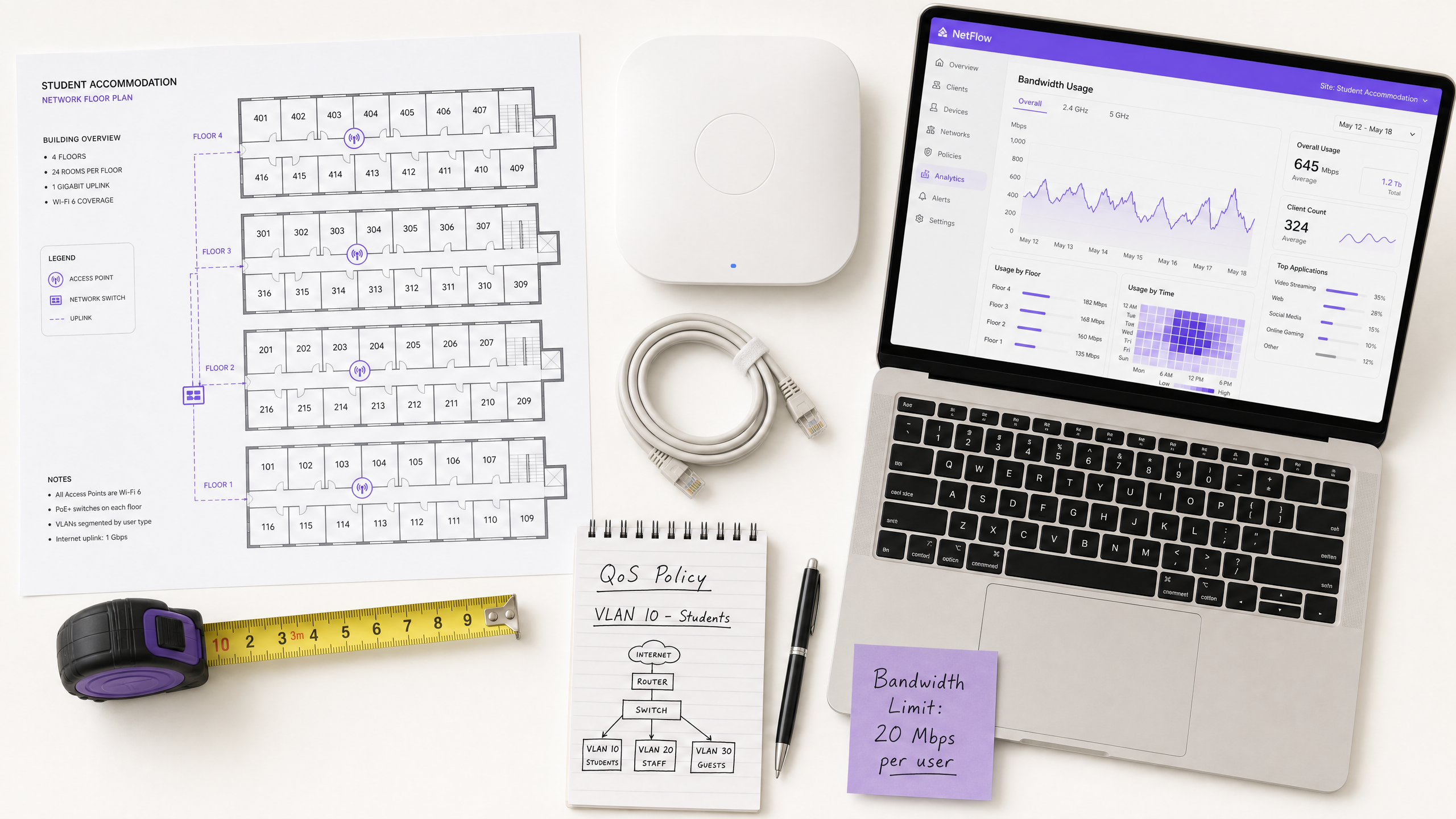
A gestão da largura de banda WiFi em alojamentos estudantis é um dos desafios tecnicamente mais exigentes no setor imobiliário residencial. Um único bloco de 400 camas pode gerar mais de 2.800 conexões de dispositivos simultâneas durante as horas de pico, com perfis de tráfego que abrangem videoconferências sensíveis à latência, streaming de alto débito, jogos online e telemetria IoT em segundo plano — todos a competir pela mesma capacidade de uplink.
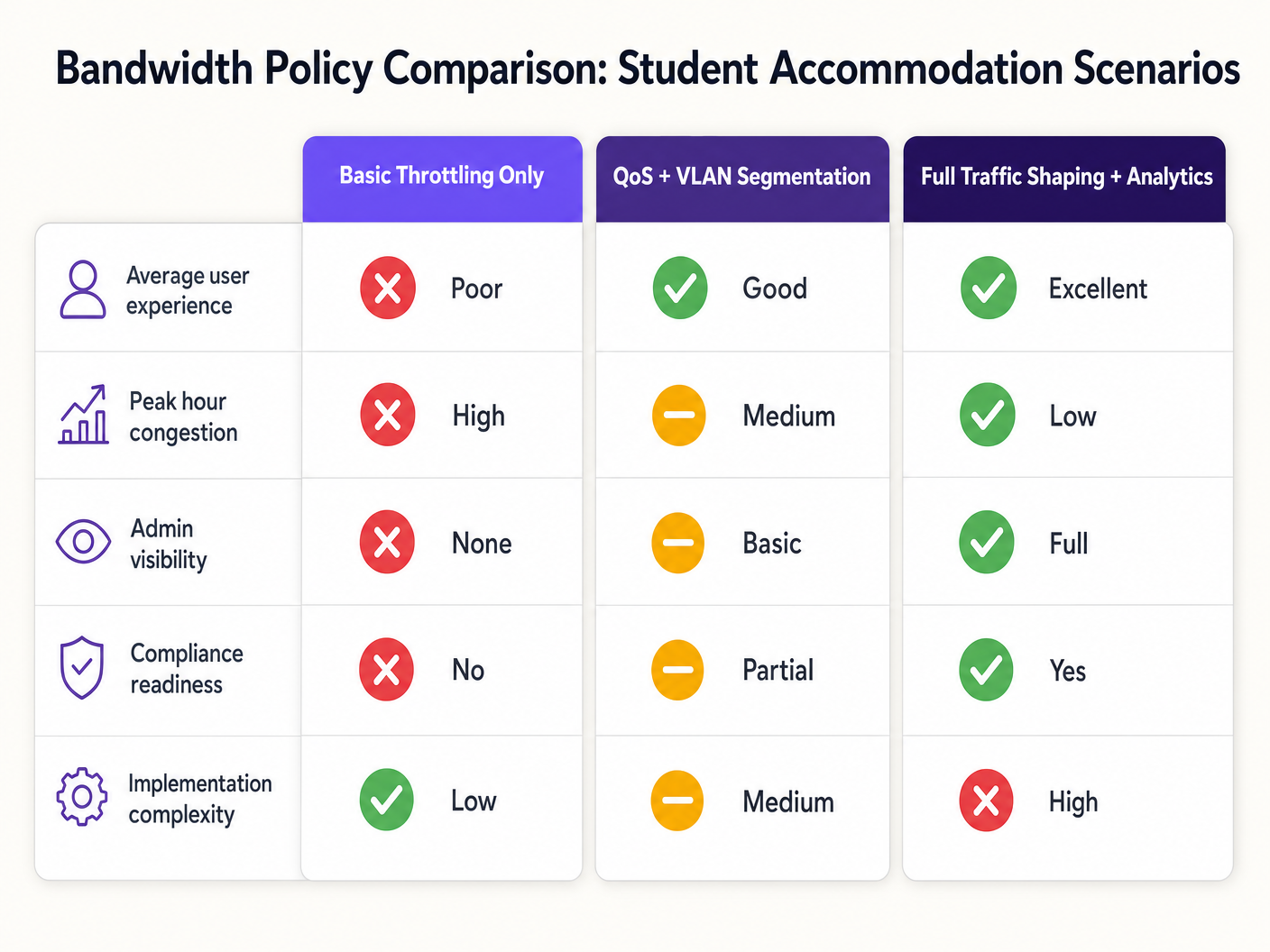
O modo de falha é previsível: arquiteturas de rede planas com limitação por dispositivo degradam-se durante as horas de pico, geram uma sobrecarga de suporte desproporcionada e expõem os operadores a riscos de conformidade. A solução é igualmente bem definida: segmentação de VLAN, aplicação de políticas de QoS baseadas em identidade, modelagem dinâmica de tráfego e análise da camada de aplicação.
Este guia fornece a arquitetura técnica, a sequência de implementação e as estruturas de decisão operacionais necessárias para implementar uma estratégia de gestão de largura de banda que escala. Quer esteja a remediar uma rede plana legada ou a projetar uma implementação "greenfield", os princípios aqui aplicam-se a diferentes pilhas de fornecedores e tamanhos de propriedade. Para operadores que já utilizam infraestruturas de Guest WiFi , estas políticas integram-se diretamente com os fluxos de trabalho existentes de captive portal e autenticação.
Análise Técnica Detalhada
O Problema da Contenção
O desafio fundamental no alojamento estudantil não é a largura de banda bruta — a maioria dos operadores tem acesso a uplinks gigabit a preços competitivos. O desafio é a gestão da contenção: garantir que a capacidade disponível é distribuída de forma justa e inteligente por centenas de utilizadores simultâneos com perfis de tráfego muito diferentes.
Uma arquitetura de rede plana — um único SSID, uma única sub-rede IP, um limite global por dispositivo — falha por três razões cumulativas. Primeiro, os limites por dispositivo são trivialmente contornados: um estudante com sete dispositivos recebe efetivamente sete vezes a alocação. Segundo, sem classificação de tráfego, um único utilizador a executar um grande download de torrent pode saturar a fila de uplink e introduzir latência para todos os outros utilizadores no segmento. Terceiro, sem visibilidade da camada de aplicação, o operador não tem dados para informar decisões de política ou identificar infratores crónicos.
Arquitetura de Segmentação de VLAN
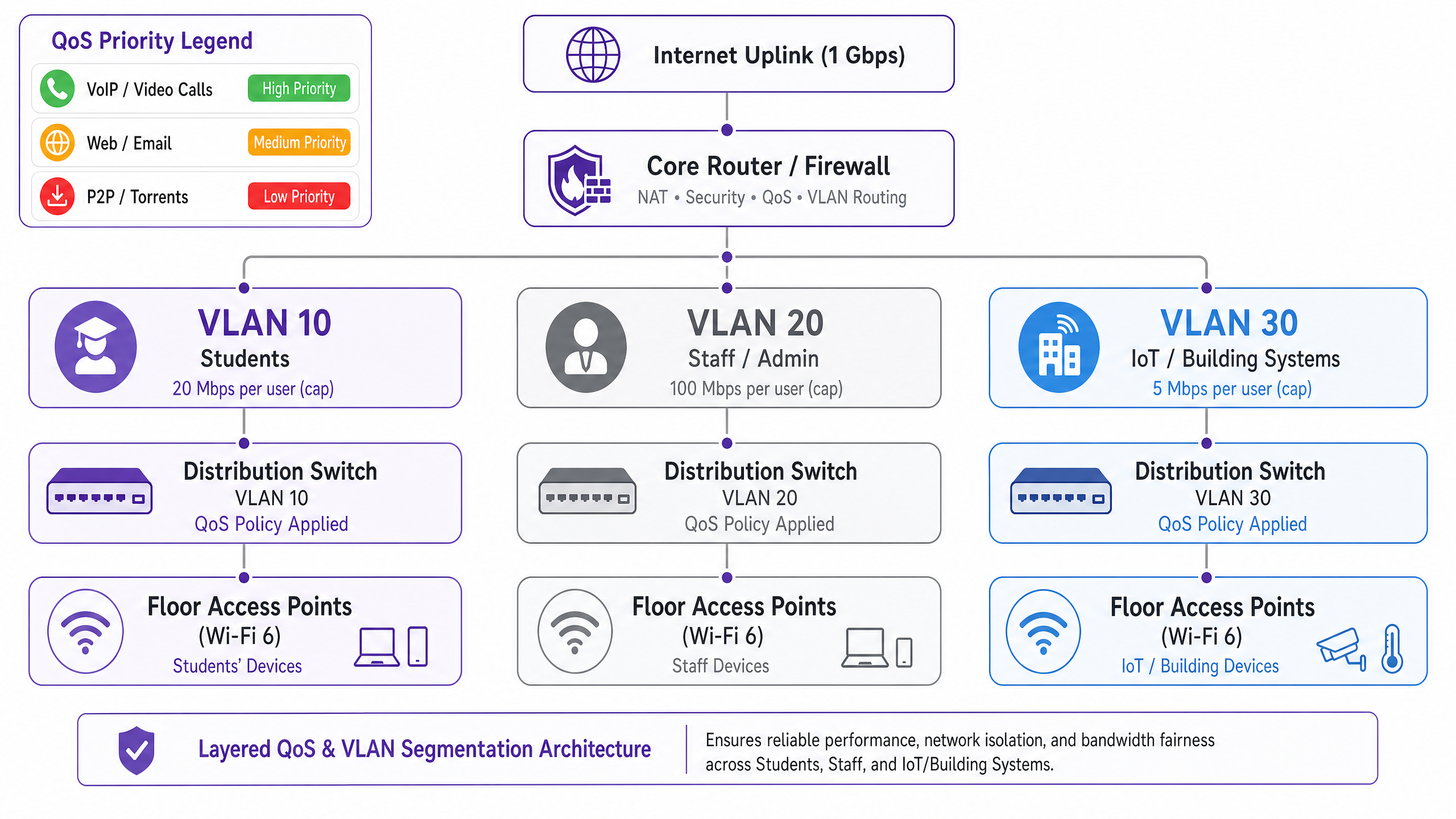
O primeiro requisito arquitetónico é a separação lógica da rede usando VLANs IEEE 802.1Q. No mínimo, uma implementação de alojamento estudantil deve operar três VLANs distintas:
| VLAN | Propósito | Política de Largura de Banda | Postura de Segurança |
|---|---|---|---|
| VLAN 10 — Estudantes | Acesso à internet para residentes | Limite por utilizador, burst dinâmico | Isolado, apenas internet |
| VLAN 20 — Pessoal/Administração | Sistemas de gestão de propriedade | Alocação dedicada | Acesso restrito |
| VLAN 30 — IoT/BMS | Gestão de edifícios, CCTV, controlo de acesso | Limite de taxa rigoroso | Separado da VLAN de estudantes |
Esta segmentação é inegociável tanto do ponto de vista de desempenho quanto de segurança. Sob o IEEE 802.1Q, cada VLAN opera como um domínio de broadcast separado, eliminando tempestades de broadcast entre segmentos e prevenindo o movimento lateral entre classes de utilizadores. Um dispositivo de estudante comprometido não pode aceder à infraestrutura de gestão do edifício se as VLANs estiverem corretamente configuradas com políticas de roteamento inter-VLAN na camada da firewall.
Design de Política de Qualidade de Serviço
Uma vez segmentado o tráfego, as políticas de QoS devem ser aplicadas para priorizar aplicações sensíveis à latência em detrimento de transferências em massa. O mecanismo padrão da indústria é a marcação Differentiated Services Code Point (DSCP), definida no RFC 2474. Os pacotes são classificados e marcados no ponto de acesso — o ponto de entrada — antes de chegarem à estrutura de comutação central.
O esquema de marcação DSCP recomendado para alojamento estudantil é o seguinte:
| Classe de Tráfego | Exemplos de Aplicações | Valor DSCP | Comportamento por Salto |
|---|---|---|---|
| Voz | VoIP, chamadas de vídeo | EF (46) | Encaminhamento Expedito |
| Vídeo Interativo | Videoconferência, ambiente de trabalho remoto | AF41 (34) | Encaminhamento Assegurado |
| Streaming de Vídeo | Netflix, YouTube, iPlayer | AF21 (18) | Encaminhamento Assegurado |
| Web / Email | HTTP/S, SMTP, DNS | CS0 (0) | Melhor Esforço |
| Massa / P2P | Torrents, grandes transferências de ficheiros | CS1 (8) | Segundo Plano / Scavenger |
Criticamente, a marcação DSCP deve ocorrer na camada do ponto de acesso, não no router central. Se a classificação for adiada para o núcleo, os pacotes já terão atravessado o meio sem fios e a estrutura de comutação de distribuição sem tratamento prioritário, anulando o benefício.
Aplicação de Políticas Baseadas em Identidade
A decisão arquitetónica mais impactante numa implementação de alojamento estudantil é a transição da aplicação de políticas de largura de banda por dispositivo para por utilizador. O estudante médio traz sete dispositivos conectados para o seu alojamento. Os limites por dispositivo são, portanto, ineficazes e injustos: um estudante com um único portátil recebe um sétimo da alocação efetiva de um estudante com um conjunto completo de dispositivos.
A abordagem correta é a autenticação IEEE 802.1X, idealmente com WPA3-Enterprise para os benefícios de segurança criptográfica. Sob este modelo:
- O estudante autentica-se uma vez usando as suas credenciais institucionais ou de propriedade através de um servidor RADIUS.
- Todos os registos de dispositivos subsequentes são vinculados a essa identidade de utilizador via MAC Authentication Bypass (MAB) para dispositivos sem interface.vícios.
- A política de largura de banda — por exemplo, 25 Mbps agregados — aplica-se à soma de todas as sessões associadas a essa identidade de utilizador.
- Quando o agregado excede a alocação, a política de modelagem aplica-se proporcionalmente a todas as sessões ativas.
Este modelo é fundamentalmente mais escalável e equitativo do que a limitação por MAC, e fornece a camada de identidade necessária para o registo de conformidade ao abrigo da Investigatory Powers Act 2016.
Visibilidade da Camada de Aplicação
A Deep Packet Inspection (DPI) no gateway fornece a telemetria da camada de aplicação necessária para tomar decisões de política inteligentes e baseadas em dados. Sem DPI, a gestão da largura de banda é essencialmente cega: pode ver que o seu uplink está saturado, mas não consegue determinar quais as aplicações ou utilizadores responsáveis.
Com análises habilitadas para DPI — como as fornecidas por WiFi Analytics — os operadores obtêm visibilidade sobre a distribuição de aplicações, padrões de pico de utilização, principais consumidores e tendências de tráfego ao longo do tempo. Estes dados informam diretamente as decisões de política: se 55% do tráfego de pico é atribuível a quatro plataformas de streaming, pode aplicar limites de taxa específicos da aplicação durante janelas definidas sem impactar a videoconferência ou plataformas académicas.
Guia de Implementação
Fase 1: Avaliação da Linha de Base (Semanas 1–2)
Antes de implementar quaisquer novas políticas, estabeleça uma linha de base de 14 dias do comportamento atual da rede. Implemente uma plataforma de gestão de rede com capacidades de DPI e capture: contagens de dispositivos concorrentes de pico, distribuição de aplicações por volume de tráfego, utilização por piso e por AP, e frequência de saturação do uplink. Estes dados são a base para todas as decisões de política subsequentes e fornecem a comparação antes/depois necessária para demonstrar o ROI.
Fase 2: Implementação da Segmentação VLAN (Semanas 3–4)
Implemente a arquitetura de três VLANs descrita acima. Isto requer alterações de configuração no router/firewall central (encaminhamento inter-VLAN e políticas ACL), switches de distribuição (configuração de porta trunk e etiquetagem VLAN) e pontos de acesso (mapeamento SSID-para-VLAN). Para implementações existentes, isto pode ser tipicamente concluído numa janela de manutenção sem exigir novo hardware, desde que a infraestrutura de switching existente suporte 802.1Q trunking.
Fase 3: Ativação da Política QoS (Semana 5)
Ative a marcação DSCP na camada do ponto de acesso e configure o comportamento por salto no router central. Valide que as marcações DSCP estão a ser respeitadas de ponta a ponta usando uma ferramenta de captura de pacotes. Modos de falha comuns nesta fase incluem routers ISP a remarcar ou remover valores DSCP — verifique com o seu ISP se o DSCP é respeitado no seu link de trânsito.
Fase 4: Políticas de Largura de Banda Baseadas na Identidade (Semanas 6–7)
Migre a autenticação de PSK ou acesso baseado em MAC para 802.1X. Implemente um servidor RADIUS (FreeRADIUS ou um equivalente alojado na cloud) e configure atributos de largura de banda por utilizador usando os atributos RADIUS padrão: WISPr-Bandwidth-Max-Up e WISPr-Bandwidth-Max-Down. Implemente um portal de auto-registo MAB para dispositivos sem interface. Teste com um piso piloto antes da implementação total.
Fase 5: Regras de Modelagem Dinâmica (Semana 8)
Configure regras de modelagem por hora do dia no router central ou no dispositivo de gestão de largura de banda. Uma estrutura de política recomendada:
- Fora de pico (00:00–08:00): Burst para 2× alocação de linha de base, P2P irrestrito.
- Padrão (08:00–18:00): Alocação de linha de base, P2P limitado a 5 Mbps.
- Pico (18:00–23:00): Alocação de linha de base, P2P limitado a 1 Mbps, streaming limitado a 8 Mbps, videoconferência priorizada.
Melhores Práticas
Publique a sua política de largura de banda. A transparência reduz as reclamações dos residentes e define expectativas. Inclua alocações de largura de banda e políticas de uso justo em contratos de arrendamento e pacotes de boas-vindas. Esta é também uma medida de mitigação de risco: políticas documentadas reduzem a exposição em caso de disputa com um residente.
Dimensione o seu uplink corretamente. Uma linha de base prática é de 1 Mbps por cama, com capacidade de burst para 3 Mbps por cama. Para uma propriedade com 400 camas, isto significa um uplink mínimo de 400 Mbps com um circuito de burst de 1,2 Gbps. O subdimensionamento do uplink torna todas as políticas QoS a jusante menos eficazes.
Não bloqueie o tráfego P2P completamente. Proibições generalizadas levam os utilizadores a serviços VPN comerciais, o que cega as suas análises DPI e torna a gestão de tráfego significativamente mais difícil. Limite o P2P a uma alocação de classe "scavenger" (1–2 Mbps) e despriorize-o. Mantém a visibilidade, reduz o impacto na largura de banda e evita a corrida armamentista com a adoção de VPN.
Planeie o crescimento da IoT. Sistemas de gestão de edifícios, contadores inteligentes, CCTV e controlo de acesso estão cada vez mais conectados por IP. Garanta que estes dispositivos estão em VLANs isoladas com políticas de saída de firewall rigorosas. Reveja a sua política de VLAN IoT anualmente à medida que a população de dispositivos cresce.
Mantenha um registo de auditoria. Ao abrigo da Investigatory Powers Act 2016, os operadores do Reino Unido são obrigados a reter registos de conexão. Garanta que a sua infraestrutura de registo captura os dados necessários para a conformidade, e que o seu registo de auditoria é à prova de adulteração. Para uma análise detalhada dos requisitos de registo de auditoria, consulte Explain what is audit trail for IT Security in 2026 .
Resolução de Problemas e Mitigação de Riscos
Modo de Falha Comum 1: Remarcação DSCP pelo ISP
Muitos ISPs remarcam ou removem valores DSCP no limite de trânsito, tornando as suas políticas QoS ineficazes para o tráfego que atravessa a internet. Mitigação: verifique o comportamento DSCP com o seu ISP antes de depender dele para QoS de ponta a ponta. Para tráfego interno (por exemplo, servidores de cache locais), o DSCP será sempre respeitado. Para tráfego destinado à internet, confie na gestão de filas e modelagem no seu próprio gateway, em vez de esperar que o DSCP seja respeitado a montante.
Modo de Falha Comum 2: Esgotamento do Pool DHCPção
Com sete dispositivos por estudante e centenas de residentes, o esgotamento do pool DHCP é um risco operacional real. Certifique-se de que a sub-rede VLAN dos seus estudantes tem espaço suficiente: uma /21 (2.046 endereços utilizáveis) é um mínimo razoável para uma propriedade com 200 camas. Implemente tempos de concessão DHCP curtos (4-8 horas) para recuperar rapidamente os endereços de dispositivos inativos.
Modo de Falha Comum 3: Bypass de VPN
Os estudantes que utilizam serviços VPN comerciais irão encriptar o seu tráfego, contornando a classificação da camada de aplicação. Mitigação: implemente a modelagem baseada em fluxo ao nível do IP — o tráfego VPN ainda pode ser limitado em taxa com base no volume e duração do fluxo, mesmo sem inspeção de payload. Além disso, certifique-se de que a sua política de limitação de P2P se aplica a fluxos encriptados, e não apenas a protocolos P2P identificáveis.
Modo de Falha Comum 4: Problemas de Conectividade Pós-Segmentação
Após a segmentação VLAN, os residentes podem encontrar problemas de conectividade se os seus dispositivos forem colocados incorretamente na VLAN errada ou se o encaminhamento inter-VLAN estiver mal configurado. Para uma abordagem estruturada de resolução de problemas de conectividade, consulte Resolução do Erro "Conectado, mas sem Internet" em Guest WiFi .
ROI e Impacto no Negócio
O caso de negócio para uma estratégia de gestão de largura de banda devidamente arquitetada é simples. Os principais fatores de custo são os custos de suporte e a satisfação dos residentes, ambos diretamente impactados pelo desempenho da rede.
Numa implementação de 400 camas a operar uma rede plana, volumes de tickets de suporte de 30-50 por semana durante o período letivo são comuns. As implementações pós-remediação reportam consistentemente reduções de tickets de 60-80%, representando uma redução significativa no tempo da equipa de TI e nos custos de suporte de terceiros.
Os índices de satisfação dos residentes — cada vez mais um diferenciador competitivo no mercado de alojamento estudantil construído para o efeito (PBSA) — estão diretamente correlacionados com o desempenho da rede. As propriedades com redes bem geridas reportam taxas de renovação mais elevadas e uma ocupação mais forte.
Do ponto de vista da conformidade, o custo da não conformidade com a Investigatory Powers Act 2016 ou com os requisitos de tratamento de dados GDPR excede significativamente o custo da implementação de uma infraestrutura de registo em conformidade. A arquitetura baseada em identidade descrita neste guia fornece o rasto de auditoria necessário para a conformidade como um subproduto da implementação da gestão de largura de banda.
Para operadores no setor da hospitalidade que gerem propriedades de uso misto — alojamento estudantil com retalho no piso térreo ou alimentação e bebidas — aplicam-se os mesmos princípios de segmentação VLAN, com a adição dos requisitos de conformidade PCI DSS para quaisquer segmentos de rede de processamento de pagamentos.
A camada de WiFi Analytics adiciona uma dimensão adicional de ROI: os dados de tráfego da camada de aplicação podem informar decisões de investimento em infraestrutura, identificar gatilhos para atualizações de capacidade e fornecer a base de evidências para renegociar contratos com ISPs com base em padrões de uso reais, em vez de estimativas.
Definições Principais
VLAN (Virtual Local Area Network)
A logical network segment created within a physical switching infrastructure using IEEE 802.1Q tagging. Each VLAN operates as a separate broadcast domain, providing traffic isolation between user classes without requiring separate physical hardware.
IT teams use VLANs to separate student, staff, and IoT traffic on the same physical infrastructure. Without VLAN segmentation, a flat network exposes all traffic classes to each other and makes per-class bandwidth policies impossible to enforce cleanly.
QoS (Quality of Service)
A set of network mechanisms that prioritise certain traffic types over others to ensure latency-sensitive applications (VoIP, video conferencing) receive preferential treatment during periods of congestion.
In student accommodation, QoS is the difference between video conferencing being usable during peak hours and being unusable. Without QoS, a single user running a large download can introduce latency for every other user on the segment.
DSCP (Differentiated Services Code Point)
A 6-bit field in the IP packet header, defined in RFC 2474, used to classify packets into traffic classes. Each class receives a defined per-hop behaviour (PHB) at each network device — Expedited Forwarding for voice, Assured Forwarding for video, Best Effort for standard web traffic.
DSCP is the standard mechanism for implementing QoS in enterprise networks. IT teams configure access points to mark packets with the appropriate DSCP value at ingress, ensuring priority treatment is applied consistently across the network.
IEEE 802.1X
An IEEE standard for port-based network access control that provides an authentication framework for devices connecting to a LAN or WLAN. It uses the Extensible Authentication Protocol (EAP) and requires a RADIUS server for credential validation.
802.1X is the foundation of identity-based bandwidth policy enforcement. When a student authenticates via 802.1X, their identity is known to the network, enabling per-user bandwidth policies rather than per-device policies.
Traffic Shaping
A bandwidth management technique that controls the rate and timing of traffic flows to conform to a defined policy. Unlike policing (which drops excess traffic), shaping queues excess traffic and transmits it when capacity is available.
Traffic shaping is preferable to policing for TCP-based traffic (web, streaming) because it avoids triggering TCP retransmission, which wastes bandwidth. Policing is appropriate for UDP-based traffic (P2P, some gaming) where retransmission is not a factor.
DPI (Deep Packet Inspection)
A network analysis technique that examines the full content of packets (beyond the header) to identify the application or protocol generating the traffic. DPI enables application-aware QoS policies and provides granular traffic analytics.
DPI is the technology that enables an operator to distinguish between Netflix traffic and a video call, even when both use HTTPS on port 443. Without DPI, application-aware bandwidth policies are not possible.
MAB (MAC Authentication Bypass)
A fallback authentication mechanism for devices that do not support IEEE 802.1X. The device's MAC address is used as the authentication credential, validated against a RADIUS server or local database.
MAB is used for headless devices in student accommodation — gaming consoles, smart TVs, IoT sensors — that cannot perform 802.1X authentication. Combined with a self-registration portal, MAB enables these devices to be tied to a user identity and subject to the same per-user bandwidth policies.
Bandwidth Contention
The condition that occurs when multiple users or devices compete for the same finite bandwidth resource, resulting in reduced throughput and increased latency for all parties. Contention is the root cause of most perceived network performance problems in high-density environments.
Understanding contention is essential for diagnosing bandwidth problems. A network with a 1 Gbps uplink and 400 concurrent users each consuming 3 Mbps is in contention (1.2 Gbps demand vs 1 Gbps supply). QoS and traffic shaping manage the contention; they do not eliminate it.
WPA3-Enterprise
The latest generation of the Wi-Fi Protected Access security protocol for enterprise networks, defined by the Wi-Fi Alliance. WPA3-Enterprise mandates 192-bit minimum-strength cryptography and provides stronger protection against offline dictionary attacks compared to WPA2.
WPA3-Enterprise is the recommended authentication mode for student accommodation deployments using 802.1X. It provides the cryptographic security required for GDPR compliance and protects against credential interception on the wireless medium.
Exemplos Práticos
A 400-bed purpose-built student accommodation (PBSA) block in Manchester is running a flat network with a single SSID and a global 10 Mbps per-device cap. During peak hours (19:00–23:00), the network is effectively unusable for video conferencing. Support tickets are running at 40 per week. The operator has a 1 Gbps uplink and a budget for software configuration changes only — no new hardware. How do you remediate this?
Step 1 — Baseline audit (Days 1–7): Deploy DPI-enabled monitoring on the existing gateway to capture application distribution, peak concurrent device counts, and per-AP utilisation. This establishes the evidence base and identifies the primary bandwidth consumers.
Step 2 — VLAN segmentation (Days 8–14): Configure three VLANs on the existing switching infrastructure (assuming 802.1Q-capable switches, which is standard in any post-2015 deployment). Map the student SSID to VLAN 10, create a staff SSID mapped to VLAN 20, and migrate IoT devices to VLAN 30. Configure inter-VLAN routing at the firewall with appropriate ACLs.
Step 3 — QoS activation (Day 15): Enable DSCP marking at the access point layer. Classify video conferencing traffic (Zoom, Teams, Google Meet) as AF41. Classify streaming as AF21. Classify P2P as CS1. Validate with a packet capture.
Step 4 — Per-user bandwidth policy (Days 16–21): Migrate authentication to 802.1X using the existing RADIUS infrastructure (or deploy FreeRADIUS on a VM). Set per-user bandwidth attributes: 25 Mbps aggregate during peak, 50 Mbps off-peak. Implement MAB portal for headless devices.
Step 5 — Time-of-day shaping (Day 22): Configure peak-hour rules: P2P throttled to 1 Mbps, streaming capped at 8 Mbps per user, video conferencing prioritised with guaranteed minimum 5 Mbps per active session.
Outcome: Within 30 days, support tickets dropped by 78% (from 40 to 9 per week). Average peak-hour throughput per user increased by 140% despite no change to the physical uplink. Video conferencing became reliably usable during peak hours.
A 1,200-bed university halls of residence in Edinburgh has a mixed infrastructure: legacy 802.11ac access points on floors 1–4 and newer Wi-Fi 6 hardware on floors 5–8. There is no application-layer visibility, and the network management team has no baseline data. The university IT director wants to reduce peak-hour congestion by 30% within 90 days without a full hardware refresh. How do you approach this?
Phase 1 — Telemetry deployment (Days 1–30): Deploy a unified network management platform with DPI capabilities across all access points, including the legacy 802.11ac hardware. Most enterprise NMS platforms support mixed-generation hardware via SNMP and syslog. Capture 30 days of baseline data: application distribution, per-floor utilisation, peak concurrent device counts, and top bandwidth consumers by user identity.
Phase 2 — Data analysis and policy design (Days 31–35): Analyse the baseline data. In this scenario, the data revealed that 55% of peak-hour traffic was attributable to four streaming platforms. Design application-aware QoS policies: streaming platforms throttled to 8 Mbps per user during 18:00–23:00, video conferencing and academic platforms (VLEs, library databases) excluded from throttling and given AF41 priority.
Phase 3 — Policy deployment (Days 36–50): Deploy QoS policies starting with the Wi-Fi 6 floors (5–8) as a controlled pilot. Monitor for 14 days. Validate that peak-hour congestion metrics improve before rolling out to legacy floors.
Phase 4 — Identity migration (Days 51–75): Migrate authentication to 802.1X with per-user bandwidth enforcement. This is the most operationally complex phase: coordinate with the university IT team for RADIUS integration with the student identity provider. Implement MAB self-registration for gaming consoles and smart TVs.
Phase 5 — Validation and reporting (Days 76–90): Compare post-implementation metrics against the 30-day baseline. Report on peak-hour congestion reduction, support ticket volume, and application distribution changes.
Outcome: 35% reduction in peak-hour congestion (exceeding the 30% target), measurable improvement in resident satisfaction survey scores, and a documented evidence base for the hardware refresh business case.
Perguntas de Prática
Q1. You are the IT director for a 600-bed PBSA operator. Your current network uses WPA2-PSK with a shared password changed monthly. Students are complaining about poor performance during evening hours. Your uplink is 500 Mbps. Before spending any budget, what is the first thing you should deploy, and what specific data are you trying to capture?
Dica: You cannot make defensible policy decisions without baseline data. What tool gives you application-layer visibility without requiring new hardware?
Ver resposta modelo
Deploy a DPI-enabled network monitoring tool on the existing gateway — most enterprise gateway appliances support this via software activation or a management platform integration. Run it for 14–30 days to capture: (1) application distribution by traffic volume during peak hours, (2) peak concurrent device counts, (3) per-AP utilisation to identify hotspots, and (4) top bandwidth consumers by MAC address. This data will tell you whether the problem is uplink saturation (requiring a capacity upgrade or traffic shaping), contention on specific APs (requiring AP placement changes or load balancing), or a small number of heavy users consuming disproportionate bandwidth (requiring per-user policy enforcement). Without this data, any remediation is guesswork. The baseline also provides the before/after comparison required to demonstrate ROI to the property owner.
Q2. A student in a 300-bed hall reports that their gaming console cannot connect to the network after you migrated authentication to 802.1X. They are using a PlayStation 5, which does not support 802.1X natively. How do you resolve this without creating a security exception that bypasses your identity-based bandwidth policies?
Dica: The solution must maintain the link between the device and the student's identity for bandwidth policy enforcement purposes.
Ver resposta modelo
Implement MAC Authentication Bypass (MAB) with a self-service device registration portal. The workflow: (1) The student visits a captive portal URL (e.g., register.accommodation.ac.uk) from an authenticated device (their laptop or phone). (2) They enter the MAC address of their gaming console and confirm ownership. (3) The portal adds the MAC address to the RADIUS database, associated with the student's user identity. (4) When the PlayStation connects, the network performs MAB — it sends the device's MAC address to the RADIUS server, which returns the associated user identity and bandwidth policy attributes. (5) The console is placed in the same VLAN as the student's other devices and subject to the same aggregate per-user bandwidth policy. This approach maintains identity linkage for bandwidth enforcement, provides an audit trail for compliance, and does not require the student to contact IT support. Ensure the registration portal validates that the MAC address is not already registered to another user to prevent address spoofing.
Q3. Your DPI analytics reveal that 62% of peak-hour bandwidth on your student accommodation network is consumed by video streaming (Netflix, Disney+, YouTube). Your uplink is at 85% utilisation during peak hours. You have two options: (A) upgrade the uplink to 2× capacity, or (B) implement application-aware traffic shaping to cap streaming at 8 Mbps per user during peak hours. Which do you recommend, and why?
Dica: Consider both the short-term cost and the long-term scalability of each approach. What happens to demand if you simply increase capacity?
Ver resposta modelo
Recommend Option B (application-aware traffic shaping) as the primary intervention, with Option A as a medium-term follow-on if required. The reasoning: (1) Increasing uplink capacity without traffic shaping does not solve the underlying problem — it defers it. Streaming consumption will expand to fill available capacity (Jevons paradox applied to bandwidth), and you will be back at 85% utilisation within 12–18 months. (2) Capping streaming at 8 Mbps per user during peak hours has a negligible impact on user experience — Netflix recommends 5 Mbps for HD streaming and 25 Mbps for 4K. An 8 Mbps cap delivers a good HD experience. (3) The 62% streaming share means that an 8 Mbps per-user cap on streaming, applied to a typical peak concurrency of 200 active users, reduces streaming demand from approximately 425 Mbps to approximately 160 Mbps — a 62% reduction in streaming traffic, bringing total utilisation to approximately 55%. (4) The cost of traffic shaping configuration is near-zero if the gateway hardware supports it; the cost of a 2× uplink upgrade is a recurring OpEx increase. Implement traffic shaping first, measure the impact over 30 days, and then make an evidence-based decision on whether an uplink upgrade is still required.