
Integração de Access Points NETGEAR Insight e Enterprise com a Purple WiFi
Este guia fornece aos gestores de TI um roteiro técnico definitivo para integrar os access points enterprise NETGEAR Insight e WAX com a Purple WiFi. Abrange configurações essenciais, incluindo Captive Portals de convidados, redes de funcionários 802.1X e segmentação multi-tenant utilizando PPSK e atribuição dinâmica de VLAN.
Ouça este guia
Ver transcrição do podcast
Resumo Executivo
Depender de chaves pré-partilhadas para o acesso WiFi enterprise é um risco de segurança significativo. Uma única credencial comprometida expõe toda a rede, e revogar o acesso exige a alteração da palavra-passe em todos os dispositivos. Este guia fornece aos gestores de TI e arquitetos de rede um roteiro definitivo para integrar os access points enterprise das séries NETGEAR Insight e WAX com a Purple.
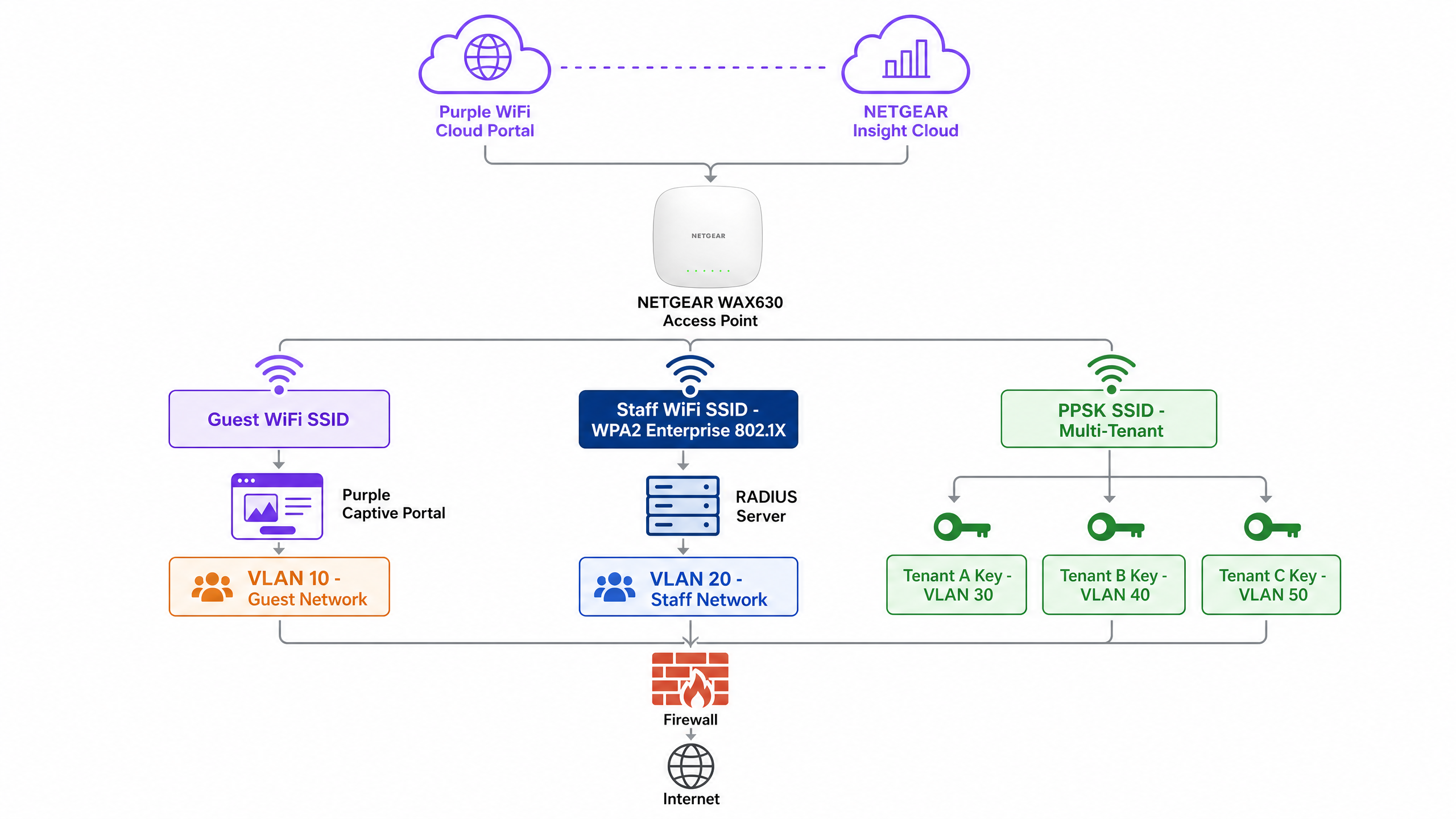
Detalhamos quatro arquiteturas principais de implementação: WiFi de Convidados com um Captive Portal, WiFi Seguro para Funcionários utilizando 802.1X, segmentação Multi-Tenant através de Private Pre-Shared Keys (PPSK) da NETGEAR e Redes Baseadas em Identidade utilizando atribuição dinâmica de VLAN. Quer opere em espaços de Hotelaria , áreas de Retalho ou ambientes do setor público, estas configurações eliminam as palavras-passe partilhadas, impõem uma segmentação de rede rigorosa e recolhem WiFi Analytics acionáveis.
Ouça o nosso podcast de briefing técnico abaixo para obter uma visão geral abrangente da arquitetura e dos erros comuns de implementação.
Análise Técnica Detalhada
Os access points da série NETGEAR WAX (WAX610, WAX620, WAX630) são dispositivos WiFi 6 geridos na cloud, concebidos para ambientes de alta densidade. Geridos através do portal NETGEAR Insight, suportam até oito SSIDs separados por rádio, encriptação WPA3 e débito multi-gigabit. Purple atua como uma sobreposição de cloud agnóstica em termos de hardware, integrando-se com o NETGEAR Insight para fornecer controlo de acesso de nível empresarial e captura de dados.
1. WiFi de Convidados com Captive Portal
Para ambientes voltados para o público, deve implementar um Captive Portal Externo. Esta configuração interceta os pedidos HTTP dos convidados e redireciona-os para uma splash page alojada pela Purple.
Arquitetura:
- Access Point: O access point NETGEAR WAX transmite um SSID de Convidado aberto ou WPA2 Personal.
- Walled Garden: O NETGEAR Insight permite o tráfego de pré-autenticação para os servidores da Purple e fornecedores de login social.
- Autenticação: A Purple gere a sessão do utilizador através de autenticação RADIUS ou web HTTP.
Quando um convidado se liga, é-lhe apresentado um portal personalizado. Ao aceitar os termos e fornecer os dados, o servidor RADIUS da Purple devolve uma mensagem Access-Accept, concedendo acesso à Internet. Esta abordagem garante a conformidade com os regulamentos de privacidade de dados, como o GDPR, ao mesmo tempo que recolhe dados first-party valiosos.
2. WiFi Seguro para Funcionários (802.1X)
As chaves pré-partilhadas são inaceitáveis para redes de funcionários. Deve implementar a autenticação IEEE 802.1X. Neste modelo, cada utilizador tem uma credencial individual. Quando um funcionário sai, desativa a sua conta de diretório e o seu acesso é revogado instantaneamente.
No NETGEAR Insight, configura um SSID de Funcionários com segurança WPA2 Enterprise ou WPA3 Enterprise. O access point atua como o autenticador, retransmitindo mensagens EAP (Extensible Authentication Protocol) para o servidor RADIUS. O servidor RADIUS valida as credenciais em relação ao seu diretório (por exemplo, Microsoft Entra ID ou Okta) e devolve a decisão de autorização.
3. Segmentação Multi-Tenant (PPSK)
Os empreendimentos de uso misto e os parques comerciais enfrentam um desafio específico: vários inquilinos a partilhar a mesma infraestrutura física de WiFi. A implementação de SSIDs separados para cada inquilino cria congestionamento de radiofrequência. Fornecer uma única palavra-passe partilhada compromete a segurança.
O sistema Private Pre-Shared Key (PPSK) da NETGEAR resolve isto. Transmite um único SSID. No NETGEAR Insight, gera palavras-passe exclusivas para cada inquilino. Crucialmente, cada palavra-passe mapeia para uma VLAN específica.
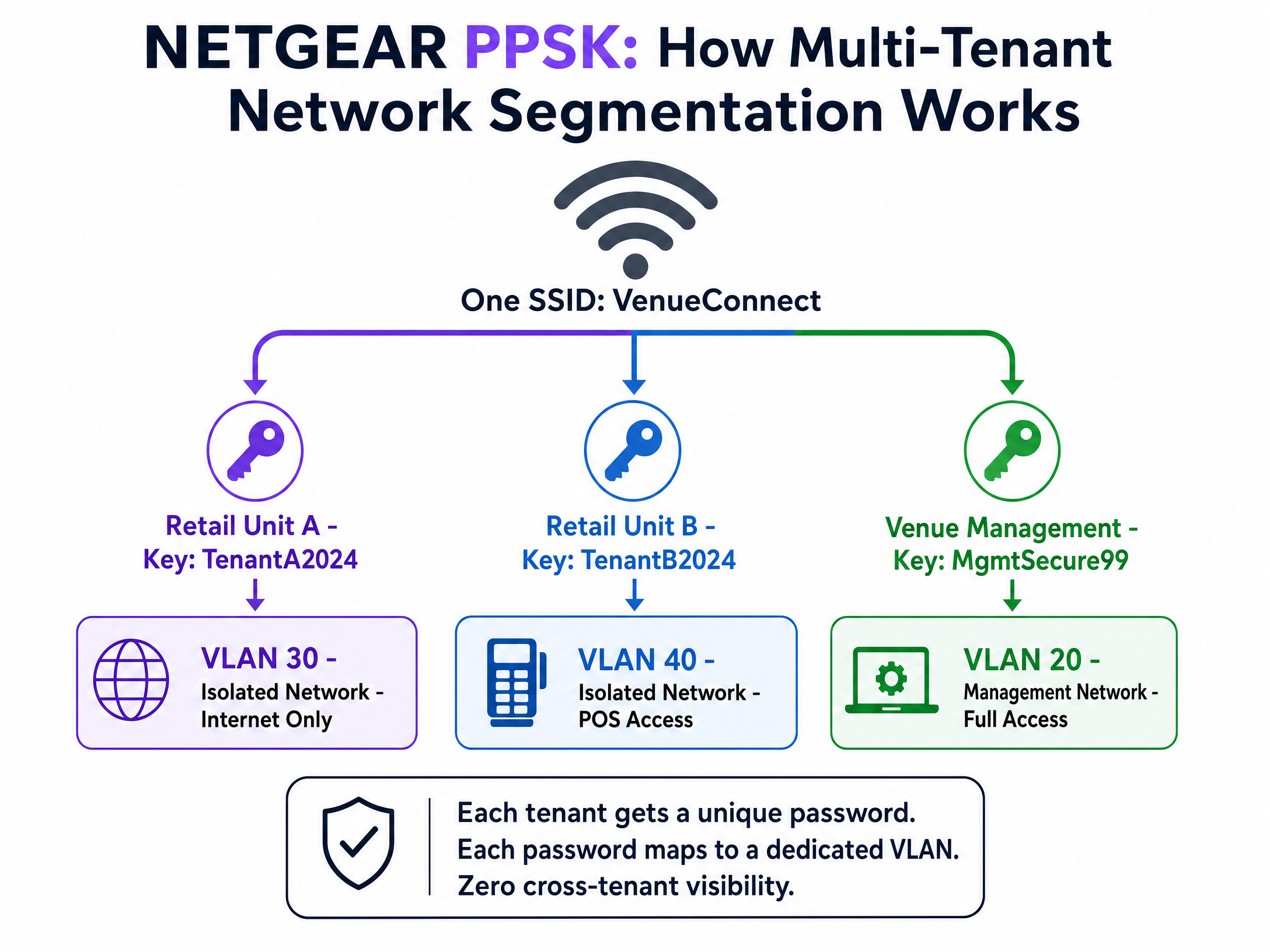
Quando um dispositivo se liga utilizando a palavra-passe da unidade de retalho, o access point coloca-o na VLAN de retalho isolada. Quando a gestão do espaço se liga utilizando a sua palavra-passe, entra na VLAN de gestão. Consegue um isolamento completo do tráfego com zero hardware adicional. Note que o PPSK requer WPA2 Personal e não pode ser combinado com um captive portal no mesmo SSID.
4. Atribuição Dinâmica de VLAN via RADIUS
Para Redes Baseadas em Identidade sofisticadas, deve utilizar a atribuição dinâmica de VLAN. Em vez de atribuir estaticamente uma VLAN a um SSID ou a uma palavra-passe, o servidor RADIUS dita a VLAN com base no perfil de diretório do utilizador.
O servidor RADIUS devolve três atributos padrão na mensagem Access-Accept:
[64] Tunnel-Type = 13 (VLAN)[65] Tunnel-Medium-Type = 6 (802)[81] Tunnel-Private-Group-ID = [VLAN ID]
Um único SSID WPA2 Enterprise pode servir toda a organização. Um gerente de hotel autentica-se e entra na VLAN 20. Um funcionário da receção entra na VLAN 21. Um prestador de serviços entra na VLAN 50. A rede adapta-se à identidade do utilizador. Para uma visão mais ampla sobre como proteger o seu ambiente, consulte o nosso Segurança WiFi Enterprise: Um Guia Completo para 2026 .
Guia de Implementação
Siga estes passos para implementar o NETGEAR Insight com o Guest WiFi da Purple.
Passo 1: Configurar o SSID de Convidados
- Inicie sessão no NETGEAR Insight Cloud Portal.
- Selecione a localização da sua rede e navegue até Wireless > Settings.
- Crie um novo SSID (por exemplo, "Venue Guest WiFi").
- Selecione Captive Portal e escolha External Captive Portal.
Passo 2: Configurar o Captive Portal
- No campo Splash Page URL, introduza o URL fornecido pela Purple.
- Selecione o botão de rádio Radius.
- Introduza o IP do Servidor de Autenticação Primário, a porta (1812) e o segredo partilhado fornecidos pela Purple.
- Introduza o IP do Servidor de Contabilidade Primário, a porta (1813) e o segredo partilhado.
- Defina um NAS-Identifier descritivo (ex.: "London-Retail-01").
Passo 3: Configurar o Walled Garden
Este é o passo mais crítico. Se o walled garden estiver incorreto, os visitantes verão um ecrã em branco.
- Desloque-se até à secção Walled Garden nas definições do Captive Portal.
- Adicione todos os domínios fornecidos na documentação de integração da Purple. Isto inclui os domínios de CDN da Purple, servidores de autenticação e quaisquer fornecedores de início de sessão social ativados (ex.: Facebook, Google).
- Clique em Guardar.
Passo 4: Verificar a Acessibilidade do RADIUS
Certifique-se de que a sua firewall permite as portas UDP 1812 e 1813 de saída dos endereços IP de gestão dos pontos de acesso para os servidores RADIUS da Purple.
Boas Práticas
- Forçar a Validação de Certificados: Para implementações 802.1X, deve forçar uma validação estrita de certificados em todos os dispositivos clientes através de Objetos de Política de Grupo (GPO) ou Gestão de Dispositivos Móveis (MDM). Se os clientes não validarem o certificado do servidor RADIUS, ficarão vulneráveis a ataques de pontos de acesso falsos (rogue access points).
- Isolar o Tráfego de Gestão: Coloque sempre os endereços IP de gestão dos pontos de acesso numa VLAN de gestão dedicada, isolada do tráfego de visitantes e de funcionários.
- Ativar o Failsafe: Nas definições do Captive Portal do NETGEAR Insight, ative a opção FailSafe. Se os servidores RADIUS ficarem inacessíveis, é concedido aos visitantes um acesso temporário à Internet, evitando uma interrupção total do WiFi.
- SSIDs Separados para PPSK: Como o NETGEAR Insight não suporta PPSK e Captive Portal no mesmo SSID, deve criar SSIDs dedicados (ex.: "Venue-Guest" and "Venue-Tenant").
Resolução de Problemas e Mitigação de Riscos
Sintoma: Os visitantes ligam-se ao SSID mas a splash page não carrega.
- Causa: Configuração incompleta do Walled Garden.
- Resolução: Verifique se todos os domínios da Purple e domínios de início de sessão social estão introduzidos corretamente nas definições de Walled Garden do NETGEAR Insight. Teste com um dispositivo que não tenha credenciais em cache.
Sintoma: Os dispositivos dos funcionários não se conseguem autenticar via 802.1X.
- Causa: Tempo limite (timeout) do RADIUS ou segredo partilhado incorreto.
- Resolução: Verifique se as portas UDP 1812 e 1813 estão abertas para saída. Confirme se o segredo partilhado coincide exatamente entre o portal NETGEAR Insight e o servidor RADIUS. Verifique os registos (logs) do servidor RADIUS para mensagens de
Access-Reject.
Sintoma: Os clientes PPSK são colocados na VLAN errada.
- Causa: Mapeamento de VLAN incorreto ou configuração de VLAN em falta no switch.
- Resolução: Certifique-se de que a VLAN foi criada no NETGEAR Insight nas definições Wired. Verifique se as Definições Multi PSK mapeiam a palavra-passe correta para o ID de VLAN correto. Certifique-se de que a porta do switch que liga o ponto de acesso está configurada como uma porta trunk que permite a VLAN de destino.
ROI e Impacto no Negócio
A implementação do NETGEAR Insight com a Purple transforma a sua infraestrutura sem fios de um centro de custos num ativo gerador de receitas. Ao implementar Redes Baseadas em Identidade e captive portals, consegue:
- Redução de Custos de TI: O PPSK e o 802.1X eliminam a necessidade de gerir manualmente palavras-passe partilhadas ou de enviar técnicos para alterações de acesso rotineiras.
- Análises Acionáveis: Registe dados demográficos, tempos de permanência e taxas de retorno para otimizar as operações do local e o mix de lojistas.
- ROI de Marketing: Construa uma base de dados CRM de elevada intenção e em conformidade com o GDPR. Os locais registam normalmente uma redução significativa nos custos de aquisição de clientes ao tirar partido de dados primários (first-party data) recolhidos via WiFi.
- Segurança Reforçada: A atribuição dinâmica de VLAN isola dispositivos IoT, sistemas de ponto de venda e tráfego de visitantes, reduzindo significativamente a superfície de ataque e garantindo a conformidade com o PCI DSS.
Definições Principais
802.1X
An IEEE standard for port-based Network Access Control that provides an authentication mechanism to devices wishing to attach to a LAN or WLAN.
Essential for enterprise security; replaces shared passwords with individual user credentials.
Captive Portal
A web page that a user of a public access network is obliged to view and interact with before access is granted.
Used by Purple to capture first-party data and ensure terms of service acceptance.
PPSK (Private Pre-Shared Key)
A feature allowing multiple unique passwords on a single SSID, where each password assigns the user to a specific VLAN.
Ideal for multi-tenant buildings or isolating IoT devices without creating multiple SSIDs.
RADIUS
Remote Authentication Dial-In User Service; a networking protocol that provides centralized Authentication, Authorization, and Accounting (AAA) management.
The core server that validates credentials and tells the NETGEAR AP whether to grant access.
Walled Garden
A limited environment that controls the user's access to web content and services prior to full authentication.
Must be configured in NETGEAR Insight to allow devices to reach the Purple splash page and social login providers.
Dynamic VLAN Assignment
The process where a RADIUS server instructs an access point to place an authenticated user on a specific VLAN based on their identity.
Enables Identity-Based Networks, allowing a single SSID to serve multiple departments securely.
NAS-Identifier
Network Access Server Identifier; a string used to identify the source of a RADIUS access request.
Configured in NETGEAR Insight so Purple knows which venue or access point the user is connecting from.
EAP-TLS
Extensible Authentication Protocol - Transport Layer Security; an authentication method requiring digital certificates on both the client and server.
The most secure 802.1X method, eliminating passwords entirely, though requiring MDM to deploy certificates.
Exemplos Práticos
A 40-unit retail park needs to provide secure, isolated WiFi for each tenant's point-of-sale systems, plus a branded public WiFi network for shoppers. They have deployed NETGEAR WAX630 access points. How should the network be configured?
Create two SSIDs in NETGEAR Insight. SSID 1: 'RetailPark-Guest'. Configure this with an External Captive Portal pointing to Purple's splash page, with RADIUS authentication and a comprehensive walled garden. Map this to VLAN 10 (Internet only). SSID 2: 'RetailPark-Tenants'. Configure this with WPA2 Personal and enable Multi PSK (PPSK). Create 40 unique passwords. Map Tenant A's password to VLAN 101, Tenant B to VLAN 102, etc. Ensure the core switch trunks all VLANs to the access points.
A corporate headquarters wants to move away from a shared WPA2 password. They need staff to authenticate with their Microsoft Entra ID credentials, and they want the finance team on VLAN 50 and the marketing team on VLAN 60.
Deploy a single 'Corporate-Secure' SSID configured for WPA2 Enterprise. Point the NETGEAR Insight RADIUS settings to a RADIUS server integrated with Entra ID. Configure the RADIUS server to return standard tunnel attributes (Tunnel-Type=13, Tunnel-Medium-Type=6, Tunnel-Private-Group-ID=50 or 60) based on the user's directory group membership. Enforce certificate validation on all corporate laptops via MDM.
Perguntas de Prática
Q1. You have deployed a Purple captive portal on a NETGEAR WAX620. Guests can connect to the WiFi, but their browsers show a 'Cannot reach destination' error instead of the splash page. What is the most likely configuration error?
Dica: Consider what must happen before the guest is fully authenticated to reach external servers.
Ver resposta modelo
The Walled Garden is misconfigured or incomplete. The NETGEAR access point is blocking the initial traffic to Purple's servers. You must ensure all required Purple CDN domains, authentication URLs, and social login domains are added to the Walled Garden list in the Insight portal.
Q2. A venue requires both a guest captive portal and secure, isolated WiFi for 10 different retail tenants. They want to minimize RF interference. How do you configure the NETGEAR access points?
Dica: NETGEAR Insight has specific limitations regarding mixing captive portals and PPSK.
Ver resposta modelo
You must create exactly two SSIDs. NETGEAR does not support PPSK and Captive Portal on the same SSID. Create 'Venue-Guest' with an External Captive Portal pointing to Purple. Create 'Venue-Retail' with WPA2 Personal and configure Multi PSK (PPSK) with 10 unique passwords, each mapping to a different VLAN.
Q3. When configuring dynamic VLAN assignment for staff using 802.1X, which three RADIUS attributes must the server return in the Access-Accept message?
Dica: Think about the RFC 2868 standard attributes for tunnel configuration.
Ver resposta modelo
The RADIUS server must return: [64] Tunnel-Type = 13 (VLAN), [65] Tunnel-Medium-Type = 6 (802), and [81] Tunnel-Private-Group-ID = [The specific VLAN ID string].
Continue a ler esta série
Integração da Alta Labs com o Purple WiFi: Instalação e Configuração do Captive Portal
Este guia de referência técnica abrange a integração de ponta a ponta dos pontos de acesso Alta Labs AP6 e AP6 Pro com o Captive Portal alojado na nuvem da Purple. Detalha a configuração de redirecionamento externo, autenticação RADIUS, requisitos de walled garden e segmentação multi-tenant utilizando as Private Pre-Shared Keys do AltaPass. Os operadores de espaços e as equipas de TI terão acesso a um manual de implementação replicável para ambientes de hotelaria, retalho e escritórios inteligentes.
Aruba ClearPass and Purple WiFi: Guia de Integração e Implementação
Este guia fornece uma referência técnica completa para integrar o HPE Aruba ClearPass Policy Manager com a plataforma Purple WiFi, cobrindo a arquitetura de proxy RADIUS, configuração de captive portal e mapeamento dinâmico de funções VLAN. É projetado para gestores de IT e arquitetos de rede em ambientes com forte presença Aruba que precisam manter o ClearPass para NAC enquanto implementam o Purple para autenticação de convidados e análises. A implementação desta integração preenche uma lacuna crítica de fornecedor, permitindo segurança e conformidade de nível empresarial juntamente com as capacidades de inteligência de visitantes líderes de mercado do Purple.
Aruba Central and Purple WiFi: Integração Gerida na Nuvem
Um guia de referência técnica abrangente para integrar o Aruba Central com a plataforma de inteligência de WiFi para convidados alojada na nuvem da Purple. Este guia abrange a arquitetura, a configuração passo a passo de captive portals externos e RADIUS, e estratégias de implementação em vários locais para equipas de TI empresariais.