

O Guia Definitivo para Canais WiFi: 2.4GHz vs 5GHz Explicado
Este guia autorizado detalha as diferenças críticas entre os canais WiFi de 2.4GHz e 5GHz para ambientes empresariais. Fornece a gestores de TI e arquitetos de rede estratégias acionáveis para planeamento de canais, mitigação de interferências e otimização de implementações em locais de alta densidade para impulsionar o ROI.
Ouça este guia
Ver transcrição do podcast
Resumo Executivo
Para gestores de TI e arquitetos de rede que implementam infraestruturas sem fios de alta densidade, a escolha entre 2.4GHz e 5GHz já não é uma simples dicotomia de alcance versus velocidade. Em ambientes empresariais modernos — desde hotéis com 500 quartos a grandes propriedades de retalho — a seleção de canais é a decisão arquitetónica fundamental que dita o débito da rede, a experiência do cliente e a postura de segurança. Este guia oferece uma análise técnica aprofundada e definitiva sobre o melhor canal para WiFi de 5GHz, mitigando a interferência de co-canal em 2.4GHz e estruturando um plano de canais que seja escalável.
Ao padronizar em 5GHz para acesso primário de clientes, enquanto se restringe 2.4GHz para dispositivos IoT legados, os operadores de espaços podem aumentar drasticamente a capacidade agregada da rede. Quando combinado com Guest WiFi e robustas WiFi Analytics , um plano de canais limpo transforma um centro de custos num motor fiável para a recolha de dados e o envolvimento do cliente.
Análise Técnica Aprofundada: Compreender as Bandas de Frequência e os Canais
Para arquitetar uma rede resiliente, devemos distinguir entre bandas de frequência e os canais dentro delas. Uma banda de frequência representa o amplo espectro de rádio alocado para comunicação sem fios, enquanto os canais são as subdivisões específicas onde os pontos de acesso (APs) e os dispositivos cliente negoceiam as ligações.
A Banda de 2.4GHz: Restrições Legadas e Interferência
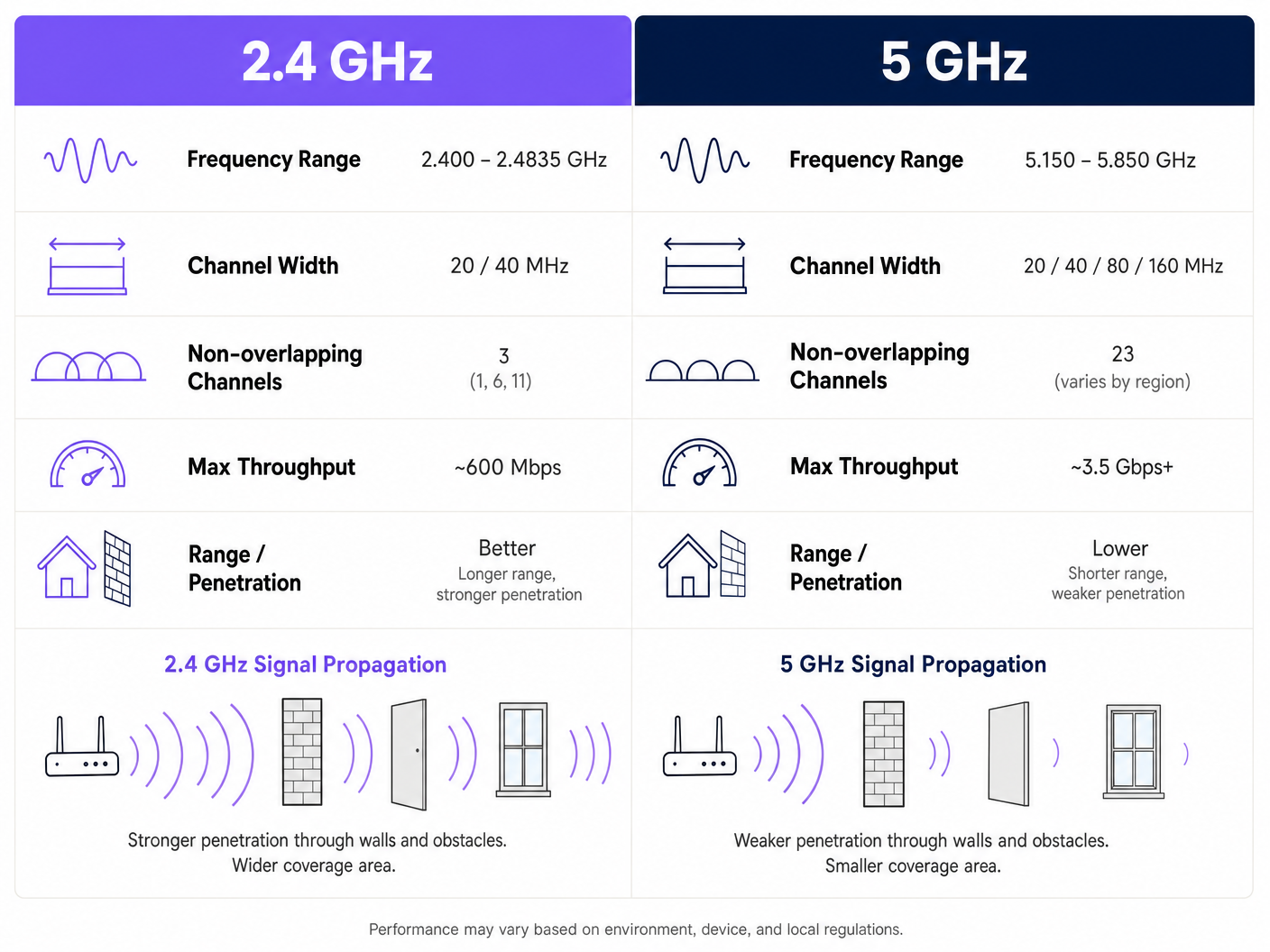
A banda de 2.4GHz (2.400 – 2.4835 GHz) é o motor legado das redes sem fios. A sua principal vantagem é a propagação do sinal; ondas de frequência mais baixas penetram paredes, portas e pisos de forma mais eficaz do que frequências mais altas. No entanto, este alcance acarreta uma penalidade arquitetónica severa em implementações de alta densidade.
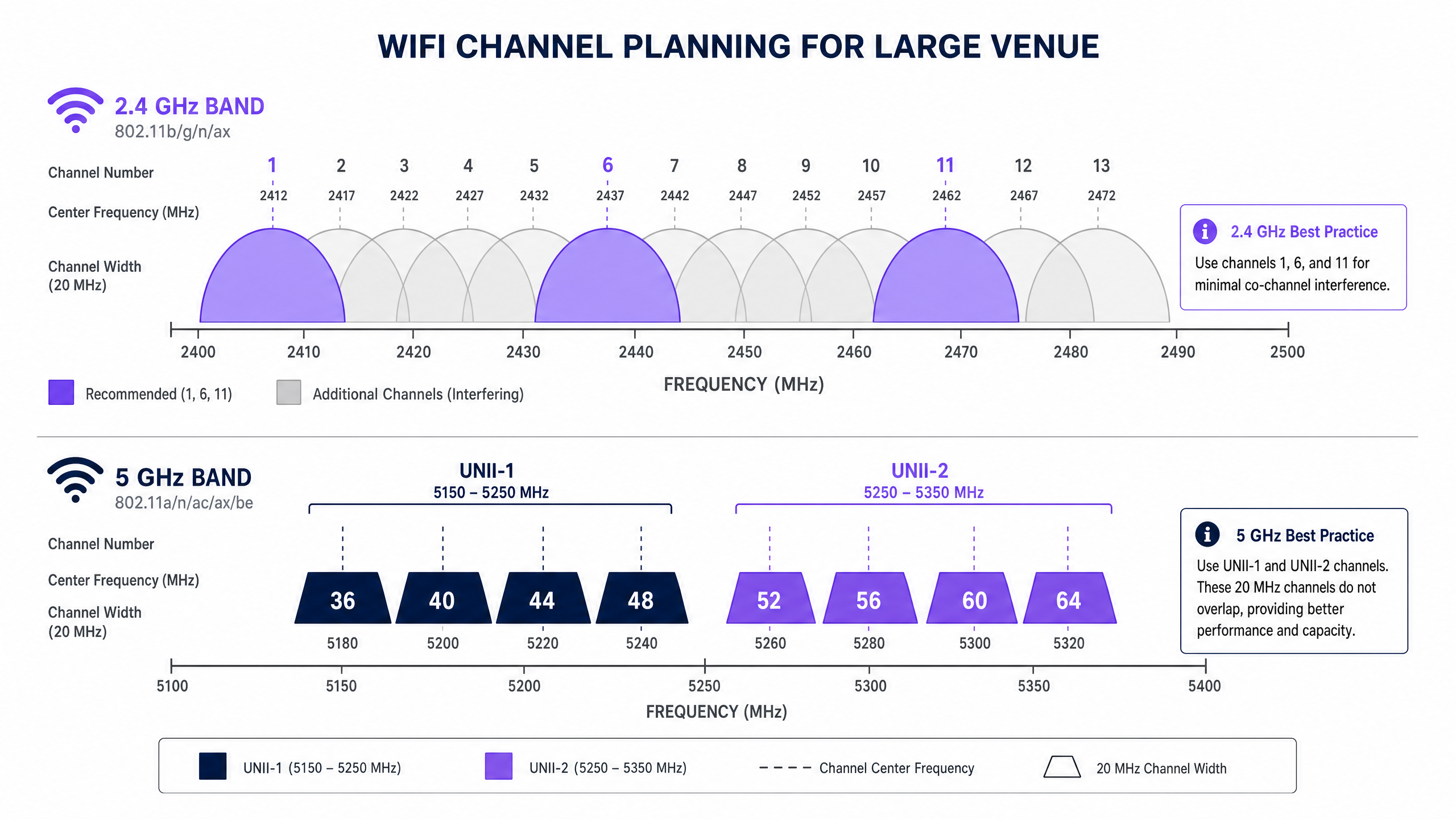
No Reino Unido e na Europa, a banda de 2.4GHz oferece 13 canais. Cada canal tem 20MHz de largura, mas estão espaçados apenas 5MHz. Esta sobreposição estrutural significa que apenas três canais — 1, 6 e 11 — são verdadeiramente não sobrepostos. Num ambiente denso, como um espaço de Hotelaria com APs implementados em todos os outros quartos, forçar centenas de dispositivos em três canais leva inevitavelmente a uma severa interferência de co-canal (CCI). Além disso, o espectro de 2.4GHz está fortemente poluído por interferentes não-WiFi, incluindo fornos de micro-ondas, dispositivos Bluetooth e telefones DECT.
A Banda de 5GHz: Capacidade e o Desafio DFS
A banda de 5GHz (5.150 – 5.850 GHz) altera fundamentalmente a equação da capacidade. Fornece um espectro significativamente mais utilizável, permitindo canais mais amplos e taxas de dados mais elevadas. No Reino Unido, a banda de 5GHz é segmentada em sub-bandas Unlicensed National Information Infrastructure (UNII), oferecendo até 19 canais de 20MHz não sobrepostos.
Ao determinar o melhor canal para WiFi de 5GHz, os arquitetos de rede devem navegar pela Seleção Dinâmica de Frequência (DFS). DFS é um requisito regulamentar concebido para evitar que as redes WiFi interfiram com sistemas de radar existentes, como radares meteorológicos e militares.
- UNII-1 (Canais 36, 40, 44, 48): Estes canais não requerem DFS. São o padrão ouro para implementações empresariais porque os APs não mudarão subitamente de canal se for detetado radar, garantindo conectividade estável do cliente.
- UNII-2A e UNII-2C (Canais 52-144): Estes são canais DFS. Se um AP detetar uma assinatura de radar no seu canal de operação, deve desocupar imediatamente esse canal e mover-se para outro, potencialmente interrompendo sessões de cliente ativas.
- UNII-3 (Canais 149-165): A disponibilidade varia por região, mas estes são geralmente canais não-DFS onde permitido.
Guia de Implementação: Construir o Plano de Canais
Uma implementação bem-sucedida requer uma abordagem de planeamento de canais neutra em relação ao fornecedor e orientada por dados. Quer esteja a implementar num ambiente de Retalho ou a atualizar um centro de Transportes , estes passos formam a base para uma rede de alto desempenho.
1. Realizar um Inquérito Ativo de Local RF
Nunca dependa apenas da modelagem preditiva. Realize um inquérito ativo utilizando um analisador de espectro para mapear o ambiente RF existente. Identifique APs não autorizados, interferências não-WiFi e redes vizinhas. Estes dados empíricos são essenciais para atribuir canais que evitem a congestão existente.
2. Definir Larguras de Canal de Forma Conservadora
O instinto de maximizar o débito através da agregação de canais (por exemplo, utilizando larguras de 80MHz ou 160MHz) é um erro arquitetónico comum em locais densos.
- Em 5GHz: Padronize em larguras de canal de 20MHz ou 40MHz. Embora as velocidades de pico por cliente sejam mais baixas do que com canais de 80MHz, o débito agregado da rede aumenta porque preserva mais canais não sobrepostos, reduzindo assim o CCI.
- Em 2.4GHz: Imponha rigorosamente larguras de canal de 20MHz. Utilizar 40MHz em 2.4GHz num ambiente empresarial garante interferência severa.
3. Implementar Band Steering
Os APs empresariais modernos suportam band steering, uma funcionalidade que incentiva os clientes com capacidade de banda dupla a conectar-se à banda de 5GHz. Isto liberta o espectro de 2.4GHz para dispositivos legados e sensores IoT, como os discutidos no nosso guia sobre BLE Low Energy Explained for Enterprise .
4. Otimizar a Potência de Transmissão
Alta potência de transmissão não equivale a melhor desempenho; equivale a um domínio de interferência maior. Numa implementação de alta densidade, reduza a potência de transmissão nos rádios de 2.4GHz (por exemplo, 8-11 dBm) para reduzir o tamanho da célula e limitar a CCI. Os rádios de 5GHz podem operar com uma potência ligeiramente superior (por exemplo, 14-17 dBm) para compensar as suas capacidades de penetração reduzidas.
Melhores Práticas e Padrões da Indústria
Para manter a conformidade e a excelência operacional, siga estas recomendações padrão da indústria:
- Padronize em UNII-1 para Infraestruturas Críticas: Utilize os canais 36, 40, 44 e 48 para áreas que exigem estabilidade absoluta, como salas de reuniões executivas ou clusters de pontos de venda (POS).
- Aproveite a Análise para Otimização Dinâmica: Utilize plataformas como Purple para monitorizar continuamente o ambiente de RF. Se um inquilino vizinho implementar um AP não autorizado, a sua análise deverá detetar o aumento da utilização do canal e acionar um ajuste de canal automático ou manual. Para obter informações sobre como otimizar ambientes de escritório, consulte Office Wi Fi: Optimize Your Modern Office Wi-Fi Network .
- Audite o Comportamento DFS Antes da Implementação: Se estiver a utilizar canais UNII-2, realize testes rigorosos para monitorizar a frequência com que os APs acionam eventos DFS. Se a deteção de radar for frequente (por exemplo, perto de um aeroporto), remova esses canais específicos da lista de canais permitidos do AP.
- Prepare-se para o Wi-Fi 6E: Se estiver a realizar uma atualização de hardware, avalie o Wi-Fi 6E (802.11ax a operar na banda de 6GHz). O espectro de 6GHz oferece até 500MHz de largura de banda adicional e livre de interferências no Reino Unido, resolvendo eficazmente o problema de capacidade de alta densidade. Leia mais em Wi Fi Frequencies: A Guide to Wi-Fi Frequencies in 2026 .
Resolução de Problemas e Mitigação de Riscos
Mesmo com um planeamento meticuloso, os ambientes de RF são dinâmicos. Os modos de falha comuns incluem:
- O Problema do "Cliente Preso": Clientes que se recusam a fazer roaming para um AP mais próximo, mantendo uma ligação fraca que prejudica o desempenho geral da célula. Mitigação: Implemente limiares mínimos de RSSI e utilize protocolos 802.11k/v/r para facilitar o roaming contínuo.
- Catástrofes de Canais Automáticos: Os algoritmos de canais automáticos baseados em controladores frequentemente convergem nos mesmos poucos canais, causando CCI generalizada. Mitigação: Utilize as funcionalidades de canais automáticos apenas durante a implementação inicial ou janelas de manutenção programadas. Para operação contínua, confie num mapa de canais estático e meticulosamente planeado, validado por análises.
- Degradação da Postura de Segurança: Um planeamento de canais deficiente pode mascarar a presença de APs não autorizados ou ataques de evil twin. Mitigação: Um ambiente de RF limpo torna a deteção de anomalias significativamente mais fiável. Garanta que a sua arquitetura se alinha com frameworks de segurança modernos, conforme discutido em La lista de verificación para migrar de NAC heredado a NAC nativo de la nube e A Lista de Verificação para Migrar de NAC Legado para NAC Nativo da Nuvem .
ROI e Impacto no Negócio
O impacto no negócio de uma rede sem fios corretamente projetada estende-se muito além da redução de tickets de suporte de TI. No retalho e na hotelaria, a rede WiFi é o principal canal para o envolvimento dos hóspedes e a aquisição de dados.
Quando a interferência de co-canal é eliminada e os clientes são direcionados com sucesso para canais de 5GHz limpos, a rede pode suportar densidades de clientes mais elevadas sem degradação. Esta fiabilidade garante que os captive portals carregam instantaneamente, aumentando a taxa de conversão dos inícios de sessão Guest WiFi. A captura de dados primários resultante impulsiona campanhas de marketing direcionadas, impactando diretamente os resultados financeiros.
Ouça o nosso briefing técnico completo sobre este tópico:
Definições Principais
Co-Channel Interference (CCI)
Interference caused when two or more access points operate on the exact same channel and their coverage areas overlap.
CCI forces devices to wait their turn to transmit, drastically reducing network throughput in dense deployments.
Dynamic Frequency Selection (DFS)
A regulatory mandate requiring WiFi devices operating in certain 5GHz bands to detect and avoid incumbent radar systems.
If an AP detects radar on a DFS channel, it must immediately switch channels, causing brief connectivity drops for connected clients.
Band Steering
A feature on enterprise APs that detects dual-band capable clients and actively encourages them to connect to the 5GHz band rather than 2.4GHz.
Essential for preserving the limited 2.4GHz spectrum for legacy IoT devices and ensuring high-performance clients get optimal speeds.
Channel Bonding
The practice of combining two or more adjacent 20MHz channels into a single wider channel (e.g., 40MHz, 80MHz) to increase data throughput.
While it increases speed, it reduces the total number of non-overlapping channels available, making it dangerous in high-density environments.
UNII-1 Band
The lower segment of the 5GHz spectrum (channels 36, 40, 44, 48) that does not require DFS compliance.
The most stable and reliable channels for mission-critical enterprise wireless traffic.
Adjacent Channel Interference (ACI)
Interference caused by transmissions on overlapping but not identical frequencies (e.g., using channel 3 and channel 6 in 2.4GHz).
ACI is more destructive than CCI because devices cannot properly decode the overlapping signals, leading to high packet loss.
RSSI (Received Signal Strength Indicator)
A measurement of the power present in a received radio signal.
Used by network administrators to set minimum connection thresholds, forcing 'sticky clients' to roam to closer access points.
BSS Coloring
A feature introduced in Wi-Fi 6 (802.11ax) that adds a 'color' identifier to transmissions, allowing APs on the same channel to ignore each other's traffic if the color doesn't match.
Significantly mitigates the impact of co-channel interference in extremely dense deployments like stadiums.
Exemplos Práticos
A 400-room hotel in a dense urban environment is experiencing widespread guest complaints regarding WiFi speeds during the evening peak (7 PM - 10 PM). The current deployment uses dual-band APs in every other room, with auto-channel selection enabled and 80MHz channel widths on 5GHz.
- Disable auto-channel selection to prevent continuous channel thrashing. 2. Reduce 5GHz channel width from 80MHz to 20MHz to increase the number of available non-overlapping channels and eliminate co-channel interference. 3. Statically assign 5GHz channels, prioritizing UNII-1 (36, 40, 44, 48) and clean UNII-2 channels. 4. Reduce 2.4GHz transmit power to 8dBm and restrict to channels 1, 6, and 11 to minimize cell overlap.
A large retail chain is deploying a new point-of-sale (POS) system that relies on wireless connectivity. The store is located in a shopping centre with dozens of neighboring retail WiFi networks visible. The POS vendor recommends using 2.4GHz for 'better range'.
- Reject the vendor's 2.4GHz recommendation for critical infrastructure. 2. Configure a dedicated SSID for the POS system operating exclusively on the 5GHz band. 3. Assign this SSID to UNII-1 channels (36, 40, 44, 48) to avoid any potential DFS radar disruptions. 4. Implement band steering on the public Guest WiFi SSID to keep consumer devices off the 2.4GHz spectrum as much as possible.
Perguntas de Prática
Q1. You are deploying WiFi in a hospital where life-critical telemetry equipment operates on 2.4GHz. The hospital also wants to offer high-speed Guest WiFi in the waiting areas. How do you architect the channel plan?
Dica: Consider physical separation and band dedication.
Ver resposta modelo
- Dedicate the 2.4GHz band entirely to the telemetry equipment, statically assigning channels 1, 6, and 11. 2. Disable the Guest WiFi SSID on the 2.4GHz radios completely. 3. Broadcast the Guest WiFi exclusively on the 5GHz band using UNII-1 and UNII-2 channels. This ensures the life-critical 2.4GHz spectrum remains uncontended while providing high capacity for guests.
Q2. A stadium deployment is suffering from massive interference on 5GHz, despite using 20MHz channels. The APs are mounted very high up and are 'hearing' each other across the bowl. What configuration change is required?
Dica: Think about how far the signal is traveling and how APs decide when the channel is clear.
Ver resposta modelo
- Significantly reduce the transmit (Tx) power on the 5GHz radios to shrink the cell size. 2. Increase the RX-SOP (Receive Start of Packet) threshold, which makes the AP 'deaf' to weak signals from distant APs across the stadium bowl, allowing it to transmit simultaneously without triggering carrier sense mechanisms.
Q3. Your corporate office is located less than 2 miles from a major commercial airport. You are currently using channels 36, 40, 44, 48, 52, 56, 60, and 64. Users are complaining of random, brief disconnects. What is the likely cause and solution?
Dica: Consider the regulatory requirements for specific 5GHz channels.
Ver resposta modelo
The disconnects are caused by DFS (Dynamic Frequency Selection) events. The APs on channels 52-64 are detecting airport radar and vacating the channel. The solution is to remove the UNII-2 DFS channels (52-64) from the allowed channel list and rely solely on the non-DFS UNII-1 channels (36-48), or upgrade to Wi-Fi 6E to utilize the non-DFS 6GHz band.