
Políticas BYOD Seguras para Redes WiFi de Colaboradores
Este guia autorizado fornece aos líderes de TI uma estrutura neutra em relação a fornecedores para o onboarding seguro de dispositivos pessoais dos colaboradores. Detalha as decisões arquitetónicas críticas — incluindo segmentação de rede, autenticação EAP-TLS e integração MDM — necessárias para suportar BYOD sem comprometer a infraestrutura corporativa central.
Ouça este guia
Ver transcrição do podcast

Resumo Executivo
O ambiente empresarial moderno exige flexibilidade, e a expectativa dos colaboradores por acesso Bring Your Own Device (BYOD) já não é negociável. No entanto, a integração de dispositivos pessoais não geridos em redes sem fios corporativas introduz riscos significativos de segurança e conformidade. Este guia de referência técnica fornece a arquitetos de rede e diretores de TI uma estrutura robusta para implementar políticas BYOD seguras para redes WiFi de colaboradores. Descrevemos as decisões arquitetónicas críticas, focando na segmentação de rede, autenticação IEEE 802.1X e integração de Mobile Device Management (MDM). Ao afastar-se de palavras-passe partilhadas e autenticação baseada em MAC em direção à identidade baseada em certificados (EAP-TLS) e encriptação WPA3-Enterprise, as organizações podem fornecer conectividade contínua sem comprometer a sua infraestrutura central. Quer opere em Retalho , Saúde , Hotelaria ou Transportes , este guia oferece as melhores práticas neutras em relação a fornecedores necessárias para proteger a sua extremidade de rede, ao mesmo tempo que apoia a produtividade dos colaboradores.
Ouça o nosso podcast complementar para um briefing executivo sobre estes conceitos:
Análise Técnica Detalhada
Arquitetura e Segmentação de Rede
O princípio fundamental de qualquer implementação BYOD segura é a segmentação rigorosa da rede. Dispositivos pessoais nunca devem residir na mesma Virtual Local Area Network (VLAN) que a infraestrutura corporativa, sistemas de ponto de venda (POS) ou bases de dados sensíveis. Uma VLAN BYOD dedicada atua como uma camada intermédia segura, logicamente isolada tanto do núcleo corporativo quanto da rede Guest WiFi .
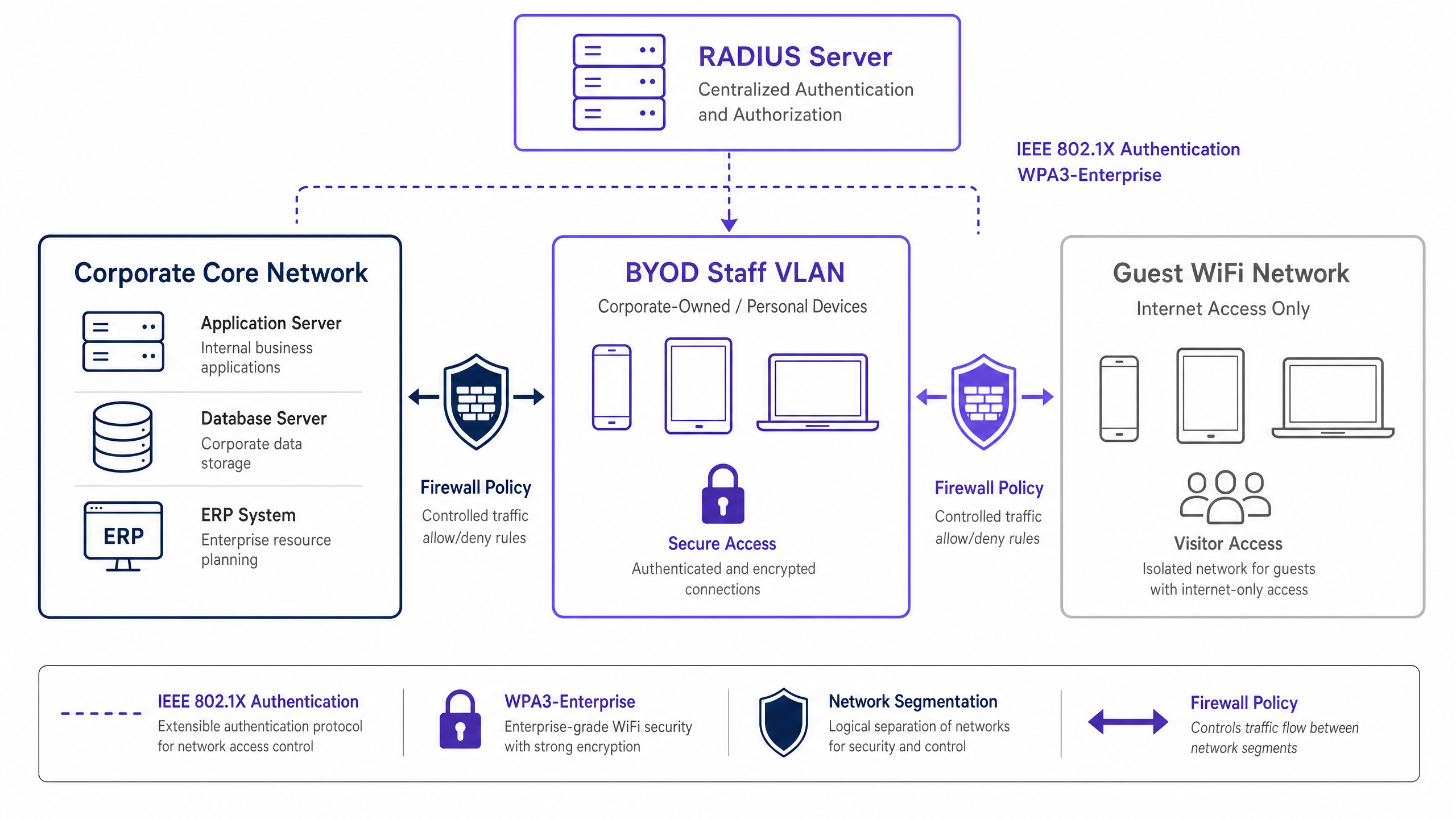
Esta segmentação garante que, mesmo que o dispositivo pessoal de um colaborador seja comprometido, a ameaça é contida. O acesso da VLAN BYOD a recursos corporativos internos deve ser regido por rigorosas Listas de Controlo de Acesso (ACLs) de firewall, operando num princípio de negação por defeito com permissões explícitas apenas para serviços necessários (por exemplo, portais de intranet ou aplicações específicas na cloud).
Autenticação: O Padrão IEEE 802.1X
Proteger o perímetro BYOD requer autenticação robusta. O padrão IEEE 802.1X fornece controlo de acesso à rede baseado em porta, garantindo que os dispositivos são autenticados antes de obterem acesso à camada de rede. Dentro da estrutura 802.1X, o Extensible Authentication Protocol com Transport Layer Security (EAP-TLS) é o padrão ouro para ambientes BYOD.
EAP-TLS baseia-se na autenticação mútua baseada em certificados. Em vez de palavras-passe vulneráveis, o dispositivo apresenta um certificado digital emitido pela Public Key Infrastructure (PKI) da organização. O servidor RADIUS valida este certificado, garantindo que tanto o dispositivo quanto a identidade do utilizador são verificados. Esta abordagem mitiga os riscos associados ao roubo de credenciais, phishing e o custo operacional das redefinições de palavras-passe.
Encriptação e Conformidade
Os dados em trânsito devem ser protegidos contra interceção. WPA3-Enterprise é o padrão atual para proteger o tráfego sem fios, substituindo o WPA2 ao eliminar vulnerabilidades como o ataque KRACK. WPA3-Enterprise exige o modo de segurança de 192 bits para ambientes altamente sensíveis e fornece sigilo de encaminhamento através de Simultaneous Authentication of Equals (SAE). A implementação de WPA3-Enterprise é cada vez mais um requisito obrigatório para estruturas de conformidade, incluindo PCI DSS 4.0 e vários padrões de proteção de dados de saúde.
Além disso, a conformidade exige visibilidade abrangente. Cada evento de conexão na rede BYOD deve ser registado, capturando a identidade do dispositivo, identidade do utilizador, carimbo de data/hora e atribuição de VLAN. Este registo de auditoria é crítico para demonstrar conformidade com regulamentos como o Artigo 32 do GDPR. Para mais contexto sobre os requisitos de registo, consulte o nosso guia sobre Explique o que é um registo de auditoria para Segurança de TI em 2026 .
Guia de Implementação
A implementação de uma rede BYOD segura requer coordenação entre política, gestão de identidade e infraestrutura de rede.

Implementação Passo a Passo
- Definição da Política: Antes de alterar a infraestrutura, defina a política BYOD. Determine os grupos de utilizadores elegíveis, os tipos de dispositivos aprovados e os recursos corporativos específicos acessíveis a partir da VLAN BYOD. Obtenha a aprovação da liderança jurídica, de RH e de segurança.
- Integração MDM e Provisionamento de Certificados: Utilize a sua plataforma de Mobile Device Management (MDM) (por exemplo, Intune, Jamf) para provisionar certificados EAP-TLS para os dispositivos dos colaboradores. Utilize o Simple Certificate Enrollment Protocol (SCEP) para automatizar esta entrega. O MDM também serve como motor de aplicação para verificações de postura do dispositivo (por exemplo, verificar os níveis de patch do SO e o estado da encriptação) antes que o acesso à rede seja concedido.
- Configuração RADIUS: Configure o servidor RADIUS com políticas específicas para dispositivos BYOD. Quando um dispositivo BYOD autentica com sucesso através do seu certificado, o servidor RADIUS deve retornar um atributo de atribuição dinâmica de VLAN (por exemplo,
Tunnel-Private-Group-ID) para colocar o dispositivo na VLAN BYOD isolada. - Configuração da Infraestrutura Sem Fios: Implemente a atribuição dinâmica de VLAN no seu Service Set Identifier (SSID) corporativo existente. Isso proporciona uma experiência de utilizador contínua — os colaboradores "ligam-se a uma rede, e a infraestrutura encaminha-os para a VLAN apropriada com base na sua identidade autenticada.
- Firewall e Controlo de Acesso: Aplique ACLs rigorosas na fronteira entre a VLAN BYOD e o núcleo corporativo. Documente cada regra de permissão e estabeleça um processo de revisão trimestral para evitar a expansão do âmbito.
- Monitorização e Análise: Integre os registos de ligação BYOD com o seu sistema de Security Information and Event Management (SIEM). Utilize plataformas como WiFi Analytics para monitorizar o desempenho da rede, a distribuição de dispositivos e potenciais anomalias.
Melhores Práticas
- Abandone a Autenticação Baseada em MAC: Os sistemas operativos móveis modernos (iOS, Android) randomizam os endereços MAC para proteger a privacidade do utilizador. Isto quebra a autenticação e o rastreamento tradicionais baseados em MAC. Confie exclusivamente na identidade baseada em certificado (EAP-TLS) ligada ao utilizador, não ao endereço de hardware.
- Aplique a Avaliação de Postura: Uma política BYOD está incompleta sem verificações de postura. Certifique-se de que a sua solução de Network Access Control (NAC) consulta o MDM para verificar se os dispositivos cumprem as linhas de base mínimas de segurança (por exemplo, não têm jailbreak, bloqueio de ecrã ativado) antes de conceder acesso. Dispositivos não conformes devem ser encaminhados para uma VLAN de remediação.
- Automatize a Gestão do Ciclo de Vida dos Certificados: Os certificados expiram. Configure o seu MDM para renovar automaticamente os certificados bem antes da expiração (por exemplo, 30 dias antes) para evitar falhas de conectividade em massa. Além disso, integre a revogação de certificados com o seu processo de desvinculação de RH para terminar imediatamente o acesso quando um funcionário sai.
- Mantenha um Isolamento Rigoroso: Garanta o isolamento absoluto entre a VLAN BYOD e a rede de convidados. Um dispositivo comprometido na rede de convidados não deve ter nenhum caminho de movimento lateral para os dispositivos dos funcionários. Para resolver problemas de acesso de convidados, consulte Solving the Connected but No Internet Error on Guest WiFi .
Resolução de Problemas e Mitigação de Riscos
- Expansão do Âmbito das Regras de Firewall: O modo de falha mais comum em implementações BYOD é a erosão gradual da segmentação da rede. As regras de acesso temporárias tornam-se permanentes, fundindo efetivamente as redes BYOD e corporativas. Mitigação: Implemente um processo rigoroso de gestão de mudanças para as regras de firewall BYOD e realize revisões trimestrais obrigatórias.
- Interrupções por Expiração de Certificados: A falha na gestão dos ciclos de vida dos certificados leva a quedas súbitas de conectividade para grandes grupos de funcionários. Mitigação: Implemente a renovação automatizada via SCEP/MDM e configure alertas proativos para expirações iminentes.
- Desvinculação Incompleta: O acesso persistente para ex-funcionários é uma vulnerabilidade de segurança crítica. Mitigação: Automatize a revogação do certificado do utilizador na PKI no momento em que o seu estado muda no sistema de RH.
ROI e Impacto nos Negócios
A implementação de uma arquitetura BYOD segura requer um investimento inicial em infraestrutura NAC, MDM e RADIUS. No entanto, o retorno do investimento (ROI) é substancial:
- Mitigação de Riscos: Ao isolar dispositivos não geridos, a organização reduz drasticamente a superfície de ataque para ransomware e movimento lateral, protegendo ativos críticos e evitando dispendiosas violações de dados.
- Eficiência Operacional: A autenticação baseada em certificado elimina a sobrecarga do helpdesk de TI associada a redefinições de palavra-passe e gestão de credenciais partilhadas.
- Produtividade dos Funcionários: Fornecer acesso seguro e contínuo aos recursos necessários em dispositivos pessoais melhora a satisfação e a produtividade dos funcionários, particularmente em ambientes dinâmicos como áreas de retalho ou enfermarias hospitalares.
- Garantia de Conformidade: O registo de auditoria abrangente e a encriptação robusta garantem que a organização cumpre os requisitos regulamentares, evitando potenciais multas e danos à reputação.
À medida que as organizações expandem a sua pegada digital, a conectividade segura permanece primordial. Iniciativas como a integração de cidades inteligentes, defendidas por líderes da indústria (ver Purple Appoints Iain Fox as VP Growth – Public Sector to Drive Digital Inclusion and Smart City Innovation ), dependem de arquiteturas de segurança fundamentais robustas. Além disso, garantir uma navegação contínua em grandes espaços, apoiada por funcionalidades como Purple Launches Offline Maps Mode for Seamless, Secure Navigation to WiFi Hotspots , depende de uma infraestrutura de rede subjacente fiável e segura.
Definições Principais
IEEE 802.1X
An IEEE standard for port-based Network Access Control (PNAC). It provides an authentication mechanism to devices wishing to attach to a LAN or WLAN.
The foundational protocol used to authenticate staff devices before they are allowed onto the BYOD network.
EAP-TLS (Extensible Authentication Protocol-Transport Layer Security)
An EAP method that relies on client and server certificates to establish a secure mutual authentication tunnel.
Considered the most secure authentication method for BYOD, as it eliminates the reliance on vulnerable user passwords.
RADIUS (Remote Authentication Dial-In User Service)
A networking protocol that provides centralized Authentication, Authorization, and Accounting (AAA) management for users who connect and use a network service.
The backend server that evaluates the 802.1X requests from access points and decides whether to grant a device access to the network.
Dynamic VLAN Assignment
A network configuration where the RADIUS server dictates which VLAN a user or device should be placed in upon successful authentication, rather than hardcoding the VLAN to the SSID.
Allows organizations to broadcast a single SSID while securely separating traffic (e.g., corporate vs. BYOD) based on the user's identity.
MAC Address Randomization
A privacy feature in modern mobile OSs where the device uses a randomly generated MAC address instead of its true hardware address when scanning for or connecting to networks.
This feature renders legacy MAC-based authentication methods obsolete, forcing a shift to identity-based authentication like 802.1X.
MDM (Mobile Device Management)
Software that allows IT administrators to control, secure, and enforce policies on smartphones, tablets, and other endpoints.
Used in BYOD deployments to push network certificates to devices and verify their security posture (e.g., patch level) before allowing network access.
WPA3-Enterprise
The latest generation of Wi-Fi security, providing robust encryption and requiring 802.1X authentication for enterprise networks.
Mandatory for modern secure deployments to protect data in transit against advanced cryptographic attacks.
Posture Assessment
The process of evaluating a device's security state (e.g., OS version, antivirus status, encryption) before granting it network access.
Ensures that a staff member's personal device isn't harboring malware or running an outdated OS before it connects to the BYOD VLAN.
Exemplos Práticos
A 400-bed hospital needs to allow nursing staff to use personal smartphones to access a secure internal scheduling application, but these devices must be strictly isolated from the clinical network containing patient records (EHR) and medical devices.
The hospital implements a dedicated BYOD VLAN. They deploy an MDM solution to push EAP-TLS certificates to staff smartphones. The wireless infrastructure uses 802.1X authentication; when a nurse connects, the RADIUS server validates the certificate and assigns the device to the BYOD VLAN. A firewall sits between the BYOD VLAN and the clinical network, with a strict default-deny policy. A single explicit permit rule allows HTTPS traffic from the BYOD VLAN to the specific IP address of the scheduling application server.
A national retail chain with 150 stores wants store managers to access inventory dashboards on their personal tablets. The chain currently uses WPA2-Personal with a shared password for staff WiFi, which is frequently shared with non-managers.
The retailer phases out the shared password SSID. They implement a centralized RADIUS server and integrate it with their Azure AD. They use their MDM to deploy certificates to approved manager tablets. The stores broadcast a single corporate SSID. Managers authenticate via 802.1X (EAP-TLS) and are dynamically assigned to a 'Manager BYOD' VLAN, which has firewall rules permitting access to the centralized inventory dashboard. Non-managers without certificates cannot connect.
Perguntas de Prática
Q1. Your organization is rolling out a BYOD program. The network team proposes using WPA2-Personal with a complex, rotating pre-shared key (PSK) that changes monthly, arguing it is simpler to deploy than 802.1X. As the IT Director, how should you respond?
Dica: Consider the requirements for individual accountability and the operational overhead of offboarding an employee mid-month.
Ver resposta modelo
Reject the proposal. A PSK, even a rotating one, provides no per-device or per-user accountability. If an employee leaves mid-month, the key must be changed immediately, disrupting all other users. You must mandate IEEE 802.1X (preferably EAP-TLS) to ensure individual authentication, enabling immediate, targeted revocation of access without affecting the rest of the staff.
Q2. A staff member reports they cannot connect their new personal iPhone to the BYOD network. Your RADIUS logs show authentication failures, but the user insists they have the correct profile installed. The logs indicate the device is presenting a different MAC address on each connection attempt. What is the root cause and the architectural fix?
Dica: Modern mobile operating systems implement privacy features that affect layer 2 identification.
Ver resposta modelo
The root cause is MAC address randomization, a default privacy feature in modern iOS and Android devices. The architectural fix is to completely decouple authentication and policy enforcement from MAC addresses. The network must rely solely on the cryptographic identity provided by the EAP-TLS certificate for authentication and subsequent session tracking.
Q3. During a security audit, the auditor notes that the BYOD VLAN has a firewall rule permitting all traffic (Any/Any) to the corporate subnet housing the HR database, citing a temporary requirement from six months ago that was never removed. What process failure occurred, and how is it remediated?
Dica: Focus on the lifecycle of firewall rules and the principle of least privilege.
Ver resposta modelo
The failure is 'firewall rule scope creep' and a lack of lifecycle management for access controls. The remediation is two-fold: First, immediately remove the Any/Any rule and replace it with an explicit permit only for the required ports/protocols (if access is still needed). Second, implement a mandatory quarterly review process for all ACLs governing traffic between the BYOD VLAN and the corporate core to ensure temporary rules are purged.