
Reduzir a Latência em Redes WiFi de Alta Densidade
Este guia detalha como a eliminação de pesquisas de DNS desnecessárias para domínios de rastreamento reduz drasticamente a latência em redes WiFi de alta densidade. Oferece orientações práticas de arquitetura, implementação e ROI para líderes de TI que gerem ambientes de recintos congestionados.
Ouça este guia
Ver transcrição do podcast
Parte da nossa série principal: Guest WiFi Guide →
Resumo Executivo

Para CTOs e arquitetos de rede que gerem ambientes de alta densidade, como espaços de Hospitality, estádios e complexos de Retail, a latência é frequentemente mal compreendida como sendo apenas um problema de RF ou de backhaul. No entanto, uma percentagem significativa da latência percebida em redes WiFi modernas tem origem na camada de DNS. Quando um utilizador se liga ao seu Guest WiFi, o carregamento de uma única página pode espoletar entre 20 a 70 consultas de DNS, principalmente para pixéis de rastreio de terceiros, redes de anúncios e beacons de telemetria. Num espaço lotado, isto cria uma "tempestade de consultas de DNS" que bloqueia os resolvedores locais e consome tempo de antena valioso.
Ao implementar uma cache DNS local agressiva na periferia (edge) e ao filtrar domínios de rastreio, os espaços podem responder com NXDOMAIN instantaneamente para pedidos desnecessários. Esta abordagem elimina as viagens de ida e volta (round-trips) à internet pública, reduzindo a latência percebida em até 87%. Este guia fornece a arquitetura técnica e a estrutura de implementação para implementar WiFi otimizado para DNS, melhorando a experiência do utilizador, reduzindo os pedidos de suporte e garantindo a captura contínua de dados de WiFi Analytics.
Análise Técnica Detalhada
Anatomia de uma Tempestade de Consultas de DNS
Em implementações de alta densidade que executam 802.11ax (WiFi 6/6E), os mecanismos de eficiência como OFDMA e BSS colouring são concebidos para gerir a interferência de cocanal e otimizar o tempo de antena. No entanto, estes mecanismos assumem que o meio de rádio está a transmitir dados reais do utilizador. Quando 3000 hóspedes num hotel ou 10 000 adeptos num estádio tentam carregar páginas web em simultâneo, o volume colossal de consultas de DNS para domínios não essenciais (por exemplo, ad-tracker.com, analytics.thirdparty.net) introduz uma sobrecarga massiva.
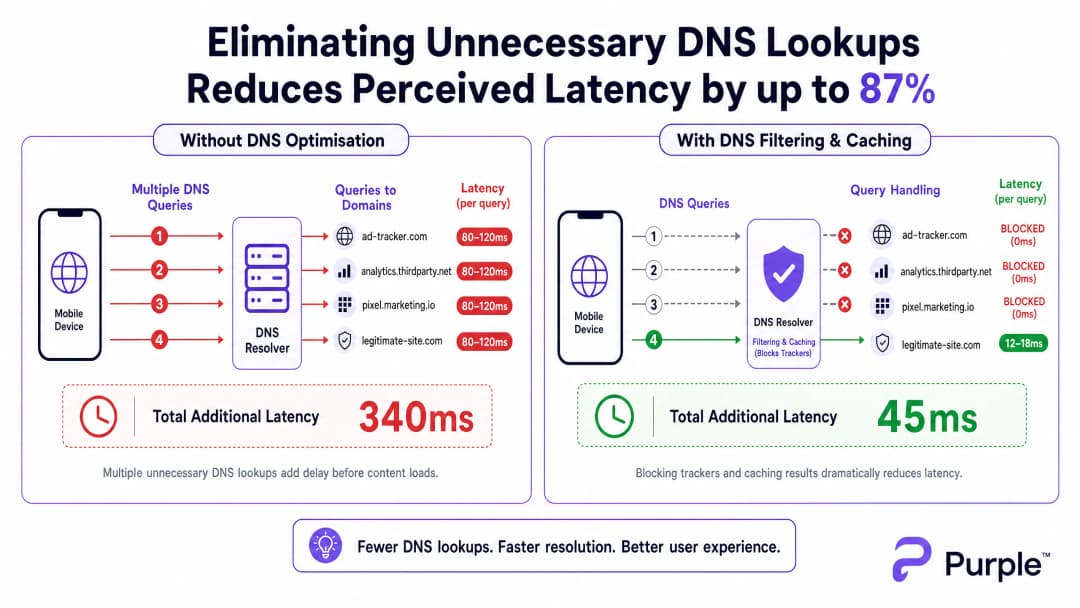
Cada consulta de DNS enviada para um resolvedor externo (como o DNS predefinido de um ISP ou o 8.8.8.8 da Google) incorre num tempo de ida e volta de 80 a 150 ms em redes congestionadas. Se uma página exigir 15 pesquisas de domínios de rastreio antes de apresentar o conteúdo, o utilizador regista mais de um segundo de atraso "invisível". Isto não é um problema de largura de banda - é um estrangulamento transacional.
Arquitetura para Resolução na Periferia (Edge)
Para mitigar este problema, a arquitetura deve transferir a resolução para a periferia da rede. A implementação de um resolvedor DNS local com uma cache TTL agressiva garante que os domínios válidos e frequentemente solicitados sejam resolvidos em menos de 5 ms.
 Crucialmente, este resolver deve integrar uma lista de bloqueio selecionada (ex. modo empresarial Pi-hole, Cisco Umbrella) para descartar consultas de domínios de monitorização conhecidos. Devolver
 NXDOMAIN liberta imediatamente a oportunidade de transmissão (TXOP) no meio sem fios, permitindo que os dados reais da carga fluam mais rapidamente.
Tem dúvidas sobre a sua configuração específica?
A nossa equipa trabalha com operadores de espaços, gestores de TI e engenheiros de rede em 80.000 espaços. Agende uma chamada de 20 minutos e mostraremos como outros profissionais na sua área o resolveram.
Guia de Implementação
Passo 1: Auditoria de Linha de Base
Antes de alterar o caminho de DNS, estabeleça uma linha de base. Instrumente o seu resolver existente ou implemente taps passivos para capturar registos de consultas durante as janelas de maior utilização. Identifique os 50 domínios mais consultados; normalmente, 30 a 50% serão serviços de monitorização ou telemetria.
Passo 2: Implementação de Resolver Local
Implemente um resolver local ou alojado na periferia (edge). Configure zonas autoritárias para recursos internos (split DNS) e aplique uma lista de bloqueio conservadora. Evite listas agressivas inicialmente para prevenir a interrupção de aplicações legítimas.
Passo 3: Gestão de DNS over HTTPS (DoH)
Os sistemas operativos modernos estão cada vez mais a contornar os resolvers locais utilizando DoH. Para manter o controlo, interjete o tráfego DoH na firewall, bloqueando a saída TCP/UDP 443 para fornecedores de DoH conhecidos, e redirecione-os para o seu resolver DoH gerido. Para implicações mais profundas, consulte o nosso guia sobre DNS Over HTTPS (DoH): Implications for Public WiFi Filtering.
Boas Práticas
- Listas de Bloqueio Iterativas: Atualize as listas de bloqueio semanalmente através de feeds automatizados, mas mantenha um processo de lista de permissões de resposta rápida para falsos positivos.
- Alinhamento de Conformidade: Documente a filtragem de DNS nos termos de serviço do seu Captive Portal. Isto alinha-se com o GDPR ao reduzir ativamente a recolha de dados de terceiros.
- Segmentação de VLAN: Teste novas listas de bloqueio em VLANs de teste ou subconjuntos específicos de APs antes de as implementar em todo o local.
Resolução de Problemas e Mitigação de Riscos
- Interrupção de Aplicações: O modo de falha mais comum é uma aplicação legítima falhar porque uma dependência foi bloqueada. Monitorize as taxas de pico de
NXDOMAIN; um aumento súbito indica normalmente um falso positivo. - Falhas de Contorno de DoH: Se a latência continuar elevada apesar da filtragem local, verifique os registos da firewall para detetar DNS encriptado a contornar as suas regras de interceção.
- Envenenamento de Cache: Garanta que o seu resolver local está protegido contra ataques de envenenamento de cache, particularmente em implementações públicas de Transport ou Healthcare.
ROI e Impacto no Negócio
A redução da latência através da otimização do DNS afeta diretamente os resultados financeiros. Para um hotel, carregamentos mais rápidos do Captive Portal e uma navegação ágil correlacionam-se diretamente com pontuações mais altas no TripAdvisor. Para um ambiente de retalho, isto garante uma integração perfeita com ferramentas como serviços baseados na localização, tais como a iniciativa Purple Appoints Iain Fox as VP Growth – Public Sector to Drive Digital Inclusion and Smart City Innovation ou Purple Launches Offline Maps Mode for Seamless, Secure Navigation to WiFi Hotspots. ).Ao tratar o DNS como uma camada de infraestrutura crítica e não como um aspeto secundário, os espaços podem extrair o máximo desempenho dos seus investimentos existentes em hardware de RF.
Podcast de Análise Especializada
Oiça a análise do nosso consultor sénior sobre as mecânicas e estratégias de implementação para a otimização de DNS em espaços de alta densidade.
Definições Principais
Tempestade de Consultas DNS
Um pico massivo e simultâneo nos pedidos de resolução de nomes de domínio, que ocorre normalmente quando centenas de dispositivos se ligam e carregam simultaneamente páginas web com muitos rastreadores.
Comum em estádios e hotéis durante as horas de pico de entrada, causando uma perceção de falha na rede mesmo quando há largura de banda disponível.
NXDOMAIN
Um código de resposta DNS que indica que o nome de domínio solicitado não existe.
Utilizado estrategicamente na filtragem de DNS para terminar instantaneamente pedidos de domínios de rastreamento conhecidos, poupando latência e tempo de antena.
DNS sobre HTTPS (DoH)
Um protocolo para realizar a resolução remota de Domain Name System através do protocolo HTTPS, encriptando os dados entre o cliente DoH e o resolvedor DNS baseado em DoH.
Embora seja benéfico para a privacidade do consumidor, o DoH pode contornar os controlos e a filtragem da rede corporativa, exigindo estratégias específicas de interceção na firewall.
Cache TTL (Time to Live)
Um mecanismo em que um resolvedor de DNS local armazena o endereço IP de um domínio recentemente resolvido durante um período especificado, respondendo instantaneamente a pedidos subsequentes sem consultar o servidor autoritativo.
Crucial para reduzir a latência de domínios legítimos e altamente traficados (por exemplo, google.com, netflix.com) num recinto.
Sobrecarga de Tempo de Antena
A proporção da capacidade de transmissão sem fios consumida por tramas de gestão, tramas de controlo e protocolos transacionais (como o DNS) em vez dos dados de payload reais do utilizador.
A redução de consultas DNS desnecessárias reduz diretamente a sobrecarga de tempo de antena, melhorando a eficiência de todo o cluster de pontos de acesso.
Split DNS
Uma implementação na qual são fornecidas diferentes respostas DNS dependendo do endereço IP de origem do pedido, frequentemente utilizada para resolver nomes de anfitriões internos de forma diferente dos externos.
Necessário quando um recinto aloja serviços locais (como um Captive Portal ou um servidor de media local) que não devem ser resolvidos através da internet pública.
BSS Colouring
Uma técnica de reutilização espacial no 802.11ax (WiFi 6) que atribui uma "cor" (um número) a cada Basic Service Set, permitindo que os APs no mesmo canal diferenciem entre o seu próprio tráfego e o tráfego de rede sobreposto.
Uma funcionalidade essencial de otimização de RF que funciona melhor quando a rede não está sobrecarregada com tarefas transacionais desnecessárias, tais como pesquisas excessivas de DNS.
Passive DNS Tap
Um método de monitorização do tráfego DNS através da cópia de pacotes a partir de uma porta de switch (porta SPAN) sem interferir com o fluxo real de tráfego.
Utilizado durante a fase de auditoria inicial para compreender o volume de consultas e identificar os principais domínios de rastreio antes de implementar a filtragem.
Exemplos Práticos
Um hotel resort de 500 quartos regista queixas graves de "WiFi lento" durante a janela de check-in das 16:00 às 18:00, apesar de ter atualizado para pontos de acesso WiFi 6 no ano passado. A utilização do backhaul é de apenas 40%.
- Implementar um resolvedor de DNS com cache local (por exemplo, Unbound) na VLAN de convidados. 2. Implementar uma lista de bloqueio conservadora de domínios de rastreamento. 3. Configurar o servidor DHCP para atribuir o IP do resolvedor local a todos os dispositivos clientes convidados. 4. Implementar regras de firewall para bloquear a porta de saída 53 para forçar todo o tráfego de DNS através do resolvedor local.
Um grande centro de conferências necessita de implementar filtragem de DNS para melhorar a latência, mas está preocupado com o facto de os smartphones modernos contornarem o resolvedor local utilizando DNS sobre HTTPS (DoH).
- Identificar as gamas de IP dos principais fornecedores públicos de DoH (Cloudflare, Google, Quad9). 2. Criar regras de firewall para bloquear a porta TCP de saída 443 para estas gamas de IP específicas. 3. Implementar um resolvedor local compatível com DoH. 4. Utilizar políticas de rede (por exemplo, DHCP Option 6) para direcionar os clientes para o resolvedor DoH gerido.
Perguntas de Prática
Q1. Está a gerir uma rede WiFi num estádio. Durante o intervalo, os utilizadores reportam tempos de carregamento lentos. As métricas do painel de controlo mostram que a utilização de CPU dos APs está baixa e a largura de banda de backhaul está a 30% da capacidade. Qual é a causa mais provável e qual é a mitigação imediata?
Dica: Considere o volume transacional que ocorre quando 15.000 pessoas abrem os seus telemóveis simultaneamente.
Ver resposta modelo
A causa mais provável é uma tempestade de consultas DNS a sobrecarregar o resolvedor local ou o resolvedor do ISP a montante. A mitigação imediata consiste em verificar a taxa de acerto de cache (cache hit rate) do resolvedor local e garantir que uma lista de bloqueio para domínios de rastreio de alto volume está ativa, devolvendo instantaneamente NXDOMAIN para reduzir a carga de consultas.
Q2. Uma cadeia de retalho implementa filtragem de DNS local para bloquear domínios de rastreio. Uma semana depois, a equipa de marketing queixa-se de que a nova aplicação de análise em loja não carrega no WiFi de convidados. Como resolve isto mantendo os benefícios de latência?
Dica: A filtragem não é uma configuração do tipo "definir e esquecer".
Ver resposta modelo
Analise os registos de consultas DNS para os dispositivos específicos ou períodos de tempo em que a aplicação falhou. Identifique o domínio bloqueado de que a aplicação depende (um falso positivo). Adicione este domínio específico à lista de permissões do resolvedor, garantindo que a aplicação funciona enquanto o resto dos domínios de rastreio permanecem bloqueados.
Q3. Implementou um resolvedor DNS local com cache e filtragem agressivas num edifício do setor público. No entanto, as capturas de pacotes mostram um volume significativo de tráfego DNS que continua a sair da rede na porta 443. O que está a acontecer e como aplica a política local?
Dica: Os navegadores modernos utilizam protocolos encriptados para contornar o DNS padrão da porta 53.
Ver resposta modelo
Os dispositivos estão a utilizar DNS over HTTPS (DoH) para contornar o resolvedor local. Para aplicar a política, deve configurar a firewall para bloquear o tráfego TCP/UDP de saída na porta 443 destinado a gamas de IP de fornecedores de DoH públicos conhecidos (por exemplo, Cloudflare, Google), forçando os dispositivos a recorrerem ao resolvedor local fornecido por DHCP.
Continue a ler esta série
Compreender o RSSI e a Força do Sinal para um Planeamento de Canais Ideal
Este guia fornece uma análise técnica aprofundada sobre RSSI, Relação Sinal-Ruído (SNR) e princípios de propagação de RF para um planeamento de canais ideal. Capacita gestores de TI, arquitetos de rede e diretores de operações de espaços com estratégias práticas para mitigar a Interferência de Co-Canal e Canal Adjacente, otimizar a colocação de APs e tirar partido de analítica para um impacto comercial mensurável em ambientes de hotelaria, retalho e setor público.
WiFi 6 vs WiFi 5: Resolve a Interferência de Canais?
Este guia fornece uma análise técnica detalhada sobre como o WiFi 6 (802.11ax) aborda a interferência de canais em ambientes empresariais de alta densidade através de OFDMA e BSS Coloring. Equipas de gestão de TI, arquitetos de rede e CTOs encontrarão estratégias de implementação práticas, estudos de caso reais dos setores da hotelaria e saúde, e uma estrutura para avaliar o ROI de atualizações de infraestrutura em locais onde o desempenho sem fios é crítico para o negócio.
Melhores Canais WiFi para Locais de Alta Densidade
Uma referência técnica definitiva para selecionar e otimizar canais WiFi em ambientes de alta densidade, como estádios, arenas e grandes recintos públicos. Abrange física de RF, estratégias de reutilização de canais nas bandas de 5 GHz e 6 GHz e orientações de implementação práticas para líderes de TI.
Tem dúvidas sobre a sua configuração específica?
A nossa equipa trabalha com operadores de espaços, gestores de TI e engenheiros de rede em 80.000 espaços. Agende uma chamada de 20 minutos e mostraremos como outros profissionais na sua área o resolveram.