

WiFi Familiar: Melhores Práticas para Centros Comerciais
Este guia de referência técnica fornece metodologias acionáveis para implementar filtragem de URL baseada em categorias em redes WiFi de convidados em ambientes de retalho. Detalha a arquitetura de rede, a definição de políticas e as estratégias de mitigação de riscos para garantir a conformidade e proteger a reputação da marca.
Ouça este guia
Ver transcrição do podcast
Resumo Executivo
Fornecer WiFi público em ambientes de retalho exige um equilíbrio entre conectividade contínua e mitigação robusta de riscos. Para centros comerciais, implementar WiFi familiar não é meramente uma funcionalidade — é um requisito básico para as operações do local. Este guia detalha a arquitetura técnica, as metodologias de implementação e as melhores práticas operacionais para filtragem de URL baseada em categorias em redes de convidados. Ao aplicar controlos de conteúdo ao nível do DNS, os gestores de IT e arquitetos de rede podem garantir a conformidade, proteger a reputação da marca e fornecer um ambiente de navegação seguro para todas as demografias. Além disso, uma implementação de Guest WiFi devidamente estruturada transforma um centro de custos num ativo estratégico, capturando dados primários que impulsionam a lealdade e as receitas, ao mesmo tempo que mitiga o risco de tráfego malicioso e acesso a conteúdo inadequado.
Análise Técnica Detalhada
Arquitetura de Filtragem DNS
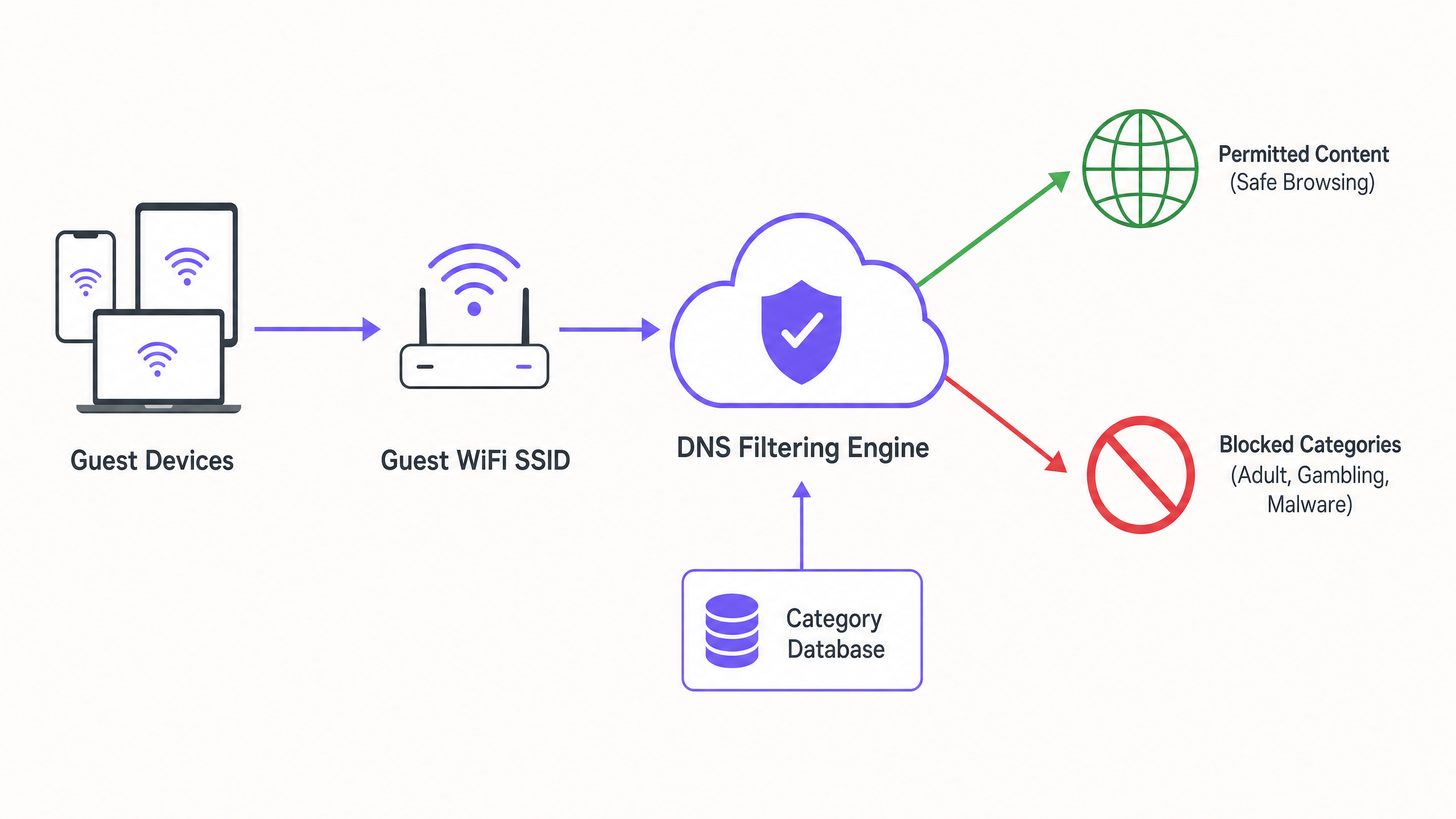
No centro de uma rede familiar está a filtragem DNS baseada em categorias. Ao contrário da filtragem de URL na camada de aplicação ou da inspeção profunda de pacotes (DPI), que exigem uma sobrecarga de processamento significativa e frequentemente quebram a encriptação SSL, a filtragem DNS opera na camada de rede. Quando um dispositivo cliente tenta resolver um domínio, a consulta é intercetada por um motor de filtragem DNS baseado na nuvem. O motor cruza o domínio solicitado com uma base de dados de URLs categorizados, continuamente atualizada. Se o domínio se enquadrar numa categoria proibida (por exemplo, malware, conteúdo adulto), a resolução é bloqueada e o utilizador é redirecionado para uma página de bloqueio.
Esta abordagem oferece alto débito e baixa latência, tornando-a altamente escalável para ambientes densos como centros comerciais, onde milhares de ligações simultâneas são comuns. É crucial compreender O Que é Filtragem DNS? Como Bloquear Conteúdo Nocivo em Guest WiFi para arquitetar isto corretamente.
Segmentação e Isolamento de Rede
Um requisito de segurança fundamental é o isolamento completo da rede de convidados da infraestrutura corporativa. O SSID de convidados deve operar numa VLAN dedicada com um âmbito DHCP separado. O tráfego deve ser encaminhado através do motor de filtragem DNS antes de sair para a internet. Esta segmentação impede o movimento lateral no caso de um dispositivo de convidado ser comprometido e garante que as políticas de tráfego de convidados não afetam inadvertidamente as operações de back-office.
Padrões de Encriptação e Autenticação
Para a infraestrutura sem fios, WPA3 é o padrão atual para encriptação robusta, protegendo contra ataques de dicionário offline em chaves pré-partilhadas. Embora o WPA2 permaneça prevalente, novas implementações devem exigir suporte WPA3. A autenticação é tipicamente gerida através de um Captive Portal, que serve dois propósitos: aceitação dos termos de serviço e captura de dados. Integrar isto com uma plataforma de WiFi Analytics permite que os operadores do local recolham dados primários baseados em consentimento em conformidade com o GDPR e outros quadros de privacidade regionais.
Guia de Implementação
A implementação de filtragem baseada em categorias requer uma abordagem faseada para minimizar a interrupção do tráfego legítimo.
1. Auditoria e Linha de Base
Antes de implementar regras de bloqueio, audite a arquitetura de rede existente para confirmar o isolamento adequado da VLAN. Implemente o motor de filtragem DNS em 'modo de monitorização' por duas a quatro semanas. Este período de linha de base fornece visibilidade sobre os padrões de tráfego reais na rede de convidados, permitindo que as equipas de IT identifiquem serviços legítimos que possam ser inadvertidamente categorizados incorretamente.
2. Definir a Política de Categorias
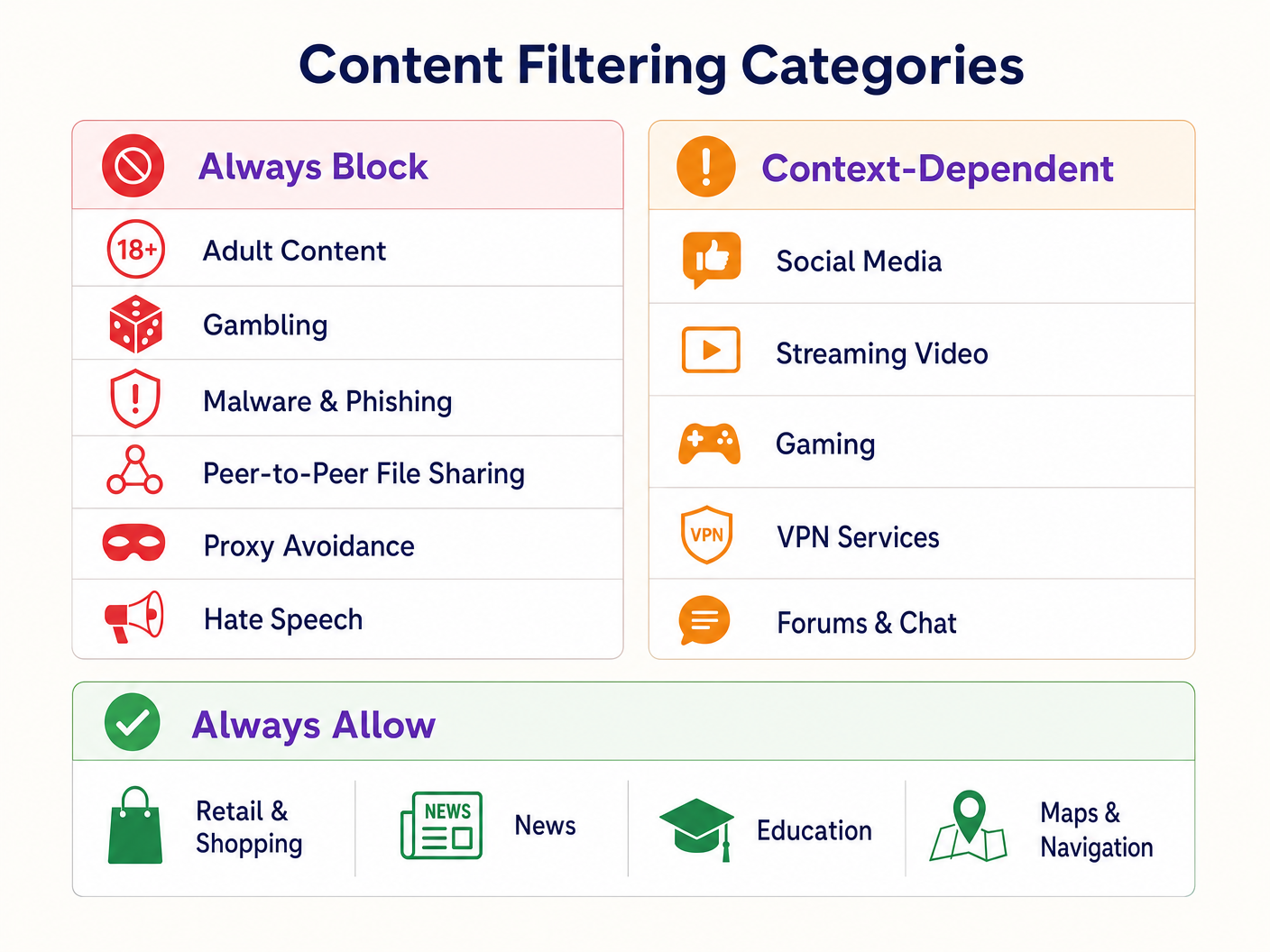
Estabeleça uma estrutura de política em camadas:
- Bloquear Sempre: Conteúdo adulto, jogos de azar, malware, phishing, partilha de ficheiros peer-to-peer (P2P) e ferramentas de evasão de proxy.
- Dependente do Contexto: Redes sociais, streaming de vídeo e jogos. Estes exigem alinhamento com os objetivos operacionais do local (por exemplo, conservação de largura de banda vs. incentivo ao tempo de permanência).
- Permitir Sempre: Domínios de Retalho , notícias, educação e navegação.
3. Abordar DNS sobre HTTPS (DoH)
Os navegadores modernos estão cada vez mais a usar DNS sobre HTTPS (DoH) por padrão, encriptando as consultas DNS e contornando a filtragem ao nível da rede. Para aplicar a política de filtragem, a firewall de perímetro deve ser configurada para bloquear o tráfego de saída na porta 443 para fornecedores DoH conhecidos (por exemplo, 1.1.1.1 da Cloudflare, 8.8.8.8 da Google). Isto força os dispositivos cliente a recorrer ao resolvedor DNS fornecido pela rede.
4. Aplicação e Gestão de Exceções
Faça a transição do modo de monitorização para o modo de aplicação. Configure uma página de bloqueio clara e com a marca que informe o utilizador sobre o motivo da restrição do conteúdo e forneça um mecanismo para relatar falsos positivos. Estabeleça um fluxo de trabalho documentado para rever e adicionar à lista branca domínios solicitados por inquilinos de retalho ou pela gestão do local.
Melhores Práticas
- Comunicação Proativa: Informe os inquilinos de retalho sobre a política de filtragem antes da sua aplicação para evitar interrupções nas suas aplicações operacionais.
- Revisões Regulares da Política: O panorama das ameaças e os padrões de uso da internet evoluem. Agende revisões trimestrais da política de categorias e da precisão da base de dados do motor de filtragem.
- Aproveitar os Captive Portals: Utilize o Captive Portal não apenas para controlo de acesso, mas como um ponto de contacto estratégico. Garanta que o design do portal se alinha com a marca do local e articula claramente os termos de uso relativos a crestrições de conteúdo.
- Monitorizar a Utilização da Largura de Banda: Embora a filtragem de DNS impeça o acesso a conteúdo específico, a gestão da largura de banda continua a ser necessária. Implemente a limitação de taxa por cliente para garantir uma distribuição equitativa dos recursos, particularmente em áreas de alta densidade. Leia mais sobre como otimizar o desempenho no nosso guia sobre Wi-Fi no Escritório: Otimize a Sua Rede Wi-Fi Moderna no Escritório .
Resolução de Problemas e Mitigação de Riscos
Bloqueio Excessivo (Falsos Positivos)
O modo de falha mais comum é uma política inicial excessivamente agressiva que resulta no bloqueio de domínios legítimos. A mitigação depende da fase inicial de monitorização para estabelecer uma linha de base de tráfego e de um processo de whitelisting responsivo.
Bypass de DoH
Se os utilizadores estiverem a aceder com sucesso a conteúdo bloqueado, verifique se as regras da firewall que bloqueiam resolvedores de DoH conhecidos estão ativas e atualizadas. A falha no bloqueio de DoH torna a filtragem de DNS ao nível da rede ineficaz.
Problemas com o Captive Portal
Em ambientes com características de RF complexas, os dispositivos podem ter dificuldade em manter a ligação tempo suficiente para completar a autenticação do Captive Portal. Garanta uma densidade de AP adequada e um planeamento de canais otimizado. Consulte Frequências Wi-Fi: Um Guia para Frequências Wi-Fi em 2026 para estratégias detalhadas de planeamento de RF.
ROI e Impacto no Negócio
A implementação de WiFi familiar através da filtragem de DNS oferece valor de negócio mensurável:
- Mitigação de Riscos: Reduz significativamente a probabilidade de multas regulamentares e danos à reputação associados ao acesso a conteúdo ilegal ou inadequado na rede do local.
- Otimização da Largura de Banda: O bloqueio de partilha de ficheiros P2P e streaming de vídeo não autorizado preserva a largura de banda para casos de uso legítimos, adiando atualizações de circuitos dispendiosas.
- Captura de Dados Aprimorada: Uma rede de convidados segura e fiável incentiva taxas de adesão mais elevadas no Captive Portal, enriquecendo o CRM do local com dados primários acionáveis para campanhas de marketing direcionadas.
- Satisfação do Inquilino: Fornecer um ambiente de rede limpo e de alto desempenho apoia as iniciativas digitais dos inquilinos de retalho e melhora a experiência geral do cliente.
Ouça o nosso podcast de briefing técnico abaixo para mais informações sobre estratégias de implementação e armadilhas comuns:
Definições Principais
DNS Filtering
The process of blocking access to specific websites by preventing the resolution of their domain names into IP addresses based on categorized databases.
The primary mechanism for enforcing family-friendly content policies efficiently at scale.
VLAN Isolation
The practice of logically separating network traffic into distinct broadcast domains.
Essential for security, ensuring guest traffic cannot interact with corporate or back-office systems.
Captive Portal
A web page that a user must view and interact with before access is granted to a public network.
Used for terms-of-service acceptance and collecting consent-based first-party data.
DNS over HTTPS (DoH)
A protocol for performing remote Domain Name System resolution via the HTTPS protocol.
A significant challenge for network administrators as it encrypts DNS queries, bypassing standard network-level filtering.
WPA3
The third generation of Wi-Fi Protected Access, offering improved encryption and protection against offline dictionary attacks.
The current standard for securing wireless networks, particularly important for public or guest SSIDs.
False Positive
In the context of content filtering, a legitimate website that is incorrectly categorized and blocked by the filtering engine.
Requires a responsive whitelisting process to minimize disruption to venue operations or tenant businesses.
Deep Packet Inspection (DPI)
A form of computer network packet filtering that examines the data part of a packet as it passes an inspection point.
Often too resource-intensive for high-density guest networks compared to DNS filtering.
First-Party Data
Information a company collects directly from its customers and owns.
A key ROI driver for guest WiFi deployments, captured via the captive portal with user consent.
Exemplos Práticos
A large shopping centre with 150 retail units is experiencing network congestion and complaints from parents regarding inappropriate content access on the open guest WiFi.
- Implement VLAN isolation for the guest SSID. 2. Deploy a cloud-based DNS filtering engine. 3. Configure a strict block policy for Adult, Gambling, Malware, and P2P categories. 4. Block outbound DoH traffic at the firewall. 5. Implement a captive portal requiring terms-of-service acceptance.
A hotel IT manager needs to implement family-friendly WiFi across public areas but must ensure corporate guests can still access necessary VPN services.
- Deploy DNS filtering with a baseline policy blocking Adult, Malware, and Gambling categories. 2. Explicitly allow the 'VPN Services' category in the filtering policy. 3. Monitor traffic logs to identify any specific corporate VPN endpoints that might be miscategorized and whitelist them proactively.
Perguntas de Prática
Q1. A retail tenant complains that their new inventory management web application is being blocked on the shopping centre's guest network. What is the immediate next step?
Dica: Consider the false-positive resolution workflow.
Ver resposta modelo
Review the DNS filtering logs to identify which category the tenant's application domain is currently assigned to. If it is a false positive (e.g., miscategorized as 'Proxy Avoidance'), add the specific domain to the global whitelist and notify the tenant.
Q2. During the monitoring phase of a new DNS filtering deployment, you notice a high volume of traffic to Cloudflare's 1.1.1.1. What does this indicate and how should you respond?
Dica: Think about encrypted DNS protocols.
Ver resposta modelo
This indicates client devices are using DNS over HTTPS (DoH) to bypass the network's DNS resolver. You must configure the perimeter firewall to block outbound port 443 traffic to known DoH provider IP addresses to force fallback to standard DNS.
Q3. A stadium IT director wants to implement family-friendly WiFi but is concerned about the performance impact of inspecting all traffic during a match day with 50,000 concurrent users. What architecture do you recommend?
Dica: Compare network-layer vs. application-layer filtering.
Ver resposta modelo
Recommend cloud-based DNS filtering rather than on-premise Deep Packet Inspection (DPI). DNS filtering only intercepts the initial domain resolution request, adding negligible latency, whereas DPI requires significant processing overhead to inspect the payload of every packet, which would bottleneck under stadium-density loads.