
GDPR and Guest WiFi: Compliance Guide for Venue Marketers and IT
This guide provides IT managers and venue operators with a practical framework for ensuring Guest WiFi services are fully GDPR compliant. It covers technical architecture, consent mechanics, data retention, and how to transform compliance into a secure first-party data asset.
Listen to this guide
View podcast transcript
Executive Summary
Guest WiFi is a regulated data collection endpoint. Every hotel, retail chain, stadium, and conference centre that provides public network access becomes a Data Controller under the General Data Protection Regulation (GDPR) the moment a guest connects. The ICO can impose fines of up to €20 million or 4% of global annual turnover for non-compliance. Marriott International received a proposed fine of $124 million from the ICO following a data breach.
This guide provides IT managers, network architects, and venue operators with a practical, actionable framework for ensuring their Guest WiFi services are fully compliant. We explore the specific types of data collected through Guest WiFi, the legal requirements for consent and data handling, and vendor-neutral best practices for implementing a compliant solution. For the Chief Technology Officer, this document outlines how to mitigate legal and financial risks. For the Operations Director, it demonstrates how a compliant Guest WiFi deployment can enhance customer trust and provide valuable, ethically sourced business intelligence.
Technical Deep-Dive
Understanding GDPR compliance for Guest WiFi begins with a clear assessment of the data being processed. Under the regulation, personal data is defined broadly as any information relating to an identified or identifiable natural person. In the context of a Guest WiFi network, this encompasses a wider range of data points than many organisations assume.
Data Categories in Guest WiFi
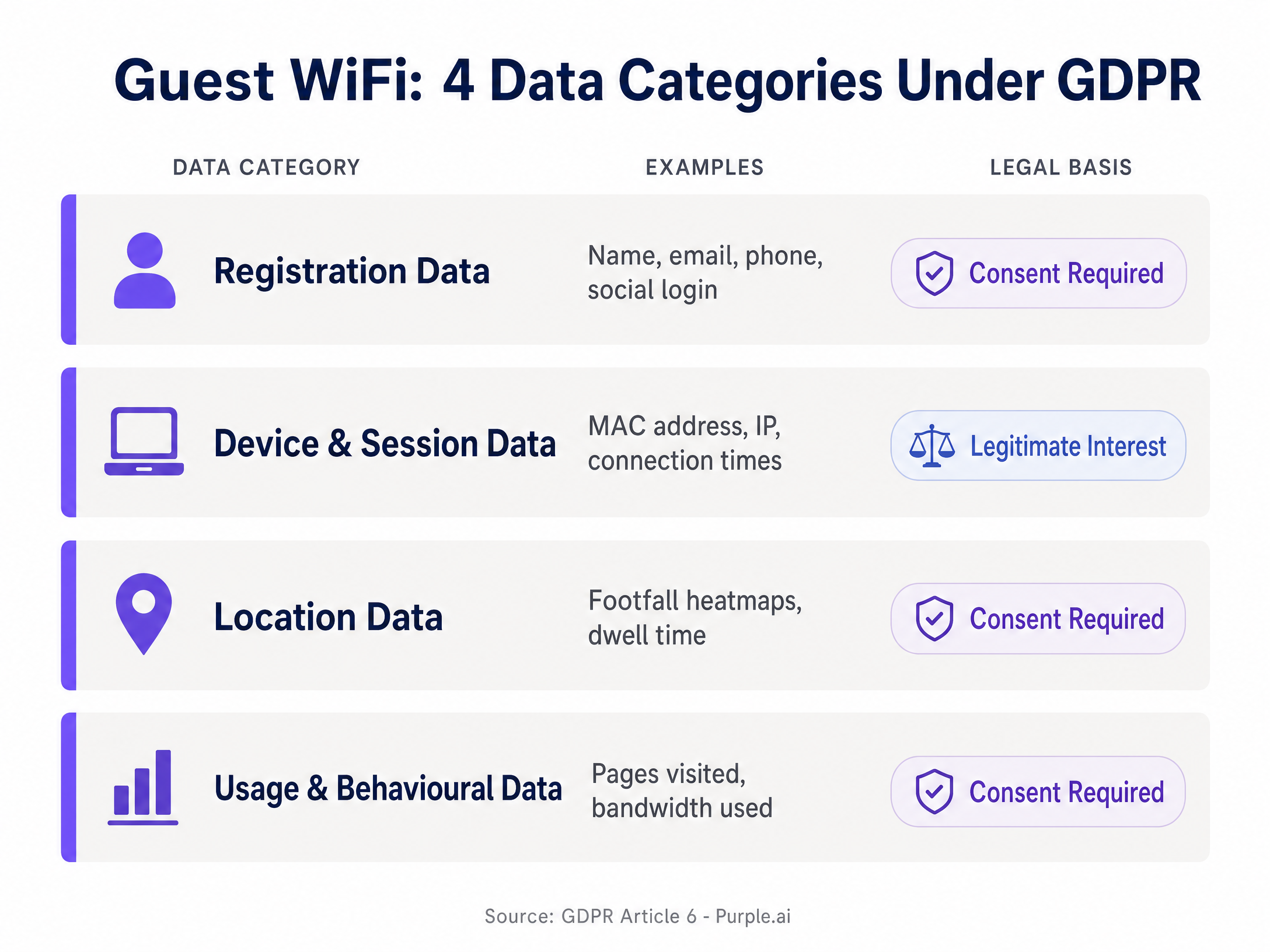
The data collected via a Guest WiFi network can be segmented into four primary categories. Each has distinct implications for GDPR compliance, particularly concerning the legal basis for processing and the required retention period.
- Registration Data: Name, email address, phone number, and social media profile data. The legal basis is Consent. You must obtain explicit consent to collect this data, and apply data minimisation principles to only ask for what is strictly necessary.
- Device and Session Data: MAC address, IP address, connection times, and session duration. The legal basis is typically Legitimate Interest for network security and troubleshooting, provided you conduct and document a Legitimate Interest Assessment.
- Location Data: Footfall heatmaps and dwell time tracking. The legal basis is Consent. Even when aggregated, the initial collection from an individual device is personal data.
- Usage and Behavioural Data: Pages visited and bandwidth consumed. The legal basis is Consent. You must be specific about what you are collecting and why.
Captive Portal Consent Mechanics
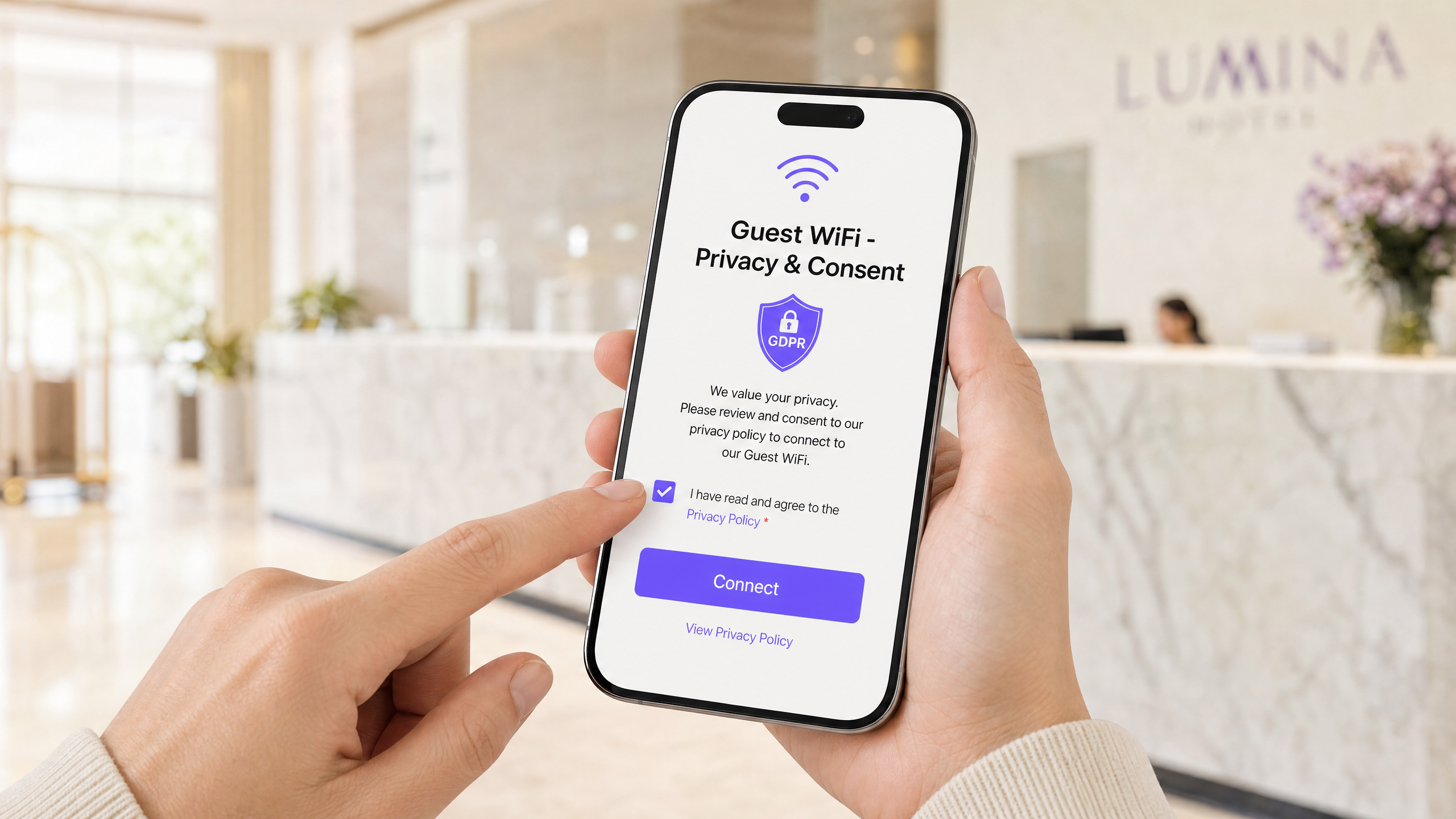
The captive portal is your primary compliance interface. It is the splash page guests see before they access the internet. The most common compliance failure is bundling, where a venue requires a guest to accept marketing emails as a condition of getting online. Under GDPR, consent must be freely given. If you bundle network access with marketing consent, the consent is invalid.
Your captive portal must present at minimum two separate consent elements:
- A mandatory checkbox for acceptance of your terms of service for network access.
- An optional, unticked checkbox for consent to receive marketing communications.
GDPR Recital 32 explicitly prohibits pre-ticked boxes. Beyond the consent structure, your portal must serve a clear and concise privacy notice before the user submits any data. It must explain what data you collect, why you collect it, how long you keep it, and who you share it with. Your system must log every consent event: who consented, when they consented, what they consented to, and the exact version of the privacy notice they saw. This consent audit trail is your proof of compliance.
Network Architecture and Security
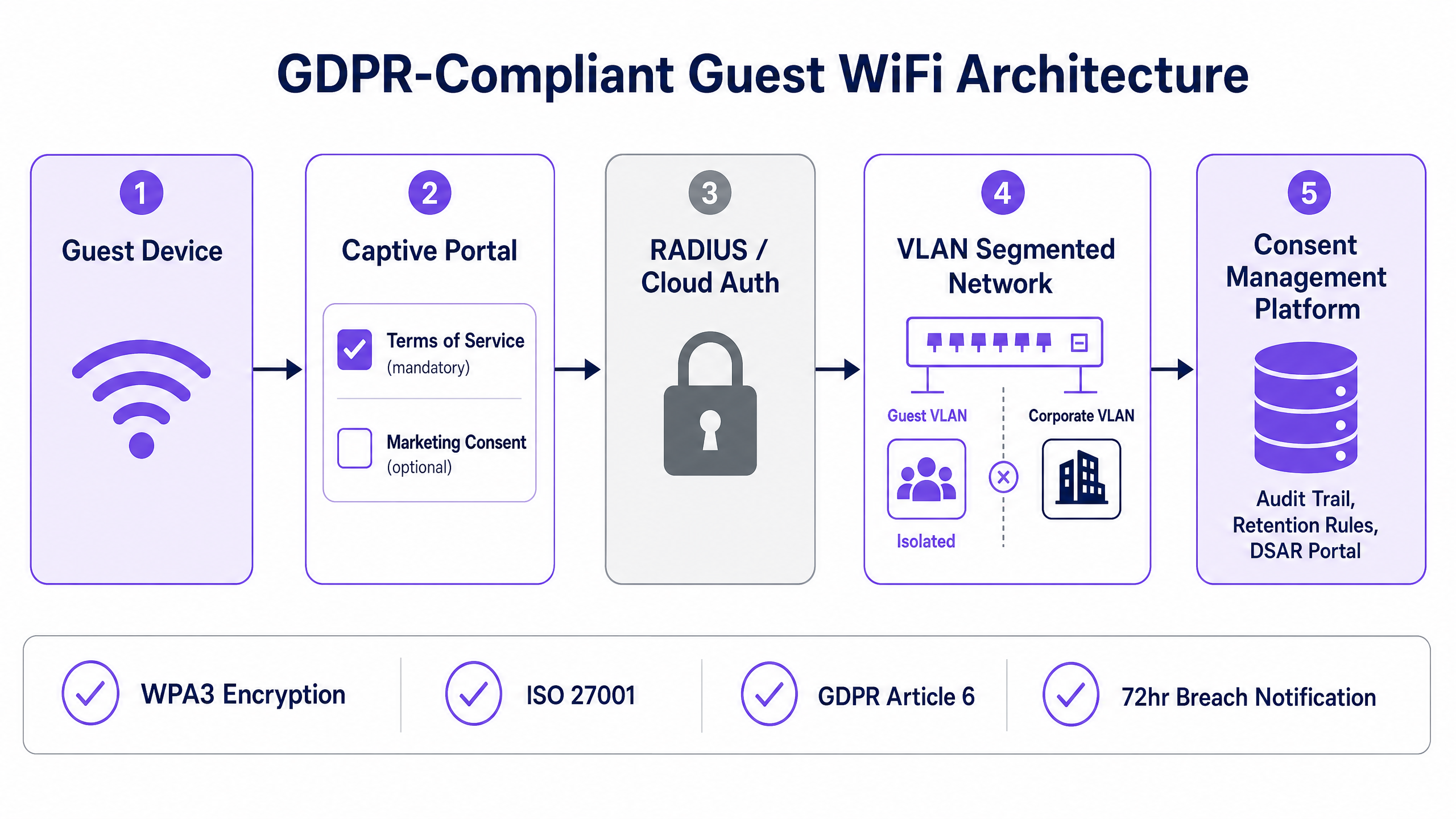
From a network architecture perspective, VLAN segmentation is non-negotiable. Guest WiFi traffic must be isolated on a dedicated VLAN, completely separate from your corporate network. Use access control lists to block guest devices from accessing internal subnets, and enable client isolation so guest devices cannot communicate with each other. This applies whether you are deploying Cisco Meraki, HPE Aruba, Ruckus, Juniper Mist, or Ubiquiti UniFi.
For authentication, integrate your wireless LAN controller with a cloud RADIUS server. When a user completes the captive portal flow, the platform sends a RADIUS Access-Accept message to the controller, granting network access. This creates a clean separation between the authentication layer and the data collection layer.
On encryption: deploy WPA3 where your hardware supports it. WPA3 uses Simultaneous Authentication of Equals, which eliminates the vulnerabilities in WPA2's four-way handshake and provides stronger protection against offline dictionary attacks. At a minimum, enforce WPA2 with AES encryption. Your captive portal must be served over HTTPS with a valid TLS certificate. Serving a form that collects personal data over HTTP is a serious security failure.
Implementation Guide
Deploying a compliant Guest WiFi solution requires careful planning and execution. The following steps outline a vendor-neutral approach to implementation.
Step 1: Audit Current Data Flows
Map exactly what data your current Guest WiFi network collects. Identify every field on your captive portal, every log file generated by your wireless controller, and every third-party integration. Document the purpose for each data point. If you cannot justify the collection of a specific data point, eliminate it.
Step 2: Redesign the Captive Portal
Implement a compliant captive portal with separate, unticked checkboxes for network terms and marketing consent. Ensure the language is plain and the value exchange is clear. Link directly to your full privacy policy.
Step 3: Automate Data Retention
Configure automated deletion policies in your WiFi Analytics platform. Manual deletion is not viable at scale.
- Session logs: Purge after 30 days.
- Network security logs: Retain for up to 12 months.
- Consent records: Keep for the duration of the service relationship plus two years.
- Marketing profiles: Delete immediately when a user withdraws consent.
Step 4: Secure the Network Edge
Segment guest traffic onto a dedicated VLAN. Implement client isolation. Enforce WPA3 encryption where supported. Ensure your captive portal is served over HTTPS.
Step 5: Implement a Preference Centre
Provide guests with a self-service preference centre where they can manage their consent settings and submit Data Subject Access Requests (DSARs). This reduces the operational burden on your IT team and ensures you can honour data subject rights efficiently.
Best Practices
To maintain compliance and build a robust Guest WiFi strategy, adhere to these industry-standard best practices:
- Conduct a DPIA: A Data Protection Impact Assessment is legally mandatory under GDPR Article 35 before deploying any large-scale location tracking or behavioural profiling capability.
- Sign a DPA: Ensure you have a signed Data Processing Addendum with every third-party platform that processes guest data on your behalf.
- Minimise Data Collection: Only ask for the data you actually need and intend to use. If you are a Retail venue, do you really need a guest's date of birth to provide internet access?
- Prepare for Breaches: The 72-hour notification clock starts the moment you become aware of a breach. Build this timeline into your incident response plan and ensure your team knows to notify the ICO within 72 hours, even if the investigation is not complete.
Troubleshooting & Risk Mitigation
Common failure modes in Guest WiFi deployments often stem from a misunderstanding of GDPR requirements.
Failure Mode: Consent Fatigue If your portal is too complex, guests will abandon the connection or click blindly. Keep the language plain. Explain the value exchange clearly. For example, "Provide your email for fast, free WiFi and occasional offers from us."
Failure Mode: Ignoring Data Subject Rights Under GDPR, guests have the right to access, rectify, and erase their data. If you lack a process for handling these requests, you are exposed to significant risk. A self-service preference centre is the most effective mitigation strategy.
Failure Mode: Indefinite Data Retention Retaining data indefinitely is a direct violation of GDPR's storage limitation principle. If you do not have automated deletion policies in place, you are accumulating risk with every passing day. Configure retention rules in your platform to automatically purge records when they reach the end of their retention period.
ROI & Business Impact
GDPR compliance for Guest WiFi is not just a cost; it is a strategic enabler. A compliant platform mitigates the risk of regulatory fines, builds customer trust, and provides ethically sourced business intelligence.
When a guest actively opts in to marketing communications through a compliant captive portal, the quality of that contact is significantly higher than a bundled opt-in. Guests who explicitly consent are more likely to engage with subsequent communications, driving higher conversion rates for your marketing campaigns.
Furthermore, a well-architected Guest WiFi platform provides valuable insights into visitor behaviour. In Hospitality environments, this data can inform staffing levels, optimise layout, and improve the overall guest experience. By treating compliance as a foundational element of your Guest WiFi strategy, you transform a regulatory requirement into a measurable business asset.
Listen to our podcast for a deeper dive into these topics:
Key Definitions
Data Controller
The entity that determines the purposes and means of processing personal data. When you provide Guest WiFi, you are the Data Controller.
This designation makes the venue legally responsible for compliance, regardless of which vendor supplies the WiFi hardware or software.
Data Processor
The entity that processes personal data on behalf of the Data Controller. Your WiFi analytics vendor is a Data Processor.
A signed Data Processing Addendum (DPA) is legally required before sharing data with a Processor.
MAC Address
Media Access Control address. A unique identifier assigned to a network interface controller for use as a network address in communications within a network segment.
Under GDPR, a MAC address is considered personal data when it can be linked to an identifiable individual.
Captive Portal
A web page that the user of a public-access network is obliged to view and interact with before access is granted.
This is the primary interface for collecting consent and serving privacy notices to guests.
VLAN Segmentation
The practice of dividing a physical network into multiple logical networks.
Guest WiFi traffic must be isolated on a dedicated VLAN to prevent access to the corporate network.
Legitimate Interest
A lawful basis for processing personal data when the processing is necessary for your legitimate interests or the legitimate interests of a third party, unless there is a good reason to protect the individual's personal data which overrides those legitimate interests.
Often used as the basis for basic session logging for network security and troubleshooting.
Data Subject Access Request (DSAR)
A request made by an individual to access the personal data an organisation holds about them.
Venues must have a process to handle DSARs efficiently, often facilitated by a self-service preference centre.
WPA3
Wi-Fi Protected Access 3. The latest security certification program developed by the Wi-Fi Alliance.
Provides stronger encryption and protection against offline dictionary attacks compared to WPA2. Should be deployed where hardware supports it.
Worked Examples
A 200-room hotel wants to collect guest emails to drive loyalty programme sign-ups. Their current system requires guests to accept marketing to get online.
Deploy a compliant captive portal with separate consent checkboxes. The mandatory checkbox covers terms of service. The optional, unticked checkbox covers marketing consent. The hotel will likely see a lower raw volume of marketing opt-ins compared to the bundled approach, but the quality and legality of the list improves dramatically. Guests who actively opt in are far more likely to engage with subsequent communications. Premier Inn, which uses Purple across its estate, operates exactly this model.
A stadium IT team wants to use WiFi analytics to monitor crowd density and manage safety, but the legal team is concerned that tracking device locations without consent is a GDPR violation.
Update the captive portal privacy notice to explicitly disclose that location data is processed for crowd management and safety purposes. Implement MAC address pseudonymisation at the edge, on the access points themselves, before the data reaches the cloud analytics platform. The analytics system then works with pseudonymous identifiers rather than raw MAC addresses.
Practice Questions
Q1. A retail chain wants to implement WiFi footfall tracking across 50 stores to measure dwell time. The IT Director suggests logging raw MAC addresses centrally for analysis. Is this compliant?
Hint: Consider the definition of personal data and the principle of data minimisation.
View model answer
No, this is high risk. Raw MAC addresses are personal data. The recommended approach is to implement MAC address pseudonymisation at the edge (on the access points) before transmitting the data to the central analytics platform. Additionally, a Data Protection Impact Assessment (DPIA) must be conducted before deployment, and clear signage must inform shoppers that analytics are in operation.
Q2. During an audit, you discover that your captive portal requires users to accept both the network terms of service and marketing emails via a single checkbox to connect to the WiFi. What is the immediate required action?
Hint: Review the requirements for valid consent under GDPR Article 6.
View model answer
Immediately redesign the captive portal to unbundle the consent. Implement two separate checkboxes: a mandatory one for the network terms of service, and an optional, unticked checkbox for marketing consent. The current bundled approach renders all collected marketing consent invalid under GDPR.
Q3. A guest submits a Data Subject Access Request (DSAR) asking for all data your venue holds on them, including WiFi session logs. Your current retention policy is to keep session logs indefinitely. What are the implications?
Hint: Consider the storage limitation principle.
View model answer
Keeping session logs indefinitely violates the GDPR storage limitation principle. You must fulfill the DSAR by providing the requested data, but you must also urgently implement an automated data retention policy. Session logs should typically be purged after 30 days. Holding them indefinitely exposes the venue to significant regulatory risk.
Continue reading in this series
Why Is My Guest WiFi Not Connecting? Troubleshooting Captive Portal Issues
This authoritative technical reference guide explains the underlying mechanics of captive portal detection and details the six primary failure modes that prevent guest WiFi from connecting. It provides IT managers and network architects with a practical troubleshooting framework to resolve HTTP redirect issues, DNS conflicts, and MAC randomisation challenges.
Why Is My Guest WiFi Not Connecting? Troubleshooting Captive Portal Issues
This authoritative technical reference guide explains the underlying mechanics of captive portal detection and details the six primary failure modes that prevent guest WiFi from connecting. It provides IT managers and network architects with a practical troubleshooting framework to resolve HTTP redirect issues, DNS conflicts, and MAC randomisation challenges.
How to Implement SCEP for Automated WiFi Certificate Enrollment
This guide explains how to implement SCEP (Simple Certificate Enrollment Protocol) for automated WiFi certificate enrollment across enterprise venues. It covers the full architectural blueprint - from PKI design and MDM integration to the mandatory three-step deployment sequence - and shows IT managers and network architects how to eliminate shared credentials, automate certificate lifecycle management, and satisfy PCI DSS and GDPR requirements at scale.