
Why is my guest WiFi not connecting? Troubleshooting captive portal issues
This authoritative technical reference guide explains the underlying mechanics of captive portal detection and details the six primary failure modes that prevent guest WiFi from connecting. It provides IT managers and network architects with a practical troubleshooting framework to resolve HTTP redirect issues, DNS conflicts, and MAC randomisation challenges.
Listen to this guide
View podcast transcript
Part of our core series: Captive Portal Guide →
Guest WiFi and Captive Portal Diagnostic Triage Tool
Isolate and resolve why guest devices fail to connect to your captive portal. Select your observed failure symptom, client device operating system, and wireless controller hardware to pinpoint protocol breakdowns and retrieve vendor-specific remediation steps.
Root Cause Summary
The client OS sends an unencrypted HTTP canary probe immediately after association. When upstream DNS fails or the gateway drops the probe instead of returning an HTTP 302 redirect, the OS cannot tell it is behind a portal: it marks the network as having no internet and never opens the Captive Network Assistant (CNA) window.
Client OS Behaviour on IOS:
Eliminate Captive Portal Failures Across Your Wireless Fleet
Purple integrates natively with Cisco Meraki, HPE Aruba, Ruckus, Ubiquiti, and Fortinet to automate walled garden DNS updates, deploy RFC 8910 Option 114, and onboard guests seamlessly via Passpoint and OpenRoaming.
Executive Summary
For modern enterprise venues, guest wireless networks are no longer a simple convenience; they represent a critical touchpoint for customer engagement, operational intelligence, and brand positioning. However, the commercial value of these networks depends entirely on the reliability of the initial connection experience. When a guest connects to a network and the Captive Portal login page does not appear, the venue immediately suffers from increased service friction, a spike in support tickets, and lost data capture opportunities.
At the heart of these failures lies a fundamental tension between secure web standards and the network-level interception techniques historically used by captive portals. Modern web browsers and operating systems are designed to detect and block unauthorised traffic redirection to protect users from man-in-the-middle attacks. By understanding the precise HTTP and DNS redirection sequences, the impact of secure protocols like HSTS, and the privacy features of modern mobile devices, IT teams can design robust wireless access solutions. This guide provides the definitive framework to diagnose and resolve the root causes behind the "guest wifi not connecting captive portal" failure state.
Listen to the full technical briefing:
Detailed Technical Analysis: How Captive Portal Detection Actually Works
To troubleshoot a Captive Portal issue, you must first understand what a Captive Portal actually does at the network level. Most people think of it as simply a login page. In reality, it is a network-level traffic interception mechanism.
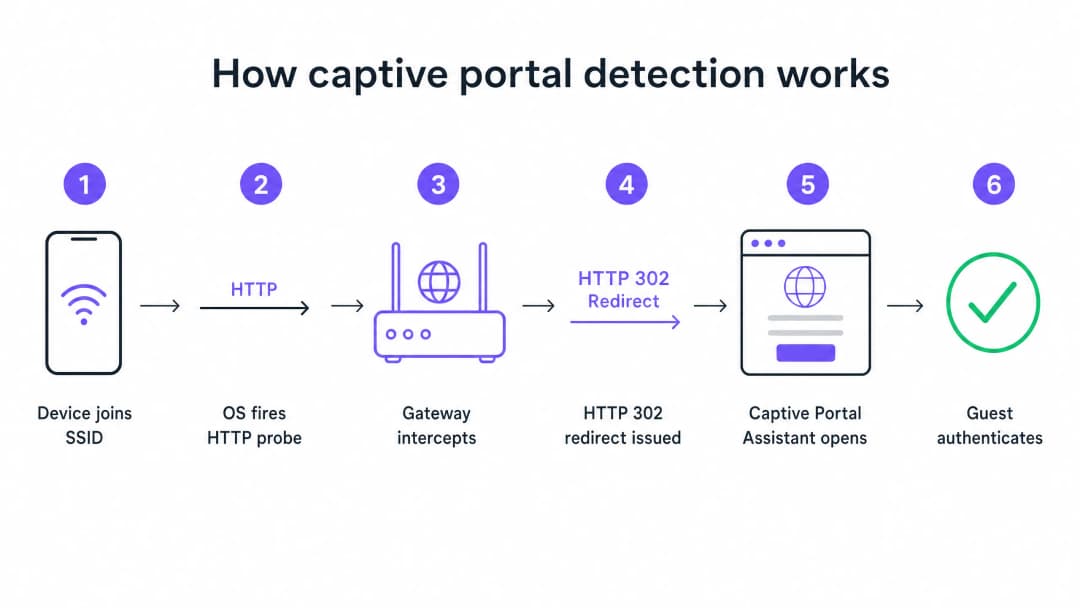
When a device connects to your guest SSID and receives an IP address via DHCP, the operating system does not wait for the user to open a browser. In the background, a system service immediately triggers an unencrypted HTTP GET request to a test URL controlled by the manufacturer. Apple devices query captive.apple.com. Android devices query connectivitycheck.gstatic.com. Windows devices query msftconnecttest.com.
If the network has open internet access, these probes return the expected responses and the operating system concludes that all is well. But on a guest network, your gateway or wireless controller intercepts this HTTP probe before it reaches the internet. Instead of the expected response, the gateway returns an HTTP 302 redirect pointing to the Captive Portal page. The operating system detects the unexpected redirect, realises it is behind a Captive Portal, and opens a sandboxed browser window to display the login page.
The Top Six Failure Modes
When a guest reports that the WiFi is not connecting, the failure almost always stems from one of six root causes that disrupt this sequence.
1. DHCP Pool Exhaustion This is the silent killer at high-density events. If you host a conference with 2,000 attendees on a standard /24 subnet, you have 254 usable IP addresses. If your DHCP lease time is set to the default of 24 hours, you will exhaust this pool within minutes of the doors opening. Every subsequent connection attempt fails before the Captive Portal sequence even begins.
2. DNS Interception Failure The Captive Portal redirect relies on the gateway intercepting the HTTP probe. But the probe requires a DNS query first. If your DNS configuration does not allow pre-authenticated clients to resolve external domain names, the probe is never triggered.
3. Incomplete Walled Garden The walled garden defines which external domains unauthenticated guests can access. If your portal page loads assets from a CDN that is not in the walled garden, the page renders as a blank screen. If you offer social login via Google, Apple or Facebook, all OAuth domains used by these providers must be on the allowlist. Social identity providers update their CDN IP ranges regularly. A walled garden that worked perfectly six months ago might be silently broken today.
4. HSTS Blocking the Redirect HTTP Strict Transport Security (HSTS) is a browser security policy that forces connections to specific domains only via HTTPS. If a guest attempts to contact an HSTS-preloaded domain and your gateway tries to intercept that HTTPS request to redirect to the portal, the browser will detect a certificate mismatch. It will present a security warning that cannot be bypassed and will block the redirect entirely. The correct solution is to never attempt HTTPS interception. Your gateway should only redirect unencrypted HTTP canary probes.
5. Active VPN on Guest Device A VPN encrypts all traffic from the device and routes it through an external tunnel before it reaches your gateway. Your gateway never sees the HTTP probe. The Captive Portal detection sequence is never triggered.
6. MAC Address Randomisation Modern iOS and Android devices use randomised MAC addresses by default as a privacy feature. Because the Captive Portal session state is tracked by the MAC address, a visitor who authenticated an hour ago might be faced with the login page again after their device's MAC rotates.
Got questions about your specific setup?
Our team works with venue operators, IT managers, and network engineers across 80,000 venues. Book a 20-minute call and we will show you how others like you solved it.
Implementation Guide: Architecting for Reliability
A well-configured Captive Portal deployment requires careful coordination across your Guest WiFi infrastructure.
Step 1: Optimise DHCP Architecture
For any venue expecting more than 200 concurrent devices, avoid using a single /24 subnet. Use /22 or larger and set lease times to match the dwell profile of your venue. A hotel sets leases for 8 hours. A stadium sets leases for 3 hours. A shopping centre sets leases for 90 minutes. A convention centre sets leases for 30 minutes.
Step 2: Automate Walled Garden Management
Validate your walled garden before every major event. On Purple's platform, we maintain and update these walled garden entries automatically as part of our cloud managed service, which removes the manual maintenance burden from your team. We support integrations with Cisco Meraki, HPE Aruba, Ruckus, Juniper Mist, Ubiquiti UniFi, Cambium, Extreme and Fortinet.
Step 3: Implement RFC 8910 (DHCP Option 114)
The standards-based long-term solution for HSTS conflicts is RFC 8910, which defines DHCP Option 114. This option allows your DHCP server to advertise the Captive Portal URL directly to the client device, completely bypassing the need for HTTP redirection. iOS 14 and Android 11 or higher support this natively.
Best Practices
Deploy Profile-Based Authentication for Returning Visitors Captive Portals are a mature technology, but they bring inherent friction. OpenRoaming, built on Passpoint and 802.1X, allows recurring visitors to connect automatically and securely without ever seeing a login page. Purple acts as a free identity provider for OpenRoaming on our Connect plan. Venues like Premier Inn and Manchester Airports Group are already deploying this to eliminate re-authentication friction for frequent visitors while maintaining full GDPR compliance and first-party data capture.
Never Test From an Authenticated Device A common mistake that affects many IT teams: testing the portal from a device that has already been previously authenticated. Your device session is still active, so you bypass the portal entirely and conclude that everything is working. Always test from a device in a clean, unauthenticated state.
Read Related Guidance To read more about securing your networks, see our What Is Secure WiFi: Essential Guide for Business 2026 and our Bandwidth Management: A Practical Guide for 2026.
Troubleshooting and Risk Mitigation
When a visitor reports a connection issue, your front-of-house team needs a rapid diagnostic framework.

Instruct your team to run client-side fixes first:
- Ask the visitor to disable any active VPN.
- Instruct the visitor to disable MAC randomisation (Private Address) for your specific SSID.
- Ask the visitor to open a default browser and navigate to
http://neverssl.com. Because this site is designed never to use SSL, the gateway can easily intercept the request and trigger the redirect. - If all else fails, ask the visitor to forget the network and connect again.
If the issue persists across multiple visitors, move to operator-side checks. Review DHCP pool utilisation immediately, check RADIUS logs for Access-Reject messages, and test DNS interception.
ROI and Business Impact
The business impact of a reliable Captive Portal goes far beyond IT metrics. By eliminating connection failures, venues directly increase the growth rate of their marketing database.
Consider Harrods, which achieved a 57x marketing ROI by optimising their WiFi Analytics and Captive Portal flow. Or AGS Airports, which delivered an 842% ROI through seamless tiered bandwidth management. A reliable connection experience is the fundamental requirement for gathering the modern feedback collection data detailed in our guide, Modern Feedback Collection: A Playbook for Venues 2026.
Every Captive Portal load failure represents a lost customer profile. By implementing the architectural standards outlined in this guide, IT leaders transform their wireless infrastructure from a cost centre into a reliable, compliant revenue generator.
Key Definitions
Captive Portal
A network-level interception mechanism that forces an unauthenticated user to view and interact with a specific web page before being granted access to the public internet.
When IT teams deploy guest networks, the captive portal is the primary tool for enforcing terms of service and capturing first-party marketing data.
Walled Garden
A pre-authentication access control list (ACL) that defines which external IP addresses or domain names an unauthenticated device is permitted to access.
Crucial for allowing devices to load the captive portal splash page assets and communicate with social identity providers before the user has fully authenticated.
HSTS (HTTP Strict Transport Security)
A web security policy mechanism that helps to protect websites against man-in-the-middle attacks such as protocol downgrade attacks and cookie hijacking.
HSTS is the primary reason why intercepting HTTPS traffic to display a captive portal results in severe browser security warnings rather than a successful redirect.
RFC 8910 (DHCP Option 114)
An IETF standard that allows a DHCP server to directly advertise the URL of the captive portal to the client device during the initial IP address assignment.
This standard eliminates the need for HTTP redirection entirely, solving the HSTS conflict and providing a cleaner connection experience.
MAC Address Randomisation
A privacy feature in modern mobile operating systems that generates a new, random MAC address for each wireless network the device joins, or periodically rotates the address.
This feature breaks traditional captive portal session persistence, forcing returning guests to log in repeatedly unless the venue upgrades to profile-based authentication like OpenRoaming.
OpenRoaming
A global roaming federation built on Passpoint and 802.1X that allows users to connect to public WiFi networks automatically and securely without interacting with a captive portal.
Purple acts as a free identity provider for OpenRoaming under the Connect plan, allowing venues to eliminate re-authentication friction.
HTTP 302 Redirect
An HTTP response status code indicating that the requested resource resides temporarily under a different URI.
This is the specific mechanism the wireless gateway uses to redirect the device's HTTP canary probe to the captive portal splash page.
Canary Probe
An automated, unencrypted HTTP request sent by an operating system immediately after connecting to a network to test for internet connectivity.
Apple uses captive.apple.com; Android uses connectivitycheck.gstatic.com. Intercepting these probes is the foundation of captive portal detection.
Worked Examples
A 2,500-capacity conference centre in London is hosting a major technology summit. Within 45 minutes of the keynote beginning, attendees report that the 'guest wifi not connecting captive portal' issue is widespread. The SSID is visible, but devices either fail to obtain an IP address or receive an IP but see no login screen. The network is configured with a single /23 subnet and 12-hour DHCP leases.
- Identify DHCP Exhaustion: A /23 subnet provides 1,022 usable IP addresses. With 2,500 attendees, the pool is undersized. The 12-hour lease means addresses are not returned to the pool when attendees leave the building for lunch.
- Expand the Subnet: Reconfigure the guest VLAN to use a /21 subnet, providing 4,094 usable IP addresses, comfortably exceeding the venue capacity.
- Reduce Lease Time: Change the DHCP lease time from 12 hours to 30 minutes. This ensures that IP addresses from devices that disconnect (e.g., when an attendee leaves) are quickly reclaimed.
- Clear Leases: Clear the existing DHCP bindings to force active devices to renew under the new parameters.
A retail chain rolls out a new captive portal featuring social login via Google and Facebook. During testing, the IT team finds that the portal splash page loads correctly, but when a user taps 'Log in with Google', the page times out and fails to connect. Standard email registration works perfectly.
- Diagnose Walled Garden Failure: The timeout indicates that the unauthenticated client device cannot reach the Google OAuth servers to complete the authentication handshake.
- Audit Walled Garden Entries: Review the pre-authentication access control list on the wireless controller (e.g., Cisco Meraki or HPE Aruba).
- Add Required Domains: Add the specific Google and Facebook authentication domains (e.g., accounts.google.com) to the walled garden. Crucially, add wildcard entries for the CDNs that serve the login page assets (e.g., *.gstatic.com).
- Implement Automated Updates: Because these providers change their IP ranges frequently, configure the controller to use wildcard domain snooping rather than static IP whitelisting.
Practice Questions
Q1. A retail venue reports that their captive portal works perfectly for guests using standard email registration, but guests attempting to use the 'Log in with Facebook' option experience a blank white screen after tapping the button. What is the most likely architectural cause?
Hint: Consider what network resources the unauthenticated device needs to reach to render the Facebook login prompt.
View model answer
The venue has an incomplete walled garden. The wireless gateway is blocking the unauthenticated device from reaching Facebook's OAuth domains or CDN infrastructure. The IT team must update the pre-authentication access control list to include all required wildcard domains for Facebook authentication.
Q2. You are designing the guest WiFi architecture for a major football stadium. The venue holds 60,000 fans, and matches last approximately 3 hours. The current configuration uses a /16 subnet and 24-hour DHCP lease times. During the first match, thousands of fans report they cannot connect. What changes should you implement?
Hint: Calculate the total available IP addresses in the subnet versus the venue capacity, and evaluate the lifecycle of those addresses.
View model answer
The network is experiencing DHCP pool exhaustion. A /16 subnet provides 65,534 usable IP addresses, which is theoretically enough for 60,000 fans. However, with a 24-hour lease time, any device that connects briefly (e.g. staff, vendors, or fans walking past) consumes an IP address that will not be released until the next day. The solution is to reduce the DHCP lease time to 3 hours to match the venue's dwell profile, ensuring IP addresses are recycled efficiently during the event.
Q3. A hotel guest complains that the captive portal login page does not appear automatically on their laptop. When the front desk staff checks the guest's device, they notice a corporate VPN client is running. Why does the VPN prevent the portal from loading?
Hint: Consider how a VPN routes traffic and how the gateway intercepts the captive portal probe.
View model answer
The VPN encrypts all traffic from the laptop and attempts to route it through a secure tunnel to the corporate server. Because the traffic is encrypted, the local wireless gateway cannot inspect it, cannot identify the unencrypted HTTP canary probe, and therefore cannot issue the HTTP 302 redirect required to trigger the captive portal. The guest must disable the VPN, authenticate via the portal, and then re-enable the VPN.
Frequently asked questions
Why does the guest WiFi captive portal login screen not appear on smartphones?
Mobile operating systems like iOS, Android, and Windows detect captive networks by sending an unencrypted HTTP canary probe (such as captive.apple.com or connectivitycheck.gstatic.com) immediately after associating. If the local gateway fails to intercept this probe and return an HTTP 302 redirect, or if DNS resolution fails before the probe is sent, the operating system assumes unrestricted internet access and suppresses the captive network assistant browser overlay.
How does RFC 8910 (DHCP Option 114) resolve captive portal browser warnings and HSTS conflicts?
RFC 8910 defines DHCP Option 114, which directly delivers the captive portal API URL to client devices during the initial DHCP lease negotiation. This eliminates the need for gateways to hijack and intercept unencrypted HTTP traffic or collide with HTTP Strict Transport Security (HSTS) preloaded domains, preventing security warning screens and providing instant browser notifications.
Why does social login fail on captive portals even when the splash page loads?
Social login authentication via Google, Apple, or Microsoft requires unauthenticated devices to communicate with external OAuth identity endpoints and content delivery networks. If the wireless controller walled garden allowlist does not include wildcard FQDNs for all required authentication domains and CDN asset hosts, the OAuth handshake times out and aborts.
How do VPNs and Private DNS (DoH) prevent devices from detecting a captive portal?
Always-on VPNs, Apple Private Relay, and DNS over HTTPS (DoH) encrypt traffic directly at the device level and route packets through secure external tunnels. Because DNS queries and HTTP requests never reach the local gateway in cleartext, the controller cannot intercept the traffic or trigger the redirection sequence. Network administrators can mitigate this by blocking outbound TCP port 853 and returning NXDOMAIN for Private Relay canary domains.
How does MAC address randomisation cause guests to be repeatedly disconnected?
Modern mobile operating systems periodically rotate private MAC addresses for user privacy. Because traditional captive portals track session state and authentication tokens using the client hardware MAC address, any address rotation causes the controller to treat the returning device as an unauthenticated guest. Venues can eliminate this friction by migrating to user-profile authentication or Passpoint Hotspot 2.0 with OpenRoaming.
How does Purple solve captive portal failure modes across enterprise networks?
Purple provides a hardware-agnostic guest WiFi management platform that integrates natively with Cisco Meraki, HPE Aruba, Ruckus, Ubiquiti, and Fortinet. Purple automates walled garden allowlists, supports RFC 8910 Option 114 API onboarding, and acts as a Passpoint identity provider under OpenRoaming, ensuring reliable guest connectivity without manual controller intervention.
Continue reading in this series
Ubiquiti UniFi guest portal not redirecting: causes and fixes
This guide isolates a UniFi guest portal redirect failure by following the guest state, redirect, pre-authorisation route and controller authorisation in sequence. It gives venue IT teams a sourced method to address guest-network versus Hotspot confusion, external portal hand-offs, current UniFi OS account requirements and DNS isolation testing.
Cisco Meraki splash page not working: a troubleshooting flowchart
This practical day-two guide isolates where a Cisco Meraki splash flow has failed: client authorisation, HTTP redirect initiation, walled-garden reachability or RADIUS sign-on. It gives venue IT teams a controlled evidence path, so they can restore Guest WiFi without making broad changes to a live estate.
Enterprise Guest WiFi Setup Guide: VLAN Segmentation, Security, and Captive Portals
This technical guide shows IT teams how to set up Guest WiFi as a controlled internet-access service, using VLAN segmentation, firewall policy and a captive portal. It also explains how Purple's registration forms and onboarding controls support a proportionate visitor experience without weakening the boundary around staff, payment and operational systems.
Got questions about your specific setup?
Our team works with venue operators, IT managers, and network engineers across 80,000 venues. Book a 20-minute call and we will show you how others like you solved it.