
Porque é que o meu WiFi de convidados não liga? Resolução de problemas de captive portal
Este guia de referência técnica de autoridade explica a mecânica subjacente à deteção de captive portal e detalha os seis principais modos de falha que impedem a ligação ao WiFi de convidados. Oferece aos gestores de TI e arquitetos de rede uma estrutura prática de resolução de problemas para resolver falhas de redirecionamento HTTP, conflitos de DNS e desafios de aleatorização de MAC.
Ouça este guia
Ver transcrição do podcast
Parte da nossa série principal: Guia de Captive Portal →
Resumo Executivo
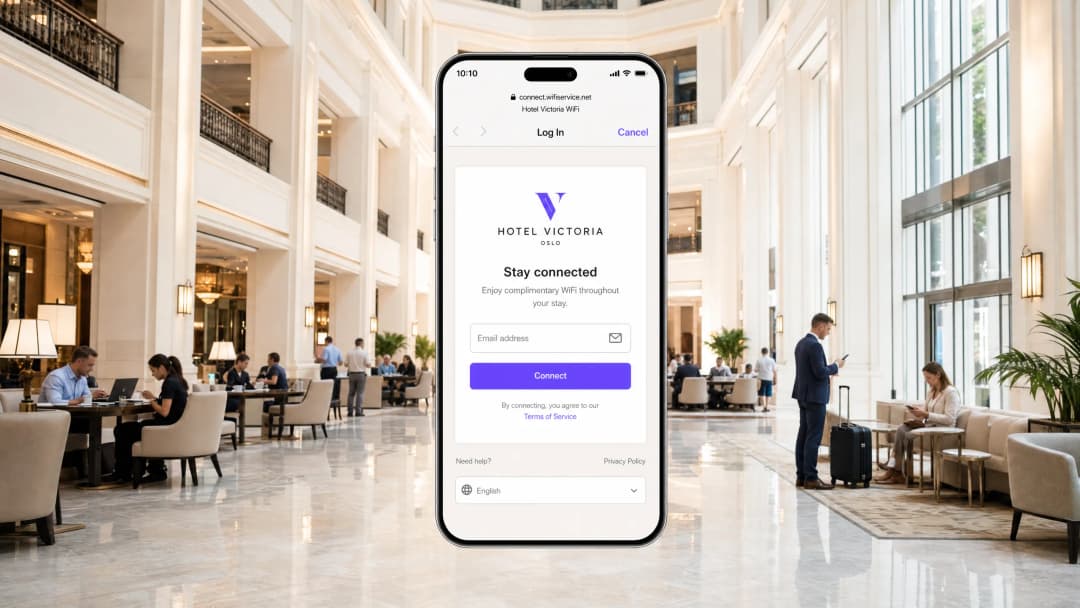
Para os locais de empresas modernas, as redes sem fios para convidados já não são uma simples conveniência; representam um ponto de contacto crítico para o envolvimento do cliente, inteligência operacional e posicionamento da marca. No entanto, o valor comercial destas redes depende inteiramente da fiabilidade da experiência de ligação inicial. Quando um convidado se liga a uma rede e a página de início de sessão do Captive Portal não aparece, o local sofre imediatamente com o aumento da fricção no serviço, um pico nos pedidos de suporte e a perda de oportunidades de recolha de dados.
No centro destas falhas reside uma tensão fundamental entre as normas web seguras e as técnicas de interceção ao nível da rede historicamente utilizadas pelos portais cativos. Os navegadores de internet e sistemas operativos modernos são concebidos para detetar e bloquear o redirecionamento de tráfego não autorizado para proteger os utilizadores de ataques man-in-the-middle. Ao compreender as sequências precisas de redirecionamento HTTP e DNS, o impacto de protocolos seguros como o HSTS e as funcionalidades de privacidade dos dispositivos móveis modernos, as equipas de TI podem conceber soluções robustas de acesso sem fios. Este guia fornece a estrutura definitiva para diagnosticar e resolver as causas profundas por trás do estado de falha "guest wifi not connecting captive portal".
Ouça o briefing técnico completo:
Análise Técnica Detalhada: Como Funciona Realmente a Deteção do Captive Portal
Para resolver problemas num Captive Portal, deve primeiro compreender o que um Captive Portal realmente faz ao nível da rede. A maioria das pessoas pensa nele simplesmente como uma página de início de sessão. Na realidade, trata-se de um mecanismo de interceção de tráfego ao nível da rede.
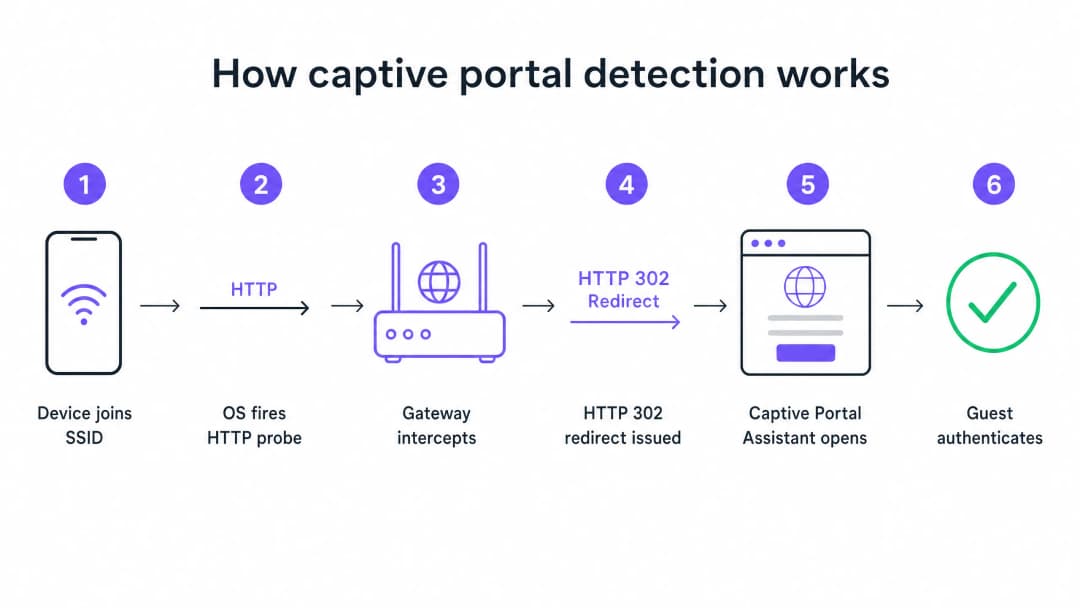
Quando um dispositivo se liga ao seu SSID de convidado e recebe um endereço IP via DHCP, o sistema operativo não espera que o utilizador abra um browser. Em segundo plano, um serviço do sistema aciona imediatamente um pedido HTTP GET não encriptado para um URL de teste controlado pelo fabricante. Os dispositivos Apple consultam captive.apple.com. Os dispositivos Android consultam connectivitycheck.gstatic.com. Os dispositivos Windows consultam msftconnecttest.com.
Se a rede tiver acesso livre à internet, estas sondagens devolvem as respostas esperadas e o sistema operativo conclui que está tudo bem. Mas numa rede de convidados, o seu gateway ou controlador sem fios intercetará esta sondagem HTTP antes que ela chegue à internet. Em vez da resposta esperada, o gateway devolve um redirecionamento HTTP 302 que aponta para a página do Captive Portal. O sistema operativo deteta o redirecionamento inesperado, percebe que está atrás de um Captive Portal e abre uma janela de browser isolada (sandbox) para apresentar a página de início de sessão.
Os Seis Principais Modos de Falha
Quando um convidado relata que o WiFi não se liga, a falha decorre quase sempre de uma de seis causas raiz que interrompem esta sequência.
1. Esgotamento do Pool de DHCP Este é o assassino silencioso em eventos de alta densidade. Se organizar uma conferência com 2.000 participantes numa sub-rede /24 padrão, terá 254 endereços IP utilizáveis. Se o tempo de concessão (lease time) do seu DHCP estiver definido para o padrão de 24 horas, esgotará este pool poucos minutos após a abertura das portas. Todas as tentativas de ligação subsequentes falham antes mesmo de a sequência do Captive Portal começar.
2. Falha de Interceção de DNS O redirecionamento do Captive Portal depende de o gateway intercetar a sondagem HTTP. Mas a sondagem requer primeiro uma consulta de DNS. Se a sua configuração de DNS não permitir que clientes pré-autenticados resolvam nomes de domínio externos, a sondagem nunca é acionada.
3. Walled Garden Incompleto O walled garden define quais os domínios externos a que os convidados não autenticados podem aceder. Se a sua página de portal carregar recursos de uma CDN que não está no walled garden, a página será apresentada como um ecrã em branco. Se oferecer início de sessão social através da Google, Apple ou Facebook, todos os domínios OAuth utilizados por estes fornecedores devem estar na lista de permissões. Os fornecedores de identidade social atualizam regularmente as suas gamas de IP de CDN. Um walled garden que funcionava perfeitamente há seis meses pode estar silenciosamente avariado hoje.
4. Bloqueio do Redirecionamento por HSTS O HTTP Strict Transport Security (HSTS) é uma política de segurança do navegador que força as ligações a domínios específicos apenas através de HTTPS. Se um convidado tentar contactar um domínio pré-carregado com HSTS e o seu gateway tentar intercetar esse pedido HTTPS para o redirecionar para o portal, o navegador irá detetar uma incompatibilidade de certificado. Apresentará um aviso de segurança que não pode ser contornado e bloqueará o redirecionamento por completo. A solução correta é nunca tentar a interceção de HTTPS. O seu gateway deve apenas redirecionar sondas HTTP canário não encriptadas.
5. VPN Ativa no Dispositivo do Convidado Uma VPN encripta todo o tráfego do dispositivo e encaminha-o através de um túnel externo antes que este chegue ao seu gateway. O seu gateway nunca vê a sonda HTTP. A sequência de deteção do Captive Portal nunca é acionada.
6. Randomização de Endereços MAC Os dispositivos modernos iOS e Android utilizam endereços MAC randomizados por predefinição como uma funcionalidade de privacidade. Como o estado da sessão do Captive Portal é monitorizado através do endereço MAC, um visitante que se tenha autenticado há uma hora pode deparar-se novamente com a página de início de sessão após a rotação do MAC do seu dispositivo.
Tem dúvidas sobre a sua configuração específica?
A nossa equipa trabalha com operadores de espaços, gestores de TI e engenheiros de rede em 80.000 espaços. Agende uma chamada de 20 minutos e mostraremos como outros profissionais na sua área o resolveram.
Guia de Implementação: Arquitetar para a Fiabilidade
Uma implementação de Captive Portal bem configurada requer uma coordenação cuidadosa em toda a sua infraestrutura de Guest WiFi.
Passo 1: Otimizar a Arquitetura DHCP
Para qualquer local que preveja mais de 200 dispositivos simultâneos, evite utilizar uma única sub-rede /24. Utilize /22 ou superior e defina os tempos de concessão (lease times) para corresponderem ao perfil de permanência do seu local. Um hotel define as concessões para 8 horas. Um estádio define as concessões para 3 horas. Um centro comercial define as concessões para 90 minutos. Um centro de congressos define as concessões para 30 minutos.
Passo 2: Automatizar a Gestão de Walled Garden
Valide o seu walled garden antes de cada grande evento. Na plataforma da Purple, mantemos e atualizamos estas entradas de walled garden automaticamente como parte do nosso serviço gerido na nuvem, o que remove a carga de manutenção manual da sua equipa. Suportamos integrações com Cisco Meraki, HPE Aruba, Ruckus, Juniper Mist, Ubiquiti UniFi, Cambium, Extreme e Fortinet.
Passo 3: Implementar o RFC 8910 (Opção DHCP 114)
A solução de longo prazo baseada em normas para conflitos de HSTS é o RFC 8910, que define a Opção DHCP 114. Esta opção permite que o seu servidor DHCP anuncie o URL do Captive Portal diretamente ao dispositivo cliente, contornando completamente a necessidade de redirecionamento HTTP. O iOS 14 e o Android 11 ou superior suportam isto nativamente.
Boas Práticas
Implementar Autenticação Baseada em Perfil para Visitantes Recorrentes Os Captive Portals são uma tecnologia madura, mas trazem fricção inerente. O OpenRoaming, baseado em Passpoint e 802.1X, permite que os visitantes recorrentes se liguem de forma automática e segura sem nunca verem uma página de login. A Purple atua como um fornecedor de identidade gratuito para OpenRoaming no nosso plano Connect. Locais como o Premier Inn e o Manchester Airports Group já estão a implementar esta solução para eliminar a fricção de nova autenticação para visitantes frequentes, mantendo a total conformidade com o GDPR e a captura de dados primários (first-party data).
Nunca Teste a Partir de um Dispositivo Autenticado Um erro comum que afeta muitas equipas de TI: testar o portal a partir de um dispositivo que já foi previamente autenticado. A sessão do seu dispositivo ainda está ativa, por isso ignora completamente o portal e conclui que tudo está a funcionar. Teste sempre a partir de um dispositivo num estado limpo e não autenticado.
Leia o Guia Relacionado Para ler mais sobre como proteger as suas redes, consulte o nosso What Is Secure WiFi: Essential Guide for Business 2026 e o nosso Bandwidth Management: A Practical Guide for 2026.
Resolução de Problemas e Mitigação de Riscos
Quando um visitante reporta um problema de ligação, a sua equipa de atendimento precisa de uma estrutura de diagnóstico rápido.

Instrua a sua equipa a executar primeiro as correções no lado do cliente:
- Peça ao visitante para desativar qualquer VPN ativa.
- Instrua o visitante a desativar a randomização de MAC (Endereço Privado) para o seu SSID específico.
- Peça ao visitante para abrir um navegador predefinido e navegar para
http://neverssl.com. Como este site foi concebido para nunca usar SSL, o gateway pode intercetar facilmente o pedido e acionar o redirecionamento. - Se tudo o resto falhar, peça ao visitante para esquecer a rede e ligar-se novamente.
Se o problema persistir em vários visitantes, passe para as verificações do lado do operador. Reveja imediatamente a utilização do pool DHCP, verifique os registos RADIUS para mensagens de Access-Reject e teste a interceção de DNS.
ROI e Impacto no Negócio
O impacto no negócio de um Captive Portal fiável vai muito além das métricas de TI. Ao eliminar as falhas de ligação, os locais aumentam diretamente a taxa de crescimento da sua base de dados de marketing.
Considere o Harrods, que alcançou um ROI de marketing de 57x ao otimizar o seu WiFi Analytics e o fluxo do Captive Portal. Ou a AGS Airports, que obteve um ROI de 842% através de uma gestão de largura de banda em camadas simplificada. Uma experiência de ligação fiável é o requisito fundamental para recolher os dados modernos de recolha de feedback detalhados no nosso guia, Modern Feedback Collection: A Playbook for Venues 2026. Cada falha no carregamento do Captive Portal representa um perfil de cliente perdido. Ao implementar os padrões arquitetónicos descritos neste guia, os líderes de TI transformam a sua infraestrutura sem fios de um centro de custos num gerador de receitas fiável e em conformidade.
Definições Principais
Captive Portal
Um mecanismo de interceção ao nível da rede que força um utilizador não autenticado a visualizar e a interagir com uma página web específica antes de lhe ser concedido acesso à internet pública.
Quando as equipas de TI implementam redes de convidados, o captive portal é a principal ferramenta para impor os termos de serviço e capturar dados de marketing primários.
Walled Garden
Uma lista de controlo de acessos (ACL) pré-autenticação que define quais os endereços IP externos ou nomes de domínio que um dispositivo não autenticado tem permissão para aceder.
Crucial para permitir que os dispositivos carreguem os recursos da página de entrada do captive portal e comuniquem com fornecedores de identidade social antes de o utilizador se ter autenticado totalmente.
HSTS (HTTP Strict Transport Security)
Um mecanismo de política de segurança web que ajuda a proteger os sites contra ataques man-in-the-middle, tais como ataques de degradação de protocolo e desvio de cookies.
O HSTS é a principal razão pela qual a interceção de tráfego HTTPS para apresentar um Captive Portal resulta em avisos de segurança graves no navegador em vez de um redirecionamento bem-sucedido.
RFC 8910 (Opção DHCP 114)
Um padrão IETF que permite a um servidor DHCP anunciar diretamente o URL do Captive Portal ao dispositivo do cliente durante a atribuição inicial do endereço IP.
Este padrão elimina totalmente a necessidade de redirecionamento HTTP, resolvendo o conflito de HSTS e proporcionando uma experiência de ligação mais limpa.
Randomização de Endereço MAC
Uma funcionalidade de privacidade nos sistemas operativos móveis modernos que gera um endereço MAC novo e aleatório para cada rede sem fios à qual o dispositivo se junta, ou roda periodicamente o endereço.
Esta funcionalidade quebra a persistência de sessão tradicional do Captive Portal, forçando os visitantes que regressam a iniciar sessão repetidamente, a menos que o local atualize para uma autenticação baseada em perfis como o OpenRoaming.
OpenRoaming
Uma federação de roaming global baseada em Passpoint e 802.1X que permite aos utilizadores ligarem-se a redes WiFi públicas de forma automática e segura, sem interagirem com um Captive Portal.
O Purple atua como um fornecedor de identidade gratuito para o OpenRoaming no plano Connect, permitindo aos locais eliminar o atrito de reautenticação.
Redirecionamento HTTP 302
Um código de estado de resposta HTTP que indica que o recurso solicitado reside temporariamente sob um URI diferente.
Este é o mecanismo específico que o gateway sem fios utiliza para redirecionar o teste canário HTTP do dispositivo para a splash page do Captive Portal.
Teste Canário
Um pedido HTTP automatizado e não encriptado enviado por um sistema operativo imediatamente após a ligação a uma rede para testar a conectividade à internet.
A Apple utiliza captive.apple.com; o Android utiliza connectivitycheck.gstatic.com. A interceção destes testes é a base da deteção de Captive Portals.
Exemplos Práticos
Um centro de conferências com capacidade para 2.500 pessoas em Londres está a acolher uma importante cimeira tecnológica. Nos 45 minutos seguintes ao início da apresentação principal, os participantes relatam que o problema de "guest wifi not connecting captive portal" é generalizado. O SSID está visível, mas os dispositivos não conseguem obter um endereço IP ou recebem um IP mas não visualizam o ecrã de início de sessão. A rede está configurada com uma única sub-rede /23 e atribuições de DHCP de 12 horas.
- Identificar a exaustão de DHCP: Uma sub-rede /23 fornece 1.022 endereços IP utilizáveis. Com 2.500 participantes, o pool é subdimensionado. A atribuição de 12 horas significa que os endereços não são devolvidos ao pool quando os participantes saem do edifício para almoçar.
- Expandir a sub-rede: Reconfigurar a VLAN de convidados para utilizar uma sub-rede /21, fornecendo 4.094 endereços IP utilizáveis, superando confortavelmente a capacidade do espaço.
- Reduzir o tempo de atribuição: Alterar o tempo de atribuição de DHCP de 12 horas para 30 minutos. Isto garante que os endereços IP de dispositivos que se desligam (por exemplo, quando um participante se vai embora) sejam rapidamente recuperados.
- Limpar atribuições: Limpar as associações DHCP existentes para forçar os dispositivos ativos a renovarem sob os novos parâmetros.
Uma cadeia de retalho lança um novo captive portal com início de sessão social através da Google e Facebook. Durante os testes, a equipa de TI descobre que a página de entrada do portal carrega corretamente, mas quando um utilizador toca em "Iniciar sessão com a Google", a página expira e não consegue ligar. O registo padrão por e-mail funciona perfeitamente.
- Diagnosticar falha no Walled Garden: O tempo limite esgotado indica que o dispositivo do cliente não autenticado não consegue aceder aos servidores OAuth da Google para concluir o processo de autenticação.
- Auditar entradas do Walled Garden: Rever a lista de controlo de acessos pré-autenticação no controlador sem fios (por exemplo, Cisco Meraki ou HPE Aruba).
- Adicionar domínios necessários: Adicionar os domínios de autenticação específicos da Google e do Facebook (por exemplo, accounts.google.com) ao walled garden. Fundamentalmente, adicionar entradas com caracteres fictícios (wildcards) para as redes de distribuição de conteúdo (CDNs) que fornecem os recursos da página de início de sessão (por exemplo, *.gstatic.com).
- Implementar atualizações automatizadas: Como estes fornecedores alteram frequentemente as suas gamas de IP, configure o controlador para utilizar a deteção de domínios com caracteres fictícios em vez de listas brancas de IP estáticos.
Perguntas de Prática
Q1. Um espaço comercial relata que o seu Captive Portal funciona perfeitamente para visitantes que utilizam o registo de e-mail padrão, mas os visitantes que tentam utilizar a opção "Iniciar sessão com o Facebook" deparam-se com um ecrã branco em branco após tocarem no botão. Qual é a causa arquitetónica mais provável?
Dica: Considere quais os recursos de rede de que o dispositivo não autenticado necessita para carregar o ecrã de início de sessão do Facebook.
Ver resposta modelo
O espaço tem um walled garden incompleto. O gateway sem fios está a impedir o dispositivo não autenticado de aceder aos domínios OAuth ou à infraestrutura CDN do Facebook. A equipa de TI deve atualizar a lista de controlo de acesso pré-autenticação para incluir todos os domínios wildcard necessários para a autenticação do Facebook.
Q2. Está a desenhar a arquitetura de WiFi para visitantes de um grande estádio de futebol. O recinto tem capacidade para 60 000 adeptos e os jogos duram aproximadamente 3 horas. A configuração atual utiliza uma sub-rede /16 e tempos de concessão DHCP de 24 horas. Durante o primeiro jogo, milhares de adeptos relatam que não conseguem ligar-se. Que alterações deve implementar?
Dica: Calcule o total de endereços IP disponíveis na sub-rede em comparação com a capacidade do espaço e avalie o ciclo de vida desses endereços.
Ver resposta modelo
A rede está a registar um esgotamento do pool de DHCP. Uma sub-rede /16 fornece 65 534 endereços IP utilizáveis, o que é teoricamente suficiente para 60 000 adeptos. No entanto, com um tempo de concessão de 24 horas, qualquer dispositivo que se ligue brevemente (por exemplo, funcionários, fornecedores ou adeptos que passam a pé) consome um endereço IP que não será libertado até ao dia seguinte. A solução consiste em reduzir o tempo de concessão DHCP para 3 horas para corresponder ao perfil de permanência do espaço, garantindo que os endereços IP são reciclados de forma eficiente durante o evento.
Q3. Um hóspede de um hotel queixa-se de que a página de início de sessão do Captive Portal não aparece automaticamente no seu portátil. Quando os funcionários da receção verificam o dispositivo do hóspede, reparam que um cliente VPN corporativo está a ser executado. Porque é que a VPN impede o portal de carregar?
Dica: Considere como uma VPN encaminha o tráfego e como o gateway intercetará o teste do Captive Portal.
Ver resposta modelo
A VPN encripta todo o tráfego do portátil e tenta encaminhá-lo através de um túnel seguro para o servidor corporativo. Como o tráfego está encriptado, o gateway sem fios local não o consegue inspecionar, não consegue identificar o teste probe de canary HTTP não encriptado e, portanto, não consegue emitir o redirecionamento HTTP 302 necessário para acionar o Captive Portal. O visitante deve desativar a VPN, autenticar-se através do portal e, em seguida, reativar a VPN.
Continue a ler esta série
Portal de convidados Ubiquiti UniFi não redireciona: causas e correções
Este guia isola uma falha de redirecionamento do portal de convidados UniFi ao seguir sequencialmente o estado do convidado, o redirecionamento, a rota de pré-autorização e a autorização do controlador. Oferece às equipas de TI dos recintos um método fundamentado para resolver a confusão entre rede de convidados e Hotspot, transições de portais externos, requisitos atuais de conta do UniFi OS e testes de isolamento de DNS.
Cisco Meraki splash page não funciona: um fluxograma de resolução de problemas
Este guia prático do dia dois isola o ponto de falha num fluxo splash Cisco Meraki: autorização do cliente, início de redirecionamento HTTP, acessibilidade do walled-garden ou início de sessão RADIUS. Disponibiliza às equipas de TI dos locais um caminho de evidências controlado para que possam restaurar o WiFi de convidados sem fazer alterações gerais num parque ativo.
Guia de Configuração de WiFi para Visitantes Empresariais: Segmentação de VLAN, Segurança e Portais Cativos
Este guia técnico mostra às equipas de TI como configurar o WiFi para Visitantes como um serviço controlado de acesso à internet, utilizando segmentação de VLAN, política de firewall e um captive portal. Também explica como os formulários de registo e controlos de adesão do Purple apoiam uma experiência de visitante proporcional sem enfraquecer o limite em torno dos sistemas operacionais, de pagamento e dos funcionários.
Tem dúvidas sobre a sua configuração específica?
A nossa equipa trabalha com operadores de espaços, gestores de TI e engenheiros de rede em 80.000 espaços. Agende uma chamada de 20 minutos e mostraremos como outros profissionais na sua área o resolveram.