
Ein Audit Trail ist eine sichere, chronologische Aufzeichnung, die zeigt, wer was, wo und wann in einem System getan hat. In Großbritannien war eine mangelhafte Dokumentation des Audit Trails in 15 % der FCA-Durchsetzungsverfahren ausschlaggebend, wobei über 500 Millionen £ an Geldbußen mit unzureichender Transaktionsprotokollierung und -überwachung in Verbindung gebracht wurden. Dies ist bei WiFi und dem Netzwerkzugriff genauso wichtig wie im Finanzbereich, denn wenn Sie eine Nutzersitzung, ein Authentifizierungsereignis oder eine Änderung durch einen Administrator nicht rekonstruieren können, können Sie nicht beweisen, was passiert ist.
Wenn Sie mit Gäste-WiFi, Mitarbeiter-SSOs, Gemeinschaftsbüros, Studentenwohnheimen oder einem Hotel mit mehreren Mandantennetzwerken zu tun haben, haben Sie wahrscheinlich schon den Moment erlebt, in dem jemand eine einfache Frage stellt, die sich zu einer schwierigen Untersuchung entwickelt. Wer hat dieses Gerät verbunden? Warum wurde ein Nutzer dem falschen VLAN zugewiesen? Stammte der fehlgeschlagene Login von einem echten Mitarbeiter, einem abgelaufenen Zertifikat oder einem Gerät, das versucht hat, alte Anmeldedaten wiederzuverwenden?
An dieser Stelle hört die Frage, was ein Audit Trail ist, auf, ein abstrakter Compliance-Begriff zu sein, und wird operativ nützlich. In der Praxis ist es das digitale Äquivalent zu den Videoüberwachungsaufnahmen eines Gebäudes in Kombination mit dem Zutrittskontrollprotokoll. Sie benötigen eine Aufzeichnung, mit der Sie Bewegungen nachverfolgen, Identitäten validieren und beweisen können, ob eine Aktion legitim, versehentlich oder böswillig war.
Was ist ein Audit Trail?
Eine nützliche Definition ist folgende. Ein Audit Trail ist eine manipulationssichere, zeitlich geordnete Aufzeichnung von Ereignissen, mit der Sie eine Aktivität von Anfang bis Ende rekonstruieren können. In der IT-Sicherheit bedeutet dies in der Regel eine Reihe von Einträgen, die mit einem Nutzer, einem Gerät, einem System oder einer Transaktion verknüpft sind. Bei identitätsbasiertem WiFi bedeutet dies, dass Sie eine Verbindung von der ersten Authentifizierung über die Richtlinienzuweisung, die Sitzungsaktivität, Änderungen des Zugriffsstatus bis hin zur schließlichen Trennung der Verbindung nachverfolgen können.
Denken Sie an einen routinemäßigen Vorfall. Ein Standortleiter stellt fest, dass ein Gast irgendwie in ein eingeschränktes Netzwerk gelangt ist. Ein Sicherheitsanalyst sieht wiederholte Authentifizierungsfehler von einem Mitarbeitergerät. Ein Auditor verlangt den Nachweis, dass nur autorisierte Nutzer auf einen bestimmten Dienst zugegriffen haben. Wenn Sie nur ein paar generische Protokolle mit uneinheitlichen Zeitstempeln haben, müssen Sie raten. Wenn Sie einen ordnungsgemäßen Audit Trail haben, können Sie mit Beweisen antworten.
Ein Systemprotokoll zeichnet Ereignisse auf. Ein Audit Trail ermöglicht es Ihnen, die Geschichte dieser Ereignisse in einer nachvollziehbaren Reihenfolge darzustellen.
Für Netzwerkteams ist nicht die Definition im Wörterbuch wichtig. Es ist die praktische Anforderung, dass die Aufzeichnung einige grundlegende Fragen klar beantworten muss:
Wer hat gehandelt
Eine echte Identität, ein Dienstkonto oder eine GeräteidentitätWas ist passiert
Anmeldung, fehlgeschlagene Authentifizierung, Rollenänderung, Richtlinienübertragung, Zertifikatsausstellung, Trennung der Verbindung, Administrator-BearbeitungWo ist es passiert
Das System, die SSID, der Controller, die Anwendung, der Mandant oder die beteiligte RessourceWann es passiert ist
Ein zuverlässiger Zeitstempel, der mit dem Rest Ihrer Umgebung übereinstimmtOb es erfolgreich war
Erfolg, Fehlgeschlagen, Zeitüberschreitung, Ablehnung oder teilweise Fertigstellung
In modernen WiFi-Umgebungen ist das wichtig, da es bei der Zugriffskontrolle nicht mehr nur darum geht, „ob der Benutzer das richtige Passwort eingegeben hat“. Es geht um Identität, Sicherheitsstatus, Föderation, Roaming, Segmentierung, Mandantengrenzen und Richtlinienentscheidungen in Sekundenschnelle. Ohne einen Audit-Trail sind Zero-Trust-Behauptungen schwer zu verteidigen.
Warum Audit-Trails für Unternehmen unverzichtbar sind
Das Ignorieren von Audit-Trails ist ein Geschäftsrisiko, nicht nur eine technische Lücke. Im Vereinigten Königreich sind Audit-Trails seit dem Companies Act 1985 ein Eckpfeiler der Finanz-Governance, und die FCA stellte in ihrem Bericht 2022/23 fest, dass Mängel in der Audit-Trail-Dokumentation zu 15 % der Durchsetzungsfälle beitrugen, was zu über 500 Millionen £ an Geldstrafen wegen unzureichender Transaktionsprotokollierung und -überwachung führte. Das ICO berichtete außerdem, dass nach der GDPR 68 % der Bußgelder auf unzureichende Audit-Trails bei der Zugriffskontrolle zurückzuführen waren, wie in dieser Audit-Trail-Übersicht zusammengefasst.

Das ist die regulatorische Seite. Auf der operativen Seite verursacht eine schwache Auditierbarkeit einen unauffälligeren Schaden. Sicherheitsteams verbringen mehr Zeit mit Untersuchungen. Netzwerktechniker können die Quelle einer fehlerhaften Änderung nicht isolieren. Veranstaltungsortbetreiber tun sich schwer damit, zu beweisen, ob eine Benutzerbeschwerde berechtigt ist. Finanz- und Compliance-Teams müssen sich schließlich auf Screenshots, Exporte und die Erinnerung von jemandem verlassen.
Sicherheitsabwehr
In einem identitätsbasierten Netzwerk sind Audit-Trails einer der ersten Orte, an denen man nach frühen Anzeichen von Missbrauch sucht. Wiederholt fehlgeschlagene Authentifizierungen, plötzliche Änderungen der Zugriffsrolle, ungewöhnliches Roaming-Verhalten zwischen Standorten oder ein Administrator, der eine Richtlinie außerhalb der normalen Änderungsfenster ändert - all das fällt auf, wenn die Datensätze gut strukturiert sind.
Ein gemeinsam genutztes Passwort sagt Ihnen im Nachhinein fast nichts. Ein benutzerbezogener Audit-Trail sagt Ihnen viel mehr.
- Gastnetzwerke profitieren davon, dass Sie einen echten wiederkehrenden Besucher von einem verdächtigen, sich wiederholenden Verbindungsmuster unterscheiden können.
- Mitarbeiterzugriff lässt sich einfacher überwachen, da SSO-Ereignisse mit einer benannten Identität verknüpft werden können.
- Multi-Tenant-Netzwerke werden sicherer, da Sie überprüfen können, ob Isolationsregeln wie beabsichtigt angewendet wurden.
Digitale Forensik
Bei einem Vorfall ist das schlimmste Ergebnis nicht „Wir haben schädliche Aktivitäten festgestellt“. Das schlimmste Ergebnis ist „Wir können nicht beweisen, was passiert ist“. Audit-Trails sind Ihre Rekonstruktionsebene. Sie helfen Ihnen dabei, eine Zeitleiste zu erstellen, Änderungen zu korrelieren und die Ursache vom Rauschen zu trennen.
Praktische Regel: Wenn Ihre Netzwerkplattform Identitätsereignisse, Richtlinienentscheidungen und Admin-Änderungen nicht in einer einzigen Zeitleiste anzeigen kann, wird Ihr Forensikprozess langsamer sein, als er sein sollte.
Dies ist über Cyber-Vorfälle hinaus von Bedeutung. Betrugsteams, interne Revision und Compliance-Mitarbeiter verlassen sich alle auf rückverfolgbare Aufzeichnungen. Wenn Ihr Unternehmen spezialisierte Unterstützung bei Finanzkontrollen und Untersuchungen benötigt, ist eine praktische externe Ressource detect fraud mit Lighthouse Consultants , insbesondere wenn sich Protokollierung und Governance überschneiden.
Einhaltung gesetzlicher Vorschriften
Viele Teams betrachten Audit-Trails als Beweise, die man nur sammelt, wenn ein Prüfer danach fragt. Das ist der falsche Ansatz. Gute Audit-Trails werden kontinuierlich aufgebaut, sodass Beweise bereits vorhanden sind, wenn die Frage gestellt wird.
Bei WiFi- und Zugriffsplattformen hängt die Compliance oft davon ab, ob Sie nachweisen können, wer sich authentifiziert hat, welche Daten verarbeitet wurden, welcher Administrator eine Änderung vorgenommen hat und wann dies geschah. Wenn diese Aufzeichnungen unvollständig oder veränderbar sind, schwächt sich die Compliance-Position schnell ab.
Betriebliche Fehlerbehebung
Nicht jeder Anwendungsfall für Audit-Trails ist dramatisch. Viele sind alltägliche technische Probleme.
Ein Benutzer meldet, dass er von der sicheren SSID getrennt wurde. Ein Mandant sagt, dass seine Geräte im falschen Profil gelandet sind. Ein Standort meldet, dass das Onboarding gestern funktionierte und heute fehlschlägt. Der Audit-Trail zeigt oft schnell die Antwort: abgelaufene Identität, abgelehnte Richtlinienzuordnung, fehlgeschlagene Verzeichnissynchronisierung, Zertifikatskonflikt oder eine Konfigurationsänderung, die die Logik für den Zugriff geändert hat.
Aus diesem Grund betrachten reife Teams Audit-Trails nicht als totes Archiv. Sie behandeln sie als aktive operative Daten.
Die Kernkomponenten eines effektiven Audit-Trails
Ein Audit-Trail ist nur so gut wie die Struktur jedes einzelnen Ereignisses. Wenn die Einträge vage, veränderbar oder inkonsistent sind, hält der Audit-Trail einer Untersuchung nicht stand. Gute Auditierbarkeit funktioniert wie ein Rezept. Lässt man eine wesentliche Zutat weg, wird das Ergebnis unzuverlässig.
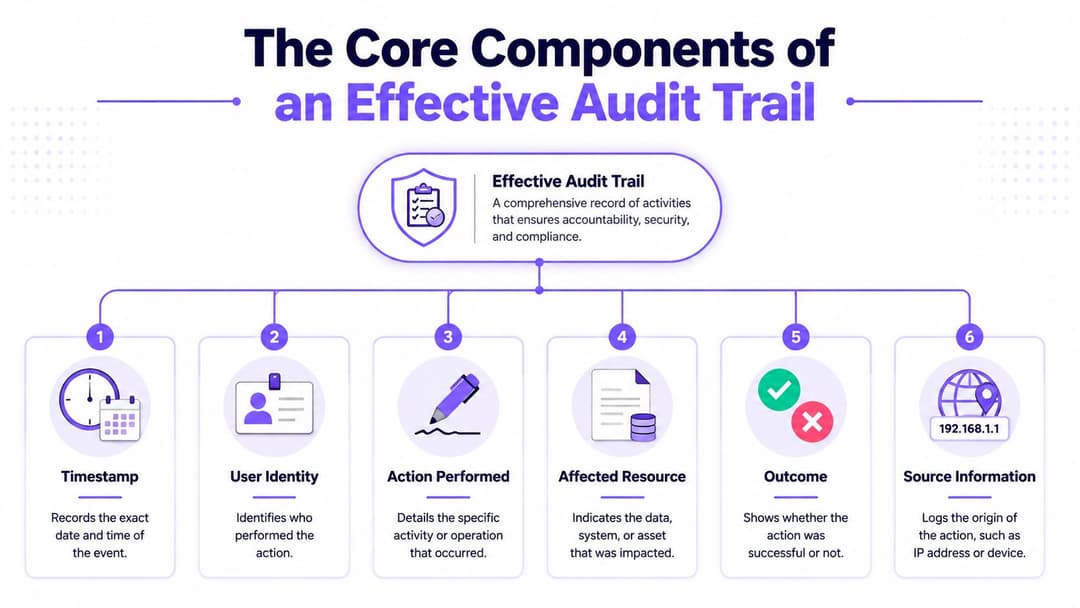
Gemäß dem UK Data Protection Act 2018 müssen Audit-Trails manipulationssicher sein. Technische Richtlinien, die in NIST SP 800-53 Rev. 5 verankert sind und in an das UK NCSC angepassten Praktiken angewendet werden, weisen auf eine unveränderliche Protokollierung unter Verwendung von WORM-Speichern oder kryptografischem Hashing wie SHA-256 hin. Die Zusammenfassung derselben Quelle stellt fest, dass die Durchsetzungsmaßnahmen des UK ICO die Geldstrafe von 18 Mio. £ gegen British Airways beinhalteten, bei der das Fehlen von Protokollen die Reaktion auf den Vorfall um 72 Stunden verzögerte. Die zugrundeliegende Referenz ist der NIST-Glossareintrag für Audit-Trail .
Das Ereignis selbst
Beginnen wir mit dem offensichtlichen, aber oft vernachlässigten Punkt. Jeder Eintrag muss ein aussagekräftiges Ereignis beschreiben.
Das bedeutet nicht nur „Authentifizierung hat stattgefunden“, sondern welche Art von Authentifizierung, gegen welche Identitätsquelle, für welchen Netzwerkkontext und mit welchem Ergebnis. Dasselbe gilt für Administratoraktionen. „Einstellungen geändert“ ist nahezu nutzlos. „SSID-Richtlinie durch benanntes Admin-Konto von Mitarbeiterzugriff auf Gastzugriff geändert“ ist verwertbar.
Ein aussagekräftiger Ereignisdatensatz sollte Folgendes erfassen:
- Benutzeridentität wie ein namentlich genannter Benutzer, ein Dienstkonto oder der Betreff eines Gerätezertifikats
- Durchgeführte Aktion wie Anmeldung, Abmeldung, Registrierung, Rollenzuweisung, Richtlinienaktualisierung oder Widerruf
- Betroffene Ressource wie SSID, Mandant, Benutzergruppe, Zugriffsprofil oder Controller-Objekt
- Ergebnis einschließlich Erfolg, Ablehnung, Fehlerursache oder Zeitüberschreitung
- Quellkontext wie Gerätetyp, Authentifizierungsquelle oder Ursprungssystem
Zeit und Reihenfolge
Zeitstempel klingen einfach, bis man sie über WiFi-Controller, Identitätsanbieter, Firewalls und SIEM-Tools hinweg korreliert. Wenn Ihre Zeitquellen nicht synchronisiert sind, werden Untersuchungen unübersichtlich.
Millisekundenpräzision kann eine Rolle spielen, wenn mehrere Aktionen fast gleichzeitig stattfinden. Ein fehlgeschlagenes SSO, ein erneuter Versuch, eine Richtliniensuche und eine Sitzungsannahme können alle in wenigen Momenten stattfinden. Ohne präzise Sequenzierung können Analysten nicht feststellen, welches Ereignis das nächste verursacht hat.
Wenn Protokolle nicht zuverlässig sequenziert werden können, fangen die Leute an, Ursachen aus unvollständigen Beweisen abzuleiten. Daraus entstehen schlechte Vorfallsberichte.
Integrität und Unveränderlichkeit
Ein Protokoll, das unbemerkt bearbeitet werden kann, ist kein Audit-Trail. Es ist ein Notizsystem.
Manipulationssicherheit verleiht dem Protokoll Glaubwürdigkeit. In der Praxis implementieren Teams dies in der Regel durch Append-Only-Speicher, kontrollierte Exportpfade, kryptografisches Hashing, strenge Rollentrennung und zentrale Aufbewahrungskontrollen. Das Ziel ist einfach: Wenn jemand einen Datensatz ändert, können Sie dies erkennen.
Dies ist besonders wichtig für Administratoraktionen. Die Personen mit den höchsten Privilegien stellen das größte Risiko dar, wenn ihre Änderungen nicht unabhängig aufgezeichnet werden.
Vorher- und Nachher-Kontext
Für die Netzwerkzugriffskontrolle ist eines der wertvollsten Felder der Änderungskontext. Was war der alte Zustand und was ist der neue?
Das ist wichtig für:
- Rollenänderungen vom Gast zum Mitarbeiter
- Änderungen der Mandantenzuordnung für gemeinsam genutzte Objekte
- Richtlinien-Updates, die VLAN-, ACL- oder Sitzungsverhalten modifizieren
- Zertifikatslebenszyklus-Ereignisse wie Ausstellung, Erneuerung und Widerruf
Wenn Sie ein Zero-Trust-Modell aufbauen, sollte Ihr Audit-Trail das gleiche Maß an Nachvollziehbarkeit unterstützen. Ein guter Bezugspunkt für diese operative Denkweise ist dieser Artikel über Zero-Trust-Netzwerkzugriff .
Beispiele für Audit-Trails bei WiFi und Netzwerkzugriff
Der schnellste Weg, Audit-Trails praxisnah zu gestalten, ist der Blick auf realistische Ereignissequenzen. Bei WiFi und Netzwerkzugriff liegt der Wert nicht in einer einzelnen Protokollzeile. Er liegt in der Kette von Aufzeichnungen, die eine gesamte Sitzung erklären.

Beispiel eins: Gäste-WiFi in einem Hotel
Ein Gast kommt an, verbindet sich mit einer SSID des Standorts, authentifiziert sich über einen passwortlosen Ablauf und erhält Internetzugang. Später meldet die Rezeption, dass der Gast berichtet, das Netzwerk sei wiederholt abgebrochen.
Ein nützlicher Audit-Trail für diese Sitzung könnte etwa so aussehen:
| Ereigniszeit | Identität | Aktion | Ressource | Ergebnis |
|---|---|---|---|---|
| 08:14:22 | Gast-Benutzerdatensatz | Assoziierungsanfrage | Gäste-SSID | akzeptiert |
| 08:14:24 | Gast-Benutzerdatensatz | Authentifizierungs-Challenge abgeschlossen | Gastzugangsdienst | Erfolg |
| 08:14:25 | Gast-Benutzerdatensatz | Zugriffsrichtlinie zugewiesen | Gast-Netzwerkrolle | Erfolg |
| 08:14:26 | Gerätesitzung | Sitzung gestartet | WiFi-Dienst des Standorts | Erfolg |
| 08:37:10 | Gerätesitzung | Reauthentifizierungsversuch | Gastzugangsdienst | Timeout |
| 08:37:14 | Gerätesitzung | Sitzung fortgesetzt | Gast-Netzwerkrolle | Erfolg |
| 09:02:41 | Gerätesitzung | Verbindung getrennt | Gäste-SSID | vom Client initiiert |
Diese Sequenz hilft einem Techniker, mehrere Fragen schnell zu beantworten. Hat sich der Gast authentifiziert? Ja. Wurde der Zugriff gewährt? Ja. Trat der Abbruch auf, weil sich die Richtlinie geändert hat? Nein. Gab es ein Timeout während der Reauthentifizierung? Ja. Das grenzt die Fehlerbehebung sofort ein.
Beispiel zwei, Mitarbeiterzugang in einem Gebäude mit mehreren Mietern
Nehmen wir nun ein anderes Szenario. Ein Mitarbeiter einer gemeinsam genutzten Gewerbeimmobilie verbindet sich über das Corporate SSO. Später möchte die IT-Sicherheit wissen, warum der Benutzer kurzzeitig den Zugriff auf eine interne Anwendung verloren hat.
Das Protokoll sieht dann eher so aus:
user=j.smith
action=authentication_request
identity_source=corporate_directory
resource=staff_secure_ssid
outcome=success
user=j.smith
action=certificate_validated
identity_source=enterprise_ca
resource=network_access_policy
outcome=success
user=j.smith
action=role_assignment
resource=tenant_staff_profile
outcome=success
admin=directory_sync_service
action=group_membership_update
resource=tenant_staff_profile
outcome=success
user=j.smith
action=reauthorisation
resource=application_access_segment
outcome=denied
Das erzählt eine ganz andere Geschichte. Die WiFi Verbindung selbst war wahrscheinlich in Ordnung. Das Problem lag vermutlich an einer Gruppenmitgliedschaft oder einem Autorisierungsstatus, der sich nach dem ersten Zugriff geändert hat. Ohne das Audit-Protokoll würde das Netzwerkteam fälschlicherweise die drahtlose Verbindungsebene beschuldigen.
Was gute Beispiele zeigen
Der Punkt bei diesen Beispielen ist nicht die Formatierung. Verschiedene Systeme geben Syslog, JSON, CEF, API Events oder proprietäre Datensätze aus. Wichtig ist, dass das Protokoll kohärent genug ist, um fundierte Entscheidungen zu unterstützen.
Achten Sie auf drei Eigenschaften:
- Sitzungskontinuität, damit die Journey eines Benutzers lückenlos nachvollzogen werden kann
- Identitätsklarheit, damit namentlich bekannte Benutzer, Gäste, Geräte und Dienste nicht miteinander verwechselt werden
- Administrative Rückverfolgbarkeit, damit Änderungen von Technikern, Helpdesk-Mitarbeitern und Automatisierungen sichtbar sind
Beim Enterprise WiFi scheitern schwache Audit-Protokolle meist an den Übergabepunkten. Die Authentifizierung wird an einem Ort protokolliert, Richtlinienentscheidungen an einem anderen und administrative Änderungen wieder woanders. Starke Audit-Protokolle führen diese Teile zusammen.
Sichere Verwaltung von Audit-Protokolldaten
Das Sammeln von Audit-Daten ist der einfache Teil. Sie nützlich, sicher und durchsuchbar zu halten, ist die eigentliche Herausforderung für Teams. Die Schwierigkeit liegt darin, die Datenqualität mit den Speicherkosten, Datenschutzaspekten und dem betrieblichen Aufwand in Einklang zu bringen.
Die erste Entscheidung betrifft die Aufbewahrung. Werden die Daten zu kurz aufbewahrt, verliert man Beweismittel, bevor ein Problem überhaupt bemerkt wird. Speichert man alles unstrukturiert für immer, entsteht ein überfülltes Archiv, das niemand schnell durchsuchen kann. Die Antwort sollte sich aus Ihren regulatorischen Verpflichtungen, den Anforderungen an die Reaktion auf Vorfälle und dem Geschäftswert historischer Zugriffsprotokolle ergeben.
Speicherung und Zugriffskontrolle
Audit-Trails selbst sind sensibel. Sie offenbaren oft Benutzernamen, Zugriffsmuster, Administratoraktionen und Systemstrukturen. Behandeln Sie sie wie geschützte Betriebsdaten und nicht nur wie technischen Abfall.
Ein solider Ansatz umfasst in der Regel:
- Eingeschränkter Zugriff, sodass nur autorisierte Administratoren, Sicherheitsanalysten und Auditoren Protokolle einsehen oder exportieren können
- Aufgabentrennung, damit die Person, die eine Änderung vornimmt, nicht die einzige ist, die den Datensatz überprüfen oder löschen kann
- Zentrale Aufbewahrungsregeln, damit lokale Geräte nicht zur einzigen Beweisquelle werden
- Kontrollierte Exporte, damit Untersuchungen nicht unkontrolliert Kopien sensibler Protokolldaten verbreiten
Für Umgebungen, in denen sich Zugriffs- und Belegungsdaten überschneiden, benötigen Immobilienteams oft auch angrenzende Betriebskontrollen. Ein relevantes Beispiel ist die Verwaltung des Gebäudezugangs mit Nimbio , insbesondere dort, wo sich Gästereisen und Prozesse für den Gebäudezugang überschneiden.
Gängige Audit-Log-Formate im Vergleich
| Format | Struktur | Am besten geeignet für | Hauptvorteil |
|---|---|---|---|
| Syslog | Klartext, ereignisorientiert | Netzwerkgeräte, Controller, Firewalls | Breite Unterstützung in Infrastrukturtools |
| JSON | Strukturiertes Schlüssel-Wert-Format | Moderne Plattformen, APIs, Cloud-Protokollierung | Einfaches Parsing und reichhaltigerer Kontext |
| CEF | Normalisiertes Ereignisformat | SIEM-Erfassung und herstellerübergreifende Korrelation | Konsistente Handhabung von Sicherheitsereignissen |
Auffindbarkeit ist wichtiger als Volumen
Bei einem echten Vorfall ist niemand davon beeindruckt, wie viele Protokolle Sie aufbewahrt haben, wenn das Team sie nicht schnell abfragen kann. Indexierung, Normalisierung und sinnvolle Feldbenennung sind wichtiger als das bloße Ablegen von Rohdaten in günstigem Speicher.
Praktischer Rat: Behalten Sie, was Sie durchsuchen können. Archivieren Sie, was Sie wiederherstellen können. Verwechseln Sie diese beiden Zustände nicht.
Die Zentralisierung von Audit-Daten bietet Unternehmen den größten Vorteil. Sie vereinfacht die Zugriffskontrolle, beschleunigt die Korrelation und verringert das Risiko, dass Datensätze verloren gehen, wenn lokale Systeme überschrieben oder neu eingerichtet werden. Wenn Sie umfassendere Plattformkontrollen für den Umgang mit Betriebs- und Benutzerdaten prüfen, ist diese Übersicht über Daten- und Sicherheitspraktiken eine nützliche Referenz.
Implementierung von Audit-Trails in Ihrem Unternehmen
Die effektivsten Audit-Trail-Programme sind als Teil der Zugriffsarchitektur konzipiert und werden nicht erst nach der Bereitstellung hinzugefügt. Wenn Ihr Netzwerk, Ihre Identitätsplattform und Ihre Sicherheitswerkzeuge alle unabhängig voneinander und ohne gemeinsame Struktur Protokolle erstellen, erhalten Sie nur Bruchstücke der Wahrheit statt einer verlässlichen Beweiskette.
Beginnen Sie mit der Zentralisierung. Leiten Sie Netzwerkzugriffsereignisse, Administratoraktionen, Identitätsereignisse und Änderungen auf Plattformebene in eine einzige Analyseebene weiter, in der Regel ein SIEM- oder Protokollverwaltungssystem. Splunk, Microsoft Sentinel, Elastic, IBM QRadar und ähnliche Tools werden dafür häufig verwendet, da sie eine Korrelation über Wireless-, Directory-, Endpunkt- und Anwendungsdaten hinweg ermöglichen.
Wählen Sie ein Protokollierungsmodell, das zum Betrieb passt
Ein dezentrales Modell kann in kleinen Umgebungen funktionieren, scheitert jedoch, sobald mehrere Teams am selben Zugriffsfluss beteiligt sind. Bei enterprise WiFi kann eine einzelne Benutzersitzung einen Wireless-Controller, einen Identitätsanbieter, einen Zertifikatsdienst, eine Richtlinien-Engine und ein Cloud-Dashboard umfassen. Wenn jede Komponente ihren eigenen Verlauf mit unterschiedlichen Aufbewahrungs- und Zugriffssteuerungen führt, verlangsamen sich Untersuchungen sofort.
Ein zentralisiertes Modell funktioniert in der Regel besser, da es Ihnen Folgendes bietet:
- Einen einzigen Suchpunkt für Sitzungs- und Administratoraktivitäten
- Konsistente Aufbewahrung über alle Systeme hinweg
- Einfachere Alarmierung bei verdächtigen Zugriffsmustern
- Sauberere Beweismittelführung bei Audits und der Reaktion auf Vorfälle
Das bedeutet nicht, dass jedes rohe Ereignis für immer an einem einzigen Ort verbleiben muss. Es bedeutet, dass Ihre wichtigen Audit-Protokolle so erfasst und aufbewahrt werden sollten, dass ihre lückenlose Nachweisbarkeit gewahrt bleibt.
Verknüpfen Sie Audit Trails mit der Zugriffsrichtlinie
Viele Implementierungen greifen in diesem Bereich zu kurz. Teams protokollieren Authentifizierungsereignisse, aber nicht die damit verbundenen Richtlinienentscheidungen. Dadurch entsteht eine Lücke zwischen "Der Benutzer hat sich angemeldet" und "Dem Benutzer wurde dies erlaubt".
Ein ausgereiftes Design erfasst beides. Es sollte die Identität, die Zugriffsentscheidung, die Rollenzuweisung und die administrativen Änderungen zeigen, die diese Ergebnisse beeinflusst haben. Wenn Sie überprüfen möchten, wie die Durchsetzung von Zugriffen in eine breitere Sicherheitsstruktur des Unternehmens passt, ist dieser Leitfaden zu network access control solutions ein solider Ausgangspunkt.
Zudem wächst das Interesse an stärkeren Integritätsmodellen für Audit-Protokolle, insbesondere dort, wo mehrere Organisationen gemeinsame Vertrauensgrenzen nutzen. In diesen Fällen untersuchen Teams manchmal reine Append-only- und verteilte Verifizierungsansätze wie blockchain solutions for enterprises - nicht als Ersatz für die Protokollierung, sondern als zusätzliche Integritätsebene für ausgewählte Datensätze.
Best Practices, die sich in der Praxis bewähren
Die Teams, die dies erfolgreich umsetzen, sind meist auf sehr pragmatische Weise diszipliniert. Sie standardisieren Felder, halten die Uhrzeiten synchron, schützen Administrator-Protokolle rigoros und testen den Abruf, bevor ein Vorfall sie dazu zwingt.
Eine praktische Checkliste:
- Protokollieren Sie identitätsreiche Ereignisse einschließlich Authentifizierungsquelle, Richtlinienergebnis und Administratoraktionen
- Synchronisieren Sie die Uhrzeit über alle Wireless-, Identitäts- und Sicherheitssysteme hinweg
- Schützen Sie die Protokolle mit Append-Only-Kontrollen und eingeschränkten Berechtigungen
- Normalisieren Sie Schlüsselfelder, damit Suchen herstellerübergreifend funktionieren
- Testen Sie Untersuchungen regelmäßig, indem Sie eine beispielhafte User Journey rekonstruieren
- Dokumentieren Sie die Verantwortlichkeiten, damit jemand für Aufbewahrung, Überprüfung und Exportkontrollen zuständig ist
Beispiele für Richtlinien-Auszüge
Eine Aufbewahrungserklärung kann einfach sein:
Sicherheitsrelevante Audit-Protokolle für den Netzwerkzugriff, Identitätsereignisse und administrative Aktionen müssen gemäß den geltenden gesetzlichen, regulatorischen und betrieblichen Anforderungen zentral aufbewahrt werden. Die Datensätze müssen während des aktiven Aufbewahrungszeitraums durchsuchbar bleiben und vor unbefugter Änderung oder Löschung geschützt werden.
Eine Erklärung zur Zugriffskontrolle sollte ebenso klar sein:
Der Zugriff auf Audit-Trail-Daten ist auf autorisiertes Personal mit einem definierten betrieblichen, sicherheitsrelevanten, Compliance- oder Ermittlungsbedarf beschränkt. Privilegierte Administratoren dürfen Audit-Protokolle außerhalb genehmigter Aufbewahrungsprozesse nicht ändern oder löschen.
Das sind keine glamourösen Richtlinien. Sie sind effektiv, weil sie durchsetzbar sind.
Häufig gestellte Fragen zu Audit Trails
Was ist der Unterschied zwischen einem Audit Trail und einem Systemprotokoll
Ein Systemprotokoll ist in der Regel eine unstrukturierte Aufzeichnung von Ereignissen, die von einem Gerät, einer Anwendung oder einem Dienst generiert werden. Ein Audit Trail ist die rekonstruierbare Abfolge dieser Ereignisse, die mit einer Benutzeraktion, einer Administratoränderung oder einem Geschäftsprozess verknüpft ist.
Anders ausgedrückt: Protokolle sind die Zutaten. Der Audit Trail ist die Beweiskette, die Sie nutzen können.
Wie lange sollten wir Audit-Trail-Daten aufbewahren
Es gibt keinen universellen Zeitraum, der für jedes Unternehmen passt. Die Aufbewahrung sollte sich nach den strengsten geltenden gesetzlichen, regulatorischen, vertraglichen und ermittlungsspezifischen Anforderungen in Ihrer Umgebung richten.
Aus praktischer Sicht sollten Sie dies einfach halten. Definieren Sie die Aufbewahrung nach Systemkategorie, dokumentieren Sie den Grund und stellen Sie sicher, dass die Daten für den Zeitraum, den Sie vorgeben, auch durchsuchbar sind.
Können Audit Trails manipuliert werden
Sie können angegriffen werden, weshalb die Manipulationssicherheit so wichtig ist. Ein vertrauenswürdiger Audit Trail nutzt Kontrollen, die unbefugte Änderungen erkennbar machen, wie Append-Only-Verfahren, kryptografische Integritätsprüfungen, strenge Berechtigungen und eine zentrale Aufbewahrung.
Wenn eine Plattform das lautlose Bearbeiten oder Löschen von wichtigen Zugriffsprotokollen zulässt, erzeugt sie zwar möglicherweise immer noch Protokolle, liefert Ihnen aber keine zuverlässigen Beweise.
Was sollte ein Netzwerk-Team zuerst priorisieren
Beginnen Sie mit Identitätsereignissen, administrativen Änderungen und Zugriffsentscheidungen. Diese drei Kategorien lösen die meisten der dringenden Fragen in Enterprise WiFi Umgebungen.
Wenn Sie nur Verbindungsversuche protokollieren, wissen Sie zwar, dass ein Gerät aufgetaucht ist. Sie wissen jedoch nicht, wem es gehörte, welche Richtlinie es erhalten hat oder ob eine Admin-Änderung das Ergebnis verursacht hat.
Wenn Sie gemeinsam genutzte WiFi-Passwörter ersetzen, den Gastzugang modernisieren oder die Konnektivität von Mitarbeitern und Mandanten einfacher auditierbar machen möchten, lohnt sich ein genauerer Blick auf Purple . Der identitätsbasierte Ansatz hilft Unternehmen, von einfachen Verbindungsprotokollen zu klareren, nachvollziehbareren Aufzeichnungen über Gastauthentifizierung, Mitarbeiterzugriff und Multi-Tenant-Netzwerkaktivitäten überzugehen.