
Wenn Sie eine SSID für Mitarbeiter mit einem geteilten Passwort betreiben, kennen Sie das Muster bereits. Jemand verlässt das Unternehmen, und das Passwort sollte geändert werden, wird es aber nicht. Ein externer Dienstleister wird für ein kurzes Projekt hinzugefügt und behält den Zugriff länger als geplant. Der Helpdesk bearbeitet ständig Tickets von Benutzern, die vergessen haben, mit welchem Netzwerk sie sich verbinden sollen, oder das richtige Passwort in das falsche Feld eingegeben haben, oder nach einer Passwortrotation nicht weiterkommen.
Unternehmen behalten geteilte WiFi-Passwörter nicht, weil sie sie mögen. Sie behalten sie, weil sie leicht zu erklären und schnell bereitzustellen sind. Das Problem ist, dass die betriebliche Bequemlichkeit am ersten Tag im sechsten Monat zu technischen Schulden wird. Die WiFi Zertifikatsauthentifizierung löst dieses Problem, indem sie ein wiederverwendbares Geheimnis durch eine Geräteidentität ersetzt, die das Netzwerk automatisch überprüfen kann.
Das Ende des Problems mit geteilten WiFi-Passwörtern
Ein typischer Montagmorgen sieht so aus: Die Haustechnik hat einen neuen Bereich eröffnet, sodass das WiFi-Passwort an weitere Personen weitergegeben wurde. Ein Mitarbeiter hat das Unternehmen verlassen, ein Lieferant ist noch vor Ort, und jemand hat das Passwort an ein Whiteboard im Serverraum geschrieben, weil "es bei der Einrichtung hilft". Bis zur Mittagspause funktioniert das Netzwerk zwar immer noch, aber niemand kann mit Sicherheit sagen, welche Geräte sich darauf befinden sollten.
Das ist das Problem mit PSKs und Captive Portals . Sie machen den Zugriff anfangs einfach, aber im Laufe der Zeit schwer kontrollierbar. Die Anmeldedaten werden geteilt, in Notizen kopiert, auf unmanaged Geräten gespeichert und noch lange nach dem Zeitpunkt verwendet, an dem sie hätten entfernt werden müssen. Wenn Sie die sicherheitsrelevanten und betrieblichen Kompromisse abwägen, ist dieser Vergleich von WPA2 Enterprise vs PSK ein nützlicher Rahmen.
Was sich ändert, wenn Passwörter verschwinden
Mit der Zertifikatsauthentifizierung gibt der Benutzer überhaupt kein WiFi-Passwort ein. Das Gerät wird mit einer eigenen Identität bereitgestellt, und die Verbindung erfolgt automatisch im Hintergrund. Das ändert das Support-Modell sofort.
Anstatt zu fragen: "Wer kennt das Passwort?", fragen Sie: "Sollte dieses Gerät Zugriff haben?" Das ist eine viel bessere Frage. Sie verknüpft den Zugriff mit einem verwalteten Endpunkt, einem Benutzerstatus oder beidem.
Eine praktische Veränderung ergibt sich in drei Bereichen:
- Das Offboarding wird präzise. Sie entziehen einem einzelnen Gerät oder einem einzelnen Benutzer den Zugriff, anstatt das Passwort für alle zu ändern.
- Der Support wird sauberer. Benutzer müssen beim Verbindungsaufbau keine manuellen Entscheidungen mehr treffen, was die Fehleranfälligkeit bei den Einstellungen verringert.
- Richtlinien werden durchsetzbar. Sie können verwaltete Geräte für den internen Zugriff vorschreiben und private Geräte oder Gäste auf einem separaten Pfad halten.
Geteilte Passwörter verbreiten sich unkontrolliert in einem Unternehmen. Zertifikate tun das nicht. Sie bleiben an die von Ihnen ausgestellte Geräteidentität gebunden.
Warum sich dies in realen Umgebungen bewährt
Die größte Verbesserung liegt nicht darin, dass die Kryptografie stärker ist - obwohl sie es ist. Der größere Gewinn besteht darin, dass das Betriebsmodell vernünftiger ist. Ein Mitarbeiter-Netzwerk sollte sich wie der Zutritt zu einem Büro per Chipkarte verhalten, nicht wie eine Kreidetafel in einer Kneipe mit dem heutigen Code.
Aus diesem Grund setzt sich zertifikatsbasiertes WiFi meist dauerhaft durch, wenn Teams es erst einmal richtig implementiert haben. Es beseitigt eine ganze Kategorie von Reibungspunkten und gibt Security-Teams etwas, das sie von alten WiFi-Setups selten erhalten: eine individuelle, überprüfbare Kontrolle.
Wie Zertifikatsauthentifizierung unter der Haube funktioniert
Der einfachste Weg, die WiFi-Zertifikatsauthentifizierung zu verstehen, besteht darin, nicht mehr an Passwörter zu denken, sondern an den Gebäudezugang.
Ein gemeinsames WiFi-Passwort ist wie ein Türcode an der Wand. Jeder, der ihn kennt, kommt hinein, und sobald er durchsickert, müssen Sie ihn für alle ändern. Ein zertifikatsbasiertes Netzwerk funktioniert eher wie ein sicheres Büro mit Ausweisen, einem Empfang und einer zentralen Liste vertrauenswürdiger Ausweissteller.
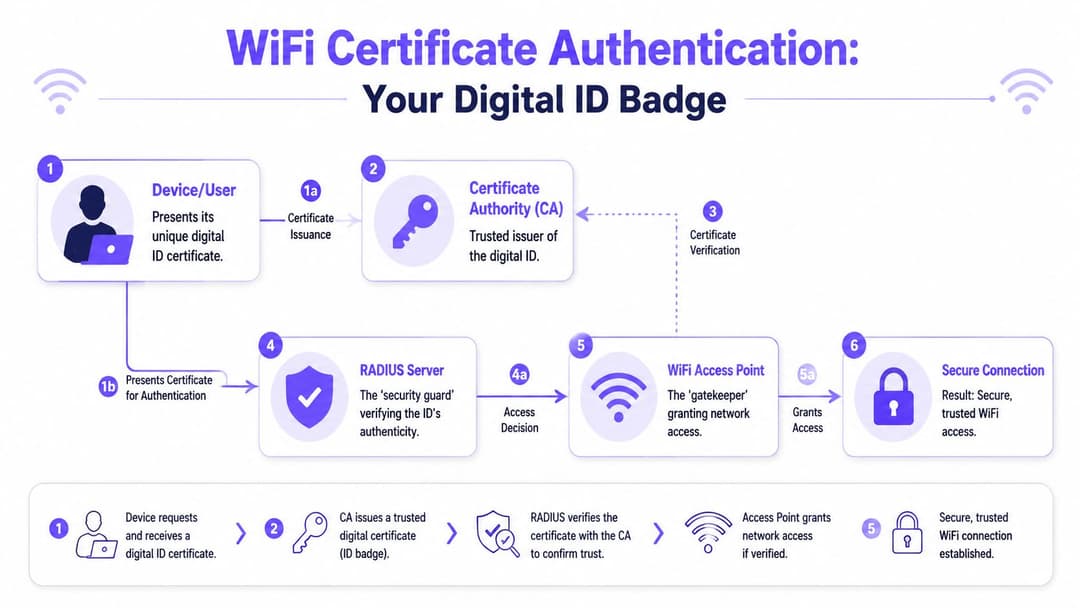
Die Kernkomponenten
Hier ist die praktische Zuordnung.
| Komponente | Analogie aus der Praxis | Aufgabe |
|---|---|---|
| 802.1X | Zutrittsverfahren an der Eingangstür | Steuert, wie ein Gerät um Einlass bittet |
| EAP-TLS | Ablauf der Ausweiskontrolle | Definiert, wie die Identität mit Zertifikaten überprüft wird |
| Zertifikat | Manipulationssicherer Dienstausweis | Weist nach, dass das Gerät eine zugewiesene Identität besitzt |
| RADIUS-Server | Sicherheitsdienst | Überprüft die vorgelegte Identität und gibt den Zugriff frei oder verweigert ihn |
| Zertifizierungsstelle (CA) | Ausweisstelle | Signiert Zertifikate, denen das Netzwerk vertraut |
| Access Point | Tür oder Drehkreuz | Leitet die Authentifizierung an RADIUS weiter und öffnet dann den Netzwerkzugang |
In britischen Unternehmens- und Behördenumgebungen bildet 802.1X/EAP-TLS das technische Fundament. Das Gerät präsentiert ein X.509-Zertifikat gegenüber einem RADIUS-gestützten Authentifizierungsserver, der dieses Zertifikat mit einer vertrauenswürdigen Zertifizierungsstelle (CA) abgleicht, bevor der Zugriff gewährt wird. Der private Schlüssel verlässt das Gerät dabei nie, wie in dieser Übersicht zur WiFi Zertifikatsauthentifizierung beschrieben. Dieselbe Quelle hebt hervor, dass das Cyber Assessment Framework v3.1 (2023) des NCSC eine starke Authentifizierung und eine hohe Identitätssicherung als Kernkontrollen für kritische Dienste vorschreibt - genau deshalb wird der zertifikatsbasierte Zugriff in britischen Zero-Trust-Diskussionen immer wieder thematisiert.
Was beim Verbindungsaufbau tatsächlich passiert
Der Handshake klingt kompliziert, bis man ihn auf eine Abfolge von Prüfungen reduziert.
Das Gerät verbindet sich mit der SSID.
Es sendet kein Passwort, sondern startet einen 802.1X-Austausch.Der Access Point leitet die Anfrage weiter.
Der AP trifft die Vertrauensentscheidung nicht selbst. Er leitet die Authentifizierung an den RADIUS-Server weiter.Der Server weist seine Identität gegenüber dem Gerät nach.
Das Gerät prüft das Serverzertifikat, um sicherzustellen, dass der Client nur mit einem vertrauenswürdigen Authentifizierungsdienst kommuniziert.Das Gerät präsentiert sein eigenes Zertifikat.
Dies ist der digitale Ausweis. Der private Schlüssel verbleibt auf dem Gerät und wird verwendet, um den Besitz nachzuweisen.RADIUS validiert die Zertifikatskette.
Es wird geprüft, ob das Zertifikat von einer vertrauenswürdigen CA ausgestellt wurde und ob die Richtlinien dieses Gerät im Netzwerk zulassen.Der Zugriff wird gewährt.
Wenn die Prüfungen erfolgreich sind, gibt der RADIUS-Server die Freigabe und der AP lässt das Gerät ins Netzwerk.
Warum gegenseitige Authentifizierung wichtig ist
Passwortbasiertes WiFi stellt meist nur eine Frage: Kennst du das Geheimnis? EAP-TLS stellt zwei. Ist das Netzwerk wirklich das, für das es sich ausgibt, und ist das Gerät wirklich eines, dem wir eine Identität zugewiesen haben?
Praxisregel: Wenn Ihre Client-Geräte das RADIUS-Serverzertifikat nicht validieren, haben Sie die Komplexität von Enterprise-WiFi beibehalten, ohne das vollständige Vertrauensmodell zu nutzen.
Diese gegenseitige Prüfung ist ein Hauptgrund, warum sich zertifikatsbasiertes WiFi in regulierten und sicherheitskritischen Umgebungen besser behauptet. Es verwandelt den drahtlosen Zugriff von einer Methode mit gemeinsam genutzten Passwörtern in einen Workflow zur Identitätsprüfung.
Die unübertroffenen Sicherheitsvorteile von passwortfreiem Zugriff
Das stärkste Argument für zertifikatsbasiertes WiFi ist nicht theoretischer Natur. Es zeigt sich ganz konkret im Vorher-Nachher-Vergleich alltäglicher Vorfälle.
Mit einem gemeinsam genutzten Passwort kann ein einziges durchgesickertes Anmeldedatum eine mühsame Bereinigungsaktion nach sich ziehen. Sie rotieren das SSID-Geheimnis, aktualisieren Handheld-Geräte, passen die Hardware in den Konferenzräumen an und hoffen, dass niemand das alte Passwort in einer gespeicherten Konfiguration hinterlassen hat. Bei Zertifikaten ist der Schadensradius wesentlich geringer, da der Zugriff an eine bestimmte ausgestellte Identität gebunden ist und nicht an ein von allen genutztes Geheimnis.
Wenn Sie betriebliche Alternativen zu Passworten prüfen, ist passwordless WiFi der richtige Ansatz. Der Hauptvorteil ist nicht die Neuheit. Es ist die Kontrolle.
Vor und nach dem Verlust eines Geräts
Vor der Zertifikatsauthentifizierung zwingt ein verlorener Laptop zu einer unangenehmen Entscheidung: Belässt man das gemeinsam genutzte Passwort und akzeptiert das Risiko, oder rotiert man es und beeinträchtigt jeden legitimen Benutzer?
Nach der Zertifikatsauthentifizierung ist die Reaktion wesentlich gezielter. Sie entziehen dem betroffenen Gerät das Vertrauen und lassen alle anderen in Ruhe. So sollte ein ausgereifter drahtloser Zugriff aussehen.
Vor und nach einer Phishing-artigen Aufforderung
Passwortbasiertes WiFi gewöhnt Benutzer daran, Aufforderungen blind zu vertrauen. Wenn ein Gerät eine bekannte SSID sieht, tippen viele Benutzer ein, wonach sie gefragt werden. Diese Gewohnheit ist im großen Stil schwer zu verteidigen.
Zertifikatsbasiertes WiFi ändert das Verhalten des Clients. Das Gerät authentifiziert sich mit seiner installierten Identität, anstatt den Benutzer zur Eingabe eines Geheimnisses aufzufordern. Dadurch wird der Mensch aus dem fehleranfälligsten Teil des Arbeitsablaufs herausgehalten.
Einige direkte Verbesserungen fallen meist besonders ins Gewicht:
- Vertrauen pro Gerät statt Gruppenvertrauen. Ein Zertifikat gehört zu einem Endpunkt, nicht zu einer ganzen Abteilung.
- Sauberere Auditierung. Sie können Zugriffsentscheidungen auf ausgestellte Anmeldeinformationen und Lebenszyklus-Ereignisse zurückführen.
- Stärkere Ausrichtung auf Zero-Trust. Das Netzwerk kann eine verifizierte Identität verlangen, bevor interner Zugriff gewährt wird.
- Weniger Kollateralschaden. Ein einzelnes Problem erzwingt kein umfassendes Zurücksetzen von Passworten.
Warum gefälschte Netzwerke schwerer auszunutzen sind
Ein „Evil Twin“-Netzwerk setzt auf Verwirrung. Es imitiert eine legitime SSID und wartet darauf, dass sich Geräte oder Benutzer am falschen Ort verbinden. Die Zertifikatsauthentifizierung erschwert diesen Angriff, da der Client die Serverseite des Austauschs validieren sollte, bevor er fortfährt.
Das bedeutet nicht, dass das Konzept von Haus aus narrensicher ist. Es bedeutet, dass die Bereitstellung ordnungsgemäß durchgeführt werden muss. Wenn Teams die Einstellungen für das Zertifikatsvertrauen überspringen, jedes Serverzertifikat akzeptieren oder Geräte mit ungenauen Anweisungen einrichten, schmälern sie den Nutzen.
Passwordless WiFi ist nur so stark wie seine Vertrauensanker und sein Onboarding-Prozess. Der Handshake ist solide. Ein nachlässiges Onboarding ist es nicht.
Der wesentliche Punkt ist einfach. Gemeinsam genutzte Schlüssel verteilen das Risiko horizontal. Zertifikate binden das Vertrauen an einen bekannten Endpunkt - und genau dort sollte eine moderne Wireless-Richtlinie ansetzen.
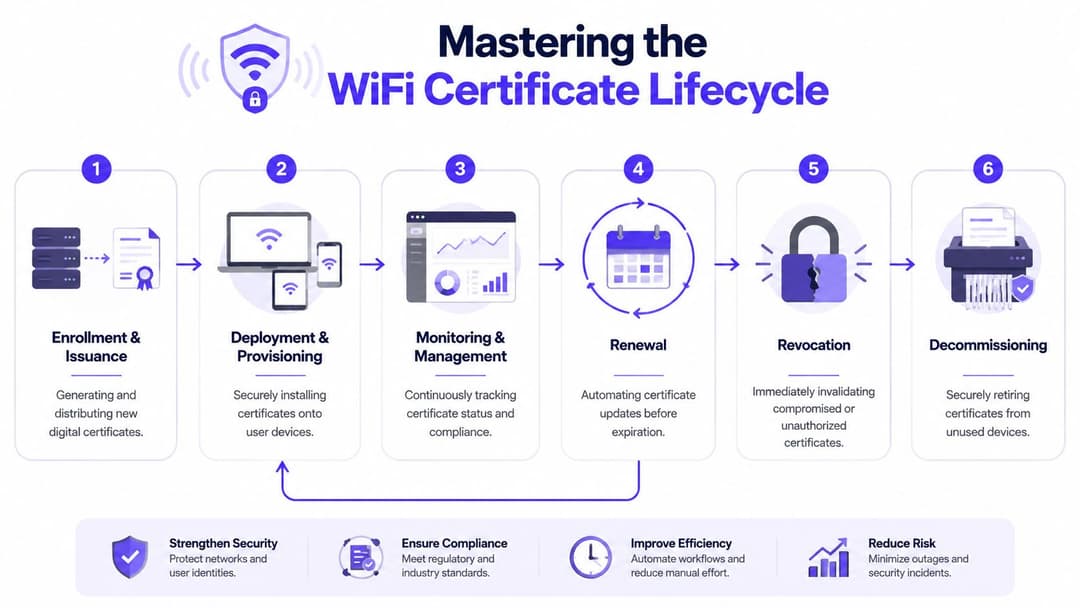
Zertifikats-Lebenszyklus und Bereitstellung meistern
Die meisten gescheiterten Zertifikats-WiFi-Projekte scheitern nicht, weil EAP-TLS unsicher ist. Sie scheitern, weil der Lebenszyklus wie eine einmalige Einrichtungsaufgabe behandelt wurde.
Das Ausstellen eines Zertifikats ist der einfache Teil. Es aktuell zu halten, es vor dem Ablaufdatum zu ersetzen, es bei Bedarf zu widerrufen und nachzuweisen, dass die richtigen Geräte die richtigen Profile haben - hier zeigt sich die betriebliche Reife. Wenn Sie den Lebenszyklus richtig verwalten, ist ein auf Zertifikaten basierendes WiFi wartungsärmer als ein passwortbasiertes WiFi. Wenn Sie es falsch machen, wird der Ablauftag zu einem Fall für den Service-Desk.
Starten Sie mit dem Registrierungspfad
Es gibt mehrere praktikable Bereitstellungsmodelle, aber sie sind nicht alle gleich.
Die MDM- oder UEM-gesteuerte Bereitstellung ist in der Regel die sauberste Option für verwaltete Geräteflotten. Tools wie Microsoft Intune, Jamf und Workspace ONE können Zertifikats-Payloads, vertrauenswürdige Root-Zertifikate und WiFi-Einstellungen zusammen bereitstellen. Das minimiert Benutzeraktionen und macht die Verlängerung praktikabel.
Die SCEP- oder EST-basierte Ausstellung ist nützlich, wenn Sie eine automatisierte Registrierung wünschen, die an einen PKI-Workflow gebunden ist. Diese Protokolle helfen Geräten, Zertifikate strukturiert anzufordern, ohne auf manuelle Dateiübertragungen angewiesen zu sein. Sie eignen sich am besten, wenn das PKI-Team und das Endpunkt-Team aufeinander abgestimmt sind.
Die manuelle Bereitstellung hat immer noch ihren Platz für Pilotprojekte, kleine Umgebungen, spezialisierte Geräte oder streng kontrollierte Ausnahmen. Sie ist jedoch nicht das Modell, das die meisten Unternehmen langfristig nutzen möchten.
Ein einfacher Vergleich hilft:
| Bereitstellungsmethode | Beste Eignung | Häufige Schwachstelle |
|---|---|---|
| MDM/UEM | Verwaltete Laptops, Mobiltelefone, Tablets | Hängt von einer lückenlosen Geräteverwaltung ab |
| SCEP oder EST | Automatisierte Enterprise-Ausstellung | Erfordert Disziplin beim PKI-Design |
| Manuelle Installation | Pilotgruppen und Sonderfälle | Ist nicht skalierbar und führt zu Ablaufproblemen |
Die Disziplin im Lebenszyklus ist wichtiger als die Erstbereitstellung
Das auf Zertifikaten basierende Authentifizierungsmodell GovWifi der britischen Regierung ist ein gutes Beispiel für die betriebliche Realität. Jedes verwaltete Gerät wird mit einer eindeutigen Zertifikatskette ausgestattet und authentifiziert sich dann automatisch bei GovWifi-Netzwerken in der Nähe, ohne dass ein Passwort eingegeben werden muss. Das Gerät präsentiert sein Zertifikat dem RADIUS-Server, und der Zugriff wird erst nach erfolgreicher Zertifikatsprüfung gewährt, wie in der GovWifi-Geräteauthentifizierungsanleitung beschrieben. Dieselbe Anleitung ist offen in Bezug auf den Kompromiss: Organisationen müssen PKI verstehen und TLS-Zertifikate aktuell und sicher halten.
Dieser letzte Punkt ist das, worauf sich erfahrene Teams konzentrieren. Die Schwachstelle ist normalerweise nicht der Handshake. Es ist das Lifecycle-Management.
Wie gutes Lifecycle-Management aussieht
Gute Implementierungen weisen von Anfang an meist vier Gewohnheiten auf:
- Automatische Verlängerung: Geräte verlängern sich vor dem Ablaufdatum mit genügend Überschneidung, um harte Abschaltungen zu vermeiden.
- Widerrufs-Workflow: Sicherheits- und Endpoint-Teams wissen genau, wie ein verlorenes, gestohlenes oder ausgemustertes Gerät ungültig gemacht wird.
- Trust-Store-Verwaltung: Root- und Intermediate-Zertifikate werden konsistent über alle Plattformen verteilt.
- Außerbetriebnahme: Ausgemusterte Geräte verlieren im Rahmen des Offboarding ihre Zertifikate und WiFi-Profile.
Das Zertifikat selbst ist nicht das Produkt. Das Produkt ist ein funktionierender Lebenszyklus um dieses Zertifikat herum.
Was in der Praxis nicht gut funktioniert
Einige Anti-Pattern tauchen immer wieder auf:
- „Wir verlängern sie später.“ Der Ablauf ist kein Problem für die Zukunft. Er ist Teil des ursprünglichen Designs.
- Getrennte Teams ohne gemeinsamen Prozess. PKI-, Endpoint- und Netzwerk-Teams besitzen jeweils ein Drittel der Wahrheit, und niemand besitzt den gesamten Pfad.
- Manuelle Ausnahmen, die zum Standard werden. Einmalige Installationen entwickeln sich zu einer unverwalteten Umgebung.
- Keine Widerrufsprüfungen. Teams gehen davon aus, dass der Widerruf funktioniert, weil die PKI ihn unterstützt, überprüfen aber nie, wie sich das Netzwerk verhält.
Die stabilsten Umgebungen behandeln die WiFi-Zertifikatsauthentifizierung wie die Endpoint-Identitätsinfrastruktur und nicht wie eine SSID-Funktion. Diese Denkweise verhindert die meisten vermeidbaren Ausfälle.
Integration der WiFi-Authentifizierung mit Ihrem Identity Provider
Sobald das zertifikatsbasierte WiFi eingerichtet ist, ist der nächste Reifeschritt offensichtlich. Hören Sie auf, den drahtlosen Zugriff als separate Insel zu behandeln, und verbinden Sie ihn mit dem Identitätssystem, das bereits Benutzer, Gruppen und den Gerätestatus verwaltet.
Das bedeutet, dass die Netzwerkzugriffsrichtlinie mit einem identity provider wie Microsoft Entra ID, Google Workspace oder Okta verknüpft wird. In der Praxis ist das drahtlose Netzwerk damit kein eigenständiges Authentifizierungsproblem mehr, sondern wird zu einem weiteren Ausdruck Ihres bestehenden Identitätsmodells.
Warum dies den Betrieb verändert
Ohne IdP-Integration läuft der WiFi-Zugriff oft in einem separaten Prozess ab. Ein Benutzer wird im Verzeichnis erstellt, dann genehmigt separat jemand den Gerätezugriff, erstellt ein Profil oder fügt eine Regel in einer Netzwerkkonsole hinzu. Durch diese Duplizierung entstehen Verzögerungen und Inkonsistenzen.
Mit der Integration wird das Verzeichnis zur Single Source of Truth. Wenn die Personalabteilung einen neuen Mitarbeiter anlegt, kann der Lebenszyklus des Kontos die Geräteregistrierung und Profilzuweisung auslösen. Wenn jemand das Unternehmen verlässt, kann dasselbe Identitätsereignis den Zugriff entziehen, ohne dass auf eine manuelle Netzwerkaufgabe gewartet werden muss.
Das sorgt für Konsistenz in Bereichen, die normalerweise auseinanderdriften:
- Benutzerstatus und WiFi-Zugriff bleiben synchron
- Gruppenmitgliedschaften können Richtlinien steuern
- Geräte-Compliance kann beeinflussen, wer Zugriff auf die interne SSID erhält
- Das Offboarding erfolgt sofort und nicht erst ticketgesteuert
Wo Plattformen ins Spiel kommen
Sie können dies auf verschiedene Weisen aufbauen. Einige Unternehmen verbinden RADIUS, PKI und MDM direkt und behalten die Control Plane im eigenen Haus. Andere nutzen Cloud-Managed Services, um diesen Stack zu vereinfachen.
Eine verwaltete Option wie RADIUS-as-a-Service kann den betrieblichen Aufwand für den Betrieb einer lokalen Authentifizierungsinfrastruktur verringern und gleichzeitig die Richtlinien an Verzeichnissysteme koppeln. Dieses Modell ist meist dann attraktiv, wenn das Netzwerkteam zertifikatsbasierte Zugriffskontrollen wünscht, ohne eine weitere Serverplattform betreiben zu müssen.
Die praktische Designentscheidung
Die Designfrage lautet nicht: "Kann mein WiFi Zertifikate verwenden?", sondern vielmehr: "Welche Identitätsereignisse sollten den Zugriff gewähren, ändern oder entziehen?"
Ein sinnvolles Modell sieht oft wie folgt aus:
| Identitätsereignis | Netzwerk-Ergebnis |
|---|---|
| Benutzer tritt bei | Das zugewiesene Gerät erhält das richtige WiFi-Profil |
| Benutzer wechselt die Rolle | Gruppenbasierte Richtlinien passen VLAN, ACL oder SSID-Berechtigungen an |
| Gerät wird als nicht-konform eingestuft | Der interne Zugriff wird eingeschränkt oder entzogen |
| Benutzer verlässt das Unternehmen | Der Zugriff wird im Rahmen des Offboardings widerrufen |
Wenn Ihr IdP bereits darüber entscheidet, wer auf E-Mails, SaaS und VPN zugreifen darf, sollte er auch beeinflussen, wer sich in Ihr internes WiFi einwählen kann.
Wenn Teams diesen Schritt vollziehen, ist WiFi keine isolierte betriebliche lästige Pflicht mehr. Es wird Teil der identitätsbasierten Zugriffskontrolle, und genau da gehört es hin.
Best Practices für Bereitstellung und Migration
Die saubersten Migrationen sind selten die schnellsten. Sie erfolgen in Phasen, sind gut beobachtbar und unaufgeregt. Und das ist auch gut so.
Der Wechsel von PSK- oder Captive Portal -Zugängen zu zertifikatsbasiertem WiFi sollte nicht mit einer abrupten Umstellung über Nacht beginnen. Beginnen Sie damit, die Vertrauenskette, das Client-Verhalten und die Lebenszyklus-Mechanismen mit einem parallelen Design zu beweisen. In der Praxis bedeutet dies meist eine dedizierte Mitarbeiter-SSID für Pilotgeräte, eine kleine Registrierungsgruppe und klare Rollback-Optionen.
Phasenweise Einführung
In den meisten Umgebungen bewährt sich ein einfacher Ablauf:
Eine Pilot-SSID einrichten
Beschränken Sie diese auf die IT, die Security-Abteilung und eine kleine Gruppe von Power-Usern. Validieren Sie die Profilbereitstellung, das Roaming-Verhalten und Fehlerszenarien.Den gesamten Lebenszyklus testen, nicht nur die Erstanmeldung
Verlängerung, Sperrung, Zertifikatsaustausch und Offboarding müssen alle erprobt werden. Ein Erfolg am ersten Tag sagt für sich genommen sehr wenig aus.Nach Geräteklasse erweitern
Beginnen Sie mit verwalteten Laptops und Mobilgeräten. Heben Sie sich Spezialgeräte und kompliziertere Plattformen für spätere Phasen auf.Altsysteme schrittweise abschalten
Geben Sie den Nutzern Zeit für den Wechsel. Schaffen Sie die Abhängigkeit von gemeinsamen Passwörtern erst ab, wenn der verwaltete Pfad stabil läuft.
Sperrungsmechanismen von Tag eins an einplanen
Die EAP-TLS-basierte WiFi-Zertifikatsauthentifizierung nutzt eine gegenseitige Zertifikatsvalidierung. Der Client überprüft das Zertifikat des RADIUS-Servers, und der RADIUS-Server überprüft die Signatur, den Aussteller, das Ablaufdatum und den Sperrstatus des Client-Zertifikats, bevor er ein Access-Accept ausgibt, wie in diesem Leitfaden für EAP-TLS-Zertifikats-WiFi erklärt wird. Derselbe Leitfaden weist darauf hin, dass CRL oder OCSP konfiguriert werden sollten und dass OCSP für hochsichere Bereitstellungen mit geringer Latenz zwingend erforderlich ist.
Das hat eine ganz praktische Konsequenz. Sicherheit und Latenz hängen direkt mit dem Sperrkonzept zusammen. Wenn Sperrprüfungen erst nachträglich bedacht werden, kann dies zu veralteten Vertrauensentscheidungen oder schmerzhaften Verzögerungen führen.
Eine nützliche Checkliste für die Planung:
- Wählen Sie Ihr Sperrmodell frühzeitig. Treffen Sie Entscheidungen zu CRL oder OCSP nicht erst, wenn sich bereits Benutzer verbinden.
- Automatisieren Sie die Zertifikatsverlängerung. Eine MDM- oder UEM-gesteuerte Verlängerung ist in einer professionellen Bereitstellung unverzichtbar.
- Validieren Sie das Serverzertifikatsvertrauen auf den Clients. Ein Client, der diese Prüfung überspringt, schwächt das gesamte Konzept.
- Messen Sie das Anmeldeverhalten während der Testphase. Achten Sie auf Verzögerungen, die auf Probleme bei der Sperrung oder dem PKI-Pfad hindeuten.
Praxishinweis: Die WiFi-Zertifikatsauthentifizierung ist ebenso sehr ein PKI-Betriebsprojekt wie ein Netzwerkprojekt.
Geräte ohne sauberen 802.1X-Support handhaben
Einige ältere Endgeräte, Embedded-Systeme und spezielle IoT-Plattformen unterstützen zertifikatsbasiertes 802.1X nicht auf eine verwaltbare Weise. Das Gegenteil anzunehmen, verzögert das Projekt nur.
Nutzen Sie für diese Geräte eine separate Strategie und grenzen Sie diese streng ein. Identity PSK kann eine praktische Brücke für Geräte sein, die eindeutige Anmeldedaten benötigen, aber keine vollständige Zertifikatsauthentifizierung unterstützen. Wichtig ist, dass Ausnahmen nicht das Design für die regulären Mitarbeiter beeinträchtigen. Halten Sie diese Geräte auf isolierten Richtlinienpfaden mit eingeschränktem Zugriff.
Das Onboarding für Benutzer einfach halten
Gute WiFi-Zertifizierung ist für den Benutzer oft unsichtbar. Schlechte WiFi-Zertifizierung beschert ihnen ein PDF, drei Vertrauensabfragen und eine Support-Hotline.
Für verwaltete Geräte ist das Onboarding-Ziel: null Entscheidungspunkte. Das Zertifikat, die Vertrauenskette und das WiFi-Profil sollten zusammen bereitgestellt werden. Verwenden Sie für BYOD einen separaten Workflow mit klarer Sprache und expliziten Grenzen bezüglich des Zugriffs, den diese Geräte erhalten.
Praxis-Anwendungsfälle und fortgeschrittene Szenarien
Der Wert der Zertifikatsauthentifizierung lässt sich am besten in realen Umgebungen statt in Labor-Diagrammen veranschaulichen.
In einem Krankenhaus geht es nicht darum, ob sich Mitarbeiter an ein Passwort erinnern können. Es geht darum, ob verwaltete klinische Geräte, mobile Visitenwagen und spezialisierte Endgeräte dauerhaft eine Verbindung herstellen können, ohne dass gemeinsam genutzte Anmeldedaten im Umlauf sind. Der zertifikatsbasierte Zugriff passt zu diesem Modell, da die Vertrauensentscheidung der Geräteidentität folgt und nicht einem Geheimnis, das sich leicht verbreitet.
In einer Einzelhandels- oder Hotelumgebung ist das Muster etwas anders. Mitarbeitergeräte benötigen einen sicheren internen Zugriff, während der Gastzugang einfach und segmentiert bleiben muss. Hier zahlt sich ein identitätsbasiertes Wireless-Design aus. Derselbe Standort kann zertifikatsbasierten Mitarbeiterzugang und ein separates Gästeerlebnis unterstützen, das auf einem einfacheren Onboarding basiert.
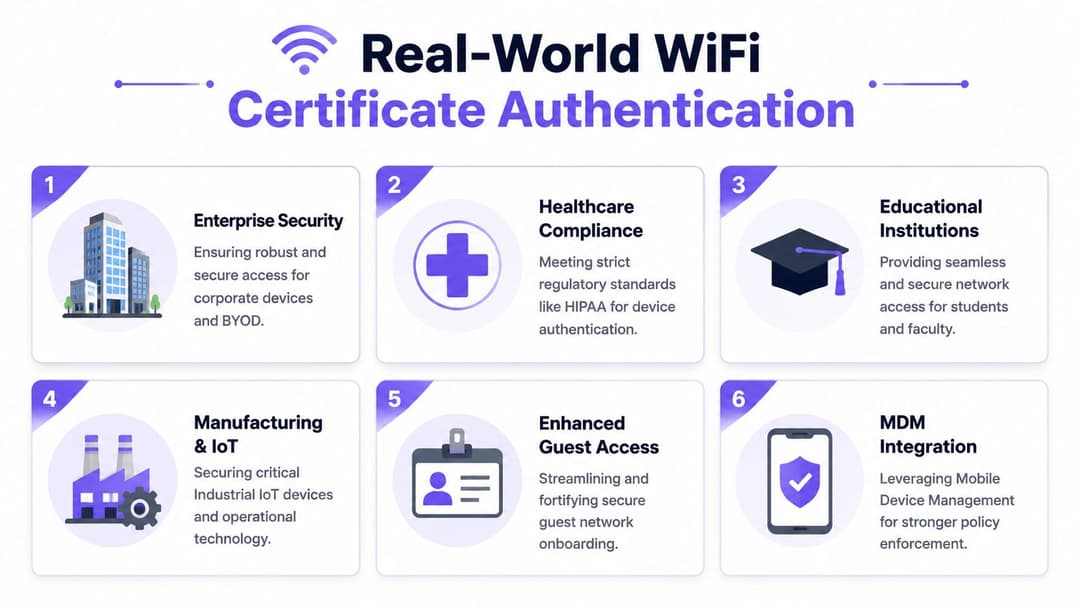
Wo es besonders gut funktioniert
- Unternehmensbüros: Verwaltete Laptops und Telefone verbinden sich automatisch, und der Zugriff kann den Verzeichnis- und Geräterichtlinien folgen.
- Einrichtungen im Gesundheitswesen: Gemeinsam genutzte Passwörter verschwinden von Visitenwagen, Tablets und klinischen Arbeitsbereichen.
- Bildungseinrichtungen und Campusse: Mitarbeiter und von der Institution verwaltete Geräte können sich ohne wiederholte Aufforderungen in allen Gebäuden verbinden.
- Industrie- und IoT-lastige Standorte: Geräte, die Zertifikate unterstützen, erhalten strengere Identitätskontrollen, während nicht-unterstützende Hardware über Ausnahmepfade isoliert wird.
Fortgeschrittene Szenarien, die eine Planung wert sind
Multi-Tenant-Immobilien, Studentenwohnheime und große Veranstaltungsorte benötigen oft eine geteilte Identität. Das Netzwerkerlebnis muss für den Benutzer einfach wirken, während die zugrundeliegende Durchsetzung streng bleibt. Zertifikate helfen auf der Seite des Personals und der verwalteten Geräte, da sie das Vertrauen pro Gerät wahren, selbst wenn die Umgebung selbst stark geteilt wird.
Passpoint und OpenRoaming fügen sich ebenfalls natürlich in die breitere Diskussion ein, insbesondere für den Gastzugang und wiederkehrende Besuche. Sie sind nicht dasselbe wie die interne EAP-TLS Mitarbeiter-Authentifizierung, teilen aber dasselbe Prinzip: Reduzierung von Reibungsverlusten beim Verbindungsaufbau bei gleichzeitiger Verbesserung von Vertrauen und Konsistenz hinter den Kulissen.
Die stärksten Bereitstellungen versuchen nicht, eine Methode auf jedes Gerät und jede Zielgruppe zu erzwingen. Sie kombinieren die Zertifikatsauthentifizierung für Geräte, die verwaltet werden sollen, segmentierten Gastzugang für Besucher und eine kontrollierte Ausnahmebehandlung für ältere Hardware.
Wenn Sie einen Wechsel von gemeinsam genutzten WiFi-Passwörtern planen, ist Purple eine Option, die Sie zusammen mit Ihrem bestehenden PKI-, MDM-, RADIUS- und Identity-Stack evaluieren sollten. Es konzentriert sich auf identitätsbasierten WiFi-Zugang für Mitarbeiter, Gäste und Multi-Tenant-Umgebungen, einschließlich passwortloser Zugriffsmuster, Cloud-managed Authentifizierung und der Integration mit Verzeichnisplattformen.