
Arista Cognitive Wi-Fi Integration mit Purple WiFi
Diese technische Referenz beschreibt Schritt für Schritt die Integration von Arista Cognitive Wi-Fi (CV-CUE) mit der Captive Portal-Plattform von Purple für Unternehmensstandorte. Sie deckt die Konfiguration des Arista Captive Portals, das Design von Walled Garden ACLs, die Einrichtung von RADIUS-Servern, die sichere 802.1X-Authentifizierung für Mitarbeiter sowie die mandantenfähige Isolierung mittels Arista PPSK mit dynamischer VLAN-Steuerung ab – und bietet IT-Teams und Netzwerkarchitekten eine definitive Bereitstellungsvorlage.
Diesen Leitfaden anhören
Podcast-Transkript ansehen
Executive summary
Deploying an Arista captive portal for guest access is not merely a connectivity task. It is a critical intersection of network security, regulatory compliance, and data strategy. For IT leaders managing distributed venues, the integration of Arista CloudVision Cognitive Unified Edge (CV-CUE) with Purple transforms unmanaged guest traffic into a secure, segmented, and measurable asset.
This reference provides a definitive blueprint for configuring Arista Cognitive Wi-Fi with Purple. We detail the exact mechanisms required to deploy third-party hosted splash pages, construct precise Walled Garden access control lists, and implement RADIUS authentication. We also cover advanced Multi-Tenant WiFi isolation using Arista Private Pre-Shared Keys (PPSK) and dynamic VLAN steering - the architecture that eliminates SSID sprawl in coworking spaces, retail malls, and residential buildings.
Purple operates across 80,000+ live venues and has processed 440 million logins in 2024 (Purple internal data). The platform is ISO 27001 certified, GDPR and CCPA compliant, and carries Cyber Essentials and B Corp certification. This guide reflects production-tested configurations validated across hospitality, retail, and public-sector deployments.
Technical deep-dive
The Arista captive portal onboarding architecture
The guest onboarding flow dictates how devices interact with the Arista access point (AP) before and after authentication. When a device associates with the open guest SSID, the Arista AP assigns it to a pre-authentication VLAN. In this state, the AP restricts DNS and HTTP traffic to a defined allow-list. The device operating system detects the captive portal and attempts to reach a known endpoint - iOS sends an HTTP request to captive.apple.com, Android to connectivitycheck.gstatic.com, and Windows to www.msftconnecttest.com. The Arista AP intercepts this request and issues an HTTP 302 redirect to the Purple splash page URL.
{{asset:captive_portal_flow.png}}
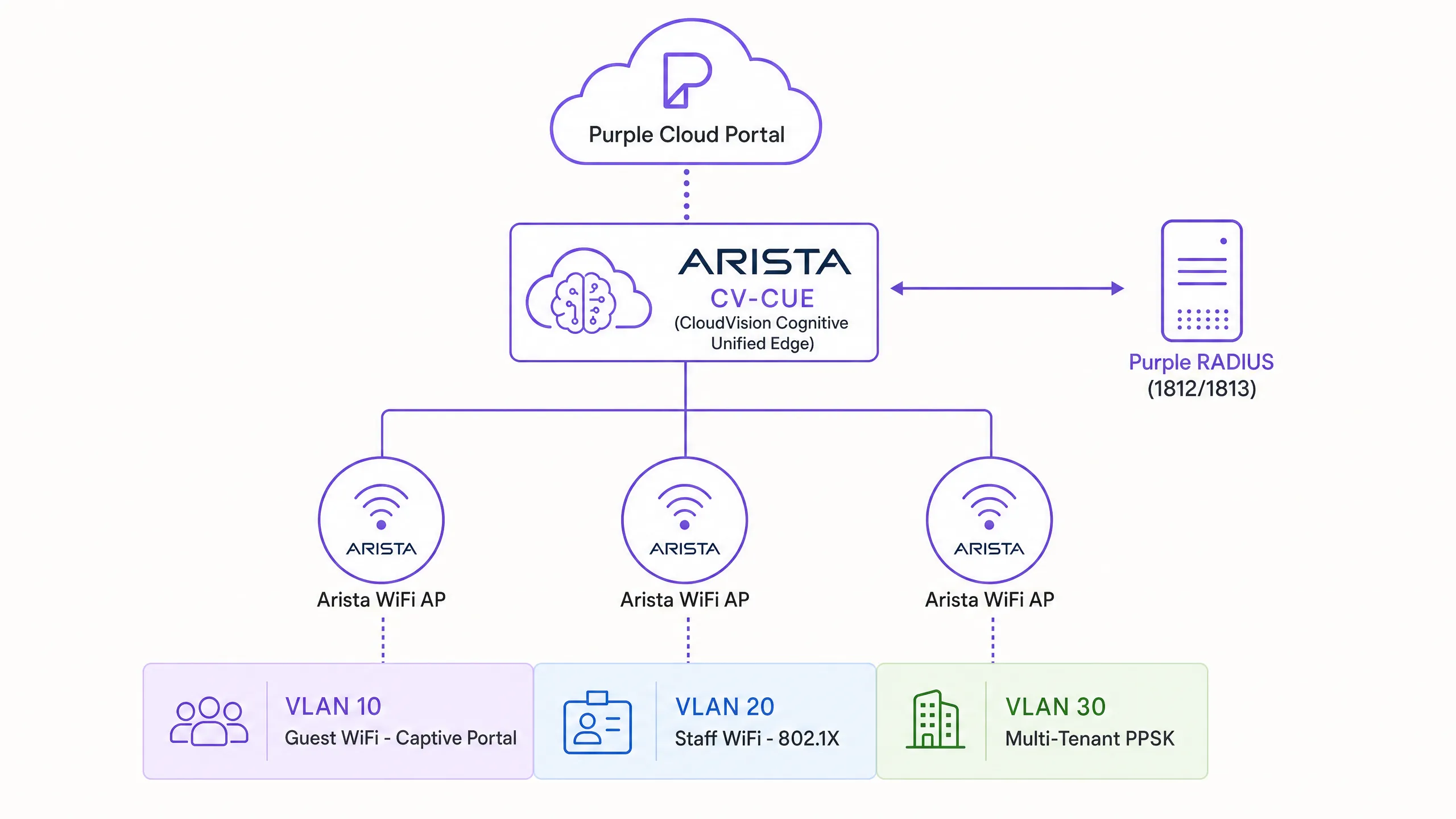
To ensure this flow executes without error, the Arista CV-CUE controller must be configured to point to Purple as a third-party hosted portal. This requires defining the Purple RADIUS servers (Authentication Port 1812, Accounting Port 1813) within the CV-CUE Network Profiles. Once the guest submits their credentials or accepts the terms on the Purple portal, Purple acts as the RADIUS server and sends an Access-Accept message back to the Arista AP. This message includes RADIUS Change of Authorisation (CoA) attributes defined in RFC 3576, instructing the AP to transition the client MAC address from the restricted pre-authentication state to full internet access on the post-authentication VLAN.
Walled Garden ACL design in CV-CUE
The Walled Garden is a whitelist of domains and IP addresses that unauthenticated devices must reach to load the splash page and complete authentication. In Arista CV-CUE, you configure this under the Captive Portal settings as "Websites that users can access before login".
The Walled Garden is an explicit allow-list. You must include the core Purple domains to render the portal. If you offer social login, you must also whitelist the Identity Provider (IdP) domains. Failure to maintain this list results in guests being unable to load the authentication provider's login screen, leading to immediate abandonment.
| Zone | Traffic permitted | Implementation |
|---|---|---|
| Pre-authentication | DNS (restricted), DHCP, portal server, captive portal detection endpoints | Gateway ACL - deny all except whitelist |
| Walled Garden | Purple portal domains, social login providers, payment processors | FQDN-based ACL in CV-CUE |
| Post-authentication | Full internet access subject to content filtering and bandwidth policy | Per-user ACL applied via RADIUS CoA |
Minimum required Walled Garden entries for Purple:
region1.purpleportal.netvenuewifi.comcloudfront.netopenweathermap.orgstripe.com(if payment-gated access is enabled)
Additional entries for social login:
- Facebook:
facebook.com,fbcdn.net,akamaihd.net,connect.facebook.net - Google Workspace:
accounts.google.com,googleapis.com - Twitter/X:
twitter.com,twimg.com - LinkedIn:
linkedin.com,licdn.net
Arista PPSK configuration for multi-tenant isolation
For environments such as coworking spaces, residential buildings, or retail malls, standard 802.1X is often too complex for unmanaged devices, yet open networks lack necessary security. Arista Private Pre-Shared Keys (PPSK) solves this by allowing multiple unique passphrases on a single SSID, each mapped to a distinct network policy.
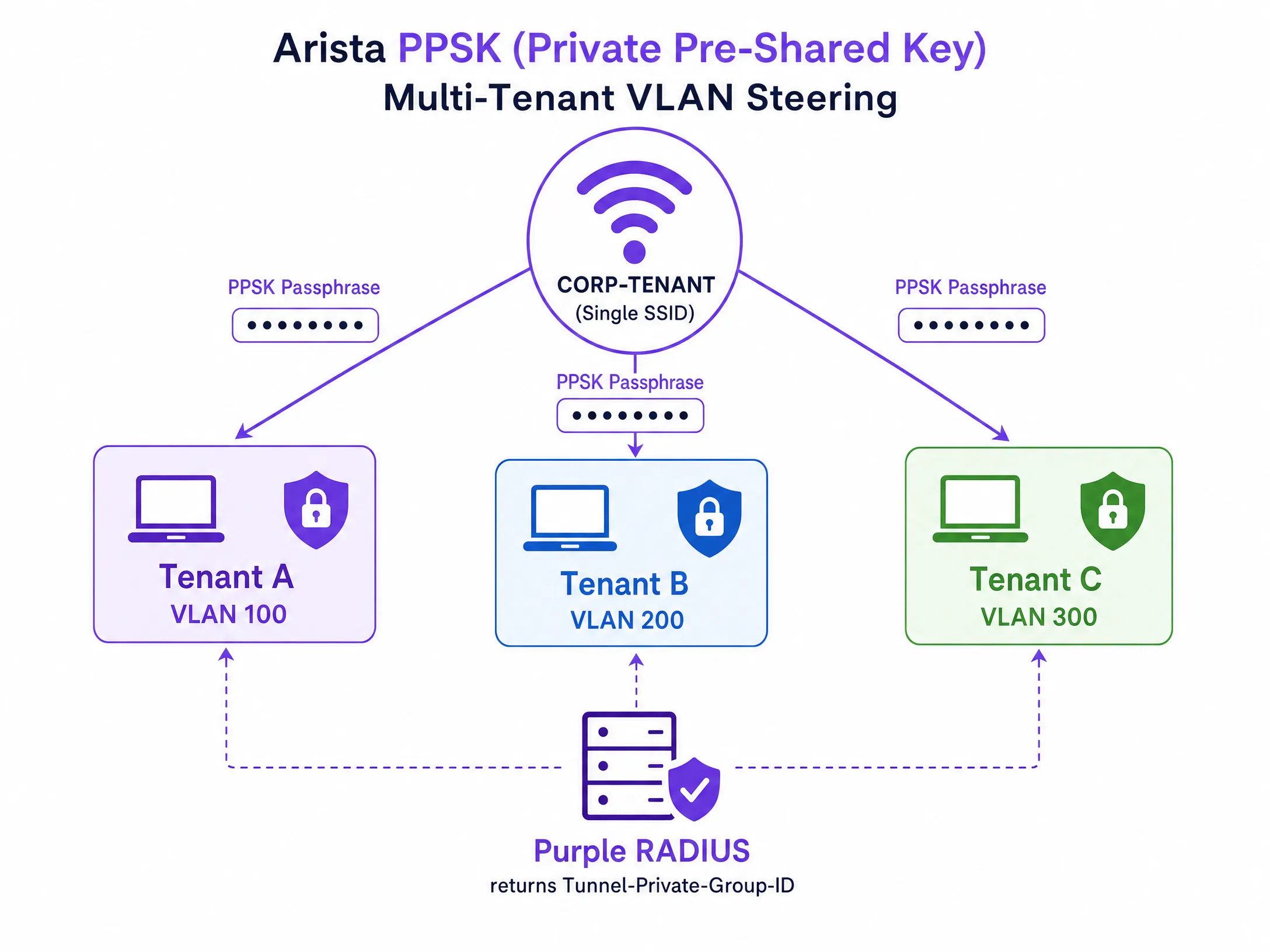
When integrated with Purple RADIUS, Arista PPSK enables dynamic VLAN steering. A resident or retail tenant connects to the unified SSID using their specific PPSK. The Arista AP authorises the key against the Purple RADIUS server. Purple returns the standard Access-Accept, but appends three RADIUS attributes that drive VLAN assignment:
| RADIUS attribute | Value | Purpose |
|---|---|---|
| Tunnel-Type | 13 (VLAN) | Specifies the tunnel type |
| Tunnel-Medium-Type | 6 (802) | Specifies the medium type |
| Tunnel-Private-Group-ID | e.g., "100" | The specific VLAN ID to assign |
The Arista AP dynamically assigns the device to that VLAN. This provides strict Layer 2 isolation between tenants without broadcasting dozens of separate SSIDs, optimising RF utilisation while maintaining absolute security boundaries.
Secure Staff WiFi with IEEE 802.1X
For staff networks, shared passphrases are a security liability. IEEE 802.1X (defined in IEEE Std 802.1X-2020) provides port-based network access control using per-user credentials. In CV-CUE, you configure a Corporate SSID with WPA2-Enterprise or WPA3-Enterprise security. The AP acts as the authenticator, forwarding credentials to the RADIUS server via EAP (Extensible Authentication Protocol). Purple supports EAP-PEAP for username/password authentication and EAP-TLS for certificate-based authentication.
For EAP-TLS deployments, you integrate with Microsoft Entra ID, Okta, or Google Workspace as the certificate authority. When a staff member's device presents a valid client certificate, the RADIUS server validates it against the directory and returns an Access-Accept. This eliminates credential theft as an attack vector entirely.
Arista Cloud WIPS integration
Arista's Wireless Intrusion Prevention System (WIPS) operates continuously in the background, scanning for rogue access points, misconfigured APs, and unauthorised clients. In CV-CUE, navigate to Configure > WIPS > Automatic Intrusion Prevention to configure the prevention level. Arista offers four levels: Degrade, Interrupt, Disrupt, and Block. For enterprise deployments, start at Disrupt, which disrupts unauthorised communication without completely blocking it, reducing false positive risk during initial deployment.
Enable SSID VLAN Monitoring under Configure > Device > Access Point > Security tab to ensure APs actively monitor their assigned VLANs for rogue activity. Arista AP-3xx series models support monitoring up to 42 VLANs simultaneously (Arista WIPS documentation, 2025).
Implementation guide
Phase 1: Network segmentation and RADIUS setup
- Log in to Arista CV-CUE and navigate to Configure > Network Profiles > RADIUS.
- Click Add RADIUS Server.
- Enter the Primary Purple RADIUS server details: IP Address, Authentication Port (1812), Accounting Port (1813), and the Shared Secret from the Purple portal hardware configuration page.
- Repeat for the Secondary Purple RADIUS server to ensure high availability.
- Verify that UDP ports 1812 and 1813 are open between the Arista APs and the Purple RADIUS servers on your firewall.
Phase 2: Guest SSID and Captive Portal configuration
- Navigate to Configure > WiFi > SSID and click Add New SSID.
- Define the SSID Name (e.g.,
Guest_WiFi) and set the SSID Type to Guest. - Under the Security tab, set the security level to Open.
- Under the Network tab, configure the pre-authentication VLAN (e.g., VLAN 10) with a dedicated DHCP scope.
- Under the Captive Portal tab, enable the Captive Portal checkbox.
- Select Third-Party Hosted from the Cloud Hosted drop-down.
- Check With RADIUS Authentication and select the Purple RADIUS profile.
- Enter the Purple Splash Page URL (e.g.,
https://region1.purpleportal.net/access/) and the Redirect URL (e.g.,https://region1.purpleportal.net/access/?res=success). - Set the Called Station ID format to
%m(MAC address format required by Purple). - Set the Accounting Interval to 2 minutes.
- Clear the HTTPS Redirection checkbox.
Phase 3: Walled Garden deployment
- Within the Captive Portal tab, locate the Websites that users can access before login section.
- Add all required Purple domains and Identity Provider domains as listed above.
- Save the SSID configuration and apply it to the target Arista AP groups.
Phase 4: PPSK multi-tenant setup
- In the Purple portal, navigate to the venue hardware configuration and retrieve the PPSK RADIUS settings.
- In CV-CUE, create a new SSID with WPA2-Personal security and enable PPSK mode.
- Configure the SSID to authenticate against the Purple RADIUS profile.
- In the Purple portal, create a PPSK passphrase for each tenant and map it to the corresponding VLAN ID.
- Verify that the switch ports connecting to Arista APs are configured to trunk the required tenant VLANs.
Phase 5: Secure Staff WiFi (802.1X)
- Create a new Corporate SSID in CV-CUE.
- Under the Security tab, select WPA2-Enterprise or WPA3-Enterprise.
- Select the RADIUS profile pointing to your corporate identity provider (Microsoft Entra ID, Okta, or Google Workspace).
- Configure EAP type: PEAP for username/password, EAP-TLS for certificate-based authentication.
- Assign the Staff SSID to a dedicated VLAN (e.g., VLAN 20) isolated from the Guest VLAN.
Best practices
Automate Walled Garden updates. Identity providers frequently change their CDN domains. Schedule a quarterly review of your Arista CV-CUE Walled Garden configuration against Purple's updated domain lists. A single missing CDN entry will break social login for all guests.
Optimise session timers by venue type. Configure idle timeouts in Arista CV-CUE to match your venue's traffic profile. Retail environments benefit from a 10-minute idle timeout to reclaim IP addresses from devices that have left the store. Hotel deployments should use longer timeouts (4-8 hours) to avoid re-triggering the portal during a guest's stay.
Enforce Client Isolation. Always enable Client Isolation on the Guest SSID within Arista CV-CUE. This prevents guest devices from communicating with each other, mitigating lateral movement risks and satisfying PCI DSS network segmentation requirements.
Enable RADIUS Accounting. Ensure RADIUS Accounting is enabled with a 2-minute interval. This provides Purple with accurate session duration and data transfer metrics, feeding into the WiFi Analytics dashboard and enabling accurate visitor dwell time analysis.
Segment by SSID type, not by AP. Apply Guest, Staff, and Multi-Tenant SSIDs to the same AP groups. Arista CV-CUE handles VLAN tagging per SSID, so you do not need separate APs for each user type. This simplifies your hardware deployment while maintaining strict logical separation.
For a broader view of enterprise WiFi security architecture, see our Enterprise WiFi Security: A Complete Guide for 2026 .
Case studies
Case study 1: 350-room hotel chain
A mid-scale hotel chain with 12 properties deployed Arista Wi-Fi 6E APs across all sites, managed through a single CV-CUE instance. The requirement was to provide branded Guest WiFi with email capture for marketing, isolated from the property management system (PMS) network, while also supporting 802.1X for staff devices.
The team configured three SSIDs per property: a Guest SSID (VLAN 10) pointing to Purple, a Staff SSID (VLAN 20) using 802.1X against Microsoft Entra ID, and an IoT SSID (VLAN 30) for building management devices. The Purple portal captured guest email addresses and consent at check-in. Within 90 days, the chain had collected verified first-party data from 68% of guests (Purple internal data), enabling targeted re-engagement campaigns. The PMS network remained completely isolated, satisfying PCI DSS requirements for cardholder data environment segmentation.
Case study 2: Multi-tenant coworking space
A coworking operator managing eight locations needed to provide isolated WiFi to 35 member companies per site without broadcasting 35 SSIDs. The RF environment was already congested, and SSID sprawl was degrading performance for all members.
The solution was a single SSID per site using Arista PPSK with Purple RADIUS. Each member company received a unique PPSK passphrase. Purple mapped each passphrase to a dedicated VLAN (VLAN 100 through VLAN 3500). When a member connected, the Arista AP dynamically steered them to their VLAN based on the Tunnel-Private-Group-ID returned by Purple RADIUS. The result was a reduction from 35 SSIDs to one per site, a measurable improvement in airtime efficiency, and complete Layer 2 isolation between member companies. When a member's contract ended, the operator revoked their passphrase in the Purple portal, terminating access within seconds.
Troubleshooting and risk mitigation
Issue: Splash page fails to load on Apple devices. iOS uses a specific mechanism to detect captive portals. If the splash page fails to load automatically, verify that the Arista Walled Garden includes all Purple CDN domains. If the Walled Garden is overly restrictive, the iOS device cannot load the portal assets and aborts the connection.
Issue: MAC address randomisation breaks returning guest recognition. iOS 14+ and Android 10+ devices randomise their MAC address per SSID. This prevents Purple from recognising a returning guest based solely on their MAC address. Rely on authenticated identity (email or social login) for long-term tracking. For seamless, secure reconnection without a captive portal, migrate to Passpoint/Hotspot 2.0 architectures.
Issue: Dynamic VLAN steering fails with PPSK. If tenants are assigned the default VLAN instead of their specific VLAN, verify the RADIUS response using the Arista CV-CUE troubleshooting tools. Ensure Purple is returning the correct Tunnel-Private-Group-ID, Tunnel-Type, and Tunnel-Medium-Type attributes, and that the specified VLAN exists on the switch port connected to the Arista AP.
Issue: DHCP pool exhaustion on the Guest VLAN. Reduce the idle timeout to 5-10 minutes in high-footfall environments. Increase the DHCP scope size if the venue regularly exceeds 80% pool utilisation. Consider using a /22 or larger subnet for high-density venues such as stadiums or conference centres.
Issue: RADIUS accounting data shows zero-second sessions. Verify that UDP port 1813 is open on the firewall between the Arista APs and the Purple RADIUS servers. Confirm the Accounting Interval is set to 2 minutes in the CV-CUE SSID settings.
For related guidance on wireless display and protocol best practices in enterprise environments, see What Is Wireless Display: Protocols and Best Practices 2026 .
ROI and business impact
Deploying Arista Cognitive Wi-Fi with Purple transforms a network cost centre into a measurable business asset. By enforcing a compliant captive portal, you mitigate the risk of GDPR fines, which can reach 4% of global annual turnover. More importantly, the Guest WiFi portal captures verified, first-party data. Purple has collected 29 billion data points across its network (Purple internal data), demonstrating the scale of what a properly deployed guest WiFi architecture can generate.
For Retail venues, this data feeds directly into CRM systems, enabling targeted marketing campaigns based on visit frequency and dwell time. For Hospitality operators, it enables personalised re-engagement with returning guests. For Transport hubs, it provides accurate passenger flow data that informs operational decisions. For Healthcare facilities, it ensures patients and visitors receive appropriate network access while clinical systems remain completely isolated.
The Purple platform operates at 99.999% uptime (Purple internal data), ensuring that guest access is never interrupted by platform availability issues. Combined with Arista's cloud-managed infrastructure, you get an end-to-end architecture that scales from a single venue to 80,000+ locations without architectural changes.
For additional integration context, see our guide on NETGEAR Insight and Enterprise Access Points Integration with Purple WiFi . For venue operators evaluating survey tools to complement their WiFi analytics, see Design of a Survey: A Practical Guide for Venues .
Schlüsseldefinitionen
Arista CV-CUE
CloudVision Cognitive Unified Edge. Die zentrale Cloud-Management-Plattform zur Konfiguration, Überwachung und Verwaltung von Arista Wi-Fi-Access Points, Switches und Netzwerkprofilen einschließlich RADIUS- und SSID-Einstellungen.
IT-Teams nutzen CV-CUE, um SSIDs zu definieren, RADIUS-Server zu konfigurieren, Walled Garden-Regeln festzulegen und WIPS-Richtlinien für alle Arista APs über eine einzige Benutzeroberfläche zu verwalten.
Captive Portal
Eine Webseite, die nicht authentifizierten Netzwerkverkehr abfängt und eine Interaktion des Benutzers erfordert (Anmeldung, Akzeptieren von Bedingungen oder Zahlung), bevor der Internetzugang freigegeben wird. Implementiert auf der Ebene des Wireless-Controllers oder Gateways.
Die primäre Schnittstelle zur Erfassung von First-Party-Daten und zur Durchsetzung der GDPR-Einwilligung in Guest WiFi-Netzwerken. Bei Arista-Bereitstellungen wird die Captive Portal-Funktion an Purple als extern gehosteten Service delegiert.
Walled Garden
Eine eingeschränkte Netzwerkumgebung, die vor der Authentifizierung nur Zugriff auf eine bestimmte Whitelist von Domains oder IP-Adressen erlaubt. Implementiert als ACL auf dem Wireless-Controller.
Unerlässlich, damit Geräte die Purple-Splash-Page und Identity Provider erreichen können, bevor sie vollen Internetzugang haben. Muss aufgrund sich ändernder CDN-IP-Bereiche als wiederkehrende operative Aufgabe gepflegt werden.
PPSK (Private Pre-Shared Key)
Ein Sicherheitsmechanismus, der die Verwendung mehrerer eindeutiger Passphrasen auf einer einzigen SSID ermöglicht, wobei jede Passphrase über RADIUS-Authentifizierung einer anderen Netzwerkrichtlinie oder einem anderen VLAN zugeordnet wird.
Wird in Mandanten-Umgebungen verwendet, um sichere, isolierte Netzwerke bereitzustellen, ohne zahlreiche SSIDs auszustrahlen. Arista PPSK mit Purple RADIUS ermöglicht eine dynamische VLAN-Steuerung pro Passphrase.
Dynamic VLAN steering
Der Prozess der Zuweisung eines Client-Geräts zu einem bestimmten VLAN basierend auf RADIUS-Attributen (Tunnel-Type, Tunnel-Medium-Type, Tunnel-Private-Group-ID), die während der Authentifizierung zurückgegeben werden, anstelle einer statischen SSID-zu-VLAN-Zuordnung.
Entscheidend für Mandanten-WiFi, da eine einzige SSID mehrere isolierte Benutzergruppen bedienen kann. Erfordert, dass die mit den APs verbundenen Switch-Ports alle möglichen Mandanten-VLANs per Trunking übertragen.
RADIUS CoA (Change of Authorization)
Eine Erweiterung des RADIUS-Protokolls (RFC 3576), die es einem RADIUS-Server ermöglicht, die Autorisierungsattribute einer aktiven Sitzung dynamisch zu ändern, ohne eine erneute Authentifizierung zu erfordern.
Wird von Purple verwendet, um den Arista AP anzuweisen, sofort nach Abschluss der Portal-Anmeldung vollen Internetzugang zu gewähren, ohne dass sich das Gerät erneut mit der SSID verbinden muss.
IEEE 802.1X
Ein IEEE-Standard für portbasierte Netzwerzugangskontrolle, der einen Authentifizierungsmechanismus für Geräte bereitstellt, die sich mit einem LAN oder WLAN verbinden. Verwendet EAP (Extensible Authentication Protocol), um Zugangsdaten zwischen dem Client, dem Authentifikator und dem Authentifizierungsserver zu übertragen.
Der richtige Authentifizierungsstandard für Mitarbeiter-WiFi. Eliminiert gemeinsam genutzte Passphrasen und ermöglicht eine benutzerbezogene Verwaltung von Zugangsdaten, die in Unternehmens-Identity-Provider wie Microsoft Entra ID oder Okta integriert ist.
MAC address randomization
Eine Datenschutzfunktion in modernen Betriebssystemen (iOS 14+, Android 10+), bei der das Gerät für jedes verbundene Wi-Fi-Netzwerk eine zufällige MAC-Adresse generiert, anstatt die im Werk eingebrannte Hardware-MAC-Adresse zu verwenden.
Beeinträchtigt die Fähigkeit, wiederkehrende Gäste ausschließlich anhand von Hardware-Identifikatoren zu verfolgen. Erfordert einen Wechsel hin zu identitätsbasierter Authentifizierung (E-Mail, Social Login) für präzise Besucheranalysen und CRM-Integration.
Client Isolation
Eine drahtlose Netzwerkeinstellung, die verhindert, dass mit demselben AP verbundene Client-Geräte auf Layer 2 direkt miteinander kommunizieren, sodass der gesamte Datenverkehr über das Gateway erzwungen wird.
Eine obligatorische Sicherheitskonfiguration für Guest WiFi, um laterale Bewegungen und Angriffe von Gerät zu Gerät zu verhindern. Auch für die PCI-DSS-Compliance erforderlich, wenn Gastnetzwerke die physische Infrastruktur mit Zahlungssystemen teilen.
EAP-TLS (Extensible Authentication Protocol - Transport Layer Security)
Ein zertifikatsbasiertes EAP-Verfahren, bei dem sowohl der Client als auch der Authentifizierungsserver X.509-Zertifikate zur gegenseitigen Authentifizierung vorlegen. Gilt als die sicherste EAP-Methode für Enterprise-WiFi.
Die empfohlene Authentifizierungsmethode für Mitarbeiter-WiFi in Sicherheitsbereichen mit hohen Anforderungen. Eliminiert passwortbasierten Diebstahl von Zugangsdaten, indem ein gültiges Client-Zertifikat erforderlich ist, das von einer vertrauenswürdigen Zertifizierungsstelle ausgestellt wurde.
Ausgearbeitete Beispiele
Eine Einzelhandelskette mit 40 Filialen muss ein Gäste-WiFi an allen Standorten mit Arista APs bereitstellen. Gäste sollen sich über Google Workspace oder Facebook authentifizieren, und das Unternehmensnetzwerk muss vollständig vom Gästedatenverkehr isoliert bleiben. Zudem ist eine GDPR-konforme Einwilligungserfassung erforderlich.
Der Netzwerkarchitekt erstellt ein dediziertes Gäste-VLAN (VLAN 50) auf den Core-Switches und verbindet dieses per Trunk mit den Arista APs. In CV-CUE wird eine neue Gäste-SSID erstellt, dem VLAN 50 zugewiesen und die Client Isolation aktiviert. Das Captive Portal wird auf „Third-Party Hosted“ eingestellt und verweist auf Purple. Der Walled Garden wird so konfiguriert, dass er die Domains von Purple sowie accounts.google.com, facebook.com und die zugehörigen CDNs enthält. Die Purple RADIUS-Server werden für die Authentifizierung auf den Ports 1812 und 1813 konfiguriert. Das Purple Portal wird mit einem nicht vorausgewählten GDPR-Einwilligungs-Kontrollkästchen und leicht verständlichen Nutzungsbedingungen eingerichtet. Wenn sich ein Kunde verbindet, wird er auf VLAN 50 isoliert, authentifiziert sich über das Purple Portal mittels Google oder Facebook und erhält den Zugriff über RADIUS CoA. Die Einwilligung wird mit einem Zeitstempel und der Version der Nutzungsbedingungen in Purple protokolliert, was die Anforderungen von GDPR Artikel 7 erfüllt.
Ein Coworking-Space benötigt Multi-Tenant-WiFi für 40 Mitgliedsunternehmen. Es soll eine einzige SSID ausgestrahlt werden, aber jedes Mitgliedsunternehmen muss aus Sicherheitsgründen in einem eigenen VLAN isoliert sein. Wenn der Vertrag eines Mitglieds endet, muss der Zugang sofort entzogen werden.
Der IT-Manager stellt Arista APs bereit und konfiguriert eine einzelne SSID mittels Arista PPSK. Die SSID ist so konfiguriert, dass sie sich gegen Purple RADIUS authentifiziert. Im Purple Portal wird jedem Mitgliedsunternehmen ein eindeutiger Passcode und eine spezifische VLAN-ID zugewiesen (VLAN 100 bis VLAN 4000). Wenn sich ein Benutzer von Unternehmen A mit seinem Passcode verbindet, fragt der Arista AP bei Purple RADIUS an. Purple gibt ein Access-Accept zurück, das Tunnel-Type (13), Tunnel-Medium-Type (6) und Tunnel-Private-Group-ID (100) enthält. Der AP leitet den Benutzer dynamisch an VLAN 100 weiter. Wenn der Vertrag eines Mitglieds endet, sperrt der Betreiber den Passcode im Purple Portal. Der nächste Verbindungsversuch eines Geräts mit diesem Passcode erhält ein RADIUS Access-Reject, wodurch der Zugriff sofort beendet wird.
Ein Konferenzzentrum veranstaltet 10 Events pro Woche, jeweils mit einem anderen Organisator, der eine eigene gebrandete Splash Page und ein isoliertes Gästenetzwerk benötigt. Das IT-Team kann die Arista-Infrastruktur nicht für jedes Event neu konfigurieren.
Das Konferenzzentrum stellt eine dauerhafte Multi-Tenant-WiFi-Architektur mit Arista PPSK bereit. Jeder Event-Organisator wird im Purple Portal vorab mit einem eindeutigen PPSK-Passcode, einem dedizierten VLAN (z. B. VLAN 200 für Event A, VLAN 201 für Event B) und einer gebrandeten Splash-Page-Vorlage eingerichtet. Die Arista APs strahlen das ganze Jahr über eine einzige SSID aus. Der Event-Organisator verteilt seinen PPSK an die Teilnehmer. Die Teilnehmer verbinden sich, authentifizieren sich gegen Purple RADIUS, erhalten ihre VLAN-Zuweisung und sehen das gebrandete Portal des Organisators. Das IT-Team aktiviert und deaktiviert die Event-Passcodes im Purple Portal nach einem Zeitplan, ohne dass Änderungen an der Arista CV-CUE-Konfiguration erforderlich sind.
Übungsfragen
Q1. Ein Hotelgast verbindet sich mit der Gäste-WiFi-SSID, aber die Portal-Anmeldeseite zeigt auf seinem iPhone einen leeren Bildschirm oder einen Zeitüberschreitungsfehler an. Das Unternehmens-WiFi funktioniert einwandfrei. Der Arista AP ist online und die Purple RADIUS-Server sind erreichbar. Was ist das erste Konfigurationselement, das Sie in Arista CV-CUE überprüfen sollten, und nach welchen spezifischen Einträgen suchen Sie?
Hinweis: Überlegen Sie, welchen Netzwerkzugriff das Gerät vor Abschluss der Authentifizierung hat und was das Gerät benötigt, um die Portal-Seite zu laden.
Musterlösung anzeigen
Überprüfen Sie die Walled Garden-Konfiguration unter den Captive Portal-Einstellungen in CV-CUE. Der Walled Garden muss die Purple Portal-Domains explizit auf die Whitelist setzen: region1.purpleportal.net, venuewifi.com und cloudfront.net. Wenn diese fehlen, kann das Gerät die Portal-Inhalte nicht laden. Überprüfen Sie außerdem, ob die Endpunkte zur Erkennung von Captive Portalen (captive.apple.com für iOS) blockiert werden. Ein leerer Bildschirm weist in der Regel darauf hin, dass das Portal-HTML geladen wird, aber die JavaScript- oder CSS-Ressourcen von einem CDN blockiert werden.
Q2. Sie stellen Multi-Tenant-WiFi mit Arista PPSK für einen Coworking-Bereich mit 30 Mitgliedsunternehmen bereit. Benutzer berichten, dass sie sich mit der SSID verbinden können und eine IP-Adresse erhalten, aber alle im Standard-Management-VLAN (VLAN 1) anstelle ihrer zugewiesenen Mandanten-VLANs landen. Welche RADIUS-Attribute fehlen wahrscheinlich oder sind falsch konfiguriert, und wie überprüfen Sie dies?
Hinweis: Denken Sie daran, wie RADIUS dem AP anweist, ein bestimmtes Netzwerksegment zuzuweisen, und welche drei Attribute zusammenwirken, um dies zu erreichen.
Musterlösung anzeigen
Der Purple RADIUS-Server gibt wahrscheinlich die dynamischen VLAN-Attribute in der Access-Accept-Nachricht nicht zurück. Drei Attribute müssen vorhanden sein: Tunnel-Type (Wert 13, d. h. VLAN), Tunnel-Medium-Type (Wert 6, d. h. 802) und Tunnel-Private-Group-ID (die spezifische VLAN-ID als String, z. B. '100'). Verwenden Sie zur Überprüfung die Fehlerbehebungstools von Arista CV-CUE, um den RADIUS-Austausch für eine Testverbindung aufzuzeichnen. Überprüfen Sie das Access-Accept-Paket auf diese drei Attribute. Stellen Sie außerdem sicher, dass der Switch-Port, der den Arista AP verbindet, so konfiguriert ist, dass er alle erforderlichen Mandanten-VLANs per Trunk weiterleitet – wenn das VLAN nicht getrunkt ist, kann der AP den Client nicht darin platzieren, selbst wenn das RADIUS-Attribut korrekt ist.
Q3. Ein Einzelhandelsstandort mit täglich 200 Besuchern stellt fest, dass Purple Analytics eine hohe Anzahl sehr kurzer Sitzungen (unter 1 Minute) anzeigt und der DHCP-Bereich im Gäste-VLAN bereits am Vormittag ständig erschöpft ist, was neue Kunden am Verbinden hindert. Der DHCP-Bereich ist ein /24-Netz (254 nutzbare Adressen). Was sind die zwei wahrscheinlichsten Ursachen und welche spezifischen Konfigurationsänderungen nehmen Sie in Arista CV-CUE und auf dem DHCP-Server vor?
Hinweis: Überlegen Sie, wie das Netzwerk feststellt, wann ein Gerät den Standort verlassen hat, und wie sich moderne Geräte beim Scannen nach Netzwerken verhalten.
Musterlösung anzeigen
Die zwei wahrscheinlichsten Ursachen sind: Erstens ein zu langes Inaktivitäts-Timeout (Idle Timeout), wodurch Sitzungen für Geräte, die das Geschäft bereits verlassen haben, aktiv bleiben; und zweitens die MAC-Adressen-Randomisierung, die dazu führt, dass Geräte bei jedem Besuch als neue Clients erscheinen und zusätzliche IP-Leases verbrauchen. Um das Inaktivitäts-Timeout zu beheben, reduzieren Sie es in den CV-CUE-SSID-Sitzungseinstellungen auf 10 Minuten. Dadurch wird sichergestellt, dass inaktive Sitzungen gelöscht und IPs wieder freigegeben werden. Um der Bereichserschöpfung entgegenzuwirken, erweitern Sie den DHCP-Bereich auf ein /22-Netz (1022 nutzbare Adressen), um dem Volumen der durch Randomisierung generierten eindeutigen MAC-Adressen gerecht zu werden. Reduzieren Sie außerdem die DHCP-Lease-Zeit auf 30 Minuten, um die IP-Rückforderung von getrennten Geräten zu beschleunigen.
Weiterlesen in dieser Reihe
Cisco WLC und Catalyst Integration mit Purple WiFi: Schritt-für-Schritt-Anleitung für den Gastzugang
Diese massgebliche Anleitung beschreibt die schrittweise Integration von Cisco Catalyst 9800 WLCs mit Purple WiFi. Sie deckt die externe Web-Authentifizierung für Gäste-Captive Portals, 802.1X EAP-TLS für sicheren Mitarbeiterzugang und Cisco iPSK für die dynamische VLAN-Segmentierung in Mandanten-Umgebungen ab.
CommScope Ruckus Integration mit Purple WiFi: Einrichtungs- und Konfigurationshandbuch
Dieses technische Referenzhandbuch bietet einen maßgeblichen Konfigurationsleitfaden für die Integration von CommScope Ruckus-Architekturen mit Purple WiFi. Es beschreibt Schritt-für-Schritt-Bereitstellungen für Guest WiFi Captive Portals, sicheres Mitarbeiter-WiFi über 802.1X und mandantenfähige Netzwerkisolierung mithilfe von Ruckus Dynamic PSK.
Allied Telesis Access Points Integration mit Purple WiFi
Dieses Handbuch bietet eine umfassende Konfigurationsanleitung für die Integration von Allied Telesis Access Points der TQ-Serie mit Purple WiFi. Es behandelt die externe Captive Portal-Weiterleitung, die 802.1X-RADIUS-Authentifizierung und die dynamische VLAN-Steuerung mithilfe von Private Pre-Shared Keys (PPSK) für sichere Multi-Tenant-Bereitstellungen.