
Bandbreitenmanagement in Studentenwohnheimnetzwerken
Dieser Leitfaden bietet IT-Managern, Netzwerkarchitekten und Direktoren für Immobilienbetrieb eine herstellerneutrale technische Referenz für das Management der WiFi-Bandbreite in Studentenwohnheimumgebungen mit hoher Dichte. Er behandelt VLAN-Segmentierung, Quality of Service (QoS)-Richtliniendesign, identitätsbasiertes Traffic Shaping und Sichtbarkeit auf Anwendungsebene – die vier Säulen eines skalierbaren Netzwerks mit fairem Zugang. Mit realen Bereitstellungsszenarien, messbaren Ergebnissen und Entscheidungsrahmen ist dies das operative Handbuch für jedes Team, das für die Infrastruktur von Wohnnetzwerken in großem Maßstab verantwortlich ist.
Diesen Leitfaden anhören
Podcast-Transkript ansehen
Zusammenfassung
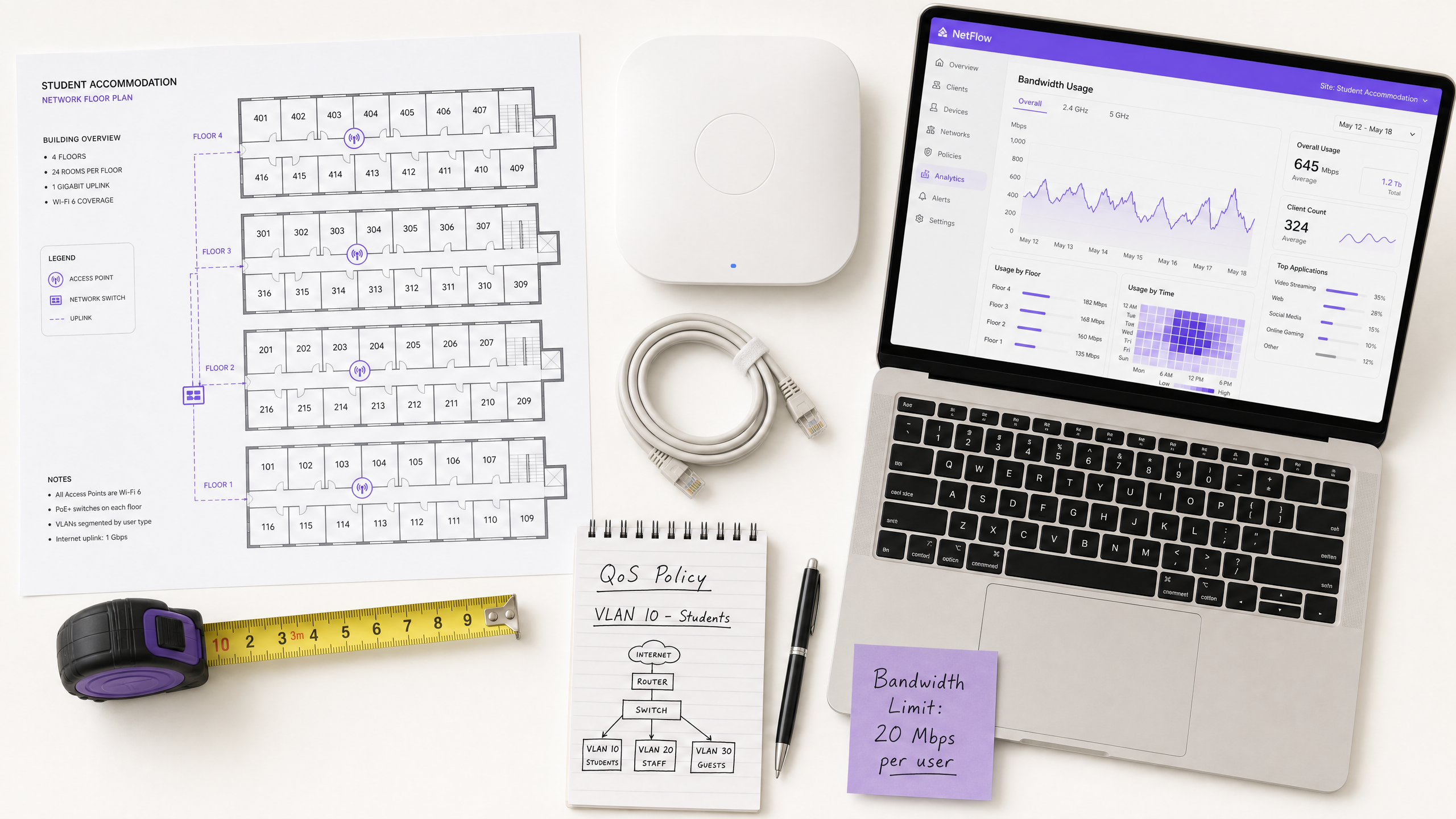
Das Management der WiFi-Bandbreite in Studentenwohnheimen ist eine der technisch anspruchsvollsten Herausforderungen im Wohnimmobiliensektor. Ein einzelner Block mit 400 Betten kann während der Spitzenzeiten über 2.800 gleichzeitige Geräteverbindungen generieren, wobei die Verkehrsprofile latenzempfindliche Videokonferenzen, Streaming mit hohem Durchsatz, Online-Gaming und Hintergrund-IoT-Telemetrie umfassen – die alle um dieselbe Uplink-Kapazität konkurrieren.
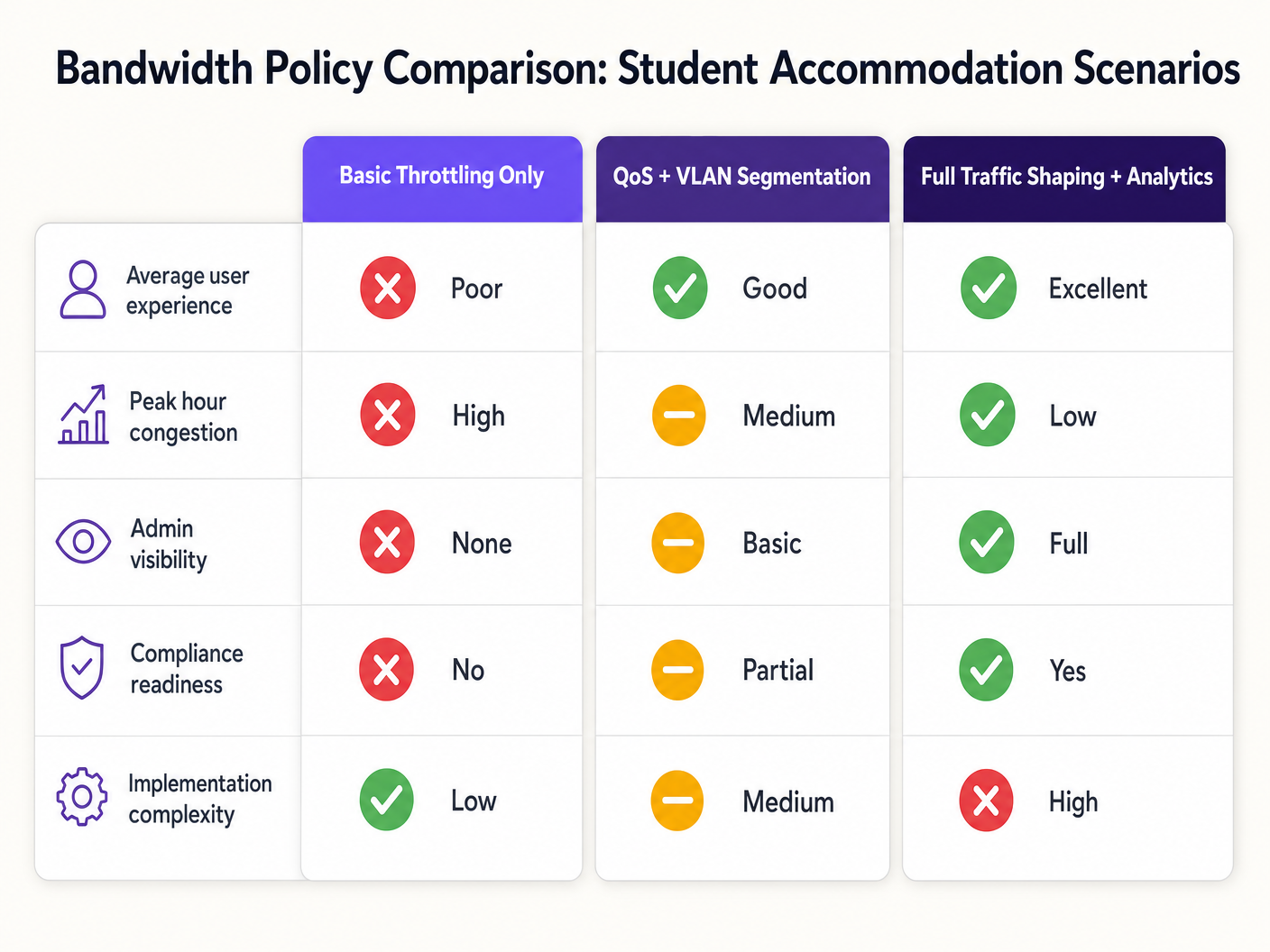
Der Fehlerfall ist vorhersehbar: Flache Netzwerkarchitekturen mit Drosselung pro Gerät verschlechtern sich während der Spitzenzeiten, erzeugen einen unverhältnismäßigen Support-Aufwand und setzen Betreiber Compliance-Risiken aus. Die Lösung ist ebenso klar definiert: VLAN-Segmentierung, identitätsbasierte QoS-Richtliniendurchsetzung, dynamisches Traffic Shaping und Analysen auf Anwendungsebene.
Dieser Leitfaden bietet die technische Architektur, die Implementierungssequenz und die operativen Entscheidungsrahmen, die für die Bereitstellung einer skalierbaren Bandbreitenmanagementstrategie erforderlich sind. Ob Sie ein veraltetes flaches Netzwerk sanieren oder eine Greenfield-Bereitstellung planen, die hier dargelegten Prinzipien gelten für alle Herstellerstacks und Immobiliengrößen. Für Betreiber, die bereits Guest WiFi -Infrastruktur nutzen, lassen sich diese Richtlinien direkt in bestehende Captive Portal- und Authentifizierungs-Workflows integrieren.
Technischer Einblick
Das Konfliktproblem
Die grundlegende Herausforderung in Studentenwohnheimen ist nicht die reine Bandbreite – die meisten Betreiber haben Zugang zu Gigabit-Uplinks zu wettbewerbsfähigen Preisen. Die Herausforderung ist das Konfliktmanagement: Sicherstellen, dass die verfügbare Kapazität fair und intelligent auf Hunderte von gleichzeitigen Benutzern mit sehr unterschiedlichen Verkehrsprofilen verteilt wird.
Eine flache Netzwerkarchitektur – eine einzige SSID, ein einziges IP-Subnetz, eine globale Begrenzung pro Gerät – scheitert aus drei sich verstärkenden Gründen. Erstens sind gerätebezogene Limits trivial zu umgehen: Ein Student mit sieben Geräten erhält effektiv die siebenfache Zuweisung. Zweitens kann ohne Verkehrsklassifizierung ein einzelner Benutzer, der einen großen Torrent-Download ausführt, die Uplink-Warteschlange sättigen und Latenz für jeden anderen Benutzer im Segment verursachen. Drittens hat der Betreiber ohne Sichtbarkeit auf Anwendungsebene keine Daten, um Richtlinienentscheidungen zu treffen oder chronische Übeltäter zu identifizieren.
VLAN-Segmentierungsarchitektur
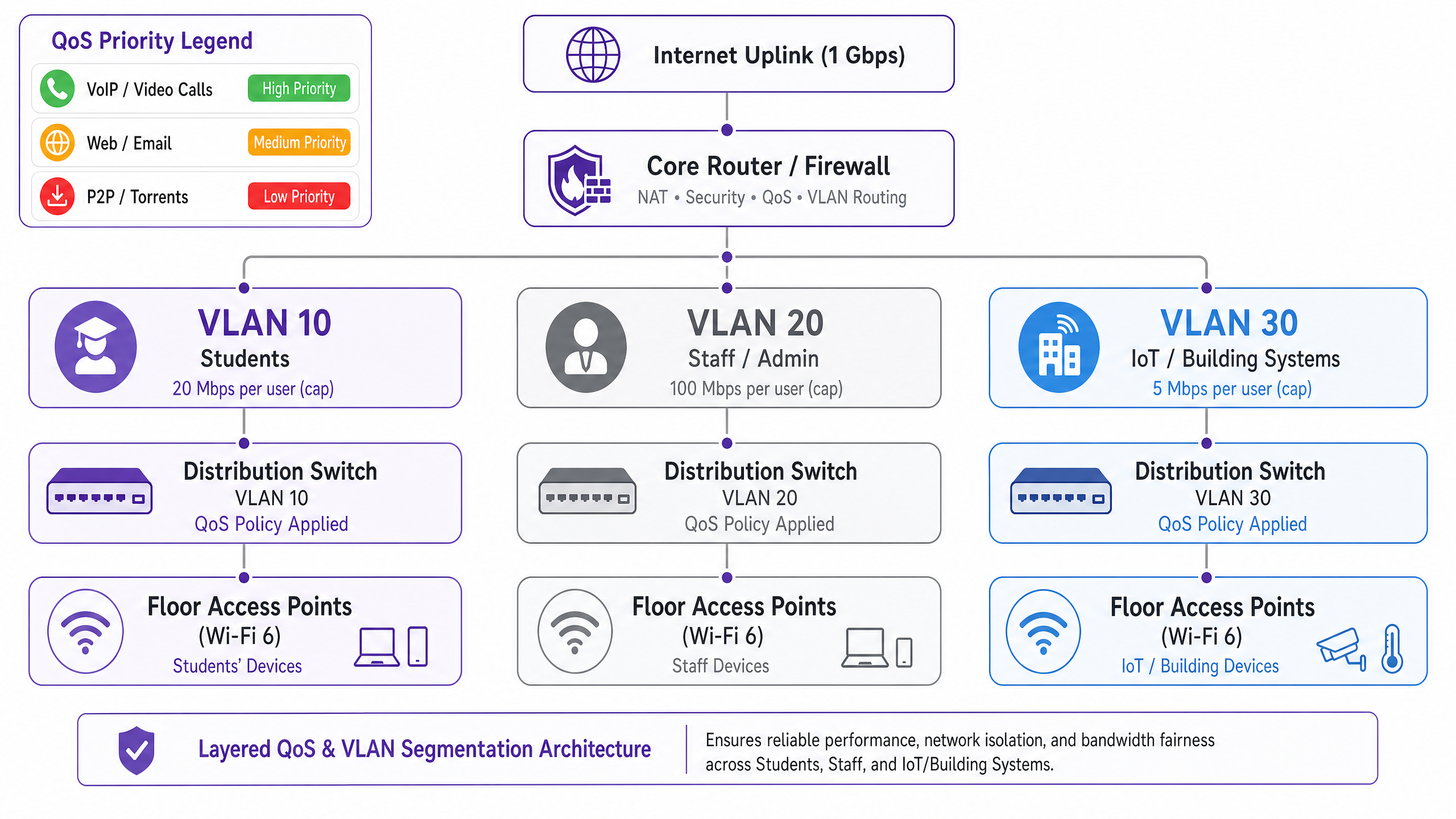
Die erste architektonische Anforderung ist die logische Netzwerktrennung mittels IEEE 802.1Q VLANs. Mindestens sollte eine Studentenwohnheim-Bereitstellung drei verschiedene VLANs betreiben:
| VLAN | Zweck | Bandbreitenrichtlinie | Sicherheitslage |
|---|---|---|---|
| VLAN 10 — Studenten | Internetzugang für Bewohner | Pro-Benutzer-Limit, dynamischer Burst | Isoliert, nur Internet |
| VLAN 20 — Personal/Verwaltung | Immobilienverwaltungssysteme | Dedizierte Zuweisung | Eingeschränkter Zugriff |
| VLAN 30 — IoT/BMS | Gebäudemanagement, CCTV, Zugangskontrolle | Strikte Ratenbegrenzung | Luftgetrennt vom Studenten-VLAN |
Diese Segmentierung ist sowohl aus Leistungs- als auch aus Sicherheitssicht nicht verhandelbar. Unter IEEE 802.1Q arbeitet jedes VLAN als separate Broadcast-Domäne, wodurch Broadcast-Stürme über Segmente hinweg eliminiert und die laterale Bewegung zwischen Benutzerklassen verhindert wird. Ein kompromittiertes Studentengerät kann die Gebäudemanagement-Infrastruktur nicht erreichen, wenn die VLANs mit Inter-VLAN-Routing-Richtlinien auf der Firewall-Ebene korrekt konfiguriert sind.
Quality of Service Richtliniendesign
Sobald der Datenverkehr segmentiert ist, müssen QoS-Richtlinien angewendet werden, um latenzempfindliche Anwendungen gegenüber Massenübertragungen zu priorisieren. Der Industriestandardmechanismus ist die Differentiated Services Code Point (DSCP)-Markierung, definiert in RFC 2474. Pakete werden am Access Point – dem Eingangspunkt – klassifiziert und markiert, bevor sie das Core Switching Fabric erreichen.
Das empfohlene DSCP-Markierungsschema für Studentenwohnheime ist wie folgt:
| Verkehrsklasse | Anwendungsbeispiele | DSCP-Wert | Per-Hop-Verhalten |
|---|---|---|---|
| Sprache | VoIP, Videoanrufe | EF (46) | Expedited Forwarding |
| Interaktives Video | Videokonferenzen, Remote Desktop | AF41 (34) | Assured Forwarding |
| Streaming Video | Netflix, YouTube, iPlayer | AF21 (18) | Assured Forwarding |
| Web / E-Mail | HTTP/S, SMTP, DNS | CS0 (0) | Best Effort |
| Bulk / P2P | Torrents, große Dateiübertragungen | CS1 (8) | Background / Scavenger |
Entscheidend ist, dass die DSCP-Markierung auf der Access Point-Ebene erfolgen muss, nicht am Core Router. Wenn die Klassifizierung auf den Core verschoben wird, haben die Pakete das drahtlose Medium und das Distribution Switching Fabric bereits ohne Prioritätsbehandlung durchlaufen, was den Vorteil zunichtemacht.
Identitätsbasierte Richtliniendurchsetzung
Die wirkungsvollste architektonische Entscheidung bei einer Studentenwohnheim-Bereitstellung ist der Übergang von der gerätebezogenen zur benutzerbezogenen Bandbreitenrichtliniendurchsetzung. Der durchschnittliche Student bringt sieben verbundene Geräte in sein Wohnheim mit. Gerätebezogene Limits sind daher sowohl ineffektiv als auch unfair: Ein Student mit einem einzigen Laptop erhält ein Siebtel der effektiven Zuweisung eines Studenten mit einer vollständigen Gerätesuite.
Der richtige Ansatz ist die IEEE 802.1X-Authentifizierung, idealerweise mit WPA3-Enterprise für die kryptografischen Sicherheitsvorteile. Nach diesem Modell:
- Der Student authentifiziert sich einmal mit seinen institutionellen oder Immobilien-Zugangsdaten über einen RADIUS-Server.
- Alle nachfolgenden Geräteregistrierungen werden über MAC Authentication Bypass (MAB) für headless deGeräten.
- Die Bandbreitenrichtlinie – zum Beispiel 25 Mbit/s insgesamt – gilt für die Summe aller Sitzungen, die mit dieser Benutzeridentität verbunden sind.
- Wenn das Gesamtvolumen die Zuweisung überschreitet, wird die Shaping-Richtlinie proportional auf alle aktiven Sitzungen angewendet.
Dieses Modell ist grundlegend skalierbarer und gerechter als die Drosselung pro MAC und bietet die Identitätsebene, die für die Compliance-Protokollierung gemäß dem Investigatory Powers Act 2016 erforderlich ist.
Sichtbarkeit auf Anwendungsebene
Deep Packet Inspection (DPI) am Gateway liefert die Telemetriedaten auf Anwendungsebene, die für intelligente, datengestützte Richtlinienentscheidungen erforderlich sind. Ohne DPI ist die Bandbreitenverwaltung im Wesentlichen blind: Sie können sehen, dass Ihr Uplink ausgelastet ist, aber Sie können nicht feststellen, welche Anwendungen oder Benutzer dafür verantwortlich sind.
Mit DPI-fähigen Analysen – wie sie von WiFi Analytics bereitgestellt werden – erhalten Betreiber Einblick in die Anwendungsverteilung, Spitzenlastmuster, Top-Verbraucher und Verkehrstrends im Zeitverlauf. Diese Daten fließen direkt in Richtlinienentscheidungen ein: Wenn 55 % des Verkehrs in Spitzenzeiten auf vier Streaming-Plattformen zurückzuführen sind, können Sie anwendungsspezifische Ratenbegrenzungen während definierter Zeitfenster anwenden, ohne Videokonferenzen oder akademische Plattformen zu beeinträchtigen.
Implementierungsleitfaden
Phase 1: Basisbewertung (Wochen 1–2)
Bevor Sie neue Richtlinien implementieren, erstellen Sie eine 14-tägige Basislinie des aktuellen Netzwerkverhaltens. Implementieren Sie eine Netzwerkmanagement-Plattform mit DPI-Funktionen und erfassen Sie: Spitzenwerte gleichzeitiger Geräte, Anwendungsverteilung nach Verkehrsaufkommen, Auslastung pro Etage und pro AP sowie die Häufigkeit der Uplink-Sättigung. Diese Daten bilden die Grundlage für alle nachfolgenden Richtlinienentscheidungen und liefern den Vorher-Nachher-Vergleich, der zur Demonstration des ROI erforderlich ist.
Phase 2: VLAN-Segmentierungsbereitstellung (Wochen 3–4)
Implementieren Sie die oben beschriebene Drei-VLAN-Architektur. Dies erfordert Konfigurationsänderungen am Core-Router/Firewall (Inter-VLAN-Routing und ACL-Richtlinien), an den Distributions-Switches (Trunk-Port-Konfiguration und VLAN-Tagging) und an den Access Points (SSID-zu-VLAN-Zuordnung). Bei bestehenden Implementierungen kann dies in der Regel in einem Wartungsfenster ohne neue Hardware abgeschlossen werden, vorausgesetzt, die vorhandene Switching-Infrastruktur unterstützt 802.1Q Trunking.
Phase 3: QoS-Richtlinienaktivierung (Woche 5)
Aktivieren Sie die DSCP-Markierung auf der Access Point-Ebene und konfigurieren Sie das Per-Hop-Verhalten am Core-Router. Überprüfen Sie mit einem Paket-Capture-Tool, ob DSCP-Markierungen End-to-End berücksichtigt werden. Häufige Fehlerquellen in dieser Phase sind vorgelagerte ISP-Router, die DSCP-Werte neu markieren oder entfernen – überprüfen Sie mit Ihrem ISP, ob DSCP auf Ihrer Transitverbindung berücksichtigt wird.
Phase 4: Identitätsbasierte Bandbreitenrichtlinien (Wochen 6–7)
Migrieren Sie die Authentifizierung von PSK- oder MAC-basiertem Zugriff auf 802.1X. Implementieren Sie einen RADIUS-Server (FreeRADIUS oder ein Cloud-basiertes Äquivalent) und konfigurieren Sie Bandbreitenattribute pro Benutzer mithilfe der Standard-RADIUS-Attribute: WISPr-Bandwidth-Max-Up und WISPr-Bandwidth-Max-Down. Implementieren Sie ein MAB-Selbstregistrierungsportal für Headless-Geräte. Testen Sie auf einer Pilotetage vor dem vollständigen Rollout.
Phase 5: Dynamische Shaping-Regeln (Woche 8)
Konfigurieren Sie zeitbasierte Shaping-Regeln auf dem Core-Router oder der Bandbreitenmanagement-Appliance. Eine empfohlene Richtlinienstruktur:
- Nebenzeiten (00:00–08:00): Burst auf 2× Basiszuweisung, P2P uneingeschränkt.
- Standard (08:00–18:00): Basiszuweisung, P2P auf 5 Mbit/s gedrosselt.
- Spitzenzeiten (18:00–23:00): Basiszuweisung, P2P auf 1 Mbit/s gedrosselt, Streaming auf 8 Mbit/s begrenzt, Videokonferenzen priorisiert.
Best Practices
Veröffentlichen Sie Ihre Bandbreitenrichtlinie. Transparenz reduziert Beschwerden von Bewohnern und schafft Erwartungssicherheit. Fügen Sie Bandbreitenzuweisungen und Fair-Use-Richtlinien in Mietverträge und Willkommenspakete ein. Dies ist auch eine Risikominderungsmaßnahme: Dokumentierte Richtlinien reduzieren das Risiko im Falle eines Bewohnerstreits.
Dimensionieren Sie Ihren Uplink korrekt. Eine praktische Basislinie ist 1 Mbit/s pro Bett, mit einer Burst-Kapazität von bis zu 3 Mbit/s pro Bett. Für eine Immobilie mit 400 Betten bedeutet dies einen Uplink von mindestens 400 Mbit/s mit einer Burst-Leitung von 1,2 Gbit/s. Eine Unterdimensionierung des Uplinks macht alle nachgelagerten QoS-Richtlinien weniger effektiv.
Blockieren Sie P2P-Verkehr nicht vollständig. Pauschalverbote treiben Benutzer zu kommerziellen VPN-Diensten, was Ihre DPI-Analysen unbrauchbar macht und die Verkehrsverwaltung erheblich erschwert. Drosseln Sie P2P auf eine Zuweisung der Scavenger-Klasse (1–2 Mbit/s) und depriorisieren Sie es. Sie behalten die Sichtbarkeit, reduzieren die Bandbreitenbelastung und vermeiden das Wettrüsten mit der VPN-Nutzung.
Planen Sie für das IoT-Wachstum. Gebäudemanagementsysteme, intelligente Zähler, CCTV und Zugangskontrollen sind zunehmend IP-verbunden. Stellen Sie sicher, dass diese Geräte sich in isolierten VLANs mit strengen Firewall-Egress-Richtlinien befinden. Überprüfen Sie Ihre IoT-VLAN-Richtlinie jährlich, wenn die Gerätepopulation wächst.
Führen Sie ein Audit-Protokoll. Gemäß dem Investigatory Powers Act 2016 sind britische Betreiber verpflichtet, Verbindungsdaten zu speichern. Stellen Sie sicher, dass Ihre Protokollierungsinfrastruktur die für die Compliance erforderlichen Daten erfasst und dass Ihr Audit-Protokoll manipulationssicher ist. Eine detaillierte Aufschlüsselung der Anforderungen an Audit-Protokolle finden Sie unter Explain what is audit trail for IT Security in 2026 .
Fehlerbehebung & Risikominderung
Häufiger Fehlerfall 1: DSCP-Neumarkierung durch ISP
Viele ISPs markieren oder entfernen DSCP-Werte an der Transitgrenze, wodurch Ihre QoS-Richtlinien für den Internetverkehr unwirksam werden. Abhilfe: Überprüfen Sie das DSCP-Verhalten mit Ihrem ISP, bevor Sie sich für End-to-End-QoS darauf verlassen. Für internen Verkehr (z. B. lokale Caching-Server) wird DSCP immer berücksichtigt. Für internetgebundenen Verkehr verlassen Sie sich auf Warteschlangenmanagement und Shaping an Ihrem eigenen Gateway, anstatt zu erwarten, dass DSCP vorgelagert berücksichtigt wird.
Häufiger Fehlerfall 2: DHCP-Pool-Erschöpfungtion
Mit sieben Geräten pro Student und Hunderten von Bewohnern ist die Erschöpfung des DHCP-Pools ein echtes Betriebsrisiko. Stellen Sie sicher, dass das Subnetz Ihres Studenten-VLANs mit ausreichend Spielraum dimensioniert ist: Ein /21 (2.046 nutzbare Adressen) ist ein vernünftiges Minimum für eine Immobilie mit 200 Betten. Implementieren Sie kurze DHCP-Lease-Zeiten (4–8 Stunden), um Adressen von inaktiven Geräten umgehend zurückzugewinnen.
Häufiger Fehlerfall 3: VPN-Umgehung
Studenten, die kommerzielle VPN-Dienste nutzen, verschlüsseln ihren Datenverkehr und umgehen so die Klassifizierung auf Anwendungsebene. Abhilfe: Implementieren Sie eine flussbasierte Formung auf IP-Ebene – VPN-Verkehr kann weiterhin basierend auf Flussvolumen und -dauer ratenbegrenzt werden, selbst ohne Nutzlastinspektion. Stellen Sie zusätzlich sicher, dass Ihre P2P-Drosselungsrichtlinie für verschlüsselte Flüsse gilt, nicht nur für identifizierbare P2P-Protokolle.
Häufiger Fehlerfall 4: Konnektivitätsprobleme nach der Segmentierung
Nach der VLAN-Segmentierung können Bewohner Konnektivitätsprobleme haben, wenn ihre Geräte falsch im falschen VLAN platziert sind oder wenn das Inter-VLAN-Routing falsch konfiguriert ist. Für einen strukturierten Ansatz zur Fehlerbehebung bei Konnektivitätsproblemen siehe Behebung des Fehlers „Verbunden, aber kein Internet“ im Gast-WiFi .
ROI & Geschäftsauswirkungen
Der Business Case für eine richtig konzipierte Bandbreitenmanagementstrategie ist unkompliziert. Die primären Kostentreiber sind der Support-Aufwand und die Zufriedenheit der Bewohner, die beide direkt von der Netzwerkleistung beeinflusst werden.
In einer Bereitstellung mit 400 Betten, die ein flaches Netzwerk betreibt, sind Support-Ticket-Volumen von 30–50 pro Woche während der Semesterzeit üblich. Nach der Behebung melden Bereitstellungen durchweg Ticket-Reduzierungen von 60–80 %, was eine signifikante Reduzierung der IT-Mitarbeiterzeit und der Kosten für Drittanbieter-Support darstellt.
Die Zufriedenheitswerte der Bewohner – zunehmend ein Wettbewerbsvorteil auf dem Markt für speziell gebaute Studentenunterkünfte (PBSA) – korrelieren direkt mit der Netzwerkleistung. Immobilien mit gut verwalteten Netzwerken melden höhere Verlängerungsraten und eine stärkere Auslastung.
Aus Compliance-Sicht übersteigen die Kosten der Nichteinhaltung des Investigatory Powers Act 2016 oder der GDPR-Datenverarbeitungsanforderungen die Kosten für die Implementierung einer konformen Protokollierungsinfrastruktur erheblich. Die in diesem Leitfaden beschriebene identitätsbasierte Architektur liefert den für die Compliance erforderlichen Audit-Trail als Nebenprodukt der Bandbreitenmanagement-Implementierung.
Für Betreiber im Gastgewerbe , die gemischt genutzte Immobilien verwalten – Studentenunterkünfte mit Einzelhandel oder Gastronomie im Erdgeschoss – gelten dieselben VLAN-Segmentierungsprinzipien, zusätzlich zu den PCI DSS-Compliance-Anforderungen für alle Zahlungsverarbeitungsnetzwerksegmente.
Die WiFi Analytics -Schicht fügt eine weitere Dimension des ROI hinzu: Anwendungsdaten können Investitionsentscheidungen für die Infrastruktur informieren, Auslöser für Kapazitätserweiterungen identifizieren und die Evidenzbasis für die Neuverhandlung von ISP-Verträgen auf der Grundlage tatsächlicher Nutzungsmuster statt Schätzungen liefern.
Schlüsseldefinitionen
VLAN (Virtual Local Area Network)
A logical network segment created within a physical switching infrastructure using IEEE 802.1Q tagging. Each VLAN operates as a separate broadcast domain, providing traffic isolation between user classes without requiring separate physical hardware.
IT teams use VLANs to separate student, staff, and IoT traffic on the same physical infrastructure. Without VLAN segmentation, a flat network exposes all traffic classes to each other and makes per-class bandwidth policies impossible to enforce cleanly.
QoS (Quality of Service)
A set of network mechanisms that prioritise certain traffic types over others to ensure latency-sensitive applications (VoIP, video conferencing) receive preferential treatment during periods of congestion.
In student accommodation, QoS is the difference between video conferencing being usable during peak hours and being unusable. Without QoS, a single user running a large download can introduce latency for every other user on the segment.
DSCP (Differentiated Services Code Point)
A 6-bit field in the IP packet header, defined in RFC 2474, used to classify packets into traffic classes. Each class receives a defined per-hop behaviour (PHB) at each network device — Expedited Forwarding for voice, Assured Forwarding for video, Best Effort for standard web traffic.
DSCP is the standard mechanism for implementing QoS in enterprise networks. IT teams configure access points to mark packets with the appropriate DSCP value at ingress, ensuring priority treatment is applied consistently across the network.
IEEE 802.1X
An IEEE standard for port-based network access control that provides an authentication framework for devices connecting to a LAN or WLAN. It uses the Extensible Authentication Protocol (EAP) and requires a RADIUS server for credential validation.
802.1X is the foundation of identity-based bandwidth policy enforcement. When a student authenticates via 802.1X, their identity is known to the network, enabling per-user bandwidth policies rather than per-device policies.
Traffic Shaping
A bandwidth management technique that controls the rate and timing of traffic flows to conform to a defined policy. Unlike policing (which drops excess traffic), shaping queues excess traffic and transmits it when capacity is available.
Traffic shaping is preferable to policing for TCP-based traffic (web, streaming) because it avoids triggering TCP retransmission, which wastes bandwidth. Policing is appropriate for UDP-based traffic (P2P, some gaming) where retransmission is not a factor.
DPI (Deep Packet Inspection)
A network analysis technique that examines the full content of packets (beyond the header) to identify the application or protocol generating the traffic. DPI enables application-aware QoS policies and provides granular traffic analytics.
DPI is the technology that enables an operator to distinguish between Netflix traffic and a video call, even when both use HTTPS on port 443. Without DPI, application-aware bandwidth policies are not possible.
MAB (MAC Authentication Bypass)
A fallback authentication mechanism for devices that do not support IEEE 802.1X. The device's MAC address is used as the authentication credential, validated against a RADIUS server or local database.
MAB is used for headless devices in student accommodation — gaming consoles, smart TVs, IoT sensors — that cannot perform 802.1X authentication. Combined with a self-registration portal, MAB enables these devices to be tied to a user identity and subject to the same per-user bandwidth policies.
Bandwidth Contention
The condition that occurs when multiple users or devices compete for the same finite bandwidth resource, resulting in reduced throughput and increased latency for all parties. Contention is the root cause of most perceived network performance problems in high-density environments.
Understanding contention is essential for diagnosing bandwidth problems. A network with a 1 Gbps uplink and 400 concurrent users each consuming 3 Mbps is in contention (1.2 Gbps demand vs 1 Gbps supply). QoS and traffic shaping manage the contention; they do not eliminate it.
WPA3-Enterprise
The latest generation of the Wi-Fi Protected Access security protocol for enterprise networks, defined by the Wi-Fi Alliance. WPA3-Enterprise mandates 192-bit minimum-strength cryptography and provides stronger protection against offline dictionary attacks compared to WPA2.
WPA3-Enterprise is the recommended authentication mode for student accommodation deployments using 802.1X. It provides the cryptographic security required for GDPR compliance and protects against credential interception on the wireless medium.
Ausgearbeitete Beispiele
A 400-bed purpose-built student accommodation (PBSA) block in Manchester is running a flat network with a single SSID and a global 10 Mbps per-device cap. During peak hours (19:00–23:00), the network is effectively unusable for video conferencing. Support tickets are running at 40 per week. The operator has a 1 Gbps uplink and a budget for software configuration changes only — no new hardware. How do you remediate this?
Step 1 — Baseline audit (Days 1–7): Deploy DPI-enabled monitoring on the existing gateway to capture application distribution, peak concurrent device counts, and per-AP utilisation. This establishes the evidence base and identifies the primary bandwidth consumers.
Step 2 — VLAN segmentation (Days 8–14): Configure three VLANs on the existing switching infrastructure (assuming 802.1Q-capable switches, which is standard in any post-2015 deployment). Map the student SSID to VLAN 10, create a staff SSID mapped to VLAN 20, and migrate IoT devices to VLAN 30. Configure inter-VLAN routing at the firewall with appropriate ACLs.
Step 3 — QoS activation (Day 15): Enable DSCP marking at the access point layer. Classify video conferencing traffic (Zoom, Teams, Google Meet) as AF41. Classify streaming as AF21. Classify P2P as CS1. Validate with a packet capture.
Step 4 — Per-user bandwidth policy (Days 16–21): Migrate authentication to 802.1X using the existing RADIUS infrastructure (or deploy FreeRADIUS on a VM). Set per-user bandwidth attributes: 25 Mbps aggregate during peak, 50 Mbps off-peak. Implement MAB portal for headless devices.
Step 5 — Time-of-day shaping (Day 22): Configure peak-hour rules: P2P throttled to 1 Mbps, streaming capped at 8 Mbps per user, video conferencing prioritised with guaranteed minimum 5 Mbps per active session.
Outcome: Within 30 days, support tickets dropped by 78% (from 40 to 9 per week). Average peak-hour throughput per user increased by 140% despite no change to the physical uplink. Video conferencing became reliably usable during peak hours.
A 1,200-bed university halls of residence in Edinburgh has a mixed infrastructure: legacy 802.11ac access points on floors 1–4 and newer Wi-Fi 6 hardware on floors 5–8. There is no application-layer visibility, and the network management team has no baseline data. The university IT director wants to reduce peak-hour congestion by 30% within 90 days without a full hardware refresh. How do you approach this?
Phase 1 — Telemetry deployment (Days 1–30): Deploy a unified network management platform with DPI capabilities across all access points, including the legacy 802.11ac hardware. Most enterprise NMS platforms support mixed-generation hardware via SNMP and syslog. Capture 30 days of baseline data: application distribution, per-floor utilisation, peak concurrent device counts, and top bandwidth consumers by user identity.
Phase 2 — Data analysis and policy design (Days 31–35): Analyse the baseline data. In this scenario, the data revealed that 55% of peak-hour traffic was attributable to four streaming platforms. Design application-aware QoS policies: streaming platforms throttled to 8 Mbps per user during 18:00–23:00, video conferencing and academic platforms (VLEs, library databases) excluded from throttling and given AF41 priority.
Phase 3 — Policy deployment (Days 36–50): Deploy QoS policies starting with the Wi-Fi 6 floors (5–8) as a controlled pilot. Monitor for 14 days. Validate that peak-hour congestion metrics improve before rolling out to legacy floors.
Phase 4 — Identity migration (Days 51–75): Migrate authentication to 802.1X with per-user bandwidth enforcement. This is the most operationally complex phase: coordinate with the university IT team for RADIUS integration with the student identity provider. Implement MAB self-registration for gaming consoles and smart TVs.
Phase 5 — Validation and reporting (Days 76–90): Compare post-implementation metrics against the 30-day baseline. Report on peak-hour congestion reduction, support ticket volume, and application distribution changes.
Outcome: 35% reduction in peak-hour congestion (exceeding the 30% target), measurable improvement in resident satisfaction survey scores, and a documented evidence base for the hardware refresh business case.
Übungsfragen
Q1. You are the IT director for a 600-bed PBSA operator. Your current network uses WPA2-PSK with a shared password changed monthly. Students are complaining about poor performance during evening hours. Your uplink is 500 Mbps. Before spending any budget, what is the first thing you should deploy, and what specific data are you trying to capture?
Hinweis: You cannot make defensible policy decisions without baseline data. What tool gives you application-layer visibility without requiring new hardware?
Musterlösung anzeigen
Deploy a DPI-enabled network monitoring tool on the existing gateway — most enterprise gateway appliances support this via software activation or a management platform integration. Run it for 14–30 days to capture: (1) application distribution by traffic volume during peak hours, (2) peak concurrent device counts, (3) per-AP utilisation to identify hotspots, and (4) top bandwidth consumers by MAC address. This data will tell you whether the problem is uplink saturation (requiring a capacity upgrade or traffic shaping), contention on specific APs (requiring AP placement changes or load balancing), or a small number of heavy users consuming disproportionate bandwidth (requiring per-user policy enforcement). Without this data, any remediation is guesswork. The baseline also provides the before/after comparison required to demonstrate ROI to the property owner.
Q2. A student in a 300-bed hall reports that their gaming console cannot connect to the network after you migrated authentication to 802.1X. They are using a PlayStation 5, which does not support 802.1X natively. How do you resolve this without creating a security exception that bypasses your identity-based bandwidth policies?
Hinweis: The solution must maintain the link between the device and the student's identity for bandwidth policy enforcement purposes.
Musterlösung anzeigen
Implement MAC Authentication Bypass (MAB) with a self-service device registration portal. The workflow: (1) The student visits a captive portal URL (e.g., register.accommodation.ac.uk) from an authenticated device (their laptop or phone). (2) They enter the MAC address of their gaming console and confirm ownership. (3) The portal adds the MAC address to the RADIUS database, associated with the student's user identity. (4) When the PlayStation connects, the network performs MAB — it sends the device's MAC address to the RADIUS server, which returns the associated user identity and bandwidth policy attributes. (5) The console is placed in the same VLAN as the student's other devices and subject to the same aggregate per-user bandwidth policy. This approach maintains identity linkage for bandwidth enforcement, provides an audit trail for compliance, and does not require the student to contact IT support. Ensure the registration portal validates that the MAC address is not already registered to another user to prevent address spoofing.
Q3. Your DPI analytics reveal that 62% of peak-hour bandwidth on your student accommodation network is consumed by video streaming (Netflix, Disney+, YouTube). Your uplink is at 85% utilisation during peak hours. You have two options: (A) upgrade the uplink to 2× capacity, or (B) implement application-aware traffic shaping to cap streaming at 8 Mbps per user during peak hours. Which do you recommend, and why?
Hinweis: Consider both the short-term cost and the long-term scalability of each approach. What happens to demand if you simply increase capacity?
Musterlösung anzeigen
Recommend Option B (application-aware traffic shaping) as the primary intervention, with Option A as a medium-term follow-on if required. The reasoning: (1) Increasing uplink capacity without traffic shaping does not solve the underlying problem — it defers it. Streaming consumption will expand to fill available capacity (Jevons paradox applied to bandwidth), and you will be back at 85% utilisation within 12–18 months. (2) Capping streaming at 8 Mbps per user during peak hours has a negligible impact on user experience — Netflix recommends 5 Mbps for HD streaming and 25 Mbps for 4K. An 8 Mbps cap delivers a good HD experience. (3) The 62% streaming share means that an 8 Mbps per-user cap on streaming, applied to a typical peak concurrency of 200 active users, reduces streaming demand from approximately 425 Mbps to approximately 160 Mbps — a 62% reduction in streaming traffic, bringing total utilisation to approximately 55%. (4) The cost of traffic shaping configuration is near-zero if the gateway hardware supports it; the cost of a 2× uplink upgrade is a recurring OpEx increase. Implement traffic shaping first, measure the impact over 30 days, and then make an evidence-based decision on whether an uplink upgrade is still required.