
SonicWall TZ and SonicWave Integration with Purple WiFi
Diese technische Referenz beschreibt die Integration von SonicWall TZ Firewalls und SonicWave APs mit der Purple WiFi Plattform. Sie bietet konkrete Konfigurationsschritte für die Captive Portal Weiterleitung, Walled-Garden-Ausnahmen, 802.1X-Authentifizierung und dynamische VLAN-Steuerung mittels Private Pre-Shared Keys (PPSK).
Diesen Leitfaden anhören
Podcast-Transkript ansehen
Executive Summary
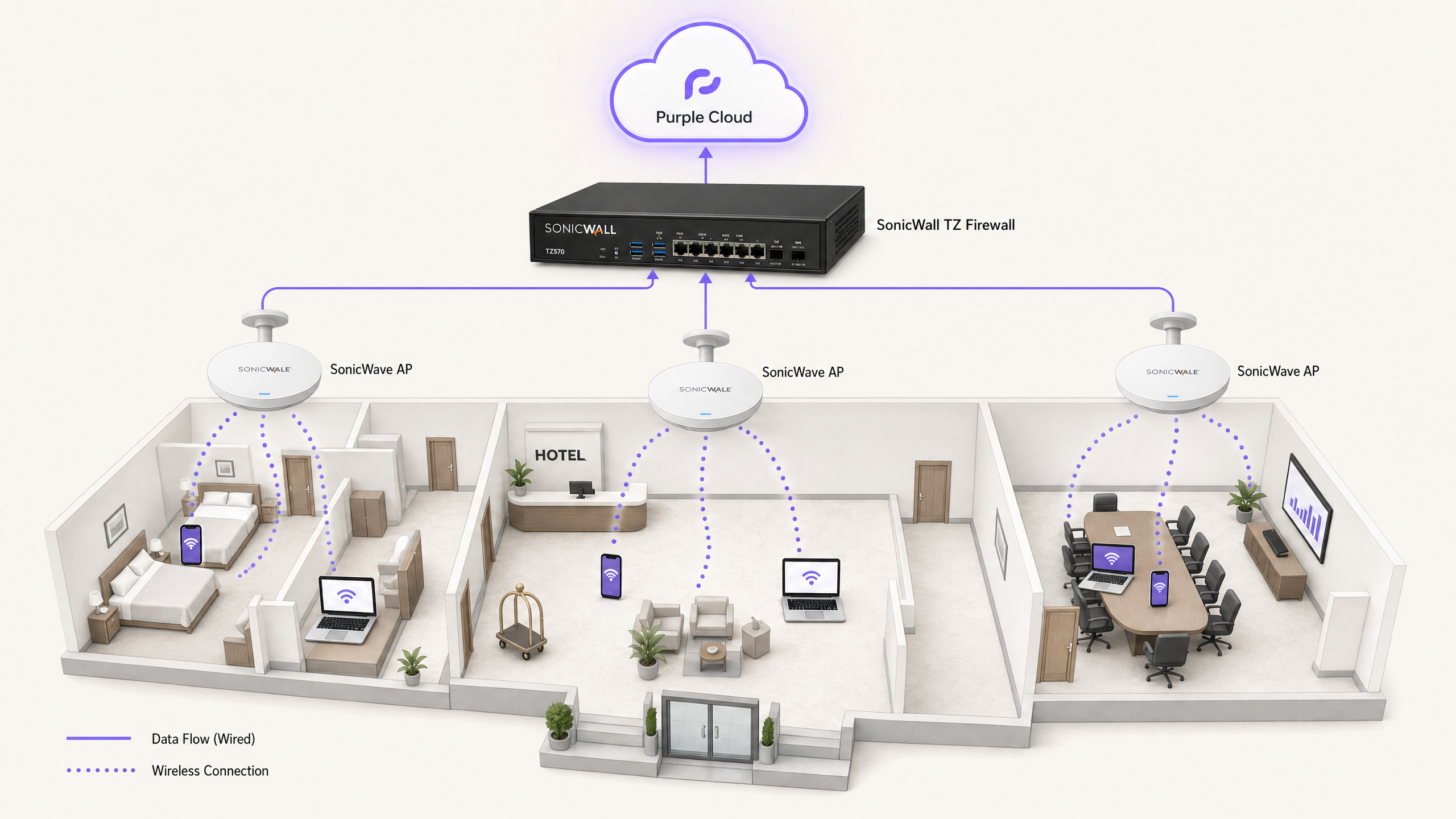
Die Integration der SonicWall-Netzwerkinfrastruktur mit dem Cloud-Overlay von Purple bietet eine Zugriffskontrolle der Enterprise-Klasse sowie eine hochentwickelte Erfassung von First-Party-Daten. Dieser Leitfaden behandelt die technische Implementierung von vier verschiedenen Anwendungsfällen: Guest WiFi mit Captive Portal Weiterleitung, Walled-Garden-Ausnahmen, sicheres Staff WiFi mittels 802.1X und Multi-Tenant-Isolierung über SonicWall Private Pre-Shared Keys (PPSK) mit dynamischer VLAN-Steuerung.
Wir verarbeiten jährlich 440 Millionen Logins an über 80.000 Live-Standorten. Die unten beschriebene Architektur hat sich in großem Maßstab im Gastgewerbe, im Einzelhandel und im öffentlichen Sektor bewährt. Sie ermöglicht es Ihnen, Ihre bestehende SonicWall-Hardware beizubehalten und gleichzeitig das Identitätsmanagement, das Hosting von Splash-Pages und die RADIUS-Authentifizierung in die Purple Cloud auszulagern.
Technical Deep-Dive
Die Integration basiert auf zwei primären Mechanismen: Lightweight Hotspot Messaging (LHM) für die Captive Portal Weiterleitung und RADIUS für die 802.1X- und PPSK-Authentifizierung.
Captive Portal Redirection via LHM
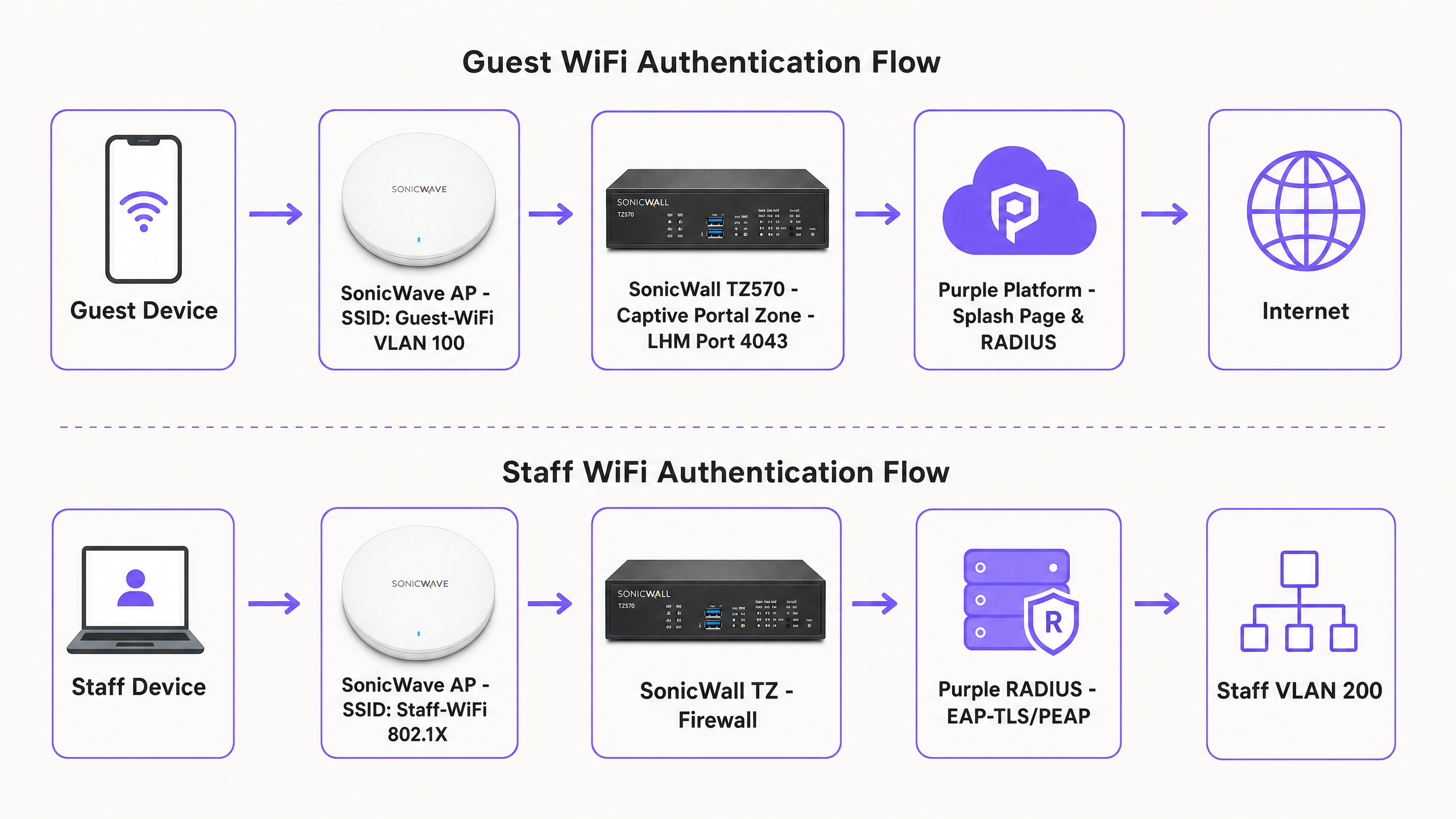
SonicOS verwendet LHM zur Verarbeitung externer Captive Portal Weiterleitungen. Wenn ein nicht authentifiziertes Gastgerät versucht, auf das Internet zuzugreifen, fängt die SonicWall TZ Firewall die HTTP-Anfrage ab und leitet den Client auf die von Purple gehostete Splash-Page weiter. Der Gast schließt den Authentifizierungs-Flow ab (z. B. Social Login, Ausfüllen eines Formulars). Purple sendet dann ein LHM-Autorisierungspaket über den TCP-Port 4043 zurück an die SonicWall. Nach Erhalt dieses Pakets aktualisiert die SonicWall ihre interne Zugriffskontrollliste und erlaubt der MAC-Adresse des Geräts den Zugriff auf das Internet.
Walled Garden Architecture
Vor der Authentifizierung befindet sich das Gastgerät in einer eingeschränkten Zone. Der Walled Garden ist die spezifische Gruppe von Fully Qualified Domain Names (FQDNs), auf die das Gerät zugreifen darf, um die Splash-Page darzustellen und den Anmeldevorgang abzuschließen. Dazu gehören das CDN von Purple (cdn.purple.ai), die Authentifizierungs-API (api.purple.ai) und die Domains, die von Drittanbietern von Identitätsdiensten wie Google Workspace, Microsoft Entra ID und Meta benötigt werden.
SonicOS implementiert Walled Gardens mithilfe von FQDN-Adressobjekten. Die Firewall führt eine dynamische DNS-Auflösung für diese Objekte durch und aktualisiert die zulässigen IP-Bereiche automatisch. Dies ist von entscheidender Bedeutung, da Identitätsanbieter und CDNs eine dynamische IP-Zuweisung verwenden; statische IP-Whitelists werden unweigerlich fehlschlagen.
Secure Staff WiFi and 802.1X
Für Mitarbeiternetzwerke fungieren SonicWave APs als 802.1X-Authenticator und leiten Anfragen an den RADIUS-Server von Purple weiter. Wir empfehlen EAP-TLS für verwaltete Geräte mit Zertifikaten oder PEAP-MSCHAPv2 für die Authentifizierung mit Benutzername/Passwort gegenüber Verzeichnissen wie Microsoft Entra ID. Nach erfolgreicher Authentifizierung gibt Purple standardmäßige RADIUS-Attribute (Tunnel-Type, Tunnel-Medium-Type und Tunnel-Private-Group-ID) zurück, um das Gerät dynamisch dem richtigen Mitarbeiter-VLAN zuzuweisen.
Multi-Tenant Isolation with PPSK
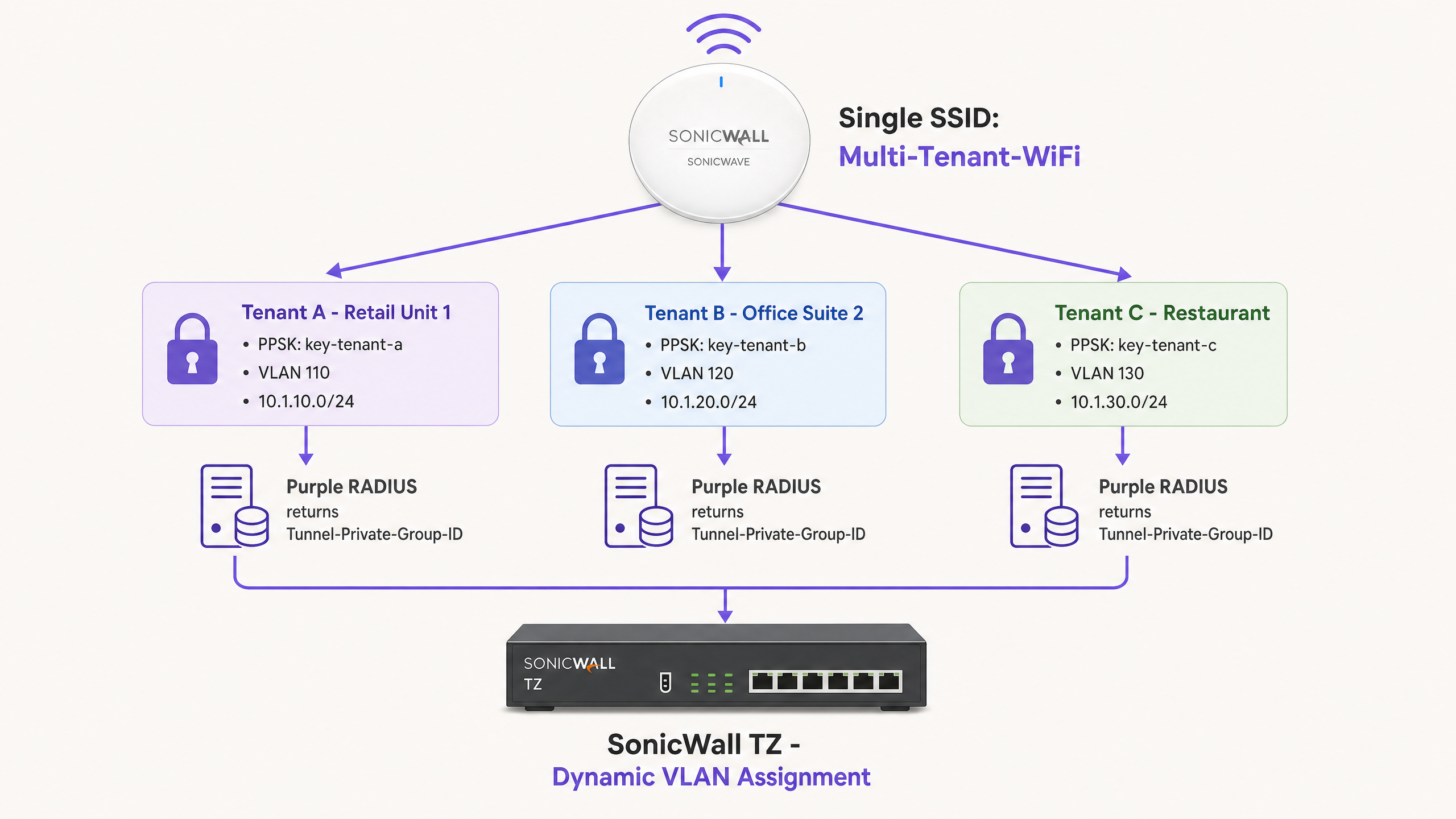
Identitätsbasierte Netzwerke machen komplexe Multi-SSID-Bereitstellungen überflüssig. Bei Verwendung von SonicWall PPSK wird eine einzige SSID (z. B. "Multi-Tenant-WiFi") am Standort ausgestrahlt. Jeder Mandant erhält ein eindeutiges Passwort. Wenn sich ein Gerät über einen bestimmten PPSK verbindet, validiert der SonicWave AP den Schlüssel mit dem RADIUS-Server von Purple. Purple identifiziert den Mandanten und gibt die zugehörige VLAN-ID zurück. Die SonicWall leitet den Datenverkehr dann in das isolierte Mandanten-VLAN.
Implementation Guide
1. Configuring the SonicWall Captive Portal (LHM)
To configure the external captive portal on a SonicWall TZ series running SonicOS 7.x:
- Navigieren Sie zu Object > Match Objects > Zones. Bearbeiten Sie die Zone, die Ihrem Gastnetzwerk zugewiesen ist (z. B. WLAN).
- Aktivieren Sie auf der Registerkarte Guest Services die Optionen Enable Guest Services und External Guest Authentication.
- Navigieren Sie zu Configure > Guest Services > General.
- Stellen Sie das Client Redirect Protocol auf HTTP ein.
- Stellen Sie die Web Server-Adresse auf
portal.purple.aiein. - Stellen Sie den Port auf
4043ein. - Stellen Sie auf der Registerkarte Auth Pages die Login URL auf die spezifische Splash-Page-URL ein, die in Ihrem Purple-Standort-Dashboard bereitgestellt wird.
- Speichern Sie die Konfiguration. SonicOS generiert automatisch eine NAT-Richtlinie und eine WAN-to-WAN-Zugriffsregel, um den TCP-Port 4043 zuzulassen. Ändern Sie diese automatisch generierten Regeln nicht.
2. Building the Walled Garden
Erstellen Sie FQDN-Adressobjekte für die erforderlichen Domains und fügen Sie diese einer Adressgruppe hinzu. Wenden Sie diese Gruppe auf eine Zulassungsregel in Ihrer Gastzone an.
Erforderliche Purple-Domains:
*.purple.ai*.purpleportal.net
OS Captive Portal Probes:
captive.apple.com(iOS/macOS)connectivitycheck.gstatic.com(Android)msftconnecttest.com(Windows)
Gängige Social-Login-Domains (Google):
accounts.google.comoauth2.googleapis.comapis.google.com*.gstatic.com
3. Configuring RADIUS for SonicWave APs
So integrieren Sie SonicWave APs mit Purple RADIUS über den Wireless Network Manager:
- Navigieren Sie zu Policies > Policy Hierarchy und wählen Sie Ihre AP-Richtlinie aus.
- Wählen Sie die Registerkarte 802.1X aus.
- Geben Sie die IP-Adresse des Purple RADIUS-Servers ein (zu finden in Ihrem Purple-Dashboard).
- Geben Sie das von Purple generierte Shared Secret ein.
- Stellen Sie den Authentication Port auf
1812und den Accounting Port auf1813ein. - Wählen Sie die entsprechende EAP-Methode basierend auf Ihrem Identitätsanbieter aus.
4. Configuring Dynamic VLAN Steering
Stellen Sie sicher, dass die Ziel-VLANs als Sub-Schnittstellen auf der SonicWall TZ Firewall existieren, bevor Sie die dynamische Zuweisung aktivieren.
Im Purple-Dashboard, weisen Sie die Benutzergruppe oder PPSK der Ziel-VLAN-ID zu. Purple gibt nach erfolgreicher Authentifizierung die folgenden Attribute zurück:
Tunnel-Type = VLAN (13)Tunnel-Medium-Type = 802 (6)Tunnel-Private-Group-ID = [VLAN-ID](z. B. "110")
Best Practices
- LHM-Port-Sichtbarkeit testen: Der TCP-Port 4043 muss aus dem Internet für die SonicWall-WAN-Schnittstelle erreichbar sein. Testen Sie dies vor der Liveschaltung mit einem externen Port-Scanner. Wenn der ISP diesen Port blockiert, wird das Autorisierungspaket verworfen und Gäste bleiben auf der Splash-Page hängen.
- VLAN-Sub-Schnittstellen vorab bereitstellen: Das dynamische VLAN-Steering schlägt geräuschlos fehl, wenn die Ziel-VLAN-Sub-Schnittstelle vor dem Authentifizierungsereignis nicht auf der SonicWall konfiguriert ist. Das Gerät fällt dann auf das standardmäßige ungetaggte VLAN zurück.
- Webbasiertes OAuth erzwingen: Stellen Sie sicher, dass Ihre Splash-Page-Konfiguration webbasierte OAuth-Flows erzwingt. Deep-Linking zu nativen Social-Media-Apps (wie der Facebook-iOS-App) unterbricht häufig die Captive Portal-Sequenz, da der Datenverkehr der nativen App durch den Walled Garden blockiert wird.
- DNS-Aktualisierungsintervalle optimieren: SonicOS resolves FQDN-Objekte periodisch. In Umgebungen mit hoher Fluktuation wie Stadien oder Verkehrsknotenpunkten sollten Sie das DNS-Aktualisierungsintervall für Walled-Garden-Objekte auf 60 Sekunden festlegen, um sicherzustellen, dass CDN-IP-Änderungen präzise nachverfolgt werden.
Fehlerbehebung & Risikominderung
Symptom: Der Gast schließt die Anmeldung auf der Splash-Page ab, hat aber keinen Internetzugang. Ursache: Das LHM-Autorisierungspaket auf TCP 4043 erreicht die SonicWall nicht. Lösung: Überprüfen Sie, ob die automatisch generierte WAN-zu-WAN-Zugriffsregel existiert. Überprüfen Sie die vorgeschalteten ISP-Router auf Port-Blockierungen. Stellen Sie sicher, dass die SonicWall-WAN-IP korrekt im Purple-Dashboard registriert ist.
Symptom: Die Splash-Page wird nicht geladen oder Social-Login-Buttons geben CORS-Fehler zurück. Ursache: Unvollständige Walled-Garden-Konfiguration. Lösung: Verbinden Sie ein Testgerät im nicht authentifizierten Zustand. Verwenden Sie die Entwicklertools des Browsers (Registerkarte „Netzwerk“), um blockierte HTTPS-Anfragen zu identifizieren. Fügen Sie die fehlerhaften Domänen als FQDN-Adressobjekte in SonicOS hinzu.
Symptom: Mitarbeitergeräte authentifizieren sich über 802.1X, erhalten jedoch eine IP-Adresse aus dem Standard-VLAN anstelle des zugewiesenen VLANs.
Ursache: Die Ziel-VLAN-Sub-Schnittstelle existiert nicht auf der SonicWall oder die RADIUS-Attribute sind fehlerhaft.
Lösung: Überprüfen Sie, ob die VLAN-Sub-Schnittstelle aktiv ist. Überprüfen Sie die Purple-RADIUS-Protokolle, um zu bestätigen, dass Tunnel-Private-Group-ID als String-Wert gesendet wird, der mit der VLAN-ID übereinstimmt.
ROI & geschäftliche Auswirkungen
Die Bereitstellung einer SonicWall-Infrastruktur mit Purple verwandelt eine standardmäßige Netzwerk-Kostenstelle in einen messbaren Geschäftswert.
Für eine Einzelhandelskette mit 200 Standorten führt der Wechsel von generischen Pre-Shared Keys zu einem gebrandeten Captive Portal in der Regel zu einer Steigerung der bekannten Kundenprofile um 40 % innerhalb von sechs Monaten. Diese First-Party-Daten lassen sich direkt in CRM-Systeme integrieren, was gezielte Marketingkampagnen ermöglicht und die Kundenbindung erhöht.
In Multi-Tenant-Umgebungen wie Coworking-Spaces oder Studentenwohnheimen eliminiert PPSK mit dynamischem VLAN-Steering den betrieblichen Aufwand für die Verwaltung dedizierter Hardware pro Mieter. Sie stellen ein physisches Netzwerk bereit und segmentieren es logisch über Identitäten. Dies reduziert die Hardware-Investitionsausgaben um bis zu 60 % bei gleichzeitiger Einhaltung einer strengen, ISO 27001-konformen Netzwerkisholierung.
Schlüsseldefinitionen
Lightweight Hotspot Messaging (LHM)
A protocol used by SonicWall to communicate with external captive portals. It handles the redirect and authorisation handshake.
Required for integrating SonicOS with cloud-managed guest WiFi platforms like Purple.
Walled Garden
A specific set of domains or IP addresses that unauthenticated devices are permitted to access.
Critical for allowing guest devices to load the splash page, access CDNs, and complete social login OAuth flows before gaining full internet access.
Private Pre-Shared Key (PPSK)
A security method where multiple unique passphrases are valid on a single SSID, with each passphrase tied to a specific user or policy.
Used in multi-tenant environments to isolate traffic without broadcasting multiple SSIDs.
Captive Network Assistant (CNA)
The built-in OS mechanism (on iOS, Android, Windows) that detects a captive portal and automatically opens a limited browser window for authentication.
If the OS probe domains (e.g., captive.apple.com) are not in the walled garden, the CNA will not trigger, and guests will think the WiFi is broken.
Dynamic VLAN Steering
The process of assigning a device to a specific VLAN based on its identity or credentials, rather than the SSID it connected to.
Managed by Purple RADIUS returning the Tunnel-Private-Group-ID attribute to the SonicWall.
FQDN Address Object
A firewall object based on a Fully Qualified Domain Name rather than a static IP address.
SonicOS resolves these objects dynamically, making them essential for robust walled garden configurations.
Identity-Based Network
A network architecture where access policies and segmentation are applied based on the authenticated user or device, rather than physical ports or SSIDs.
Achieved by combining Purple RADIUS with SonicWall PPSK and 802.1X.
Tunnel-Private-Group-ID
The standard RFC 2868 RADIUS attribute used to specify the VLAN ID for a connecting device.
Must be returned by Purple as a string value (e.g., '100') to instruct the SonicWall to steer the device.
Ausgearbeitete Beispiele
A 150-room hotel (Premier Inn) needs to provide free Guest WiFi via a splash page and a secure Staff WiFi network for housekeeping devices. They have a SonicWall TZ570 and 40 SonicWave APs. How should they segment this traffic?
Deploy two SSIDs. SSID 1: 'Guest-WiFi' mapped to VLAN 100. Configure the SonicWall WLAN zone for External Guest Authentication pointing to portal.purple.ai on TCP 4043. Configure the walled garden FQDNs for Purple and social logins. SSID 2: 'Staff-WiFi' mapped to VLAN 200 using 802.1X. Point the SonicWave AP policy to Purple's RADIUS server. Configure Purple to authenticate housekeeping devices via MAC address bypass (MAB) or PEAP-MSCHAPv2, returning Tunnel-Private-Group-ID '200'.
A coworking space manages 15 different companies sharing one open-plan office. They want to provide secure, isolated networks for each company without broadcasting 15 different SSIDs from their SonicWave APs.
Deploy a single SSID named 'Workspace-Secure' using WPA2-Enterprise with PPSK. Create 15 VLAN sub-interfaces on the SonicWall TZ firewall (e.g., VLANs 101-115). In the Purple dashboard, generate a unique PPSK for each company and map it to their specific VLAN ID. When a user connects using their company's PPSK, Purple RADIUS returns the corresponding Tunnel-Private-Group-ID, and the SonicWall steers the device into the isolated VLAN.
Übungsfragen
Q1. You have configured the SonicWall guest zone for External Guest Authentication and set the web server to portal.purple.ai. Guests are redirected to the splash page and can log in successfully, but they never gain internet access. What is the most likely cause?
Hinweis: Think about how Purple tells the SonicWall that the authentication was successful.
Musterlösung anzeigen
The LHM authorisation packet is being blocked. TCP port 4043 must be open on the SonicWall WAN interface to receive the success signal from Purple. Check upstream firewalls or ISP configurations for port blocking.
Q2. A venue wants to offer Facebook login on their splash page. You add www.facebook.com to the walled garden FQDN address group. Guests report that the Facebook login page loads, but the styling is broken and the login button does not work.
Hinweis: Modern web applications load assets from multiple domains.
Musterlösung anzeigen
The walled garden is incomplete. You must also whitelist the domains that serve Facebook's CSS, JavaScript, and API calls, specifically graph.facebook.com, connect.facebook.net, and the CDN domain (e.g., *.fbcdn.net).
Q3. You are deploying PPSK for a multi-tenant office. You configure the SSID for WPA2-Enterprise with PPSK and point the RADIUS server to Purple. You create a PPSK in Purple mapped to VLAN 50. When a user connects with that PPSK, they receive an IP address from VLAN 10 instead. Why?
Hinweis: The SonicWall needs to know where to send the traffic before the RADIUS request completes.
Musterlösung anzeigen
VLAN 50 has not been created as a sub-interface on the SonicWall TZ firewall. Dynamic VLAN steering requires the target VLAN to exist on the firewall beforehand; if it does not, the device falls back to the default untagged VLAN (in this case, VLAN 10).
Weiterlesen in dieser Reihe
CommScope Ruckus Integration mit Purple WiFi: Einrichtungs- und Konfigurationshandbuch
Dieses technische Referenzhandbuch bietet einen maßgeblichen Konfigurationsleitfaden für die Integration von CommScope Ruckus-Architekturen mit Purple WiFi. Es beschreibt Schritt-für-Schritt-Bereitstellungen für Guest WiFi Captive Portals, sicheres Mitarbeiter-WiFi über 802.1X und mandantenfähige Netzwerkisolierung mithilfe von Ruckus Dynamic PSK.
Cisco WLC and Catalyst Integration with Purple WiFi: Step-by-Step Guest Access Guide
Diese Anleitung beschreibt die schrittweise Integration von Cisco WLC und Catalyst 9800 Wireless mit Purple. Sie umfasst die Weiterleitung zum Guest WiFi Captive Portal über Central Web Authentication, sicheres Mitarbeiter-WiFi mittels 802.1X EAP-TLS sowie Multi-Tenant-Segmentierung über Cisco Identity Pre-Shared Keys (iPSK) mit dynamischer VLAN-Zuweisung. Sie richtet sich an Netzwerkarchitekten in Unternehmen und IT-Sicherheitsverantwortliche, die Cisco-Infrastrukturen im Gastgewerbe, im Einzelhandel und in großen öffentlichen Veranstaltungsorten bereitstellen.
OpenWrt Custom Firmware Integration with Purple WiFi
Dieses Handbuch bietet das vollständige Integrations-Playbook für die Bereitstellung von OpenWrt Custom Firmware mit Purple WiFi. Es deckt die Konfiguration des CoovaChilli Captive Portal, die Verwaltung des iptables Walled Garden, sicheres Mitarbeiter-WiFi über 802.1X mit hostapd sowie die mandantenfähige PPSK-Segmentierung mit dynamischer VLAN-Zuweisung ab. Damit erhalten IT-Teams die genauen Konfigurationsschritte, die für den Aufbau eines identitätsbasierten Netzwerks auf jeder OpenWrt-fähigen Hardware erforderlich sind.