
Die besten WiFi-Analyse-Tools zur Fehlerbehebung bei Kanalüberlappungen
Dieser umfassende Leitfaden bietet IT-Managern und Netzwerkarchitekten umsetzbare Strategien zur Identifizierung und Behebung von WiFi-Kanalüberlappungen in Umgebungen mit hoher Dichte. Er bewertet die besten WiFi-Analyse-Tools und skizziert eine bewährte Methodik zur Optimierung der RF-Leistung, um ein nahtloses Gästeerlebnis zu gewährleisten und den Infrastruktur-ROI zu maximieren.
Diesen Leitfaden anhören
Podcast-Transkript ansehen
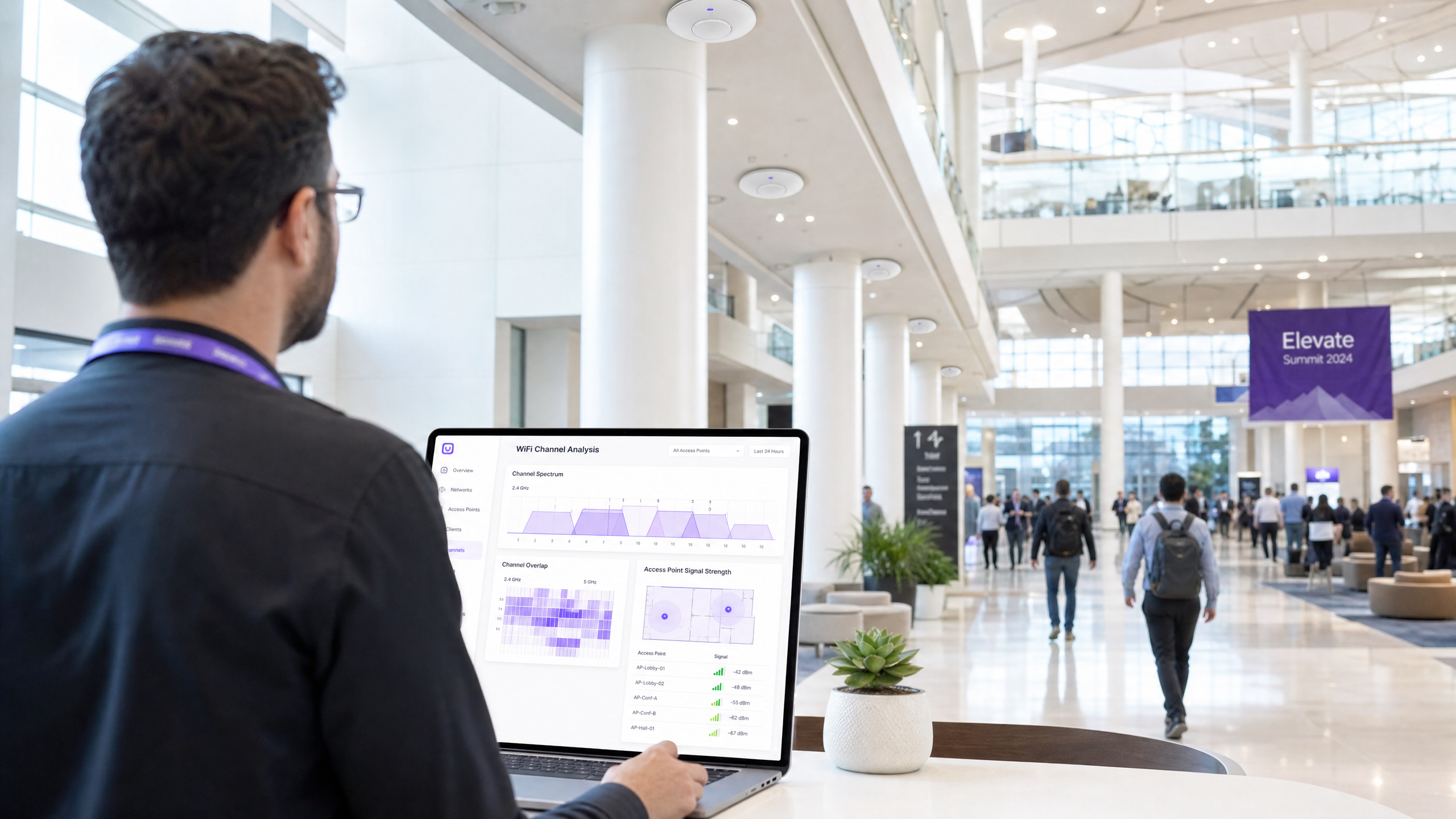
Management Summary
Für IT-Manager und Netzwerkarchitekten, die Umgebungen mit hoher Dichte verwalten, bleiben Kanalüberlappungen eine der hartnäckigsten Ursachen für die Beeinträchtigung der WiFi-Leistung. Wenn Access Points um dasselbe Spektrum konkurrieren, wirken sich Gleichkanal- und Nachbarkanalinterferenzen direkt auf den Durchsatz aus, erhöhen die Wiederholungsraten und beeinträchtigen das Gästeerlebnis. Dieser Leitfaden bietet eine definitive technische Referenz zur Identifizierung, Diagnose und Behebung von Kanalüberlappungen mithilfe der besten WiFi-Analyse-Tools der Branche.
Durch das Verständnis der zugrunde liegenden RF-Mechanismen und den Einsatz der richtigen Diagnosesoftware können technische Teams Kanalzuweisungen optimieren, Interferenzen mindern und den Return on Investment für drahtlose Unternehmensbereitstellungen maximieren. Ob Sie ein Hotel mit 200 Zimmern, eine Retail -Kette mit mehreren Standorten oder einen weitläufigen Veranstaltungsort im öffentlichen Sektor verwalten, die hier detaillierten Methoden werden Sie befähigen, ein robustes, leistungsstarkes drahtloses Netzwerk zu unterhalten. Darüber hinaus gewährleistet die Integration dieser Praktiken mit fortschrittlichen WiFi Analytics -Plattformen wie Purple eine kontinuierliche Sichtbarkeit und proaktive Verwaltung der RF-Umgebung.
Technischer Deep-Dive
Die Physik der Kanalüberlappung
Auf der physikalischen Ebene arbeiten WiFi-Netzwerke innerhalb definierter Frequenzbänder, hauptsächlich 2.4GHz, 5GHz und zunehmend 6GHz. Die grundlegende Herausforderung bei der WiFi-Bereitstellung besteht darin, das begrenzte Spektrum innerhalb dieser Bänder zu verwalten, um mehrere Access Points (APs) und Client-Geräte zu bedienen, ohne störende Interferenzen zu verursachen.
Im 2.4GHz-Band stehen in Nordamerika 11 Kanäle und in Europa bis zu 13 Kanäle zur Verfügung. Jeder Kanal belegt jedoch 20MHz Spektrum, während die Kanäle selbst nur 5MHz voneinander entfernt sind. Diese physikalische Realität diktiert, dass nur die Kanäle 1, 6 und 11 vollständig überlappungsfrei sind. Wenn ein AP auf Kanal 2 sendet, strahlt sein Signal in die Kanäle 1, 3 und 4. Dies wird als Nachbarkanalinterferenz (ACI) bezeichnet. ACI ist besonders schädlich, da das 802.11 CSMA/CA (Carrier Sense Multiple Access with Collision Avoidance)-Protokoll Kollisionen zwischen teilweise überlappenden Übertragungen nicht effektiv verwalten kann, was zu beschädigten Frames und hohen Wiederholungsraten führt.
Gleichkanalinterferenz (CCI) hingegen tritt auf, wenn mehrere APs auf genau demselben Kanal arbeiten. Während das CSMA/CA-Protokoll CCI verwalten kann, indem es Geräte zwingt, abwechselnd zu senden, reduziert dies effektiv die verfügbare Sendezeit und den Durchsatz für alle Geräte, die den Kanal teilen. In Umgebungen mit hoher Dichte kann übermäßige CCI ein Netzwerk unbrauchbar machen. Für ein tieferes Verständnis der Bandeigenschaften verweisen wir auf unseren Leitfaden zu Warum 5GHz schneller, aber 2.4GHz zuverlässiger ist .
Der 5GHz- und 6GHz-Vorteil
Das 5GHz-Band bietet eine erhebliche Entlastung von der Überlastung des 2.4GHz-Bandes. Es bietet bis zu 25 überlappungsfreie 20MHz-Kanäle. Diese Spektrumfülle ermöglicht es Netzwerkarchitekten, breitere Kanäle (40MHz oder 80MHz) zu nutzen, um den Durchsatz zu erhöhen, ohne sofort CCI oder ACI zu verursachen. Eine sorgfältige Kanalplanung ist jedoch weiterhin erforderlich, insbesondere bei der Verwendung breiterer Kanäle, da die Bündelung von zwei 20MHz-Kanälen die Anzahl der verfügbaren überlappungsfreien Kanäle halbiert.
Die Einführung von WiFi 6E und des 6GHz-Bandes bietet noch mehr Spektrum – bis zu 59 überlappungsfreie 20MHz-Kanäle oder 14 überlappungsfreie 80MHz-Kanäle. Diese massive Kapazitätserhöhung ermöglicht eine echte Gigabit-Wireless-Leistung in dichten Umgebungen, vorausgesetzt, die Client-Geräte unterstützen den neuen Standard.

Kernfunktionen des Analysators
Um Kanalüberlappungen effektiv zu diagnostizieren, benötigen IT-Teams Tools, die in der Lage sind, die RF-Umgebung zu visualisieren. Zu den wichtigsten Funktionen gehören:
- Spektrumanalyse: Die Fähigkeit, rohe RF-Energie über das gesamte Spektrum zu visualisieren. Dies ist entscheidend für die Identifizierung von Nicht-WiFi-Interferenzquellen wie Mikrowellenherden, Bluetooth-Geräten oder drahtlosen Überwachungskameras, die im 2.4GHz-Band arbeiten, aber keine 802.11-Frames senden.
- Kanalnutzungsmessung: Die Fähigkeit zu quantifizieren, wie viel der Kapazität eines Kanals aktiv durch WiFi-Verkehr genutzt wird im Vergleich zur verfügbaren Kapazität. Eine hohe Auslastung deutet auf Überlastung und die Notwendigkeit einer Kanalneuzuordnung hin.
- Signal-Rausch-Verhältnis (SNR)-Kartierung: SNR ist die Differenz zwischen der Signalstärke (RSSI) und dem Grundrauschen. Ein hohes SNR ist für komplexe Modulationsschemata (wie 256-QAM oder 1024-QAM) erforderlich, die hohe Datenraten liefern.
- BSSID-Verfolgung: Die Fähigkeit, einzelne Basic Service Set Identifiers (BSSIDs) – die MAC-Adressen einzelner AP-Radios – zu verfolgen, um Rogue-APs oder falsch konfigurierte Infrastruktur zu identifizieren.
Implementierungsleitfaden
Der effektive Einsatz eines WiFi-Analyse-Tools erfordert eine strukturierte Methodik. Die folgenden Schritte skizzieren einen Best-Practice-Ansatz zur Fehlerbehebung und Optimierung eines drahtlosen Netzwerks.
Schritt 1: Basisbewertung
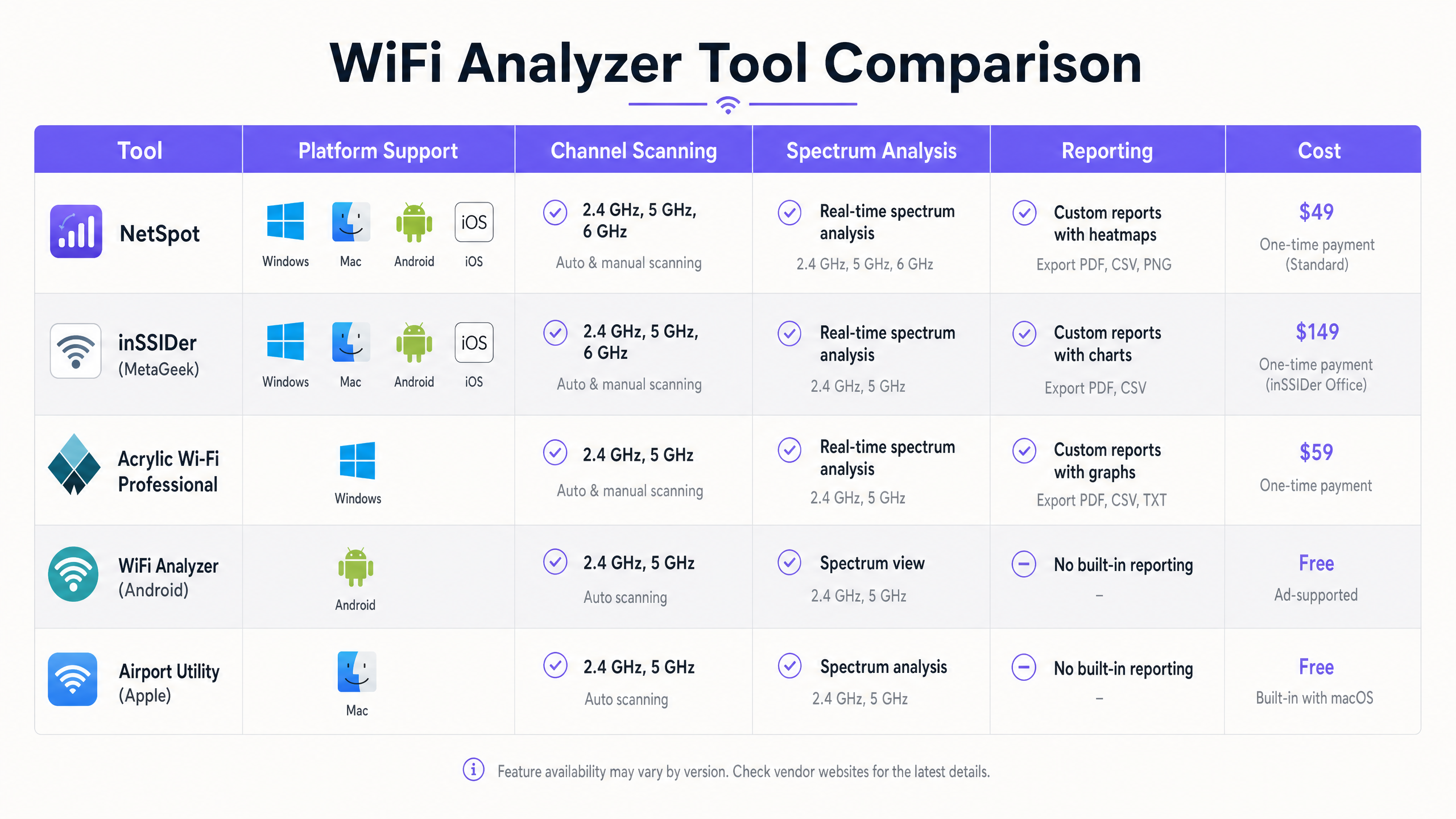
Bevor Sie Konfigurationsänderungen vornehmen, erstellen Sie eine Basislinie der aktuellen RF-Umgebung. Verwenden Sie ein Tool wie Ekahau oder NetSpot, um eine passive Standortuntersuchung durchzuführen. Gehen Sie den Abdeckungsbereich ab und erfassen Sie Daten zu Signalstärke, Kanalzuweisungen und Grundrauschen. Diese Basislinie dient als einen Vergleichspunkt nach den Sanierungsmaßnahmen.
Schritt 2: Interferenzzonen identifizieren
Analysieren Sie die Vermessungsdaten, um Bereiche mit hohem CCI oder ACI zu identifizieren. Suchen Sie nach Standorten, an denen drei oder mehr APs, die auf denselben oder überlappenden Kanälen arbeiten, mit einer Signalstärke von mehr als -70 dBm empfangen werden. Dies sind Ihre primären Interferenzzonen. Im Gastgewerbe sind dies oft Korridorkreuzungen; im Einzelhandel könnten sie sich in der Nähe von Kassenterminals befinden.
Schritt 3: Spektrum-Sweeps
Führen Sie Spektrum-Sweeps mit einem Tool mit echten Spektrumanalysefunktionen durch (z. B. Ekahau Sidekick oder ein dedizierter Spektrumanalysator). Suchen Sie nach kontinuierlichen oder stoßweisen Nicht-WiFi-Energiesignaturen, die den Grundrauschpegel erhöhen. Wenn Nicht-WiFi-Interferenzen identifiziert werden, muss die Quelle lokalisiert und entfernt oder gemindert werden, bevor die Kanalplanung effektiv sein kann.
Schritt 4: Kanalneuzuordnung
Basierend auf den Vermessungs- und Spektrumdaten den Kanalplan neu gestalten.
- 2.4GHz: Halten Sie sich strikt an die 1-6-11-Regel. Bei hoher AP-Dichte sollten Sie in Betracht ziehen, die 2.4GHz-Radios an alternierenden APs zu deaktivieren, um CCI zu reduzieren.
- 5GHz: Nutzen Sie dynamische Frequenzwahl (DFS)-Kanäle, wenn lokale Vorschriften dies zulassen und keine Radarinterferenzen vorhanden sind. Wählen Sie die Kanalbreiten sorgfältig aus; während 80MHz-Kanäle einen höheren Spitzendurchsatz bieten, sind 40MHz- oder sogar 20MHz-Kanäle in dichten Umgebungen oft besser geeignet, um die Anzahl der nicht überlappenden Kanäle zu maximieren.
Schritt 5: Leistungspegel-Feinabstimmung
Kanalüberlappungen werden oft durch übermäßige Sendeleistung verschärft. Wenn das Signal eines APs zu weit reicht, verursacht es unnötige CCI für benachbarte APs. Reduzieren Sie die Sendeleistung auf das Minimum, das erforderlich ist, um eine ausreichende Abdeckung zu gewährleisten und ein Ziel-SNR am Zellrand aufrechtzuerhalten. Dies verkleinert die Abdeckungszelle und reduziert Interferenzen.
Schritt 6: Validierung nach der Sanierung
Nach der Anwendung des neuen Kanalplans und der Leistungseinstellungen führen Sie eine erneute Standortbegehung durch. Vergleichen Sie die neuen Daten mit der Ausgangsbasis, um zu überprüfen, ob CCI und ACI reduziert wurden und die Abdeckungsanforderungen weiterhin erfüllt sind.
Best Practices
Um eine optimierte HF-Umgebung aufrechtzuerhalten, befolgen Sie die folgenden Best Practices der Branche:
- Standardisierung auf Enterprise-Tools: Während kostenlose Smartphone-Apps für schnelle Stichproben nützlich sind, erfordern umfassende Fehlerbehebung und Planung Tools auf Enterprise-Niveau wie Ekahau, OmniPeek oder AirMagnet.
- Integration mit Analytics: Kombinieren Sie die HF-Analyse mit einer umfassenden Guest WiFi - und Analyseplattform. Purple bietet kontinuierliche Transparenz über die Qualität der Client-Assoziation, die Sitzungsdauer und den allgemeinen Netzwerkzustand, sodass IT-Teams Verschlechterungen erkennen können, bevor Benutzer Probleme melden.
- Regelmäßige Audits: Die HF-Umgebung ist dynamisch. Neue benachbarte Netzwerke, Änderungen im Gebäude-Layout oder die Einführung neuer Geräte können die HF-Landschaft verändern. Planen Sie regelmäßige Standortbegehungen (z. B. vierteljährlich), um sicherzustellen, dass das Netzwerk optimiert bleibt.
- Auto-RF vorsichtig nutzen: Die meisten modernen Enterprise WLAN Controller verfügen über ein automatisiertes Radio Resource Management (RRM). Obwohl diese Algorithmen hochentwickelt sind, können sie in hochdynamischen Umgebungen manchmal ein „Channel Thrashing“ verursachen. Überwachen Sie das RRM-Verhalten genau und seien Sie bereit, Kanalzuweisungen bei Bedarf manuell zu sperren.
- Bleiben Sie auf dem neuesten Stand der Standards: Stellen Sie sicher, dass Ihre Infrastruktur und Fehlerbehebungsmethoden mit den neuesten IEEE-Standards (z. B. 802.11ax/WiFi 6) und Sicherheitsprotokollen (z. B. WPA3) übereinstimmen.
Fehlerbehebung & Risikominderung
Selbst bei sorgfältiger Planung können WiFi-Netzwerke Leistungsprobleme aufweisen. Das Verständnis gängiger Fehlerursachen und Minderungsstrategien ist unerlässlich.
Häufige Fehlerursachen
- Das „Sticky Client“-Problem: Clients halten oft an einer schwachen Verbindung mit einem entfernten AP fest, selbst wenn ein näherer, stärkerer AP verfügbar ist. Dies verschlechtert die Leistung für den Sticky Client und verbraucht übermäßige Airtime, was alle anderen Clients auf diesem Kanal beeinträchtigt. Minderung: Implementieren Sie minimale Basisraten und RSSI-Schwellenwerte, um Clients zum Roaming zu besseren APs zu zwingen.
- DFS-Radarereignisse: Im 5GHz-Band müssen APs, die auf DFS-Kanälen arbeiten, auf Radarsignaturen achten und den Kanal sofort verlassen, wenn Radar erkannt wird. Dies kann zu plötzlichen Netzwerkunterbrechungen führen. Minderung: Überwachen Sie die Controller-Protokolle auf DFS-Ereignisse. Wenn häufige Radar-Treffer auftreten, vermeiden Sie die Verwendung von DFS-Kanälen an diesem spezifischen Standort.
- Problem des versteckten Knotens: Tritt auf, wenn zwei Clients mit demselben AP kommunizieren können, sich aber gegenseitig nicht hören. Sie können gleichzeitig senden, was zu Kollisionen am AP führt. Minderung: Aktivieren Sie RTS/CTS (Request to Send/Clear to Send)-Mechanismen, obwohl dies Overhead hinzufügt und den Gesamtdurchsatz reduziert.
Strategien zur Risikominderung
- Robuste Authentifizierung implementieren: Sichern Sie das Netzwerk mit 802.1X/EAP für Unternehmensgeräte und sicheren Captive Portals für den Gastzugang. Für modernen, sicheren Zugang ziehen Sie Lösungen wie How a wi fi assistant Enables Passwordless Access in 2026 in Betracht.
- Netzwerksegmentierung: Isolieren Sie verschiedene Arten von Datenverkehr (z. B. Gast, Unternehmen, IoT, PoS) auf separaten VLANs und SSIDs, um die Sicherheit zu verbessern und Broadcast-Domains zu verwalten.
- Kontinuierliche Überwachung: Nutzen Sie Plattformen wie Purple, um Netzwerk-Leistungsmetriken und Benutzerverhalten kontinuierlich zu überwachen. Zum Beispiel kann das Verständnis, wie Benutzer einen Raum navigieren, die AP-Platzierung beeinflussen, ein Konzept, das in Purple Launches Offline Maps Mode for Seamless, Secure Navigation to WiFi Hotspots weiter vertieft wird.
ROI & Geschäftsauswirkungen
Die Optimierung des WiFi-Netzwerks durch rigorose Kanalplanung und -analyse liefert messbarden Geschäftswert in verschiedenen Dimensionen:
- Verbesserte Benutzererfahrung: Die Reduzierung von Kanalüberlappungen erhöht direkt den Durchsatz und verringert die Latenz. In einem Transport -Knotenpunkt bedeutet dies, dass Passagiere zuverlässig auf Bordkarten und Unterhaltung zugreifen können; in einem Hotel führt dies zu höheren Gästezufriedenheitswerten und weniger Beschwerden an der Rezeption.
- Erhöhte Betriebseffizienz: Ein stabiles, leistungsstarkes Netzwerk reduziert die Belastung der IT-Helpdesks. Weniger Konnektivitätstickets bedeuten, dass IT-Mitarbeiter sich auf strategische Initiativen konzentrieren können, anstatt auf reaktive Fehlerbehebung.
- Verbesserte Datenerfassung: Ein zuverlässiges Netzwerk ist die Grundlage für präzise Standortanalysen und Benutzerengagement. Wenn das Netzwerk gut funktioniert, können Plattformen wie Purple qualitativ hochwertigere Daten sammeln, was effektivere Marketingkampagnen und operative Einblicke ermöglicht. Wie durch jüngste strategische Schritte, wie Purple ernennt Iain Fox zum VP Growth – Public Sector zur Förderung digitaler Inklusion und Smart City Innovation , hervorgehoben wird, ist eine robuste Infrastruktur entscheidend für fortschrittliche digitale Initiativen.
- Verlängerte Hardware-Lebensdauer: Durch die Optimierung der RF-Umgebung kann die bestehende Infrastruktur oft höhere Client-Dichten unterstützen, ohne sofortige Hardware-Upgrades zu erfordern, wodurch die Kapitalrendite maximiert wird.
Schlüsseldefinitionen
Co-Channel Interference (CCI)
Interference that occurs when two or more access points operate on the exact same frequency channel.
Forces devices to share airtime, reducing overall throughput. Often caused by overly dense AP deployments or excessive transmit power.
Adjacent-Channel Interference (ACI)
Interference that occurs when transmissions on one channel bleed into and disrupt communications on a neighboring, overlapping channel.
More destructive than CCI because the CSMA/CA protocol cannot effectively manage the collisions. Common when channels other than 1, 6, or 11 are used in the 2.4GHz band.
Signal-to-Noise Ratio (SNR)
The difference (in decibels) between the received signal strength (RSSI) and the background noise floor.
A critical metric for performance. High SNR is required for high data rates. A strong signal is useless if the noise floor is equally high.
Received Signal Strength Indicator (RSSI)
A measurement of the power level being received by the antenna.
Used to determine basic coverage boundaries. Typically, enterprise deployments aim for an RSSI of -65 dBm to -70 dBm at the cell edge.
Dynamic Frequency Selection (DFS)
A mechanism that allows unlicensed devices to share the 5GHz spectrum with legacy radar systems.
APs must monitor DFS channels for radar signatures and immediately switch channels if detected, which can cause temporary client disconnects.
Radio Resource Management (RRM)
Automated algorithms used by WLAN controllers to dynamically adjust AP transmit power and channel assignments.
Useful for initial setup, but can cause instability ('channel thrashing') in highly dynamic environments if not monitored.
Basic Service Set Identifier (BSSID)
The MAC address of the wireless access point radio.
Essential for tracking specific hardware during a site survey and identifying rogue APs.
Spectrum Analysis
The process of measuring and visualizing all RF energy within a specific frequency band, not just 802.11 traffic.
Necessary for identifying non-WiFi interference sources like microwaves or Bluetooth devices that standard WiFi scanners cannot see.
Ausgearbeitete Beispiele
A 300-room hotel is experiencing widespread guest complaints regarding slow WiFi speeds and dropped connections during peak evening hours, particularly in the central atrium where multiple access points are deployed.
- Deploy a tool like Ekahau Site Survey to conduct a passive RF sweep of the atrium during peak hours.
- Analyze the resulting heatmaps to identify areas where more than two APs operating on the 2.4GHz band are visible on the same channel (e.g., channel 6) with RSSI > -70 dBm.
- Implement a strict 1-6-11 channel plan for the 2.4GHz radios, ensuring adjacent APs use non-overlapping channels.
- Reduce the transmit power on the 2.4GHz radios in the atrium to minimize cell overlap.
- Conduct a post-remediation survey to verify CCI reduction and monitor Purple Analytics for improved session stability.
A large retail store recently upgraded its PoS terminals to wireless tablets, but transactions are frequently timing out. The IT team suspects interference but standard WiFi scans show only the store's own SSIDs.
- Utilize a spectrum analyzer (like Ekahau Sidekick or a dedicated tool) rather than a standard WiFi scanner.
- Perform a spectrum sweep in the 2.4GHz and 5GHz bands around the PoS areas.
- Identify non-802.11 energy signatures (e.g., from a nearby microwave oven, wireless security cameras, or Bluetooth beacons) that are elevating the noise floor and causing a low SNR.
- If possible, remove the source of interference. If not, migrate the PoS tablets to the 5GHz band, selecting channels far removed from the identified interference frequencies.
Übungsfragen
Q1. You are auditing a new retail deployment. The 2.4GHz APs are currently set to channels 1, 4, 8, and 11 to 'spread out' the signals. What is the immediate risk, and what is the recommended action?
Hinweis: Consider the 20MHz width of a 2.4GHz channel and the 5MHz spacing between channel numbers.
Musterlösung anzeigen
The immediate risk is severe adjacent-channel interference (ACI). Channel 4 overlaps with 1 and 8; channel 8 overlaps with 4 and 11. ACI is highly destructive to throughput. The recommended action is to immediately reconfigure all 2.4GHz radios to use only channels 1, 6, and 11.
Q2. During a site survey in a conference center, you notice the noise floor on channel 6 is elevated to -75 dBm, but your WiFi scanner shows no BSSIDs broadcasting on that channel. What is the likely cause?
Hinweis: Think about what a standard WiFi scanner can and cannot detect.
Musterlösung anzeigen
The likely cause is a non-802.11 interference source, such as a microwave oven, wireless AV equipment, or Bluetooth devices operating in the 2.4GHz band. A standard WiFi scanner only sees 802.11 management frames. A dedicated spectrum analyzer is required to visualize this raw RF energy.
Q3. A hotel IT manager wants to maximize throughput by configuring all 5GHz APs to use 80MHz channel widths. The hotel has a dense deployment with APs in every other room. Why might this approach degrade performance rather than improve it?
Hinweis: Consider the total number of available non-overlapping channels in the 5GHz band when using wider channels.
Musterlösung anzeigen
Using 80MHz channels significantly reduces the number of available non-overlapping channels (typically to 5 or 6, depending on regulatory domain and DFS usage). In a dense deployment, this will inevitably lead to co-channel interference (CCI) as neighboring APs are forced to reuse the same wide channels, ultimately reducing aggregate capacity and stability.